
HPA-M205 - Air purifier Heinner - Free user manual and instructions
Find the device manual for free HPA-M205 Heinner in PDF.


| Product Type | Air Purifier |
| Model | HPA-M205 |
| Brand | Heinner |
| Dimensions (W x D x H) | Approx. 36 x 20 x 55 cm |
| Weight | Approx. 5.5 kg |
| Power Supply | 220-240V, 50Hz |
| Power Consumption | 45 W |
| Filter Type | HEPA H13 + Activated Carbon Pre-filter |
| Fan Speeds | 3 speeds (Low, Medium, High) |
| Airflow Capacity | 250 m³/h |
| Coverage Area | Up to 30 m² |
| Noise Level | 30 – 55 dB |
| Timer | 1/2/4/8 hours |
| Additional Features | Air quality indicator, Auto mode, Sleep mode, Ionizer (optional) |
| Filter Replacement Indicator | Yes, LED indicator |
| Maintenance | Clean pre-filter monthly; replace HEPA filter every 6-12 months |
| Safety Features | Overheat protection, auto shut-off when front cover removed |
| Spare Parts Availability | Filters available from authorized dealers |
| Warranty | 2 years |
Frequently Asked Questions - HPA-M205 Heinner
User questions about HPA-M205 Heinner
0 question about this device. Answer the ones you know or ask your own.
Ask a new question about this device
Download the instructions for your Air purifier in PDF format for free! Find your manual HPA-M205 - Heinner and take your electronic device back in hand. On this page are published all the documents necessary for the use of your device. HPA-M205 by Heinner.
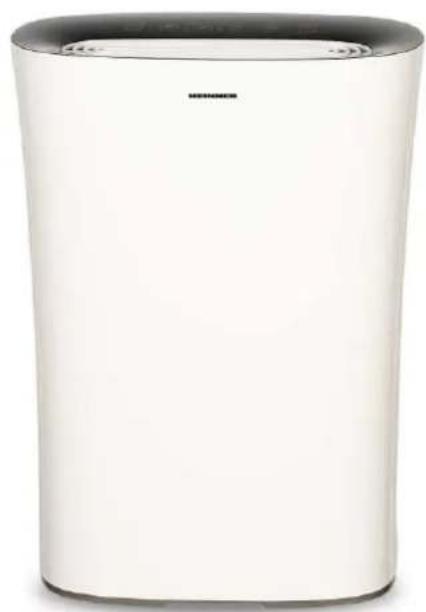
USER MANUAL HPA-M205 Heinner
natural_image
White industrial air purifier with black lid and brand logo (no visible text or symbols on body)- Purificator de aer
• CADR (flux de aer) 205 m³/h
• Arie de acoperire: 16-24 m²
natural_image
Three-panel image showing textured surfaces and a heat sink, labeled 1 to 4 (no text or symbols on the surfaces themselves)V. PROCEDURI DE MONTAJ
natural_image
Diagram of a server rack with a mesh vent and a blue arrow indicating direction (no text or symbols)natural_image
Diagram showing a door opening and a washing machine with a blue arrow indicating left-side motion (no text or symbols)natural_image
3D diagram of a rectangular object with a blue arrow pointing to its top surface, no text or symbols present.natural_image
Illustration of a portable air conditioner unit with a blue arrow pointing to the front panel (no text or symbols)natural_image
Illustration of a portable air conditioner unit with a mesh vent and airflow direction arrow (no text or symbols)natural_image
Illustration of a plug inserted into a wall socket with blue arrows indicating direction (no text or symbols)IMPORTANT! AMPLASAREA CORESPUNZĂTOARE:
natural_image
White cylindrical air purifier with black lid and logo (no visible text or symbols)- Air purifier
- CADR 205 m^3/h
• Room space: 16-24 m²
Thank you for purchasing this product!
I. INTRODUCTION
Before using the appliance, please read carefully this instruction manual and keep it for future reference.
This instruction manual is designed to provide you with all required instructions related to the installation, use and maintenance of the appliance.
In order to operate the unit correctly and safety, please read this instruction manual carefully before installation and usage.
II. CONTENT OF YOUR PACKAGE
Air purifier
Filter
User manual
Warranty card

ATTENTION! Remove the plastic bag before using the filter! Also, do not wash the filter, clean and maintain it according to the info from CLEANING AND MAINTENANCE chapter.
III. SAFETY MEASURES
WARNING
- If the supply cord is damaged, it must be replaced by manufacturer, its service agent or a similarly qualified person in order to avoid a hazard.
- This appliance can be used by children aged from 8 years and above and persons with reduced physical, sensory or mental capabilities or lack of experience and knowledge if they have been given supervision or instruction concerning use of the appliance in a safe way and understand the hazards involved. Children shall not play with the appliance. Cleaning and user maintenance shall not be made by children without supervision.
- Indoor and household use only.
- When the appliance is not in use and before cleaning, unplug the appliance from the outlet.
- To protect against the risk of electrical shock, do not immerse the unit, cord or plug in water or other liquid.
- Do not place other items on top of the appliance, and forbid sitting or standing on this appliance.
- Please use the original filter provided by the factory. In case of other filters, the best results cannot be achieved.
- Do not insert the fingers or objects into the air inlets or air outlets to prevent the product from physical damages or malfunction.
- Please unplug the power cord immediately and contact the service center in time when the appliance suffers abnormal sound or burnt smell or smoke.
- Do not spray flammable substances near the appliance; do not spray water directly on the appliance or use chemical cleaners like alcohol or hydrochloric acid, etc.; do not place water containers, medicines, or flammable materials on the appliance.
- Do not block the air inlets/outlets of the appliance with any item.
- This appliance cannot replace natural ventilation and other appliances like the vacuum cleaner, kitchen ventilator, etc.
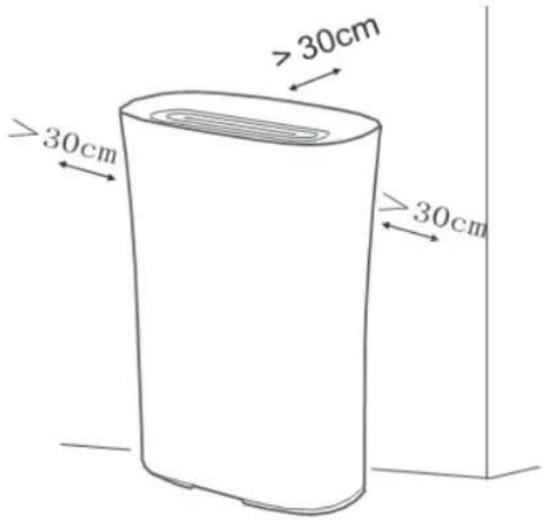
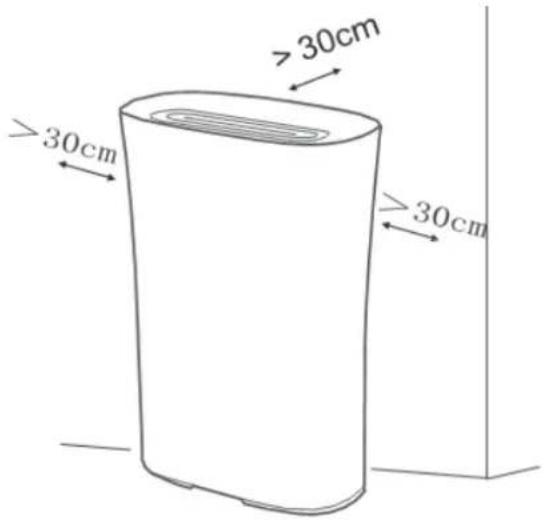
- When the appliance is working, it must be placed on a dry, flat and stable floor, with at least 30cm space reserved around it.
- Do not put it in a place with direct sunlight.
- To prevent electromagnetic disturbance, the appliance must keep a certain distance from the TV, radio, microwave oven and others.
- The mist produced by the ultrasonic humidifier may affect the PM2.5 detection of this appliance, and both should maintain a certain distance.
- Do not disassemble or modify this appliance without authorization to avoid accidents.
- Do not pull the power cord to move the appliance.
IV. PRODUCT DESCRIPTION
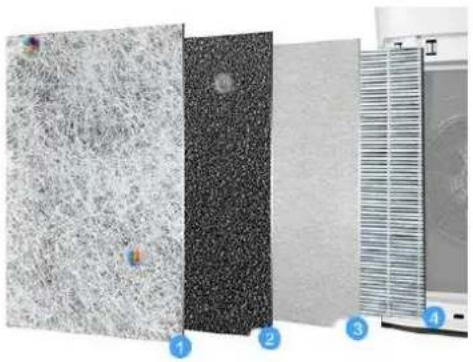
4 IN 1 INNOVATIVE FILTER DESIGN
Primary filter
- purify hair/fabric
- Large particulate pollutant etc.
Carbon filter 2
- React with the harmful substances in the air and decomposes harmful substances, effectively intercept formaldehyde, ammonia gas etc.
HEPA 13 filter
- Electrostatic in the pole process, purify and absorb (dual affect)
- Effectively removes PMO.1 particles, tiny dust
Carbon filter 4
- High efficiency coconut shell micro-porous activated carbon
- Specially added modified cold catalyst active ingredients, effectively absorbs formaldehyde and other decoration pollution.
natural_image
Three-panel image showing textured surfaces and a vertical panel with grid lines, labeled 1 to 4 (no text or symbols on panels)V. ASSEMBLY PROCEDURES
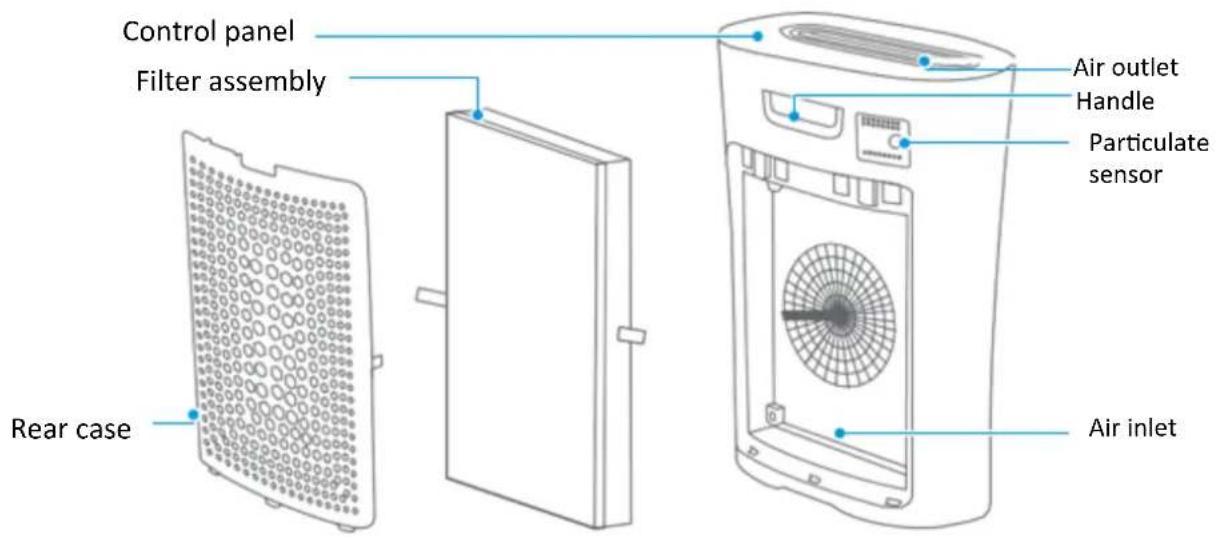
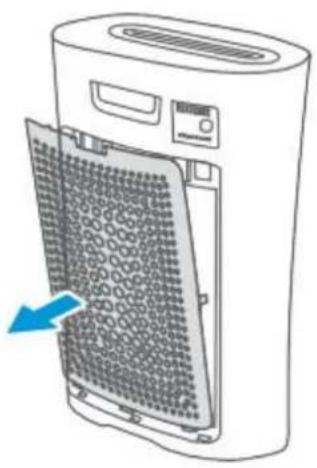
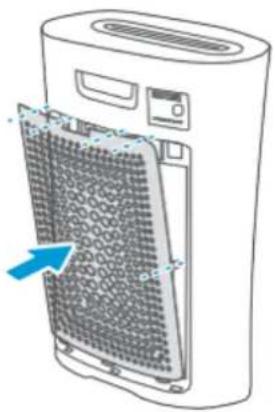
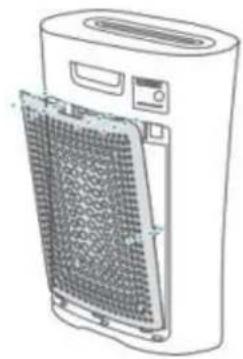
1. Remove the rear case.
Grab the buckle and pull it out, then remove the rear case
2. Take out the filter assembly
Hold both sides of the filter assembly and take it out
natural_image
Diagram of a server rack with mesh insulation and a blue arrow indicating direction (no text or symbols)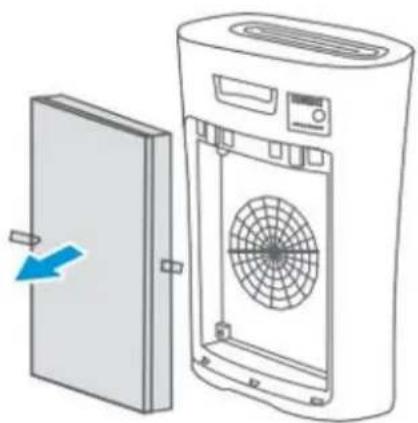
natural_image
Diagram of a door panel being removed from a washing machine, showing internal fan and ventilation (no text or symbols)3. Remove the protective film of the filter assembly
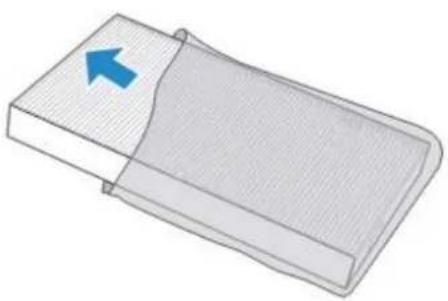
natural_image
3D diagram of a rectangular object with a blue arrow pointing to its top surface, no text or symbols present.4. Mount the filter assembly
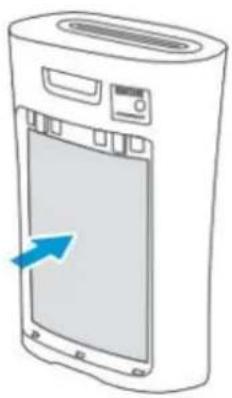
natural_image
Illustration of a portable air conditioner unit with a blue arrow pointing to the front panel (no text or symbols)5. Mount the rear case
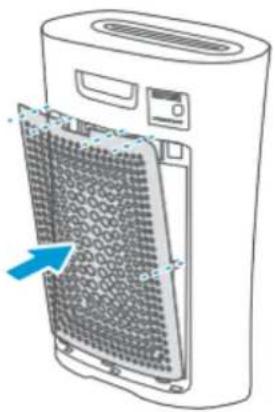
natural_image
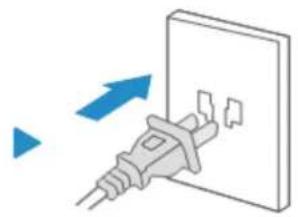
Illustration of a portable air conditioner unit with a mesh vent and airflow direction arrow (no text or symbols)- Plug in the power cord, all the LEDs will flash once.
natural_image
Diagram of a plug inserted into a wall socket with blue arrows indicating direction (no text or symbols)IMPORTANT! PROPER PLACEMENT
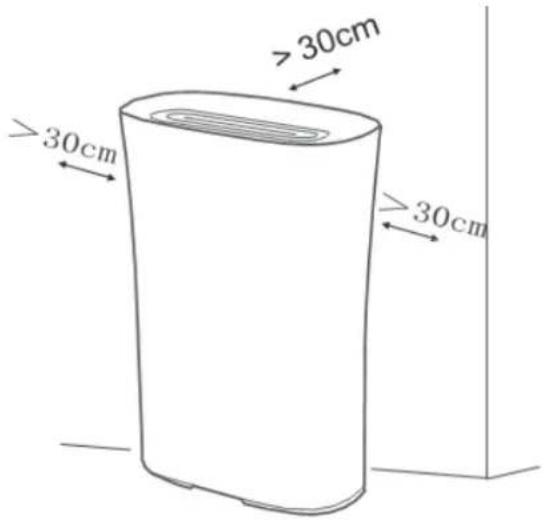
To achieve better purification effects and avoid metallic shield effect affecting the communication, please be sure that the air purifier is over 30cm away from shelters like walls and is also over 50cm away from the metal/home appliances.
VI. CONTROL PANEL
flowchart
graph TD
    A["Air quality tips"] --> B["Light sensing function"]
    B --> C["Air Quality"]
    C --> D["Power"]
    D --> E["Power"]
    D --> F["Fan – purifying rate"]
    F --> G["Fan"]
    G --> H["Child lock"]
    G --> I["Timer"]
    I --> J["Auto mode"]
    I --> K["Sleep mode"]
    I --> L["ON"]
    L --> M["Ionization"]
    L --> N["Clean prompts"]
    L --> O["Child lock prompts"]
    style A fill:#f9f,stroke:#333
    style B fill:#ccf,stroke:#333
    style C fill:#cfc,stroke:#333
    style D fill:#fcc,stroke:#333
    style E fill:#cff,stroke:#333
    style F fill:#ffc,stroke:#333
    style G fill:#cfc,stroke:#333
    style H fill:#fcc,stroke:#333
    style I fill:#ffc,stroke:#333
    style J fill:#cfc,stroke:#333
    style K fill:#fcc,stroke:#333
    style L fill:#cfc,stroke:#333
    style M fill:#fcc,stroke:#333
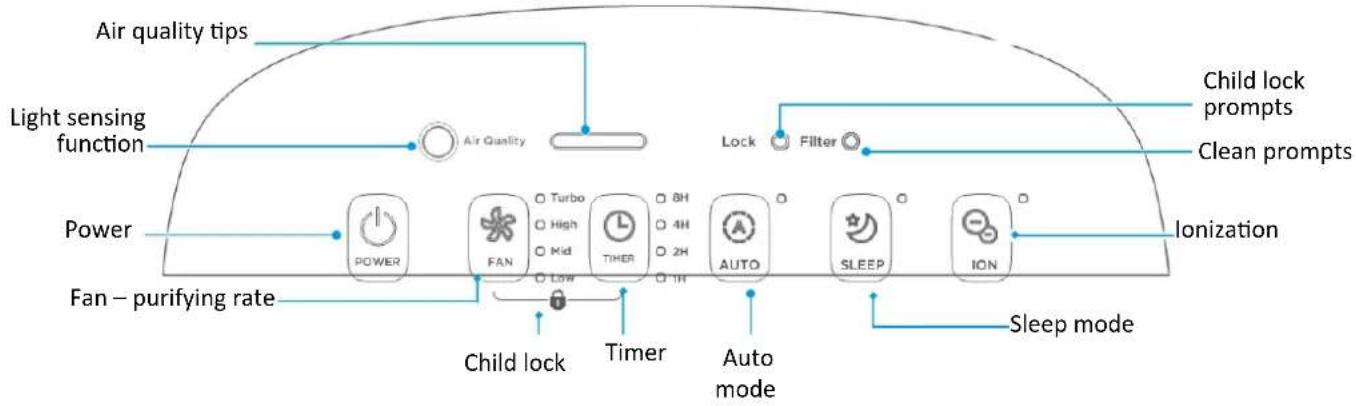
Explanations of the icons
AIR QUALITY TIPS
| Air quality (particulate) | Air quality indicator light color |
| GOOD | Green |
| NORMAL | Orange |
| BAD | Red |
FAN – PURIFIYNG RATE
"Low", "Mid", "High" or "Turbo" may be adjusted by pressing this button. For "Low" press it once, for "Mid" twice, for "Mid" three times and for "Turbo" forth times.
CHILD LOCK
Press "Fan" and "Timer" buttons in the same time for 1 second in order to activate Child lock and then press it again to cancel it.
TIMER
You can set the air purifier to auto shutdown after 1, 2, 4 or 8 hours.
AUTO MODE AND LIGHT SENSING FUNCTION
In the automatic mode, the purifier can automatically sense the ambient light level and activate the sleep mode or exit the sleep mode.
CLEAN PROMPT AND IONIZATION BUTTON (the lifetime of the ionizer is 7 years)
When “Clean” indicator light is on, it prompts the users to clean the filter, after the cleaning is finished, press the “Ionization” button for 3s to restart the timing.
SLEEP MODE
In "Sleep mode", the indicator light becomes dimmed, other lights are off and the fan is adjusted to be low. In the sleep mode, touch any key to reset to the normal operating status.
VII. CLEANING
Main body
Wipe the main body with a soft towel
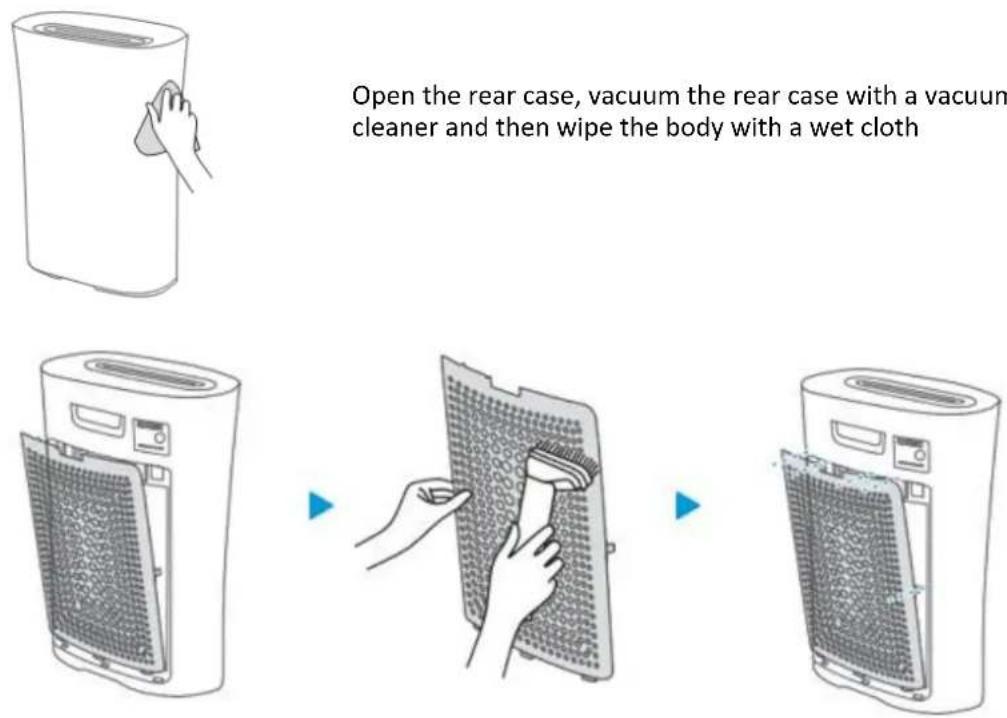
Open the rear case, vacuum the rear case with a vacuum cleaner and then wipe the body with a wet cloth
Particulate sensor
A dry cotton swab is used to clean the sensor lens.
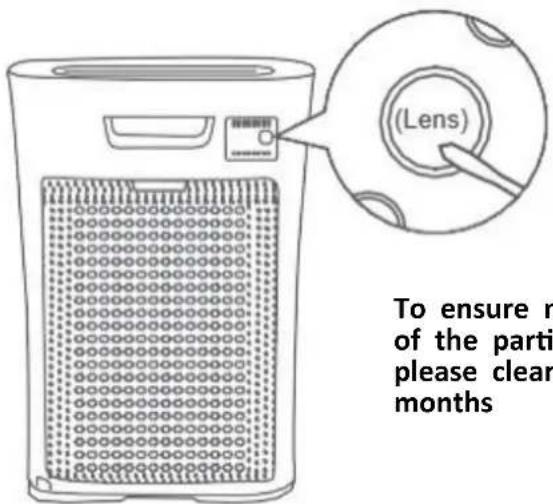
To ensure normal operation of the particulate sensor, please clean it every two months
FILTER CLEANING / REPLACEMENT
Notes!
Be sure to turn off the appliance before any maintenance and cut off power.
Tips for filter cleaning/replacement: when the display light is purple
↓
Cleaning method: clean the filter with a vacuum cleaner or a brush (once every two weeks)
↓
Replace the filter: replace the filter (once three to six months, depending on the environment)
↓
Filter reset: after cleaning and replacing the filter, long press "ionization" on the panel for 3 seconds to reset the filter
- It is recommended to clean the filter once every two weeks and replace the filter once every six months (the cleaning and replacement cycle can be adjusted according to the operating environment);
- Do not wash the filter with water;
- It is recommended to use a small soft brush or household vacuum cleaner when cleaning the filter;
- When cleaning with a brush, the brush should be traversed along the filter. Avoid vertical brush as far as possible, so as not to damage the filter;
- When cleaning with a vacuum cleaner, keep the suction port 5-10mm away from the surface of the filter to avoid damaging the filter.
- When used under the strong odor of cigarettes, grilled meat, etc., the filter may have odors within a few weeks or months. Please clean and air the filter (2-5 days) at this time. If the odor still cannot be removed, replace the filter.
VIII. TROUBLESHOOTING
Notes: please confirm the following contents before the entrusted maintenance
| Problems encountered | Reason | Troubleshooting |
| The air quality indicator keeps red during continuous operation. | Maybe the room area exceeds the purification capacity of the machineThe filter components may not have been installed | Please keep the purifier running continuouslyPlease install the filter components correctly |
| The purifier can't run | The power cord may not be plugged in, or the power cord may not be in good contact.The power switch may not have been turned on | Please plug in the power and make good contactPlease turn on the power switch |
| The effect of removing smoke and odor is poor. | Maybe the filter components are not installedMaybe the filter components have expiredMaybe the air inlet is blocked by foreign objects | Please install the filter components correctlyPlease replace the new filter assemblyPlease remove the foreign matter from the air inlet |
| The air quality indicator does not change | It may be that the sensitivity of the sensor is unstable for a period of time after the start of operation. If it doesn't change after turning green, the air may be in a clean stateIt may be placed in a location where dirt monitoring is difficult, or the sensor is dirtyThe strong indoor odor may cause the sensor sensitivity to decrease | Please wait, after a few minutes of operation, the sensor will stabilize Blow the cigarette to the sensor.If the indicator color changes, it is normal Please move the purifier or clean the sensorPlease adjust the fan speed to high grade and run for several hours to 1 day |
| Filter cleaning light does not go out | It may be that after cleaning the filter components, the "negative ion" button was not long pressed for 3 seconds | After cleaning the filter components, long press the "negative ion" button for 3 seconds |
| Odor and smoke are difficult to remove | It may be that the filter assembly is still wrapped in the package | Please remove the packing bag outside the filter components |
Environment friendly disposal
You can help protect the environment!
Please remember to respect the local regulations: hand in the non-working electrical equipment's to an appropriate waste disposal center.

HEINNER is a registered trademark of Network One Distribution SRL. Other brands and product names are trademarks or registered trademarks of their respective holders.
No part of the specifications may be reproduced in any form or by any means or used to make any derivative such as translation, transformation, or adaptation without permission from NETWORK ONE DISTRIBUTION.
Copyright © 2013 Network One Distribution. All rights reserved.
www.heinner.com, http://www.nod.ro
http://www.heinner.com, http://www.nod.ro

This product is in conformity with norms and standards of European Community.
Importer: Network One Distribution
Str. Marcel Iancu, nr. 3-5, Bucuresti, Romania
Tel: +40 21 211 18 56, www.heinner.com, www.nod.ro
HEINNER
ПРЕЧИСТВАТЕЛ ЗА ВЪЗДУХ
Модел: ForestBreeze Sense 205
Код: HPA-M205
natural_image
White cylindrical air purifier with black lid and logo (no visible text or symbols)natural_image
Close-up of four-panel material sample showing textured surfaces and a grid-like structure (no text or symbols visible)natural_image
Diagram of a server rack with a mesh vent and a blue arrow indicating direction (no text or symbols)natural_image
Diagram showing a door opening and a washing machine with a blue arrow indicating left-side motion (no text or symbols)natural_image
3D diagram of a rectangular object with a blue arrow pointing to its top surface, no text or symbols present.natural_image
Illustration of a portable air conditioner unit with a blue arrow pointing to the front panel (no text or symbols)5. Поставете задния капак.
natural_image
Illustration of a large industrial air purifier with a mesh vent and blue arrow indicating airflow direction (no text or symbols)natural_image
Illustration of a plug inserted into a wall socket with blue arrows indicating direction (no text or symbols)natural_image
Line drawing of a hand cleaning a cylindrical object (no text or symbols)natural_image
Line drawing of a portable air purifier unit with ventilation grilles and control panel (no text or symbols)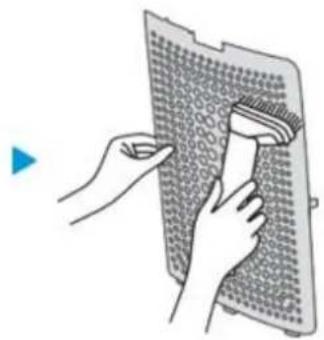
natural_image
Illustration of hands using a brush to clean or adjust a textured surface (no text or symbols)▶
natural_image
Line drawing of a portable air conditioner unit with a mesh cover and ventilation slots (no text or symbols)Сензор за частици
natural_image
White cylindrical air purifier with black lid and logo (no visible text or symbols)natural_image
Three-panel image showing textured surfaces and a vertical scale with numbered annotations (no readable text or symbols)V. BESZERELÉSI MÓDOK
natural_image
Diagram of a server rack with a mesh vent and a blue arrow indicating a component (no text or symbols present)natural_image
Diagram showing a door opening and a washing machine with a blue arrow indicating left-side motion (no text or symbols)natural_image
3D diagram of a rectangular object with a blue arrow pointing to its top surface, no text or symbols present.natural_image
Illustration of a portable air conditioner unit with a blue arrow pointing to the front panel (no text or symbols)natural_image
Illustration of a large industrial air purifier with a mesh vent and blue arrow indicating airflow direction (no text or symbols)natural_image
Illustration of a plug inserted into a wall socket with blue arrows indicating direction (no text or symbols)FONTOS! MEGFELELŐ ELHELYEZÉS:
- PROCEDURI DE MONTAJ
- IMPORTANT! AMPLASAREA CORESPUNZĂTOARE:
- Thank you for purchasing this product!
- INTRODUCTION
- CONTENT OF YOUR PACKAGE
- SAFETY MEASURES
- WARNING
- PRODUCT DESCRIPTION
- IN 1 INNOVATIVE FILTER DESIGN
- Primary filter
- Carbon filter 2
- HEPA 13 filter
- Carbon filter 4
- ASSEMBLY PROCEDURES
- Remove the rear case.
- Take out the filter assembly
- Remove the protective film of the filter assembly
- Mount the filter assembly
- Mount the rear case
- IMPORTANT! PROPER PLACEMENT
- CONTROL PANEL
- Explanations of the icons
- FAN – PURIFIYNG RATE
- CHILD LOCK
- TIMER
- AUTO MODE AND LIGHT SENSING FUNCTION
- CLEAN PROMPT AND IONIZATION BUTTON (the lifetime of the ionizer is 7 years)
- SLEEP MODE
- CLEANING
- Main body
- Particulate sensor
- FILTER CLEANING / REPLACEMENT
- Notes!
- TROUBLESHOOTING
- Environment friendly disposal
- HEINNER
- Поставете задния капак.
- Сензор за частици
- BESZERELÉSI MÓDOK
- FONTOS! MEGFELELŐ ELHELYEZÉS:
Brand : Heinner
Model : HPA-M205
Category : Air purifier