
TS2000 - Toaster BLACK & DECKER - Free user manual and instructions
Find the device manual for free TS2000 BLACK & DECKER in PDF.


| Product Type | 2-Slice Toaster |
| Brand | Black & Decker |
| Model | TS2000 |
| Dimensions (W x D x H) | Approximately 10.2 x 7.3 x 7.9 inches (26 x 18.5 x 20 cm) |
| Weight | Approximately 2.5 lbs (1.1 kg) |
| Power Supply | 120 V AC, 60 Hz |
| Power Consumption | 850 W |
| Number of Slots | 2 |
| Browning Control | Variable shade dial with 7 settings |
| Functions | Toast, bagel, defrost, reheat |
| Self-Centering Racks | Yes, for even toasting |
| Cancel Button | Yes |
| Lift & Look Feature | Allows checking toast without canceling |
| Extra-Lift Carriage | Yes, for easy removal of small items |
| Removable Crumb Tray | Yes, slide-out for easy cleaning |
| Cord Length | Approximately 30 inches (76 cm) |
| Material | Stainless steel and plastic |
| Safety Features | Automatic shut-off, non-slip feet, cool-touch exterior |
| Cleaning Instructions | Unplug, empty crumb tray, wipe with damp cloth; do not immerse in water |
| Spare Parts Availability | Crumb tray, cord replacement available from manufacturer |
| Warranty | 2-year limited warranty |
Frequently Asked Questions - TS2000 BLACK & DECKER
User questions about TS2000 BLACK & DECKER
0 question about this device. Answer the ones you know or ask your own.
Ask a new question about this device
Download the instructions for your Toaster in PDF format for free! Find your manual TS2000 - BLACK & DECKER and take your electronic device back in hand. On this page are published all the documents necessary for the use of your device. TS2000 by BLACK & DECKER.
USER MANUAL TS2000 BLACK & DECKER
natural_image
Line drawing of a stylized open book or device with a circular frame and handle (no text or symbols)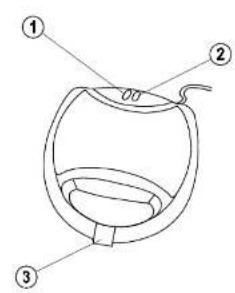
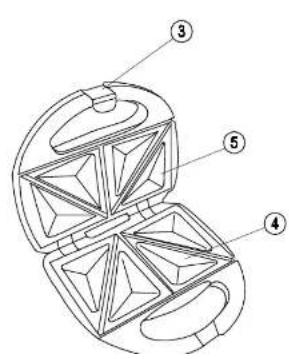
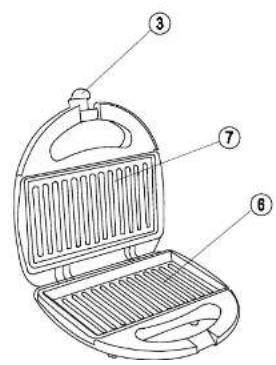
Parts
- Power indicator
- Temperature indicator
- Clamp
- Cut and seal triangular lower plate (TS2000)
- Cut and seal triangular upper plate (TS2000)
- Lower plate (TS2020)
- Upper plate (TS2020)
Intended use
Your Black & Decker Sandwich Maker has been designed for making toasted sandwiches and grilling food as described in this manual. This appliance is intended for household use only.

Read this entire manual carefully before using the appliance.
Safety instructions
- Warning! When using mains-powered appliances, basic safety precautions, including the following, should always be
- The intended use is described in this manual. The use of any accessory or attachment or the performance of any operation with this appliance other than those recommended in this instruction manual may present a risk of personal injury.
- Retain this manual for future reference.
Using your appliance
- Do not touch hot surfaces.
• Always take care when using the appliance. - Never pull the power supply cord to disconnect the plug from the socket. Keep the power supply cord away from heat, oil and sharp edges.
- Do not allow the power supply cord to hang over the edge of your work top or table. Route the cord carefully to avoid tripping hazard.
- Never operate an appliance directly below the socket it is
ENGLISH
(Original instructions)
- Always place the appliance on a level surface with adequate free space on all sides.
- Do not place the appliance on or near heat sources or in a heated oven.
- Do not use the appliance outdoors.
- Do not use the appliance on a wet or slippery surface.
- Do not use the appliance near flammable or explosive materials.
• Always protect the appliance from water or excessive humidity. - Do not move the appliance when in use.
- Operate the appliance only with dry hands.
- Do not use the appliance if you have bare feet.
- Route the cord carefully to avoid tripping hazard.
-
If the power supply cord is damaged during use, disconnect the appliance from the power supply immediately. Do not touch the power supply cord before
-
Disconnect the appliance from the power supply when not in use, before fitting or removing parts and before cleaning.
- Never let the appliance operate unattended.
- Do not immerse the appliance, cord set or plug in liquids.
- Allow the appliance to cool before cleaning.
- Do not use this appliance to cook raw meats.
Safety of others
- This appliance is not intended for use by persons (including children) with reduced physical sensory or mental capabilities, or lack of experience and knowledge, unless they have been given supervision or instruction concerning use of the appliance by a person responsible for their safety.
- Children should be supervised to ensure that they do not play with the appliance.
- Do not allow children or animals to come near the work area or to touch the appliance or power supply cord. Close supervision is necessary when the appliance is used near children.
After use
- Remove the plug from the socket before leaving the appliance unattended and before changing, cleaning or inspecting any parts of the appliance.
- When not in use, the appliance should be stored in a dry place. Children should not have access to stored appliances.
Inspection and repairs
- Before use, check the appliance for damaged or defective parts. Check for breakage of parts, damage to switches and any other conditions that may affect its operation.
-
Do not use the appliance if any part is damaged or defective.
-
Before use, check the power supply cord for signs of damage, ageing and wear.
- Do not use the appliance if the power supply cord or mains plug is damaged or defective.
- If the power supply cord or mains plug is damaged or defective it must be repaired by an authorised repair agent in order to avoid a hazard. Do not cut the power supply cord and do not attempt to repair it yourself.
- Never attempt to remove or replace any parts other than those specified in this manual.
Electrical safety
This product must be earthed. Always check that the power supply corresponds to the voltage on the rating plate.
If the supply cord is damaged, it must be replaced by the manufacturer or an authorised Black & Decker Service Centre in
ENGLISH
(Original instructions)
To avoid the risk of electric shock, do not immerse the cord, plug or appliance in water or other liquid.
Use
Warning! Always place the appliance on a flat, clean and non-slip surface before operating it.
Warning! Do not leave the unit unattended while in use.

Do not touch hot parts. The plates (4, 5, 6 and 7) will become hot during use.
Preheating
- Place the appliance on a suitable surface.
- Connect the plug to a power socket.
• The red power indicator (1) will light up. - Wait for the green temperature indicator (2) to go out. This indicates the unit is at the correct temperature and is ready to use.
Toasting (TS2000)
- Preheat the plates as described above.
- Open the appliance and place a slice of buttered bread onto the cut and seal triangular lower plate (4), with the buttered side down.
- Add the required filling and place another piece of buttered bread on top, with the buttered side up.
- If required repeat for a second sandwich.
- Close the cooking plates by slowly lowering the cut and seal triangular upper plate (5).
- Use the clamp (3) to keep the plates closed.
- After approx. 2-3 minutes, the sandwiches will be ready. The time may vary depending on your taste and the type of bread and filling.
Warning! Do not use force to close the cover or to apply the clamp. If necessary, remove some filling.
Toasting (TS2020)
- Preheat the plates as described above.
- Open the appliance and place a slice of buttered bread onto the lower plate (6), with the buttered side down.
- Add the required filling and place another piece of buttered bread on top, with the buttered side up.
- If required repeat for a second sandwich.
- Close the cooking plates by slowly lowering the upper plate (7).
Warning! The contents of a toasted sandwich may be very hot.
- After approx. 2-3 minutes, the sandwiches will be ready. The time may vary depending on your taste and the type of bread and filling.
Warning! Do not use force to close the cover or to apply the clamp. If necessary, remove some filling.
Grilling (TS2020)
- Preheat the plates as described above.
-
Open the appliance and lightly brush both grill plates (6 and 7) with butter, margarine or cooking oil to prevent food sticking to the plates.
-
Close the cooking plates by carefully lowering the upper plate (7).
- If possible use the clamp to lock the cover in place.
Note: Avoid thick foods as these will prevent the unit closing properly.
Note: The cooking time will vary depending on the food type and thickness. - Check the food regularly to avoid burning.
Maintenance & cleaning
Warning! Before cleaning and maintenance, switch the appliance off, remove the plug from the socket and allow the appliance to cool.
Warning! Do not immerse the appliance, the cord set or the plug in water or any other liquid.
- Wipe the exterior with a damp cloth.
- Do not use scouring pads.
- If necessary, use a mild detergent to remove spots. Do not use any abrasive or solvent based cleaner.
- Do not use metal implements on the non-stick surfaces.
Protecting the environment

Separate collection. This product must not be disposed of with normal household waste.
Should you find one day that your Black & Decker product needs replacement, or if it is of no further use to you, do not dispose of it with household waste. Make this product available for separate collection.
- Black & Decker provides a facility for recycling. Black & Decker products once they have
- You can check the location of your nearest authorised repair agent by contacting your local Black & Decker office at the address indicated in this manual. Alternatively, a list of authorized Black & Decker repair agents and full details of our after-sales service and contacts are available on the Internet at: www.2helpU.com.
Technical data
| Voltage | 220 – 240 Volts |
| Power | 750 W |
| Weight | 1.3 kg |
Guarantee
Black & Decker is confident of the quality of its products and offers an outstanding guarantee. This guarantee statement is in addition to and in no way prejudices your statutory rights. The guarantee is valid within the territories of the Member States of the European Union and the European Free Trade Area.
If a Black & Decker product becomes defective due to faulty materials, workmanship or lack of conformity, within 24 months from the date of purchase, Black & Decker guarantees to replace defective parts, repair products subjected to fair wear and tear or replace such products to ensure minimum inconvenience to the customer unless:
• The product has been used for trade, professional or hire purposes;
• The product has been subjected to misuse or neglect;
- The product has sustained damage through foreign objects, substances or accidents;
• Repairs have been attempted by
ENGLISH
(Original instructions)
authorised repair agent. You can check the location of your nearest authorised repair agent by contacting your local Black & Decker office at the address indicated in this manual. Alternatively, a list of authorised Black & Decker repair agents and full details of our after-sales service and contacts are available on the Internet at: www.2helpU.com.
Parti
Do not forget to register your product!
www.blackanddecker.co.uk/productregistration Register your product online at www.blackanddecker.co.uk/ productregistration or send your name, surname and product code to Black & Decker in your country
ITALIANO
www.blackanddecker.it/productregistration
- Parts
- Intended use
- Safety instructions
- Using your appliance
- ENGLISH
- (Original instructions)
- Safety of others
- After use
- Inspection and repairs
- Electrical safety
- Use
- Preheating
- Toasting (TS2000)
- Toasting (TS2020)
- Grilling (TS2020)
- Maintenance & cleaning
- Protecting the environment
- Guarantee
- Parti
- ITALIANO
Brand : BLACK & DECKER
Model : TS2000
Category : Toaster