TPAC-09K - Air conditioner Tatung - Free user manual and instructions
Find the device manual for free TPAC-09K Tatung in PDF.


| Product Type | Portable Air Conditioner |
| Brand | Tatung |
| Model | TPAC-09K |
| Cooling Capacity | 9,000 BTU |
| Coverage Area | Up to 400 sq. ft. |
| Power Supply | 115V / 60Hz |
| Rated Power Input | ~900 W |
| Energy Efficiency Ratio (EER) | 10.0 |
| Dimensions (W x H x D) | 17.5 x 28.5 x 14.5 inches |
| Weight | 58 lbs |
| Air Flow Rate | 200 CFM (high) |
| Noise Level | 52 dB (high), 45 dB (low) |
| Operating Modes | Cool, Fan, Dehumidify |
| Fan Speeds | 3 (High, Medium, Low) |
| Thermostat Type | Digital with remote control |
| Timer Function | 24-hour programmable |
| Auto Restart | Yes, after power failure |
| Refrigerant | R-410A |
| Filter Type | Washable mesh filter |
| Maintenance | Clean filter every 2 weeks |
| Safety Features | Overheat protection, auto shutoff |
| Accessories Included | Remote control, exhaust hose, window kit |
| Warranty | 1 year limited |
Frequently Asked Questions - TPAC-09K Tatung
User questions about TPAC-09K Tatung
0 question about this device. Answer the ones you know or ask your own.
Ask a new question about this device
Download the instructions for your Air conditioner in PDF format for free! Find your manual TPAC-09K - Tatung and take your electronic device back in hand. On this page are published all the documents necessary for the use of your device. TPAC-09K by Tatung.
USER MANUAL TPAC-09K Tatung
Do you have a particular question about the Tatung TPAC-09K not answered by the manual?
Type your question here ...
Ask a question
√ Receive updates on solutions
√ Get answers to your question
TABLE OF CONTENTS
- Introduction 3
- Important safeguards 4
- LCDI power cord and plug 5
- Parts names 6
- Installation 7
- Operating instruction 9
- Water drainage 13
- Maintenance and cleaning 14
- Troubleshooting 15
- Specification 16
- 產品介紹 17
- 使用安全須知 18
- LCDI 電源線與插座 19
- 產品部位名稱 20
- 安装注意事項 21
- 操作使用說明 23
- 排水方式 27
- 產品清潔與維護 28
- 異常故障排除 29
- 產品規格 30
- Tatung Limited Warranty 31
Thank you for choosing Tatungs Portable Air Conditioner. We hope you enjoy this instant cooling portable air conditioner. Please read this manual carefully before using this product.
The following tips may help to maximize the efficiency of your air conditioner:
- When the air conditioner is on, keep doors and windows closed.
• Turn off kitchen or bathroom exhaust fans when your air conditioner is on.
• Turn off the air conditioner when you leave home.
• Check the filters monthly. - Do not place anything that may generate heat near the thermostat since it may sense the heat and will make the air conditioner run longer than necessary.
- Keep blinds and curtains closed during hot weather.
- Do not block the air vents. A free flowing air conditioner operates most efficiently
SAVE THESE INSTRUCTIONS FOR FUTURE REFERENCE
IMPORTANT SAFEGUARDS
When using electrical appliances, basic safety precautions should always be followed:
- Read all instructions
- To protect against fire, electric shock and personal injury, do not immerse cord, plugs, or the unit in water or other liquid.
- Close supervision is necessary when the product is used around children. This product is not intended for use by children.
- Do not operate the product with a damaged cord/plug. If the plug is damaged, please return the product for repair.
- Always keep the product in an upright position.
- During the transit, the product could be placed up side down, which may cause the oil in the compressor drain into the refrigerant tubes reducing the cooling efficiency. Thus, before using the product, keep the product in a upright position for 2 hours.
- Connect the product to a properly grounded power supply. Do not use an adapter plug or extension cord.
- Do not cover or insert any object into the air inlet and/or outlet.
- Turn off the power when no one is in the room.
- Do not place anything in the direct path of the airflow.
- Do not place the product near any heat source or where gas leakage may occur.
- Do not use the product near a bath, shower, swimming pool, or in any other steamy, or wet areas.
- Do not turn off/on the product by plugging or unplugging the power cord directly.
- Do not modify the power cord or share the outlet with other appliances.
- Unplug the product from the outlet when not in use and before cleaning.
- Attachments not recommended by the manufacturer may cause injuries.
- Do not expose skin, face and eyes directly to cool air for a long period of time.
- If an abnormal odor or smoke comes from the product, disconnect the unit immediately and contact Tatung Service Department.
- Unplug the power from wall outlet before cleaning the filter and do not touch the metal parts inside.
- Do not apply any kind of insecticide or flammable spray onto or into the unit.
- Do not step on the product or place objects on the unit.
- Always place the product on a steady and flat surface.
- Before storing the product, always drain the water from the unit and clean the filter.
- Do not use the product for other than its intended use.
The manufacturer disclaims any responsibility if the above instructions are not followed. The manufacturer reserves the right to make technical changes without notice.
SAVE THESE INSTRUCTIONS
This product is designed for household use only
LCDI POWER CORD AND PLUG
This air conditioner is equipped with an LCDI (Leakage Current Detection and Interruption) power cord and plug. The LCDI power cord and plug will shut off the supply source via electrical disconnect (circuit trip) if the nominal current leakage between the cord shield and either load conductor exceeds a predetermined value. The cord will not be able to conduct power until the devise has been manually reset. This device provides protection to reduce the risk of fire due to arcing faults in the power cord. The cord shields are not grounded and they must be considered as shock hazards if exposed. The cord shield must not be connected to ground or to any exposed metal.
To ensure if the plug is working properly, please follow the following instructions to test it:
- Plug power cord into wall outlet.
- Press TEST button. The circuit should tr ip, cutting power to the air conditioner.
- Press RESET button for use.
DO NOT USE IF ABOVE TEST FAILS.
In the event the LCDI Plug of the power cord trips by itself, then first examine the cord for any damage. If there
is no damage to the cord, then press the RESET Button. If the LCDI Plug trips again, then immediately unplug the power supply cord and Tatung Service Department.
WARNING:
- Do not use the TEST and RESET buttons as "ON" and "OFF" switches.
- Do not press the TEST button while the air conditioner is operating
-
The cord and plug are designed for indoor use only.
-
Periodically examine the cord for any damage. If the shield gets exposed, immediately unplug the power cord and do not use the unit.

Front view
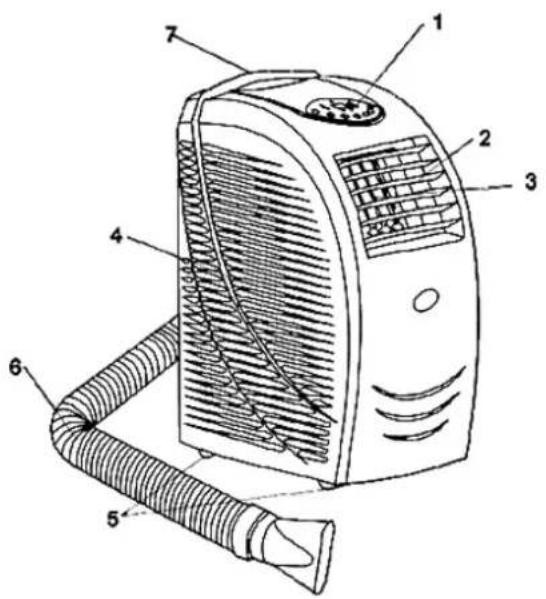
- Control panel
- Horizontal louver
- Vertical louver
-
Air inlet grille
-
Castor
- Air Exhaust hose
-
Moving handle
-
Air outlet grille
- Power cord
- Water filling drawer
Back view

- Power cord hook
- Air filter
Accessories

INSTALLATION
1. Select a proper installation location
Place the portable air conditioner on a flat and dry location where the air outlets cannot be obstructed. Leave a 20 inch (50 cm) minimum space between the product and the wall.
Adapter B

natural_image
Diagram of a coiled tube with directional arrows indicating movement, alongside a magnified cross-section showing internal features (no text or symbols)
Adapter A
2. Assemble the air exhaust hose
Connect the end of the hose and adapter and twist them.
3. Mount the air exhaust duct on the product
(1) Slide the square Adapter A of the exhaust dust to the exhaust terminal of the unit.
(2) Put the other end to the nearest window. Leave at least 20 inch (50 cm) space around it.
NOTE:
The length of the air exhaust duct can be extended from 17.5 inch 62 inch. Using the minimum length of the air exhaust duct could save energy for you.
This length has been designed especially according to the specifications of the air conditioner. Do not replace or extend it with your own hose as this could cause the unit to malfunction.

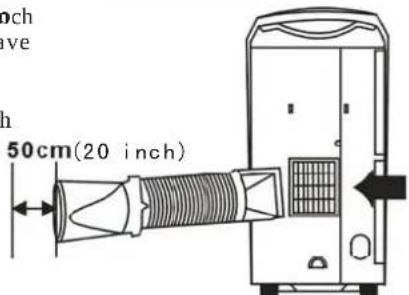
4. Install the window kit
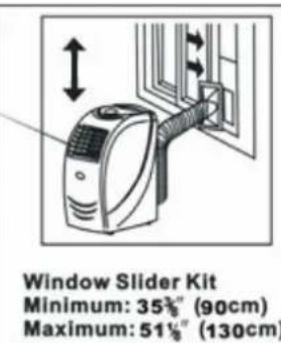
Your window kit has been designed to fit most standard "vertical" and "horizontal" window applications. However, it may be necessary for you to modify some aspects of the installation procedures for certain types of windows. Please refer to the illustration for minimum and maximum window openings
Installation in the horizontal window
Installation in the Vertical window
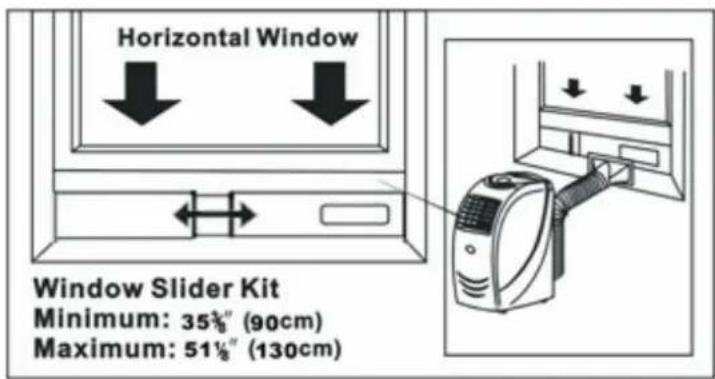

INSTALLATION
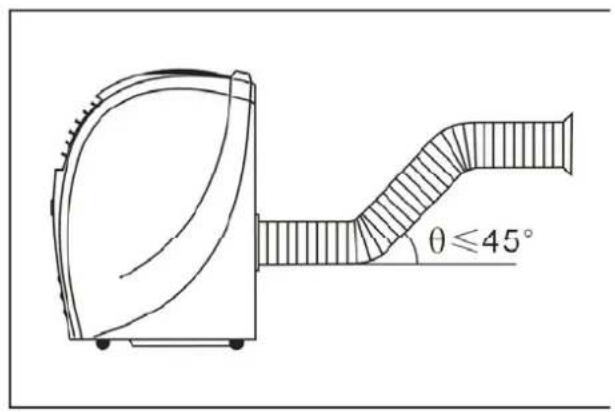
- The correct way of bending the hose
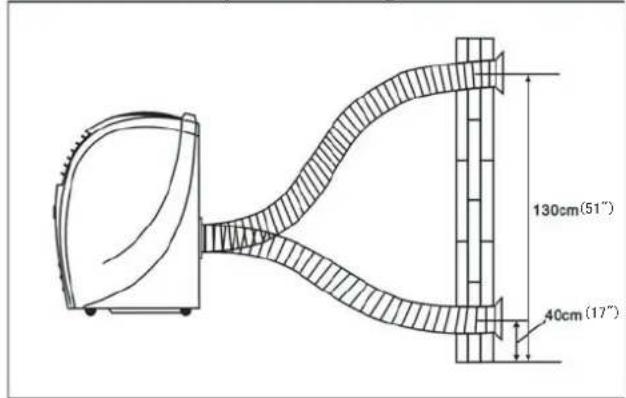
Fig. 9
Correct bending

Fig.10

Fig.11
Wrong bending

natural_image
Diagram of a curved duct with a fan-like structure and a labeled X (no text or symbols present)CAUTION:
This length has been designed especially according to the specifications of the air conditioner. Do not replace or extend it with your own hose as this could cause the unit to malfunction
| Timer | Timer | Press this button to enter time-setting status. |
| Swing | Swing | Press this button to make the vertical louver swing automatically. To stop swing, press the swing button again. |
| Speed | Speed | Press this button for 5 seconds to select high, middle or low fan Speed. When the machine is on FAN mode, press this button for five seconds, the system will dry itself; if you want to stop drying, press for another five seconds. |
| ▲▼ | Up/Down | Press up or down button to set temperature or adjust the time inTimer mode. When setting timer-on and timer-off, press these two buttons to adjust the time of starting or shutting off. Press both buttons to convert from Celsius to Fahrenheit. |
| Mode | Mode | Press this button to select cool, heat, dry or fan mode |
| Power | Power | Press this button to turn on/off the unit. |
COOL: On cooling mode, the led will illuminate.
FAN: On fan mode, the led will illuminate.
DRY: On dehumidifying mode, the led will illuminate.
COMP: When compressor is working, the led will illuminate.
FULL: When water is full in the machine, the led will illuminate.
ADD WATER: When the led is illuminating, the user can put some water in the machine.
HIGH: When the fan speed is on high, the led will illuminate.
MED: When the fan speed is on the middle setting, the led will illuminate.
LOW: When the fan speed is on low, the led will illuminate.
3. Remote control
| Power | Press this button to turn on/off the unit | |
| Timer | Press this button to set the timer | |
| Swing | Press this button to make the vertical louver swing automatically. | |
| °C °F | Celsius degree and Fahrenheit degree indicator | |
| Cool | Press this button to choose Cooling mode | |
| Dry | Press this button to choose Dehumidifying mode | |
| Fan | Press this button to choose fan mode | |
| Up | Press this button to adjust temperature or timer setting. | |
| Down | Press this button to adjust temperature or timer setting. | |
| High | Press this button to select high fan speed | |
| Medium | Press this button to select high fan speed | |
| Low | Press this button to select high fan speed | |
| Auto mode | This function presets the fan speed, mode and temperature, and the setting cannot be changed. Under this mode, the default setting for the temperature is 80.6F(27C), operating mode is cooling, and fan speed is low. |

TPAC remote control
5. Simple steps to use cooling mode
*Plug in the power cord and press the "POWER" button
*Press "MODE" to chose COOLING mode.
*Press “UP” or “DOWN” to set the desired temperature. The temperature ranges from 64F to 84F(18C\~31C)
*Press, "SPEED" to set a desired fan speed.
*The fan will run first. After few minutes, the compressor will start to run if the room temperature is higher then the setting temperature. The compressor will stop running when the room temperature is below the setting temperature.
6. Setting the timer
(1) Turn off the unit automatically:
When the unit is running, press TIMER to set operating duration, and then the LED will flash five times. During this period of time, press Up or Down button to adjust setting time from 0.5 hr. to 24 hr. After setting, the LED will flash five times and then display the room temperature again. When the operating duration reaches the pre-set time, the power will turn off automatically.
(2) Turn on the unit automatically:
When the unit is off, press TIMER to set start time, and then the LED will flash five times. During this period of time, press Up or Down button to adjust setting time from 0.5 hr. to 24 hr. After setting, the LED will flash five times and then display the temperature again. Once the set time is reached, the power will turn on automatically.
(3) Change the setting:
When TIMER is on, you can check the remain time by pressing the TIMER button. It will flash five times. Press Up or Down button to adjust the timer. The timer can be canceled if you press the TIMER button once again when LED is flashing.
Attention:
If the unit is suddenly turned off during operation, the compressor will start to run five minutes after the power is turned back on.
7. Setting operating mode
☐ COOLING: When this mode is selected, the fan will run first and then the compressor will start to run five minutes after the power is back on. To set your desired temperature, press UP or DOWN button. The temperature ranges from 64F\~84F (18C\~31C). When the room temperature lower than the setting temperature, the compressor will stop running until the room temperature is higher than set temperature. In this case, only the fan will keep running.
☐ FAN: When this mode is selected, the temperature setting cannot be changed, but you can set your desired speed. There is no need to use air exhaust duct in this mode.
☐ DEHUMIDIFING: When this mode is selected, it presets the fan speed and other mode, and these settings cannot be changed. Under this mode, the compressor will not run, and LCD will display room temperature. There is no need to use air exhaust duct. You may need to drain water with the drainpipe if the humidity is very high.
8. Setting temperature
In COOLING mode, press the "UP" button to increase the temperature setting or press the "DOWN" button to lower the temperature setting. When the number is flashing, it indicates the temperature you are setting up. When the number is lit but not flashing, it indicates the current room temperature.
In COOLING and FAN mode, press "SPEED" to adjust the fan speed. There are high, medium and low
modes. Each fan speed corresponds to one indicator on LED control panel. Please note: when unit is in dehumidifier mode, the fan speed cannot be adjusted.
10. About water adding function
Some portable air conditioners in the market can self-evaporate the condenser water, by using water pump to extract the condenser water collected from the air to cool the condenser in order to increase the cooling efficiency.
This unit not only self-evaporates the condenser water, but also comes with patented water injection function, allowing the user to add some water to increase the cooling efficiency, rather than rely on the condenser water collected from the air. This function is especially useful to the areas where the humidity is very low and condenser water is not enough to cool the condenser.
When the water is not enough for the water pump, the pump will stop working. At the same time, the
Water filling light on the control panel will illuminate, you can fill some water into the water-filling drawer carefully. To avoid overfilling the water, use the included measuring cup to fill the water no more than 1800ml (three cups). This operation may help save 20%-30% energy for you.

natural_image
Simple line drawing of a beaker with a measuring tool and an arrow pointing to it (no text or symbols)Please note, all the functions will work normally even when the water tank is empty and water pump stop running. You can choose not to add water. However, do not add water if the product is used in the place where has moderate or high humidity.
WATER DRAINAGE
During the cooling or dehumidifying mode, the condenser water will be drained into the internal water tank. Since this unit is equipped with a self-evaporative system, the condenser water will be used to cool the condenser making the unit run more efficiently. However, if the unit is used in high humidity areas, the water may need to be drained out. When the water tank is full, the water full indicator at LED control panel will light up and the compressor will stop running. The buzzer will sound for 10 times every 5 minutes unit the water is drained out.
After draining out the water, the alarm will stop and the unit will work normally. The compressor will start to run five minutes after the power is back on.
You can drain the water out with a drainpipe (included). Please follow the steps to drain the water:
- Turn off the power;
- Place a plate, pan or container under the drain mouth;
- Remove the water stopper from the drain mouth, thus the condenser water will flow out of the water tank.
- If you want to continuously drain the water, please use the drainpipe and follow the steps:
(1) Turn off the power;
(2) Place a plate, pan or container under the drain mouth;
(3) Take off the water stopper
(4) Connect the supplied drainpipe to the water mouth, and place a container at the end of
the pipe to collect the water. The condenser water will drain out automatically into the container.

(5) If you want to extend the drainpipe, you can use 9mm l. D. plastic pipe to connect with the supplied drainpipe.
Attention: Do not move the unit while the water is full. It may cause the water to overflow on the floor and damage the product.
MAINTENANCE AND CLEANING
Attention: unplug the power from the wall outlet before cleaning.
1. Clean the air filters
Clean the filters regularly to optimize the airflow.
(1) Unplug the power
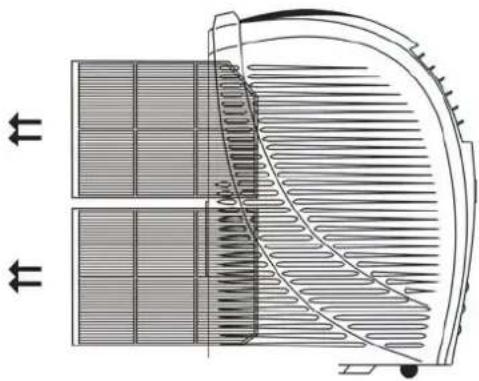
(2) Pull out the air filters as shown at right figure
(3) Wash the filters by immersing them gently into warm water (no hotter than 104F). Apply some neutral detergent if necessary and rinse the filter thoroughly.
(4) Put them back to the unit after the filters are dry.
Attention: Never operate the unit without the filter.
2. Clean the housing
(1) Unplug the power
(2) Wipe the surface of the appliance with a wet and soft cloth.
(3) Never use strong chemicals, oil-based products, detergents, chemically treated cloths or other cleaning solutions. These could damage the plastic surface.
(4) Do not immerse the unit in water
(5) Do not allow water on the control panel as it may cause malfunction.
natural_image
Technical diagram of a heat exchanger or cooling unit with heat flow arrows indicating direction (no text or labels present)3. End of season storage
(1) Unplug the power from wall outlet.
(2) Clean the filter
(3) Drain out the condenser water COMPLETELY. (Please refer to "water drainage" section.)
(4) Plug the power back in and operate the unit with FAN mode for half day to dry the water inside the water tank.
(5) Unplug the power and tie the power cord in power cord hook.
(6) Uninstall the air exhaust hose.
(7) Pack the appliance and accessories with its original box.
(8) Store the product in a dry place.
| Symptom | Check | Action |
| The unit does not operate | Is the unit plugged in? | Plug in the power cord |
| Cannot power on? | Check the power switch | |
| Does the power turn on? | Turn on the power | |
| Is the timer on? | Turn the timer off | |
| The unit only runs in fan mode (the compressor doesn't run) | Is the water tank full? | Empty the water. Please read the “Water Drainage” section |
| Is the room temperature below the set temperature? | Change the temperature setting | |
| The room is not cool enough | Is the room too big? | Use this unit at the recommended room size. |
| Are there too many people in the room? | The more people in the room, the longer time it needs to cool the room | |
| Is the filter dirty? | Clean the filters | |
| Are there too many windows or doors open? | Close the windows and doors | |
| Is the room in direct sunshine? | Close the blinds or curtains | |
| Is the air exhaust hose installed correctly? | Check the air exhaust hose | |
| Is the temperature setting too high? | Change the temperature setting | |
| Is there additional heat source nearby? | Remove the heat sources from the room. | |
| The unit is too noisy and vibrates | Is the unit placed on an uneven surface? | Place the unit on an even surface. |
| Hear the inner liquid flow inside | It is normal. That is the sound of refrigerant flowing inside the condenser. | |
| The unit starts and stops frequently | Is the proper voltage connected | Check the voltage 115V/60Hz |
| Is the air exhaust hose installed incorrectly? | Check the exhaust hose | |
| Is the air exhaust hose modified? | Do not modify or add air exhaust by yourself . | |
| Water is leaking from the unit | Surface is uneven | Place the unit on an even surface. |
| Drain knob is loose | Make sure the knob is secured tightly in the drainage spout. | |
| Is the water tank full? | Empty the water. Please read the “Water Drainage” section. | |
| LED control panel show some error codes | E2- Room temperature faults | Contact Tatung Service Center |
| E3- Faulty coil temperature | Contact Tatung Service Center | |
| E4- the coil is defrosted | That is the normal status. The message will disappear after few minutes. | |
| E5- Unit faults | Contact Tatung Service Center. |
If you cannot solve the problem or the problem is not listed on above, unplug the power and contact Tatung Service Department at 1-800-827-2850.
When one the following situations happen, stop running the unit and contact Tatung Service Center:

- The fuse and switch often break
- The power cord superheat or sleeve of the cord is broken
- There is abnormal odor or smoke comes out the units.
SPECIFICATION
| Model number | TPAC-09K | TPAC-12K |
| Cooling capacity | 9000 BTU | 12000BTU |
| Power supply | 115V/60 Hz | 115V/60 Hz |
| Power consumption | Cooling: 1050W | Cooling: 1380 W |
| Dehumidifying: 750 W | Dehumidifying: 750 W | |
| Control | Digital LCD control panel / remote controller | Digital LCD control panel / remote controller |
| Working temperature | 64°F~86°F | 64°F~86°F |
| Noise level (dBA) | =< 52 (dBA) | =< 54 (dBA) |
| Max room size | 150 sq.ft. | 200 sq.ft. |
| Refrigerant | R22/12.35oz/0.77lb | R22/12.35oz/0.77lb |
| Dimension (WxDxH) | 20.8" x 12.5" x 28" | 20.8" x 12.5" x 28" |
| Net weight (lbs) | 66 lbs | 68 lbs |
| Safety compliance | ETL | ETL |
Remarks:
(1) The data may vary, please refer to the rating label placed on the product.
(2) The manufacture reserves the rights to change without notice.
產品介紹
安裝注意事項
5. 彎曲伸縮軟管的正確方法

正確的伸縮軟管方法

錯誤的伸縮軟管方法

natural_image
Diagram of a showerhead with a curved pipe and a labeled X (no text or symbols on the diagram itself)注意:
natural_image
Simple line drawing of a beaker with a small object nearby (no text or symbols)排水方式
natural_image
Technical diagram of a heat exchanger or cooling unit with heat flow arrows indicating direction (no text or symbols present)3. 季節末的收納
If the product is defective or not working properly, please contact us directly with our service or technical assistance at 1-800-827-2850
TATUNG LIMITED WARRANTY
Tatung Company of America, Inc. (“Tatung”), 2850 El Presidio Street, Long Beach, California 90810, warrants to you, the original owner of this new Tatung product that all parts of this product are free from defects in material and workmanship, for one year from the date of purchase under normal use and service.
Tatung will, at our option, repair or replace the product or any part that becomes defective, malfunctions, or otherwise fails to conform to this warranty under normal use and service during the term of this warranty, at no charge to you for parts and labor.
This warranty does not cover:
-
Defects, malfunctions or failures resulting from causes beyond the control of Tatung or the manufacture of the product, including, but not limited to, shipping or transit accidents, abuse, misuse operation contrary to furnished instructions, improper or insufficient ventilation, operation with incorrect power supplies, operation with faulty associated equipment, modification, alternation, improper servicing, acts of God, tampering or normal wear and tear;
-
Products on which the serial number has been altered, defaced or removed;
-
Products purchased outside of the United States.
Should any product submitted for warranty service be found ineligible for warranty service, we will provide you with an estimate of the cost of repair and will repair the product upon your request and upon receipt of payment or acceptable arrangements for payment.
Carry-In or Mail-in Service
You must carry-in or mail-in your product at you cost during the limited warranty period (one year from the date of purchase). This limited warranty only applies to products purchased and serviced in the United States. This Limited Warranty is extended only to the original purchaser and only covers product purchased as new. Please pack your portable air conditioner carefully to avoid damages in transit. Tatung dose not be responsible for improper handling in transit, or for transportation expenses. To expedite processing, please indicate nature of the defect, along with a copy of one of the following: a dated sales receipt, invoice, bill of sale, detailed charge slip, or dated proof of purchase, and contact Tatung Service Department at 1-800-827-2850
Some states do not allow the exclusion or limitation of incidental or consequential damages, or limitations on how long an implied Limited Warranty lasts, so the exclusions may not apply to you.
This warranty gives you specific legal rights and you may also have other rights, which vary from state to state. This is the only express warranty applicable to the product. Tatung neither assumes nor authorized anyone to assume for it any other express warranty.
THIS LIMITED WARRANTY IS CONDITIONED ON AND BECOMES EFFECTIVE UPON DATE OF PURCHASE.
© 20 07, Tatung Company of America, Inc.
Tatung reserves the right to change implied warranty without notice.
- Ask a question
- TABLE OF CONTENTS
- SAVE THESE INSTRUCTIONS FOR FUTURE REFERENCE
- IMPORTANT SAFEGUARDS
- SAVE THESE INSTRUCTIONS
- This product is designed for household use only
- LCDI POWER CORD AND PLUG
- WARNING:
- INSTALLATION
- Select a proper installation location
- Assemble the air exhaust hose
- Mount the air exhaust duct on the product
- NOTE:
- Install the window kit
- Installation in the horizontal window
- Installation in the Vertical window
- CAUTION:
- Remote control
- Simple steps to use cooling mode
- Setting the timer
- Turn off the unit automatically:
- Turn on the unit automatically:
- Change the setting:
- Attention:
- Setting operating mode
- Setting temperature
- About water adding function
- WATER DRAINAGE
- MAINTENANCE AND CLEANING
- Clean the air filters
- Clean the housing
- End of season storage
- SPECIFICATION
- Remarks:
- 產品介紹
- 安裝注意事項
- 彎曲伸縮軟管的正確方法
- 正確的伸縮軟管方法
- 錯誤的伸縮軟管方法
- 注意:
- 排水方式
- 季節末的收納
- TATUNG LIMITED WARRANTY
- Carry-In or Mail-in Service
Brand : Tatung
Model : TPAC-09K
Category : Air conditioner