
BPC2B - Blender GORENJE - Free user manual and instructions
Find the device manual for free BPC2B GORENJE in PDF.


| Brand | Gorenje |
| Model | BPC2B |
| Product Type | Blender |
| Jug Capacity | 2 litres |
| Jug Material | Glass |
| Number of Preset Programs | 6 (Vegetable, Ice, Smooth, Soy Milk, Nut, Fruit) |
| Speed Settings | Variable with speed setting buttons (1-10) |
| Time Setting | Yes, with time setting buttons |
| Pulse/Cleaning Function | Yes, dedicated button |
| Program Selection | Rotary dial |
| Display | LED display |
| Blade | Removable stainless steel blade |
| Overheating Protection | Yes, automatic shut-off |
| Overload Protection | Yes |
| Maximum Operating Time (with water) | 30 minutes |
| Maximum Operating Time (dry ingredients) | 10 minutes |
| Cooling Down Period | 15 minutes before next use |
| Power Cord | Detachable (not specified length) |
| Safety Lock | Lid must be correctly placed for operation |
| Cleaning | Hand wash only; motor unit wipe with damp cloth |
| Dishwasher Safe Parts | None (do not wash in dishwasher) |
| Accessories Included | Pusher, measuring cup lid |
| Warranty | Covered by Gorenje warranty, see official website |
Frequently Asked Questions - BPC2B GORENJE
User questions about BPC2B GORENJE
0 question about this device. Answer the ones you know or ask your own.
Ask a new question about this device
Download the instructions for your Blender in PDF format for free! Find your manual BPC2B - GORENJE and take your electronic device back in hand. On this page are published all the documents necessary for the use of your device. BPC2B by GORENJE.
USER MANUAL BPC2B GORENJE


Za rastavljanje uređaja postupite obrnutim redoslijedom.
Rukovanje uređajem
Blender/mikser ima šest programiranih mogućnosti djelovanja (1) koje birate okretanjem gumba za izbor programa (7). Odabrani program bljeska. Kad je program izabran, uređaj uputite u rad pritiskom na gumb za uključenje djelovanja (7).


Za rastavljanje aparata postupite obrnutim redosledom.
Rukovanje aparatom
Blender ima šest programiranih mogućnosti rada (1) koje biramo obrtanjem dugmeta za izbor programa (7). Odabrani program trepće. Kada je program izabran, aparat startujemo pritiskom na dugme za upućivanje u rad (7).
| Prog. | Namena | Opis delovanja |
| vegetable | Za povrće i zelene sokove | Period rada 5 sekundi na trećoj brzini, a zatim 28 sekundi na najvećoj brzini, sa 2 sekunde prekida. Ukupan period rada 90 sekundi. |
| ice | Za mešanje pića sa mnogo leda | Period rada 4 sekunde sa 4 sekunde prekida, na najvećoj brzini. Ukupno vreme rada 30 sekundi. |
| smooth | Za usitnjavanje sastojaka za sosove i supe | Postepeno pojačavanje brzine od 1 do najveće brzine u intervalu 10 sekundi, a zatim seckanje na najvećoj brzini do završetka programa. Ukupno vreme rada 90 sekundi. |
| soya milk | Za izradu sojina mleka | Postepeno pojačavanje brzine od 1 do 5 u intervalu 5 sekundi. Nakon toga period rada 25 sekundi na brzini 5. Povećanje brzine na 8 i rad 30 sekundi. Pojačavanje na najveću brzinu i rad do završetka programa. Ukupno vreme rada 6 minuta. |
| nut | Za suvo seckanje oraščića | Period rada 5 sekundi na petoj brzini, a zatim pojačanje brzine na 8 i rad 2 sekunde sa 1 sekundom prekida. Ukupno vreme rada 35 sekundi. |
| fruit | Za pripremu voćnih kaša –smoothie | Početak rada na trećoj brzini, a zatim pojačavanje na najveću brzinu i rad do završetka programa. Ukupno vreme rada 60 sekundi. |
Moguće je koristiti i vlastite jednostavne programe.
Koristeći dugmad za podešavanje brzine (4) i vremena rada (5), birate određenu brzinu i period rada, nakon čega program upućujete u rad pritiskom na dugme za start (7). Tokom samog rada brzina rada može proizvoljno da se menja.
Kada koristite vlastite programe preporučujemo da program započnete na najmanjoj brzini, a zatim brzinu postepeno pojačavate do potrebnog nivoa.


- Feed opening lid / measuring cup
- Lid
- Blender jug (2 litres)
- Pusher
- Removable blade
- Clutch
- Program selector dial
- LED display
- Control buttons
- Housing
- Plastic feet

- Preset programs
- Operating time
- Speed
- Speed setting buttons
- Time setting buttons
- Pulse operation / cleaning
- Start button
Important:
Before using the appliance for the first time, carefully read this instruction manual and save it for future reference. Also save the warranty statement.
Warning
Check if the voltage indicated on the blender corresponds to the local power voltage before you connect it. Do not connect the appliance to an external timer to prevent danger. Only connect the blender to a grounded power outlet. Always make sure that the plug is inserted firmly into the power outlet.
Make sure that the damaged power cord is replaced by Gorenje, a service center authorized by Gorenje or similarly qualified persons in order to avoid a hazard.
If you appliance is damaged in any way, do not use it anymore and contact the nearest Gorenje service center. Do not replace parts of the appliance yourself.
This appliance shall not be used by children.
This appliance can be used by persons with reduced physical, sensory or mental capabilities or lack of experience and knowledge if they have been given supervision or instruction concerning use of the appliance in a safe way and if they understand the hazards.
For their safety, do not allow children to play with the appliance.
Keep the appliance and its power cord out of the reach of children. Do not hang the power cord over the desk or table edge, where you place the appliance.
To prevent a short circuit or an electric shock, make sure that your hands are dry before you insert the plug into the power outlet and switch on the appliance.
Never let the appliance run unattended.
Never reach into the feeding hole and the main unit with your fingers or an object while the blender is running. Never use any objects to replace the pusher.
Be careful if hot liquid is poured into the blender as it can be ejected out of the appliance due to a sudden steaming.
Caution
This appliance is intended for household use only.
Never use any accessories or parts from other manufacturers or that Gorenje does not specifically recommend. If you use such accessories or parts, your guarantee becomes invalid.
Do not use this appliance on an unstable or uneven surface.
Before you insert the plug into the power outlet, make sure that the appliance is assembled correctly. Unplug the appliance immediately after use.
Switch off and unplug the appliance from the power outlet after use. Wait till the main unit and the driving shaft stop turning, then you can take out any accessories from the main unit.
Food coloring can discolor components. This is normal and has no impact on use.
To prevent damages due to heat deformation, never use water with a temperature of over 60° C or a microwave oven to clean all components.
Do not use scouring pads, abrasive cleaning agents or aggressive liquids such as petrol, alcohol or acetone to clean the appliance.
Danger: Do not immerse the main unit of the juicer in water, any other fluid, nor rinse it under the tap. Use only a moist cloth to clean.
Before switching on the appliance, make sure all components are correctly installed.
Only use the appliance if the lid is correctly in place.
Do not open the lid during appliance operation.
Do not use the pusher if the lid is not correctly in place.


Make sure the motor unit is dry during appliance operation.
Maximum appliance operating time when water is present in the jug is 30 minutes. When blending dry ingredients, maximum operating time is 10 minutes. When maximum time is reached, the appliance has to be left to cool down for at least 15 minutes before next use.
Always disconnect the appliance from the power mains after use.
The appliance features overheating protection. In case of overheating, the appliance will stop automatically. In such case, operation can only be resumed in 15 minutes.
This equipment is labelled in compliance with the European Directive 2012/19/EC on waste electric and electronic equipment – WEEE. The Directive specifies the requirements for collection and management of waste electric and electronic equipment effective in the entire European Union.
Preparation for use
- Remove the packaging.
- Clean the appliance as instructed in the section "Cleaning".
Assembly and disassembly instructions


Observe the reverse order to disassemble.
Use
The blender features 6 preset programs (1) that can be selected by rotating the program selector dial (7). The selected program will flash. When a program is selected, start it by pressing the start key (7).
| Program | Purpose | Description of operation |
| Vegetable | For vegetables and juicing greens | Operation: 5 seconds at speed 3; then 28 seconds at maximum speed with a 2 second pause Total operating time: 90 seconds |
| Ice | For mixing drinks with a lot of ice | Operation for 4 seconds at top speed with a 4-second pause Total operating time: 30 seconds |
| Smooth | Blending sauces and soups | Gradual increase in speed from 1 to top speed in a 10-second interval; then blending at top speed until the end of the program. Total operating time: 90 seconds |
| Soy milk | Program for making soy milk | Gradual increase of speed from 1 to 5 in a 5-second interval, followed by 25-second operation at speed 5. Then increase of speed to 8 and operation for 30 seconds. Increase to top speed and operation until the end of the cycle. Total operating time: 6 minutes. |
| Nut | For dry chopping of nuts | Operation: 5 seconds at speed 5; then, increase of speed to 8 and operation for 2 seconds, with a 1-second pause. Total operating time: 35 seconds |
| Fruit | Program for making smoothies | Start of operation at speed 3, then acceleration to top speed and blending until the end of the cycle. Total operating time: 60 seconds |
You may also use your own simple programs. Set the speed (4) and time (5) with respective buttons and start the program using the start button (7). Speed can be adjusted during operation.
When using your own program, we recommend starting the program at minimum speed and then gradually accelerating to the desired speed.
If you often use the appliance for dry chopping of nuts, grain, and spices, we recommend buying and using a separate jug. Aggressive oils are released during chopping of some types of nuts, which can permanently discolour the jug.
Cleaning
Do not clean the appliance with scouring pads, caustic or corrosive cleaners or aggressive liquids like alcohol, gasoline, or acetone.
Appliance is easier to clean if it is cleaned immediately after use.
Before manual cleaning, pour 1 litre of warm water and a drop of detergent in the appliance. Then, press and hold the pulse operation/cleaning button (6).
Tip the switch to the OFF position and disconnect the appliance from the power mains.
Disassemble the appliance by observing the steps for assembly in the opposite order.
Thoroughly clean each part.
Do not use any metal cleaning accessories as they may damage the appliance.
Do not immerse the motor unit in water or wash it under a tap. Only use a damp cloth to clean it.
Do not wash in a dishwasher.
Troubleshooting
| Trouble | Possible reason | Solution |
| The appliance is not operating, LCD does not light up. | There is no voltage in the power mains.The appliance is not connected to the power mains.The jug is not correctly placed. | 1. Check whether there is voltage in the power mains.2. Connect the appliance to the power mains.3. Replace the jug.4. Internal appliance components have failed. Call Gorenje's customer service. |
| The appliance is not operating, LCD flashes. | You are using your own program, but you have not set the operating time.Operating time too long; overheating protection has been activated.Amount of ingredients in the jug is too large; overload protection has | 1. Set the desired operating time.2. Wait for 15 minutes for the appliance to cool down.3. Reduce the amount of ingredients in the jug.4. Internal appliance components have failed. Call Gorenje's |
| been activated. | customer service. | |
| The appliance has been switched on, but the blade does not spin. | Amount of ingredients in the jug is too large; overload protection has been activated. Blending speed set too high. | 1. Reduce the amount of ingredients in the jug.2. Reduce blending speed.3. Internal appliance components have failed. Call Gorenje's customer service. |
| Strange smell during operation | This is normal during the first use of the appliance. | 1. Once the appliance has been used a few times, the smell will no longer be there.2. Internal appliance components have failed. Call Gorenje's customer service. |
| Abnormal noise during appliance operation. | The jug is not correctly placed.Ingredients sticking to the jug wall and blade is spinning idly. | 1. Replace the jug.2. Scrape the ingredients from the jug walls. Add more water if necessary.3. Internal appliance components have failed. Call Gorenje's customer service. |
Environment
After the expiry of its useful life, do not discard the appliance with common household waste. Take is to an authorized recycling center. This will help preserve the environment.
Warranty and repair
For more information or in case of problems, please visit Gorenje website at www.gorenje.com or contact Gorenje customer service in your country (phone numbers are listed in the International Warranty Sheet). If there is no such center in your country, please contact the local Gorenje dealer or Gorenje's small domestic appliance department.
For personal use only!
GORENJE
WISHES YOU A LOT OF PLEASURE IN USING YOUR APPLIANCE.
We reserve the right to modifications.
Általános leírás


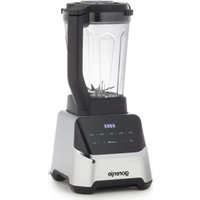
Brand : GORENJE
Model : BPC2B
Category : Blender