
2077DF - Safe FIRST ALERT - Free user manual and instructions
Find the device manual for free 2077DF FIRST ALERT in PDF.


| Product Type | Fire and Water Safe |
| Model | 2077DF |
| Brand | First Alert |
| Dimensions (Exterior) | 17.2 x 14.6 x 14.6 inches |
| Dimensions (Interior) | 14.5 x 9.2 x 9.2 inches |
| Weight | 35 lbs |
| Capacity | 1.0 cu ft |
| Power Source | 4 AA batteries (included) |
| Lock Type | Electronic keypad with backup key |
| Fire Rating | 1 hour at 1700°F |
| Water Resistance | Submersible in 2 feet of water for 72 hours |
| Number of Emergency Override Keys | 2 keys included |
| Interior Features | Carpeted floor, shelf, door organizer |
| Mounting Options | Rear and floor pre-drilled bolt holes |
| Security Features | Pry-resistant hinges, concealed hinges, anti-drill plates |
| Color | Black matte finish |
| Warranty | Limited lifetime |
| Certifications | ETL verified for fire and water |
| Battery Life | Up to 1 year under normal use |
| Low Battery Indicator | Yes, audible beep and LED |
| Maintenance | Clean with soft damp cloth, avoid abrasives |
Frequently Asked Questions - 2077DF FIRST ALERT
User questions about 2077DF FIRST ALERT
0 question about this device. Answer the ones you know or ask your own.
Ask a new question about this device
Download the instructions for your Safe in PDF format for free! Find your manual 2077DF - FIRST ALERT and take your electronic device back in hand. On this page are published all the documents necessary for the use of your device. 2077DF by FIRST ALERT.
USER MANUAL 2077DF FIRST ALERT
Operation & Installation Guide
First Alert®
MANUAL # M08-0273-004
First Alert®
2077Df
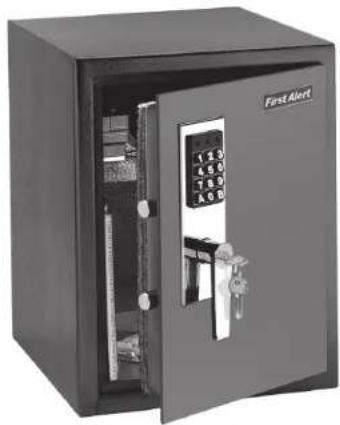
natural_image
Exterior view of a black metal safe with open door and internal compartments (no visible text or symbols)www.FirstAlert.com
DiGital anti-tHeft Safe


MANUAL # MOB-0273-004
Index / Overview of Your Safe Overview of Your Safe
INDEX
Overview of Your Safe 2
Initial Set Up ....3
Programming a Personal Passcode 4
Shelf and Mounting ....5
Use, Care and Maintenance 7
Consumer Affairs 8
Limited Warranty 10
FOR YOUR PROTECTION
√ Do not remove the serial number tag from the safe.
√ Store emergency override keys away from safe, NEVER INSIDE.
√ Record all safe identification numbers on Safe Identification Record (page 10).
√ Save this manual and NEVER keep it inside the safe.
OVERVIEW OF YOUR SAFE
Congratulations!
Your new First Alert® Anti-Theft Safe™ will provide secure protection for your valuables, important documents and other personal items. All First Alert® safes are designed and built using the highest manufacturing standards to ensure maximum user satisfaction under a variety of conditions. With proper care, your First Alert® safe will provide peace of mind for many years to come.
PACKAGE CONTENTS

YOU WILL NEED

1 Small Phillips Head Screwdriver

1 Drill with 3/16 in. Bit
1 Pencil
IMPORTANT: DO NOT RETURN SAFE TO STORE
If you are missing parts, have difficulty programming your safe or have any other questions pertaining to its proper use and care, DO NOT RETURN your safe to the store. Please contact Consumer Affairs at 1-800-323-9005, 7:30 a.m. – 5 p.m. Central Standard Time, Monday through Friday. To assist us in serving you, please have the model number and date of purchase available when calling.
INITIAL SETUP
emerGencY overriDe KeY uSe
① Remove override key lock cover.
② Insert key turn clockwise and hold.
3 Rotate handle clockwise then pull door open.


IMPORTANT
If the lever handle will not rotate clockwise after the key is turned, then rotate the lever handle slightly counterclockwise until it stops, then rotate clockwise again to open. The override key is used to gain access to the safe to change batteries or if the fingerprint lock fails to operate. This key should be stored in a secure place away from your safe.
BatterY inStall
① Remove battery cover.
2 Install four (4) AA batteries. Make sure to install them facing the proper direction.
③ Replace the battery cover.
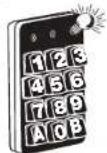
4 When installed correctly, a red light will flash on the digital keypad.
①

2

3
4
PROGRAMMING A PERSONAL PASSCODE
① Open the safe door.
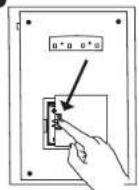
2 Press the reset button on the inside edge of the door closest to the hinges.
3 When the safe is ready to be programmed, you will hear a beep and a light will flash on the keypad.
4 Enter your new three to eight (3-8) digit passcode followed by 'A' or 'B'.
5 The light will once again flash and you will hear a beep.


oPeninG Your Safe With tHe DiGital KeYPaD
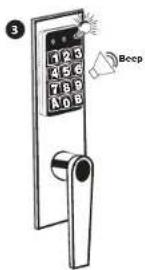
1 Enter new code: 3-8 digits followed by the 'A' or 'B' key. Ready light flashes along with a beep.
2 Rotate handle clockwise then pull door open.


natural_image
Line drawing of a simple open-plan safe with door, door lock, and handle (no text or symbols)
natural_image
Line drawing of a simple open safety cabinet with door and door panel (no text or symbols)Shelf and Mounting Mounting Instructions
trouBle SHootingG
If safe fails to open with your Personal Passcode, try the following:
① Check to see if the batteries have been installed properly and replace if necessary.
2 Lock-out may have occurred. Wait 15 minutes before trying again.
3 Contact BRK Consumer Affairs Department.
Security locKout PerioDS
For added security, the safe will automatically lockout entry for 15 minutes after three attempts to open with an invalid passcode.
cloSinG Safe
Push door closed then rotate handle counterclockwise fully into the locked position.

natural_image
Line drawing of a simple open safety cabinet with door and side lock (no text or symbols)
natural_image
Line drawing of a simple safe with a door and lock (no text or symbols)SHELF AND MOUNTING
inStallinG tHe SHelf
Slide shelf into place on top of shelf racks.
Note: Place shelf in unit when wall mounting safe.

natural_image
Line drawing of a hand holding a rectangular object inside a bookshelf (no text or symbols)mountinG inStructionS
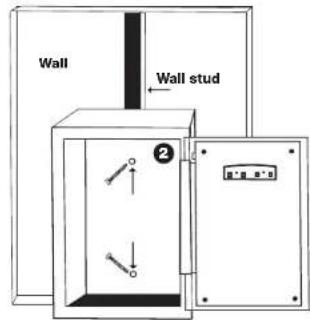
1 Place safe in desired location and use a pencil to make drill marks on the shelf.
② Use the safes predrilled holes as your guide.
Floor Mounting


Wall Mounting

USE, CARE AND MAINTENANCE
When properly maintained, your safe will continue to operate and accurately read the authorized passcode for many years. In order to ensure optimum performance of your safe, please follow these simple precautions:
Battery Maintenance
1 Always purchase and use the batteries as specified by this User's manual.
Always replace all batteries at the same time. It is recommended to replace all batteries at least once a year or sooner depending on amount of use.
3 Always clean the battery contacts in the battery compartment and on the batteries before installing new batteries.
4 Always make sure all batteries match the polarity (+ and -) signs in the open battery compartment.
5 If your safe will not be used for an extended period of time, it is recommended that you remove the batteries.
6 Always promptly remove and properly discard of all used batteries.
Replace Batteries – For best results and performance, we recommend that the batteries be replaced at least once a year or sooner depending on amount of use.
Clean Hand – Never attempt to operate the digital keypad if your hands have excessive dirt, debris or liquids on them.
Clean Safe – To clean the surface of your safe, it is recommended that you use a mild cleaner (e.g., window cleaner) to avoid scratching or discoloring the surface. Always wipe dry and NEVER use abrasive cleansers on the safe or digital keypad.
Moisture – We recommend that you place delicate items such as pictures or intricate jewelry into an air-tight container before storing them in your safe. Avoid placing your safe in areas of high humidity. For optimum performance, the safe should be opened and aired out for at least 20 minutes every two weeks.
For future reference, store this Operation and Installation Guide in a secure area away from the safe. DO NOT DISCARD!
CONSUMER AFFAIRS
YOUR SAFE'S UNIQUE IDENTIFICATION NUMBERS
When contacting Consumer Affairs, you should be prepared to supply some important information that specifically identifies your safe. This information is extremely important to assuring prompt and accurate customer assistance.
It is strongly recommended that you identify and record the following information in the Safe Identification Record form located on page 10.


IMPORTANT DO NOT REMOVE TAGS
In case your safe becomes inoperable or you lose your keys, these identification numbers will be needed to correct the problem. It is recommended that the number tags remain in place on the safe. If removal is necessary, then they should be attached to the inside back cover of this manual. Store in a safe and secure place for future reference.
How to Obtain Warranty Service Safe Identification Record
HOW TO OBTAIN WARRANTY SERVICE
If service is required, do not return the product to your retailer. In order to obtain warranty service, contact Consumer Affairs at 1-800-323-9005, 7:30 a.m. – 5 p.m. Central Standard Time, Monday through Friday. To assist us in serving you, please have the model number, serial number and date of purchase available when calling.
For Warranty Service return to:
First Alert, Inc. Attn: Warranty Safe Returns 23610 S Banning Blvd Carson, CA 90745
PLEASE CALL US AT 1-800-323-9005 TO ESTABLISH A WARRANTY RETURN SET-UP
ORDERING REPLACEMENT KEYS
If you lose the safe entry or Emergency Override keys or would like additional keys, you can purchase them from First Alert, Inc. You must supply the following information to assure accurate processing:
1 Name / Address / Telephone Number
2 Safe Model Number / Serial Number
3 Key Number (located on the key and on the Emergency Override Key Lock)
4 Notarized statement of ownership (a notary letter form can be printed off at www.firstalert.com)
5 Indicate number of keys requested
Please send all the information via fax at 630-851-7995 or mail First Alert, Inc., 3901 Liberty Street Road, Aurora, IL 60504-8122.
Checks or Money Orders are required for orders received by mail and should be made payable to First Alert. Contact our Consumer Affairs Department for costing information prior to ordering.
Mail To: First Alert, Inc.
Attn: Consumer Affairs 3901 Liberty Street Road Aurora, IL 60504-8122
SAFE IDENTIFICATION RECORD

Model Number ____
Serial Number
Key Number ____
Digital Passcode Record
Your passcode must be at least three (3) digits and no more than eight (8) digits followed by the letter 'A' or 'B'.
LIMITED WARRANTY
BRK Brands, Inc., ("BRK") warrants that for a period of five (5) years from the date of purchase, this product will be free from defects in material and workmanship. BRK, at its sole option, will repair or replace this product or any component of the product found to be defective during the warranty period. Replacement or repair will be made with a new or remanufactured product or component. If the product is no longer available, replacement may be made with a similar product of equal or greater value. This is your exclusive warranty.
This warranty is only valid for the original retail purchaser from the date of initial retail purchase and is not transferable. You must keep the original sales receipt. Proof of purchase is required to obtain warranty performance. BRK dealers, service centers, or retail stores selling this product do not have the right to alter, modify or in any way change the terms and conditions of this warranty.
This warranty does not apply to the finish on the product. This warranty does not cover normal wear and tear of parts or damage resulting from any of the following: negligent use or misuse of the product, use contrary to the operating instructions, disassembly, repair or alteration by anyone other than BRK or an authorized service center, improper installation, or exposure to extremes of heat or humidity.
Further, the warranty does not cover Acts of God, such as fire, flood, hurricanes and tornadoes.
Limited Warranty
BRK shall not be liable for any incidental or consequential damages caused by the breach of any express or implied warranty. BRK is also not responsible for: costs associated with removing or installing the product; damage or loss of the contents of the product; nor for the unauthorized removal of the contents; or damages incurred during shipment.
Except to the extent prohibited by applicable law, any implied warranty of merchantability or fitness for a particular purpose is limited in duration to the duration of the above Warranty Period. Some states, provinces or jurisdictions do not allow the exclusion or limitation of incidental or consequential damages or limitations on how long an implied warranty lasts, so the above limitations or exclusion may not apply to you. This warranty gives you specific legal rights, and you may also have other rights that vary from state to state, or province to province, or jurisdiction to jurisdiction.
If you have any questions that cannot be answered by reading this manual, call Consumer Affairs at 1-800-323-9005
© 2012 BRK Brands, Inc., a Jarden Corporation company (NYSE: JAH)
3901 Liberty Street Road, Aurora, IL 60504-8122
All rights reserved.
www.FirstAlert.com
US PATENT NO. D557,875, 7,350,470
OTHER PATENTS PENDING
NOTES:
- First Alert®
- INDEX
- FOR YOUR PROTECTION
- OVERVIEW OF YOUR SAFE
- Congratulations!
- IMPORTANT: DO NOT RETURN SAFE TO STORE
- INITIAL SETUP
- emerGencY overriDe KeY uSe
- IMPORTANT
- BatterY inStall
- PROGRAMMING A PERSONAL PASSCODE
- oPeninG Your Safe With tHe DiGital KeYPaD
- Shelf and Mounting Mounting Instructions
- trouBle SHootingG
- Security locKout PerioDS
- cloSinG Safe
- SHELF AND MOUNTING
- inStallinG tHe SHelf
- mountinG inStructionS
- USE, CARE AND MAINTENANCE
- Battery Maintenance
- CONSUMER AFFAIRS
- YOUR SAFE'S UNIQUE IDENTIFICATION NUMBERS
- IMPORTANT DO NOT REMOVE TAGS
- How to Obtain Warranty Service Safe Identification Record
- HOW TO OBTAIN WARRANTY SERVICE
- PLEASE CALL US AT 1-800-323-9005 TO ESTABLISH A WARRANTY RETURN SET-UP
- ORDERING REPLACEMENT KEYS
- SAFE IDENTIFICATION RECORD
- LIMITED WARRANTY
- NOTES:
Brand : FIRST ALERT
Model : 2077DF
Category : Safe