2054DF - Safe FIRST ALERT - Free user manual and instructions
Find the device manual for free 2054DF FIRST ALERT in PDF.


Pick your language and provide your email: we'll send you a specifically translated version.
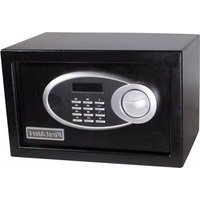
| Product Type | Safe |
| Brand | First Alert |
| Model | 2054DF |
| Lock Type | Electronic keypad with backup key |
| Construction Material | Solid steel body |
| Dimensions (Approx.) | 16.5 x 13.8 x 8.3 inches (W x H x D) |
| Weight (Approx.) | 38.5 lbs (17.5 kg) |
| Interior Capacity | 1.48 cubic feet |
| Power Source | 9V battery (not included) |
| Battery Type | 9V alkaline |
| Backup Key | Yes, included |
| Primary Function | Secure storage for valuables, documents, cash |
| Security Features | Programmable code, manual override key, pry-resistant hinges |
| Mounting Option | Pre-drilled holes for floor or wall mounting |
| Fire Resistance | Not specified (typically 30-minute rating) |
| Color | Glossy black or dark grey |
| Interior Layout | Removable shelf, carpeted floor |
| Warranty | 1 year limited |
| Maintenance | Clean with soft dry cloth; replace battery when low indicator appears |
| Spare Parts Availability | Contact First Alert customer service |
Frequently Asked Questions - 2054DF FIRST ALERT
How do I change the battery on my First Alert 2054DF safe?
Locate the battery compartment inside the safe. Remove the cover and replace the old 9V battery with a new 9V alkaline battery. Ensure correct polarity. Test the lock after replacement.
What is the default factory code for the 2054DF safe?
The default code is typically set to 123456 or 0000. Refer to the manual for confirmation. We recommend changing it immediately after first use.
How do I reset my safe if I forgot the code?
Use the backup key to open the safe. Inside, locate the reset button. Press and hold it, then enter a new 4-6 digit code. Release the button and test the new code.
Can I mount the First Alert 2054DF safe to the floor?
Yes, the safe has pre-drilled holes at the bottom. Use suitable screws and anchors (not included) to secure it to a concrete or wooden floor. Ensure the mounting surface is sturdy.
Is the 2054DF safe fire resistant?
While not explicitly rated, most First Alert safes offer 30-minute fire protection up to 1550°F. Check the product label or contact support for precise ratings.
What should I do if the keypad is not responding?
First, check the battery by opening the safe with the backup key. If the battery is dead, replace it. If the keypad still doesn't work, clean it gently with a dry cloth. If problems persist, contact First Alert customer service.
How many digits is the programmable code?
You can set a code between 4 and 6 digits. Choose a memorable yet secure combination.
Can I store documents and cash in this safe?
Yes, the safe is designed for storing valuables, documents, cash, and small electronics. Its interior shelf helps organize contents.
How do I clean my safe?
Use a soft, dry cloth to wipe the exterior and interior. Do not use abrasive cleaners or liquids. Clean the keypad gently to avoid damage.
Where can I find replacement backup keys?
Contact First Alert customer support with your model number (2054DF). They can provide replacement keys. Keep the key in a secure but accessible location.
User questions about 2054DF FIRST ALERT
0 question about this device. Answer the ones you know or ask your own.
Ask a new question about this device
No questions yet. Be the first to ask one.
Download the instructions for your Safe in PDF format for free! Find your manual 2054DF - FIRST ALERT and take your electronic device back in hand. On this page are published all the documents necessary for the use of your device. 2054DF by FIRST ALERT.
USER MANUAL 2054DF FIRST ALERT
Manual assistant
Powered by Anthropic
Waiting for your message
Product information
Brand : FIRST ALERT
Model : 2054DF
Category : Safe