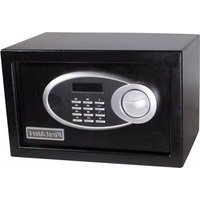
2190F - Safe FIRST ALERT - Free user manual and instructions
Find the device manual for free 2190F FIRST ALERT in PDF.


Pick your language and provide your email: we'll send you a specifically translated version.
| Product Type | Fire Safe |
| Model | 2190F |
| Brand | First Alert |
| Exterior Dimensions (H x W x D) | 12.8 x 9.8 x 7.8 inches |
| Interior Dimensions (H x W x D) | 9.5 x 6.8 x 5.5 inches |
| Weight | 12.5 lbs |
| Material | Heavy-gauge steel body |
| Fire Rating | 30 minutes at 1550°F (UL Class 350 1/2 hour) |
| Lock Type | Electronic keypad with backup key |
| Power Source | 9V battery (not included) |
| Battery Life | Approximately 1 year under normal use |
| Number of User Codes | 1 user code (4-8 digits) |
| Mounting Option | Pre-drilled holes for floor or wall mounting |
| Interior Features | Carpeted floor, removable shelf |
| Color | Black or textured gray |
| Warranty | 1-year limited warranty |
| Recommended Use | Protection of documents, digital media, and valuables |
| Maintenance | Replace 9V battery annually; clean with soft dry cloth |
| Compliance | UL Class 350 1/2 hour fire tested |
Frequently Asked Questions - 2190F FIRST ALERT
What is the fire rating of the First Alert 2190F safe?
The 2190F has a UL Class 350 1/2 hour fire rating, meaning it can withstand internal temperature below 350°F for 30 minutes in a fire of up to 1550°F.
How do I set or change the electronic lock code?
To set a new code, open the safe with the existing code or key. Press the reset button inside, enter your new 4-8 digit code followed by the '#' key. Test the new code before closing the door.
What battery does the safe use and how do I replace it?
The safe uses a standard 9V battery. To replace, open the safe, locate the battery compartment inside, detach the old battery, and connect a new one. Close the compartment and test the keypad.
Can I mount the safe to the floor or wall?
Yes, the safe has pre-drilled holes at the bottom and back. Use appropriate hardware (not included) to secure it to concrete or wooden surfaces.
What should I do if I forget the code?
Use the backup key provided with the safe. Insert it into the lock hidden under the keypad cover and turn to open. You can then reset the code using the reset button.
How do I clean the safe?
Clean the exterior with a soft, dry cloth. Avoid abrasive cleaners or solvents. For the interior, gently vacuum or wipe with a slightly damp cloth and dry thoroughly.
Is the safe waterproof?
No, the 2190F is fire-resistant but not waterproof. It offers limited protection against water damage; for complete water protection, consider storing valuables in a sealed bag inside.
What is the weight and size of the safe?
The exterior dimensions are approximately 12.8 x 9.8 x 7.8 inches. It weighs about 12.5 lbs. The interior compartment is about 9.5 x 6.8 x 5.5 inches.
Can I store digital media like CDs or USB drives?
Yes, but note that the fire protection is rated for paper (350°F). CDs and USBs may have lower tolerance. It is recommended to use certified media storage cases for best protection.
What does the warranty cover?
The 1-year limited warranty covers defects in materials and workmanship. It does not cover damage from misuse, fire, or water. For details, refer to the manual or contact First Alert.
User questions about 2190F FIRST ALERT
0 question about this device. Answer the ones you know or ask your own.
Ask a new question about this device
No questions yet. Be the first to ask one.
Download the instructions for your Safe in PDF format for free! Find your manual 2190F - FIRST ALERT and take your electronic device back in hand. On this page are published all the documents necessary for the use of your device. 2190F by FIRST ALERT.
USER MANUAL 2190F FIRST ALERT
Manual assistant
Powered by Anthropic
Waiting for your message
Product information
Brand : FIRST ALERT
Model : 2190F
Category : Safe