19756 - Uncategorized K&M - Free user manual and instructions
Find the device manual for free 19756 K&M in PDF.


| Product Type | Desktop Smartphone Stand |
| Brand | K&M |
| Model | 19756 |
| Material | Base: Steel, powder-coated black; Holder, arm, ball adapter, clamping nut: Plastic; Support arm inside: Aluminum rod; Rubber pads: Plastic, transparent; Threaded bolt: Steel, galvanized |
| Dimensions (Base) | 148 x 144 x 4 mm |
| Total Height | Approx. 200 mm |
| Packaging Dimensions | 165 x 151 x 58 mm |
| Weight | 0.62 kg |
| Smartphone Compatibility (Width) | 55-85 mm |
| Smartphone Compatibility (Height) | 130-180 mm |
| Smartphone Thickness (Max) | 15 mm |
| Load Capacity | Smartphones and similar devices (exact weight not specified; suitable for typical phones) |
| Adjustable Arm Angle | Up to 90 degrees in any direction |
| Clamping Mechanism | Clamping lever with audible engagement |
| Rubberized Retaining Tabs | Yes, for secure hold |
| Assembly Required | Yes, screw base to arm, attach holder, glue rubber pads |
| Maintenance | Check screw connections regularly; clean with damp cloth; no abrasive cleaners |
| Repair | Contact manufacturer for spare parts; repair only with necessary knowledge |
| Safety Warnings | Do not transport with smartphone inserted; do not open screws while smartphone is in; do not use upside down |
| Warranty | No warranty for improper use, modifications, or non-observance of instructions |
| Disposal | Recycle metal, plastic, paper, and cardboard components according to local regulations |
Frequently Asked Questions - 19756 K&M
User questions about 19756 K&M
0 question about this device. Answer the ones you know or ask your own.
Ask a new question about this device
Download the instructions for your Uncategorized in PDF format for free! Find your manual 19756 - K&M and take your electronic device back in hand. On this page are published all the documents necessary for the use of your device. 19756 by K&M.
USER MANUAL 19756 K&M
Smartphone-Halter
The desktop smartphone stand is suitable for holding a smart phone with a width of 55-85 mm and a height of 130-180 mm. Similar devices can also be clamped with the holder. Rubberized retaining tabs surrounding the smartphone ensure a firm, secure hold. Thanks to the sturdy base, high stability is guaranteed.
Foreseeable misapplication
Do not transport the desktop smartphone stand while the smartphone is inserted. Do not open the clamping and adjusting screws while a smartphone is inserted. Do not use the desktop smartphone stand upside down.
General
▶ The surface must be clean, dry, level and load-bearing.
▶ When the smartphone is claimed it is only allowed to loosen the adjustment screw to carry out small corrections regarding the position. Increased caution is required during correction, to prevent the device from falling unexpectedly.
▶ The smartphone must be enclosed by the rubberized retaining tabs.
The desktop smartphone stand must be protected from falling, dirt, moisture and jerky movements.
▶ Do not handle with excessive force.
▶ Injuries und damages can be caused to individuals or property if the desktop smartphone stand should tip or fall.
▶ Do not operate with excessive force.
▶ The user should be physically fit and technically competent.
The usage information is an integral part of the product and should be kept for its service life or passed on to any subsequent owner or user.
Warranty
No warranty is given for damage caused by:
▶ Non-observance of the usage information and the "General safety and assembly instructions".
▶ Unsuitable or improper use.
▶ Incorrect installation or commissioning by the buyer or third parties.
▶ Natural wear and tear.
▶ Careless handling.
▶ Improper modifications or repair work by the buyer and third parties.
▶ Impact on components of foreign origin.
▶ Use of non-original spare parts.
Modifications, additions and conversions that may impair safety are prohibited without the manufacturer's approval.

Technical data
| Material | Base: Steel, powder-coated blackSmartphone holder, ball adapter, retaining arm, clamping nut: plasticSupport arm inside: Aluminum rodRubber pads: Plastic, transparentThreaded bolt: Steel, galvanized |
| Load capacity Smartphones and similar devices | |
| Dimensions and adjustment range | Smartphone holder: width: 55-85 mm, height: 130-180 mm, thickness max. 15 mmBase: 148 x 144 x 4 mmHeight: ca. 200 mm |
| Packaging 165 x 151 x 58 mm | |
| Weight 0.62 kg | |
Mounting
To mount the desktop smartphone stand, proceed as follows:
1.) Unpack and check product for damage and completeness
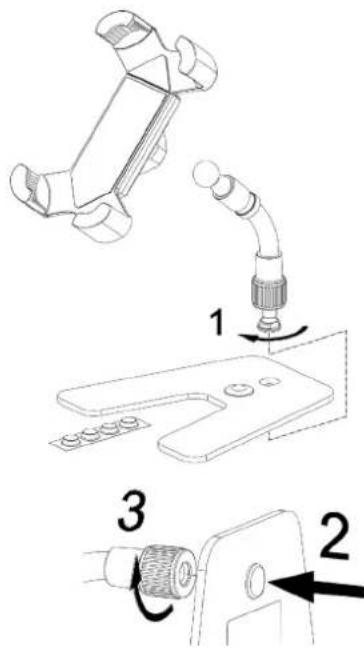
Smartphone holder
Holding arm with ball adapter and threaded bolt
Base
4x rubber pad
Assembly:
The threaded bolt is screwed into the holding arm for transportation. Unscrew the threaded bolt from the holding arm 1 and insert it into the base from below 2. Ensure that the threaded bolt is flush with the base plate. Place the holding arm on the threaded bolt and screw it tight 3.
Note: To ensure a secure stand, align the smartphone holder centrally above the base, see illustration.
Glue the four rubber pads to the underside of the base with an even edge distance.
2.) Connect smartphone holder with swivel joint
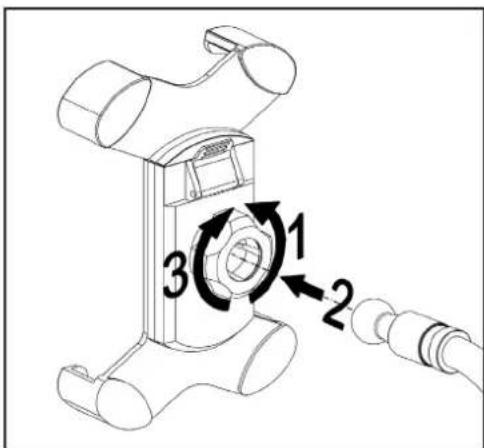
1 Open the clamping nut on the smartphone holder in the UNLOCK direction until the swivel joint 2 snaps into the smartphone holder with slight pressure.
3 Hand-tighten the clamping nut in the LOCK direction.
To adjust the position, loosen the clamping nut, set the desired position, and hand-tighten the clamping nut.
3.) Insert smartphone
√ The desktop stand is properly set up.
√ Table stand is placed on a clean, dry, level and load-bearing surface.
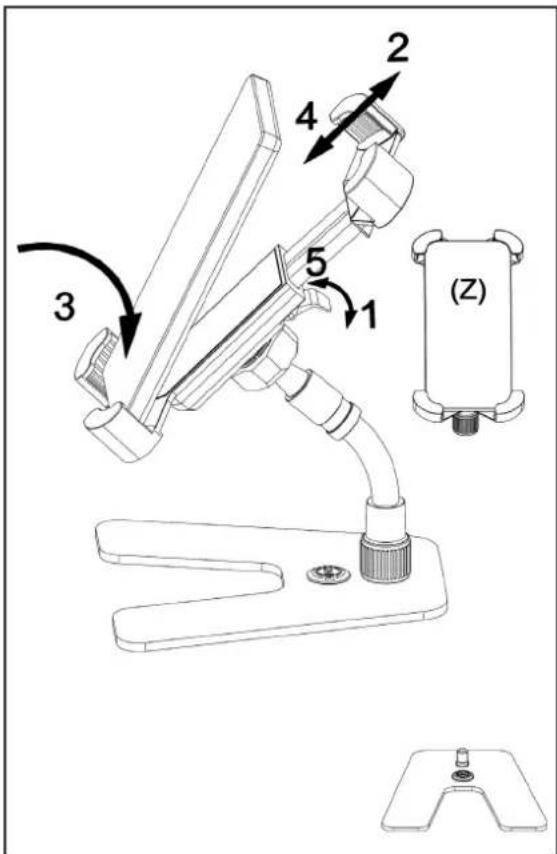
Open the clamping lever 1 on the smartphone holder, and slide the smartphone holder apart 2. Lower the smartphone from above onto the lower retaining tabs 3, and place the smartphone in the smartphone holder. Push the smartphone holder together 4. Use the clamping lever to lock the closed smartphone holder 5. Clamping lever audibly engages.
Note: The back of the smartphone must lie flat against the smartphone holder, and the retaining tabs must enclose the smartphone Z. This is the only way to ensure a firm and secure hold.
The holding arm can be bent up to 90^ in any direction. This requires some effort. Preferably, the desired position is to be set via the ball adapter.
Maintenance, cleaning and repair
▶ Maintenance: Regularly check if the screw connections are tight.
▶ Cleaning: Use a slightly damp cloth to clean the desktop smartphone stand. Do not use chlorinated or abrasive cleaning agents. These will cause damage to the surface and varnish.
▶ Repair: Immediately repair any damage that occurs and stop using the desktop smartphone stand. Maintenance work may only be carried out if you have the necessary knowledge. If any parts are missing, contact the manufacturer at www.k-m.de. Here you can find a corresponding spare parts list by entering the article number on the type label. Use this page to reorder missing or damaged components.
Fault and troubleshooting
| Fault/cause Check/Remedy | |
| The desktop stand wobbles or is unstable | Check the surface, rubber pads and screw connections of the stand. |
| Smartphone holder wobbles | Check the screw connections on the smartphone holder and the Stand and tighten if necessary. |
| Smartphone wobbles in the holder | Check whether the clamping lever on the smartphone holder is engaged.Smartphone must lie flat against the back and in the retaining tabs. |
Storage, disposal
Store the desktop smartphone stand in a dry place.
Recycle disassembled components:
▶ Scrape all components made of metal.
▶ Recycle or reuse all plastic, paper, and cardboard components.
▶ Sort all other components according to material composition and dispose of them according to local regulations.
Contact information

Brand : K&M
Model : 19756
Category : Uncategorized