
ABTS-TK19 - Bluetooth speaker AKAI - Free user manual and instructions
Find the device manual for free ABTS-TK19 AKAI in PDF.


| Product Type | Active Portable Speaker System |
| Brand | AKAI |
| Model | ABTS-TK19 |
| Dimensions | 25 x 22.2 x 53.3 cm (9.84 x 8.74 x 20.98 in) |
| Power Source | DC 5V/2A (USB charging) |
| Power Consumption | MAX 10W |
| RMS Power | 8W |
| Bluetooth Version | V5.0 BDR+EDR |
| Bluetooth Range | 10 meters (33 ft) |
| Battery Type | Li-ion, 3.7V, 3600 mAh |
| Speakers | 6.5" x 2 |
| Frequency Response | 60 Hz - 16 kHz |
| FM Radio Frequency | 87.5 - 108 MHz |
| Playback Formats | MP3 (USB/MicroSD) |
| USB/MicroSD Support | Up to 32 GB, FAT/FAT32 |
| Audio Inputs | AUX 3.5 mm, Microphone 6.35 mm |
| TWS Function | Yes (pair two identical speakers for stereo) |
| EQ Presets | Yes (multiple presets) |
| Remote Control | Included |
| LED Lighting | Yes (can be turned off) |
| Accessories Included | AUX cable, remote control (with battery), charging cable, manual |
| Safety | Read manual before use; do not disassemble; avoid moisture and extreme temperatures |
| Maintenance | Clean with a slightly damp cloth after switching off and unplugging |
| Disposal | Do not dispose as household waste; recycle at designated collection points |
Frequently Asked Questions - ABTS-TK19 AKAI
User questions about ABTS-TK19 AKAI
0 question about this device. Answer the ones you know or ask your own.
Ask a new question about this device
Download the instructions for your Bluetooth speaker in PDF format for free! Find your manual ABTS-TK19 - AKAI and take your electronic device back in hand. On this page are published all the documents necessary for the use of your device. ABTS-TK19 by AKAI.
USER MANUAL ABTS-TK19 AKAI
natural_image
Black and red portable speaker tower with visible sound waves and a red-lit head (no text or symbols)ABTS-TK19
Bluetoothportablespeaker
UserManual
Dear customer!
Thank you for purchasing our product. For safety, it is strongly recommended to read this manual carefully before connecting, operating and/or adjusting the product and keep the manual for reference in future.
Description
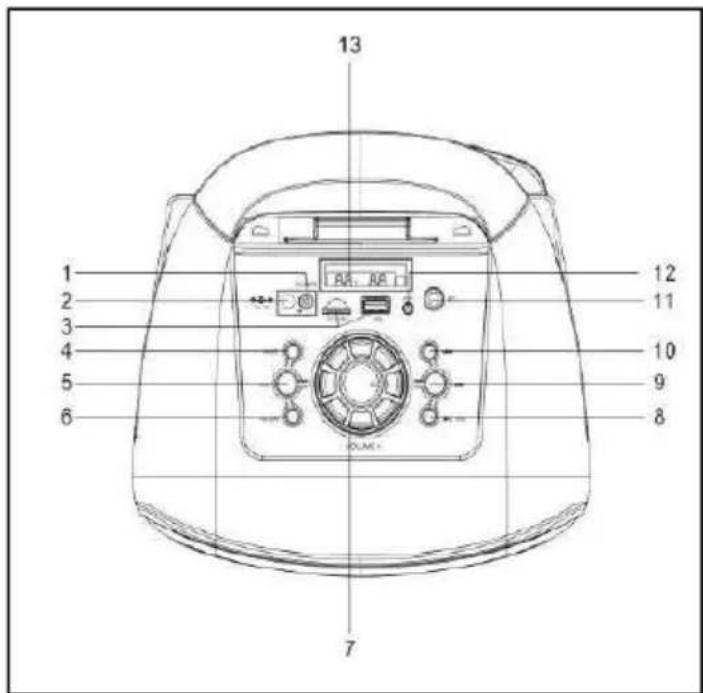

- Power (OFF/ON) switch
- DC 5V charging port
- TF card slot / USB port
- MODE button
- LED Switch (Long press to close LED)
- REPEAT
- Volume knob
- Button / TWS▶
- Button
- Button
- Microphone input
- AUX input
-
Display
-
STOP button
- ⏻ (POWER)button
- MUTE button
- REPEAT button
- MODE button
- EQ button
- (NEXT) button
- (PREVIOUS) button
- (PLAY/PAUSE) button ▶
- VOL- button
- VOL+ button
- Numeric buttons
Important safeguards
- Theinstructionmanualcontainsimportant operatingandmaintenanceinstructions.Foryour safety,itisnecessarytorefertothemanual. Keepthemanualforfutureuse.
- Donothitordroptheunit
- Donotexposetheunittovibration, direct sunlight, too high or low temperatures or humidity.
- Donotdisassembletheunityourselves Referservicingtoqualifiedservicepersonnel Alltheillustrationsinthismanualareschematic images,whichma ydifferfromactualobjects.
Powersupply
- Theunitoperateswithaninternal rechargeableLi-ionbattery.
- The battery can be recharged with the USB charging cable provided by connecting to a DC powersupply source (5V)
- InsertthechargingcableintotheDC5V socketoftheunit.
- Forbestresults, trytofullycharge the batterybeforeeachuse. If the battery is empty, please allow it to recharge for a few hours.
- PushtheOFF/ONswitchintoONposition (totheright)toswitchtheuniton.PutitintoOFF position(left)toswitchoff.
Generaloperation
Bluetoothwirelessplayback
• This unit can wirelessly playback audio from any device with Bluetooth A2DP function.
• Thewirelessrangeisapproximatelywithin 10metersindirectlineofsight
- Wireless audio streaming requires pairing of a Bluetooth device (e.g. smartphone).
Howtopairyourdevicetothisunit:
• Make sure the Bluetooth function is switched on inyourdevice(e.g.smartphone, tablet).
- Switch on the unit and press the MODE button repeatedly to select the Bluetooth mode (selectedb ydefault). Thedisplaywillshow"bt".
- OncetheBluetoothpairingindicatorbegins flashing, you will find the unit listed in the Bluetooth connections list of your device (as ABTS-TK19)
- Ifaskedforapasscode,enter"0000".
• The initial setup is required only once perdevice. The unit will automatically pair to the last paired device.
• The LED indicator will flash when searching for a Bluetooth device and stay on whenthedevicesarepaired. - When playing files, you can press the buttonopauseandresume playback.
- Press the ◀◀ or ▶▶ button to go to a previousornnexttrack. Rotatethevolumeknob orpressthevolumebuttonstoadjustvolume.
Externaldeviceconnection
- Youcanconnecttheaudiooutputofan externaldevicetothisunit,tolistentothesound ofthatdevicethroughthespeaker.
• Toconnectanexternalaudiodevice, pleaseusetheincludedaudiocablewith3.5mm-to-3.5mmplugstoconnecttheheadphoneoutor audioline-outoftheexternaldevicetotheAUX inputofthisunit. - PressMODEbuttontoselecttheAUX mode.
- Turnontheexternaldevice.Youcanpress thevolumebuttonstoadjustvolume.
USB/MicroSDoperation
Playback
- Turnonthedevice.
- InsertamicroSD(TF)cardintotheslot.
- OrinsertaUSBdriveintotheUSB port.PresstheMODEbuttonrepeatedlyto selecttheUSBorMicroSDmode.
- Whenplaying,youcanpressto play/pausethe playback.
- Duringthe playbackyoucanpressthe and << >> buttonstogototheprevious andnexttrack.Rotatethevolumeindicatorto adjustvolume.
Itmaytakeupto60secondstoopen andverifyalargemicroSDcard/USBdrive withmanyfiles.
- PresstheEQbuttontoswitch betweenvariousequalizerpresets.EQis onlyavailableintheBTandUSB/TF modes.
GeneralUSB/MicroSDnotes
- ThisunitisequippedwithamicroSDslot andUSBportthatcanreadandplayMP3 filesstoredonstandardmicroSDcardsand USBdrivesupto32GB.
- FATandFAT32filesystemissupported bythisunit.
NeverremovemicroSDcardsandUSBdrives fromtheunitduring playback,alwaysstop playback,thenpresstheMODEbuttonto switchtoanothermodebeforeeremovingthe storagetopreventdamagetoyourfilesand cards/drivesthemselves.

IfthereisamicroSDcardorUSBdrive
installedintheunit,whenpoweredon, playback will automatically start from microSD/USB.

Slightnoiseduringplaybackpausesisnota constructiondefect, itisdetermined by the factorypresetsofthedynamicnoisereduction system.
FMRadio
- Turnonthedevice.
- PresstheMODEbuttonrepeatedlytoselect theFMmode.
- PressSCANtoautomaticallyscanand saveallavailableradiostations. Theprocedure willtake several minutes and cannot be interrupted.
• Radiofrequencycanbesetmanually using thenumericbuttonsontheremotecontrol. - Oncethesearchisfinished,youcanpress the ◀◀ ▶▶ andbuttons togotoapreviousornextradiostation.Also youcaninputthefrequencydirectlyusingthe numericbuttonsonthe remote.
Microphone
- You can connect a microphone (not provided)forkaraokeorotherpurposes into this unit by connecting it to the 6.35mm microphoneinputjack.Pleasedonotplugthe microphonewhentheunitischarging.
- While connected, you can control the microphonevolumeandechoeffectbyrotating thecorrespondingknobonthetoppanel.
TWSFunction
(Truewirelessstereotechnology)TWStechnology enablesusertomakewirelessconnectionbetween twospeakerswhicharesamemodelandcompatible withTWS.InTWsconnection,twospeakerswillbe automaticallygroupedtobeaStereo-SpeakerSystem whichoutputstheleftandrightchannel.
HOWTOESTABLISHCONNECTION
Notice: Twospeakersmustbesamemodelandboth compatiblewithTWS.
- Pleaseswitchonbothspeakersandselect "Bluetooth" mode;
-
PressandholdPLAY button(09)ontheunit, you willheara"beep".Itbecomesthemainspeaker(left channel), whichwillautomaticallysearchandconnect withanotherspeaker
(rightchannel).Afterconnection,youwillheara "beep"; -
ConnectmobilephoneorBluetoothplayertothe speakerbyBluetooth. Afterconnection, you can play music with the TWS Stereo-Speaker System.
-
Afterconnection, pressandholdPLAYbutton(09) oneitherunittodisconnectTWS.Youwillheara "beep"while disconnectingsuccessfully.
TWSfunctionoperatesinTWSmode, manipulations tothemainspeakerwillbesimultaneouslyaffected in another speaker. Forexample, volumeadjustment, previousandnextsongselection, playandpause, poweronandoff.
Note:
-Ifthe2loudspeakersarenotpaired, switchoffboth devicesandrepeatsteps1,2and3.
-TheTWSfunctiononlyworksbetweenequal speakersorwithotherspeakersthatusethesame micro-processororsolution.
Maintenanceandcare
- Switchofftheunit,unplugfromthepower supply.Theoutsideoftheppliancecanbe cleanedwithaslightlydampcloth.
Accessories
1xAUXcable
• 1xRemotecontrol(withbattery)
• 1xInstructionmanual
1xSpeaker
- 1xChargingcable
Technical specifications
| Power Source | DC 5V/2A |
| Power Consumption | MAX 10W |
| RMS Power | 8W |
| Bluetooth version | V5. 0 BDR+EDR |
| BTH channel emission power | 4bBm |
| Bluetooth frequency | 2,402 GHz- 2,480 GHz |
| Bluetooth range | 10 m |
| FM frequency | 87.5-108 |
| Battery type | Li-ion, 3.7V, 3600 mAh |
| Speakers | 6.5"×2 |
| Frequency response | 60HZ-16KHZ |
| Product dimensions | 25*22.2*53.3 cm |
Specifications and functions are subject to change without notice. It is connected with continual improvement of the device.

DISPOSAL OF ELECTRICAL AND ELECTRONIC EQUIPMENT
This symbol on the product or packaging means that the product should not be treated as household waste. Do not throw garbage at the end of its life, but take it to a collection center for recycling. In this way you will help to protect the environment a be able to prevent any negative consequences that it would have on the environmer and human health.
To find your nearest collection center:
- Contact local authorities
- Access the website: www.mmediu.ro
- Request additional information from the store where you purchased the product.
Nr. INT256
We, INTERVISION TRADING RO SRL, default importer (manufacturer), with registered office in Mosoia Commune, Smeura Village, 8 Fagetului Alley, declare under sole responsibility that the following products:
Brand name: AKAI
Type: ABTS-TK19
Descriptions: ACTIVE PORTABLE SPEAKER SYSTEM
Lot: 0722TK19XXXX
to which this declaration related is in conformity with the essential requirements of the following directives of the Council of the European Communities:
EUROPEAN COMMUNITY DIRECTIVE 2014/53/EU
EUROPEAN COMMUNITY DIRECTIVE 2014/35/EU
EUROPEAN COMMUNITY DIRECTIVE 2014/30/EU
EUROPEAN COMMUNITY DIRECTIVE 2011/65/EU AMD 2015/863/EU
The products are compliant with the following standards and safety regulations:
EN 62368-1:2014+A11:2017
EN 62479:2010
EN 301 489-1 V2.2.3:(2019-11)
EN 301 489-3 V2.1.1 :(2019-03)
EN 300 328 V2.2.2 : (2019-07)
EN 303 345 V1.1.7 (2017-03)
EN 55032:2015
EN 55035:2017
IEC 62321-3-1:2013 ;
IEC 62321-6:2015 ;
IEC 62321-7-2:2017 ;
IEC 62321-4:2013+AMD1:2017
IEC 62321-5:2013 ;
IEC 62321-8:2017
IEC 62321-7-1:2015 ;
Certificate of conformity issued based on the Certificates AT18220WC000897; AT18230SC000463; AT18300RC002821; AT18230EC000994; 18220WC00089702S; 18220WC00089703H; 18220WC00089701E; 18220WC00089704W; 18220WC00089705W; 18230SC00046301; 18300RC00282101 and 18230EC00099401 of Shenzhen Anbotek Compliance Laboratory Limited, 1/F, Building D, Sogood Science and Technology Park, Sanwei community, Hangcheng Street, si Shenzhen Anbotek Compliance Laboratory Limited, East of 4/F., Building A, Hourui No.3, Industrial Zone, Xixiang Street, Bao'an District, Shenzhen, Guangdong, 518128, China
Intervision Trading Ro SRL,
Signature:

Printed name and Position:
CIOBANU DORIN - GENERAL MANAGER
Date: 30 ^th of June, 2022
Place: Pitesti, Romania
AKAI

natural_image
Black and red portable speaker tower with visible sound waves and a 'AKAI' logo (no text or symbols on body)ABTS-TK19
Manualdeutilizarepentru difuzorportabilcu tehnologieBluetooth
Stimate client,
Certificat de conformitate eliberat in baza certificatelor si rapoartelor de teste AT18220WC000897; AT18230SC000463; AT18300RC002821; AT18230EC000994; 18220WC00089702S; 18220WC00089703H; 18220WC00089701E; 18220WC00089704W; 18220WC00089705W; 18230SC00046301; 18300RC00282101 si 18230EC00099401 ale Shenzhen Anbotek Compliance Laboratory Limited, 1/F, Building D, Sogood Science and Technology Park, Sanwei community, Hangcheng Street, si Shenzhen Anbotek Compliance Laboratory Limited, East of 4/F., Building A, Hourui No.3, Industrial Zone, Xixiang Street, Bao'an District, Shenzhen, Guangdong, 518128, China
Intervision Trading Ro SRL,
Semnatura:

Numele si functia: CIOBANU DORIN – DIRECTOR
Data: 30 lunie, 2022
Locul: Pitesti, Romania
AKAI

natural_image
Black and red portable electronic device with two circular cutouts, no visible text or symbols on bodyABTS-TK19
ФОРHTO HXEIO Bluetooth
Αγαπητέ πελάτη!
USB/ MicroSD operation
Αναπαραγωγή
natural_image
Simple line drawing of a trash bin with crossed lines indicating no waste or discharge (no text or symbols)natural_image
Black and red portable electronic device with two circular lens design (no visible text or symbols)ABTS-TK19
natural_image
Symbol of a discarded bin with crossed lines indicating no waste or plastic (no text or labels)natural_image
Black and red portable speaker tower with visible sound waves and a red ring (no text or symbols)ABTS-TK19
Technicalspecifications
natural_image
Black and red portable electronic device with two circular cutouts, no visible text or symbols on bodyABTS-TK19
natural_image
Black and red portable electronic device with two circular speaker windows (no visible text or symbols)ABTS-TK19
natural_image
Symbol of a trash bin crossed with no visible text or labelsnatural_image
Black and red portable speaker tower with visible sound waves and a 'AKAI' logo (no text or symbols on body)ABTS-TK19
natural_image
Black and red portable speaker tower with two circular cutouts, no visible text or symbolsABTS-TK19
Návodnapoužitiepre prenosnýreproduktors technológiouBluetooth
Vážený zákazník,

- ABTS-TK19
- Bluetoothportablespeaker
- UserManual
- Dear customer!
- Important safeguards
- Powersupply
- Generaloperation
- Bluetoothwirelessplayback
- Howtopairyourdevicetothisunit:
- Externaldeviceconnection
- USB/MicroSDoperation
- Playback
- Itmaytakeupto60secondstoopen andverifyalargemicroSDcard/USBdrive withmanyfiles.
- GeneralUSB/MicroSDnotes
- FMRadio
- Microphone
- TWSFunction
- HOWTOESTABLISHCONNECTION
- Note:
- Maintenanceandcare
- Accessories
- Technical specifications
- DISPOSAL OF ELECTRICAL AND ELECTRONIC EQUIPMENT
- Nr. INT256
- AKAI
- Stimate client,
- USB/ MicroSD operation
- Αναπαραγωγή
- Vážený zákazník,
Brand : AKAI
Model : ABTS-TK19
Category : Bluetooth speaker