
ABTS-15 - Bluetooth speaker AKAI - Free user manual and instructions
Find the device manual for free ABTS-15 AKAI in PDF.


| Product Type | Bluetooth Portable Speaker |
| Brand | AKAI |
| Model | ABTS-15 |
| Power Source | DC 5V, 1A |
| Charging Port | Micro-USB |
| RMS Power | 7W |
| Bluetooth Version | 5.3 |
| Bluetooth Range | 10 m |
| Bluetooth Frequency | 2.402 - 2.480 MHz |
| Bluetooth Transmission Power | 10 dBm |
| Battery Type | Li-ion 3.7V |
| Battery Capacity | 1200 mAh |
| Speaker Diameter | 66 mm |
| Speaker Impedance | 3 ohm |
| Speaker Power (each) | 8W |
| Frequency Response | 20Hz - 22KHz |
| Functions | Bluetooth, FM Radio, USB Playback, TF Card Playback, Handsfree, Microphone Input, RGB Lights |
| Playing Time (at 50% volume) | 3 - 4 hours |
| Charging Time | 2.5 - 3 hours |
| Dimensions (W x D x H) | 245 x 126 x 110 mm |
| Weight | 884 g |
| Included Accessories | 1x Bluetooth Speaker, 1x Wired Microphone, 1x Micro USB Charging Cable, 1x User Manual, 1x Warranty Card |
| Control Buttons | Mode/Light, Volume Down/Previous Track, Volume Up/Next Track, Play/Pause, ON/OFF Switch |
| Microphone Input | Yes (6.35 mm jack) |
| USB Card Slot | Yes (for USB drive) |
| TF Card Slot | Yes |
Frequently Asked Questions - ABTS-15 AKAI
User questions about ABTS-15 AKAI
0 question about this device. Answer the ones you know or ask your own.
Ask a new question about this device
Download the instructions for your Bluetooth speaker in PDF format for free! Find your manual ABTS-15 - AKAI and take your electronic device back in hand. On this page are published all the documents necessary for the use of your device. ABTS-15 by AKAI.
USER MANUAL ABTS-15 AKAI
Bluetooth Portable Speaker
ABTS-15

natural_image
Black portable radio with two circular earbuds and a antenna, no visible text or symbols on the device body.USER MANUAL
EN - ENGLISH
AKAI
Notice for Use:
- For the first use, please charge the battery fully. Do not play music while charging.
- Please use a certified DC 5V cable for charging.
- If the sound is interrupted it may be due to lack of power, please ensure to fully charge of the battery first.
Specifications:
• Power source: DC 5V, 1A
• Charging port: Micro-USB
- RMS Power: 7W
- Bluetooth version: 5.3
• Bluetooth channel emission power: 10 dbm
• Bluetooth frequency: 2.402-2.480 MHz
• Bluetooth action range: 10 m
• Battery type and voltage: Li-ion 3.7V, 1200 mAh
• Speakers:66 mm/ 3ohm/ 8W *2
• Frequency Response: 20Hz-22KHz
• Function: BT/FM/USB/TF/Handsfree/MIC/RGB lights
• Playing time at 50% volume: 3-4h
• Charging time: 2.5-3h
• Product dimensions/ weight:245*126*110mm /884g
Package content:
• 1xBluetooth Speaker
- 1xWired Microphone
• 1xMicro USB Charging Cable
- 1xUser Manual
- 1xWaranty card
AKAI
Functional buttons:
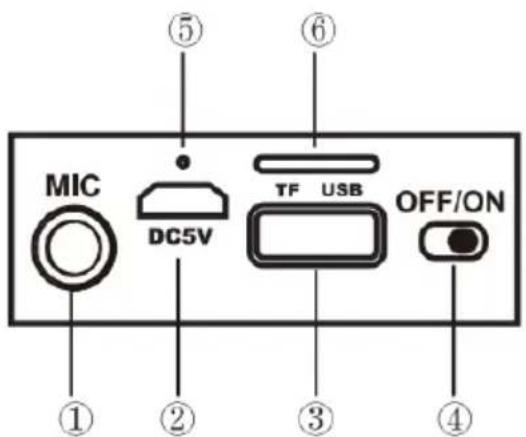

①Microphone port
②Charging port
③USB disk port
④ON/OFF switch
⑤LED indicator
⑥TF card port
⑦Mode button/Light mode button
⑧Volume down/Previous track
⑨Volume up/Next track
⑩Play/Pause
④ ON/OFF
Slide the button to "ON" or "OFF" to turn on or turn off the speaker. When you turn on the device a sound will indicate the speaker is on.
Activate the Bluetooth feature on your phone and set the device to search for a Bluetooth "ABTS-15".
⑦Mode button
Short press to change to BT/USB/TF/FM modes.
Long press to change the different light modes and to turn off the light.
AKAI
⑧Volume down/Previous track
Long press to decrease the volume.
Short press to change to the previous track.
⑨ Volume up/Next track
Long press to increase the volume.
Short press to change to the next track.
⑩Play/Pause
Short press to play or pause music.
Long press to disconnect/reconnection the Bluetooth connection.
For incoming calls click to answer the call, click again to hang up the call, and long press to reject the phone call.
Double click in a short time to redial the last number.
In FM mode long press the play/pause button to complete a frequency auto search. When you findthe station that you want press one more time to save the station in the speaker.
Then short press the + and - volume buttons to choose the channel you want.
Note: Please lengthen the antenna of the speaker to enlarge the signal when using the FM mode.
①Microphone hole
Plug the jack of the microphone into the MIC hole then you can use the Microphone function.
⑥TF card port &③USB disk port
Insert the USB drive/TF card (not included) into the speaker, it will play the music automatically.
The volume/previous/next song can be adjusted by the buttons of the speaker.
Charging the Speaker:
Turn off the unit before charging.
Connect the small end of the Micro USB charging cable (included) to the Micro USB port and connect the larger end of the cable to your computer's USB port or an AC adaptor (not included) to charge the speaker. The red light will be on
while charging. Once it is fully charged the red light will be off.
AKAI
Do not overcharge.
Charging time: Around 2-3 hours.
Battery run time: Around 2-4 hours.
Safety instructions:
- Do not disassemble, throw away or damage this product;
- Consult your local waste collection agency for proper disposal or recycling methods;
- This product is not a toy! Children should be supervised by adults to ensure that they do not play with the appliance;
- Keep the speaker and charging cable away from direct sunlight, excessive heat or flammable materials. Do not cover the speaker during use.
- Do not store the speaker inside a car during hot weather. Remember, a closed car acts as a greenhouse allowing the inside temperature to possibly reach over 200 degrees;
- The device may become warm while charging;
- The charging of the battery will be made while the product is completely turned off;
Warning! Damage, shock and/or injury can occur if this warning is not respected thoroughly.
DISPOSAL OF ELECTRICAL AND ELECTRONIC EQUIPMENT

natural_image
Symbol of a trash bin crossed with two crossed lines and a black rectangular block below (no text or labels)This symbol on the product or packaging means that the product should not be treated as household waste. Do not throw garbage at the end of its life, but take it to a collection center for recycling. in this way you will help to protect the environment and be able to prevent any negative consequences that it would have on the environment and human health.
To find your nearest collection center:
-Contact local authorities
- Access the website: www.mmediu.ro;
- Request additional information from the store where you purchased the product.
IMPORTER: SC INTERVISION TRADING-RO SRL
Street I.C Bratianu, no. 48-52, building A, floor. 5, room 504-505, Pitesti City, Arges County, Romania
Postal code: 110121
AKAI
natural_image
Black electronic device with two circular LEDs and a antenna, no visible text or symbols on the device body.MANUALUL UTILIZATORULUI
RO - ROMÂNĂ
AKAI
natural_image
Simple line drawing of a trash bin with two crossed lines indicating no waste or restriction (no text or symbols)natural_image
Black electronic device with two circular LEDs and a antenna, no visible text or symbols on the device body.ΟΔΗΓΙΕΣ ΧΡΗΣΗΣ
ΕΛ-ΕΛΛΗΝΙΚΑ
AKAI
Σημείωση για χρήση:
⑥TF card port &③USB disk port
natural_image
Black rectangular electronic device with two circular LEDs and a antenna, no visible text or symbols on the device body.natural_image
Black portable radio with two circular earbuds and a antenna, no visible text or symbols on the device body.INSTRUKCJA OBSŁUGI
PL - POLSKI
AKAI
natural_image
Simple line drawing of a trash bin with crossed lines indicating no waste or restriction (no text or symbols)natural_image
Black portable electronic device with two circular LEDs and a antenna, no visible text or symbols on the device body.NÁVOD K POUŽITÍ
CZ - ČESKY
AKAI
Návod k použití
natural_image
Simple line drawing of a trash bin with two crossed lines indicating no waste or prohibition (no text or symbols)
natural_image
Black portable radio with two circular earbuds and a antenna, no visible text or symbols on the device body.NÁVOD NA POUŽITIE
SK- SLOVENSKY
AKAI
Návod na použitie
natural_image
Simple line drawing of a trash bin with two crossed lines indicating no waste or prohibition (no text or symbols)

- Bluetooth Portable Speaker
- ABTS-15
- AKAI
- Notice for Use:
- Specifications:
- Package content:
- Functional buttons:
- ④ ON/OFF
- ⑦Mode button
- ⑧Volume down/Previous track
- ⑨ Volume up/Next track
- ⑩Play/Pause
- ①Microphone hole
- ⑥TF card port &③USB disk port
- Charging the Speaker:
- Safety instructions:
- DISPOSAL OF ELECTRICAL AND ELECTRONIC EQUIPMENT
- IMPORTER: SC INTERVISION TRADING-RO SRL
- MANUALUL UTILIZATORULUI
- Σημείωση για χρήση:
- Návod k použití
- Návod na použitie
Brand : AKAI
Model : ABTS-15
Category : Bluetooth speaker