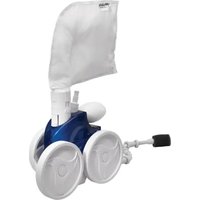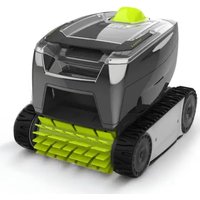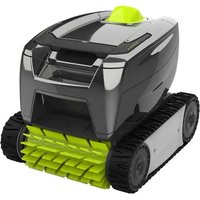
Freerider FR2000 iQ - Robot vacuum ZODIAC - Free user manual and instructions
Find the device manual for free Freerider FR2000 iQ ZODIAC in PDF.


| Type | Robotic Pool Cleaner |
| Brand | Zodiac |
| Model | Freerider FR2000 iQ |
| Dimensions (L x W x H) | 18.9 x 18.9 x 11.8 inches (48 x 48 x 30 cm) |
| Weight | 15.4 lbs (7 kg) |
| Power Supply | 24V DC via transformer |
| Cable Length | 49 ft (15 m) |
| Filtration | Fine filter cartridge (30 microns) |
| Flow Rate | 3960 GPH (15 m³/h) |
| Programs | Standard (2h) and Intensive (3h) |
| Mobility | Tracks |
| Max Slope | 45 degrees |
| Pool Length | Up to 39 ft (12 m) |
| Cleaning Coverage | Floor, walls, waterline |
| Indicator | LED diagnostic |
| Warranty | 2 years |
Frequently Asked Questions - Freerider FR2000 iQ ZODIAC
User questions about Freerider FR2000 iQ ZODIAC
0 question about this device. Answer the ones you know or ask your own.
Ask a new question about this device
Download the instructions for your Robot vacuum in PDF format for free! Find your manual Freerider FR2000 iQ - ZODIAC and take your electronic device back in hand. On this page are published all the documents necessary for the use of your device. Freerider FR2000 iQ by ZODIAC.
USER MANUAL Freerider FR2000 iQ ZODIAC
natural_image
Line drawing of a robotic vehicle with visible tracks and wheels (no text or symbols)Freerider™ Cordless Robotic Cleaner
FR1000 iQ
FR2000 iQ
TYPE EB37--
WARNING
FOR YOUR SAFETY – For anything other than the routine cleaning and maintenance described in this guide, this product must be serviced by a qualified professional with sufficient experience in pool equipment installation and maintenance so that all of the instructions in the product's complete installation and operations manual can be followed exactly. All safety instructions in the complete manual must be followed explicitly in order to prevent injury hazards. Improper installation and/or operation may void the warranty. Never turn the cleaner on unless it is fully submerged in the water. Doing so may void the warranty and may cause severe damage to the cleaner motors.
Table of Contents
Section 1. Important Safety Instructions......4
Section 2. Cleaner Specifications ....6
2.1 General Specifications....6
2.2 Contents....6
2.3 Assemble the Charging Station....6
2.4 Information/Status LEDs....7
2.5 Charging Station Status 8
Section 3. General Cleaner Operation ....8
3.1 Set Up and Charging....9
3.2 Start Cleaner 9
3.3 Install and Submerge the Cleaner....10
3.4 Remote Control....10
3.5 Removal....10
Section 4. Installing iAquaLink ^® ......12
4.1 Download the App ....12
4.2 Sign Up and Log In 12
4.3 Configure the System....13
Section 5. iAquaLink ^® Control ....13
5.1 iAquaLink® Control Home Screen....13
5.2 Set Cleaning Mode.....13
5.3 In-App Error Messages and Troubleshooting....14
5.4 System Settings....14
Section 6. Maintenance....14
6.1 Clean the Cleaner and Charging Station ....14
6.2 Clean the Filter Canisters....14
6.3 Storage....15
6.4 Replacing Wear Parts....16
6.5 Replacing Tracks....17
6.6 Recycling & Disposal....18
Section 7. Troubleshooting....18
7.1 General Troubleshooting....18
7.2 Charging Station Behavior ....19
7.3 Cleaner Error Codes....20
7.4 Battery Error....21
7.5 Remote Error ^* .....21
7.6 Dismissing an Error Code ......22
7.7 iAquaLink® Troubleshooting .....22
SAVE THESE INSTRUCTIONS
FCC Statement
This device complies with Part 15 of the FCC Rules and IC licence-exempt RSS standard. Operation is subject to the following two conditions: (1) this device may not cause harmful interference, and (2) this device must accept any interference received, including interference that may cause undesired operation.
NOTE: This equipment has been tested and found to comply with the limits for a Class B digital device, pursuant to part 15 of the FCC Rules. These limits are designed to provide reasonable protection against harmful interference in a residential installation. This equipment generates, uses and can radiate radio frequency energy and, if not installed and used in accordance with the instruction, may cause harmful interference to radio communications. However, there is no guarantee that interference will not occur in a particular installation. If this equipment does cause harmful interference to radio or television reception which can be determined by turning the equipment off and on, the user is encouraged to try to correct interference by one or more of the following measures:
CAUTION
Any changes or modifications not expressly approved by the part responsible for compliance could void the user's authority to operate the equipment.
NOTE: This device complies with FCC and IC RF radiation exposure limits set forth for general population. This device must be installed to provide a separation distance of at least 20cm from all persons and must not be co-located or operating in conjunction with any other antenna or transmitter.
SAVE THESE INSTRUCTIONS
Section 1. Important Safety Instructions
READ AND FOLLOW ALL INSTRUCTIONS
Congratulations on purchasing this Zodiac Robotic Pool Cleaner. Please read through the entire manual before installing your new robotic pool cleaner. Your cleaner must be installed and operated as specified.
WARNING
Failure to comply with the following warnings can result in permanent injury, electrocution or death. PREVENT ELECTRICAL SHOCK
To reduce risk of electrical shock:
- Please read the manual carefully, especially the safety instructions, and make sure you understand them fully before using the product. Only use the equipment for the purposes specifically intended by the manufacturer. Carefully follow the instructions on operation, maintenance and repair.
- This Cleaner is not suitable for use by children and people with reduced physical, sensory or mental capabilities or inexperienced people who are not familiar with the product. Children should be supervised to ensure that they do not play with the appliance, even when it is not in operation.
- Operators who perform maintenance must be fully conversant with its special features and safety regulations. Before using the cleaner, carefully read the operating manual and make sure you understand the instructions.
- Only use original spare parts, do not change the design of the Cleaner, do not remove, bypass or tamper with the safety devices installed. The manufacturer shall not be held liable if non-original spare parts are used. Failure to comply with this requirement may seriously endanger the health and safety of people.
- Ensure the cleaner is turned off before performing any adjustment or maintenance that the user is authorized to perform. Cleaning and maintenance must not be performed by children.
- Do not use the cleaner if the top cover or brushes are damaged.
- Never use and recharge the cleaner in explosive and/or flammable environments.
- Only use the battery charger supplied by the manufacturer. Improper use may cause electric shocks, overheating or leakage of corrosive liquids from the battery.
- If any liquid leaks, wash the cleaner with water/neutralizer; in case of contact with eyes, seek medical attention. Liquid ejected from the battery may cause irritation or burns.
- If the battery charger is damaged, have it replaced by the manufacturer or an authorized Zodiac dealer. DO NOT attempt to service the battery charger. A damaged cord can lead to contact with live parts.
- The product contains magnets and components that emit electromagnetic fields. The magnets and electromagnetic fields can interfere with pacemakers, defibrillators and other medical devices. Keep a safe distance between the medical device and the product. Consult your doctor or the manufacturer of the medical device for specific information about it. If you think that the product is interfering with a pacemaker, defibrillator, or any other medical device, stop using the product starting from the distance at which you feel interference.
- Do not smoke around, or allow the cleaner to be near sparks or flames. The batteries can generate gases which could possibly ignite.
- If at any time you detect any physical damage to the cleaner chassis, such as swollen or cracked casing, STOP and do not continue discharging or charging the battery.
- Never attempt to disassemble a battery pack. A battery can produce a short circuit causing severe burns. Avoid contact between any wires or metal items that could cause sparking and short circuit the battery. If a battery leak occurs, avoid any contact with the leaking fluids and place the cleaner in a plastic bag. Wear complete eye protection, gloves and protective clothing when disposing of cleaner. If leaking fluids come in contact with skin and clothing, wash immediately with plenty of soap and water. If leaking fluids come in contact with eyes, do not rub eyes, immediately flush eyes with cool running water for at least 15 minutes and do not rub them. Seek medical attention as soon as possible.
- Do not use a battery operated appliance that is damaged or modified. Damaged or modified batteries may exhibit unpredictable behavior resulting in fire, explosion, or risk of injury.
- Connect unit to receptacle protected by Residual-current circuit breaker with over-current protection (RCBO). Such a RCBO receptacle should be provided by a qualified installer and should be tested on a routine basis. To test the RCBO, push the test button. The RCBO should interrupt power. Push the reset button. Power should be restored. If the RCBO fails to operate in this manner, the RCBO is defective. If the RCBO interrupts power to the pump without the test button being pushed, a ground current is flowing, indicating the possibility of an electric shock. Do not use this product. Disconnect the cleaner and have the problem corrected by a qualified service representative before using.
Alkaline batteries: - Operating Temperature: 10^ to 40^ C :
- Do not leave batteries or LIFI remote exposed to high temperature, direct sunlight, or inclement weather.
- Keep battery out of reach of children. Swallowing can lead to chemical burns, performance of soft tissue, and death. Severe burns can occur within 2 hours of ingestions. Seek medical attention immediately.
- Risk of explosion if the battery is replaced by a different type of battery or mishandling.
- Risk of explosion if the battery is disposed of in a fire or hot oven, crushed mechanically, dismantled or cut.
- Respect the battery polarity.
- This appliance LIFI remote contains non-rechargeable batteries. Do not recharge the battery.
- If you do not use the remote control for more than two months, please remove the batteries. Otherwise, battery leakage may damage the remote control.
- The battery must be disposed of properly. Recycling is required. Contact your local authority for more information.
| LITHIUM-ION batteries:• A battery can produce a short circuit causing several burns.• If a battery leak occurs, avoid any contact with the leaking fluids and contact a professional to replace the battery.• If leaking fluids come in contact with skin and clothing, wash immediately with plenty of soap and water.• If leaking fluids come in contact with eyes, do not rub eyes. Immediately flush eyes with cool running water for at least 15 minutes and do not rub them. Seek medical attention as soon as possible. |
| WARNING |
| Do not enter pool while the Zodiac pool cleaner is in water.To reduce the risk of electrical shock, do not use the Zodiac robotic cleaner or charging station if the cord is worn or damaged. Contact Zodiac Customer Care Service at 1300 763 021 for Australia or 0800 807 665 for New Zealand immediately for proper servicing and replacement of the damaged cord.Do not use a battery pack or battery operated appliance that is damaged or modified. Damaged or modified batteries may exhibit unpredictable behavior resulting in fire, explosion or risk of injury.Double insulation—For continued protection against possible electric shock, use only identical replacement parts when servicing. Do not attempt repair of the Zodiac robotic cleaner, charging station, or power cord.DO NOT USE AN EXTENSION CORD TO CONNECT THE CHARGING STATION TO ELECTRIC SUPPLY; PROVIDE A PROPERLY LOCATED RCBO RECEPTACLE.NEVER OPEN CHARGING STATION.UNDER ABUSIVE CONDITIONS, LIQUID MAY BE EJECTED FROM THE BATTERY; AVOID CONTACT. LIQUID EJECTED FROM THE BATTERY MAY CAUSE IRRITATION OR BURNS. IF CONTACT ACCIDENTALLY OCCURS, FLUSH WITH WATER. IF LIQUID CONTACTS EYES, SEEK MEDICAL ATTENTION.DO NOT EXPOSE A BATTERY PACK OR APPLIANCE TO FIRE OR EXCESSIVE TEMPERATURE. EXPOSURE TO FIRE OR TEMPERATURE ABOVE 265°F/130°C MAY RESULT IN AN EXPLOSION.Battery Life & Disposal of Li-Ion BatteriesRegulations and laws pertaining to the recycling and disposal of Li-Ion batteries vary from country to country as well as by state and local governments. You should check the laws and regulations where you live.There are a number of facilities that recycle Li-Ion batteries. The Battery Stewardship Council's web site, https://bsc.org.au/ provides information on where these types of batteries can be disposed of for recycling and is an excellent source for finding a facility to handle these types of batteries. If you are not sure if your waste facility can handle Li-Ion batteries, contact them and verify if they are permitted or not.Remember that before any type of disposal the batteries should be discharged completely. Tape the cleaner charging contacts with electrical tape and package so as to prevent contacts accidentally coming together at any time.This cleaner contains a maintenance-free, rechargeable lithium ion battery pack, which must be disposed properly. Recycling is required.Battery ChargerUse ONLY the battery charger provided with this appliance.The battery charger must be connected only to a supply circuit that is protected by a ground-fault by a RCBO.PREVENT CHILD INJURY AND DROWNINGTo reduce the risk of injury, do not permit children to operate this product. The appliance is not a toy for children.Do not let anyone, especially small children, sit, step, lean, or climb on any equipment installed as part of your pool's operational system. |
| CAUTION |
| Failure to comply with the following warnings could cause damage to pool equipment or personal injury.The Zodiac cleaner must be installed and operated as specified.This product is intended for use with permanently-installed pools. Do not use with storable pools. A permanently-installed pool is constructed in or on the ground or in a building such that it cannot be readily disassembled for storage. A storable pool is constructed so that it is capable of being readily disassembled for storage and reassembled to its original integrity.Clean the filter canister in the Zodiac cleaner after each use.Do not use the product in your pool if the water temperature is above 35°C or below 13°C.USE OF THE ZODIAC ROBOTIC CLEANER IN A VINYL LINER POOLCertain vinyl liner patterns are particularly susceptible to rapid surface wear of pattern removal caused by objects coming into contact with the vinyl surface, including pool brushes, pool toys, floats, fountains, chlorine dispensers, and automatic pool cleaners. Some vinyl liner patterns can be seriously scratched or abraded simply by rubbing the surface with a pool brush. Ink from the pattern can also rub off during the installation process or when it comes into contact with objects in the pool. Zodiac Group Australia Pty. Ltd. is not responsible for, and the Limited Warranty does not cover, pattern removal, abrasion or markings on vinyl liners. |
Section 2. Cleaner Specifications
2.1 General Specifications
The general specifications for the cleaner are as follows:
| WARNING |
| Only use the battery charger supplied with the cleaner. |
| Charging Station Supply Voltage | 100-240 VAC; 50/60 Hz |
| Supply Voltage 29.4 V DC | |
| Battery Capacity 9.6 Ah | |
| Operating Power 29.4 W | |
| Cleaner Size (WxDxH) 41 x | 42 x 28 cm |
| Weight of Cleaner 9.1 kg | |
| Packed Weight 15.5 kg / FR | 1000 iQ16.5 kg / FR2000 iQ |
| Filtration All-purpose filter | canister |
| Cycle Lengths Variable pro | gramming |
| Charge Temperature Max | 35°CMin 5°C |
| Water Temperature Range | Max 35°CMin 13°C |
| Operating Depth Max 4 m | Min 40 cm |
The cleaner is a double-insulated product. A double-insulated electrical appliance is one which has been designed in such a way that it does not require a safety connection to ground. The basic requirement for double-insulation is that no single failure can result in dangerous voltage becoming exposed so that it might cause an electric shock and that this is achieved without relying on an earthed (grounded) metal casing. This is achieved by having two (2) layers of insulating material surrounding live parts or by using reinforced insulation. Therefore, devices having double-insulated construction, such as this cleaner, do not use a grounded (three-prong) cord/plug.
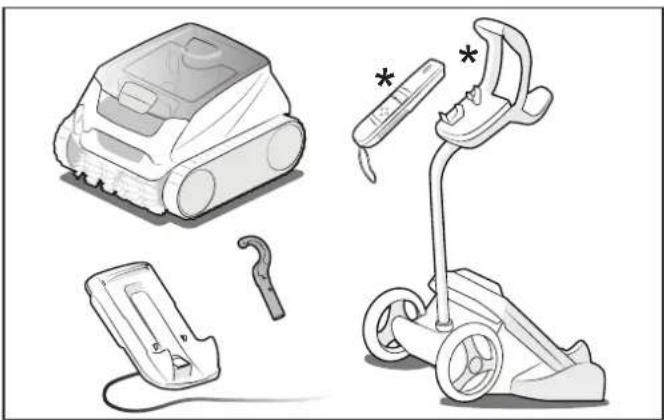
2.2 Contents
The packaging should contain the following items:
- Freerider™ Cleaner
- Charging Station
- Removal Hook
- Transportation Caddy*
- Remote Control*
* Model FR2000 iQ
natural_image
Illustration of four different household appliances: a robotic vacuum cleaner, a handheld device with a hook, a flat-screen electric scooter, and a handbag (no text or symbols present)Figure 1. Contents
2.3 Assemble the Charging Station
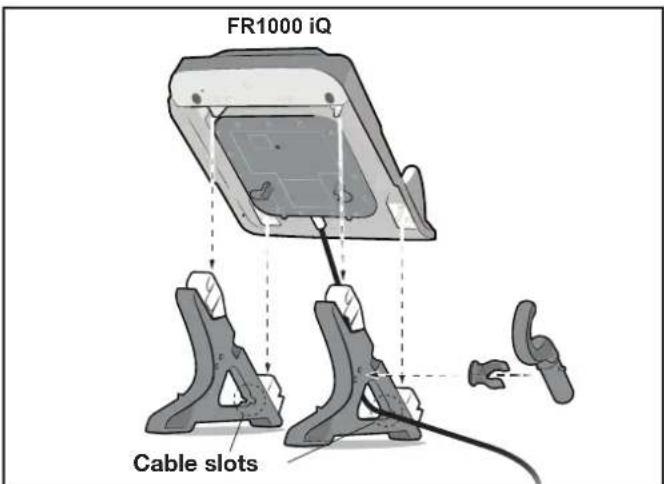
- Insert the top of the charging station foot (marked with a blue dot) into the top rear of the charging station (also marked with a blue dot). Push the lower part of the foot into the lower cavity of the charging station until clip is secure.
- Attach the hook clip to either charging station foot. Attach the hook to the clip.
- Run cable through either foot cable slot.
text_image
FR1000 iQ Cable slotsFigure 2. Assemble Charging Station
Refer to the trolley assembly document for trolley assembly instructions.
WARNING
Failure to comply with the following warnings can result in permanent injury, electrocution or drowning.
PREVENT ELECTRICAL SHOCK AND FIRE
- Keep the charging station at least 3.5 m from the edge of the pool.
- The cleaner is to be installed in accordance with the relevant requirements of the Australian wiring rules AS/NZS 3000. Also refer to the installation instructions relating to the swimming pool equipment for which the cleaner will be an integral part.
- Only connect the charging station to a receptacle protected by Residual-current circuit breaker with over-current protection (RCBO). Contact a certified electrician if you cannot verify that the receptacle is protected by a RCBO.
- Do not use an extension cord to connect the charging station.
- Do not allow anyone to swim while the cleaner is in the pool.
- Follow all charging instructions and do not charge cleaner outside of the temperature range specified in the instructions. Charging improperly or at temperatures outside of the specified range may damage the battery and increase the risk of fire.
2.4 Information/Status LEDs
| Battery Status[W204] | Solid Green | Fully charged. |
| Blinking Green Ready | to run a full cycle (2 h 30 min). | |
| Solid Orange | Not fully charged. May not run a complete floor & wall cycle. | |
| Blinking Orange | Very low battery level. Charge required. Cannot run cleaner. | |
| Blinking Red Charging error. Cleaner is too hot. | ||
| Wi-Fi Connection Status[xwcc] | Blinking Blue Pairing. | |
| Solid Blue Connected to Wi-Fi. | ||
Operating Status | Blinking Blue | Out of Water: Ready to submerge, start cleaning.In Water: End of cycle. Waiting for removal from pool. |
| Blinking Red Error. | ||
| Cleaning Mode(Additional cleaning modes available in app.If app mode selects either Floor Only or Floor+wall, only the selected LED lights ON. If in the App,waterline or smart mode is selected, then both LED lights ON.) | Cleaning mode via cleaner or the APPFloor Only (1 h 30 min) Floor, walls, and waterline (2 h 30 min) Floor, walls, and waterline (2 h 30 min) | App only cleaning modeSmart mode, floor, walls, and waterline[GTAY]Waterline (00 h 45 min)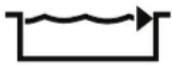 |

natural_image
Top-down line drawing of a robotic device with labeled mode and start button (no text or symbols beyond basic labels)Figure 3. Information/Status LEDs
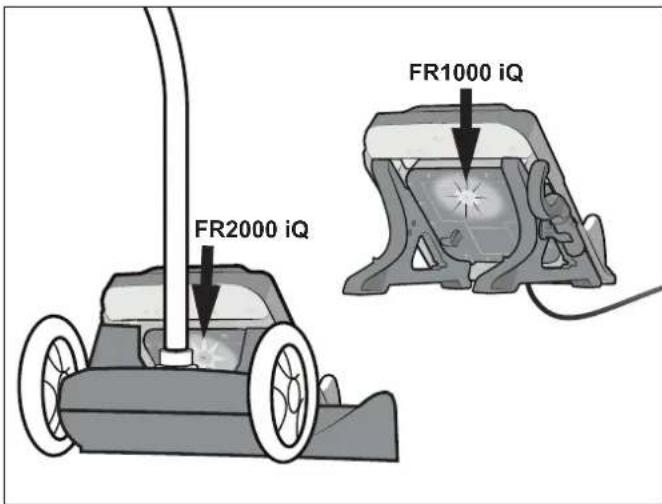
2.5 Charging Station Status\*
| Solid Green Base is receiving power | |
| Solid Red Charging is in progress | |
| Blinking Green | Charging station needs to be replaced |
| *The charging station LED indicator light should not be confused with the battery indicator light on the cleaner. The charging station LED identifies if the charger is providing power to the cleaner. | |
text_image
FR2000 iQ FR1000 iQFigure 4. Charging Station Status LED
Section 3. General Cleaner Operation
CAUTION
To prevent damage to the cleaner, be sure to adhere to the following guidelines:
- Remove the cleaner from the pool after the cleaning cycle is completed.
- Store out of direct sunlight or inclement weather.
- For retrieval, pickup at waterline when notified by app or use the manual retrieval hook. For FR2000 iQ, use the remote control to activate Lift system if necessary and retrieve at waterline.
- Take additional care when lifting the cleaner out of the pool. It becomes heavier when filled with water.
- Always remove the cleaner from pool when super chlorinating or adding acid.
- Do not handle cleaner while it is in operation.
- Ensure that the cleaner is not in running mode before handling.

WARNING
DO NOT use an extension cord with the charging station
- Follow all charging instructions and do not charge outside of the temperature range specified in the instructions. Charging improperly or at temperatures outside of the specified range may damage the battery and increase the risk of fire.
- When charging, cleaner must NOT be exposed to direct sunlight, rain or inclement weather, heat ignition sources, pool and spa chemicals or water. DO NOT position cleaner and charging station on direct contact with soil.
- Charging station is outdoor-rated.
IMPORTANT
- Start the cleaner, then fully submerge in the water to start cleaning cycle.
- At the end of each cycle, remove the cleaner from the pool and recharge.
- Clean the filter canister after each cleaning cycle.
- Do not leave your cleaner in the pool on a permanent basis.
The Zodiac robotic cleaner includes a safety feature that automatically stops the cleaner if it is powered on but not submerged in water. For pools equipped with a beach area, this safety feature is programmed to drive the cleaner in reverse and back into the pool when the impeller is out of the water.
3.1 Set Up and Charging
- Select a charging location (RCBO outlet) at least 3.5 m away from the pool, out of direct sunlight, rain or inclement weather, and with adequate Wi-Fi strength.

text_image
FR1000 iQ 3.5 mFigure 5. Charging Location
- Align the cleaner and charging station with the wall for easier access to the controls and handle.
- Plug charging station into RCBO.
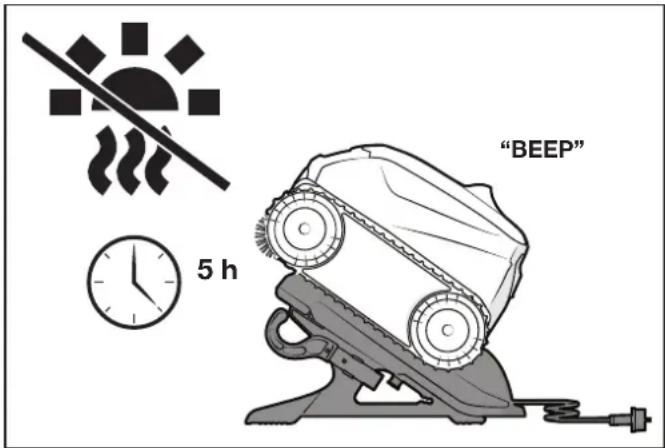
- Seat cleaner on charging contacts. The cleaner will "beep" and begin charging.
text_image
"BEEP" 5 hFigure 6. Plug in Charging Station and Seat Cleaner
NOTE: Battery LED will blink orange when charging and solid green when complete.
-
Fully charge the cleaner before every cleaning. The battery LED will be solid green when fully charged. Charging takes approximately 5 hours.
-
Check the current charge level in the App whenever the cleaner is on the charging station.
-
The cleaner goes into deep sleep after 8 days of inactivity to protect the battery. When all indicators are off, the cleaner is in sleep mode. Re-set the cleaner on the charging base to wake up. If this does not work, see Troubleshooting.
NOTE: For best results, dry the cleaner and base charging contacts before charging. Periodically clean the charging contacts. See maintenance section.
3.2 Start Cleaner
- Select Cleaning Mode using the slider by sliding and releasing to the left or by using the App.
| Cleaning Mode S | Select Runtime | |
| Floor/Wall Product or App 2.5 hrs | ||
| Floor Product or App 1.5 hrs | ||
| SMART In App Calculated | ||
| Waterline | In App | 0:45 min |

text_image
Diagram of a device control panel with icons and directional arrow, showing battery status and playback controlsFigure 7. Slide and Release Left to Select Mode
NOTE: Choose Floor Only mode to clean with Pool Cover on.
3.3 Install and Submerge the Cleaner
- Start the cleaner using the slider by sliding and releasing to the right or use the App.

natural_image
Hand pressing a button on a device panel, showing navigation and playback icons (no text or symbols)Figure 8. Slide and Release Right to Start
- The cleaner does not begin moving until it senses water. A blinking blue LED light means it is ready to clean.
- At the center point, submerge the cleaner in the pool and hold in the vertical position to release any air trapped inside.

natural_image
Illustration of a hand holding a fire extinguisher with a downward arrow indicating water flow (no text or symbols)Figure 9. Submerge the Cleaner Vertically
- Wait for bubbles to stop completely, then let the cleaner sink to the bottom of the pool.

text_image
2Figure 10. Cleaner Sinking to the Bottom of the Pool
- Cleaning cycle will start as soon as the cleaner detects the pool floor.
| WARNING | |
 | Do not enter pool while the robotic cleaner is in water. |
3.4 Remote Control
The LiFi remote control for models FR2000 iQ uses light signals to communicate underwater with the cleaner. Use the remote to start/stop a cleaning cycle, direct the cleaner, or remove the cleaner from the pool. Bright sunlight may interfere with the signal. Hold tip of remote underwater pointing at the cleaner's antenna to send a command. Maximum distance between remote control and cleaner is 7m. The remote is water resistant up to 30cm and floats if dropped in water.
- Place the end of the handheld remote control in the pool and direct it towards the cleaner's antenna.

natural_image
Illustration of a person using a handheld device to spray light onto a robotic vacuum cleaner on tiled floor (no text or symbols)Figure 11. Remote Control End in the Pool
- Press to start or stop the cleaner. Press the arrows to navigate cleaner.
NOTE: Cycle interruption will occur with any usage of remote control during a cleaning cycle. Cleaning cycle will restart from the beginning. Do NOT leave remote fully submerged for extended periods.
3.5 Removal
3.5.1 Lift System Retrieval with Remote Control
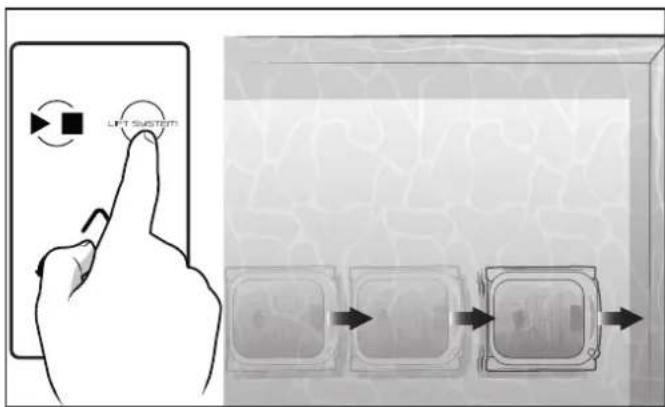
The Lift System is designed to assist in retrieving the cleaner from the pool. Lift System can be activated at any time during or after a cleaning cycle.
- Place the end of remote control in the pool and press Lift System to begin automated procedure.
- The cleaner will drive forward and up the nearest wall it is facing. It will wait at the waterline to be retrieved.
text_image
LIFT SYSTEMFigure 12. Cleaner Drives to Wall
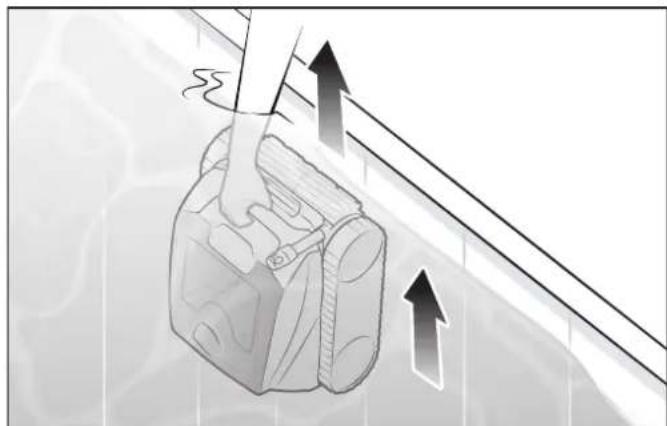
- When in reach, remove the cleaner from the pool using the handle. The cleaner will quickly expel water to allow for lighter, easier removal.
natural_image
Illustration of a hand gripping a device with motion arrows indicating movement (no text or symbols)Figure 13. Remove Cleaner
3.5.2 Waterline Retrieval
-
At the end of the cleaning cycles (other than Floor Only), the cleaner climbs and waits at the waterline.
-
If the cleaner is not retrieved after 30 seconds, it moves to a different wall.
NOTE: If the cleaner is not removed at the waterline, it will return to the floor at the end of the cycle.
- If not retrieved after 10 minutes, the cleaner returns to the pool floor for retrieval with the hook and pool pole.
- If connected to the iAquaLink ^ app, you will receive push notifications to your mobile device alerting you to remove the cleaner.
- Remove cleaner at the waterline by using the handle and it will expel water to make it lighter.

natural_image
Illustration of a person using a foot presser on a small boat, with an upward arrow indicating motion (no text or symbols present)Figure 14. Remove the Cleaner
3.5.3 Manual Retrieval
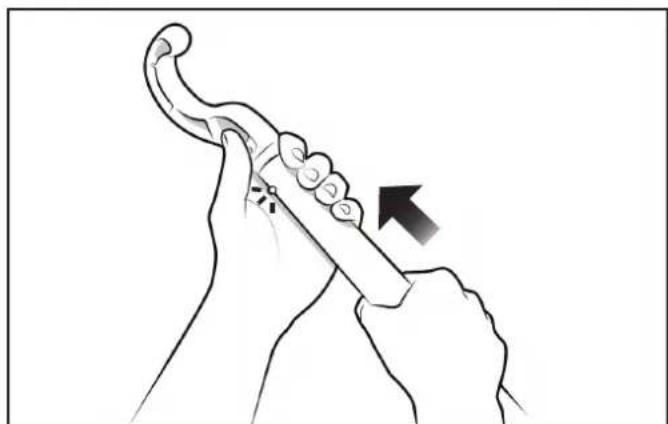
- Attach the hook (stored on the charging station) to a standard pool cleaning pole (not included).
natural_image
Illustration of hands holding a curved tool with an arrow indicating motion (no text or symbols)Figure 15. Removal Hook
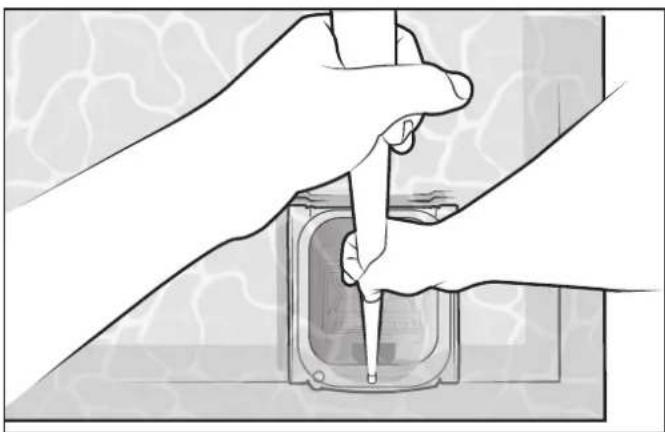
- Secure the hook on the cleaner handle. Bring the cleaner to the waterline.
natural_image
Illustration of hands using a tool to adjust or install a component, no text or symbols presentFigure 16. Secure the Hook
- Pull up the cleaner by the handle and hold vertically to let the water drain into the pool.

natural_image
Illustration of a hand pouring liquid from a container into a puddle, with an arrow indicating flow direction (no text or symbols)Figure 17. Drain the Cleaner
- Charge the cleaner on the charging station out of direct sunlight.

natural_image
Illustration of a car on a lift with a diagonal line and sun symbol (no text or labels)Figure 18. Store the Cleaner
NOTE: For best results, dry the cleaner and base charging contacts before charging. Periodically clean the charging contacts. See maintenance section.
3.5.4 Remove with Remote Control (Freerider™ FR2000 iQ)
- Press Lift System button on the remote control. The cleaner will drive to the nearest wall.
- The cleaner drives up the wall and waits at the waterline.
- Remove cleaner at the waterline by using the handle.
Section 4. Installing iAquaLink®

text_image
ANDROID APP ON Google play Available on the App StoreThe iAquaLink app is available for download from the App Store or Google Play.
With iAquaLink Control, you can connect to your robotic cleaner from anywhere, anytime to access many functions and troubleshooting advice. App features are dependent on model.
Before you begin installation, make sure you have the following:
- Robotic cleaner is on charging station
- Charging station is connected and plugged into a RCBO outlet
- Smart device (phone) with Wi-Fi and Bluetooth enabled
- A Wi-Fi router broadcasting a 2.4Ghz wifi network with sufficient signal strength at the charging station
IMPORTANT
Have your Wi-Fi network password available
4.1 Download the App
Install or update the iAquaLink app from the App Store or Google Play.
Once the download is complete, select the iAquaLink icon on your smart device to open the app.
4.2 Sign Up and Log In
Click Sign Up to create a new user account. Or, if you previously set up an iAquaLink account, click Log In to access your systems.
Complete all required fields in the Account Setup page and agree to the Terms and Conditions.
4.3 Configure the System
- On the My Systems page, click + in the upper right-hand corner to add a system.
- Choose "Robotic Cleaner" from the list and choose your model type.
- Follow on screen prompts to pair your cleaner.
- Slide the slider right and HOLD for ten seconds to put the cleaner in Pairing Mode.
| Wi-Fi LED Indicates Connection Status | |
| BLINKING - pairing | |
| SOLID - connected to internet | |

natural_image
Hand pressing a button on a device panel, showing a finger and arrow (no text or symbols visible)Figure 19. Slide and Hold Right to Pair
- Follow on-screen prompts to add your cleaner and connect to your home router.
NOTE: If you have problems connecting, the Wi-Fi signal may not be strong enough next to the pool. Try placing the charging station in another location closer to your home router (see iAquaLink Troubleshooting section.)
Section 5. iAquaLink® Control
Once you have downloaded the iAquaLink app and connected the device to Wi-Fi, the iAquaLink app allows for robotic cleaner control from anywhere, anytime. Functions vary within the iAqualink app depending on which cleaner model you have.
IMPORTANT
During cleaning cycles while in water, the cleaner will not have connection to the WiFi. Once the cycle is complete place the cleaner back on the charging stand to reconnect to the WiFi.
| WARNING | |
| Do not enter pool while the robotic cleaner is in water. | |
5.1 iAquaLink ^® Control Home Screen
App function and design is subject to change.
 | Start Cleaning |
 | Clean Mode |
| Castel | Battery Charge Status |
| Castel | Green Charged: Fully Charged |
| Castel | Green Charging: Ready For Use |
| Castel | Orange Charging |
| Castel | Orange Partially Charged |
5.2 Set Cleaning Mode
Start Cleaning
The factory default cleaning surface setting is Floor/Wall.
- From the Home screen, press the Start button to begin cycle. The cleaner will start when it detects water and will cancel the cycle if not submerged after 5 minutes.

NOTE: At the beginning of each cleaning cycle, the robot confirms your pool parameters (approximately 10 minutes). During this time, the cleaner does not climb to the waterline.
- From the main screen, select Cleaning Mode to view options.
- Select Cleaning Mode. The factory default cleaning mode is Floor/Wall.
| Cleaning Mode Select Runtime | |
| Floor/Wall Product or App 2.5 hrs | |
| Floor Product or App 1.5 hrs | |
| SMART In App Calculated | |
| Waterline In App 0:45 min |
SMART Cycle
SMART Cycle calculates a customized cleaning time optimized for your pool. On the first run of SMART Cycle, the app counts up as it calculates the optimized cleaning time.
On periodic SMART Cycle cleaning, the app will count down from the optimized cleaning time.
NOTE: To Recalculate SMART Cycle, go to the Set Cleaning Mode after the initial calculation.
5.3 In-App Error Messages and Troubleshooting
If an error occurs, after removing the cleaner from the water, the status bar will show a warning symbol and: "Cleaning Interrupted".
- Click on the warning symbol to view troubleshooting advice on how to fix the issue.
- Choose Clear Error if you believe you have fixed the problem and want to re-try. Choose OK if you want to suspend the cleaner in error mode and work on the troubleshooting fix at a later time.
5.4 System Settings
Access System Settings by pressing the gear icon in the upper right hand corner of the app screen.
Section 6. Maintenance
WARNING
To avoid electric shock and other hazards which could result in permanent injury or death, disconnect (unplug) the cleaner from the power source before performing any cleaning and maintenance.

text_image
FR1000 iQ 3.5 mFigure 20. Charging Station Distance to Pool Edge
6.1 Clean the Cleaner and Charging Station
- Always dry the cleaner before setting on the charging station.
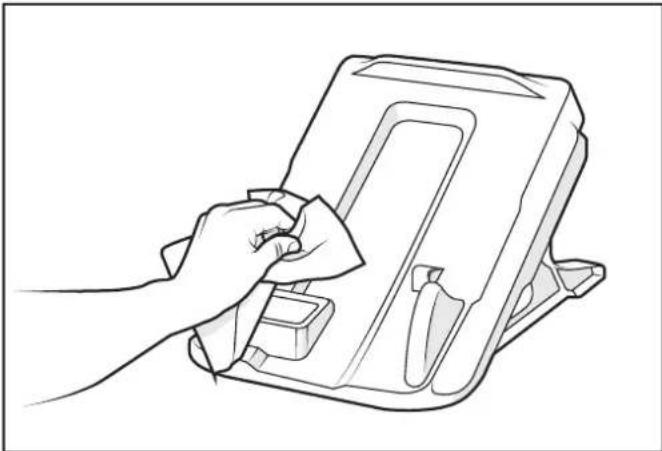
- Clean the charge plates ON the charging station using a cloth or scouring pad. DO NOT use metal sponges or brushes and solvents or salt water.
natural_image
Line drawing of a hand using a tool to clean or adjust a device (no text or symbols present)Figure 21. Clean the Charge Plates
- Clean the charge plates UNDER the cleaner using a cloth or scouring pad. DO NOT use metal sponges or brushes and solvents or salt water.
- Rinse the cleaner and charging station thoroughly with clean water.
- Dry the cleaner and charging station with a towel. DO NOT leave the cleaner and charging station to dry in the direct sun.
6.2 Clean the Filter Canisters
The filter canisters should be cleaned at the end of each cycle.
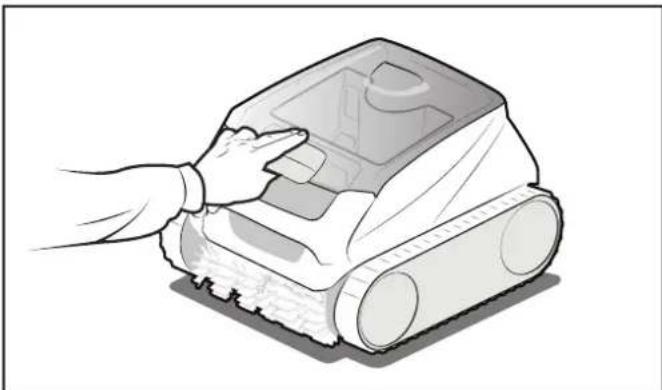
- Push the cover lock and lift the cover until it is secured in the vertical position.
natural_image
Illustration of a hand operating a robotic vacuum cleaner (no text or symbols visible)Figure 22. Lift Cleaner Cover
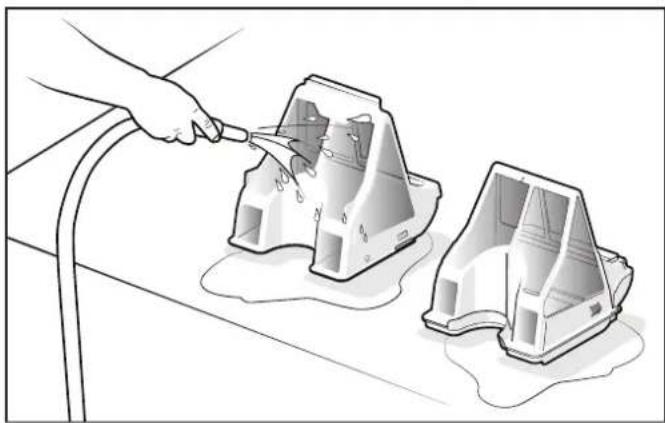
- Remove the filter canisters assembly from the body.
- Empty all debris from the filter canisters, then rinse the filters and the cleaner using a hose.
natural_image
Illustration of a hand using a tool to clean or repair plastic components, with no visible text or symbols.Figure 23. Remove and Wash the Filter Canisters
NOTE: Periodically, remove the filter canisters and clean thoroughly with soapy water and a soft bristle brush
- Replace the filter canisters into the cleaner.
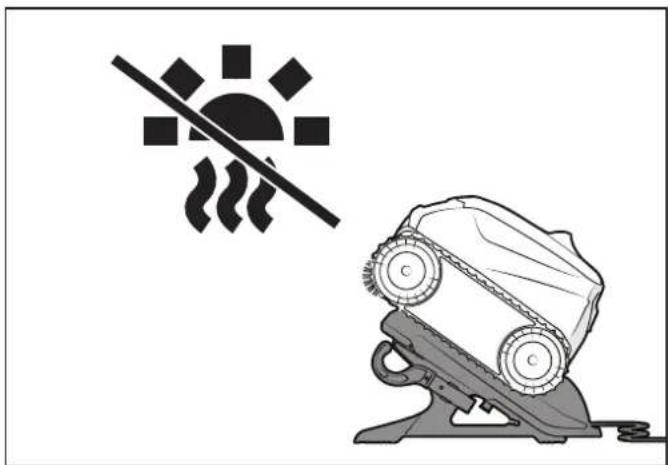
- Store the cleaner on the charging station out of direct sunlight.
natural_image
Illustration of a car on a lift with a diagonal line and sun symbol (no text or labels)Figure 24. Store Cleaner on the Charging Station
NOTE: We recommend to let the cleaner dry before being positioned on the charging station.
6.3 Storage
Everyday Storage
Store the cleaner in a protected and dry place with an ambient temperature between 10°C and 21°C, out of reach of children, pets, other foreign objects, etc.
- Never store or dry the cleaner in direct sunlight.
- DO NOT expose cleaner to fire, excessive temperatures, ignition sources, or pool and spa chemicals.
- DO NOT leave the cleaner in the water when not in use.
Long-Term & Winter
Remove the cleaner from the pool and drain all water to avoid freezing water damage (freeze damage is not covered under warranty).
For long term storage, it is recommended to store the cleaner at 80-100% of battery capacity (indicated by solid GREEN battery LED).
You may either:
- Leave the cleaner and charging station connected until next use.
- Disconnect and recharge the cleaner at the start of season.
Store cleaner and charging station out of direct sunlight, rain or inclement weather.
6.4 Replacing Wear Parts
6.4.1 Replacing Brushes
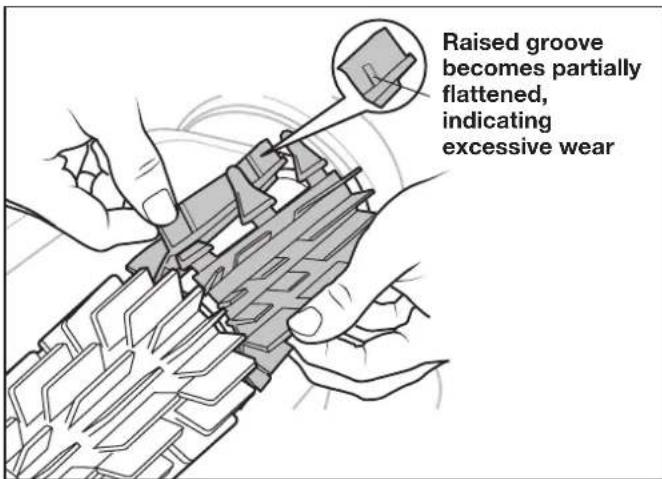
The cleaner is fitted with PVC brushes with a "wear" indicator.
text_image
Raised groove becomes partially flattened, indicating excessive wearFigure 25. Worn Brush Indicator
To maintain cleaner performance at its best you need to replace the brushes as soon as one of the wear indicators is reached (even if the blade wear is not even). It is recommended that you replace the brushes when the rubber is worn down to the top of the wear indicator (or every two years, whichever comes first).
To replace a worn brush:
- Lift the cleaner to a vertical position so that the handle is up.

natural_image
Illustration of a hand holding a plastic bag with a curved arrow labeled '1' pointing to it, no text or symbols present.Figure 26. Cleaner in Upright Position
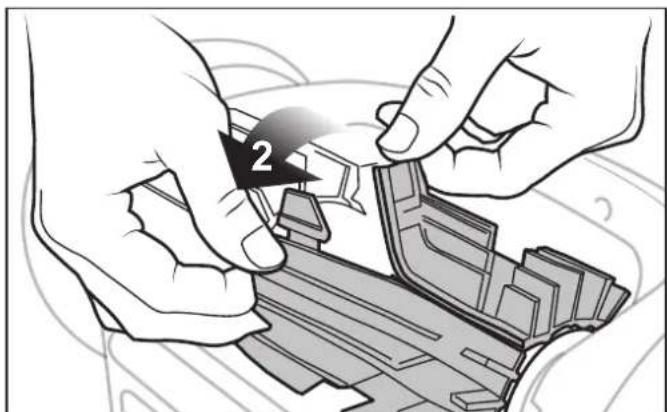
- Separate the edges of the brush and undo the tabs. Remove the worn brushes.
natural_image
Illustration of hands assembling a mechanical component with a numbered arrow (no text or symbols)Figure 27. Undo the Tabs of the Brush
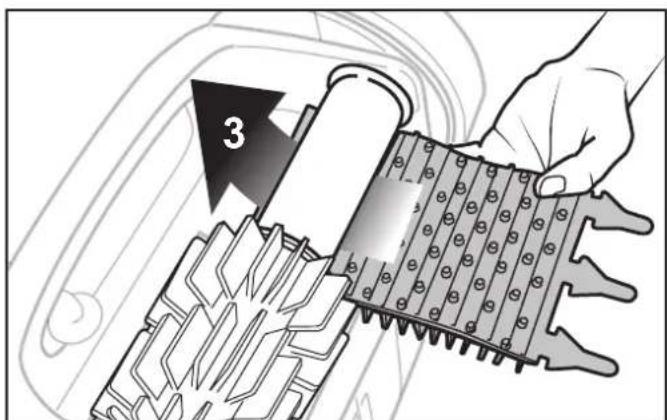
- To install the new brush, position the new brush on the roller with the cleaning blades facing away from the roller.
text_image
3Figure 28. Install the New Brush
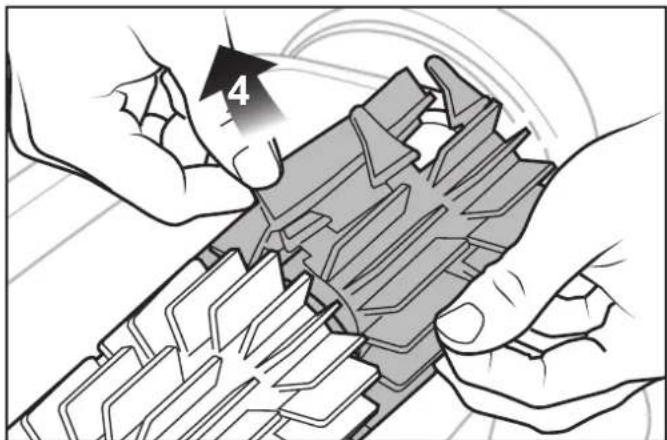
- Thread each tab into the slot provided and gently feed it through until the heel comes out at the other side of the slot.
text_image
4Figure 29. Pull Tabs Through Each Slot
- Use a pair of scissors to cut the tabs 3/4 inch from the heel so that they are no higher than the cleaning blade.
- Repeat the procedure to install the second brush.
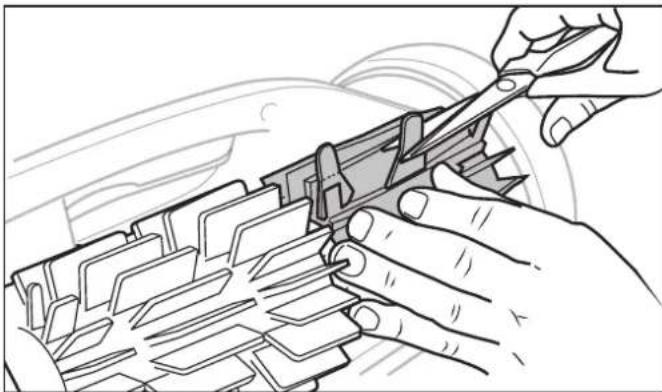
natural_image
Illustration of hands using a tool to cut or adjust a component with no visible text or symbolsFigure 30. Cut Tabs
6.5 Replacing Tracks
- Pull on the inside of the old track to remove the track lip from the front wheel.

natural_image
Illustration of hands adjusting a car seatbelt with directional arrows (no text or symbols)Figure 31. Pull the Old Track Over the Wheel
- Remove the old track from the front wheel, then remove track from the rear wheel.
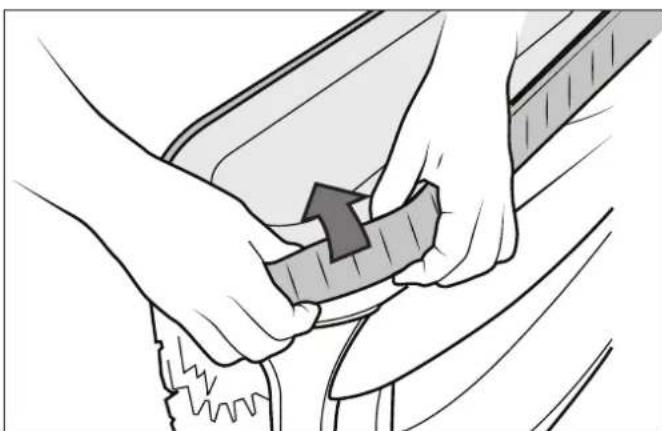
natural_image
Illustration of hands performing a mechanical or repair operation with a tool (no text or symbols visible)Figure 32. Remove the Old Track
- Replace the track on the wheel by positioning the rib toward the body of the cleaner.
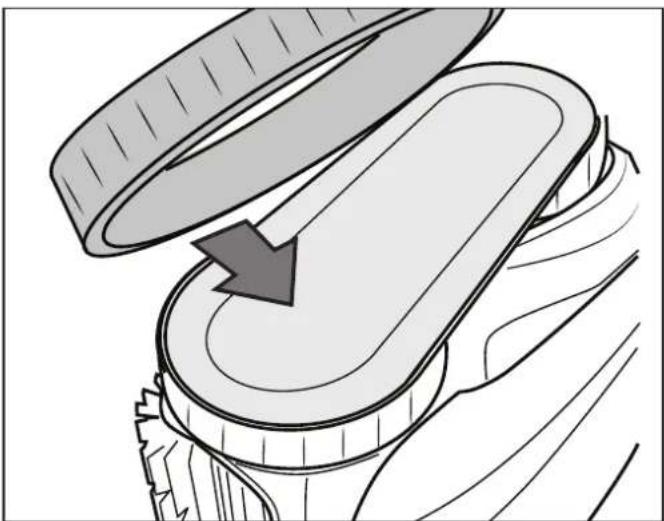
natural_image
Diagram of a mechanical component with an open lid and a curved arrow indicating rotation (no text or symbols)Figure 33. Track Replacement Orientation
- Push one side of the track on to the wheel and fit the rib of the track in the groove of the wheel.
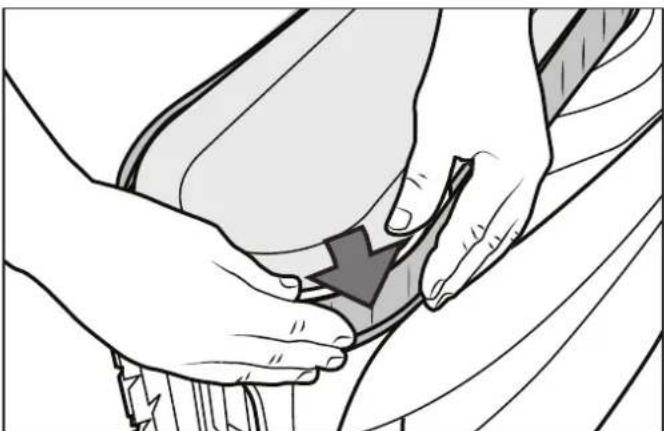
natural_image
Illustration of hands performing a medical procedure on a patient's abdomen (no text or symbols present)Figure 34. Start on One Side of the Track
- Work the track onto the front wheel and verify the rib of the track is positioned properly within the groove of the wheel.
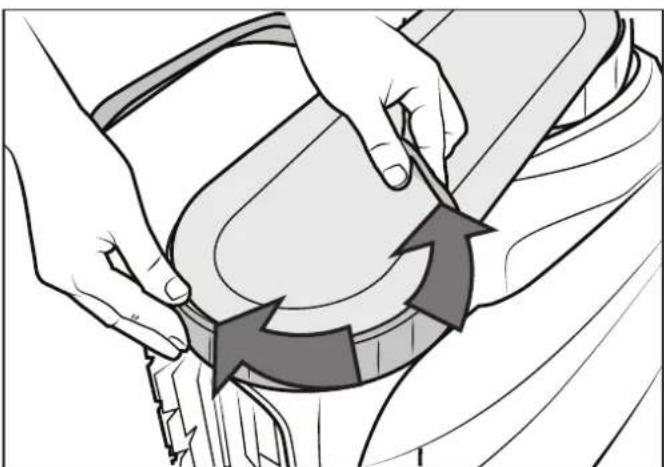
natural_image
Illustration of hands performing a circular motion exercise on a vehicle (no text or symbols)Figure 35. Work the Track On Around the Wheel
- Push and position the rib of the inner side of the track in the groove of the rear wheel. If needed, turn the wheel gently to help with installation.

natural_image
Illustration of hands adjusting a car seatbelt with directional arrows indicating movement (no text or symbols)Figure 36. Push the Track into Place on the Wheel
- Work the track onto the rear wheel and verify the rib of the track is positioned properly within the groove of the wheel.
- Push and position the rib of the inner side of the track in the groove of the rear wheel. If needed, turn the wheel gently to help with installation.
6.6 Recycling & Disposal
The battery is not a serviceable or replaceable component. DO NOT attempt to service the battery.
Battery and cleaner must be disposed of in accordance with local requirements.
Always dispose of batteries in a sustainable way in approved collection bins or at authorized collection centers in accordance with local law. Contact your local authority for more information.
Section 7. Troubleshooting
Information about the cleaner status and any relevant condition will be displayed in the iAquaLink® app while the cleaner is on the charging station.
7.1 General Troubleshooting
The following list provides some helpful hints for troubleshooting common challenges when using the cleaner.
| User Issue Possible Cause Suggested Solution | ||
| The cleaner does not stay on the pool surface or is floating excessively. | There is air trapped inside the cleaner housing. | Remove cleaner from pool and re-submerge (see Install and Submerge the Cleaner). |
| The filter canister is full or dirty. | Dispose of debris and thoroughly clean the filter canister with mild soap and a soft brush. Then, re-submerge the cleaner (see Clean the Filter Canister). | |
| The cleaner is not climbing walls. | The filter canister is full or dirty. | Dispose of debris and thoroughly clean the filter canister with mild soap and a soft brush. Then, re-submerge the cleaner (see Clean the Filter Canister). |
| Track treads worn down. See | Replacing Wear Parts. | |
| Confirm appropriate pool chemistry. | Speak with your pool service professional. Do not leave cleaner in the pool during any chemical treatments. | |
| Product in Floor Only mode. | Select Floor/Wall cleaning mode. | |
| The cleaner does not respond to the remote control. | Bright sunlight may interfere with the signal. | Hold tip of the remote underwater pointing at the cleaner's antenna to send a command. Maximum distance between remote control and cleaner is 7m. |
| Cleaner may not have enough battery to respond to the commands of the remote control. | Use the retrieval hook to remove cleaner. Recharge cleaner for next use. | |
| Remote control LED light blinks red. | Replace AA batteries in remote control. | |
| User Issue Possible | Cause Suggested Solution | |
| The cleaner is not moving. | The cleaner may not be charged. | The outlet the charging station is connected to is not supplying electrical power. Check that the outlet to which the charging station is connected is receiving electricity. |
| Cycle not started. Remove from water and start the cleaner using the slider by sliding and releasing to the right or use the App. | ||
| Reset needed. Turn off the cleaner using the slider by sliding to the left and hold for 20 seconds. Then, place the cleaner on the charging station to wake it up. If the problem is not resolved, contact your local retailer to request a diagnostic review or contact Technical Support at 1300 763 021 for Australia or 0800 807 665 for New Zealand. | ||
| The cleaner does not fully charge. | Dirty charging contacts. If the cleaner does not charge after 6 + hours of charging, clean the charging contacts on both cleaner and charging station with a cloth and non salt water. Dry the cleaner before putting on the charging station after each cycle use. If the underside of charging station is blinking green it will need to be replaced. | |
| The cleaner is not cleaning the pool effectively. | Filter canister is full or dirty. Dispose of debris and thoroughly clean the filter canister with mild soap and a soft brush. Then, re-submerge the cleaner (see Clean the Filter Canister). | |
| Brushes are worn. | Check the wear indicator(s) (see Replacing Wear Parts). | |
| The cleaner is not fully charged. | Charge the cleaner. | |
| The cleaner does not collect debris or go forward. | Debris jamming traction motor. | Remove any debris in the front brush area. |
7.2 Charging Station Behavior
| User Issue | Cleaner Behavior Charging | Station Behavior Suggested Solution | |
| The cleaner will not charge | The battery LED on the cleaner does not blink when the cleaner is on the charging station. | The charging station is connected but the LED under the station is off or blinking (instead of green) when the cleaner is placed on it. | The cleaner is not positioned correctly on the charging station.Clean charging contacts on the cleaner and the charging station with a cloth and fresh non salt water.The charging station is faulty, contact your retailer for a diagnostic review or contact Technical Support at 1300 763 021 for Australia or 0800 807 665 for New Zealand. |
| The LED under the charging station is green when the cleaner is placed on it. | |||
| The battery LED on the cleaner blinks red 4 times when the cleaner is on the charging station. | The charging station is plugged into a RCBO outlet.The charging station LED is green when the cleaner is placed on it.The charging station LED is red when the cleaner is placed on it. | Clean charging contacts on the cleaner and the charging station with a cloth and fresh non salt water. | |
| The battery LED on the cleaner blinks orange for a few seconds or minutes then switches to solid green when cleaner is on the charging station. | Remove the cleaner from the charging station. If the battery LED on the cleaner turns off instead of indicating the charge level the battery needs replacing. |
7.3 Cleaner Error Codes
| On/Off | Blinking Red | Error # | Display in the iAquaLink® App | Solutions |
 | 10 | Communication Error | The cleaner board is under power but does not respond.Contact your service center for a diagnostic review or contact Technical Support at 1300 763 021 for Australia or 0800 807 665 for New Zealand. | |
| 14 | Motor Block Error | |||
 | 2 & 3 | Traction Motor Right/Left | Check that debris is not preventing the brushes or tracks from moving freely.Rotate each wheel by a quarter of a turn in the same direction until it rotates smoothly. Repeat turning wheels in the opposite direction until rotation is smooth.Contact your service center for a diagnostic review or contact Technical Support at 1300 763 021 for Australia or 0800 807 665 for New Zealand. | |
| 5 & 6 | Drive Motor Consumption Right/Left | |||
 | 7 | Cleaner Floating | Thoroughly clean the filter canister.Restart the cycle, then submerge cleaner in the water and shake to release air bubbles.Contact your service center for a diagnostic review or contact Technical Support at 1300 763 021 for Australia or 0800 807 665 for New Zealand. | |
| 8 | Cleaner Out of the Water | |||
| 1 & 4 | Pump Motor • Turn | off the cleaner using the slider by sliding to the left and hold for 20 seconds while off of the charging station. No LEDs will be illuminated.Check for small debris or hair in the fan impeller.Thoroughly clean the filter canister.Contact your service center for a diagnostic review or contact Technical Support at 1300 763 021 for Australia or 0800 807 665 for New Zealand. | ||
 | 31 | Antenna Error • The | antenna is damaged and the cleaner cannot be controlled with the remote.Contact your service center for a diagnostic review or contact Technical Support at 1300 763 021 for Australia or 0800 807 665 for New Zealand. | |
 | 12 | Firmware Update Error | Close the iAquaLink® app.Check that the cleaner is connected to the Wi-Fi network (the LED is solid blue).If the indicatoris not steady, open the iAquaLinkTM app, select the cleaner and click on “Update”. |
7.4 Battery Error
| On/Off | Blinking Error # | Display in the iAquaLink® App | Solutions | |
 | 20 & 21 | Battery Error • The | battery block needs to be replaced.Contact your retailer for a diagnostic review or contact Technical Support at 1300 763 021 for Australia or 0800 807 665 for New Zealand. | |
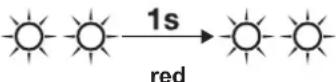 | 22 & 23 | Charging Error (Too hot)Charging Error (Too cold) | The temperature detected at the charging station location is outside of the recommended temperature range for recharging the cleaner 5°C - 40°C.Charging is paused until temperature is within normal range.Move charging station to a new location. | |
 | 25 | Charging Error • Clean | the charge plates (located on the underside of the cleaner and on the charging station base) with a cloth and fresh water (non-salt water). | |
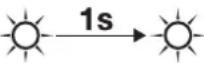  | No Code | Battery Error • Remove | the cleaner from the charging station.If the battery indicator turns off instead of indicating the charge level of the cleaner: the battery is obsolete and needs replacing.Contact your retailer for a diagnostic review or contact Technical Support at 1300 763 021 for Australia or 0800 807 665 for New Zealand. |
7.5 Battery Error \*
| Remote Blinking Possible Cause Solutions | |||
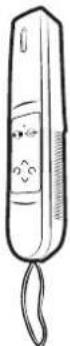 | red blinking LED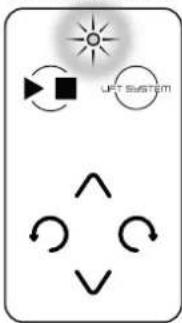 | Remote Battery Power is Low | • Remove battery cover and replace both AA batteries. |
*Model FR2000 iQ only
7.6 Dismissing an Error Code
From the iAquaLink® App:
Press the error icon to display troubleshooting solutions. After you have completed the troubleshooting solution steps, press Clear Error to return to normal operation. Or, press OK if you need to complete the solution steps at a later time.
7.7 iAquaLink ^® Troubleshooting
This information can help to troubleshoot connection and setup challenges between the iAquaLink app and the cleaner.
How it works:
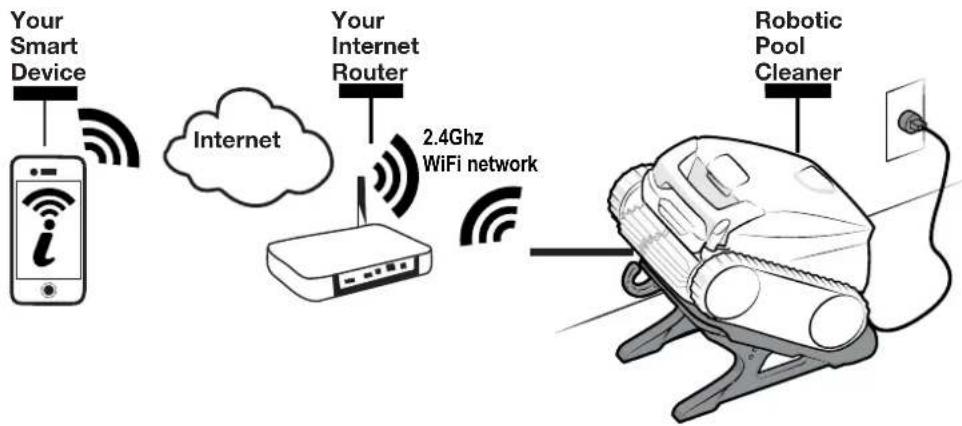
flowchart
graph LR
    A["Your Smart Device"] -->|Wireless Signal| B["Internet"]
    B --> C["Your Internet Router"]
    C -->|2.4Ghz WiFi network| D["Robotic Pool Cleaner"]
IMPORTANT
Most of the cordless robotic app functions only work when the cleaner is out of water and on the charging station.
How to connect:
You must connect to the home router (network) with your smart device which will communicate with the cleaner. (See Configure the System.)
The device can only connect to a 2.4Ghz wifi network. Consult your network or wifi equipment provider for assistance.
IMPORTANT
It is recommended to locate the charging station as close to the home router as practical. Do not use an extension cord.
Common iAquaLink® Troubleshooting
Remember, if you get a new Wi-Fi Router, reset the defaults of your current Wi-Fi Router or simply change your Wi-Fi network password, you will have to re-establish the connection between your cleaner and the router. (See: Configure the System.)
| User Issue Possible Cause Suggested Solution | ||
| Wi-Fi light is off. Bright sunlight Shield the lights to block sunlight shield the lights to block sunlight shield the lights to block sunlight shield the lights to block sunlight shield the lights to block sunlight shield the lights to block sunlight shield the lights to block sunlight shield the lights to block sunlight shield the lights to block sunlight shield the lights to block sunlight shield the lights to block sunlight shield the lights to block sunlight shield the lights to block sunlight shield the lights to block sunlight shield the lights to block sunlight shield the light's light's light's light's light's light's light's light's light's light's light's light's light's light's light's light's light's light's light's light's light's light's light's light's light's light's light's light's light's light's light's light's light's light's light's light's light's light's light's light's light's light's light's light's light's light's light's light's light's light's light of light's light's light's light's light's light's light's light's light's light's light's light's light's light's light's light's light's light's light's light's light's light's light's light's light's light's light's light's light's light's light's light's light's light's light's light's light's light's light's light's light's light's light's light's light's light's light's light's light's light, and then the light's light's light's light's light's light's light's light's light's light's light's light's light's light's light's light's light's light's light's light's light's light's light's light's light's light's light's light's light's light's light's light's light's light's light's light's light's light's light's light's light's light's light's light's light's light's light's light's light's Light's light's light's light's light's light's light's light's light's light's light's light's light's light's light's light's light's light's light's light's light's light's light's light's light's light's light's light's light's light's light's light's light's light's light's light's light's light's light's light's light's light's light's light's light's light's light's light's light's light's Light of light's light's light's light's light's light's light's light's light's light's light's light's light's light's light's light's light's light's light's light's light's light's light's light's light's light's light's light's light's light's light's light's light's light's light's light's light's light's light's light's light's light's light's light's light's light's light's light's light's Light or light's light's light's light's light's light's light's light's light's light's light's light's light's light's light's light's light's light's light's light's light's light's light's light's light's light's light's light's light's light's light's light's light's light's light's light's light's light's light's light's light's light's light's light's light's light's light's light's light's light' | light and re-check if the lights are lit. | |
| Charging station is unplugged. Plug the charging station into a RCBO outlet (see Connect to a Power Source). | ||
| Power outage. Verify that the breaker is on and electricity is being supplied to the outlet. | ||
| Lost internet connection. Check internet connection - network may be down. | ||
| Router is off. Turn router on. | ||
| Router password was changed. Reset router with new password. | ||
| Wi-Fi light is flashing. Lost internet connection Check internet connection - network may be down. | ||
| Connectivity issue with local Wi-Fi or connection to the server. | Contact your local internet service provider. | |
| Unplug your charging station and wait 10 seconds. Plug in the box again and see if lights illuminate. | ||
| Check Internet connection - network may be down. | ||
| Wi-Fi light is on but buttons and functions are disabled. | Firmware update in progress. | “PROG” is displayed in the app during an over-the-air firmware update. Simply wait for button functions to resume after update completes. Do not unplug from power during an update. |
| WARRANTY REGISTRATION | Record your equipment details here for quick reference:Model No.: ____Serial No.: ____ |
 | AUSTRALIA WARRANTY:For full warranty terms and conditions and to register your warranty,visit www.zodiac.com.au/warranty and complete your details.◄ Or scan the QR code to go directly to the registration page. |
 | NEW ZEALAND WARRANTY:For full warranty terms and conditions and to register your warranty,visit www.zodiac.co.nz/warranty and complete your details.◄ Or scan the QR code to go directly to the registration page. |
Fluidra Group Australia Pty Ltd
1 Herbert Place, Smithfield NSW 2164
PO Box 7238 Wetherill Park NSW 1851, Australia
ABN: 87 002 641 965
Zodiac.com.au | 1300 186 875
Fluidra NZ Ltd
13 Douglas Alexander Parade
Rosedale Auckland 0632, New Zealand
NZBN: 942 903 181 70759
Zodiac.co.nz | 0800 807 665
A Fluidra Brand