
JUBI 12A DSP - Pregnant PHONIC - Free user manual and instructions
Find the device manual for free JUBI 12A DSP PHONIC in PDF.


| Product Type | Active DSP Loudspeaker |
| Brand | Phonic |
| Model | JUBI 12A DSP |
| Amplifier Type | Class AB (Tweeter), Class D (Woofer) |
| Continuous Power | 700 Watts |
| Peak Power | 1400 Watts |
| Maximum SPL | 126 dB |
| Frequency Response | 56 Hz - 20 kHz |
| Low-Frequency Driver | 12" Woofer with Ferrite Magnet, 2.6" Voice Coil |
| High-Frequency Driver | 1" Titanium Diaphragm Compression Tweeter |
| Horn Coverage | 60° x 100° |
| Input Connectors | 2 x Combo (XLR & 1/4" TRS), 1 x Mini-Stereo (AUX) |
| Output Connector | 1 x XLR (Link/Mix) |
| Bluetooth | Yes (Device name: Phonic.BT, password: 0000) |
| Enclosure Material | Impact-Resistant Polymer |
| Grille Gauge | 1.2 mm Steel |
| Handles | 2 on Sides |
| Mounting | 35mm Pole Socket |
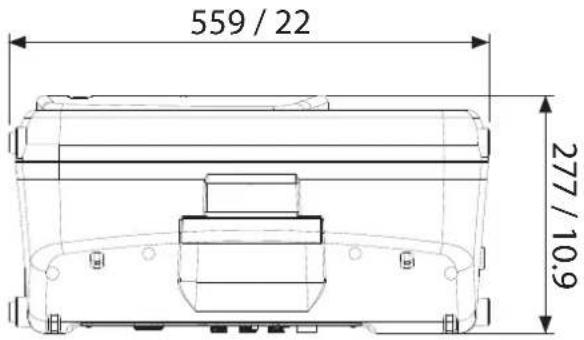
| Dimensions (H x W x D) | 559 x 370 x 277 mm (22" x 14.56" x 10.9") |
| Weight | 14.5 kg (32 lbs) |
| Power Supply | AC Mains via included cable (100-240V, 50/60Hz) |
| DSP Features | 2-Channel Mixer, Parametric EQ, Reverb, Graphic EQ, Limiter, Crossover, Delay, Subwoofer Filter, Scene Storage |
Frequently Asked Questions - JUBI 12A DSP PHONIC
User questions about JUBI 12A DSP PHONIC
0 question about this device. Answer the ones you know or ask your own.
Ask a new question about this device
Download the instructions for your Pregnant in PDF format for free! Find your manual JUBI 12A DSP - PHONIC and take your electronic device back in hand. On this page are published all the documents necessary for the use of your device. JUBI 12A DSP by PHONIC.
USER MANUAL JUBI 12A DSP PHONIC
natural_image
Top-down line drawing of a device casing with ventilation grilles and a labeled 'PHONIC' button (no other text or symbols)WWW.PHONIC.COM
JUBI 12A DSP
JUBI 15A DSP
Phonic reserves the right to improve or alter any information within this document without prior notice.
IMPORTANT SAFETY INSTRUCTIONS
The apparatus shall not be exposed to dripping or splashing and that no objects filled with liquids, such as vases, shall be placed on the apparatus. The MAINS plug is used as the disconnect device, the disconnect device shall remain readily operable.
Warning: the user shall not place this apparatus in the confined area during the operation so that the mains switch can be easily accessible.
- Read these instructions before operating this apparatus.
- Keep these instructions for future reference.
- Heed all warnings to ensure safe operation.
- Follow all instructions provided in this document.
- Do not use this apparatus near water or in locations where condensation may occur.
- Clean only with dry cloth. Do not use aerosol or liquid cleaners. Unplug this apparatus before cleaning.
- Do not block any of the ventilation openings. Install in accordance with the manufacturer's instructions.
- Do not install near any heat sources such as radiators, heat registers, stoves, or other apparatus (including amplifiers) that produce heat.
- Do not defeat the safety purpose of the polarized or grounding-type plug. A polarized plug has two blades with one wider than the other. A grounding type plug has two blades and a third grounding prong. The wide blade or the third prong is provided for your safety. If the provided plug does not into your outlet, consult an electrician for replacement of the obsolete outlet.
- Protect the power cord from being walked on or pinched particularly at plug, convenience receptacles, and the point where they exit from the apparatus.
- Only use attachments/accessories specified by the manufacturer.
- Use only with a cart, stand, tripod, bracket, or table specified by the manufacturer, or sold with the apparatus. When a cart is used, use caution when moving the cart/apparatus
combination to avoid injury from tip-over.
- Unplug this apparatus during lighting storms or when unused for long periods of time.

- Refer all servicing to qualified personnel. Servicing is required when the apparatus has been damaged in any way, such as power-supply cord or plug is damaged, liquid has been spilled or objects have fallen into the apparatus, the apparatus has been exposed to rain or moisture, does not operate normally, or has been dropped.

CAUTION RISK OF ELECTRIC SHOCK DO NOT OPEN

CAUTION: TO REDUCE THE RISK OF ELECTRIC SHOCK, DO NOT REMOVE COVER (OR BACK) NO USER SERVICEABLE PARTS INSIDE REFER SERVICING TO QUALIFIED PERSONNEL

The lightning flash with arrowhead symbol, within an equilateral triangle, is intended to alert the user to the presence of uninsulated "dangerous voltage" within the product's enclosure that may be of sufficient magnitude to constitute a risk of electric shock to persons.

The exclamation point within an equilateral triangle is intended to alert the user to the presence of important operating and maintenance (servicing) instructions in the literature accompanying the appliance.
WARNING: To reduce the risk of fire or electric shock, do not expose this apparatus to rain or moisture.
CAUTION: Use of controls or adjustments or performance of procedures other than those performed result in hazardous radiation exposure.
INTRODUCTION
Congratulations on your purchase of the Phonic Jubi 12A DSP or Jubi 15A DSP active loudspeakers. The Jubi's 700 Watt (continuous) amplifier uses both Class D and AB technology to produce up to a shattering 126 dB maximum SPL. This provides sufficient power for a wide range of venues, large and small. Jubi's stylish polymer enclosure also improves acoustical accuracy by minimizing distortion and diffraction. Finally, reliability and durability was the paramount factor throughout the Jubi DSP's development. With 700 Watts of ground shaking power, a 2-channel on-board mixer, custom engineered transducers, and great versatility, the Jubi active loudspeakers simply excel.
Woofers and Tweeters Engineered Right
Unlike many other speaker manufactures that use pre-assembled OEM woofers and tweeters, Jubi transducers are designed from scratch, in-house, by Phonic. Everything, from the cone pulp formula and the curvature of the tweeter's titanium membrane to the characteristic of the magnetic field, is uniquely Phonic, uniquely Jubi. Jubi DSP's state-of-the-art 12" or 15" woofer has a distinctly high BL force factor and a long-throw extension which produce marvelously deep and defined bass traditionally unattainable in small enclosures. The 1" compression tweeter and 95 degree conical horn complete the Jubi DSP's vivid, transparent sound signature.
Advanced Electronics. Advanced Reliability
With over 35 years of experience, Phonic has few equals when it comes to advanced electrical engineering technology. With the Jubi series, this cumulated expertise is on display. Core features include:
- Time alignment and phase correction: In listening tests, many notice that the Jubi seems more “real” or more “live” than other speakers. This is because Phonic’s active electronics ensure that sounds from the Jubi hit listeners’ ears at the precise moments the original recording intended.
- High Dampening Factor and Woofer Stabilization: The Jubi has a high amplifier dampening factor to ensure that the woofer reaches optimal excursion. Additionally, Phonic engineers added circuitry to manage the speaker's electrical feedback, in effect, stabilizing woofer movement. The high amplifier dampening factor and stabilization circuitry give the Jubi its spectacular bass depth and clarity.
- Transducer Protection: Active electronics oversee tweeter and woofer excursion, preventing audio artifacts, distortion, and speaker damage.
- 4th order, phase-accurate, Linkwitz-Riley crossover
- Thermal protection: Precautionary feature that cuts off the Jubi in case of overheating.
With experience and technology comes excellent performance and reliability. But you can never be too careful. As of the launch date, the Jubi DSP has logged more than 1000 hours of real world and lab tests, guaranteeing a remarkable level of reliability. From heated ovens, freezing subzero rooms, high humidity chambers, to electrical voltage spikes, the Jubi has endured it all.
FEATURES
- Remarkable sound, remarkable power, and remarkable style in a lightweight, durable enclosure
- 700 Watts of continuous power using Class AB and D technologies for high and low frequencies, respectively
• 126 dB maximum sound pressure level - 12" or 15" woofer matched with 1" compression tweeter
- Internal DSP with an array of signal processors
- Flat frequency response between 53/56Hz and 20kHz
- 2 channel onboard mixer: two mic/line inputs through combo jacks plus a mini-stereo AUX input connector
- Send speaker's main signal off to additional speakers or amplifiers through a balanced XLR output connector
• 35mm pole mount for extended audience reach - Impact resistant polymer enclosure with internal bracings
• Tour grade steel grille (1.2 mm)
APPLICATION
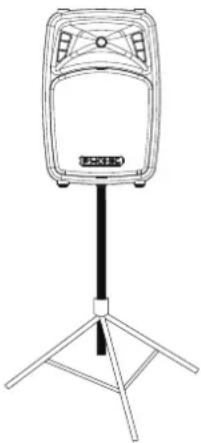
natural_image
Line drawing of a standing electronic device with a tripod base (no text or symbols)35mm mounting point
BLUETOOTH CONNECTIVITY
- Enter the BT menu in the DSP software and set to "on".
- Enter your cell phone or tablet's Bluetooth setup options to find the "Phonic.BT" as an available device.
- If requested, the password for the Jubi DSP's Bluetooth function is 0000. Many modern smartphones will enter this as the default password.
- Audio signals received through Bluetooth will be routed to the "BT in" channel found within the DSP software.
- To reset the connection, turn your smartphone or tablet's Bluetooth connection off and then on again.
- To avoid phone calls and push notifications interrupting your audio, we advise turning your phone to "flight mode". This may disable Bluetooth initially, but you can typically re-activate it while remaining in flight mode.
- When a Bluetooth connection is not established to the Jubi DSP, the Bluetooth will appear as "BT unpair" in the software.
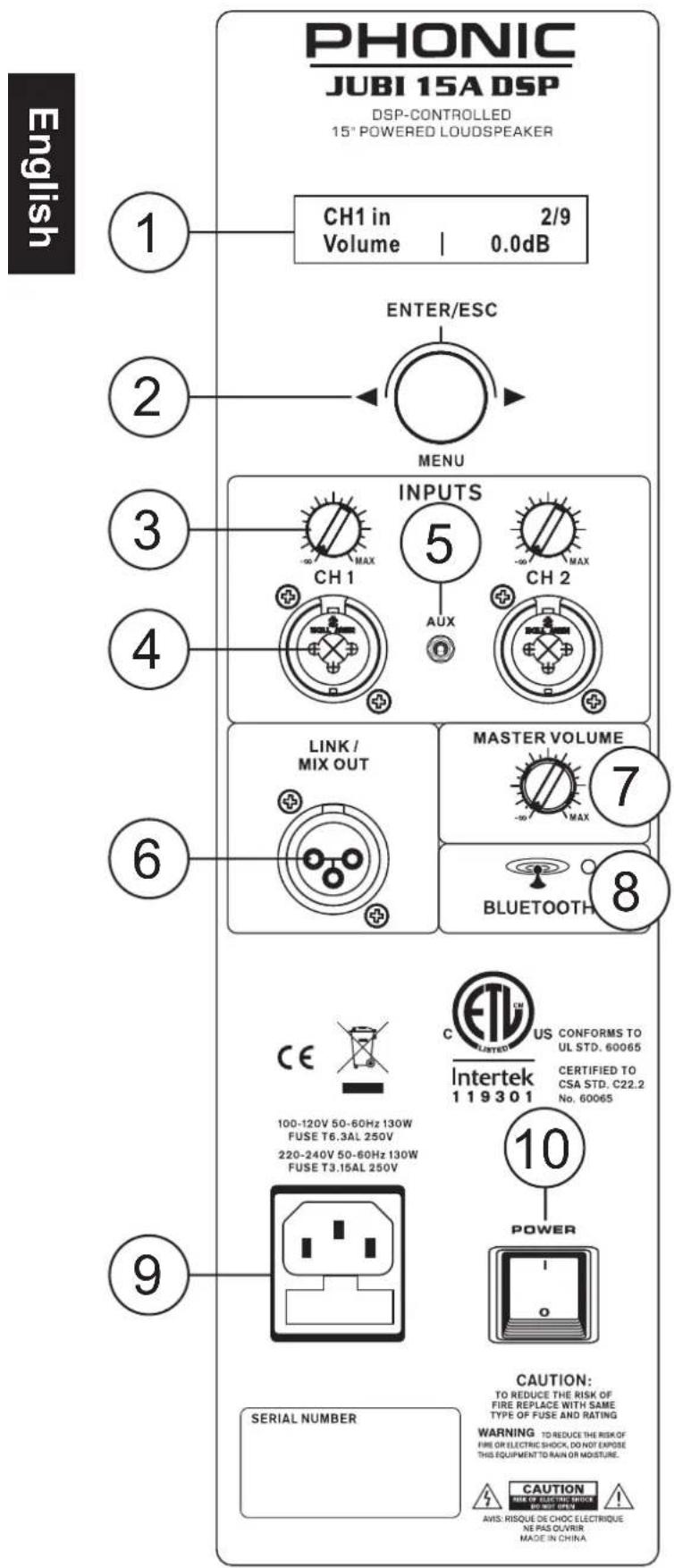
SYSTEM OVERVIEW
1. DSP Display
This screen will display the functions of the internal DSP. Use the DSP MENU control to adjust these functions.
2. DSP MENU Control
This control is used to control the digital signal processor. Turn to the left or right to scroll through menus and adjust parameters. Push the button in to select the parameter you wish to adjust and again to confirm. Push and hold the button to return to the main menu.
3. Mic/Line Gain Controls
These controls allows you to adjust the incoming signals from the Mic/Line Combo input jacks. Setting them to the left-most position ( - dB) will completely cut the incoming signal, whereas the right-most position (MAX) will add 10dB of boost to the signal. Each input also has a volume control available within the DSP software.
4. Combo (XLR / 1/4") Input Jacks
These inputs are design to accept mic and line level signals through these combination jacks. They accept either XLR or 14 " phone jacks (balanced or unbalanced). The level of this input's signal is affected by the corresponding mic/line gain control.
5. AUX In
This 1/8" mini-stereo jack is for connection of auxiliary devices to the Jubi DSP. This may include a CD or MP3 player through use of a mini-stereo connector or y-cable. The volume of this input can be adjusted through the Jubi DSP's software.
6. Link/Mix Output
The XLR line output will send the Jubi's main mix, allowing the signals to be employed by additional speakers or other devices. Do not under any circumstances connect this output connector to the input of the same unit. This will cause an audio loop at frequencies and levels that will be extremely unpleasant.
This output can be used in conjunction with subwoofers by simply utilizing the subwoofer low-pass filter function activated within the software.
7. Master Volume
This rotary control will adjust the final output level of the Jubi DSP loudspeaker. The Jubi DSP also features an AMP out volume control within the DSP software.
8. Bluetooth Link Indicator
This LED indicator will light up whenever a connection is established between another Bluetooth device and the Jubi. The Jubi DSP's Bluetooth can be found on your phone or tablet as "Phonic.BT" and the password is 0000. When Bluetooth is unpaired, the word "unpaired" will appear on screen beside the BT name.
9. AC Power Connector
Connect the included AC power cable to this connector and into a suitable power source allowing the unit to be powered. This connector also contains the Jubi's fuse. If the fuse blows, please replace it with an identical fuse as listed directly above the AC connector.
10. Power Switch
This switch will turn the Jubi DSP speaker on and off.
DSP OVERVIEW
Each channel has its own set of options available through the DSP. These are all visible through the LCD display and controlled by the DSP MENU control. For a full list of available functions, check the DSP PARAMETERS chart.
Push the DSP MENU control to select the option you wish to adjust, turn the control left or right to adjust the parameter, and push again to confirm. Push and hold the DSP MENU control to return to the main menu.
ON/OFF
This option can turn the corresponding channel ON and OFF. This can be found on all input and output channels. On the BTin function, this will also activate Bluetooth.
VOLUME
The volume of the currently selected channel (CH1, CH2, BT in, AUX in, MIX out, AMP out) can be adjusted here. The volume can be adjusted anywhere between -50 and +6 dB.
HPF (High Pass Filter)
Activating a high pass filter on channels 1 and 2 will help to remove stage rumble and other low-frequency background noise often picked up by microphones. The HPF features an on/off option. Directly below this is a frequency option where the high pass filter's cut-off frequency can be adjusted between 50 and 250Hz. This feature is not available on the Bluetooth or AUX channels.
BASS
Adjust low-frequency audio for any of the input channels (CH1, CH2, BT and AUX) using the BASS control. The level of bass can be adjusted between -12 and +12 dB. The bass control provides a shelving curve for the low-frequency audio below 250 Hz.
MID LEVEL
The level of the Jubi DSP's mid EQ allows for anywhere between -12 and +12dB of cut or boost to be applied to the signal. The mid EQ is only found on the CH1 and CH2 inputs.
MID FREQUENCY
Unlike the treble and bass controls, the mid frequency control offers a bell-curve for equalization. The Jubi DSP's mid EQ center-frequency can be adjusted by the user. This option allows the center-frequency to be adjusted between 0.5 and 5 kHz.
TREBLE
The treble of each input channel (CH1, CH2, BT in, AUX in) can be adjusted through this option. The Jubi DSP allows for anywhere between -12 and +12 dB of cut/boost to be applied to high-frequency signals. This treble control offers shelving boost/cut for signals over 2.5kHz.
EFXsend
Adjust the level of the EFXsend to send the corresponding channel (CH1, CH2, BT in or AUX in) to the internal REVERB processor. The EFXsend on each channel can be adjusted between -50 and 0 dB. Turning the control past the -50dB will turn the EFXsend off.
| 1. CH1 in2. CH2 in | |
| CH1 inOFF ON | 1/9ON | |
| CH1 inVolume | 2/90.0dB | |
| CH1 inHPF | 3/9OFF | |
| CH1 inHPF | 4/975Hz | |
| CH1 inBass | 5/90.0dB | |
| CH1 inMid | 6/90.0dB | |
| CH1 inMid | 7/92.5kHz | |
| CH1 inTreble | 8/90.0dB | |
| CH1 inEFXsend | 9/9-10.0dB | |
| REVERB OFF ON | 1/4 OFF |
| REVERB Volume | 2/4 -6.0dB |
| REVERB Time | 3/4 3.0Sec |
| REVERB Type | 4/4 Room |
| GEQ OFF ON | 1/8 ON |
| GEQ1 60Hz | 2/8 0.0dB |
| MIX out Subwoof | 4/6 250Hz |
| MIX out Delay | 6/6 100mS |
| AMP out Limit | 4/7 Fast |
| AMP out Xover | 7/7 1.7kHz |
REVERB ON/OFF
Turn the reverb effect on and off here.
REVERB VOLUME
The reverb volume can be adjusted here. The reverb's volume can be adjusted between -50 and 0 dB. Turning the volume below -50 will turn the reverb off. The reverb effect is sent directly to the MIX and AMP output signals. Users can opt to provide a mix of reverb signal and unprocessed signal by balancing the Reverb volume and the main input volumes.
REVERB TIME
The time parameter of the reverb effect can be adjusted here. The reverb time can be adjusted between 100 milliseconds and 10 seconds.
REVERB TYPE
The Jubi DSP has Room, Hall and Plate Reverb effects all available. Select the type of reverb you wish to use in this submenu.
GEQ ON/OFF
Activate and deactivate the Graphic Equalizer here. The Jubi DSP's GEQ is applied to the AMP output signal.
GEQ1 through GEQ7
Each of the bands on the Jubi DSP's GEQ are represented by their own page in the software. The center-frequency of each of the bands will appear on screen. Users can adjust the amount of cut/boost between -12 and +12 dB for each independent band.
MIX out SUBWOOFER
The subwoofer low-pass filter of the MIX out can be turned on and off using the on/off feature, while the cut-off frequency can be adjusted between 50 and 350 Hz. Frequencies above the cut-off frequency will be removed from the mix output sent through the XLR jack on the rear of the Jubi DSP. Activating the subwoofer will deactivate the delay function.
MIX out DELAY
An output delay can be applied to the Jubi DSP's MIX out and AMP out. Adding a delay to output channels can help to compensate for distance between speakers in large multi-speaker setups. Applying a delay time of one millisecond for every foot that the speaker is away from the stage is the general rule of thumb in this application (or 3 milliseconds per meter). The Jubi DSP's delay time can be adjusted between 1 millisecond and 650 milliseconds. The delay function is not available if the Subwoofer is active.
The AMP out menu features many of the features previously listed (including the volume & delay) plus the following:
AMP out LIMITER
The main amplifier output features a limiter circuit that will cut off excessive signals to help protect your speakers and help make better use of your amplifier. Users can adjust the limiter's response time between fast, mid, and slow. A fast limiter will limit all signals, while a slow response time will allow punchy signals to still make it through the limiter.
AMP out CROSSOVER
The Jubi DSP's crossover frequency can be adjusted by the user. The crossover point can be adjusted between 1 and 8 kHz).
Out of the box, the AMP out crossover point will be set to 1.6kHz, as we find this is an optimal position for best response. It should be noted that initializing the unit will return the crossover point to the internal default position of 2.9kHz. Phonic recommends users manually adjust the crossover point back to 1.6kHz for best results.
AMP SHUTDOWN
The amp shutdown time is selectable between 1 minute and 90 minutes. This will determine the length of time the system will wait without a signal before the amp automatically shuts down. An input signal (above -56dB) will activate the amplifier once again.
SCENES
Within the SYSTEM menu you will find 4 independent "Scene" storage slots. Select the Scenes to 'Save' or 'Load' the corresponding scene slot. This option also features an "Esc" option in the event you don't wish to store or recall.
INITIALIZE
Within the SYSTEM menu, select "Initialize" followed by "Yes" to restore the Jubi DSP to factory default settings. Please note that initializing the unit will return the default crossover point to 2.9kHz. We recommend adjusting this to 1.6kHz for best results.
BACKLIGHT
The backlight of the Jubi DSP's screen can be adjusted within the SYSTEM menu. Dimming the light will stop the screen from distracting the audience.
MONITOR
When not editing functions, users can bring up any of the monitoring screens. These give real-time information on system performance, including input levels, output levels or internal amp temperature.
PROTECTION
The internal amplifier offers numerous protection circuits that ensure your Jubi DSP works efficiently. When the protection circuitry kicks in, a warning will appear on screen.
A Peak warning will appear on screen (as "PK.") in the event that the channel you are currently viewing is receiving an excessive signal. This applies to any of the inputs (CH1, CH2, BT in, AUX in) or outputs (MIX out and AMP out). In the event that a peak warning appears on screen, Phonic suggests reducing the level of the incoming signal(s), reducing the gain or simply lowering the level of the channel, depending on the cause of the peak.
When the internal temperature reaches 70 degrees Celsius (158 degrees Fahrenheit), the output level will be cut by 6 dB to help compensate. When the unit reaches 80 degrees Celsius (176 degrees Fahrenheit), the amp will shut down. Normal operation will resume when the temperature is reduced once again.
SYSTEM 1/6 Scene 1 | Esc
SYSTEM 5/6 Initial | No
LCD 6/6 BL.
Temperature 29°C
MAIN MENUS
The below 10 options make up the main menu of the Jubi DSP. For detailed information on each of these menus and their subsequent options, please consult the DSP Parameters table on the next page.
- CH1 in
- CH2 in
- BT in
- AUX in
- EFX
- GEQ
- MIX out
- AMP out
- SYSTEM
- MONITOR
DSP PARAMETERS
Parameter Details
| 1. CH1 | On/Off On/Off | |
| Volume | OFF, -50 to -20dB in 1 dB steps, -20 to -10dB in 0.5dB steps, -10 to +6dB in 0.2 dB steps | |
| HPF ON/OFF, 50 to 250 Hz in 50Hz steps | ||
| Bass (250Hz Shelf) -12 to +12 dB in 0.5dB steps | ||
| Mid -12 to +12 dB in 0.5dB steps, 0.5 to 5 kHz in 0.1kHz steps | ||
| Treble (2.5Hz Shelf) -12 to +12 dB in 0.5dB steps | ||
| EFXsend | OFF, -50 to -20dB in 1 dB steps, -20 to -10dB in 0.5dB steps, -10 to +0dB in 0.2 dB steps | |
| 2. CH2 | On/Off On/Off | |
| Volume | OFF, -50 to -20dB in 1 dB steps, -20 to -10dB in 0.5dB steps, -10 to +6dB in 0.2 dB steps | |
| HPF ON/OFF, 50 to 250 Hz in 50Hz steps | ||
| Bass (250Hz Shelf) 12 to +12 dB in 0.5dB steps | ||
| Mid -12 to +12 dB in 0.5dB steps, 0.5 to 5 kHz in 0.1kHz steps | ||
| Treble (2.5Hz Shelf) -12 to +12 dB in 0.5dB steps | ||
| EFXsend | OFF, -50 to -20dB In 1 dB steps, -20 to -10dB in 0.5dB steps, -10 to +0dB in 0.2 dB steps | |
| 4. AUX in | On/Off On/Off | |
| Volume | OFF, -50 to -20dB in 1 dB steps, -20 to -10dB in 0.5dB steps, -10 to +6dB in 0.2 dB steps | |
| Bass (250Hz Shelf) -12 to +12 dB in 0.5dB steps | ||
| Treble (2.5Hz Shelf) -12 to +12 dB in 0.5dB steps | ||
| EFXsend | OFF, -50 to -20dB in 1 dB steps, -20 to -10dB in 0.5dB steps, -10 to +0dB in 0.2 dB steps | |
| 3. Bluetooth | On/Off On/Off | |
| Volume | OFF, -50 to -20dB in 1 dB steps, -20 to -10dB in 0.5dB steps, -10 to +6dB in 0.2 dB steps | |
| Bass (250Hz Shelf) -12 to +12 dB in 0.5dB steps | ||
| Treble (2.5GHz Shelf) -12 to +12 dB in 0.5dB steps | ||
| EFXsend | OFF, -50 to -20dB in 1 dB steps, -20 to -10dB in 0.5dB steps, -10 to +0dB in 0.2 dB steps | |
| 5. EFX | On/Off On/Off | |
| Volume | OFF, -50 to -20dB in 1 dB steps, -20 to -10dB in 0.5dB steps, -10 to +0dB in 0.2 dB steps | |
| Time 100 mSec to 10 Sec in 100 mSec steps | ||
| Type Room, Hall, Plate | ||
| 6. GEQ | On/Off On/Off | |
| GEQ1 to GEQ7 (60Hz, 120Hz, 360Hz, 1kHz, 2.5kHz, 7kHz, 16kHz) | -12 to +12 dB in 0.5dB steps | |
| 7. MIX out | On/Off On/Off | |
| Volume | OFF, -50 to -20dB in 1 dB steps, -20 to -10dB in 0.5dB steps, -10 to +6dB in 0.2 dB steps | |
| Subwoofer On/Off, LPF: 50 to 350Hz in 50Hz steps | ||
| Delay | On/Off, 0 to 50mS in 1mS steps, 50 to 100mS in 2mS steps, 100 to 200mS in 5mS steps, 200 to 650mS in 10mS steps | |
| 8. AMP out | On/Off On/Off | |
| Volume | OFF, -50 to -20dB in 1 dB steps, -20 to -10dB in 0.5dB steps, -10 to +6dB in 0.2 dB steps | |
| Limit Slow, Mid, Fast | ||
| Delay | On/Off, 0 to 50mS in 1mS steps, 50 to 100mS in 2mS steps, 100 to 200mS in 5mS steps, 200 to 650mS in 10mS steps | |
| Amp Shutdown 1 minute to 90 minutes | ||
| Xover (Frequency) 1 to 8kHz in 0.1kHz steps (default: 2.9kHz, recommended: 1.6kHz) | ||
| 9. System | Scene 1 - 4 | Save, Load, Esc |
| Initialize | Restore Factory Defaults (Yes or No?) | |
| BL (Back Light) 1 to 10 (dim to bright), screen off | ||
| 10. Monitor | CH1, CH2, BT, AUX, AMPout, MIXout | Monitors current signal level |
| Temperature | Monitors internal system temperature | |
SPECIFICATIONS
Jubi 12A DSP Jubi 15A DSP
| Amp Type | Tweter: Class ABWoofer: Class D | Tweter: Class ABWoofer: Class D |
| Continuous Power 700 Watts 700 Watts | ||
| Peak Power 1400 Watts 1400 Watts | ||
| Minimum THD 0.01% 0.01% | ||
| Maximum SPL 126 dB 126 dB | ||
| Frequency Response 56 Hz - 20 kHz 53 Hz - 20 kHz | ||
| LF Size 12" | 15" | |
| LF-Magnet Material | Ferrite | Ferrite |
| LF-VC Diameter | 2.6 inch | 2.6 inch |
| HF-Diaphragm Size & Material | 1" Titanium | 1" Titanium |
| HF-Magnet Material | Ferrite | Ferrite |
| Horn Coverage Pattern | 60 x 100 degree | 60 x 100 degree |
| Input Connectors | Combo (XLR & 1⁄4" TRS), Mini-Stereo | Combo (XLR & 1⁄4" TRS), Mini-Stereo |
| Output Connectors | XLR | XLR |
| Enclosure Material | Polymer | Polymer |
| Grille Gauge | 1.2 mm | 1.2 mm |
| Handles | 2 on sides | 2 on sides |
| Monitor Position | Yes - Two sides | Yes - Two sides |
| Mounting | Stand mounting with 35mm pole socket | Stand mounting with 35mm pole socket |
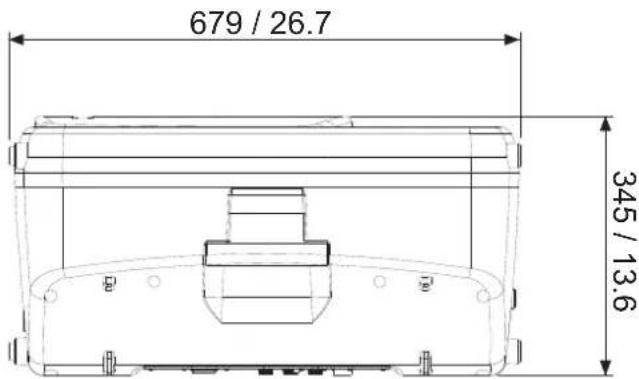
| Dimensions (HxWxD) | 559 x 370 x 277 mm(22" x 14.56" x 10.9") | 680 x 410 x 330 mm(26.8" x 16.1" x 13") |
| Net Weight | 14.5 kg (32 lbs) | 20.2 kg (44.5 lbs) |
SERVICE AND REPAIR
For replacement parts, service and repairs please contact the Phonic distributor in your country. Phonic does not release service manuals to consumers, and advice users to not attempt any self repairs, as doing so voids all warranties. You can locate a dealer near you at http://www.phonic.com/where-to-buy/.
WARRANTY INFORMATION
Phonic stands behind every product we make with a no-hassles warranty. Warranty coverage may be extended, depending on your region. Phonic Corporation warrants this product for a minimum of one year from the original date of purchase against defects in material and workmanship under use as instructed by the user's manual. Phonic, at its option, shall repair or replace the defective unit covered by this warranty. Please retain the dated sales receipt as evidence of the date of purchase. You will need it for any warranty service. No returns or repairs will be accepted without a proper RMA number (return merchandise authorization). In order to keep this warranty in effect, the product must have been handled and used as prescribed in the instructions accompanying this warranty. Any tampering of the product or attempts of self repair voids all warranty. This warranty does not cover any damage due to accident, misuse, abuse, or negligence. This warranty is valid only if the product was purchased new from an authorized Phonic dealer/distributor. For complete warranty policy information, please visit http://www.phonic.com/warranty/.
CUSTOMER SERVICE AND TECHNICAL SUPPORT
We encourage you to visit our online help at http://support.phonic.com/. There you can find answers to frequently asked questions, tech tips, driver downloads, returns instruction and other helpful information. We make every effort to answer your questions as soon as possible.
support@phonic.com
http://www.phonic.com
PHONIC
MANUAL DEL USUARIO
CONTENIDO
INTRODUCCIÓN....1
CARACTERISTICAS....1
SOLICITUD....1
RESUMEN DEL SISTEMA....2
PANORAMA GENERAL DEL DSP....3
CONECTIVIDAD BLUETOOTH....5
PARAMETROS DSP....6
ESPECIFICACIONES....7
APÉNDICE
DIMENSIONES....1
natural_image
Line drawing of a standing-mounted device with tripod base (no text or symbols)FCC Caution: To assure continued compliance, any changes or modifications not expressly approved by the party responsible for compliance could void the user's authority to operate this equipment. (Example - use only shielded interface cables when connecting to computer or peripheral devices).
THIS DEVICE COMPLIES WITH PART 74 OF THE FCC RULES. This equipment complies with FCC RF radiation exposure limits set forth for an uncontrolled environment.


support@phonic.com
http://www.phonic.com
PHONIC
DIMENSIONS DIMENSIONES
Jubi 12A DSP
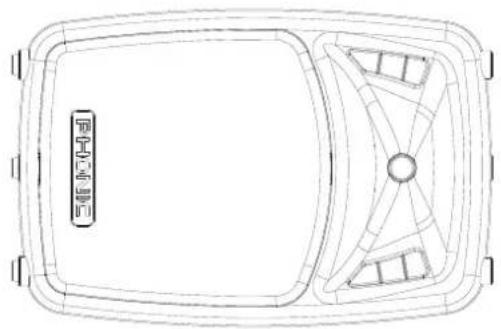
natural_image
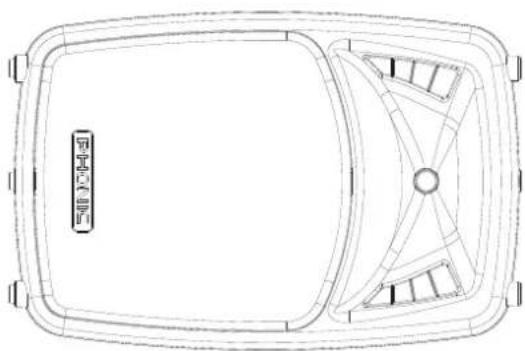
Top-down line drawing of a rectangular device with internal compartments and a central hub (no text or symbols)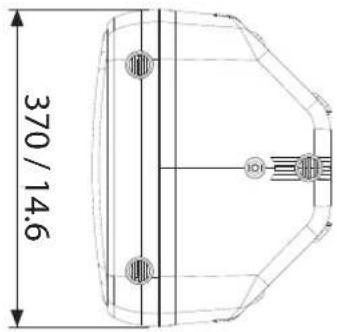
Jubi 15A DSP
natural_image
Top-down line drawing of a rectangular frame with internal geometric patterns and no visible text or symbols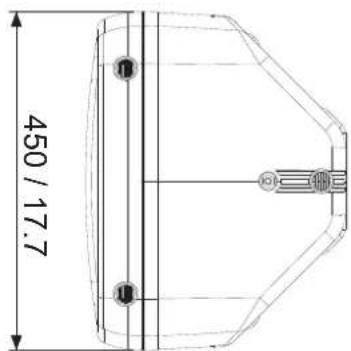
- IMPORTANT SAFETY INSTRUCTIONS
- INTRODUCTION
- Woofers and Tweeters Engineered Right
- Advanced Electronics. Advanced Reliability
- FEATURES
- APPLICATION
- BLUETOOTH CONNECTIVITY
- SYSTEM OVERVIEW
- DSP Display
- DSP MENU Control
- Mic/Line Gain Controls
- Combo (XLR / 1/4") Input Jacks
- AUX In
- Link/Mix Output
- Master Volume
- Bluetooth Link Indicator
- AC Power Connector
- Power Switch
- DSP OVERVIEW
- ON/OFF
- VOLUME
- HPF (High Pass Filter)
- BASS
- MID LEVEL
- MID FREQUENCY
- TREBLE
- EFXsend
- REVERB ON/OFF
- REVERB VOLUME
- REVERB TIME
- REVERB TYPE
- GEQ ON/OFF
- GEQ1 through GEQ7
- MIX out SUBWOOFER
- MIX out DELAY
- AMP out LIMITER
- AMP out CROSSOVER
- AMP SHUTDOWN
- SCENES
- INITIALIZE
- BACKLIGHT
- MONITOR
- PROTECTION
- MAIN MENUS
- SERVICE AND REPAIR
- WARRANTY INFORMATION
- CUSTOMER SERVICE AND TECHNICAL SUPPORT
- MANUAL DEL USUARIO
- CONTENIDO
- APÉNDICE
- DIMENSIONS DIMENSIONES
Brand : PHONIC
Model : JUBI 12A DSP
Category : Pregnant