DJ900BT - Loudspeaker Reflexion - Free user manual and instructions
Find the device manual for free DJ900BT Reflexion in PDF.


| Type | Portable Bluetooth Speaker |
| Model | DJ900BT |
| Brand | Reflexion |
| Dimensions (W x H x D) | 200 x 100 x 100 mm |
| Weight | 0.9 kg |
| Power Supply | Built-in rechargeable lithium-ion battery (3.7V, 2000mAh), USB charging (5V, 1A) |
| Battery Life | Up to 8 hours at medium volume |
| Charging Time | Approximately 3-4 hours |
| Bluetooth Version | Bluetooth 5.0 |
| Wireless Range | Up to 10 meters (30 ft) |
| Audio Output Power | 10W RMS |
| Frequency Response | 80 Hz – 18 kHz |
| Driver Size | 2x 2.5" full-range drivers |
| Inputs | Bluetooth, AUX 3.5 mm, USB (for playback), MicroSD card slot |
| Radio | Built-in FM tuner |
| Controls | Power, Volume +/-, Play/Pause, Next/Previous, Mode, EQ presets |
| Hands-free Calling | Yes, with built-in microphone |
| Water Resistance | IPX5 (splash-proof) |
| Care Instructions | Wipe with a soft, dry cloth. Do not use abrasive cleaners or immerse in water. |
| Safety Warnings | Do not expose to extreme temperatures. Use only the supplied charging cable. Keep away from children. |
| Included Accessories | USB charging cable, AUX cable, user manual |
Frequently Asked Questions - DJ900BT Reflexion
User questions about DJ900BT Reflexion
0 question about this device. Answer the ones you know or ask your own.
Ask a new question about this device
Download the instructions for your Loudspeaker in PDF format for free! Find your manual DJ900BT - Reflexion and take your electronic device back in hand. On this page are published all the documents necessary for the use of your device. DJ900BT by Reflexion.
USER MANUAL DJ900BT Reflexion
natural_image
Exterior view of a portable electronic device with a handle and control panel (no visible text or symbols)natural_image
Black and white icon of a propeller on a stand (no text or symbols)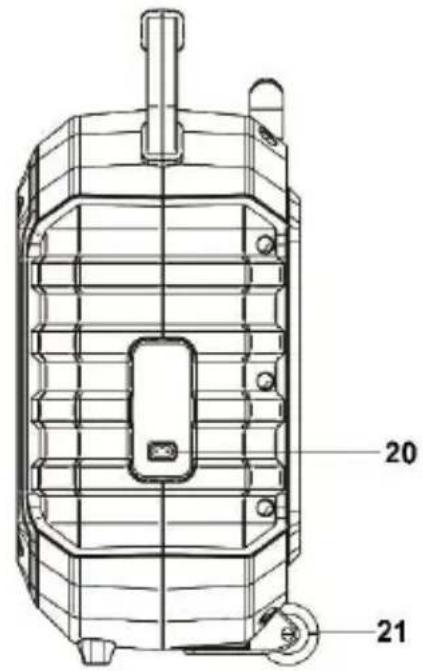
D
- AUSZIEHGRIFF
- GRIFF
- 6,3 mm MIKROFON-BUCHSE 2
- 6,3 mm MIKROFON-BUCHSE 1
- USB-BUCHSE
- 3,5 mm AUX-IN ANSCHLUSS
- LAUTSTÄRKEREGLER (-) / (+)
- LAUTSTÄRKEREGLER MIKROFON
- BLUETOOTH KOPPLUNGSANZEIGE
- LADE-ANZEIGE
- LCD DISPLAY
- FUNCTION / CASTE
- P-MODE/LIGHT TASTE
- FOLD/10.+ TASTE
- EQ/ECHO TASTE
- TASTE
- TASTE
- /PAIR TASTE
- LAUTSPRECHER
- AC NETZ EINGANG
- ROLLEN
BASISFUNKTION
natural_image
Exterior view of a portable electronic device with a handle and control panel (no visible text or symbols)Read the operating instructions carefully before using the device for the first time and keep the instructions for future reference.

The exclamation mark in a triangle draws the user's attention to important operating and maintenance instructions (service) in this manual which must be followed.
The lightning bolt in the triangle alerts the user to "dangerous voltages" on some components inside the device.
To avoid the risk of electric shock, do not open the housing under any circumstances. There are no user-serviceable parts inside. Repairs may only be carried out by an authorized specialist workshop.

This device is designed for 230V \~ 50Hz mains voltage. If the device is not used for a long period of time, pull the plug out of the socket.

Do not expose the device to moisture or rain.

Do not switch the system on until you have carefully checked all connections.

natural_image
Black and white icon of a four-blade propeller on a stand (no text or symbols)Set up the device in such a way that an undisturbed fresh air supply is always ensured. Never place the device on carpets or near curtains, and do not build it into bookshelves.

Do not expose the device to direct sunlight or heat sources.

READ ALL INSTRUCTIONS BEFORE USE Always observe basic safety precautions when using this Bluetooth speaker system with microphone, especially when children are present.
SAFETY INSTRUCTIONS
1) Read these operating instructions before using the device for the first time.
2) Keep these operating instructions in a safe place for future reference.
3) The device should not be exposed to dripping or splashing, and no objects filled with liquids, such as vases, should be placed on the product. Use only in dry regions.
4) Do not place open flames such as candles on the device and keep the device away from open flames.
5) Children should be supervised to ensure that they do not play with the device.
6) Ventilation must not be impeded by covering the ventilation openings.
7) Make sure that the device is connected to an AC 100-240V 60 / 50Hz socket. The use of higher voltages can lead to malfunctions in the device. Switch off the device before disconnecting it from the mains in order to switch it off completely.
8) If your hands are wet or damp, do not touch the power plug.
9) Do not use force to insert the plug into the socket.
10) Only use accessories and spare parts that have been approved by the manufacturer.
11) Install the device according to the manufacturer's instructions.
12) Only set up the device in a sufficiently ventilated area. Place the device on a flat and stable surface.
13) Do not expose to temperatures above 40^ C.
14) At the installation site, make sure that 30 cm to the rear and the top of the device and 5 cm from each side are adhered to.
15) Do not press the buttons of the device with excessive force as this can lead to damage.
16) Dispose of batteries and rechargeable batteries in an environmentally friendly manner.
17) Always ensure that the device is unplugged from the power cord before transport or cleaning. Only clean the device with a dry cloth.
18) In the event of a thunderstorm or if the device will not be used for a long period of time, disconnect the device from the power supply.
19) This product has no user serviceable parts. Do not try to repair this product yourself. Only qualified service personnel are allowed to carry out maintenance. In the event of a defect, report the product to your dealer.
20) Do not allow anyone, especially children, to push anything into holes, slots, or any other openings in the device, as this could result in a fatal electric shock.
21) Do not mount this unit on a wall or ceiling.
22) Do not place the device near televisions, speakers, or other objects that generate strong magnetic fields.
23) Do not leave the device unattended when it is in use.
NOTE:
If the device is not going to be used for a long period of time, pull the power plug out of the socket and press the toggle switch to switch the device off.
ACCESSORIES
DJ900BT x1
User manual x1
Microphone (wired) x1
AC power cord x1
POWER SUPPLY
This device works with a rechargeable battery. The capacity is 2600mAh. Charge the device fully (approx. 5 hours) before using the device for the first time.
Playback time is approx. 3 hours after a full charge at 50% volume. Disconnect the device from the power cord to switch to battery operation.
BATTERY CHARGING
- Connect the power cord to the device and an electrical outlet.
• Charging: charging indicator lights up red.
• Full battery: charge indicator lights up green.
• Low battery: charge indicator flashes red.
- The charging process can take up to 5 hours, depending on the state of charge of the battery.
- When the charging process is complete, pull the power cable out of the socket and the device.
Note:
- Do not change the battery, only qualified personnel may carry out this process.
- It is recommended to fully charge the battery once every 2-3 months to avoid damaging the battery.
NAME OF THE OPERATING ELEMENTS
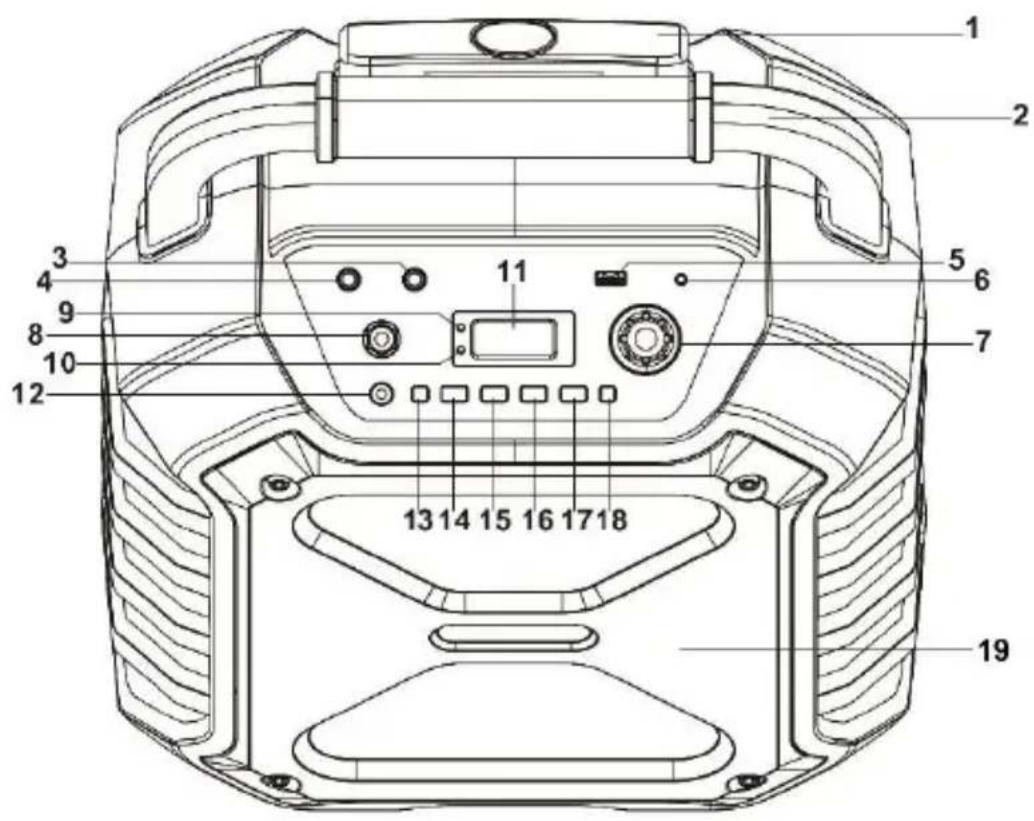
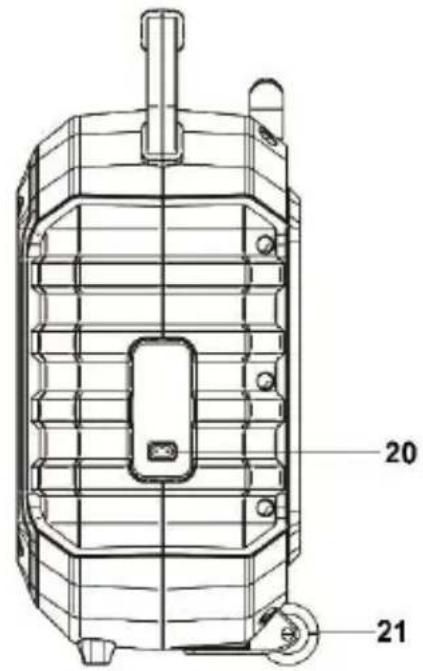
- EXTENDING HANDLE
- HANDLE
- 6.3 mm MIC JACK 2
- 6.3 mm MIC JACK 1
- USB PORT
- 3.5 mm AUX-IN CONNECTION
- VOLUME CONTROL (-) / (+)
- MICROPHONE VOLUME CONTROL
- BLUETOOTH PAIRING INDICATOR
- CHARGE INDICATOR
- LCD DISPLAY
- FUNCTION / BUTTON
- P-MODE / LIGHT BUTTON
- FOLD/10.+ KEY
- EQ/ECHO BUTTON
- BUTTON
- BUTTON
- ▶PAIR BUTTON
- SPEAKER
- AC SOCKET
- ROLES
BASIC FUNCTION
SWITCH THE DEVICE ON / OFF
- To switch the device on, press and hold the FUNCTION / button.
- To switch the device off, press and hold the FUNCTION / button.
STANDBY MODE
The device automatically switches to standby mode after approx. 15 minutes if there is no audio signal. To switch the device on again, press the FUNCTION/ button.
NOTE:
Note that a very low audio setting can also have the effect that the device switches to standby mode after 15 minutes.
SET FUNCTION MODE
- To change the function mode, press the FUNCTION / ⏻ button repeatedly.
- The following functions are available:
USB / Bluetooth / AUX
ADJUSTING THE VOLUME
- Turn the volume control VOLUME - / + on the device to increase or decrease the volume.
- Turn the microphone MIC VOL volume control on the device to increase or decrease the volume of the microphone.
- This device has a built-in equalizer system.
- Press the EQ button on the device to select the desired setting.
- The following settings are available: FLAT, POP, CLASSIC, JAZZ, ROCK, Bass
MICROPHONE ECHO SETTING
- Press and hold the ECHO button on the device to switch the microphone echo effect "On" or "Off".
Note:
The function can only be used when the microphone is connected.
LED EFFECT SETTINGS
- Press and hold the P-MODE / LIGHT button on the device to switch the setting "On" or "Off".
- The LED lighting glows in time with the music and adapts to the volume.
USB MODE
- Press the FUNCTION / ⏻ button on the device to select the USB mode.
- Insert a USB stick into the USB socket (USB sticks up to max. 32GB are supported).
- Playback starts automatically from track 1.
Control buttons:
▶/ PAIR: Play / pause
▶: Next track
Previous track
▶(hold): Fast forward
(hold): Rewind
FOLD / 10. +: Next track +10
FOLD / 10. + (hold): Next folder
Note:
• Devices other than USB sticks cannot be used with this device.
- The use of USB extension cables is not recommended.
- Do not pull the USB stick out of the device during playback.
- Not suitable for charging smartphones etc.
SET PLAYBACK MODE:
- During playback, press the P-MODE button repeatedly until the desired playback mode is set.
- A corresponding symbol is shown in the display when a playback mode has been selected.
-
The following playback modes are available.
-
REPEAT A TITLE:
- REPEAT ALL TITLES:
- REPEAT FOLDER: FOLDER
• RANDOM PLAYBACK:
RAND


BLUETOOTH MODE
- Press the FUNCTION / ⏻ button repeatedly until "bt" appears on the display.
- The "PAIR indicator" flashes at high speed.
- Switch on the Bluetooth function on the external device and start the scan function.
- Select the "DJ900BT" device to connect the devices. When prompted for a password, enter the password 0000.
- The “pair indicator” stops flashing and is now lit permanently. The external device is now connected to the DJ900BT.
- Press the ▶ / PAIR button to start playback.
- The basic volume is specified by the connected device. You can adjust the volume with the Volume control.
- Press and hold the ▶/PAIR button to disconnect Bluetooth.
Note:
- Bluetooth works best within 10 meters outdoors.
- After switching on the device, the DJ900BT connects to the last paired device, if within range.
- Can only receive Bluetooth, not send it.
AUX MODE
- Press the FUNCTION / ⏻ button repeatedly until "AUX" appears on the display.
- Connect your external audio device with a 3.5mm audio cable to the AUX port of the DJ900BT (audio cable is not included).
- The basic volume is specified by your external device. You can adjust the volume with the Volume control on the device.
- You can only control playback with your external audio device.
MICROPHONE
- The microphone is available in any mode.
- Connect the microphone to the "6.3 mm microphone connector".
- Turn the MIC VOL. Control on the device to increase or decrease the volume of the microphone.
- Press and hold the ECHO button to switch the echo effect of the microphone "On" or "Off".
TECHNICAL SPECIFICATIONS
General
Power supply AC100-240V \~ 60 / 50Hz
Power consumption 15W
Max. Music power 400W
Max. Sound pressure 90dB
AUX in socket 3.5mm
Microphone jack 2x 6.3mm
Operating temperature 5 °C - + 40 °C
Unit dimensions (L / D / H) 370 x 230 x 524mm
Weight 5,8Kg
USB
Max. USB stick size 32GB Max.
Supported USB tracks 999 tracks
Max.supported folders 99 folder
Supported playback quality 8 - 320 kbit / s
Bluetooth
Frequency 2.4GHz
Communication system Bluetooth standard version 5.0
Reception range 10 meters (line of sight)
Compatible Bluetooth profiles Advanced Audio Distribution Profile (A2DP)
Battery pack
Battery capacity 2600mAh / 7,4V
Battery type Lithium battery
All statements without guarantee.
Design and specification are subject to change without notice.
DISPOSAL INSTRUCTIONS
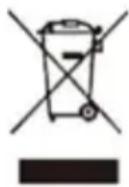
This symbol on the device and / or accessories means that the device and electrical and electronic devices must be disposed of separately from your household waste at the end of their service life. There are separate collection systems for recycling in the EU. For more information, please contact the local authority or the dealer where you purchased the product.
SIMPLIFIED EU DECLARATION OF CONFORMITY
UltraMedia GmbH & Co. Handels KG hereby declares that the radio system type DJ900BT complies with Directive 2014/53 / EU.
The full text of the EU Declaration of Conformity is available at available at the following internet address.
We hope you enjoy using the device
Your UltraMedia team
CE
WARRANTY
Dear Customer,
Thank you for choosing one of our products. Our products undergo precise quality control in the course of production. If one of our devices gives you cause for complaint, or you have questions about one of our devices, please call our customer support.
We give a 36 month warranty on TV and SAT devices, and a 24 month warranty on portable DVD and audio devices from the date of purchase. Outside of the warranty, we offer you a paid repair based on a cost estimate. Please contact our customer support before submitting.
The warranty relates to material and production defects. Your device will be repaired or replaced during the warranty period. Unfortunately, UltraMedia cannot reimburse the purchase price. Damage caused by improper use, the use of third-party accessories, falls, dust, water damage and signs of wear (e.g. scratches, optical wear and tear) caused by the customer or external influences are excluded from the guarantee.
In order to assert the warranty claims, send the device with all accessories, a copy of the invoice and the description of the fault to the address given below. Devices that do not have a proof of purchase cannot be guaranteed. Please do not forget to include your full address and a telephone number / email address for any queries.
Shipping to us takes place at your own expense. Unpaid parcels cannot be accepted and are returned to the sender.
Please pack the device securely for transport. UltraMedia assumes no liability for damage in transit that occurs on the way to us. After receiving your submission, we will process your device as soon as possible and send it back to you.
Before sending your device in, please contact our customer support or your specialist dealer, as many problems can also be solved over the phone.
natural_image
Exterior view of a portable electronic device with a handle and control panel (no visible text or symbols)natural_image
Simple black silhouette of a cloud with raindrops and a small wavy line above it (no text or symbols)natural_image
Black and white icon of a propeller on a stand (no text or symbols)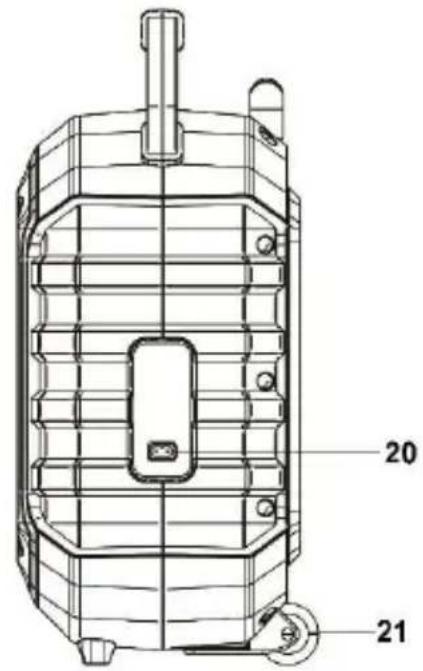
- VYSÚVACIA RUKOVÄT
- RUKOVÄT
- ZÁSUVKA MIKROFÓNU 6,3 mm
- ZÁSUVKA MIKROFÓNU 3,5 mm
- Zásuvka USB
- KONEKTOR AUX-IN 3,5 mm
- OVLÁDAČ HLASITOSTI (-) / (+)
- OVLÁDAČ HLASITOSTI MIKROFÓNU
- INDIKÁTOR PÁROVANIA BLUETOOTH
- INDIKÁTOR LED NABÍJANIA
- DISPLEJ LCD
- TLAČIDLO FUNKCIÍ
- TLAČIDLO P-MODE / LIGHT (Režim P/Svetlo)
- TLAČIDLO FOLD/10.+
- TLAČIDLO EQ/ECHO
- TLAČIDLO
- TLAČIDLO
- ▶// TLAČIDLO PÁROVANIA
- REČNÍK
- ZÁSUVKA AC
- ROLE
ZÁKLADNÁ FUNKCIA
ZAPNUTIE A VYPNUTIE ZARIADENIA
Zásuvka AUX in 3,5mm
Konektor mikrofónu 2x 6,3mm
Prevádzková teplota + 5°C a + 40°C
Rozmery jednotky (D / H / V) 370 x 230 x 524 mm
Hmotnost' 5,8 kg
USB
POKYNY NA LIKVIDÁCIU
- D
- BASISFUNKTION
- SAFETY INSTRUCTIONS
- NOTE:
- ACCESSORIES
- POWER SUPPLY
- BATTERY CHARGING
- NAME OF THE OPERATING ELEMENTS
- BASIC FUNCTION
- SWITCH THE DEVICE ON / OFF
- STANDBY MODE
- SET FUNCTION MODE
- ADJUSTING THE VOLUME
- MICROPHONE ECHO SETTING
- LED EFFECT SETTINGS
- USB MODE
- SET PLAYBACK MODE:
- BLUETOOTH MODE
- AUX MODE
- MICROPHONE
- TECHNICAL SPECIFICATIONS
- General
- USB
- Bluetooth
- Battery pack
- DISPOSAL INSTRUCTIONS
- SIMPLIFIED EU DECLARATION OF CONFORMITY
- WARRANTY
- ZÁKLADNÁ FUNKCIA
- ZAPNUTIE A VYPNUTIE ZARIADENIA
- POKYNY NA LIKVIDÁCIU
Brand : Reflexion
Model : DJ900BT
Category : Loudspeaker