
Elias - Soundbar Majority - Free user manual and instructions
Find the device manual for free Elias Majority in PDF.


| Product Type | Soundbar |
| Brand | Majority |
| Model | Elias |
| Dimensions (L x W x H) | 61 x 9.9 x 6.9 cm |
| Power Input | 20V, 2.5A adapter |
| Connectivity | Bluetooth 5.3, AUX IN, USB, Optical, HDMI eARC/ARC |
| Audio Technology | Dolby Atmos |
| Frequency Response | 80Hz - 18kHz |
| Signal-to-Noise Ratio | >70 dB |
| Bluetooth Range | Up to 15 meters (line of sight) |
| Remote Control | Included with batteries |
| Wall Mountable | Yes (brackets included) |
| USB Playback | Supports MP3/WAV, up to 64GB |
| Equaliser Modes | Music, Movie, News, 3D |
| Warranty | 12 months (registration required within 30 days) |
| Cleaning | Disconnect power, clean with soft dry cloth |
| Safety | Do not expose to liquids; ensure proper ventilation |
| Compatible Inputs | ARC/eARC, Optical, AUX, Bluetooth, USB |
| Display | LED indicators for input modes |
| Dolby Atmos Support | Yes (requires HDMI eARC/ARC with Passthrough) |
| Included Accessories | Power cable, remote, HDMI cable, wall mount brackets, user manual |
| Supported Audio Formats | PCM, Dolby Audio, Dolby Atmos |
Frequently Asked Questions - Elias Majority
User questions about Elias Majority
0 question about this device. Answer the ones you know or ask your own.
Ask a new question about this device
Download the instructions for your Soundbar in PDF format for free! Find your manual Elias - Majority and take your electronic device back in hand. On this page are published all the documents necessary for the use of your device. Elias by Majority.
USER MANUAL Elias Majority
Safety Precautions & Warnings.... 3
Box Contents.... 4
The Majority Elias Soundbar Wall Mounting.... 5
Controls And Functions.... 7
Instructions Guide....
Basic Operation.... 9
HDMI ARC/ EARC.... 10
Digital Optical Input.... 11
AUX/Audio Input.... 12
Bluetooth.... 13
USB Playback.... 14
Troubleshooting & Support.... 15
Product Specification.... 16
Warranty.... 16
Safety Information.... 17
Thank you for purchasing the Majority Elias Dolby Atmos Soundbar. Before using this product, please read and understand the following safety and warning information to ensure safe and proper usage.
Safety Precautions:
- Electrical Safety: This soundbar should be plugged into a properly grounded electrical outlet to prevent electrical hazards such as electric shock or fire. Do not use extension cords or damaged electrical cords with the soundbar.
- Placement: Place the soundbar on a stable surface and ensure that it is positioned securely to prevent it from falling or tipping over, which could cause injury or damage.
- Ventilation: Do not block the ventilation openings of the soundbar. Ensure that there is adequate ventilation around the soundbar to prevent overheating and ensure safe operation.
- Liquid and Moisture: Do not expose the sound bar to liquid or moisture, as it may result in electrical shock or damage to the product. Keep liquids away from the soundbar at all times.
- Cleaning: When cleaning the soundbar, always disconnect it from the power source and use a soft, dry cloth. Do not use liquid or abrasive cleaners that may damage the surface of the soundbar.
- Cables: Use only the cables provided with the soundbar or cables that are compatible with the product. Improper cables may result in poor performance or damage to the soundbar.
- Children: Keep the soundbar and its accessories out of reach of children, especially small parts that could pose a choking hazard. Do not allow children to play with the soundbar or its components.
- Overheating: If the soundbar becomes excessively hot during use, immediately disconnect it from the power source and allow it to cool down before handling or further operation.
Warnings:
-
Hearing Safety: Listening to sound at high volumes for extended periods of time may damage your hearing. Use the soundbar at a comfortable volume level and take breaks if listening for prolonged periods.
-
Electrical Hazards: Do not attempt to open or disassemble the soundbar as it may expose you to dangerous electrical components. Repairs should only be performed by qualified technicians.
-
Compatibility: Ensure that the soundbar is compatible with your audio source and follow the manufacturer's instructions for setup and configuration. Using the soundbar with incompatible devices may result in damage to the product or poor audio performance.
-
Power Source: Only use the provided power cord or a cord that meets the manufacturer's specifications. Using an improper power cord may result in electrical hazards or damage to the soundbar.
-
Use in Approved Locations: Only use the soundbar in indoor environments and in accordance with local regulations and guidelines. Do not use the soundbar in damp or wet locations or expose it to extreme temperatures or humidity.
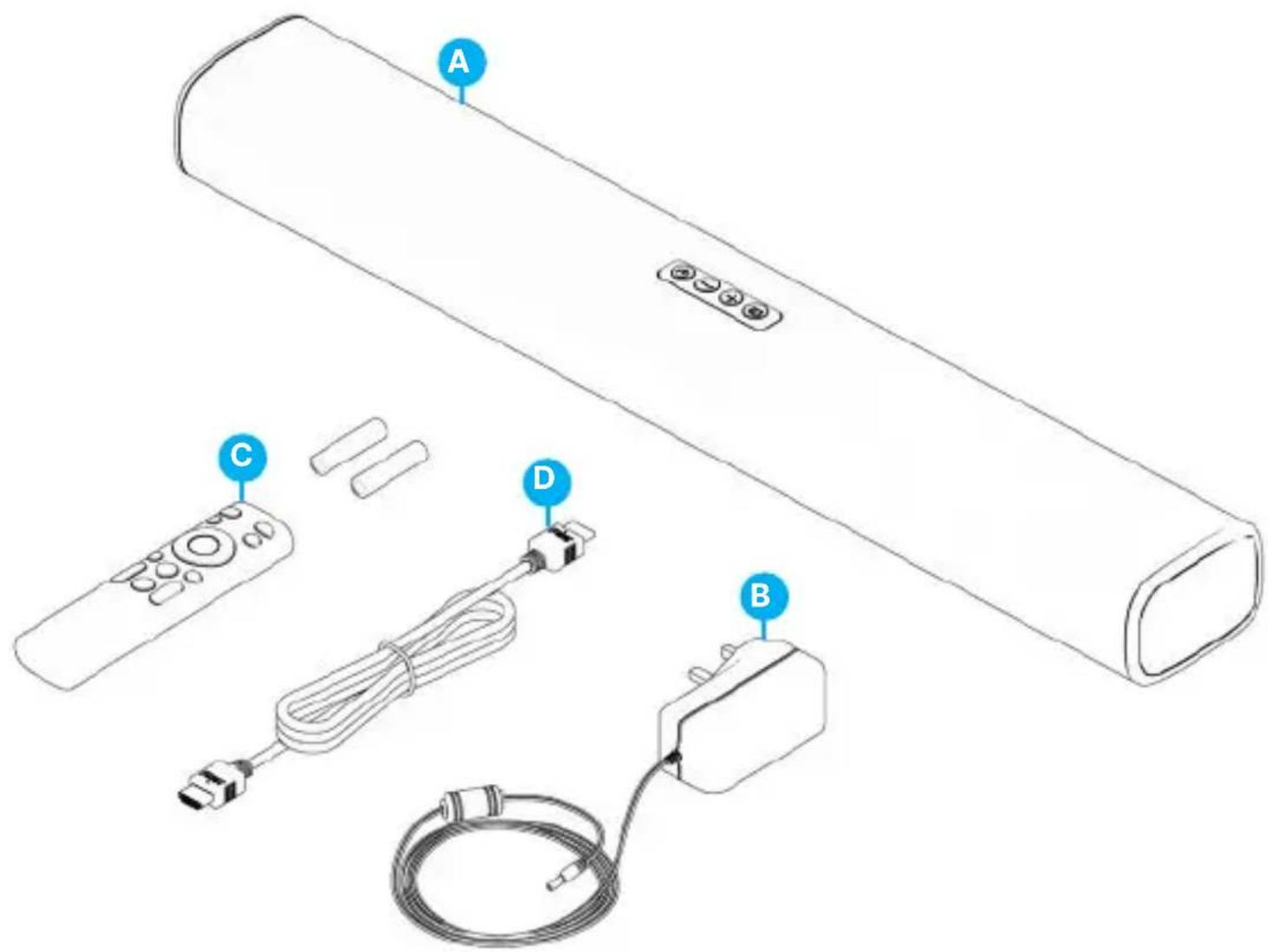
What's in the Box?
A. Majority Elias Dolby Atmos Soundbar
B. Power Cable x 1 (20V,2.5A)
C. Remote Control with batteries included
D. HMDI (ARC) Cable
Majority Elias Soundbar Wall Mounting
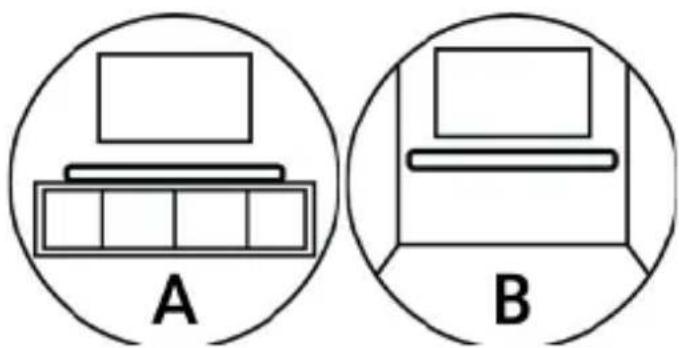
The Majority Elias Dolby Atmos Soundbar can be positioned under your TV on an entertainment centre (Picture A) or can be wall mounted (Picture B).
natural_image
Two circular diagrams labeled A and B showing simple line drawings of a laptop with a storage cabinet (no text or symbols beyond labels)-
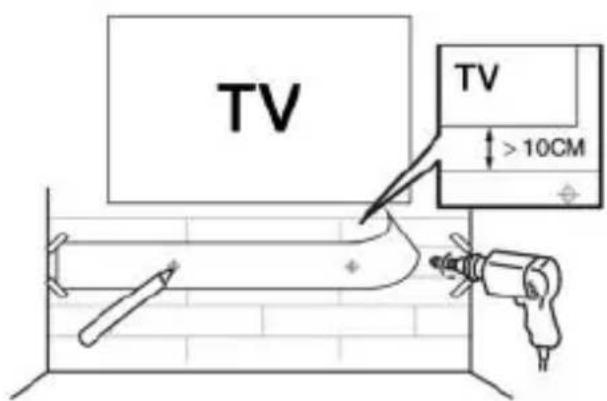
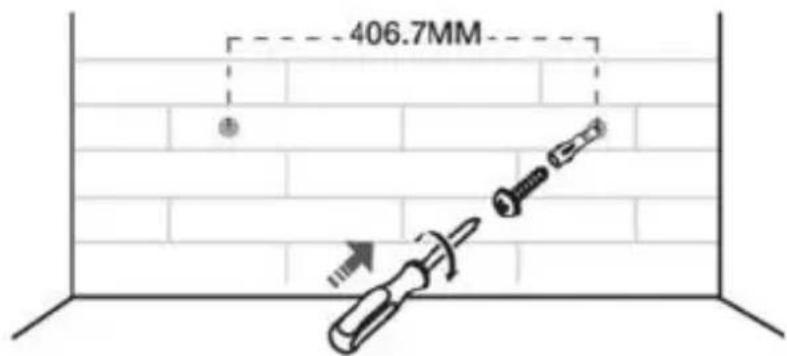
Ensure the wall mount is positioned at least 10cm below the centre of the TV. Use a ruler to measure the distance and ensure the soundbar is correctly positioned.
-
Mark on the wall using each marking on the ruler through the mounting holes.
-
Drill a hole at each marking on the wall.
-
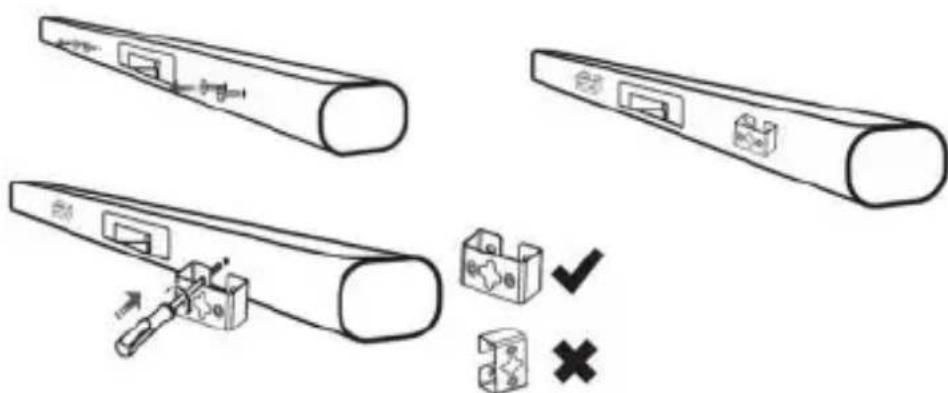
Take out the screws from the rear of the soundbar, 2 per side.
-
Using a screwdriver, attach the mounting brackets to the soundbar.
-
Installation complete.
Majority Elias Soundbar Wall Mounting
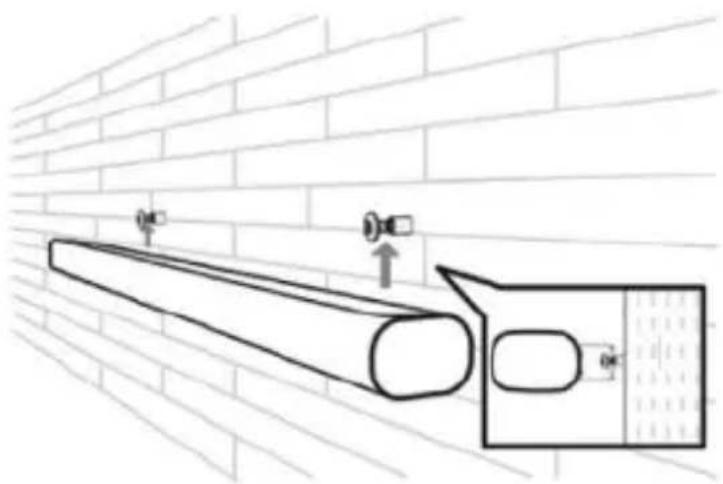
- Insert the supplied wall anchors into 2 screw holes on the wall.
- Insert the supplied screws into the wall anchors.
- Fix and tighten the screws on the wall.
- Hang the soundbar main unit on the screws.
natural_image
Technical line drawing of a pipe mounted on a brick wall, with no visible text or symbolsMajority Elias – Back View
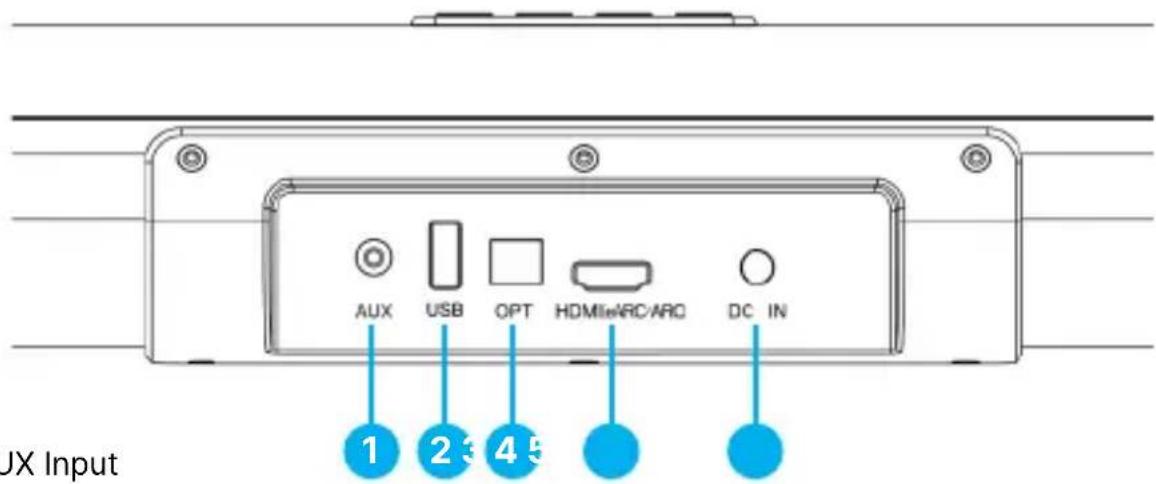
- AUX Input
- USB Playback Port
- Optical Input
- HDMI eARC/ARC
- DC IN
Majority Elias – Top View
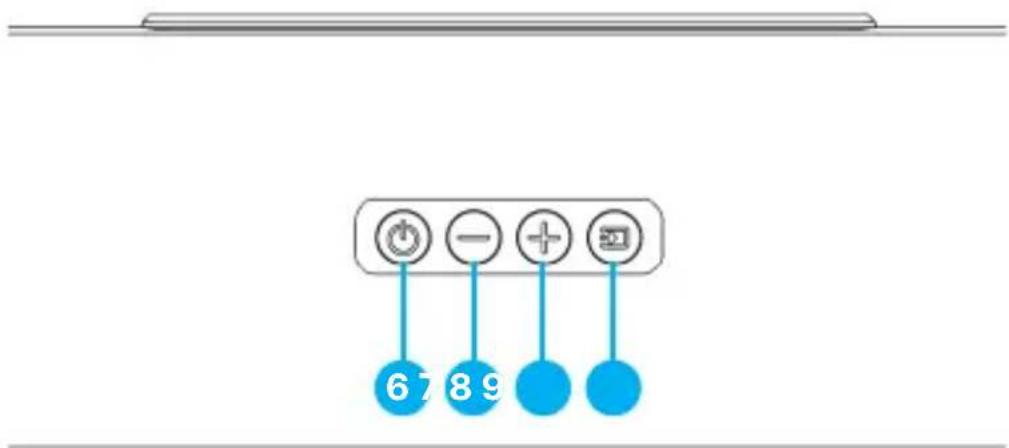
- Power ON/OFF
- Volume -
- Volume +
- Mode- press to change the soundbar mode to BT/AUX/OPT/ ARC/EARC
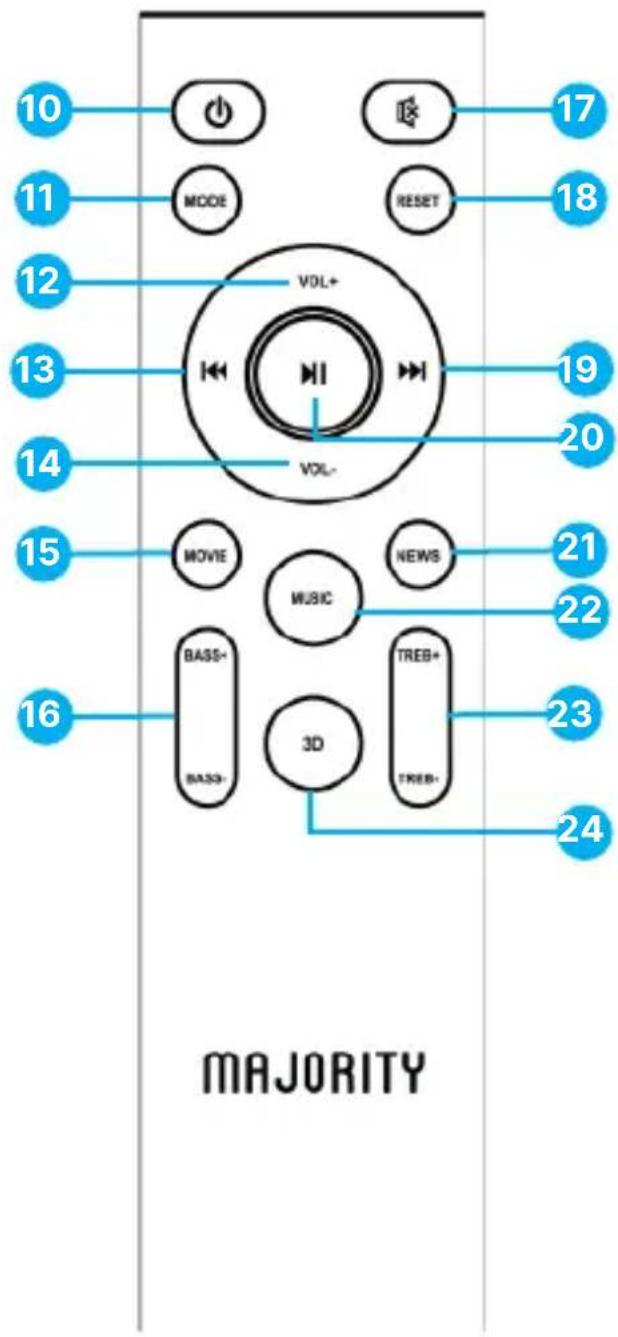
Remote Control
- Power ON/OFF
- Mode- change the soundbar mode (ARC, Optical, Aux, BT)
- Volume +
- Previous Track
- Volume -
- Movie -Equaliser Sound Mode
- Bass +/-
- Mute
- Reset
- Next Track
- Play/Pause
- News- Equaliser Sound Mode
- Music- Equaliser Sound Mode
- Treble +/-
- 3D- Equaliser 3D Sound Effect Mode
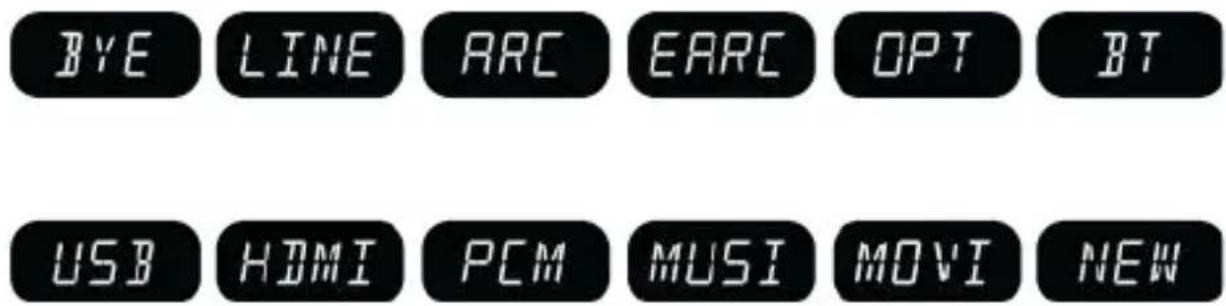
Display Icons & Equalisers
Please note that the instructions within this user manual will refer to the button number on the soundbar (Ref 'number'), or buttons on remote control e.g. (Rem. 'number'), in accordance with the diagrams from pages 7-8.
The Soundbar LED Display Input- text Indicators are:
Equalisers – Audio Settings
There are 4 pre-defined equalisers available for you to use based on the content you are watching and your preferences. These are: MUSIC, MOVIE, NEWS, and 3D (3D sound effect).
Press the corresponding button on the remote control to activate any of these (Rem.15, 21, 22 and 24). While using these equalisers presets you can control the Bass and Treble on your soundbar as per your preferences.
The sound equalisers can be used in any soundbar mode. When you press any of the corresponding buttons for the equalisers on the remote control, the soundbar screen will show 'MUSI' for Music, 'MOVI' for Movie, and 'NEW' for News. This text will be only visible for up to 3 minutes after the selection. The display text will then switch back to the input mode you are using.
To reset to default settings, press the 'Reset' button on the remote control (Rem.18). This action will cancel all existing settings you set on, such as volume, equalisers if any have been set, bass and treble.
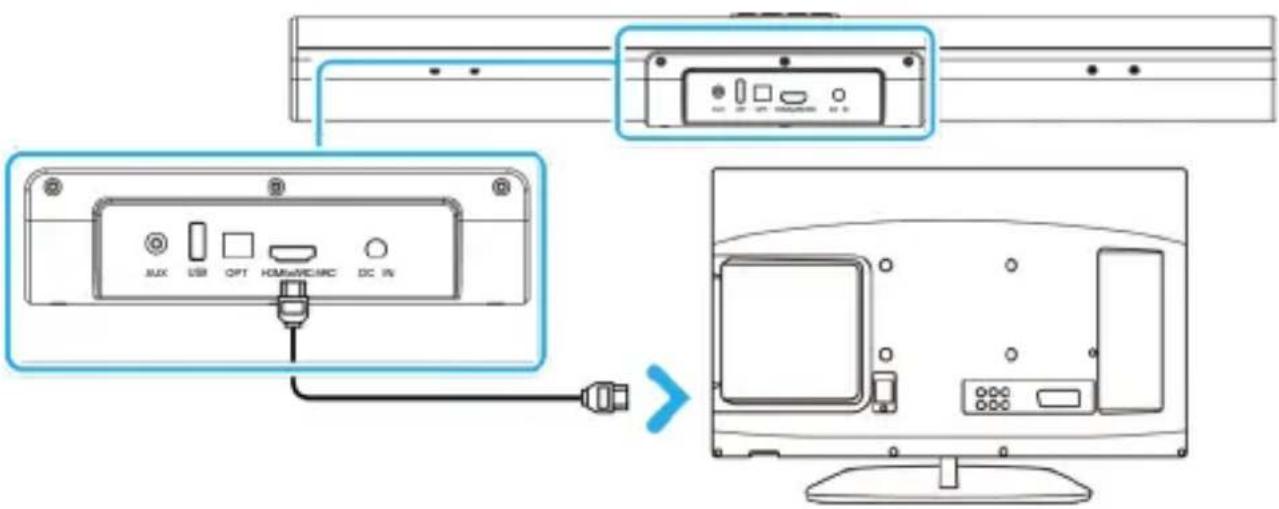
To connect the soundbar to an ARC-compatible TV, please follow these steps:
- Insert one end of the included HDMI cable to the TV HDMI eARC/ARC port and the other end into the HDMI ARC/ eARC port on the soundbar (Ref.4).
- Change the soundbar input to ARC/ eARC by pressing repeatedly the 'MODE' button on the remote control (Rem.11) or the soundbar (Ref.9), until 'ARC' or 'eARC' is shown on the soundbar display.
- If necessary, adjust your TV audio settings, and the sound will be heard through the soundbar.
IMPORTANT: The Majority Elias Soundbar cannot be connected with a TV regular HDMI port. It must be HDMI ARC/EARC port. Before using this type of connection ensure your TV is HDMI ARC/eARC compliant, and the TV HDMI audio settings are enabled.
For Dolby Atmos sound, your TV audio settings should be set to HDMI out- CEC and 'Pass Through' must also be enabled. The soundbar will then display on its screen 'DDP' and a scrolling text 'ATMOS', which will be visible for a few seconds while watching Dolby Atmos content.
Based on the content you are watching, the soundbar can also display on the LED screen for a few seconds: 'DD' for Dolby Audio as well as scrolling text 'Surround Sound' visible for just a few seconds.
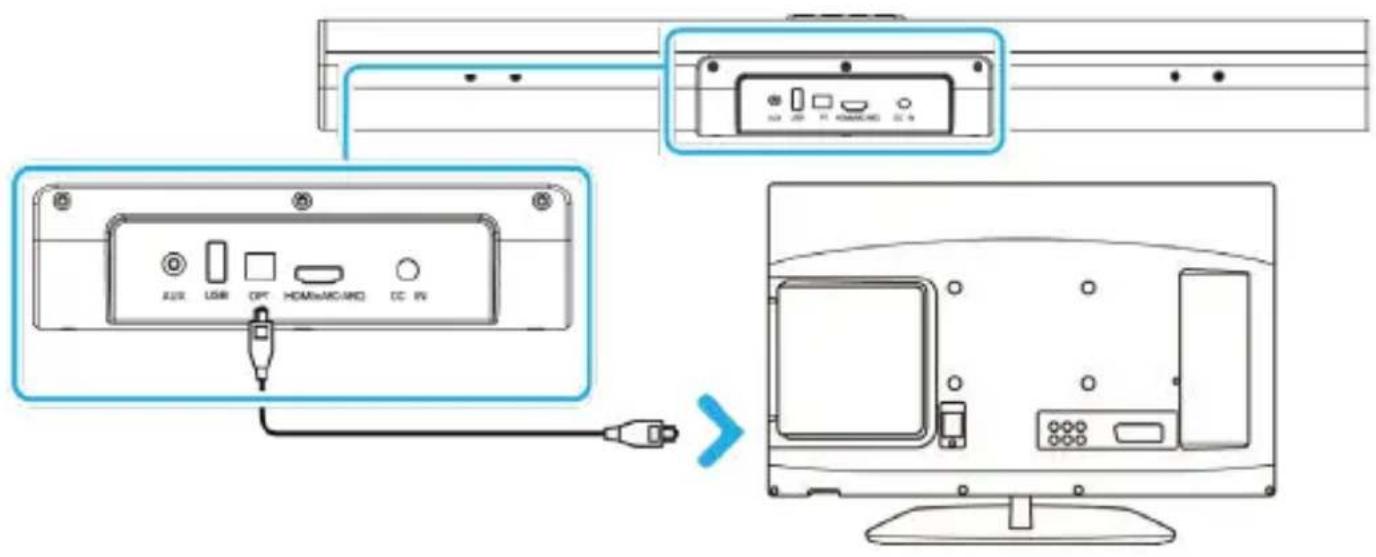
Using the Digital Optical Input
To connect the soundbar to the TV Digital Audio Out (Optical) port, please follow these steps:
- Insert one end of the optical cable (not included) to the TV Digital Audio Out (Optical) port and the other end into the optical Input port on the soundbar (Ref.3).
- Change the soundbar input to 'OPT' by pressing repeatedly the 'MODE' button on the remote control (Rem.11) or on the soundbar (Ref.9) until 'OPT' is shown on the soundbar display.
- Change the TV audio settings if required to Digital Audio Out / External Speaker. The sound will now be heard via the soundbar.
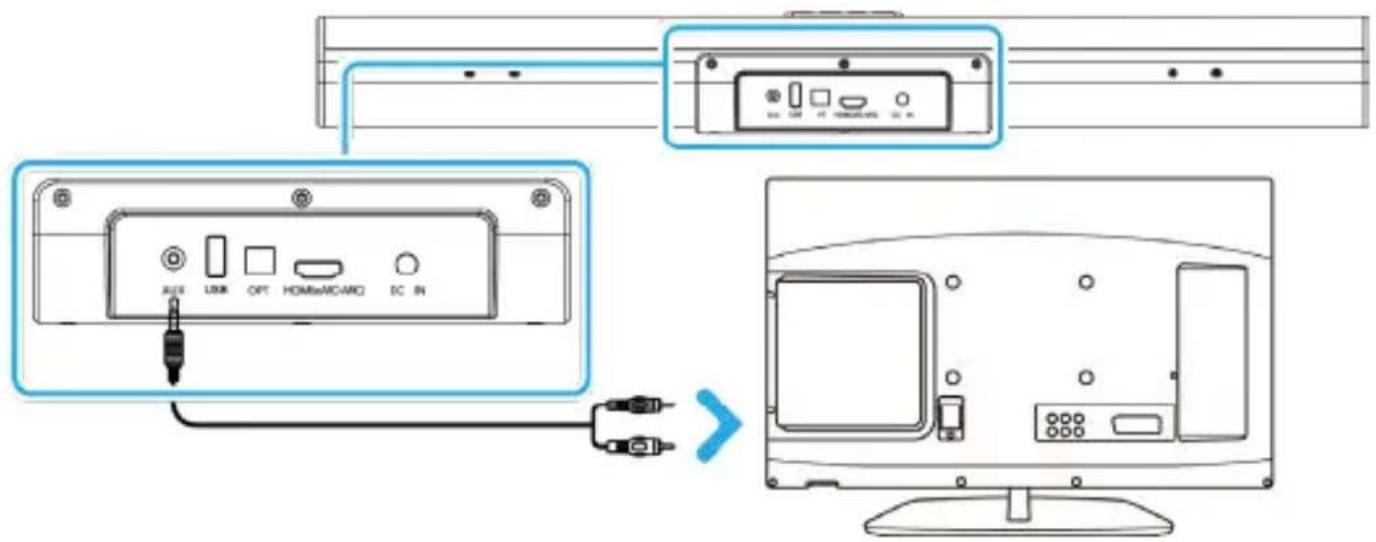
To connect the soundbar to a TV with an AUDIO Output port / Headphone port, please follow these steps:
- Connect the RCA to 3.5 mm audio cable (not included) or a 3.5 mm audio cable (not included) to the AUDIO OUT port on your TV. Insert the other end of 3.5 mm of the cable into the AUX Input port on the soundbar (Ref.1).
- Change the soundbar input to AUX by pressing repeatedly the MODE button on the remote control (Rem.11) or on the soundbar (Ref.9) until 'AUX' is shown on the soundbar display.
- Change your TV audio settings if required to PCM (please check TV user manual).
The Majority Elias Soundbar can be paired via Bluetooth with a TV or other device such as a phone or a tablet that you would like to play audio from via the soundbar.
To connect your Bluetooth device to the soundbar, please follow these steps:
- Change the soundbar Input by pressing the 'MODE' button repeatedly on the remote control (Rem.11) or on the soundbar (Ref.9) to change the soundbar in Bluetooth mode. The flashing 'BT' LED indicator will confirm that you are in Bluetooth mode.
- Go to the Bluetooth function on your TV, phone or other Bluetooth device and select 'Majority Elias'.
- Once successfully paired, you will hear a sound tone and the BT LED will stop flashing.
- You can now start playing audio from your device via Majority Elias Soundbar.
Please Note:
- If your Bluetooth device is switched off or manually disconnected, the soundbar will automatically enter pairing mode.
- To connect a different or new device via Bluetooth device to Majority Elias Soundbar, press and hold the 'Play/Pause' button on the remote control (Rem.20) for 5 seconds. The 'BT' text on the soundbar display will start flashing again, indicating that the soundbar is now ready to be paired with a new device.
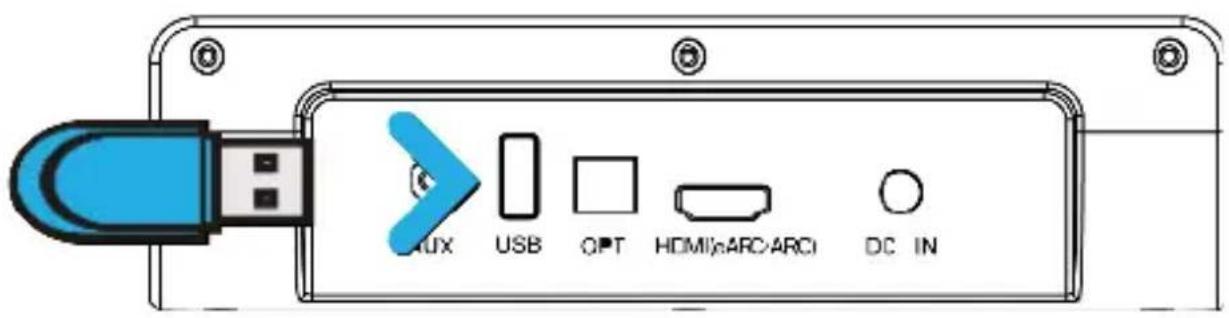
The Majority Elias Soundbar USB port is only to be used for playback. Use a USB stick of up to 64 GB, with audio files in supported formats MP3 or WAV format.
- Insert the USB stick into the soundbar USB port (Ref.2).
- Change the soundbar input by pressing the by pressing repeatedly the MODE button on the remote control (Rem.11) or on the soundbar (Ref.9) until 'USB' will be displayed on the soundbar screen.
- The soundbar will automatically start playing audio from the USB stick.
While in USB playback mode you can use the media controls on the remote control to play, pause, and navigate between tracks on the flash drive.
Please note: The USB port can only be used only for playback not as a connection port with other devices.
Troubleshooting & Support
| Possible issue Suggested solution | |
| No sound when connecting with a TV using ARC or Optical | Check and ensure the HDMI (ARC) cable is inserted into the soundbar HDMI eARC/ARC port, and your TV support ARC output.Check your TV audio settings which may vary due to different brands (see TV user manual):- Check if the TV speakers are switched off and the TV is set to external speaker only.- For ARC: Ensure the TV audio settings are set on sound output receiver HDMI- For Optical: Ensure your TV audio settings are set to External speaker /Digital Optical out.Ensure the soundbar is set into the correct mode as per the type of connection used. |
| Bluetooth device is not pairing with the soundbar. | Ensure that the Bluetooth is enabled to your device and is not connected with another device.Change soundbar mode to Bluetooth. If the 'BT' text displayed on the soundbar LCD screen is not flashing, then is paired with another device. Press and hold the 'Play/Pause' button on the soundbar or remote control (Rem.20) for 5 seconds to unpair , and then try pairing with the new device. |
| The sound heard is just humming or buzzing noise | Ensure all cable connections are properly inserted into the soundbar and TV.Check TV audio settings and adjust as per the type of cable connection used.Test the soundbar sound, by pairing via Bluetooth with a phone, see if buzzing sound is still heard in this mode when playing audio from your phone via the soundbar. If buzzing will not be heard, then the issue is something related to TV audio settings that needs to be adjusted.Try using an alternative connection between soundbar and TV. |
Support
If you require further assistance with your new Majority Elias Dolby Atmos soundbar please contact our support team on the Majority website: www.majority.co.uk/support
Specification
| Model Majority Elias | |
| Connectivity | Bluetooth / AUX IN / USB Playback / Optical / HDMI(eARC/ARC) |
| 3D Audio Technology Dolby Atmos | |
| Frequency Response 80Hz-18KHz | |
| Signal-to-Noise Ratio >70 dB | |
| Power Input | 20V,2.5A adaptor for Soundbar |
| Bluetooth | V5.3, Range: up to 15 meter (Straight line) |
| Soundbar Dimension (L*W*H) | 61 × 9.9 × 6.9 CM |
Warranty
All products come with a standard 12-month warranty. All items must be registered within 30 days of purchase on www.majority.co.uk for the warranty to be valid. Once on the web page, use the menu to find 'Register'.
- Read these instructions.
- Keep these instructions. Instructions are also available for download at www.majority.co.uk.
- Heed all warnings.
- Follow all instructions.
- Do no clean the apparatus near or with water.
- Do not block any ventilation openings. Install in accordance with the manufacturer's instructions.
- Do not install near any heat sources such as radiators, heat registers, stoves, or other apparatus that produce heat.
- Protect the power from being walked on or pinched particularly at plugs, convenience receptacles, and the point where they exit from the apparatus.
- Only use accessories specified by the manufacturer.
- Unplug this apparatus during light storms or when unused for long periods of time.
- Refer all servicing to qualified service personnel.
- No naked flame sources, such as a lit candle should be placed on the apparatus.
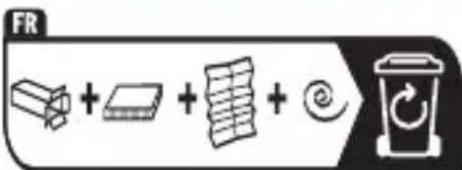
- Dispose of used electrical products and batteries safely according to your local authority and regulations.
ADDITIONAL WARNINGS
The apparatus shall not be exposed to dripping, splashing or objects filled with water.
The main plug is used to disconnect the device. In order to disconnect the apparatus from the main mains completely, the mains plug should be disconnected from the main socket outlet completely.
Battery shall not be exposed to excessive heat.
RECYCLING ELECTRICAL PRODUCTS
You should now recycle your waste electrical goods and in doing so help the environment.
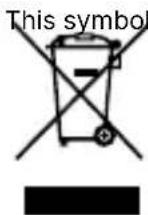
electrical product should not be disposed of with normal household waste. Please ensure it is taken to a suitable facility for disposal when finished.
IMPORTANT: Please read all instructions carefully before use and keep for future reference.
Risk of electric shock. Do not open.
Read all instructions carefully before use and keep for future reference.
When servicing, use only identical replacement parts.

ATTENTION
RISK OF ELECTRIC SHOCK DO NOT OPEN


CAUTION
RISQUE D'ELECTROCUTION NE PAS OUVRIR


IMPORTANT: Please read all instructions carefully before use and keep for future reference
I hereby declare that the product:
Product Name: Elias Dolby Atmos Soundbar
Model: 1000002982
Brand Name: Majority
Satisfies all the technical regulations applicable to the product within the scope of Council Directives 2014/35/EU and 2014/30/EU, 2009/125/EC, 2012/19/EU, 2014/53/EU, 2011/65/EU, 1907/2006.
2014/35/EU (LVD Directive)
EN IEC 62368-1:2020+A11:2020
2014/30/EU (EMC Directive)
EN55032:2015+A11:2020,Class B, EN IEC 61000-3-2, 2019+A1: 2021, EN61000-3-3:2013+A2:2021. EN55035: 2017-A11:2020
2009/125/EC (ERP Directive)
1907/2006 (REACH Directive)
All essential test suites have been carried out.
This declaration is issued under the sole responsibility of iZilla Ltd.
Point of Contact: Eddie Latham | Founder
Signed:
E.Latham
Date: Nov 2023
UK: Newton House, 2 Pioneer Court, Histon, Cambridge, CB24 9PT
EU RP: AR Experts, P.O. Box 5047, 3620 AA Breukelen, The Netherlands
US: iZilla Ltd, C/O A.N. Deringer, Inc., 19520 Wilmington Ave, Rancho Dominguez, CA, 90220
Oakcastle is owned and operated by iZilla Ltd. Registered in England with Company No: 08520738

natural_image
Solid dark blue rectangle with no visible text, symbols, or features.MAJORITY
www.majority.co.uk


- Safety Precautions:
- Warnings:
- What's in the Box?
- Majority Elias Soundbar Wall Mounting
- Majority Elias – Back View
- Majority Elias – Top View
- Remote Control
- Display Icons & Equalisers
- The Soundbar LED Display Input- text Indicators are:
- Equalisers – Audio Settings
- Using the Digital Optical Input
- Please Note:
- Troubleshooting & Support
- Support
- Warranty
- ADDITIONAL WARNINGS
- RECYCLING ELECTRICAL PRODUCTS
- ATTENTION
- CAUTION
- MAJORITY
Brand : Majority
Model : Elias
Category : Soundbar