ColumbiaVac OPC1000N - Dehumidifier Eldom - Free user manual and instructions
Find the device manual for free ColumbiaVac OPC1000N Eldom in PDF.


| Product type | Portable dehumidifier |
| Model | ColumbiaVac OPC1000N |
| Brand | Eldom |
| Dehumidification capacity (30°C, 80% RH) | 12 L/24h |
| Dehumidification capacity (27°C, 60% RH) | 7 L/24h |
| Rated voltage | AC 220-240 V, ~50 Hz |
| Rated power (27°C, 60% RH) | 160 W |
| Maximum power (30°C, 80% RH) | 185 W |
| Rated current (27°C, 60% RH) | 0.9 A |
| Maximum current (30°C, 80% RH) | 1.0 A |
| Water tank capacity | 2 L |
| Noise level | ≤36 dB(A) |
| Air flow | 130 m³/h |
| Recommended room area | 4 - 25 m² |
| Refrigerant type | R290 (propane) |
| Refrigerant charge | 55 g |
| Weight | 12 kg |
| Operating temperature range | 5 °C – 35 °C |
| Recommended clearance around unit | 30 cm minimum |
| Programs | Continuous, Night, Standard (humidity setting 30–80% RH) |
| Timer | Delayed start / auto shut-off (1–12 h) |
| Continuous drain | Yes, via included hose |
| Air filter | Washable, clean every 2 weeks |
| Auto defrost | Yes, between 5 °C and 18 °C |
Frequently Asked Questions - ColumbiaVac OPC1000N Eldom
User questions about ColumbiaVac OPC1000N Eldom
0 question about this device. Answer the ones you know or ask your own.
Ask a new question about this device
Download the instructions for your Dehumidifier in PDF format for free! Find your manual ColumbiaVac OPC1000N - Eldom and take your electronic device back in hand. On this page are published all the documents necessary for the use of your device. ColumbiaVac OPC1000N by Eldom.
USER MANUAL ColumbiaVac OPC1000N Eldom
OPC1000N
natural_image
White cylindrical air purifier with a circular vent and 'COLUMBER VAC' logo on the front panel (no other text or symbols visible)
natural_image
Two black upward arrows on a white background within a rounded square border (no text or symbols)/EN/ Disposal of used electrical and electronic equipment (applies to the European Union countries and other European countries with separate waste collection systems).
The symbol on the product or its packaging indicates that the product should not be classified as household waste. It should be handed over to a collection point that deals with the collection and recycling of electrical and electronic devices. Correct disposal of the product prevents potential negative consequences for the environment and human health that could be caused by improper disposal of the product. Material recycling helps to preserve natural resources. For detailed information on recycling of this product, please contact your local authority, a cleaning service provider or a shop where the product has been bought.

2
3
4
5
natural_image
Technical line drawing of a portable air conditioner unit with open lid and side panel (no text or symbols)6
natural_image
Simple line drawing of a door with a handle and a small object below (no text or symbols)7
natural_image
Line drawing of a portable air purifier with cooling fan and attached plug (no text or symbols)8
natural_image
Diagram showing a heat exchanger unit with side panel and internal air gap (no text or symbols)9
natural_image
Technical line drawing of a heat exchanger or radiator with horizontal slats (no text or symbols)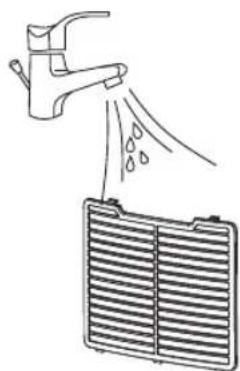
natural_image
Diagram showing a faucet spraying water onto a heat exchanger (no text or symbols)
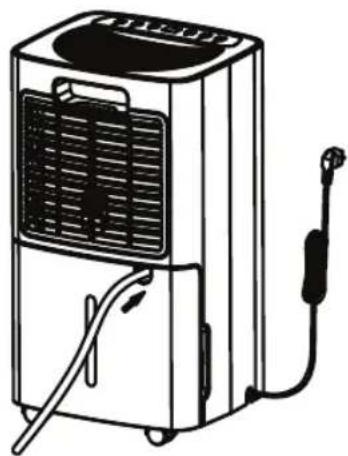
CIĄGŁY ODPŁYW WODY (rys. 7)
Appliance is filed with flammable gas R290.

Before using the appliance, read the mannual.

Before installing the appliance, read the installation manual.

Any repairs you need, contact the nearest authorized Service Centre and strictly follow manufacturer's instruction only.
CAUTION: RISK OF FIRE
The figures in this Instructions Manual might slightly differ from those actually displayed on the device. Note the actual figures.
SAFETY INSTRUCTIONS
PRECAUTIONS
- Carefully read the Instructions Manual, and familiarise yourself with the warnings on the device before installing and commissioning. The Instructions Manual contains the correct installation and operation principles of the air conditioner. Non-observance of the principles can lead to voiding the warranty.
- This device can be used by children of at least 8 years of age; by persons with reduced physical and mental abilities; and by persons with no experience or knowledge of the equipment, if supervised or instructed on its safe use so that the risks associated with it are understood. Children should not play with the device. Unattended children should not be allowed to perform the cleaning and maintenance of the device.
- Unintended use of the air conditioner can lead to voiding the warranty.
- The device should not be operated by persons who have no knowledge of the equipment or have not read the Instructions Manual. This particularly applies to children.
- The device is intended for use only with R-290 (propane) gas as the refrigerant. R290 is a gaseous coolant which meets EU Environmental Directives.
Information on equipment using R290 gaseous refrigerant
- Read all warnings carefully.
- Do not pour the refrigerant into the atmosphere.
• R-290 (propane) is flammable and heavier than air.
- It first accumulates at the lower levels, but can be distributed by air movement (e.g., by fans).
- If propane is present, or its presence is even just suspected, it is forbidden to allow unqualified personnel to try to find the cause.
- The R-290 (propane) used in the device is odourless.
- No odour does not mean that no gas is escaping.
- In the event of leak detection, evacuate all persons from the room, ventilate the room, and contact the local fire service in order to report the propane leak.
- Do not allow anyone into the room until a qualified service technician arrives and affirms that entering the room is safe.
- Do not use tools other than those recommended by the manufacturer during defrosting and cleaning.
- The device should be placed in the area free of fixed ignition sources (e.g., an open fire, or operating gas or electric equipment).
- The device's components are specially designed for the use of propane, and have no ignition or sparking properties. Replace the components only with identical spare parts.
- Do not allow the housing to be punctured. Do not burn the device.
- The unit must be installed, operated, and stored in a room bigger than 4 m2.
- If the unit is installed, operated, or stored in a room without ventilation, measures should be implemented preventing the accumulation of leaking coolant, the causing of a fire, or an explosion hazard due to the ignition of the coolant caused by an electric heater, stove, or other ignition sources.
- Store the device in a way which avoids mechanical damage.
- Persons operating or modifying the cooling circuit must hold the appropriate authorisations from an accredited organisation to guarantee the professional handling of the refrigerant, which must be confirmed by reputable industry organisations.
- All repairs should be performed according to the manufacturer's recommendations. Maintenance and repairs requiring the employment of experts in other fields should be carried out under the supervision of a person authorised to use flammable refrigerants.
- This device is intended for home use only, as described in this Instructions Manual. Do not use the device for purposes other than those specified in this Instructions Manual.
- Installing the air conditioner does not require special knowledge, and may be performed by the user in accordance with the guidelines and figures contained in the Instructions Manual. Improper installation can result in water leakage, or electrocution, or irreparable damage to the unit. Eldom Sp. z o. o. shall not be liable for any potential losses due to the improper use of the device.
- The unit must be installed in accordance with the national regulations for electrical systems. Before connecting the device to the mains, check that the mains current parameters (voltage) correspond to the parameters indicated on the device. The device's outlet plug should be completely plugged into the power socket. Do not use extension cords or multi-outlet adapters to connect the device's power cord. Remove the outlet plug from the socket if the device is not to be used for an extended period. If the unit has not been used for a long time, check that the air inlets and outlets are unobstructed before starting the device.
- Connect the device only to an earthed power socket.
- Keep the device at least 50 cm away from flammable material and substances (e.g., alcohol, etc) or pressurised containers (e.g., aerosols).
- The power cord and plug are intended for the final disconnection of the device from the power supply, which is why they must be easily accessible at all times.
- Switch off the air conditioner and disconnect it from the power supply during a storm.
- Do not insert hands or objects into the air outlets.
- Do not put any objects on the device.
- Do not step or sit on the device.
- Do not insert fingers or other objects into the air outlet.
- Do not touch the air inlet or the aluminium fins of the unit.
- Before cleaning, repair, maintenance, or inspection, switch the air conditioner off and disconnect it from the power supply.
- Clean the device with a dry, soft, cloth. If the unit's housing is heavily soiled, you may use a cloth soaked in a household cleaning agent. Do not wipe or clean the air conditioner with chemical solvents such as petrol and alcohol.
- Do not immerse or expose this unit to precipitation, moisture, or other liquids.
- Do not operate with wet hands. Avoid water spillages on the unit.
- Do not immerse or expose this unit to precipitation, moisture, or other liquids.
- Do not leave the device unattended when it is running. Do not tilt or overturn the device.
- Place and operate the unit away from splashes of water or oil.
- If during the device's operation, the user detects any irregularities, such as a strange odour or sound, smoke, steam, fire, over heating of housing or outlet plug, fuse failure, or interruptions to the operation of other devices, immediately switch the device off, disconnect from the power supply, and contact an authorised service centre.
- Do not use if the power cord is damaged, or if the unit has been dropped or otherwise damaged. The repair of the device should be entrusted to an authorised service centre; see information on the warranty card and on the website www.eldom.eu.
- All modifications, and the use of spare parts or device elements other than the original ones, are prohibited, and can pose a hazard to the safety of use.
- Under the risk of voiding the warranty, the user may not perform any repairs, modifications, or disassembly, of the device's housing.
- There are no user-serviceable parts inside the unit.
- All modifications, and the use of spare parts or device elements other than the original ones, are prohibited, and can pose a hazard to the safety of use.

Persons operating or modifying the cooling circuit must hold the appropriate authorisations accredited organisation to guarantee the professional handling of the refrigerant, which confirmed by reputable industry organisations.

All repairs should be performed according to the manufacturer's recommendations. Maintenance and repairs requiring the employment of experts in other fields should be carried out under the supervision of a person authorised to use flammable refrigerants.
If there is any lack of understanding of any information, or help is needed, contact the dealer's service centre

BEFORE THE FIRST USE OF THE DEVICE, MAKE SURE THAT IT HAS BEEN PLACED IN THE AL POSITION FOR 24 HOURS; OTHERWISE, THE DEHUMIDIFIER COMPRESSOR CAN BE GED.
SAFETY WARNINGS FOR SERVICING
Observe all these warnings when performing the following works while servicing the dehumidifier with R290.
1. Area inspections
Before performing any works on circuits containing flammable refrigerants, it is necessary to perform safety inspections of the area to make sure that the risk of ignition is minimised. When repairing the cooling system, the following precautions must be implemented before working on the system.
2. Working procedure
Tasks should be carried out under the controlled procedure so that the risk of the presence of flammable gas or vapours is minimised when work is being carried out.
3. General workplace
All maintenance personnel and others working in the place should be instructed in the nature of the work. Avoid working indoors. The area around the workplace must be isolated. Make sure that conditions in the area have been secured by control flammable materials.
4. Refrigerant-presence inspection
Before and during performing work, check the area with a suitable refrigerant detector to ensure that the technician is aware of potentially flammable atmospheres. Make sure that the leak-detection equipment used is suitable for use with flammable refrigerants, i.e., does not cause sparking, is properly sealed, and is intrinsically safe.
5. Fire-extinguishing accessibility
If any hot operations are to be carried out on the cooling equipment or any associated parts, suitable fire-extinguishing equipment should be available. Dry powder or CO2 fire extinguisher should be placed adjacent to the charging area.
6. No ignition sources
No persons performing work on cooling systems, which consists of uncovering pipes containing flammable refrigerant may use any ignition sources in a manner creating a risk of fire or explosion. All possible sources of ignition, including cigarette smoking, should be kept at a suitable distance from the place of installation, repair, removal, and disposal, during which the flammable refrigerant can be released into the environment. Before starting work, examine the area around the equipment to ensure that there is no fire or ignition hazard. Place “No smoking” signs.
7. Ventilated area
Make sure that the area is outside or properly ventilated before performing any repair or maintenance works on the system or hot operations. A certain degree of ventilation should be maintained during the work-performing period. Ventilation should safely disperse the released refrigerant, and preferably release it outside into the atmosphere.
8. Cooling equipment inspections
In the event of the replacement of electrical components, they should be appropriate for the purpose, and compliant with the relevant specifications. The manufacturer's guidelines for maintenance and servicing must be observed at all times. If any doubts, contact the technical department of the manufacturer.
The following inspections should be performed concerning the systems using flammable refrigerants:
- The size of the load is compliant with the room size in which components containing refrigerant are installed;
- Ventilation units and outlets are working properly, and are not clogged up;
- When using an intermediate cooling circuit, check for the refrigerant;
- The marking of the device is still visible and legible. Markings and signs which are illegible must be corrected;
- Cooling pipes or components should be installed in a place where there is a low likelihood of their coming into contact with any substance which can cause corrosion of components containing refrigerant, unless these components are made of materials inherently resistant to corrosion, or adequately protected against corrosion.
9. Electrical-equipment inspections
Repairs and maintenance of the electric components include preliminary safety inspections and component-control procedures. In the instance of a fault which could risk safety, do not connect the power supply to the circuit until it has been satisfactorily rectified. If the fault cannot be rectified immediately, but further action is necessary, an appropriate temporary solution must be implemented. This should be reported to the device owner so that all parties are informed.
Preliminary safety inspections include
- condenser discharge: should be done in a safe way to avoid the possibility of sparking;
- no covering of live electrical components or wiring when charging, recovering, or cleaning the system;
- earthing continuity
SPECIAL RECOMMENDATIONS:
- Ambient temperature range for the device is 5°C -35°C.
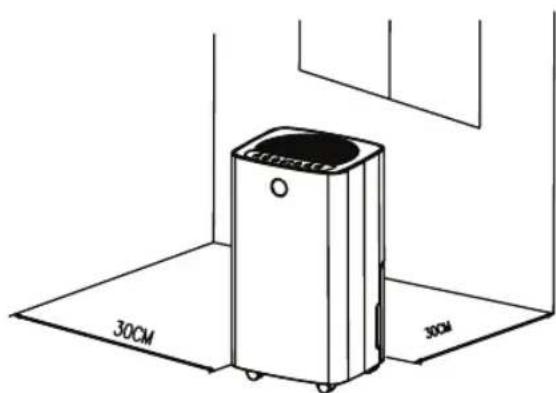
- Install the portable air dryer on a flat location with a large space, without obstacles. Leave a 30cm minimum space between the unit and the wall.
- The device must be installed in accordance with national installation regulations.
- The plug shall be always accessible after its installation.
- Always place the appliance in a vertical position, in order to maintain the compressor in good working condition.
- Do not tilt the device in any direction as spilled water can damage the device.
- Do not use the appliance near gas or other inflammable liquids.
- Do not block the air outlet and inlet ventilation. Do not place heavy objects on the device.
- Do not use spray (insecticides, painting) or any other inflammable products near the appliance as the plastic case may be deformed. The unit may sustain electrical damage.
POWER SOURCES
- The plug has to be well fixed and should not be damaged.
- Do not plug in the appliance with an adaptor.
- Plug into the wall socket before switching on the appliance then press on the ON/OFF button.
EN
INSTRUCTION MANUAL
AIR DEHUMIDIFIER OPC1000N
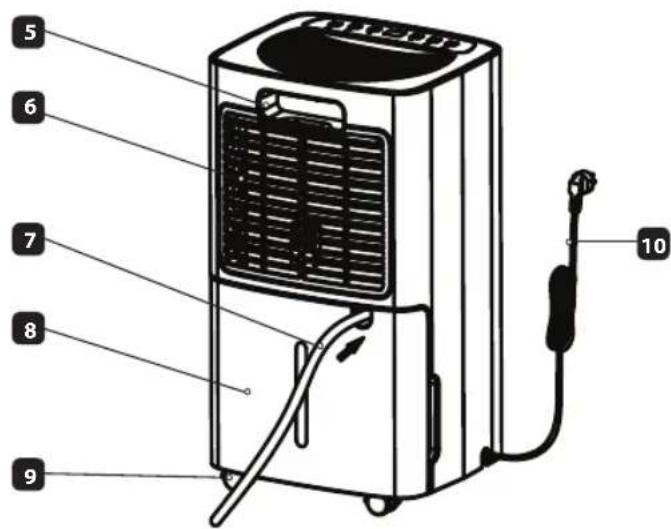
| GENERAL DESCRIPTION (fig.1-2) | |
| 1. Air outlet | 6. Inlet filter |
| 2. Control panel | 7. Tube |
| 3. indicator | 8. Water tank |
| 4. body | 9. Wheels |
| 5. Handle | 10. Power cord |
TECHNICAL DATA
| Dehumidification capacity | 12l/24h (30°C, RH80%)7l/24h (27°C, RH60%) |
| Rated voltage | AC220-240V, ~ 50Hz |
| Rated power | 160W (27°C, RH60%) |
| Maximum power | 185W (30°C, RH80%) |
| Rated current | 0,9A (27°C, RH60%) |
| Maximum Rated current | 1A (30°C, RH80%) |
| Water tank | 2l |
| Noisiness | ≤36dB(A) |
| Air flow | 130m3/h |
| Recommend room area 4-25m2 | |
| Maximum working pressure on the suction/outlet side | 0,7MPa/3,2MPa |
| Maximum allowable pressure on the high/low pressure side | 3,2MPa |
| Maximum permissible pressure of the heat exchanger | 3,2MPa |
| Device weight | 12kg |
| Chemical name | R290/55g |
| Device hermetically sealed | yes |
| Factory added agent amount | 0,055 kg |
INSTALLATION
Choosing the place for installation (Fig.3)
The device must be placed vertically on a flat surface, in a dry and spacious location. The room should be ventilated. At least 20 cm of clearance should be left around the device.
Water accumulates in the tank (8). An attached hose (9) can be used for water discharge. The method of installation is described in “CONTINUOUS WATER DISCHARGE” section.
Any changes in settings are signalled by a sound.
The illuminated indicator (3) signals the air relative humidity level:
- blue – relative humidity below 45%,
- green – relative humidity between 45 and 65%,
- red – relative humidity above 65%.
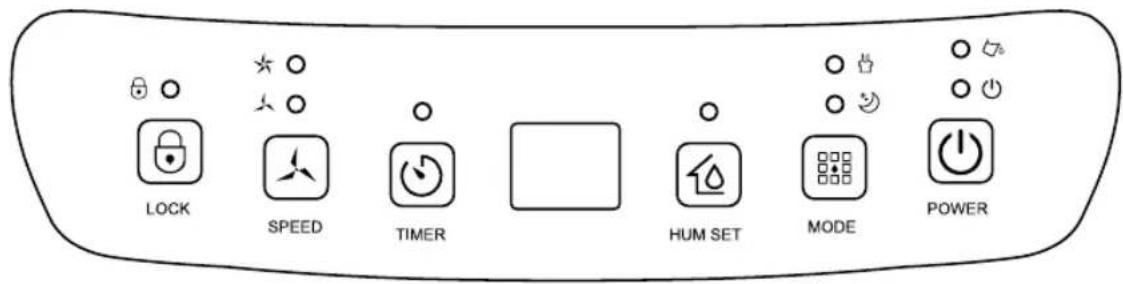
CONTROL PANEL (fig.4)
Indicator -signals that the water tank is full.
The indicator will light up in red when the capacity of 2 l is reached.
This will additionally be indicated by a sound; then, the appliance will turn off.
To turn off the audible alarm, press any button.
Then empty the water tank and put in back in the right position.
Indicator ⚠ indicates that the device is connected to the power supply.
"POWER" button ⏻ intended for turning the appliance on/off To turn the appliance on, press the ⏻ button.
When turning on the appliance for the first time and after connecting it to the power supply, a standard program with a default setting of a relative humidity level of 50% RH is activated.
After turning off the appliance with the 📊 button, it will save the set parameters (selected program, relative humidity level setting).
After disconnecting the power supply, the appliance will reset to the factory settings.
Do not directly remove the power cord plug to force the appliance to stop.
"MODE" button 📄 allows a program to be selected.
To select the saved program, press the button until the appropriate indicator lights up:
The indicator light of the selected program will flash and start to illuminate continuously after activating the program.
Continuous program - continuous operation, the appliance will operate continuously at high fan speed.
When this program is activated, you cannot change the fan speed or adjust the relative humidity level.
Night program
When this program is activated, the fan speed is automatically set to low.
After 10 seconds of inactivity, the display and some controls are dimmed.
You cannot change the fan speed or set the relative humidity level.
When in this program, the dehumidifier maintains the relative humidity level at the range of 57% - 63% and the fan operates at a low speed.
If the ambient relative humidity increases above 63% RH, the appliance will start dehumidifying to achieve the ambient relative humidity level below 57% RH.
Then the compressor stops, and the fan will operate for the next 30 s.
The appliance will restart if the relative humidity rises to 63%.
If the ambient relative humidity is below 63%, after connecting the appliance, it stays in the standby mode until the relative humidity increases to 63%.
Audible signals are off. If the tank overflows, the appliance will stop, and the indicator will illuminate, but the alarm will not sound.
Standard program

This mode has the default relative humidity setting of 50% RH.
The relative humidity level can be adjusted between 30 - 80% RH as well as the fan speed.
To set the relative humidity level, press the "HUM SET" button until the display shows the selected value in the range 30-80% RH. The relative humidity setting follows the order presented below: 30% RH - 35% RH - 40% RH - 45% RH - 50% RH - 55% RH - 60% RH - 65% RH - 70% RH - 75% RH - 80% RH - 30% RH etc.
When the ambient relative humidity increases by 3% above the set value, the fan will first turn on, and then the compressor will start operating.
When the ambient relative humidity drops 3% below the set humidity, the compressor will first stop operating, and the fan will turn off after about 30 seconds.
Temperature
The appliance has a built-in thermometer. To view the room temperature on the display, press and hold the "HUM SET" button for about 3 s.
Display □
- when the appliance is on, it shows ambient humidity,
- when setting the humidity level, it shows the value from the range "30-80",
- when setting the "TIMER" function, it shows values from the range "00-12",
- after pressing and holding the button for about 3 s, it shows ambient temperature.
"SPEED" button fan speed selection
A single press of the "SPEED" sets the fan speed, which is indicated by the indicator lights: high, low.

You cannot select the fan speed when the continuous and night programs are activated and when the buttons are locked.
"LOCK" button - button lock
To activate the button lock, press and hold the "LOCK" button for a few seconds.
Function activation is indicated by the indicator light.
When the lock is active, you cannot change the appliance settings or turn it off.
To deactivate the lock, press and hold the dimmed "LOCK" button for a few seconds.
"TIMER" button - intended for automatically turning the appliance on (delayed start) and off.
- Delayed start - this function allows you to set the time after which the appliance will automatically turn on.
The function can only be activated when the appliance is turned off but connected to the power supply.
The delayed start can be set in the range of 1 to 12 hours by pressing the "TIMER" button until the desired value appears on the display. You can only set full hours.
Setting the "00" value means cancelling the settings.
Function activation is indicated by an indicator light and the numbers on the display.
After turning on the appliance with the button (the time setting will be deleted.
- Automatic turn off - this function allows you to set the time after which the appliance will automatically turn off.
The function can only be activated when the appliance is turned on (operated).
The automatic turn off can be set in the range of 1 to 12 hours by pressing the "TIMER" button
until the desired value appears on the display. You can only set full hours.
Setting the "00" value means cancelling the settings.
Function activation is indicated by the indicator light.
After turning on the appliance with the button (the time setting will be deleted.
● EMPTYING THE TANK
ATTENTION
Water collected in the dehumidifier tank is not suitable for drinking and must not be allowed to come into contact with food.
Do not put the floater out of water; otherwise the device will not stop working when the water tank fills up. Then, water will overflow, which may cause damage to the floor.
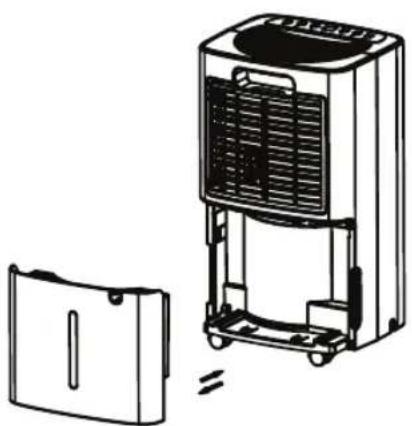
- Pull the tank gently at the back of the device; the tank will slide out (fig.5).
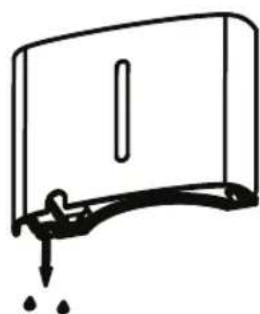
- Pour the water out of the tank (fig.6).
- If the water tank is dirty, clean it with water. Do not use any acrid cleaning agents. Do not use chemical solvent (such as benzene, alcohol, gasoline). The surface may be damaged or even the whole case may be deformed. Do not sprinkle water
- Place the tank in the right position in the device. Otherwise, the full tank indicator will still light up red and the device will not be able to work.
CONTINUOUS WATER OUTLET (fig. 7)
In order to use the device with the continuous water outlet connected, you should:
- Remove the water tank (8).
- Remove the tank housing component.
- Slide a pipe (9) to the water outlet valve located in the upper section of the tank bay.
- Slide the tank (8) in and lead the pipe out through the cut-out.
- Place the other end of the pipe into a container, e.g. a bucket.
ATTENTION
Never bend the drain tube. The tube outlet must always be below the water outlet from the device. Never block the water outlet from the device or the tube.
MAINTENANCE
Note:
Turn off the unit and unplug it before any maintenance or repair begins to avoid electric shock.
CLEANING
Unplug the unit before any cleaning. Clean the housing with a soft moisture cloth. Do not use chemical solvent (such as benzene, alcohol, gasoline). The surface may be damaged or even the whole case may be deformed. Do not sprinkle water on the unit.
AIR FILTER
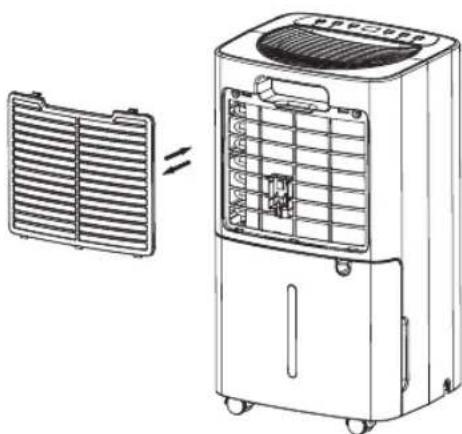
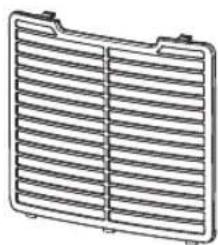
Clean the air filter every 2 weeks. If the air filter is blocked with dust, the efficiency will reduce. Filters must be pulled out of the housing, dismantled, then washed in warm water (about 40 °C) using a neutral detergent. Rinse, dry thoroughly, and then install.
Note: Do not operate the device without a properly installed filter.
STORING THE DEVICE
If the dehumidifier is not used for a longer period of time:
- Unplug the power cord from the socket and roll it.
- Empty the tank entirely of water and make sure that there is no water inside (fig. 8-9).
- Remove and clean the air filter, dry it completely and reinstall it.
- Store the dehumidifier in a cool, dry place, inaccessible to sun rays, high temperature or excessive dust.
TROUBLE SHOOTING
Before contacting the service centre, you should compare the symptoms given by the device with those listed below. The list includes normal situations which are not caused by a manufacturing defect or defective material.
| Problem Possible cause | Solution | |
| The device won't work | No power. Connect to the power socket and switch on. | |
| Water fill indicator is flashing. | Check whether the water tank is correctly installed and empty the water tank | |
| The temperature in the room is below 5°C or above 35°C. | Designed protection tripped to protect the device. The device cannot operate at these temperatures. | |
| The dehumidifier function does not work or the device switches on/off frequently | Air filter is clogged. | Clean the air filter according to the instructions. |
| Door or window is open. Close the door / window. | ||
| The device is near a heat source. Place the device in the cooler location. | ||
| Inlet or outlet channel is obstructed. | Remove the obstruction from the inlet or outlet channel. | |
| The device makes excessive noise | The device is tilted or unstable. | Place on an even, hard surface (with no vibrations). |
| Air filter is clogged. | Clean the air filter according to the instructions. | |
| E2 A problem with the humidity sensor. Contact the authorized service center. | ||
| LO | The ambient humidity is less than 20%. | The automatic device protection function enabled. Ensure that the device is in proper working conditions. |
| HI The ambient humidity is above 95%. | ||
| CL | Low temperature protection, ambient temperature <5°C. | |
| CH | High temperature protection, ambient temperature >35°C. | |
When the ambient temperature is below 5^ C or above 35^ C, the dehumidifier stops.
AUTOMATIC DEFROSTING
When the ambient temperature is between 5^ C and 18^ C, the compressor automatically defrosts at specified intervals.
During defrosting, the compressor stops and the fan continues to run.
ENVIRONMENTAL PROTECTION
The appliance is made of materials which can be recycled.
It should be handed over to the applicable collection point for the recycling of electrical and electronic equipment.
WARRANTY
This appliance is designed for domestic use only.
It cannot be used for professional purposes or for other than the intended use.
Improper use will nullify the guarantee.

- CIĄGŁY ODPŁYW WODY (rys. 7)
- SAFETY INSTRUCTIONS
- PRECAUTIONS
- Information on equipment using R290 gaseous refrigerant
- SAFETY WARNINGS FOR SERVICING
- Area inspections
- Working procedure
- General workplace
- Refrigerant-presence inspection
- Fire-extinguishing accessibility
- No ignition sources
- Ventilated area
- Cooling equipment inspections
- Electrical-equipment inspections
- SPECIAL RECOMMENDATIONS:
- POWER SOURCES
- EN
- INSTRUCTION MANUAL
- AIR DEHUMIDIFIER OPC1000N
- INSTALLATION
- Choosing the place for installation (Fig.3)
- CONTROL PANEL (fig.4)
- Do not directly remove the power cord plug to force the appliance to stop.
- Standard program
- Temperature
- Display □
- "SPEED" button fan speed selection
- "LOCK" button - button lock
- ● EMPTYING THE TANK
- ATTENTION
- CONTINUOUS WATER OUTLET (fig. 7)
- MAINTENANCE
- Note:
- CLEANING
- AIR FILTER
- STORING THE DEVICE
- TROUBLE SHOOTING
- AUTOMATIC DEFROSTING
- ENVIRONMENTAL PROTECTION
- WARRANTY
Brand : Eldom
Model : ColumbiaVac OPC1000N
Category : Dehumidifier