AmpUSB-EQ - Headphones InLine - Free user manual and instructions
Find the device manual for free AmpUSB-EQ InLine in PDF.


| Product Type | Hi-Res Audio USB DAC, Headphone Vacuum Tube Amplifier and Equalizer |
| Brand | InLine |
| Model | AmpUSB-EQ |
| Dimensions (W x D x H) | 93 x 110 x 50 mm |
| Power Supply | 24V DC via external power adapter |
| Audio Inputs | Micro-USB, 3.5mm Line-in, AUX, Toslink Optical, Phono (2x RCA) |
| Audio Outputs | 3.5mm & 6.3mm Headphone, Line-out (3.5mm), SPDIF/Pre out (3.5mm), Bass out (3.5mm) |
| Supported Sample Rates | PCM up to 384 kHz / 32-bit, DSD up to 128xDSD (2.8/5.6 MHz) |
| DAC Chipset | ES9018Q2C |
| Vacuum Tube | 12AU7 |
| Headphone Output Power | 210 mW @ 16Ω, 190 mW @ 32Ω |
| Headphone Impedance Support | 16 - 600 Ω |
| Equalizer | 3-band (Treble, Mid, Bass) with selectable on/off and Loudness EQ |
| Phono Input | MM/MC selectable |
| Operating Systems | Windows 10/8.x/7 (32/64-bit), Mac OS X |
| Driver Installation | Required for Windows; included on CD with JRiver Media Center license |
| Mobile Compatibility | Compatible with Apple (via Camera Kit) and Android (via OTG adapter) |
| Special Features | ASIO support, LED indicators, de-pop function, metal case |
| Maintenance | Clean with dry, lint-free cloth |
| Spare Parts Available | 12AU7 vacuum tube (model 99206R) |
| Safety Notes | Use only supplied power adapter; avoid high volume to prevent hearing damage; do not disassemble |
Frequently Asked Questions - AmpUSB-EQ InLine
User questions about AmpUSB-EQ InLine
0 question about this device. Answer the ones you know or ask your own.
Ask a new question about this device
Download the instructions for your Headphones in PDF format for free! Find your manual AmpUSB-EQ - InLine and take your electronic device back in hand. On this page are published all the documents necessary for the use of your device. AmpUSB-EQ by InLine.
USER MANUAL AmpUSB-EQ InLine
Hi-Res
AUDIO
BEDIENUNGSANLEITUNG
USER MANUAL
inLine®
INHALT
-
General 9
-
Scope of delivery 9
-
Explanation of warning symbols and notes 9
-
Engineering property 10
-
Introduction 10
-
Features and specifications....10
-
Intended use 10-11
-
Improper use 11
-
Product overview 11
-
Driver installation....11-12
-
Software installation JRiver Media Center 12-14
-
Maintenance and Cleaning 15
-
Further Equipment 15
-
Disposal 15
-
Disclaimer 15
1. GENERAL
VALIDITY:
This operating instructions is valid for following product: 99207I InLine® AmpUSB-EQ, Hi-Res AUDIO HiFi DSD USB Audio DAC, Headphone Vacuum Tube amplifier and Equalizer
MANUFACTURER:
INTOS ELECTRONIC AG
Siemensstraße 11
D-35394 Gießen
DATE:
August 2018
2. SCOPE OF DELIVERY
• 1x InLine® AmpUSB-EQ USB DAC
- 1x USB cable
- 1x Power adapter
- 1x Drivers and software CD, with JRiver Media Center License Key
• 1x Operating instructions
Check the delivery for completeness. Should any components be missing, please contact your reseller.
3. EXPLANATION OF WARNING SYMBOLS AND NOTES

NOTE!
This symbol indicates information which contributes to a better understanding.

DANGER!
This symbol indicates major danger for human health.
4. ENGINEERING PROPERTY
• Computer connection: Micro-USB
• Audio connections: 3.5mm jack, RCA and Toslink (see point 9. Product Overview)
• Color: Black
• Power supply: 24V DC with external power adapter
• Size: Approx. 93 x 110 x 50 mm (w x d x h)
5. INTRODUCTION
Congratulations on your purchase of the InLine®
AmpUSB-EQ 384KHz/32bit DSD USB Audio DAC. In order for you to enjoy your audio device for a long time, we would like to give you the following information on how to use it:
- Before inserting or removing the power supply unit into the power socket (21) on the back, switch off the InLine® AmpUSB-EQ by turning the volume control (6) all the way to the left beyond the slight resistance.
- Switch off the InLine® AmpUSB-EQ before inserting or removing the power supply unit from the mains socket.
- Also switch off the InLine® AmpUSB-EQ before connecting or disconnecting input or output devices.
Misuse can lead from annoying cracking in headphones to damage of the electronics in the device and should always be avoided.
The InLine® AmpUSB-EQ 384KHz/32bit DSD USB Audio DAC is a highly transparent digital audio playback system. It is capable of converting high-resolution PCM audio up to 384 kHz and DSD audio (up to 128xDSD). The USB DAC allows you to bypass the sound card or headphone output of your computer and send digital audio signals via the USB interface. This perfect digital interface between your computer and music system raises the sound quality in your entire music environment to a higher level. In addition to the micro-USB input, the headphone amplifier and equalizer also has a chinch / phono input, an optical SPDIF input and a line-in and aux-in. The various inputs can be selected via the input select button. The available outputs are: 3.5mm and 6.3mm stereo headphone output, line-in, SPDIF / Pre out and bass out. The connection variety makes it possible to use the amplifier and equalizer not only on the computer, it can be used with sound systems, TVs, smartphones or turntables.
6. FEATURES AND SPECIFICATIONS
• Supports DSD 2.8/5.6MHz playback
• Supports PCM 384KHz/32bit playback
• Supports DSD native or DoP
• Asynchronous transmission mode
- Compatible with Apple (via camera kit / optional accessories) and Android devices (with OTG adapter cable / optional accessories)
- Max. Headphone output power (at 1KHz and single channel):
- approx. 210mW / 16ohm;
- approx. 190mW / 32ohm;
- Headphone impedances from 16 - 600 Ohm can be used
• High Quality DAC Chipset - ES9018Q2C
- High quality 12AU7 tube amplifier for crystal clear audio playback
• High quality headphone amplifier
Tri-Band Tone Control
- Treble:
- Control range: 3KHz-20KHz
- Trim range: -12dB to +12dB
- Center frequency: 18KHz
• Middle:
- Control range: 200Hz-4KHz
- Trim range: -10dB to +10dB
- Center frequency: 1KHz
- Bass:
- Control range: 20-250Hz
- Trim range: -14dB to +14dB
- Center frequency: 100Hz
• Hardware Loudness EQ
• MM/MC turntable selector switch
• Analog volume control
• Supports ASIO
• Power by DC24V via external power supply unit
- LED indicators for DSD and PCM playback and input status
- Metal case
- Integrated de-pop function to suppress pop noise during PC startup and shutdown
- Supported operating systems: Windows 10/8.x/7 (32/64-bit) and MAC OS X
7. INTENDED USE
General Warning:
The InLine® AmpUSB-EQ HiFi DSD headphone amplifier is connected to a PC via USB for playback and amplification of audio signals, headphones are connected to the device via a stereo jack plug and the playback volume is adjusted via a rotary control.

NOTE!
We strongly recommend that you make a backup copy of all data on the hard disk before installing this product. We accept no liability for data loss resulting from improper installation, misuse or negligence.

DANGER!
Playback that is too loud can damage your hearing, so make sure that you always start playback at a minimum volume and avoid playback that is too loud
8. IMPROPER USE
As improper use within the meaning of foreseeable misuse obtains:
- Do not disassemble the InLine® AmpUSB-EQ HiFi DSD headphone amplifier
- The tube should only be changed by qualified personnel. If you have any questions, please contact your dealer.
• Use only the supplied power supply unit
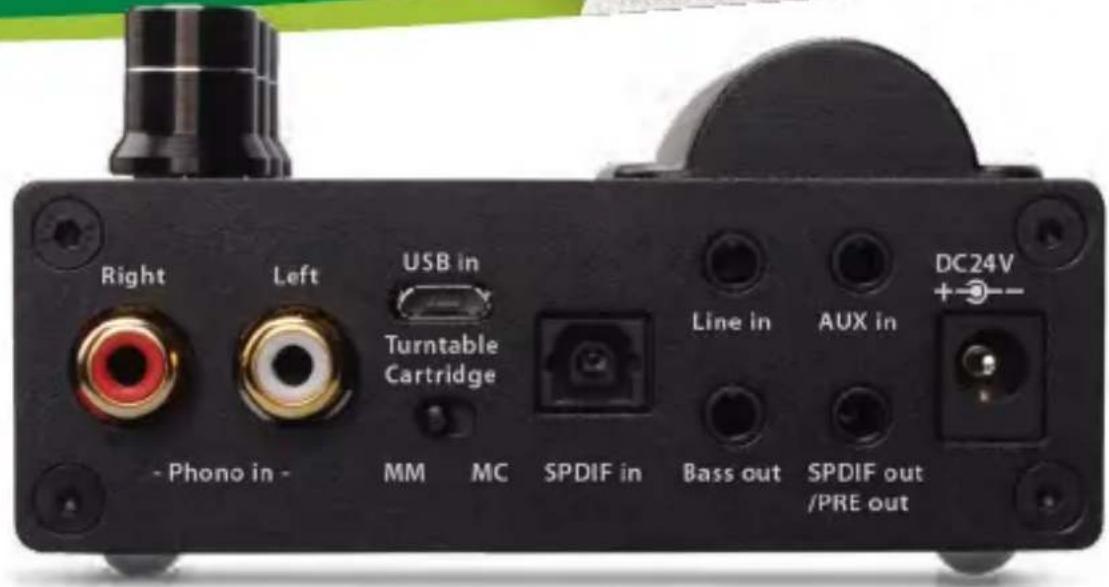
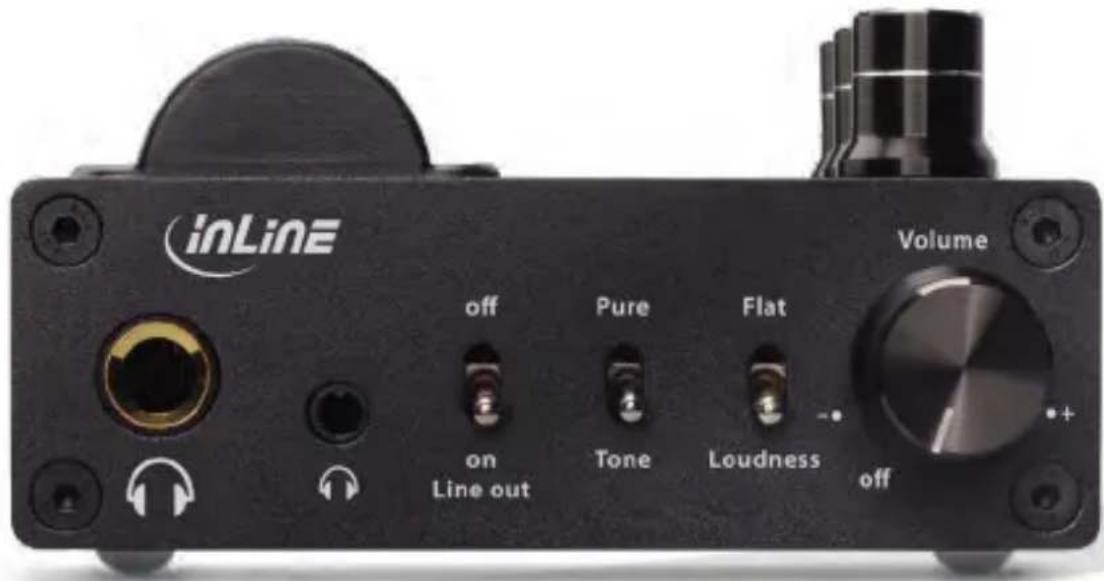
9. PRODUCT OVERVIEW
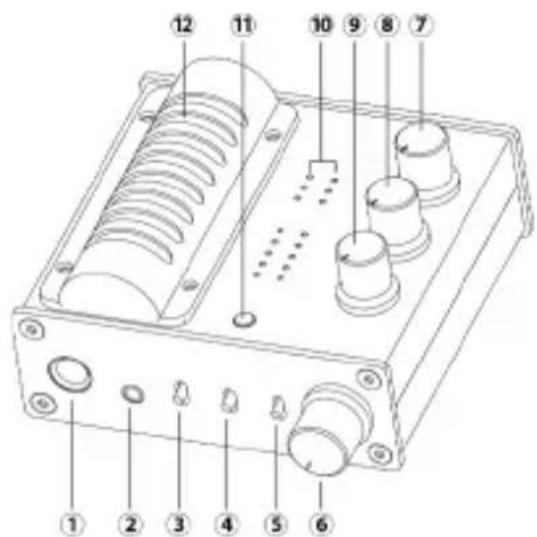
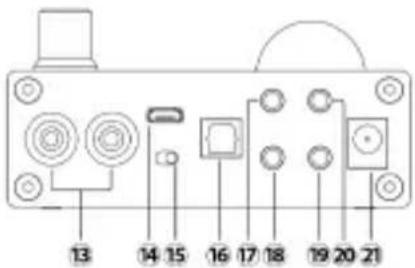
- 6.3 mm stereo headphone output
- 3.5mm stereo headphone output
- Line-out on/off switch
- EQ on/off switch: Activate (Tone) or deactivate (Pure) the 3-band equalizer
- Loudness switch: In Loudness mode especially at low lice levels it raises low and high frequencies to represent the music aurally since human hearing perceives middle frequencies more strongly. The sound becomes fuller and rounder. As the volume increases the effect decreases and the frequency response becomes linear.
- Combined on/off switch and volume control
- Treble control
- Middle control
- Bass control
- LED grid for indicating USB audio stream type (PCM, DSD), Sampling rate and input status
- Input source selection button
- 12AU7 Vacuum tube
- Phono input, 2x RCA jack stereo
- USB input (USB Micro-B socket)
- MM/MC turntable cartridge selector for phono input: Affects only the phono input. For MC systems, the signal gain is increased in the corresponding mode and the input impedance is changed.
- S/PDIF Optical Input, Toslink Jack
- 3.5mm Line in jack socket, Stereo
- Bass output, 3.5mm jack socket (low-pass frequency approx. 150Hz)
- Combined stereo audio output, 3.5mm jack Line-out & optical S/PDIF
- AUX input, 3.5mm jack, stereo
- 24V DC power input
10. DRIVER INSTALLATION
Installation of drivers for Windows 10, 8.1 / 8 / 7 (32/64-bit):
- Insert the driver CD into your computer's drive.
- Go to the directory D:\Savitech\SA9227 (D is the drive letter of the CD drive assumed here, may differ)
- Double click on „setup.exe“
- The installation wizard will guide you through the next steps and follow the instructions to complete the installation. Finally, the PC must be restarted.
- The InLine® AmpUSB-EQ HiFi DSD headphone amplifier should be available as BC USB DAC in the Windows Device Manager under „Audio, Video and Game Controller“.
No driver installation is required for installation on Mac systems.
11. SOFTWARE INSTALLATION JRIVER MEDIA CENTER
After the successful installation of the driver, please install the trial version of JRiver Media Center which is included in the bundled CD in order to playback Hi-Resolution music. Before installing the JRiver Media Center software, please make sure that your computer fulfils the minimum system requirement listed as below:
• 4 GB of RAM or more,
• Windows XP or later / OS X 10.6 or later.
Installing JRiver Media Center (Windows):
- Insert the driver CD disc into your optical drive. Assume the optical drive letter is D.
- Go to the driver folder D:\JRiver\Windows\
- Double click on the executable file.
- The installation wizard will guide you through the setup process. Follow the on-screen instruction until the installation is completed.
JRiver Media Center DSD DoP setting on Windows OS:
We suggest the user to choose DoP mode for playing back the DSD in JRiver Media Center software in order to have the best experience of music enjoyment:
- Plug in the InLine® AmpUSB-EQ HiFi DSD head - phone amplifier into one of your USB 2.0 ports of your PC (the USB port with good USB signal integrity is preferred for the playback of Hi-Resolution music)
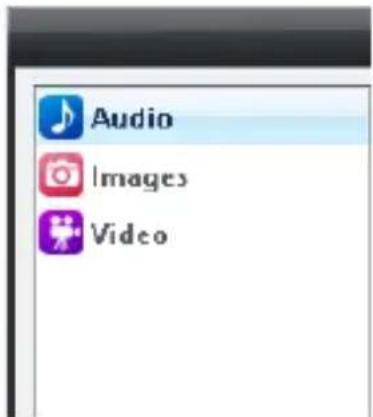
- Please run JRiver Media Center. Inside JRiver Media Center, locate and CLICK the Player Tab and select PLAYBACK OPTIONS at the top of the screen.
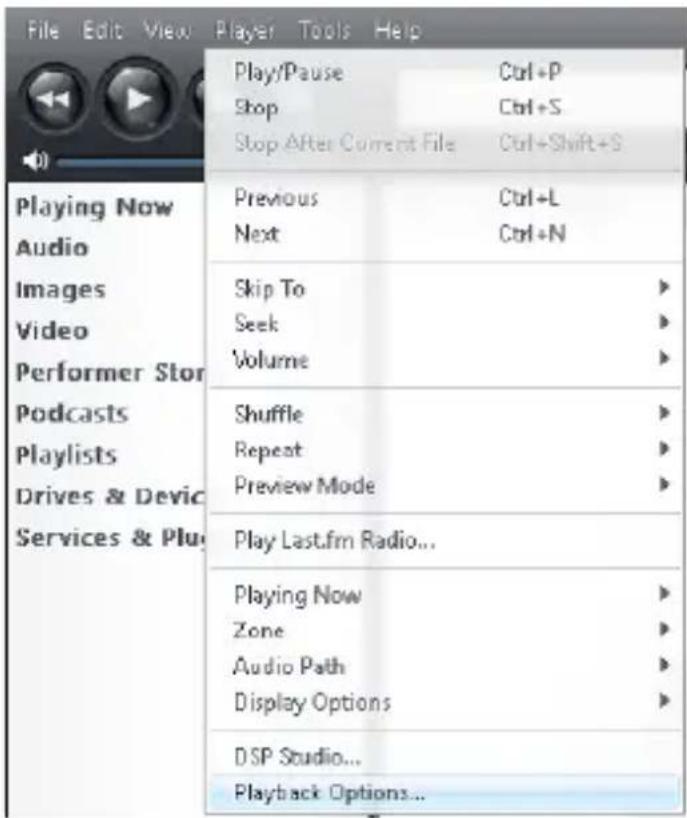
- CLICK the AUDIO Tab
4. Under Audio Device choose Bravo-HD [ASIO]
![Audio Images Video Zone to configure Player Audio Device BRAVO-HD (ASIO) Default Audio Device (Direct Sound) Sed BRAVO-HD (ASIO) Test_dual_area (ASIO) Digital Output (2- BRAVO-HD-HS USB Audio) [WASAPI] High Definition Audio Device (1) [WASAPI] High Definition Audio Device (WASAPI) More](/content/2026/05/904234/images/1c8eef4ac5a0cee782c443007301df99346ded19c7d9cf5f9201af1d75a84c7d.jpg)
5. Staying inside the Audio Tab CLICK Device settings
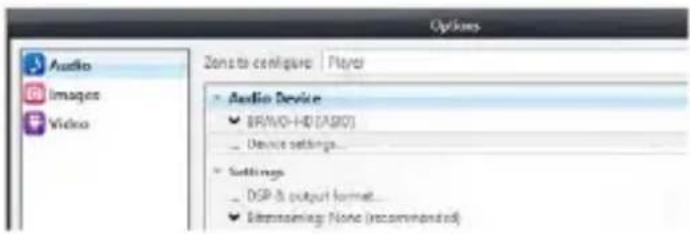
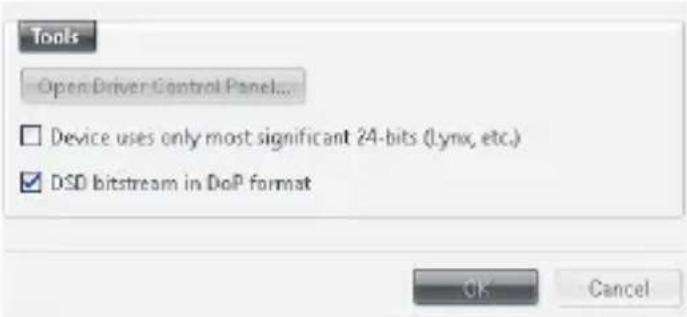
6. Inside the device settings dialog box in Tools TAB select (V) box: "DSD bitstream in DoP format". CLICK "OK", to accept the changes.
7. Go to Audio tab CLICK Settings
![Options Audio Images Video Zone to configure Player Audio Device ✓ VIA KS Direct [ASIO] ... Device settings... Settings ... DSP & output format... ✓ Bitstreaming: None (recommended)](/content/2026/05/904234/images/d0af11c5f497e9168880377d294be0cc34a8aea298673d08be3e53a956d440e6.jpg)
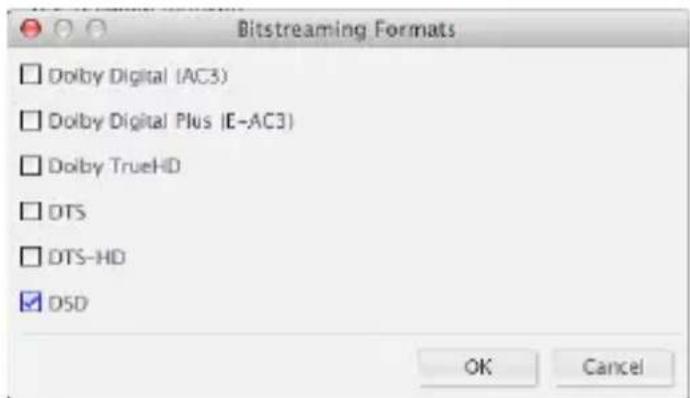
8. Under Settings CLICK the Bitstreaming box and select Custom...
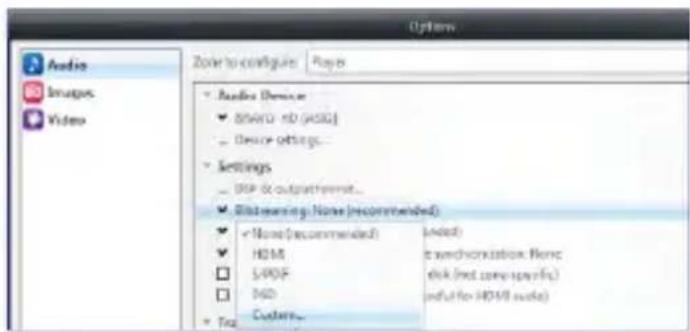
9. Inside the Bitstreaming formats dialog box, select the DSD box only. Click "OK".
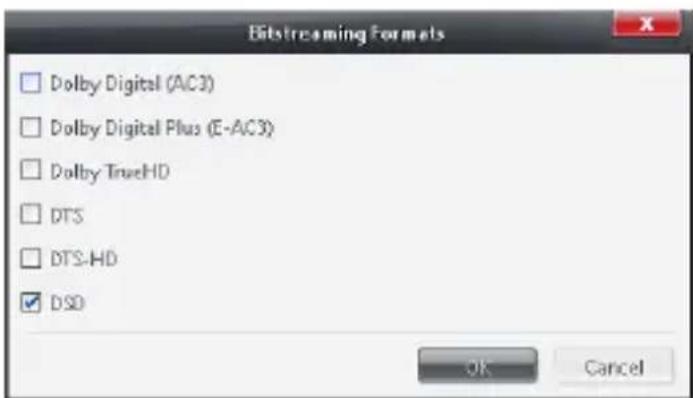
10. You are now configured to stream DSD files and even PCM files directly to the DSD USB Audio DAC.
Installing JRiver Media Center on MAC OS:
- Insert the driver CD disc into your optical drive.
- Go to the driver folder \JRiver\Mac\
- Run the package file in the folder
- The installation wizard will guide you through the setup process. Follow the on-screen instruction until the installation is completed.
JRiver Media Center DSD setting on MAC OS:
- Plug in the InLine® AmpUSB-EQ HiFi DSD head-phone amplifier into one of your USB 2.0 ports of your PC (the USB port with good USB signal integrity is preferred for the playback of Hi-Resolution music)
- Please Run JRiver Media Center. Inside JRiver Media Center, locate and CLICK the Player Tab and select Playback Options the top of the screen.
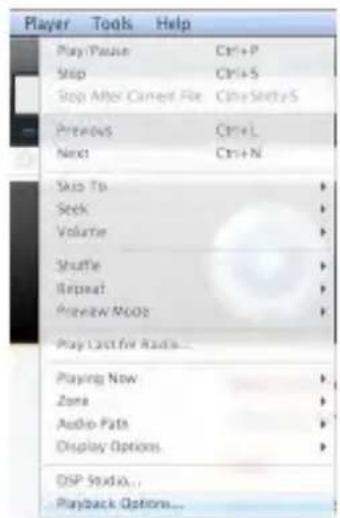
3. CLICK the AUDIO Tab
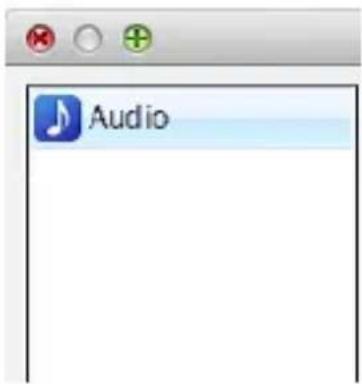
Under Audio Device choose "BRAVO-HD HS USB Audio [Core Audio]"
![Audio Zone to configure: Player Audio Device (Default) [Core Audio] (Default) [Core Audio] Set BRAVO-HD HS USB Audio [Core Audio] Built-in Output [Core Audio] HDMI [Core Audio] More](/content/2026/05/904234/images/20d9a9b3b6c58bcb5e4a4b928f32a68580795c0ba191271f246ec29f50a37e4b.jpg)
- Staying inside Audio Tab under Audio Device CLICK Device settings

- Inside the Device setting dialog box select "Open device with exclusive access" and click OK.
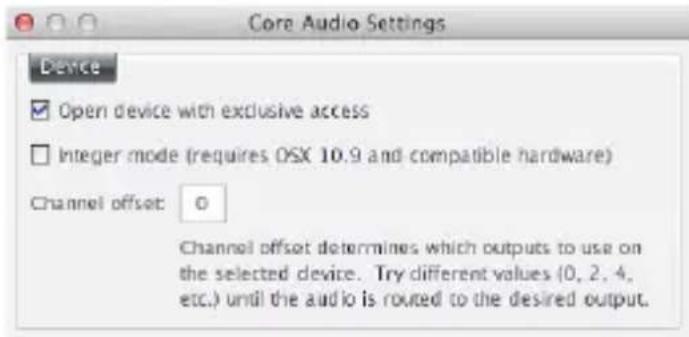
- Under Audio Tab SELECT Settings Tab, CLICK Bitstreaming settings and SELECT Custom...
![Audio Zone to configure: Player Audio Device BRAVQ-HD HS USB Audio [Core Audio] Device settings... Settings DSP & output format... Bitstreaming: None (recommended) -None (recommended) Not recommended HDMI Wide synchronization: None 5/PDF of disk (not zone-specific) DSD if (useful for HDMI audio) Custom...](/content/2026/05/904234/images/113c815895b9e81e8cd56f189086307a5156f39356cbb05c8e14f406d5433416.jpg)
- Inside the Bitstreaming formats dialog box, select DSD box. And then CLICK OK inside the Bitstreaming Formats dialog box and OK in the Options dialog.
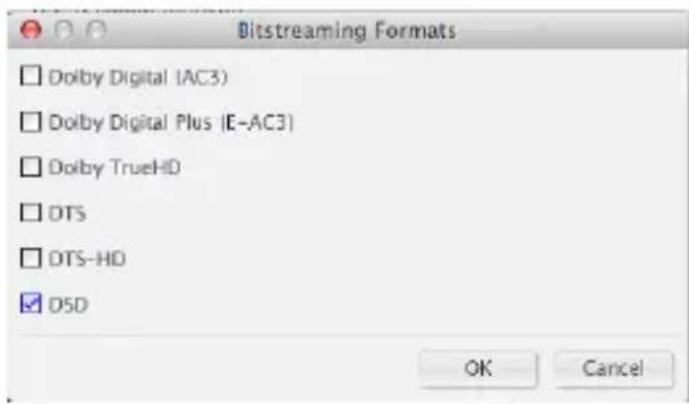
- Close JRiver Playback Options and begin playing DSD and PCM files directly from the computer!
Installation on mobile devices:
The InLine® AmpUSB-EQ HiFi DSD headphone amplifier can be connected and operated with mobile devices with Apple iOS and Android. For this purpose, an optional Camera Kit adapter cable for Apple devices or an optional USB OTG adapter cable for Android devices is needed to connect between mobile device and InLine® AmpUSB-EQ HiFi DSD headphone amplifier.
For the power supply of InLine® AmpUSB-EQ HiFi DSD headphone amplifier, please connect the included 24V power adapter. Compatible apps with DSD audio playback are available in the app stores and possibly connected with full functionality with additional costs (in-app purchases, such as app „Onkyo HF Player“)
12. MAINTENANCE AND CLEANING
- Clean the InLine® AmpUSB-EQ HiFi DSD headphone amplifier with a dry and lint-free cloth.
13. FURTHER EQUIPMENT

99206R Vacuum Tube 12AU7 / ECC82 for InLine® AmpUSB HiFi-EQ DSD USB Audio DAC
14. DISPOSAL

Electric and electronic devices as well as batteries must not be disposed of with household waste. Consumers are obliged by law to return
electrical and electronic devices as well as batteries at the end of their service lives to the public collecting points set up for this purpose or point of sale.
15. DISCLAIMER
1. Edition English 33/2018
Documentation © 2018 INTOS ELECTRONIC AG
All rights reserved. No part of this manual may be re - produced in any form or duplicated or processed using electronic, mechanical or chemical processes without the publisher's written consent. It is possible that this manual may still contain typographical defects or prin - ting errors. However, the information in this manual is reviewed regularly and corrections will be made in the next edition. We accept no liability for technical or ty - pographical errors and their consequences. All trade- marks and industrial property rights are acknowledged. Changes in the sense of technical progress can be made without prior notice. Our products, including packaging, are not toys; they may contain small parts and sharp objects. Keep away from children, please.
InLine is a brand of:
INTOS ELECTRONIC AG
Siemensstrasse 11, D-35394 Giessen
www.intos.de
NOTES
FRAGEN ZU PRODUKTEN ODER ZUR TECHNIK ANY QUESTIONS?
EN We will help you to find suitable products for your needs, we provide support in finding supply sources, answer technical questions and gladly help you to install your InLine products e.g. by providing up-to-date drivers.
MO. - FR.: 9AM TO 5PM
live.inline-info.com

- BEDIENUNGSANLEITUNG
- INHALT
- GENERAL
- VALIDITY:
- MANUFACTURER:
- DATE:
- SCOPE OF DELIVERY
- EXPLANATION OF WARNING SYMBOLS AND NOTES
- NOTE!
- DANGER!
- ENGINEERING PROPERTY
- INTRODUCTION
- FEATURES AND SPECIFICATIONS
- Tri-Band Tone Control
- INTENDED USE
- General Warning:
- IMPROPER USE
- PRODUCT OVERVIEW
- DRIVER INSTALLATION
- SOFTWARE INSTALLATION JRIVER MEDIA CENTER
- Installing JRiver Media Center (Windows):
- JRiver Media Center DSD DoP setting on Windows OS:
- Under Audio Device choose Bravo-HD [ASIO]
- Staying inside the Audio Tab CLICK Device settings
- Inside the device settings dialog box in Tools TAB select (V) box: "DSD bitstream in DoP format". CLICK "OK", to accept the changes.
- Go to Audio tab CLICK Settings
- Under Settings CLICK the Bitstreaming box and select Custom...
- Inside the Bitstreaming formats dialog box, select the DSD box only. Click "OK".
- You are now configured to stream DSD files and even PCM files directly to the DSD USB Audio DAC.
- Installing JRiver Media Center on MAC OS:
- JRiver Media Center DSD setting on MAC OS:
- CLICK the AUDIO Tab
- Installation on mobile devices:
- MAINTENANCE AND CLEANING
- FURTHER EQUIPMENT
- DISPOSAL
- DISCLAIMER
- Edition English 33/2018
- InLine is a brand of:
- NOTES
- FRAGEN ZU PRODUKTEN ODER ZUR TECHNIK ANY QUESTIONS?
Brand : InLine
Model : AmpUSB-EQ
Category : Headphones