
304024 - Uncategorized Brandson - Free user manual and instructions
Find the device manual for free 304024 Brandson in PDF.


| Product Type | Portable Bluetooth Speaker |
| Model | 304024 |
| Brand | Brandson |
| Dimensions (HxWxD) | 18 x 7.5 x 7.5 cm |
| Weight | 0.5 kg |
| Power Supply | Built-in rechargeable battery, 5V DC via Micro USB |
| Battery Capacity | 1200 mAh |
| Playback Time | Up to 6 hours |
| Charging Time | Approx. 2-3 hours |
| Bluetooth Version | 5.0 |
| Bluetooth Range | Up to 10 meters |
| Supported Audio Sources | Bluetooth, FM Radio, microSD card, USB flash drive |
| Speaker Output | 5W RMS |
| Frequency Response | 80 Hz - 20 kHz |
| Controls | Power, Volume, Play/Pause, Next/Previous track, Mode |
| Display | LED indicators for power, Bluetooth, battery |
| Care & Cleaning | Wipe with a soft, dry cloth; do not use abrasive cleaners |
| Safety Notes | Do not expose to water or high temperatures; keep away from children |
| Spare Parts | USB charging cable, replacement battery (order from Brandson) |
| Repairability | Battery replaceable; other repairs by authorized service center |
Frequently Asked Questions - 304024 Brandson
User questions about 304024 Brandson
0 question about this device. Answer the ones you know or ask your own.
Ask a new question about this device
Download the instructions for your Uncategorized in PDF format for free! Find your manual 304024 - Brandson and take your electronic device back in hand. On this page are published all the documents necessary for the use of your device. 304024 by Brandson.
USER MANUAL 304024 Brandson
natural_image
Diagram of a device with a sensor or connector inserted into a cylindrical housing, showing directional arrows (no text or symbols)Warning! This device can be dangerous! Careless or improper use may result in injuries to yourself and others.

Please read all instructions carefully so that you understand how to operate the device and always know what you're doing.

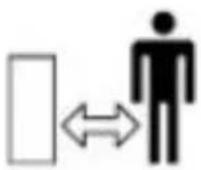
Do not allow pedestrians or un-qualified persons to come close to the device.



Always wear ear protection, protective glasses, a dust mask and gloves.

Switch off the device! Always disconnect the plug from the outlet before adjusting or cleaning or if the device or mains cable is faulty.

Do not expose the device to rain under any circumstances. Do not keep it in the open and do not leave it in the rain.
IMPORTANT SAFETY GUIDELINES FOR THIS DE- VICE
Please read all the safety guidelines and instructions carefully! Not following the safety guidelines and instructions may result in electric shock, fire and/or serious injuries.
Retain all the safety guidelines and instructions for future reference. The term "Power tool" used in the following safety instructions refers to power tools with a mains cable or to cordless power tools without a mains cable.
Workplace safety
- Keep the work area adequately lit. Dirty or dark workplaces result in accidents.
- Do not operate power tools in potentially explosive surroundings, e.g., near flammable liquids, gases, etc.
Power tools may generate sparks, which can ignite flammable materials!
- Keep bystanders and children away when using the power tool. You could lose control of the tool if you get distracted.
Electrical safety
- The power tool plug has to fit into a properly installed socket. The plug should not be changed or modified. Never use adapters with earthed power tools. Proper plugs and sockets reduce the risk of electric shock.
- Avoid body contact with earthed surfaces such as heaters, refrigerators or pipes. There is a risk of electric shock.
- Keep power tools away from moisture and rain. The risk of electric shock increases if water gets into power tools!
- Do not misuse the cable under any circumstances! Never carry the power tool by its cable. Do not hang it by the cable or do not pull the cable to disconnect the plug from the socket. Keep the cable away from heat, oil and sharp edges or moving parts! Damaged or entangled cable increases the risk of electric shock!
- If you operate the power tool outdoors, always use an extension cable suitable for outdoors. Using a cable suitable for outdoors reduces the risk of electrical shock.
Personal safety
- Ensure that you are always alert. Be aware of what you are doing and use common sense when working. Do not use a power tool if you are under the influence of alcohol, drugs or medication, or are tired! Carelessness while using power tools may result in serious injuries.
- Always wear personal protective equipment and safety glasses when using the power tool. Wearing appropriate protective clothing, such as ear protection, safety glasses, safety shoes and helmet can reduce the risk of injuries, depending on the type and use of the power tool.
- Prevent the power tool from starting unintentionally. Always check whether the device is switched off before connecting it to the battery or the power supply, picking it up or carrying it. Accidents may occur if you keep your finger on the switch while carrying the tool or if you connect the power tool to the power supply when the tool is switched on.
-
Remove any setting tools or wrench before switching on the power tool. Any tool or object left in a rotating part of the device may result in injuries.
-
Always maintain a normal posture when using power tools and ensure that your footing is secure at all times and that you maintain your balance. This allows you to control the power tool better in unexpected situations.
- Always wear suitable clothing when using a power tool. Never wear loose clothing or jewellery. Keep your hair, clothing and gloves always away from moving parts.
This type of clothing or hair can get caught in moving parts!
- If connecting attachments for dust extractors and collectors are available, they should be properly mounted and used. The use of dust protection devices can reduce risks caused by dust.
Use and handling of power tools
- Never overload the power tool under any circumstances. Always use the appropriate power tool for your work. Working with the incorrect power tool reduces the safety considerably.
-
Never use a power tool with a faulty switch. A device that cannot be switched on or off must absolutely be repaired and may not be used.
-
Before changing the settings, the accessories on the power tool, or storing the device, it must be disconnected from the mains supply and/or the battery. These measures reduce the risk of the device switching on accidentally.
- Keep the unused power tool out of reach of children. Do not allow those who are not familiar with the usage instructions of the device to use it. Power tools are dangerous in the hands of inexperienced users.
- Maintain your power tools properly. Check your tool for misalignment, damage and other conditions that may affect the operation. In case it is damaged, have the power tool repaired by a specialist before using it again.
- Keep the cutting tools clean and sharp. Well maintained tools with sharp blades are less prone to damage, and are better to handle.
- Use the power tool, accessories and tool inserts in accordance with these instructions. Take the conditions and the work to be carried out into account.
General warning and safety instructions for grinding, sandpaper grinding, polishing, abrasive cutting or working with wire brushes
- This device has to be used as a sander, sandpaper grinder, polisher, power cutter, drill and as a milling machine. Note the warning and safety instructions as well as the instructions and data provided with the tool. If you do not follow the instructions given below, it may result in electric shock, fire and / or serious injury.
- Use only accessories provided and recommended by the manufacturer specifically for this power tool. Even if you can mount the accessories on your power tool, it does not guarantee safe use.
- The permissible speed of the tool has to be at least as high as the maximum speed specified on the power tool. Accessories that rotate faster than permitted may break and be flung around.
- Outer diameter and thickness of the accessories have to match the specifications of your power tool. Incorrectly dimensioned accessories can not be adequately shielded or controlled.
- Grinding wheels or rollers or other accessories have to match your power tool perfectly. Accessories that do not fit into the holder of the power tool rotate unevenly, vibrate heavily and can lead to loss of control.
- Wheels, cutting tools or other accessories mounted on the mandrel have to be fully inserted into the collet or chuck. If the mandrel is not sufficiently and properly clamped or if the tool bit juts out too far, the tool bit can come loose and be thrown out at high speed.
- Do not use damaged tool bits. Before using the tool bits such as grinding wheels, grinding rollers, check them each time for cracks and abrasion or excessive wear. Check wire brushes, e.g., for loose or broken wires. If the power tool or the tool bit falls down, check to see if it is damaged. Use an undamaged tool bit in case of doubt. Once you have checked and mounted the tool, keep yourself and anyone nearby away from the plane of the rotating device and allow the device to run at maximum speed for one minute. Damaged tool bits usually break during this testing time.
- Always wear personal protection gear. Depending on the application, full face protection, eye protection and / or safety glasses. If necessary and appropriate, wear dust mask, ear protection, protective gloves or special apron that
protects you from small grinding and material particles. The eyes must be protected from foreign objects that are generated and dislodged by the various applications. Dust mask or breathing mask have to filter the generated dust. If you are exposed to loud noise for long durations, you may suffer hearing loss.
- Keep others at a safe distance from your work area. Anyone entering the work area has to wear personal protective gear. Broken tool bits or fragments of the workpiece can be thrown around and cause injuries even outside the immediate work area.
- Hold the tool using its insulated gripping surfaces only when carrying out work where the tool may come into contact with hidden wiring. Contact with live wires can cause current to flow through the metal parts of the power tool and result in an electrical shock.
- Always hold the power tool firmly when starting it. When ramping up to the maximum speed, the reaction torque of the motor may cause the device to twist. Therefore position your body and arms to absorb any possible kickback.
- Use clamps to fix the workpiece if possible. Never hold a workpiece in one hand and the device in the other hand, while using the device. By clamping the workpieces, your hands are free for better control of the power tool.
When cutting round workpieces, such as rod material or, pipes, they tend to roll away causing the tool bit to get jammed and it can be flung in your direction.
- Never put the power tool down before the tool bit stops completely. The rotating tool bit can come into contact with the counter, causing you to lose control of the power tool.
- Tighten the chuck or other fastening elements properly after replacing tool bits or after making settings on the device. Loose fastening elements may unexpectedly move and result in loss of control.
- Do not allow the power tool to run while carrying it. Your clothes may get caught by accidental contact with the rotating tool bit and the tool bit may injure you.
- Clean the air vents of your power tool regularly. The motor can attract dust into the housing and heavy accumulation of metal dust can pose electrical hazards.
- Do not use the power tool near flammable materials. Sparks can ignite these materials.
- Do not use tool bits that require liquid coolant. The use of water or other liquid coolants can result in electric shock.
Kickback and corresponding safety instructions
- Kickback is the reaction of a tool bit that gets jammed or blocked. Jamming or blocking of the tool bit causes it to stop abruptly. This in turn causes the uncontrolled power tool to be forced in the direction opposite to the tool bit's rotation at the blocked point. If, e.g., a grinding wheel is blocked in the workpiece, the edge of the grinding wheel which penetrates the workpiece, may get caught causing the grinding wheel break away and / or cause a kickback. Depending on the direction of rotation of the wheel, it either moves towards or away from the operator. The grinding wheel may also break in the process. Kickback is the result of using the power tool in an incorrect or improper manner. Kickback can be avoided by taking appropriate precautions, as described below.
- Hold the power tool firmly and move your body and arms to a position where you can absorb the kickback forces. The operator can control kickback forces by taking suitable precautions.
- Work very carefully in areas with sharp edges and corners, etc. Prevent the tool bits from bouncing back from the workpiece and getting jammed. The rotating tool bit tends to get stuck at corners, sharp edges or when it bounces back. This can result in loss of control or kickback.
- Do not use serrated saw blades. Such saw blades can result in frequent kickback and loss of control over the power tool.
- Guide the tool bit always in the direction of the material in which the cutting edge leaves the material (corresponds to the direction in which the chips are thrown out). Guiding the power tool in the wrong direction may cause the tool bit to break out of the workpiece, which then pulls the power tool in this feed direction.
- Always clamp the workpiece firmly during use, especially when using cutting wheels. Even if there is a slight tilting in the groove, the tool bits may get jammed and cause kickback. When a cutting wheel gets jammed, it usually breaks. For example, if rotary files, milling tools get jammed, the tool bit can jump out of the groove and result in loss of control over the power tool.
Specific safety instructions for grinding and abrasive cutting
- Use only wheels approved for your power tool and for the recommended applications. Example: Never grind with the side face of a cutting wheel. Cutting wheels are intended for removing material with the edge of the wheel. A lateral force on the wheel can break it.
- For tapered and straight grinding pins with thread, use only undamaged mandrels of the correct size and length. Suitable mandrels reduce the possibility of breakage.
- Avoid blocking or excessive pressure on the cutting wheel. Do not make very deep cuts. Overloading the cutting wheel increases the load and the chances of jamming or blocking and thus increases the possibility of kickback or wheel breakage.
- Avoid using your hands and any other body parts in the area in front of and behind the rotating cutting wheel. If you move the cutting wheel in the work piece using your hands, the power tool along with the rotating wheel can be flung directly at you in case of kickback.
- If the cutting wheel is blocked or if you stop working, switch off the device and hold it until the cutting wheel stops turning completely. Never try to pull the running cutting wheel out
of the cut. There is a risk of kickback. Identify and rectify the cause of the blockage.
- Never restart the power tool while it is still in the workpiece. Allow the cutting wheel to reach its maximum speed first before carefully continuing with the cutting work. Otherwise, the wheel can get jammed and break out of the workpiece or, for example, cause a kickback.
- Support plates and large workpieces to reduce the risk of kickback caused by a jammed cutting wheel. Large workpieces can bend due to their own weight. The workpiece has to be supported on both sides of the wheel as well as near the cutting line and at the edge.
- Be very careful when making "pocket cuts" in existing walls or other concealed areas. The cutting wheel may get into gas or water pipes as well as electrical wiring or other objects that cause a kickback, during cutting.
Specific safety instructions for grinding and abrasive cutting
- Note that the wire brush loses pieces of wire even during normal use. Do not overload the wires by applying excessive pressure. Pieces of wire that are flung out can very easily penetrate thin clothing and / or skin. Always wear protective clothing!
- Allow the wire brush to run at operating speed for at least one minute before use. Make sure that no one is in front of or in the same line as the brush during this time. Caution! Loose pieces of wire may be flung out during the run-in time.
- Point the rotating wire brush away from yourself. Danger of injury! When working with wire brushes, small particles and tiny pieces of wire may be flung out at high speed and penetrate through the skin.
Additional safety instructions
- Use appropriate suitable detectors to find hidden utility lines (e.g. water and gas lines or power lines), or call the local utility company for assistance. Contact with electric lines can cause fire and result in electric shock. Damaging a gas line can lead to explosions. Damaging a water line causes property damage by water.
- Always secure the workpiece adequately. A workpiece secured in place using a clamping device or vice is more secure than one held with your hand.
Important safety instructions for batteries
- Please note all the safety instructions and warnings given in this manual and the warnings related to the battery, charger and power tool before using the battery.
- Do not disassemble the battery!
- If the operating time of the battery is significantly lower than usual, then stop using the device immediately. There is a risk of overheating or explosion.
- If battery fluid gets into your eyes, wash it out immediately! Obtain medical treatment immediately! There is a risk of losing your eyesight.
- Do not short-circuit the battery. Do not touch the contacts using conductive materials. Do not store the device
along with conductive materials.
- Do not allow any liquid to come into contact with the battery. A short circuit generates a very high flow of current and can result in overheating or burns.
- Do not store the power tool or the battery in places where the temperature exceeds 50°C!
- Never try to burn the battery even if it is damaged. The battery may explode in the fire!
- Ensure that the battery is never dropped or exposed to any impact. Do not use the battery if it has been dropped or has been shaken.
Notes on battery service life
- Charge the battery only when it is completely empty. Switch off the power tool if you notice a reduction in its capacity. Charge the battery subsequently.
• Overcharging the batteries reduces its service life. Avoid charging a fully charged battery.
- Allow the battery to cool down before charging it. Charge the battery at a room temperature between 10^ and 40^ .
- The power tool is not suitable for stationary operation It should not be clamped, e.g., in a vice or mounted on a work bench and operated.
- Caution! Always follow these safety guidelines! Familiarise yourself with the corresponding product! Not following and misusing the safety guidelines given in this manual may cause serious injuries!
Important safety instructions
- Do not machine materials containing asbestos!
• Always wear a safety mask! Some dusts are considered harmful (sometimes even carcinogenic). - Get the device repaired by qualified technician!
- Do not store the power tool in places where the temperature exceeds 50°C!
Ensure that you read and keep the safety instructions carefully!
Intended use
The power tool is intended for cutting metal and stone materials as well as for grinding, sand paper grinding and polishing of metal and painted surfaces without using water. In addition, the power tool is also suitable for drilling in wood, soft metal, plastic and lightweight materials, with appropriate accessories.
Thank you for choosing a Brandon product. Please read the following user manual carefully so that you can enjoy the purchased product for a long time. Before using the product, first check that the delivered item is complete, accurate and undamaged.

1. Scope of delivery
- Multi-functional tool
- Accessories
- Transport case
2. Transport case accessories
Holder / Assembly
| Number | Description |
| 1 Spanner | |
| 4 | Collets(1/16", 1/8", 3/32", 5/64") (1.59 mm, 3.18 mm, 2.38 mm, 1.98 mm) |
Cutting / Separating
| Number | Description |
| 2 Mandrels (shanks) | |
| 20 Cutting discs (1/64") (0.4 mm) | |
| 10 Cutting discs (1/32") (0.8 mm) | |
Grinding / Engraving
| Number Description | |
| 1 Sharpening stone | |
| 4 Grinding discs | |
| 20 Grinding discs | |
| 2 Rubber sanding disks | |
| 2 Grinding drums for abrasive belts (rubber adapter) | |
| 6 Grinding belts (1/2 ")(13 mm) | |
| 5 Grinding belts (1/4 ")(6.35 mm) | |
| 4 Silicon carbide grinding stones | |
| 5 Aluminium oxide grinding stones | |
| 7 Diamond-tip bits |
Polishing / Cleaning
| Number Description | |
| 1 Mandrel | |
| 4 Felt polishing wheels (1/2") (13 mm) | |
| 2 Felt polishing wheels (1") (25.4 mm) | |
| 1 Felt tip | |
| 1 Cloth polishing wheel | |
| 1 Brush | |
| 1 Nylon brush | |
| 1 Steel brush | |
| 1 Polishing paste | |
Drilling
4 twist drill bits
- Technical data
| Power supply | 8V DC (Device)100-240V AC 50/60 Hz IN / 9V 500mA DC Out-(Power adapter) |
| Battery 2x 3.7V ISR-18650 | 1300mAh |
| Rated speed 5000 - 25000 min ^-1 | |
| Collet diameter max. 3.2 mm | |
| Max. outer diameter of accessories | 32 mm |
4. Product details
The figure of the following table is given on the 2nd page of this user manual.
| Number Name | |
| 1 | Main adapter connector (coaxial power plug 3.5 mm x 1.35 mm) |
| 2 Battery charging indicator | |
| 3 Reduce speed | |
| 4 Increase speed | |
| 5 ON/OFF button | |
| 6 Spindle locking button | |
| 7 Tool bit | |
| 8 Clamping nut / tool holder | |
| 9 Working LED | |
| 10 Ventilation shafts | |
| 11 Speed display | |
5. Initial use
Take the device out of the package and remove all the packaging material. Check if the product, the components and the accessories are intact and if the device is working properly when using it for the first time.
Remove any protective covers. Make sure that sensitive objects are not damaged once a tool bit is inserted. Make sure that the "On / off switch" is switched off and the speed switch is on the lowest setting.
When using the multi-functional tool, hold the device firmly to operate it properly. The multi-functional tool is now ready for use. Then insert the desired tool bit. To start the device, press the "On / Off switch" to position "A". Now select the desired speed carefully using the speed switch.

CAUTION!
- Do not cover the air vents or the intake opening!
- Certain dusts are considered carcinogenic. Always ensure that the work place has good ventilation. Follow the applicable local regulations regarding the machining of materials!
- Materials containing asbestos should only be machined by professionals!
- Avoid dust accumulation at the workplace. Dust can easily ignite.
- Always grip the device firmly! Ensure secure footing when using the device
6. Tool bits
Do not use faulty or worn out tool bits under any circumstances. This can result in serious injuries or damage to the property.
Use only tested accessories from specialist shops for the power tool. Make sure that the accessories are approved for a speed of 25000 min ^-1 and the outer diameter is a maximum of 3.2 mm.
When mounting the tool bit, ensure that the shaft of the tool bit is firmly sitting in the tool holder on the collet (8). If the shaft of the tool bit is not properly inserted into the tool holder, there is a possibility that the tool bit may come loose and get out of control.
Mounting the tool bits
natural_image
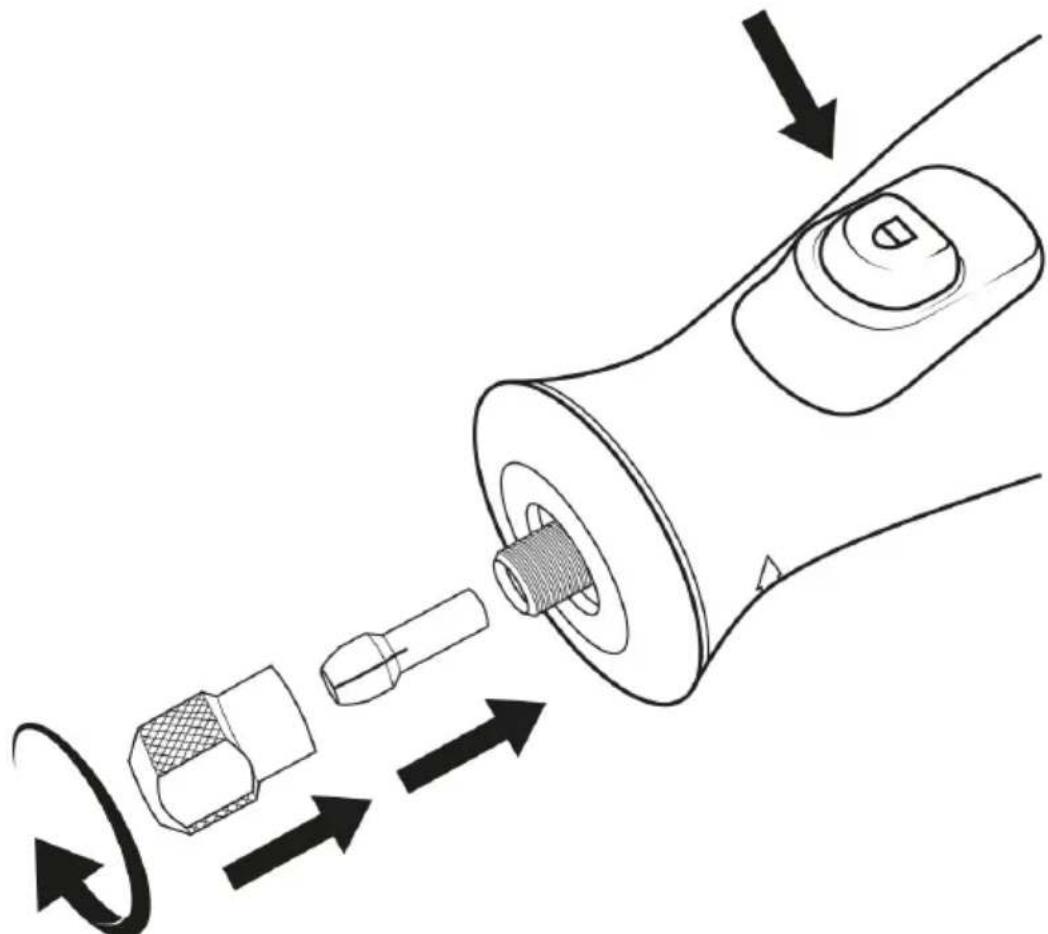
Diagram of a mechanical component with arrows indicating motion, showing a shaft, connector, and housing (no text or symbols)- Press the spindle locking button (6) and rotate the clamping nut (8) by hand until it blocked.
- Keep the spindle locking button (6) pressed and loosen the clamping nut (8) using the wrench.
- Insert the tool bit into the tool holder (8) on the collet. Caution! Make sure that you choose the collet with the appropriate inner diameter for your tool bit!
- Keep the spindle locking button (6) pressed and clamp the tool bit by tightening the clamping nut (8) clockwise using the wrench.
Dismantling the tool bits
Loosen the clamping nut (6) as described in the chapter "Mounting tool bits" and remove the tool bit from the device.
Mounting the wheel or grinding attachments
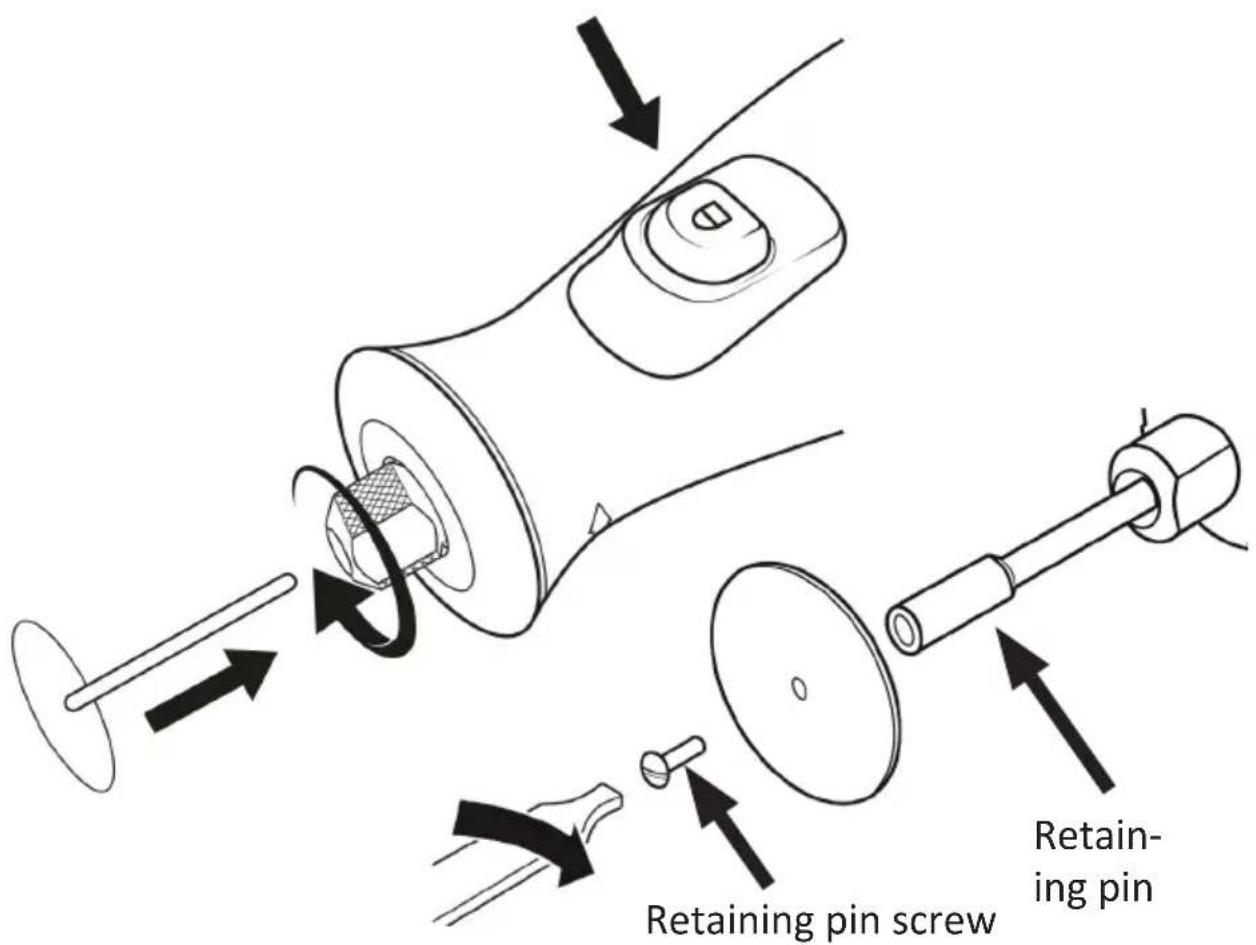
- The delivery includes various wheel or grinding attachments which you can use with the device. You need the retaining pin to use these attachments.
- Insert the retaining pin into the tool holder as described in the previous section.
- Keep the spindle locking button (6) pressed and remove the screw on the retaining pin completely using a screwdriver or with the back side of the wrench.
- Place the desired wheel or grinding attachment on the retaining pin and tighten the previously removed screws of the retaining pin.
Changing the collet
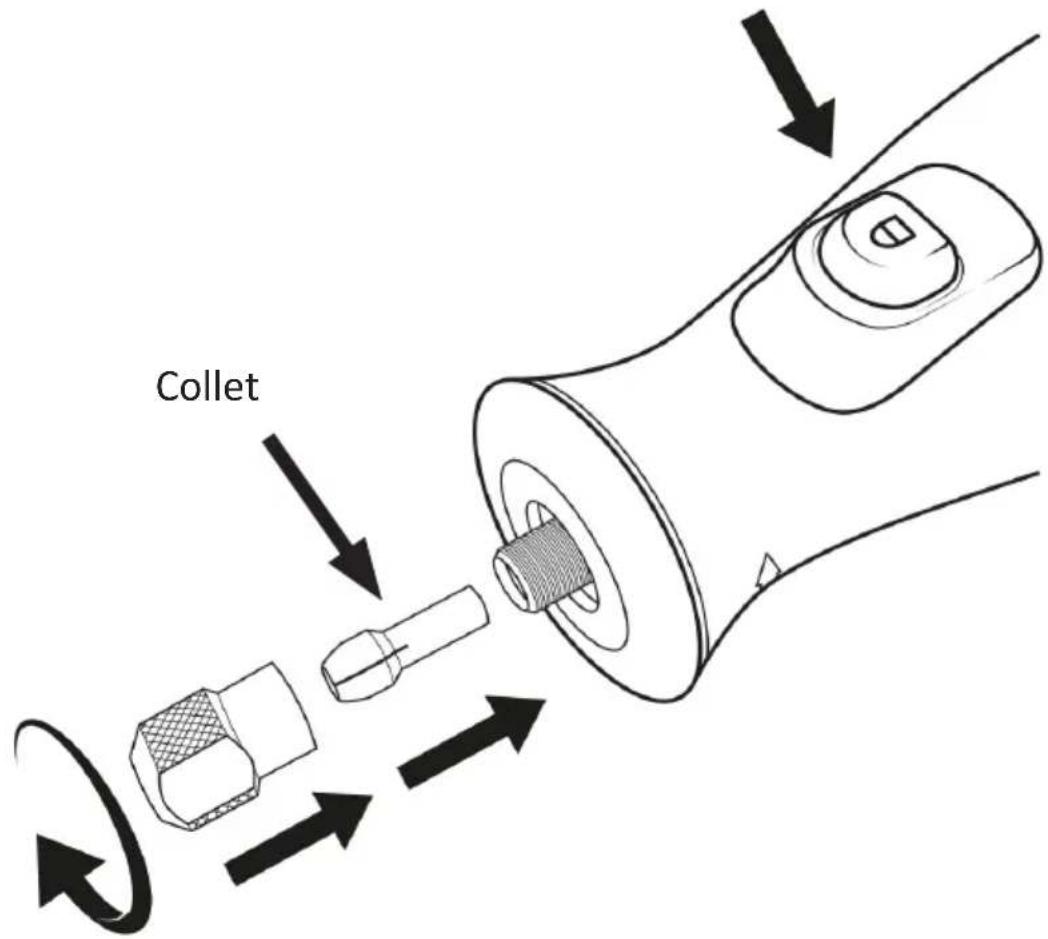
- Press the spindle locking button (6) and rotate the clamping nut (8) by hand, until it is blocked.
- Keep the spindle lock pressed and loosen the clamping nut (8) using the wrench and then remove the clamping nut (8) along with the collet (Tool holder).
- Then insert the new collet. Make absolutely sure that you choose the correct size for the desired application.
- Slightly screw the clamping nut (8) including the new collet using the wrench in clockwise direction.
7. Usage
Hold the device firmly with both hands. Use the product only if you have completely read and understood the user manual and all the relevant safety instructions. Use it only for the intended purpose.
Selecting the speed
Familiarise yourself about special handling instructions before machining the appropriate material. For example, you should machine materials with a low melting point only at low speeds, otherwise there is a risk that the material may deform. Materials such as wood should be machined at high speeds.

Caution! When it is switched on, the device always starts at speed 3!
You can adjust the speed using the "Increase speed (4)" and "Reduce speed (3)" buttons. The following table shows the approximate speed at each setting:
| Setting Speed | |
| 1 about 5000 min ^-1 | |
| 2 about 10000 min ^-1 | |
| 3 about 15000 min ^-1 | |
| 4 about 20000 min ^-1 | |
| 5 about 25000 min ^-1 |

Note: For polishing, grinding work as well as cleaning work, a maximum speed of about 15000 min ^-1 is recommended to prevent damage.
Turning the device on and off
You can switch the device on or off using the "On / Off" switch.
8. Cleaning and Care
Avoid the use of solvents for cleaning plastic parts. Many plastics are susceptible to damage from various types of commercial solvents and may be damaged by their use.
Always use clean cloths for cleaning to remove dirt, dust, oil, grease, etc. Never immerse the device in water!
Keep clean the power tool and the air vents clean to work in a better and safer manner.

Caution! Do not allow petrol, brake fluids, aggressive oils etc. to come in contact with plastic parts. Chemicals can damage, weaken or destroy plastic parts, which can lead to serious injuries.
9. Storage
Before storing the device, make sure that it has been cleaned. Store the device in a dry, well-ventilated place out of reach of children. Keep the device away from corrosive substances such as garden chemicals and salts.

CAUTION!
10. Safety instructions and disclaimer
Please do not try to open the device to carry out repairs or modifications. Avoid contact with the mains voltage. Do not short-circuit the product. The device is not waterproof. Please use it only in dry surroundings. Protect it from high humidity, water and snow.
Keep the device away from high temperatures.
Do not expose the device to sudden changes in temperature or strong vibrations, as this could damage the electronic components. Check the device for any damage before using it. The device should not be used if it was subject to impact or has been damaged in some other manner. Please comply with the local regulations and restrictions. Do not use the device for purposes other than those described in the user manual.
This product is not a toy. Keep it out of the reach of children or mental-
ly disabled persons. Any repair or modification to the device, which is not carried out by the original supplier, will void any warranty and guarantee claims. The device should only be used by those who have read and understood this user manual. The specifications of the device may be changed without any special prior notification.

11. Disposal instructions
In line with the European WEEE directive, electrical and electronic devices should not be disposed of along with domestic waste. Their components have to be separately sent for recycling or disposal, because improper disposal of toxic and dangerous components may permanently damage the environment.
According to the electrical and electronic equipment act (ElektroG), you are obliged (as a consumer) to return (free of charge) electrical and electronic devices to the manufacturer, the point of sale or public collection points at the end of their service life. The relevant local laws regulate the details in this regard. The symbol displayed on the product, in the user manual or/and on the packaging refers to these regulations. With this manner of sorting, recycling and disposal of used devices, you make an important contribution towards protecting our environment.

12. Instructions for battery disposal
In conjunction with the sale of batteries along with the supply of devices that include batteries, the supplier is obliged to point out the following to the customer: The customer is legally obliged to return used batteries. He can return used batteries which the supplier offers or has offered as new batteries in his assortment free of charge to the supplier's dispatch warehouse (shipping address). The symbols shown on the batteries indicate the following: Pb = battery contains more than 0.004 percent lead by weight, Cd = battery contains more than 0.002 percent cadmium by weight, Hg = battery contains more than 0.0005 percent mercury by weight.
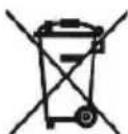
The symbol of the crossed-out dustbin means that the battery may not be disposed of in household waste.

WEEE directive: 2012/19/EU
WEEE Register no.: DE 67896761
The company WD Plus GmbH hereby certifies that the device 304024/20191118JS007 complies with the fundamental requirements and all other relevant stipulations of the guideline 2006/42/EC. A complete conformity statement can be obtained from: WD Plus GmbH, Wohlenbergstraße 16, 30179 Hannover, https://www.ganzeinfach.de
Only for European countries EC Declaration of compliance
WD-Plus GmbH declares that the following device:
Description of the device: Multi-functional tool
Model number / Type: 303824
of the European directives corresponds to: 2006/42/EC, 2014/30/EU, 2014/35/EU, 2011/65/EU
To ensure compliance, the applicable versions of the following standards / specifications were used at the time of issue: EN60745
The technical documentation in accordance with 2006/42 / EC 2014/30 / EU 2014/35 / EU 2011/65 / EU is available at:
WD Plus GmbH, Wohlenbergstraße 16, 30179 Hannover, Germany
Hanover, 03/09/2019
We hope you enjoy your new product in every way!
If there is still something you're concerned about please feel free to let us know.
You're welcome to contact our service team at any time.
- IMPORTANT SAFETY GUIDELINES FOR THIS DE- VICE
- Workplace safety
- Electrical safety
- Personal safety
- Use and handling of power tools
- General warning and safety instructions for grinding, sandpaper grinding, polishing, abrasive cutting or working with wire brushes
- Kickback and corresponding safety instructions
- Specific safety instructions for grinding and abrasive cutting
- Additional safety instructions
- Important safety instructions for batteries
- Notes on battery service life
- Important safety instructions
- Ensure that you read and keep the safety instructions carefully!
- Intended use
- Scope of delivery
- Transport case accessories
- Drilling
- Product details
- Initial use
- CAUTION!
- Tool bits
- Mounting the tool bits
- Dismantling the tool bits
- Mounting the wheel or grinding attachments
- Changing the collet
- Usage
- Selecting the speed
- Turning the device on and off
- Cleaning and Care
- Storage
- Safety instructions and disclaimer
- Disposal instructions
- Instructions for battery disposal
- Only for European countries EC Declaration of compliance
Brand : Brandson
Model : 304024
Category : Uncategorized