
SRX-R320 - Vidéo-projecteur SONY - Free user manual and instructions
Find the device manual for free SRX-R320 SONY in PDF.


| Product Type | Digital Cinema Projector |
| Dimensions (W x H x D) | Approx. 700 × 640 × 1250 mm (27 5/8 × 25 1/4 × 49 1/4 in) (excluding optional lens and projecting parts) |
| Weight | Approx. 195 kg (429 lb 14 oz) (excluding optional lamp and lens) |
| Power Requirements | 200 to 240 V AC, 50/60 Hz |
| Current Consumption | 27 to 22.5 A |
| Projection System | 3-chip SXRD (Silicon X-tal Reflective Display), 8,847,360 pixels (4096 × 2160) × 3 |
| Lens | Optional |
| Lamp | Optional |
| Input Signal | DVI-D (with optional input board: HD-SDI 4:4:4/4:2:2, DC-SDI 4:4:4) |
| Connectors | RS-232C (service), INGEST PORT (content ingestion) |
| Operating Temperature | 5°C to 35°C (41°F to 95°F) (guaranteed performance: 10°C to 30°C) |
| Storage Temperature | -20°C to +60°C (-4°F to +140°F) |
| Operating Humidity | 35% to 85% (no condensation) |
| Storage Humidity | 10% to 90% |
| Supplied Accessories | Keys, lamp replacement keys, lens screws, status indicator lamp, TPC adaptor, ducts, LVDS cables, CSS cable, Ethernet cable, operating instructions |
| Safety Features | Earth (ground) connection required; lamp explosion danger radius (calculated based on height); automatic shutdown on high temperature; douser operation |
| Maintenance | Periodic inspection by qualified personnel; clean cabinet with soft cloth; avoid touching lens; replace air filter when recommended usage time passed |
| Error Indication | Status messages via STATUS MESSAGE window; three levels: ALERT (high), WARNING (medium), FAILURE (low) |
| Warranty | Limited warranty varies by region; see Sony website for details |
| Regulatory Compliance | Class A digital device; FCC Part 15, ICES-003, CE; not for residential use |
Frequently Asked Questions - SRX-R320 SONY
User questions about SRX-R320 SONY
0 question about this device. Answer the ones you know or ask your own.
Ask a new question about this device
Download the instructions for your Vidéo-projecteur in PDF format for free! Find your manual SRX-R320 - SONY and take your electronic device back in hand. On this page are published all the documents necessary for the use of your device. SRX-R320 by SONY.
USER MANUAL SRX-R320 SONY
Digital Cinema Projector
取扱説明書 JF
Operating Instructions ____ GB
使用说明书 ____ CS
natural_image
Simple line drawing of a device emitting flames, no text or symbols present
すぐに電源を切り、消火する。
警告表示の意味
①8 インチダクト取り付け部
排気ダクトを取り付けます。
②吸気口/エアフィルター(右側面)
Before operating the unit, please read this manual thoroughly and retain it for future reference.
Owner's Record
The model and serial numbers are located on the rear. Record these numbers in the spaces provided below. Refer to these numbers whenever you call upon your Sony dealer regarding this product.
Model No. ____ Serial No. ____
WARNING
To reduce the risk of fire or electric shock, do not expose this apparatus to rain or moisture.
To avoid electrical shock, do not open the cabinet. Refer servicing to qualified personnel only.
WARNING
THIS APPARATUS MUST BE EARTHED.
For the NETWORK connector
CAUTION
For safety, do not connect the connector for peripheral device wiring that might have excessive voltage to this port.
For the customers in the U.S.A.
This equipment has been tested and found to comply with the limits for a Class A digital device, pursuant to Part 15 of the FCC Rules. These limits are designed to provide reasonable protection against harmful interference when the equipment is operated in a commercial environment. This equipment generates, uses, and can radiate radio frequency energy and, if not installed and used in accordance with the instruction manual, may cause harmful interference to radio communications. Operation of this equipment in a residential area is likely to cause harmful interference in which case the user will be required to correct the interference at his own expense.
You are cautioned that any changes or modifications not expressly approved in this manual could void your authority to operate this equipment.
All interface cables used to connect peripherals must be shielded in order to comply with the limits for a digital device pursuant to Subpart B of Part 15 of FCC Rules.
This device complies with Part 15 of the FCC Rules. Operation is subject to the following two conditions: (1) this device may not cause harmful interference, and (2) this device must accept any interference received, including interference that may cause undesired operation.
For the customers in Canada
This Class A digital apparatus complies with Canadian ICES-003.
For the customers in Europe, Australia and New Zealand
WARNING
This is a Class A product. In a domestic environment, this product may cause radio interference in which case the user may be required to take adequate measures.
For the customers in Europe
This product has been manufactured by or on behalf of Sony Corporation, 1-7-1 Konan Minato-ku Tokyo, 108-0075 Japan. Inquiries related to product compliance based on European Union legislation shall be addressed to the authorized representative, Sony Deutschland GmbH, Hedelfinger Strasse 61, 70327 Stuttgart, Germany. For any service or guarantee matters, please refer to the addresses provided in the separate service or guarantee documents.
This apparatus shall not be used in the residential area.
For kundene i Norge
Dette utstyret kan kobles til et IT-strømfordelingssystem.
For the State of California, USA only
Perchlorate Material - special handling may apply, See www.dtsc.ca.gov/hazardouswaste/perchlorate
For the customers in Taiwan only

廢電池請回收
AVERTISSEMENT
For the customers in the U.S.A.
SONY LIMITED WARRANTY - Please visit
http://www.sony.com/psa/warranty for important information and complete terms and conditions of Sony's limited warranty applicable to this product.
For the customers in Canada
SONY LIMITED WARRANTY - Please visit http://www.sonybiz.ca/pro/lang/en/ca/article/resources-warranty-product-registration for important information and complete terms and conditions of Sony's limited warranty applicable to this product.
For the customers in Europe
Sony Professional Solutions Europe - Standard Warranty and Exceptions on Standard Warranty. Please visit http://www.pro.sony.eu/warranty for important information and complete terms and conditions.
For the customers in Korea
SONY LIMITED WARRANTY - Please visit http://bpeng.sony.co.kr/handler/BPAS-Start for important information and complete terms and conditions of Sony's limited warranty applicable to this product.
Location and Function of Controls......17
Messages ....18
Error Messages 18
Information Messages.... 20
Projector Maintenance....22
Specifications....22
Precautions
On safety
- Operate the unit on 200 V to 240 V AC, 50/60 Hz.
- Should any liquid or solid object fall into the cabinet, turn off the unit and have it checked by Qualified Sony Service Personnel before operating it further.
- Turn off the power switch if it is not to be used for several days.
- The unit is not disconnected from the AC power source (mains) as long as it is connected to the distribution board and the power switch is turned on.
- Do not place your hand or objects near the ventilation holes. The air coming out is hot.
- Use a lifter to carry the projector to avoid accidents or injury.
- Do not catch your finger between the unit and surface of the floor when moving the unit installed on the floor.
- Be careful not to catch your finger in the cooling fan.
- Since an intense light has come out of this projector from the front, do not stand on the front of a projector for a long time.
On repacking
Save the original shipping carton and packing material; they will come in handy if you ever have to ship your unit. For maximum protection, repack your unit as it was originally packed at the factory.
On condensation
If the room temperature where the projector is installed changes rapidly, or if the projector is moved suddenly from a cold to a warm place, condensation in the projector may occur. As the condensation may cause malfunction, be careful in adjusting temperature settings of the air conditioner. If condensation occurs, leave the projector with the power turned off until it is sufficiently dry before operating it any further.
On LCD panel
The LCD panel fitted to this unit is manufactured with high precision technology, giving a functioning pixel ratio of at least 99.99%. Thus a very small proportion of pixels may be “stuck”, either always off (black), always on (red, green, or blue), or flashing. In addition, over a long period of use, because of the physical characteristics of the liquid crystal display, such “stuck” pixels may appear spontaneously. These problems are not a malfunction.
On dangerous areas in a case of lamp explosion
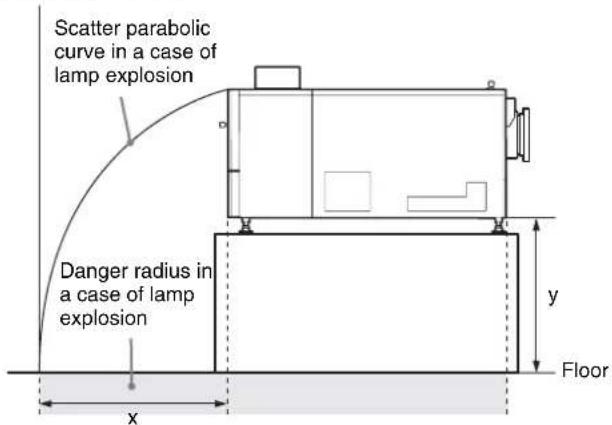
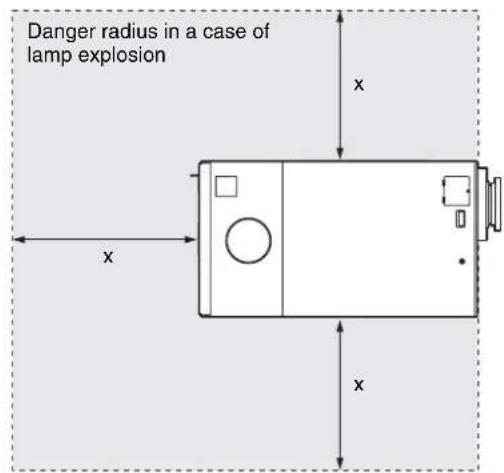
Since a projector lamp can explode, it is dangerous to be in the shaded areas shown in the illustrations below. Keep away from the dangerous areas.
The danger radius (x) differs depending on the height (y) between the bottom of the projector and the floor.
$$ \mathrm{x} = 2 0 / 3 \times \sqrt {1 0 \mathrm{y} + 6 4 0 0} $$
For example, in a case where the height (y) is 800 mm (31 ^1/2 in.), the danger radius (x) calculated by the formula above is 800 mm (31 ^1/2 in.)
Left side view
Top view
On security
SONY WILL NOT BE LIABLE FOR DAMAGES OF ANY KIND RESULTING FROM A FAILURE TO IMPLEMENT PROPER SECURITY MEASURES ON TRANSMISSION DEVICES, UNAVOIDABLE DATA LEAKS RESULTING FROM TRANSMISSION SPECIFICATIONS, OR SECURITY PROBLEMS OF ANY KIND.
Depending on the operating environment, unauthorized third parties on the network may be able to access the unit. When connecting the unit to the network, be sure to confirm that the network is protected securely.
Location and Function of Controls
Front/Sides
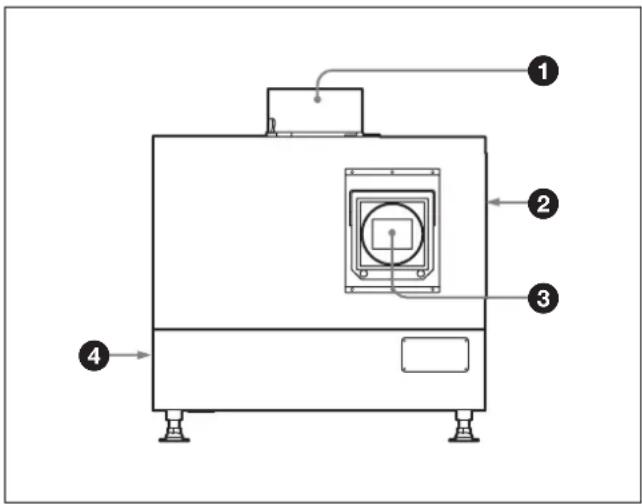
①8-inch duct attachment part
Install an 8-inch duct for exhaust.
②Ventilation holes (intake)/air filter (right side)
Contact Qualified Sony Service Personnel for replacement of an air filter.
③ Lens attachment part
Contact Qualified Sony Service Personnel for attachment of an optional lens.
④ Ventilation holes (exhaust) (left side)
Rear
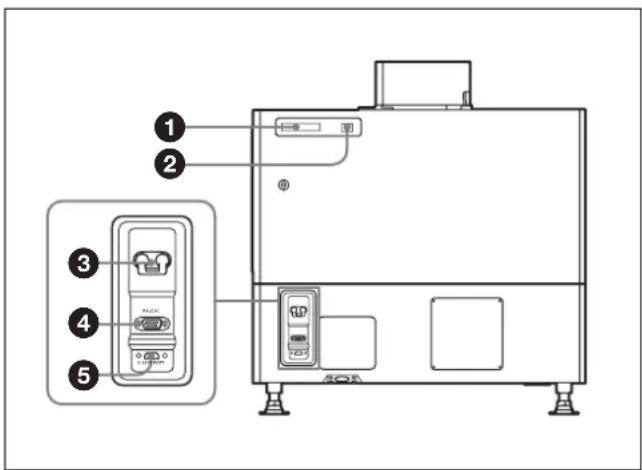
①STATUS MESSAGE window
Displays various messages.
For details on the messages, see page 18.
②Status indicators
Combinations of the MAIN and LAMP indicators indicate the status of the projector as follows:
| MAIN indicator | LAMP indicator | Status of the projector |
| ● (in red) | ● (in red) | The unit is in standby mode. You can turn on the unit with the controller. |
| ● (in green) | ● (in green) | The unit is turned on with the controller. You can operate the unit with the controller. |
| ★ (in green) | ★ (in green) | The unit is in standby after shutting it down with the controller. Cooling fans are running. |
| ● (in green) | ★ (in green) | The unit is in lamp-off mode. |
●: Lights ●Flashes
③Power switch
Turns on/off the main power.
To turn off the projector completely
The projector is ready to be turned off when the LAMP indicator flashes in green then lights in red steadily. You can then turn off the power switch to turn off the projector completely.
④RS-232C connector
Connects the SRX controller. This is for service use.
⑤INGEST PORT connector
Connects a removable drive to ingest the digital cinema contents.
Note
If you use this connector, you must make the necessary connections with this connector inside the projector housing. For details, contact Qualified Sony Service Personnel.
Messages
Various messages may be displayed in the STATUS MESSAGE window at the rear of the projector during operation.
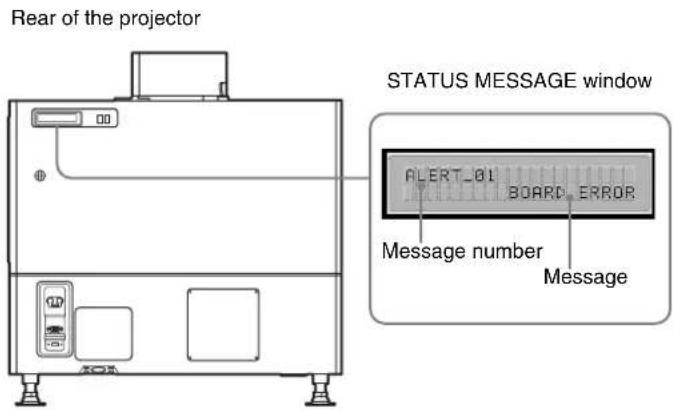
Displayed messages are classified into "Error messages" and "Information messages."
Error Messages
Error messages are classified into three types, described below, depending on the danger level. If an error occurs, the message number and the message are displayed in the STATUS MESSAGE window.
ALERT : Danger level - High Message number: ALERT_xx
WARNING: Danger level - Middle Message number: WARN_xx
FAILURE: Danger level - Low Message number: FAIL_xx
If an error message is displayed, contact Qualified Sony Service Personnel and give them the message and its number. The error messages to be displayed are listed below.
ALERT : Danger level - High
| Message number | Error message Meaning | |
| ALERT_01 BOARD | ERROR Trouble with power of IFA board | |
| ALERT_02 BOARD | ERROR Trouble with power of IFB board | |
| ALERT_03 BOARD | ERROR Trouble with power of IFC board | |
| ALERT_04 BOARD | ERROR Trouble with power of IFD board | |
| ALERT_05 BOARD | ERROR Trouble with power of MX board | |
| ALERT_06 BOARD | ERROR Trouble with power of LPD board | |
| ALERT_07 BOARD | ERROR Trouble with power of CT board | |
| ALERT_08 BOARD | ERROR Trouble with power of DST board | |
| ALERT_09 BOARD | ERROR Trouble with power of PR1 board | |
| ALERT_10 BOARD | ERROR Trouble with power of PR2 board | |
| Message number | Error message | Meaning |
| ALERT_11 BOARD | ERROR Trouble with power of SY board | |
| ALERT_12 BOARD | DETACHED CN board disconnected | |
| ALERT_13 BOARD | DETACHED MX board disconnected | |
| ALERT_14 BOARD | DETACHED LPD board disconnected | |
| ALERT_15 BOARD | DETACHED CT board disconnected | |
| ALERT_16 BOARD | DETACHED DST board disconnected | |
| ALERT_17 BOARD | DETACHED PR1 board disconnected | |
| ALERT_18 BOARD | DETACHED PR2 board disconnected | |
| ALERT_19 TEMPER | ATURE ERROR Temperature of R panel is too high, and the unit stops operation. | |
| ALERT_20 TEMPER | ATURE ERROR Temperature of G panel is too high, and the unit stops operation. | |
| ALERT_21 TEMPER | ATURE ERROR Temperature of B panel is too high, and the unit stops operation. | |
| ALERT_22 COVER | DETACHED Rear cover detached and/or internal mirror position changed | |
| ALERT_27 FAN ERROR | Abnormal in fan A for lamp | |
| ALERT_28 FAN ERROR | Abnormal in fan B for lamp | |
| ALERT_29 FAN ERROR | Abnormal in fan C for lamp | |
| ALERT_30 FAN ERROR | Abnormal in fan D for lamp | |
| ALERT_32 BALLAST | ERROR Temperature of lamp power is too high, and the unit stops operation. | |
| ALERT_33 BALLAST | ERROR Abnormal in the fans for lamp power | |
| ALERT_34 BALLAST | ERROR Abnormal in the lamp power | |
| ALERT_35 LAMP ERROR | The lamp does not light, or goes out. | |
| ALERT_36 BALLAST | ERROR Abnormal in the lamp power | |
| ALERT_37 COVER | DETACHED Abnormal position of the lamp house cover | |
| ALERT_38 BOARD | ERROR Trouble with power of CN board | |
| ALERT_39 TEMPER | ATURE ERROR Temperature of 8-inch duct attachment part is too high, and the unit stops operation. | |
| ALERT_41 COVER | DETACHED Filter duct is detached, and the unit stops operation. |
WARNING: Danger level – Middle
| Message number | Error message | Meaning |
| WARN_01 | FAN ERROR | Abnormal in fan 1 for the main power |
| WARN_02 | FAN ERROR | Abnormal in fan 2 for the main power |
| WARN_05 | FAN ERROR | Abnormal in fan 1 for board |
| WARN_06 | FAN ERROR | Abnormal in fan 2 for board |
| WARN_12 | FAN ERROR | Abnormal in fan for peltier R |
| WARN_13 | FAN ERROR | Abnormal in fan for peltier G |
| WARN_14 | FAN ERROR | Abnormal in fan for peltier B |
| WARN_20 | DEVICE ERROR | Failure of the peltier R control |
| WARN_21 | DEVICE ERROR | Failure of the peltier G control |
| WARN_22 | DEVICE ERROR | Failure of the peltier B control |
| WARN_23 | CONNECTOR DETACHED | The peltier R connector disconnected |
| WARN_24 | CONNECTOR DETACHED | The peltier G connector disconnected |
| WARN_25 | CONNECTOR DETACHED | The peltier B connector disconnected |
| WARN_26 | DOUSER ERROR | Trouble with the douser operation |
| WARN_27 | BALLAST ERROR | Failure of the ballast communication for the lamp power |
| WARN_28 | BALLAST ERROR | Incorrect settings of the lamp S/N |
| Message number | Error message Meaning | |
| WARN_29 EXHAUST ERROR Abnormal air volume of the outside duct | ||
| WARN_30 COVER DETACHED Filter duct is detached | ||
| WARN_31 FAN ERROR Abnormal in fan for PS2 | ||
| WARN_32 FAN ERROR Abnormal in fan for PS1 | ||
| WARN_33 FAN ERROR Abnormal in fan for PBS | ||
FAILURE: Danger level – Low
| Message number | Error message Meaning | |
| FAIL_02 TEMPERATURE | ERROR Warning for abnormal | temperature of 8-inch duct |
| FAIL_04 TEMPERATURE | ERROR Temperature of the intakes is too high. | |
| FAIL_06 TEMPERATURE | ERROR Temperature of the optical unit area is too high. | |
| FAIL_10 TEMPERATURE | ERROR Warning for abnormal | temperature of Panel R |
| FAIL_11 TEMPERATURE | ERROR Warning for abnormal | temperature of Panel G |
| FAIL_12 TEMPERATURE | ERROR Warning for abnormal | temperature of Panel B |
| FAIL_15 TEMPERATURE | ERROR Warning for abnormal | temperature of the lamp power |
| FAIL_16 LENS ERROR | Failure of the zoom position adjustment to the registered setting | |
| FAIL_17 | LENS ERROR Failure of the lens focus adjustment to the registered setting | |
| FAIL_18 | LENS ERROR Trouble with the zoom position adjustment | |
| FAIL_19 LENS ERROR | Trouble with the lens focus adjustment | |
| FAIL_21 | ADJUSTMENT ERROR | Abnormal in the Z-axis adjustment |
| FAIL_24 | ADJUSTMENT ERROR | Failure of calibration for luminance deterioration |
| FAIL_25 DEVICE ERROR | Failure of FPGA configuration | |
| FAIL_26 | DEVICE ERROR | Trouble with the IIC circuit |
| FAIL_27 | DEVICE ERROR | Trouble with the LVDS circuit |
| FAIL_28 | DEVICE ERROR | Trouble with the PLL circuit |
| FAIL_29 | DEVICE ERROR | Trouble with the PARITY circuit |
| FAIL_30 | BALLAST ERROR Lamp power interlocked | |
| FAIL_34 ADJUSTMENT ERROR | Deviation of the Z-axis operation for + direction | |
| FAIL_35 ADJUSTMENT ERROR | Deviation of the Z-axis operation for - direction | |
| FAIL_36 | DEVICE ERROR | Error of the DVI setting |
Information Messages
The message number is not displayed for information messages. Check the following if a message appears in the STATUS MESSAGE window.
| Message | Meaning |
| DOUSER CLOSED | Douser is closed. |
| LAMP POWER + LIMIT | The setting for lamp power (sum of the lamp power and luminance control) is greater than the maximum output (100%). |
| LAMP POWER – LIMIT | The setting for lamp power (sum of the lamp power and luminance control) is lower than the minimum output. |
| LOW REAL TIME CLOCK BATTERY | The RTC battery (BT200) for the SY board should be replaced. |
| LUMI VALUE + LIMIT | Correction for luminance deterioration was made, but the picture is not brighter. |
| LUMI VALUE – LIMITMessage Meaning | Correction for luminance deterioration was made, but the picture is not darker. |
| LAMP ALERT The recommended | usage time of the projection lamp has passed. |
| AIR FILTER WARNING OPTICAL | The recommended usage time of the optical air filter has passed. |
Projector Maintenance
On abnormal noise
The projector is equipped with a fan to prevent heat internal build-up, and some noise will be generated when the projector is turned on. However, if the noise generated is abnormally loud, consult Qualified Sony Service Personnel.
On illumination
Do not expose the screen to direct lighting or sunlight. To obtain the best picture, obey the following.
- Use light-condensing recessed lights.
- Use mesh covers for fluorescent lighting and other scattered light sources.
- Cover any windows that permit sunlight to enter with curtains or blinds.
- If the floor or walls are of light-reflecting material, cover them with carpets or wall paper.
On cleaning
- Periodically clean the cabinet and panels with a soft cloth. For stubborn stains, use a soft cloth lightly dampened with a mild detergent diluted with water. Always turn off the power switch before cleaning.
- Avoid touching the lens with your hands or hard objects that may scratch the lens.
On periodic inspection
The projector includes some consumable parts that degrade over a long period of use.
To keep the projector working properly and to prolong its usable lifetime, have the projector inspected periodically. We recommend you make a maintenance contract for periodical inspection with us. For details on the contract, consult Qualified Sony Service Personnel.
Specifications
Optical characteristics
Projection system
SXRD (Silicon X-tal Reflective Display) 3 panel system
SXRD 8,847,360 (4096 (H) × 2160 (V)) pixels × 3
Lens Optional
Lamp Optional
Input/output
RS-232C For service use (to connect the SRX controller)
INGEST PORT
For service use (to ingest the contents)
Input signal
DVI-D
The following signals are acceptable when the optional input board is installed.
HD-SDI (4:4:4/4:2:2) (SMPTE-292M)
DC-SDI (4:4:4)
For details on optional input boards, contact Qualified Sony Service Personnel.
General
Dimensions Approx. 700 × 640 × 1250 ~mm (27 58 × 25^1/4 × 49^1/4 inches) (w/h/d) (excluding the optional lens and main unit's projecting parts)
Mass Approx. 195 kg (429 lb 14 oz) (excluding the optional lamp and lens)
Power requirements 200 to 240 V AC, 50/60 Hz
Current consumption 27 to 22.5 A
Operating temperature 5°C to 35°C (41°F to 95°F)
Performance guarantee temperature 10°C to 30°C (50°F to 86°F)
Operating humidity 35% to 85% (no condensation)
Storage temperature -20^ to +60^ ( -4^ to +140^ )
Storage humidity 10% to 90%
Supplied accessories
- Keys for removing panels (5)
- Keys for lamp replacement panel (2)
- Lens attachment screws (M8) (4)
• Status indicator lamp (1) - TPC adaptor (1 set)
• One-touch bush (1) - Attachment screws for status indicator lamp and TPC adaptor (1 set)
• LMT duct (A) (1)
• LMT duct (B) (1)
• LVDS cables (1-833-055-21 (Sony)) (2)
• CSS cable (1-966-785-11 (Sony)) (1) - Ethernet cable (1-830-803-12 (Sony)) (1)
- Operating Instructions (1)
Equipment complying with IEC 61000-3-12
Design and specifications are subject to change without notice.
Notes
- Always verify that the unit is operating properly before use. SONY WILL NOT BE LIABLE FOR DAMAGES OF ANY KIND INCLUDING, BUT NOT LIMITED TO, COMPENSATION OR REIMBURSEMENT ON ACCOUNT OF THE LOSS OF PRESENT OR PROSPECTIVE PROFITS DUE TO FAILURE OF THIS UNIT, EITHER DURING THE WARRANTY PERIOD OR AFTER EXPIRATION OF THE WARRANTY, OR FOR ANY OTHER REASON WHATSOEVER.
- SONY WILL NOT BE LIABLE FOR CLAIMS OF ANY KIND MADE BY USERS OF THIS UNIT OR MADE BY THIRD PARTIES.
- SONY WILL NOT BE LIABLE FOR THE TERMINATION OR DISCONTINUATION OF ANY SERVICES RELATED TO THIS UNIT THAT MAY RESULT DUE TO CIRCUMSTANCES OF ANY KIND.
中文
机型名称:数字电影放映机
①8 英寸风管安装部分
用于安装 8 英寸风管以便进行排风。
② 通风孔(进气)/空气过滤器(右侧)
①STATUS MESSAGE 窗口
显示各种信息。
有关信息的细节,请参阅第28页。
②状态指示灯
Printed on recycled paper.
使用再生纸印刷。
- Digital Cinema Projector
- 警告表示の意味
- Owner's Record
- WARNING
- CAUTION
- For the customers in the U.S.A.
- For the customers in Canada
- For the customers in Europe, Australia and New Zealand
- For the customers in Europe
- For kundene i Norge
- For the State of California, USA only
- For the customers in Taiwan only
- AVERTISSEMENT
- For the customers in Korea
- Precautions
- On safety
- On repacking
- On condensation
- On LCD panel
- On dangerous areas in a case of lamp explosion
- On security
- Location and Function of Controls
- Note
- Messages
- Error Messages
- Information Messages
- Projector Maintenance
- On abnormal noise
- On illumination
- On cleaning
- On periodic inspection
- Specifications
- Optical characteristics
- Input/output
- Input signal
- General
- Supplied accessories
- Notes
- 中文
- ①8 英寸风管安装部分
- ② 通风孔(进气)/空气过滤器(右侧)
- ①STATUS MESSAGE 窗口
- ②状态指示灯
Brand : SONY
Model : SRX-R320
Category : Vidéo-projecteur