
PWS-100SC1 - Server SONY - Free user manual and instructions
Find the device manual for free PWS-100SC1 SONY in PDF.


| Product Type | Switcher Control Station (Server) |
| Brand | Sony |
| Model | PWS-100SC1 |
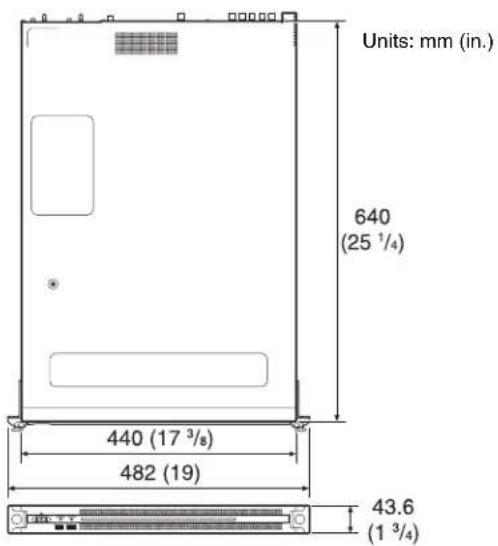
| Dimensions (W x H x D) | 440 x 43.6 x 640 mm (17 3/8 x 1 3/4 x 25 1/4 in) |
| Weight | 14 kg (30 lb 14 oz) |
| Power Requirement | 100 V to 240 V AC, 50/60 Hz |
| Power Consumption | 235 W (operating), 3 W or lower (standby) |
| Operating Temperature | 5 °C to 35 °C (41 °F to 95 °F) |
| Storage Temperature | -20 °C to +60 °C (-4 °F to +140 °F) |
| Operating Humidity | 20% to 90% (relative humidity) |
| Storage Humidity | 5% to 80% |
| CPU | Intel Core i7-3770 (3.4 GHz) |
| Memory | 8 GB DDR3 (SO-DIMM) |
| Internal Storage | 60 GB m-SATA |
| Expansion Bus | PCIe Gen2 8 Lane (30 W) (2 slots) |
| Network Interfaces | 2 x RJ-45 (1000BASE-T/100BASE-TX) |
| USB Ports | 6 x USB 3.0 Type A (2 front, 4 rear; front both 900 mA, rear bottom right 900 mA) |
| Video Outputs | 1 x HDMI (Ver. 1.4a, max 1920x1200 60 Hz), 1 x DisplayPort (Ver. 1.1a, max 2560x1600 60 Hz) |
| Front Panel Indicators | On/Standby button with LED, SYSTEM indicator (green/flashing green/flashing orange/fast red), front panel LED |
| Internal Status Indicators (panel removed) | FAN indicators (red on failure), POWER indicators (red on failure), TEMP indicator (red on overheat) |
| Main Functions | Control station for ICP-X7000 Integrated Control Panel; web browser-based GUI for configuration and operation |
| Power Supply Units | 2 x AC power supply units (redundant, replaceable by service representative) |
| Supplied Accessories | Operation Guide (PWS-100), Operation Manual (PWS-100SC1), Installation Manual |
Frequently Asked Questions - PWS-100SC1 SONY
User questions about PWS-100SC1 SONY
0 question about this device. Answer the ones you know or ask your own.
Ask a new question about this device
Download the instructions for your Server in PDF format for free! Find your manual PWS-100SC1 - SONY and take your electronic device back in hand. On this page are published all the documents necessary for the use of your device. PWS-100SC1 by SONY.
USER MANUAL PWS-100SC1 SONY
Japanese/English/Chinese
1st Edition (Revised 1)
目次
概要 3
システム構成例 4
各部の名称と働き 5
前面 5
前面(パネルを外した場合)……5
背面 6
準備 7
初期設定....7
ライブラリ等のライセンスについて……7
使用上のご注意....7
仕様 8
①FAN インジケーター
① SYSTEM TC 端子
本システムでは使用しません。
Name and Function of Parts.... 12
Front View.... 12
Front View (Panel Removed).... 12
Rear View.... 13
Setting Up 14
Initial Settings.... 14
Library Licenses 14
Usage Precautions.... 14
Specifications.... 15
For safety, please read the precautions described in the PWS-100 Operation Guide (supplied).
Overview
This unit is a control station for controlling the ICP-X7000 Integrated Control Panel and its peripheral devices.
Web application
Control and configuration of the unit is performed using a graphical interface displayed in a web browser on a client PC.
System Configuration Examples
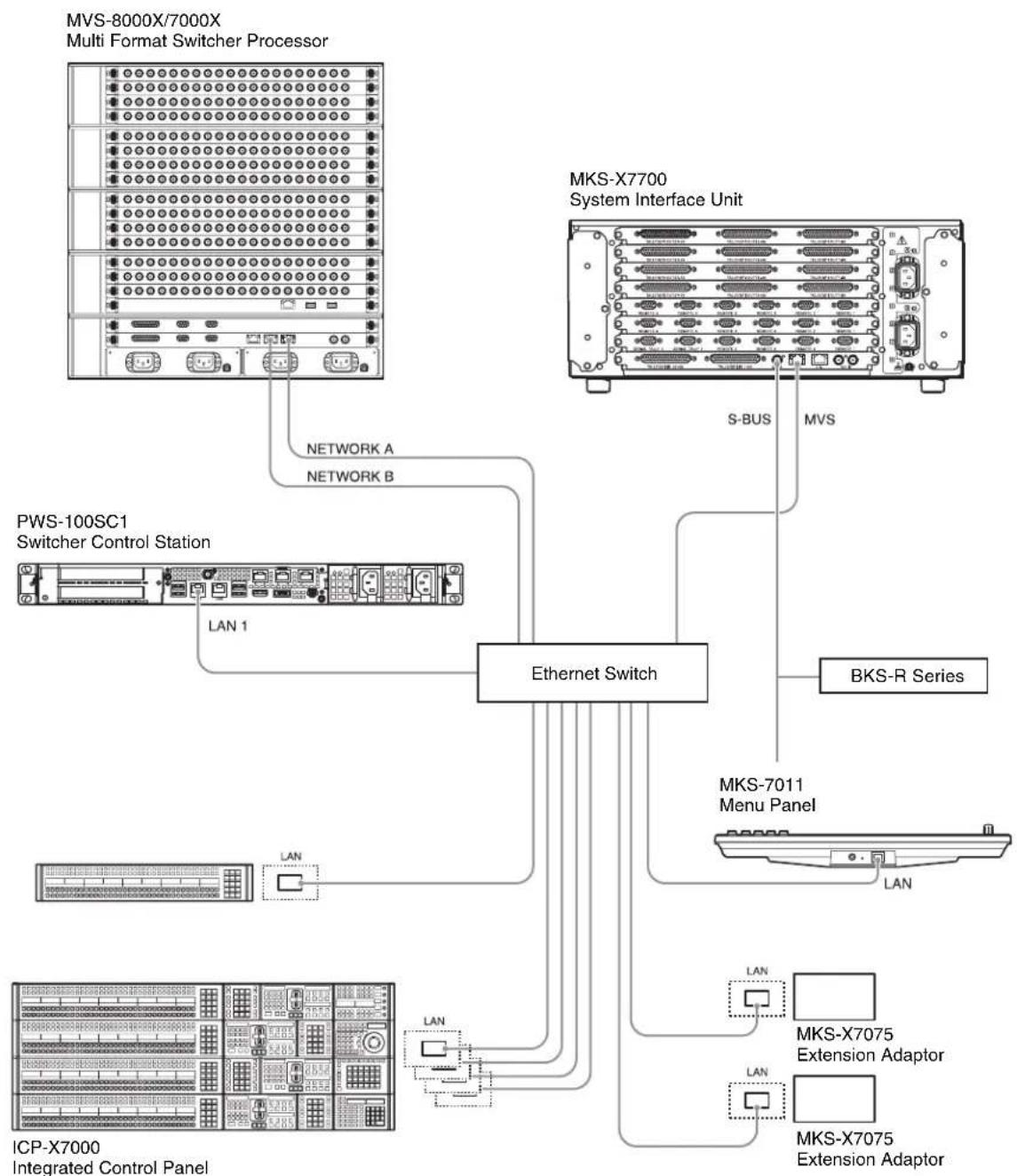
flowchart
graph TD
    A["MVS-8000X/7000X Multi Format Switcher Processor"] --> B["Network A"]
    A --> C["Network B"]
    A --> D["PWS-100SC1 Switcher Control Station"]
    A --> E["LAN 1"]
    A --> F["ICP-X7000 Integrated Control Panel"]
    G["MKS-X7700 System Interface Unit"] --> H["S-BUS"]
    G --> I["MVS"]
    G --> J["BKS-R Series"]
    G --> K["MKS-7011 Menu Panel"]
    K --> L["LAN"]
    K --> M["LAN"]
    K --> N["MKS-X7075 Extension Adaptor"]
    K --> O["MKS-X7075 Extension Adaptor"]
Name and Function of Parts
Front View

①On/Standby button and indicator
Switches the unit on/off (standby state). Connecting the power cord places the unit in standby state, and the indicator turns on red. Pressing the On/Standby button while in standby state turns on the unit and the indicator turns on green. Pressing and holding the On/Standby button for two seconds switches the unit to standby state, and the indicator changes to red. To turn the unit on again after switching from On state to standby state, when the indicator is red, press and hold the On/Standby button for three seconds or longer. The indicator goes out when the power cord is disconnected.
② SYSTEM indicator
Indicates the status of the unit.
Green: Operating normally
Flashing green (once per second): System is booting or transitioning to standby state.
Flashing orange (once per second): A warning has been generated.
High-speed flashing red (four times per second): An error has occurred.
③ACCESS indicator
Not used by this system.
④Front panel LED
Always turned on when the system is operating.
⑤USB connectors (front panel)
Connects to a keyboard and mouse for setting the unit. USB devices not described in this document are not supported.
Notes
- Both USB ports on the front panel support power delivery (900 mA).
- Use SuperSpeed USB cables.
Front View (Panel Removed)
When the SYSTEM indicator or web application indicates an error, you can remove the front panel to check the status of the hardware components.
To remove the front panel, loosen the screws on the left and right sides and pull the panel towards you.

①FAN indicators
If any of the fans fail, the corresponding fan indicator turns on red.
② POWER indicators
If either of the AC power supply units fail, the corresponding indicator turns on red.
③TEMP indicator
If an abnormally high temperature is detected within the unit, the indicator turns on red.
④HDD slots
Not used by this system.
Rear View

① SYSTEM TC connector
Not used by this system.
② Remote connectors (1/2, 3/4, 5)
Not used by this system.
③AC power supply units
Insert the power cords and connect to power outlets. Two AC power supply units are installed at the factory.
For details about replacing a power supply unit, consult your Sony sales or service representative.
④USB connectors (rear panel)
Connect to a USB device.
Notes
- Of the four USB connectors on the rear panel, only the bottom right port supports power delivery (900 mA). The other three ports do not support power delivery, and should be used to connect USB devices that do not require power supplied from the USB connector.
- Use SuperSpeed USB cables.
⑤LAN connectors
Connect to a Gigabit Ethernet network.
⑥HDMI connector
Connect to a monitor using an HDMI cable. Use only Sony-brand HDMI cables.
Recommended cable (example): DLC-HE20XF HIGH SPEED HDMI cable (2 m (6 ft.))
⑦DisplayPort connector
Connect to a monitor using a DisplayPort cable. Use the following recommended cable.
• LINDY 41630 4K-compatible DisplayPort cable (1 m (3 ft.))
The compatibility of the following displays has been confirmed.
- Sony: BVM-F170
• ASUS: PB248Q
Note
Use an active-type cable if using a DisplayPort-DVI conversion cable or DisplayPort-HDMI conversion cable.
Setting Up
Initial Settings
This unit requires no initial setup.
For details about required settings when installing the ICP-X7000, refer to the ICP-X7000 installation manual.
Library Licenses
Refer to the [Help] menu in the web application for the licenses of each type of library used by the PWS-100SC1.
Usage Precautions
Power supply precautions
If the unit is suddenly turned off during operation, data loss may occur. To maintain data integrity, the use of an uninterruptible power supply (UPS) is recommended.
When disconnecting the power cord or turning off the breaker, always stop operation of the unit using one of the following methods before proceeding.
- Press the On/Standby button on the unit.
- Execute shutdown from the switcher menu.
Note
DIP switch settings are required in order to start the unit automatically when power is restored.
For details, contact your Sony service representative.
Specifications
General
Power requirement
100 V to 240 V AC
50/60 Hz
Power consumption
235 W
Standby power consumption
3W or lower
Operating temperature
5 °C to 35 °C (41 °F to 95 °F)
Storage temperature
-20^ to +60^ (-4^ to +140^)
Operating humidity
20% to 90% (relative humidity)
Storage humidity
5% to 80%
Mass 14 kg (30 lb. 14 oz.)
Dimensions 440 × 43.6 × 640 mm (17^3/8 × 1^3/4 ×
25^1/_4 in.) (width / height / depth)
CPU
Processor Intel Core i7-3770 (3.4 GHz)
Memory 8 GBytes
SO-DIMM (DDR3) (2)
Drive (m-SATA)
60 GBytes
Expansion bus PCIe Gen2 8Lane (30 W) (2)
Inputs/outputs
LAN RJ-45 (2)
1000BASE-T
100BASE-TX
USB (front panel/rear panel)
Super Speed USB (USB 3.0) Type A
(6, 2 on front and 4 on rear)
Front: Power delivery support (900 mA/port)
Rear: Power delivery support on bottom right port (900 mA), not supported on other three ports
HDMI Type A (1)
HDMI Ver. 1.4a,
1920 × 1200 maximum resolution,
60 Hz
DisplayPort DisplayPort (1)
DisplayPort Ver. 1.1a,
2560 × 1600 maximum resolution,
60 Hz
Supplied accessories
Operation Guide
PWS-100 (1)
Operation Manual
PWS-100SC1(this document)(1)
Installation Manual (1)
Design and specifications are subject to change without notice.
SONY WILL NOT BE LIABLE FOR DAMAGES OF ANY KIND RESULTING FROM A FAILURE TO IMPLEMENT PROPER SECURITY MEASURES ON TRANSMISSION DEVICES, UNAVOIDABLE DATA LEAKS RESULTING FROM TRANSMISSION SPECIFICATIONS, OR SECURITY PROBLEMS OF ANY KIND.
Notes
- Always make a test recording, and verify that it was recorded successfully.
SONY WILL NOT BE LIABLE FOR DAMAGES OF ANY KIND INCLUDING, BUT NOT LIMITED TO, COMPENSATION OR REIMBURSEMENT ON ACCOUNT OF FAILURE OF THIS UNIT OR ITS RECORDING MEDIA, EXTERNAL STORAGE SYSTEMS OR ANY OTHER MEDIA OR STORAGE SYSTEMS TO RECORD CONTENT OF ANY TYPE.
• Always verify that the unit is operating properly before use. SONY WILL NOT BE LIABLE FOR DAMAGES OF ANY KIND INCLUDING, BUT NOT LIMITED TO, COMPENSATION OR REIMBURSEMENT ON ACCOUNT OF THE LOSS OF PRESENT OR PROSPECTIVE PROFITS DUE TO FAILURE OF THIS UNIT, EITHER DURING THE WARRANTY PERIOD OR AFTER EXPIRATION OF THE WARRANTY, OR FOR ANY OTHER REASON WHATSOEVER. - SONY WILL NOT BE LIABLE FOR CLAIMS OF ANY KIND MADE BY USERS OF THIS UNIT OR MADE BY THIRD PARTIES.
- SONY WILL NOT BE LIABLE FOR THE LOSS, REPAIR, OR REPRODUCTION OF ANY DATA RECORDED ON THE INTERNAL STORAGE SYSTEM, RECORDING MEDIA, EXTERNAL STORAGE SYSTEMS OR ANY OTHER MEDIA OR STORAGE SYSTEMS.
- SONY WILL NOT BE LIABLE FOR THE TERMINATION OR DISCONTINUATION OF ANY SERVICES RELATED TO THIS UNIT THAT MAY RESULT DUE TO CIRCUMSTANCES OF ANY KIND.
中文
机型名称:切换台控制工作站
①开机 / 待机键和指示灯
①FAN 指示灯
The material contained in this manual consists of information that is the property of Sony Corporation and is intended solely for use by the purchasers of the equipment described in this manual.
Sony Corporation expressly prohibits the duplication of any portion of this manual or the use thereof for any purpose other than the operation or maintenance of the equipment described in this manual without the express written permission of Sony Corporation.
For the customers in the U.S.A.
SONY LIMITED WARRANTY - Please visit http://www.sony.com/psa/warranty for important information and complete terms and conditions of Sony's limited warranty applicable to this product.
For the customers in Canada
SONY LIMITED WARRANTY - Please visit http://www.sonybiz.ca/solutions/Support.do for important information and complete terms and conditions of Sony's limited warranty applicable to this product.
For the customers in Europe
Sony Professional Solutions Europe - Standard Warranty and Exceptions on Standard Warranty. Please visit http://www.pro.sony.eu/warranty for important information and complete terms and conditions.
For the customers in Korea
SONY LIMITED WARRANTY - Please visit http://bpeng.sony.co.kr/handler/BPAS-Start for important information and complete terms and conditions of Sony's limited warranty applicable to this product.
出版日期:2015年2月
PWS-100SC1(SY/CN)
4-567-841-02(1)


- 目次
- ①FAN インジケーター
- ① SYSTEM TC 端子
- Overview
- Web application
- System Configuration Examples
- Name and Function of Parts
- Front View
- ①On/Standby button and indicator
- ② SYSTEM indicator
- ③ACCESS indicator
- ④Front panel LED
- ⑤USB connectors (front panel)
- Notes
- Front View (Panel Removed)
- ①FAN indicators
- ② POWER indicators
- ③TEMP indicator
- ④HDD slots
- Rear View
- ① SYSTEM TC connector
- ② Remote connectors (1/2, 3/4, 5)
- ③AC power supply units
- ④USB connectors (rear panel)
- ⑤LAN connectors
- ⑥HDMI connector
- ⑦DisplayPort connector
- Note
- Setting Up
- Initial Settings
- Library Licenses
- Usage Precautions
- Power supply precautions
- Specifications
- General
- CPU
- Inputs/outputs
- Supplied accessories
- 中文
- ①开机 / 待机键和指示灯
- ①FAN 指示灯
- For the customers in the U.S.A.
- For the customers in Canada
- For the customers in Europe
- For the customers in Korea
Brand : SONY
Model : PWS-100SC1
Category : Server