BC23SRT01 - Measurement Be Cool - Free user manual and instructions
Find the device manual for free BC23SRT01 Be Cool in PDF.


| Product Type | Laser Distance Measurer |
| Model | BC23SRT01 |
| Brand | Be Cool |
| Measurement Range | Up to 50 m |
| Accuracy | ±1.5 mm |
| Measurement Units | Meters, feet, inches |
| Display | Backlit LCD |
| Power Source | 2 AAA batteries (1.5 V) |
| Battery Life | Up to 5000 measurements |
| Auto Power Off | After 90 seconds of inactivity |
| Laser Class | Class II, <1 mW, 635 nm |
| Operating Temperature | 0°C to 40°C |
| Storage Temperature | -20°C to 60°C |
| Dimensions (L x W x H) | 115 x 50 x 25 mm |
| Weight (with batteries) | 120 g |
| Functions | Distance, area, volume, continuous measurement |
| Additional Features | Addition/subtraction, memory (last 10 values), bubble level |
| Cleaning & Maintenance | Wipe with a soft dry cloth; do not use solvents |
| Safety | Avoid direct eye exposure to laser; use in accordance with instructions |
| Spare Parts & Repairability | Batteries replaceable; no user-serviceable parts inside |
| Warranty | 2 years |
Frequently Asked Questions - BC23SRT01 Be Cool
User questions about BC23SRT01 Be Cool
0 question about this device. Answer the ones you know or ask your own.
Ask a new question about this device
Download the instructions for your Measurement in PDF format for free! Find your manual BC23SRT01 - Be Cool and take your electronic device back in hand. On this page are published all the documents necessary for the use of your device. BC23SRT01 by Be Cool.
USER MANUAL BC23SRT01 Be Cool
natural_image
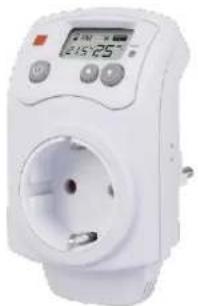
White electrical wall-mounted power plug with a digital display showing 2:15:25 (no visible text or symbols)Lieferumfang
1 Kontroll-LED
Plug-in room thermostat
Operating instructions
natural_image
White electrical outlet with a digital display showing 2:15:25' and no visible text or symbols on the device itself.Scope of delivery
- Room thermostat
- Operating instructions
Intended use
The product is used to automatically switch an electrical consumer (e.g. heating or air conditioning unit) on or off when the temperature falls below or exceeds a certain level.
The product must be connected to an earthed mains socket. The connection data and the max. permissible power consumption of the connected consumer can be found in the chapter "Technical data".
The safety instructions and all other information in this instruction manual must be followed. Read the operating instructions carefully and keep them or pass them on to other users of the product.
Any use other than that described above will result in damage to this product, and is also associated with hazards such as short circuits, fire, electric shocks, etc. The entire product must not be modified or converted!
This product complies with the legal, national and European requirements. All company names and product designations contained are trademarks of their respective owners. All rights reserved.
Current operating instructions
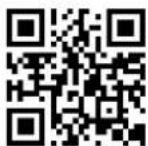
Download current operating instructions via the link www.becool.at/downloads or scan the QR code shown. Follow the instructions on the website
Symbol explanation

The symbol with the lightning bolt in a triangle is used when there is danger to your health, e.g. from electric shock.

The symbol with the exclamation mark in the triangle indicates important instructions in these operating instructions that must be followed.

The arrow symbol can be found when special tips and notes on operation are to be given to you.

Observe the operating instructions!
Safety instructions

Read the operating instructions carefully and pay particular attention to the safety instructions. If you do not follow the safety instructions and the information on proper handling in these operating instructions, we accept no liability for any resulting personal injury/property damage. In addition, the warranty/guarantee becomes void in such cases.
General
- For safety and approval reasons, unauthorised conversion and/or modification of the product is not permitted. Do not open/disassemble it! There are no parts inside that need to be adjusted or maintained by you.
- Maintenance, adjustment or repair work may only be carried out by a specialist/specialist workshop that is familiar with the associated dangers or relevant regulations.
- The product is designed in protection class I. It may only be connected to and operated from an earthed mains socket.
- The mains socket to which the product is connected must be close to the product and easily accessible.
- The product is equipped with a touch protection. Only when both contacts of a mains plug are inserted into both openings at the same time does the integrated mechanism release the opening of the plug socket.
- Exercise special caution in the presence of children. Children cannot recognise the dangers that arise when electrical equipment is handled incorrectly. There is a danger to life from electric shock!
- Do not leave the packaging material lying around carelessly, this can become a dangerous toy for children.
- Handle the product with care, it will be damaged by bumps, knocks or falling from even a small height.
- In commercial facilities, the accident prevention regulations of the Federation of Institutions for Statutory Accident Insurance and Prevention for electrical systems and equipment must be observed!
- If you still have questions that are not answered in these operating instructions, please contact us or another specialist.
- In commercial facilities, the accident prevention regulations of the Federation of Institutions for Statutory Accident Insurance and Prevention for electrical systems and equipment must be observed! - If you still have questions that are not answered in these operating instructions, please contact us or another specialist.
Operating site
- The product may only be operated in dry, closed indoor rooms; it must not get damp or wet! Never place the product in the immediate vicinity of a bath, shower, bathtub or similar. There is a danger to life from electric shock!
- The product is not a toy, it does not belong in children's hands. Place the product so that it cannot be reached by children.
- The product must not be exposed to extreme temperatures, direct sunlight or strong vibrations.
- Operation in environments with a high dust content, with flammable gases, vapours or solvents is not permitted. There is a risk of explosion and fire!
- Never operate the room thermostat in a vehicle.
Operation and use
- Never touch the product or the mains plug that you want to plug into the front socket of the room thermostat with wet or damp hands. There is a risk of life-threatening electric shock! The same applies to the room thermostat itself.
- Never connect the product to the mains voltage immediately after it has been brought from a cold room into a warm room (e.g. during transport). The resulting condensation may destroy the unit or cause an electric shock! Let the product come to room temperature first. Wait until the condensation has evaporated; this may take several hours. Only then may the product be connected to the power supply and put into operation.
- Never pull out a mains plug inserted into the front socket of the room thermostat by the cable. Grasp the plug by the grip surfaces on the side and pull it out of the front socket.
- Do not overload the room thermostat. Observe the connected load in the chapter "Technical data".
- Do not plug in one after the other! This can lead to an overload of the room thermostat! There is a risk of fire!
- Do not operate covered! At higher connected loads, the room thermostat heats up, which can lead to overheating and possibly a fire if it is covered!
• Voltage-free only when the plug is pulled out!
- Do not use the product if it is damaged. There is a danger to life from electric shock!
• In this case, dispose of the product in an environmentally friendly manner.
- It can be assumed that safe operation is no longer possible if:
• the product has visible damage
- the product does not work or does not work properly (escaping smoke or smell of burning, audible crackling noises, discolouration on the product or adjacent surfaces).
• the product has been stored under unfavourable conditions
• heavy transport stresses have occurred
• Use the product only in temperate climates, not in tropical climates.
- Always unplug the room thermostat from the mains socket before cleaning it or if you are not going to use it for a long time.
- Never pour liquids on top of or next to the product. There is a high risk of fire or fatal electric shock.
- If liquid should nevertheless get into the interior of the unit, immediately switch off all poles of the mains socket to which the room thermostat is connected (switch off the fuse/automatic circuit breaker/F1 circuit breaker of the associated circuit). Only then unplug the room thermostat from the mains socket and contact a specialist. Do not operate the product any longer.
d) Placement of the connected heating/air conditioning unit
- Follow the operating instructions for the heating/air-conditioning unit that you connect to the room thermostat.
- Many heating/air-conditioning units must not be operated unattended for safety reasons.
- In any case, keep sufficient distance between the heater/air conditioner and flammable objects (e.g. curtains).
- Only set up a mobile heating/air-conditioning unit on a stable, level, horizontal surface.
- Never cover heating/air conditioning units.
- Keep children away from heating/air-conditioning units! There is not only a risk of injury or burns, but also a risk of life-threatening electric shock!
- Do not connect several heating/air conditioning units to the room thermostat.
- Make sure that the connected heating or cooling unit is set up and operated far enough away from the room thermostat so that the mutual interference is as low as possible. Otherwise there will be unnecessarily frequent switching operations.
Initial commissioning, charging of the integrated battery
A NiMH rechargeable battery is integrated in the room thermostat. This serves to ensure that the set data are not lost in the event of a power failure (backup time up to 200h).
In addition, the room thermostat can be programmed (when the battery is charged) even when it is not plugged into a mains socket.
The battery is fully charged when the room thermostat has been connected to the mains voltage for about 8 - 12 hours.
On delivery, the NiMH battery is normally empty, there is no indication in the display. To be able to carry out programming in this case, plug the room thermostat into a mains socket. Shortly afterwards, the display is activated and the room thermostat can be put into operation.
Operating elements
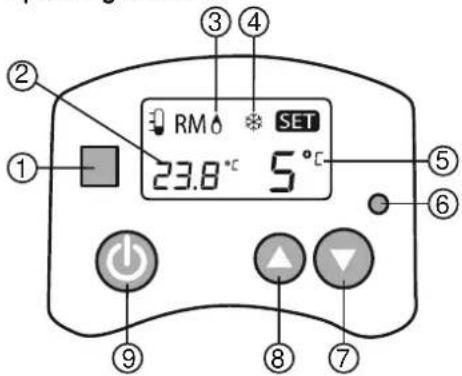
1 Control LED
LED off: The room thermostat is switched off
LED red: The set temperature limit has not yet been reached and the front socket of the room thermostat is deactivated
LED blue: The set temperature limit has been reached and the front socket of the room thermostat is activated
2 Current temperature
3 Symbol "♂" for heating mode (front socket is switched on when the temperature falls below the set limit value)
4 Symbol "※" for cooling mode (front socket is switched on when the set temperature limit is exceeded)
5 Current temperature limit value (not visible if the room thermostat is switched off and the control LED (1) is not lit)
6 RESET" button: Reset room thermostat to basic settings
7 Button "Decrease temperature limit
8 Button " Increase temperature limit
9 Button " ⏻": Switch room thermostat on/off
→ The "♂" or "※" symbol only appears when...
• the room thermostat is switched off
- the temperature limit value is not reached when the room thermostat is switched on
Placement of the room thermostat
The temperature sensor is permanently installed in the room thermostat. For this reason, the room thermostat measures the temperature at the place of operation (e.g. when it is plugged into a wall socket).
→ In a closed room, cool air sinks down and warm air rises up.
For this reason, it may be necessary to select the temperature limit value accordingly if the room thermostat is to switch on a heating or cooling unit.
Also make sure that the connected heating or cooling unit is set up and operated far enough away from the room thermostat so that mutual interference is as low as possible. Otherwise there will be unnecessarily frequent switching operations.
The room thermostat should therefore never be operated near furniture or curtains, as these hinder the air circulation in the room.
Plug the room thermostat into the mains socket (wall socket) so that the display is facing upwards and the front socket is facing downwards. In this position, the temperature sensor is on the underside of the room thermostat (see circle marking in the picture on the right), so it is not or only slightly affected by the room thermostat's own heating.
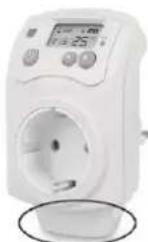
In other operating positions, the heating of the room thermostat has a great influence on the temperature sensor, which sometimes results in strong deviations when switching on/off at the set temperature limit value.
Select temperature unit °C or °F
- Switch off the thermostat with the "⏻" button (9) so that the control LED (1) goes out.
- Now hold down the two buttons "▼" (7) and "▲" (8) simultaneously for about 3 seconds to switch between the temperature unit °C (degrees Celsius) and °F (degrees Fahrenheit).
Select operating mode
The room thermostat has two different operating modes:
3. Heating mode
In this operating mode, the room thermostat switches on the connected consumer when the room temperature falls below the set temperature limit. This operating mode is therefore suitable for connecting a heater.
4. Cooling mode
In this operating mode, the room thermostat switches on the connected consumer when the room temperature rises above the set temperature limit. This operating mode is therefore suitable for connecting a cooling unit.
To switch between the two operating modes, proceed as follows:
- Switch off the thermostat with the "⏻" button (9) so that the control LED (1) goes out. The operating mode currently set on the room thermostat appears at the top of the display ("⏻" = heating mode, " &= cooling mode).
- Press and hold the two buttons "⏻" (9) and "▲" (8) simultaneously for 3 seconds to change the operating mode.
Set temperature limit value
The temperature limit value shown at the bottom right of the display can be reduced with the "▼" button (7) or increased with the "▲" button (8) (keep the corresponding button pressed longer for a quick adjustment).
The setting is only possible when the room thermostat is switched on.
Heating mode example
- If the room thermostat is to serve as a frost monitor and the room temperature of e.g. a storeroom or cellar room is to be kept above +5 °C, connect a heating device, such as a convector, to the front socket of the room thermostat.
- Switch off the room thermostat and check which operating mode is currently set (" ^A " = heating mode, " ^B " = cooling mode).
- Select heating mode as the operating mode.
- Switch on the room thermostat. The control LED (1) must now light up (LED lights up red = front socket is deactivated, LED lights up blue = front socket is activated).
- Set a temperature limit of +5 °C with the buttons "▼" (7) or "▲" (8). (8) to set a temperature limit value of +5 °C. The room thermostat is now ready for operation.
- If the room temperature now falls below +5 °C for more than 1 minute, the room thermostat switches on the connected heater. The control LED (1) lights up blue and the symbol "♂" also appears.
The period of 1 minute serves to ensure that a connected heater is not switched on or off too quickly in succession.
- If the room temperature rises above +5 °C, the room thermostat switches the connected heater off again. The control LED (1) lights up red, the symbol " " 0 disappears again.
Cooling mode example
- If the room thermostat is to protect a room from excessive temperatures, connect a fan (or a suitable air conditioner), for example, to the front socket of the room thermostat.
- Switch off the room thermostat and check which operating mode is currently set (" " = heating mode, " " = cooling mode).
- Select cooling mode as the operating mode.
- Switch on the room thermostat. The control LED (1) must now light up (LED lights up red = front socket is deactivated, LED lights up blue = front socket is activated).
- Set a temperature limit of +25 °C with the buttons "▼" (7) or "▲" (8). (8) to set a temperature limit value of +25 °C. The room thermostat is now ready for operation.
- If the room temperature now rises above +25 °C for more than 3 minutes, the room thermostat switches on the connected fan (or an air conditioner). The control LED (1) lights up blue and the symbol "※" also appears.
The time period of 3 minutes serves to ensure that a connected air conditioner is not switched on or off too quickly in succession.
- If the room temperature falls below +25 °C, the room thermostat switches the connected fan (or an air conditioner) off again. The control LED (1) lights up red, the symbol 🌐 disappears again.
Maintenance and care
- The product is maintenance-free for you. There are no components inside the product that you need to maintain, so never open/disassemble it. Maintenance or repair may only be carried out by a specialist or specialist workshop.
- Before cleaning, disconnect the room thermostat from the mains voltage, unplug it from the mains socket. Then disconnect a consumer connected to the room thermostat.
• A dry, soft and clean cloth is sufficient for cleaning. - Dust is easily removed with the help of a long-haired, soft and clean brush and a hoover.

Never use aggressive cleaning agents, cleaning alcohol or other chemical solutions, as this may damage the housing or even impair its function.
Recycling, disposal, declaration of conformity
 | RECYCLINGThe packaging materials can be recycled. Therefore, it is recommended to dispose of them in sorted waste. |
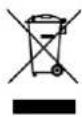 | DISPOSALThe symbol "crossed-out dustbin" requires the separate disposal of waste electrical and electronic equipment (WEEE). Electrical and electronic equipment may contain hazardous and environmentally dangerous substances. Therefore, do not dispose of this in unsorted residual waste, but at a designated collection point for waste electrical and electronic equipment. By doing so, you will contribute to the protection of resources and the environment. For more information, please contact your dealer or local authorities. Directive 2012/19/EU |
 | DECLARATION OF CONFORMITYWe hereby confirm that this article complies with the basic requirements, regulations and directives of the EU. You can view the detailed declaration of conformity at any time under the following link:https://www.schuss-home.at/downloads |
Errors and technical modifications excepted
| Technical information | |
| Rated voltage | 230 V/AC, 50 - 60 Hz |
| Connected load Ohmic load | Max. 3680W (230V/AC, 16 A) |
| Connected load Inductive load | Max. 460 W (230 V/AC, 2 A) |
| Switch type | Relay (single pole) |
| Temperature setting range | +5 °C to +30 °C |
| Accuracy | ±1 °C |
| Backup battery | Permanently installed (NiMH, 2.4V, 40 mAh); charging time approx. 8 - 12h, backup time approx. 200h |
| Environmental conditions | Temperature 0 °C to +40 °C, humidity 20% to 90%, non-condensing. |
| Dimensions (WxHxD incl. plug) | 60x110x77mm |
| Weight | 136g |
| Contact address for further Information and service line | Schuss Home Electronic GmbHScheringgasse 3,A-1140 Vienna Tel: +43 (1) 97 0 21 www.beccol.atFB-No: 236974 t / FB-Court: Vienna |
→ Consumers with predominantly resistive load are e.g. incandescent lamps, heaters or similar. Consumers with inductive load are e.g. motors, ballasts, conventional transformers, energy-saving lamps or similar.
- Lieferumfang
- Plug-in room thermostat
- Scope of delivery
- Intended use
- Current operating instructions
- Symbol explanation
- Safety instructions
- General
- Operating site
- Operation and use
- d) Placement of the connected heating/air conditioning unit
- Initial commissioning, charging of the integrated battery
- Placement of the room thermostat
- Select temperature unit °C or °F
- Select operating mode
- Heating mode
- Cooling mode
- Set temperature limit value
- Heating mode example
- Cooling mode example
- Maintenance and care
Brand : Be Cool
Model : BC23SRT01
Category : Measurement