BCLB802IKUHF05 - Air purifier Be Cool - Free user manual and instructions
Find the device manual for free BCLB802IKUHF05 Be Cool in PDF.


| Product Type | Air Humidifier with Purification |
| Model | BCLB802IKUHF05 |
| Brand | Be Cool |
| Dimensions (W x H x D) | 240 x 371 x 170 mm |
| Weight | 2.5 kg |
| Power Consumption | 105 W |
| Input Voltage | 220-240 V |
| Working Temperature | 15 °C – 30 °C |
| Mist Output (Cold) | 300 ml/h |
| Mist Output (Warm) | 400 ml/h |
| Noise Level | 35 dB |
| Water Tank Capacity | 5 L |
| Filters Included | Silver Ion Filter, Lime Filter, HEPA Filter |
| Filter Replacement Interval | Every 2 months (all filters) |
| Functions | Warm Mist, Timer (1-10 h), Humidity Setting (40-80%), Auto Mode, Night Mode, Ionizer, UV Sterilization, Aroma Diffuser |
| Control | Touch Control Panel & Remote Control |
| Remote Control Battery | CR2032 (included) |
| Safety Features | Auto shut-off when water tank empty, overheat protection |
| Cleaning | Clean tank every 3 days; clean converter regularly; use vinegar for descaling |
| Warranty | 2 years (Austria only) |
| Intended Use | Indoor humidification for living spaces |
Frequently Asked Questions - BCLB802IKUHF05 Be Cool
User questions about BCLB802IKUHF05 Be Cool
0 question about this device. Answer the ones you know or ask your own.
Ask a new question about this device
Download the instructions for your Air purifier in PDF format for free! Find your manual BCLB802IKUHF05 - Be Cool and take your electronic device back in hand. On this page are published all the documents necessary for the use of your device. BCLB802IKUHF05 by Be Cool.
USER MANUAL BCLB802IKUHF05 Be Cool
natural_image
Exterior view of a modern stainless steel air fryer with digital display and control buttons (no readable text or symbols)HERZLICHEN GLÜCKWUNSCH!
VIELEN DANK, DASS SIE SICH FÜR EIN PRODUKT VON BECOOL
ENTSCHIEDEN HABEN.
BE COOL
natural_image
Warning symbol: black exclamation mark inside a triangle (no text or numbers)GEBRAUCHSLAGE
INBETRIEBNAHME
natural_image
Pure mechanical component diagram without any text, numbers, or symbolsWICHTIG
natural_image
Line drawing of a mechanical device with a circular component and internal components (no text or symbols)| Important information on safety, location and electrical connection | 15-17 |
| Recycling, Disposal and Declaration of Conformity | 17 |
| Delivery Content | 18 |
| Description of the device | 18 |
| Start Up | 18-23 |
| Safety Measurements | 23 |
| Cleaning Instructions | 24-25 |
| Activities at the beginning and end of the season | 25 |
| Trouble Shooting | 26 |
| Technical information | 26 |
| Warranty | 27 |
PLEASE READ THE INSTRUCTIONS CAREFULLY, BEFORE USING THE PRODUCT. PROTECT YOURSELF AND OTHERS BY FOLLOWING THE SAFETY INSTRUCTIONS. IF YOU ARE NOT FOLLOWING THE INSTRUCTIONS, IT MAY CAUSE PERSONAL AND/OR PROPERTY DAMAGE AND/OR LOSS OF WARRANTY!
IMPORTANT INFORMATION ON SAFETY, LOCATION AND ELECTRICAL CONNECTION.

-
Use this device only in accordance with the guidelines in the instruction manual. Any other use not recommended by the manufacturer could result in a fire, electric shock, or personal injury.
-
This device is intended exclusively for the humidification of living spaces in households and must not be used for any other purposes.
-
Remove the packaging and make sure the humidifier is not damaged. If in doubt, do not use the device and contact the service center or your dealer.
-
Before connecting to the mains, you must check whether the type of current and the main's voltage match the information on the device nameplate.
-
The electrical socket in which you connect the device must not be defective or loose and must be suitable for the required current load and, above all, reliably earthed.
-
Avoid using an extension cord as it could overheat and cause a fire.
-
If the power supply cable is damaged, it must be replaced by the manufacturer or an authorized service center in order to avoid all possible risks. Do not twist or kink the power cord.
-
If in doubt, have your electrical installation checked by a qualified electrician.
-
The device must not be operated with an external timer or a separate remote control system.
-
It is forbidden to adapt or modify the properties of this device in any way and only use spare parts and accessories recommended by the manufacturer (Failure to do so will void the guarantee).
-
If the device is defective, switch it off and contact the customer hotline.
BE COOL
- For any repairs to the device, the power plug or the cable, only contact customer service centers authorized by the manufacturer. You can access the customer service points online at www.becool.at.
- This device can be used by children aged 8 years and over and by persons with reduced physical, sensory or mental capabilities or a lack of experience and knowledge, provided they are supervised or have been instructed in the safe use of the device and understand the resulting dangers. Children are not allowed to play with the device.
- In case of an allergic respiratory disease, consult your doctor before using the device.
- Talk to your doctor if you experience health problems with use. In this case, stop using the device immediately.
- Do not operate the device unattended. If you leave the room, always switch the device off.
- Children are not allowed to play with the device.
- Keep children away from packaging material. There is a risk of suffocation if swallowed!
- Only use the humidifier indoors and do not expose the humidifier to direct sunlight, high temperatures or the elements.
- Place the device on an easily accessible, level, dry and heat-resistant surface.
- Never operate it in damp rooms and do not set up the device in the immediate vicinity of a bathtub, shower or swimming pool - please observe the minimum distance of approx. 1 meter.
- Do not place the device in the immediate vicinity of a heat source such as a hot stove, open flames, or heating stoves.
- Avoid heat build-up by not placing the humidifier directly against a wall or under cupboards or the like.
- The ideal working environment for the humidifier is a temperature between 15 °C and 30 °C and a relative humidity below 55%.
- Too intensive use can lead to over saturation of the room air with moisture, which can condense on walls, windows and objects in the room. You should therefore regularly check with a hygrometer that the relative humidity does not exceed 55%.
- Please note that the escaping steam could cause damage, so make sure that the mist does not hit furniture or electrical devices.
- Do not insert any objects into the mist outlet of the humidifier.
- ONLY fill the water tank with WATER, do not use essential oils or other additives.
- Use only fresh drinking water to operate the device. With hard, calcareous water, you also have the option of using demineralized water.
- Clean the device regularly and remove limescale and other deposits in order to maintain its functionality.
- Always switch off the device before pulling out the power plug.
- If you are not using the device, unplug it before cleaning, it needs servicing.
- Do not pull on the power cord to disconnect the device from the electrical outlet. Always pull the plug to unplug the power cord.
- To avoid electric shock, do not handle the plug with wet hands.
- Never touch the plug when it is wet.
- Always let the device cool down before cleaning it.
BE COOL
ATTENTION

RISK OF INJURY
WARNING HOT STEAM
Never put your hand in the mist outlet or in the steam flowing out.
FIRE HAZARD & OVERHAUL
Never covert he device and make sure that the air inlet is free.

natural_image
Warning symbol: black exclamation mark inside a triangle (no text or numbers)SAFETY DISTANCE
Hold minimum 1m safe distance from easily inflammable objects such as furniture, curtains, paper, etc.!
The mist outlet is rotatable. Make sure that the emerging mist is not directed towards other electrical devices, furniture or walls.
ATTENTION
POSITION
Make sure that the humidifier is operated on a surface that is insensitive to moisture.
Always set up the device so that air can flow in and out unhindered.
Precipitation / deposits can occur especially when operating with mineral-containing water / aromatic essence.

RECYCLING
The packaging materials can be recycled. It is therefore recommended to dispose of them in the sorted waste.
DISPOSAL
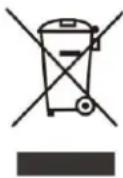
The symbol "crossed-out garbage can" requires the separate disposal of waste electrical and electronic equipment (WEEE). Electrical and electronic devices can contain dangerous and environmentally hazardous substances. Therefore, do not dispose of it in unsorted residual waste, but at a designated collection point for used electrical and electronic equipment. In this way you contribute to the protection of resources and the environment.
For more information, please contact your dealer or local authorities.
DECLARATION OF CONFIRMITY
We hereby confirm that this article complies with the essential requirements, regulations and guidelines of the EU.
You can view the detailed declaration of conformity at any time under the following link:
www.becool.at/downloads
Subject to errors and technical changes.
www.becool.at

BE COOL
DELIVERY CONTENT
The scope of delivery of the BECOOL humidifier consists of:
- 1x humidifier
• 1x ION filter (already inserted in the base/tub)
• 1x lime filter (already screwed on the water tank lid)
• 1x HEPA filter (already inserted in the bottom) - 1x remote control
• 1x instruction manual
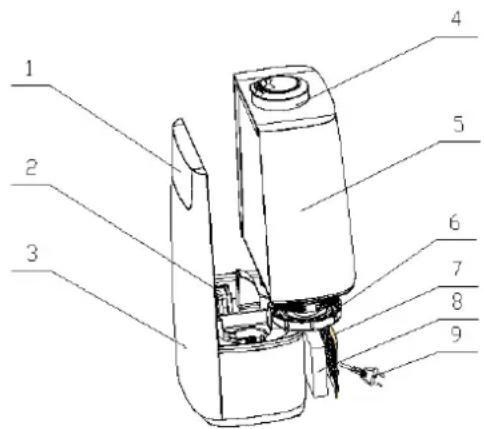
DESCRIPTION OF THE DEVICE
- LED Display
- Aroma sponge
- Frontside + Base
- Mist outlet nozzles
- Water tank
- Water tank cover
- HEPA air filter cover
- HEPA air filter
- Power cord
START UP
The installation and operation of the BE COOL humidifier is very quick and uncomplicated:
1. INSTALLATION
- Take the humidifier out of the packaging and remove all packaging materials.
- Check the device for possible damage.
- Unwind the power cord and check it for damage.
- Place the humidifier on a stable, level and heat-resistant surface so that it cannot tip over.
- Now insert the power plug into a suitable socket.

CAUTION
Please carefully follow the instructions for setting up the device in the safety instructions.
BE COOL
2.COMMISSIONING
• Fill the water tank as follow:
- First remove the mist outlet nozzles on top of the water tank
- Now lift the water tank out of the base of the humidifier
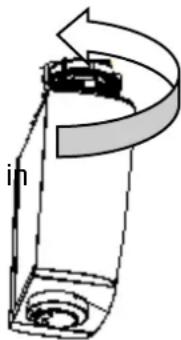
- Turn it upside down and open it by pressing the water tank
- lid counterclockwise.
- Then fill the water tank with water and be careful not to overfill it.
- Close the water tank again by pressing the Tighten the fuel cap clockwise direction.
- Now dry the outside of the water tank and sit downput it
- back into the base.
- Put the steam outlet nozzles back into the for it provided opening
- and turn it to any position.
natural_image
Technical line drawing of a mechanical component with no visible text or symbolsIMPORTANT
Please note the following when filling the water tank:
- Do not use any essential oils in the water tank (e.g.: eucalyptus or menthol) as these could damage the device.
- Do not put metals, chemicals or detergents in the water tank.
- Never fill the water tank completely.
- Never fill the water tank with water with a temperature over 40^ to avoid deformation.
- Fill water only into the water tank and never into the other parts of the humidifier.
- Never fill the water through the steam outlet.
- If the room temperature is less than 0^ , empty the water tank as freezing water could damage the humidifier.
- If there is a lot of water in the water tank, do not move the humidifier excessively, otherwise water could leak out and penetrate other parts of the humidifier and cause irreparable damage.
- Discoloration of the device is normal due to the evaporating water.
• Use of aromatic oil:
- You can use aromatic oil to give the escaping steam a pleasant scent.
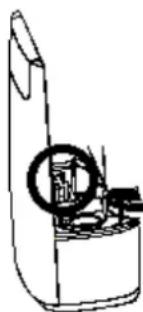
- Push the aroma oil compartment on the back of the device to pull it out.
- Then dribble a little oil into the sponge provided and put the aroma oil compartment back in.
-
As soon as you switch on the device, the aroma diffuser function is activated automatically.
-
You can wash the aroma oil sponge and use it again as soon as it is dry.
natural_image
Line drawing of a mechanical device with a circular component and internal components (no text or symbols)BE COOL
3. DESCRIPTION OF THE CONTROL PANEL AND REMOTE CONTROL
The buttons on the control panel and the remote control are identical.
You can set the functions of the humidifier using the remote control or directly on the device.
When using the remote control, this must be pointed directly at the sensor on the housing to ensure that it functions properly.
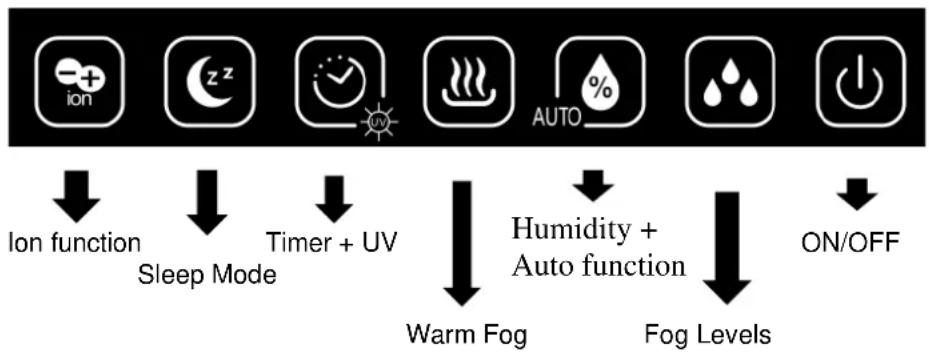
flowchart
graph TD
    A["ion"] --> B["Ion function"]
    C["Sleep Mode"] --> D["Sleep Mode"]
    E["Timer + UV"] --> F["Timer + UV"]
    G["AUTO %"] --> H["Warm Fog"]
    I["Humidity + Auto function"] --> J["Humidity + Auto function"]
    K["Fog Levels"] --> L["Fog Levels"]
    M["ON/OFF"] --> N["ON/OFF"]
4. COMMISSIONING THE REMOTE CONTROL
Please refer to the following instructions:
To use the remote control for the first time, please pull the plastic protection out of the battery compartment.
To change the battery, proceed as follows:
- Pull out the battery holder on the back of the remote control, remove the old battery and then insert a new one:

flowchart
graph LR
    A["Top-Left Device"] --> B["Top-Right Device"]
    B --> C["Bottom-Left Device"]
    C --> D["Bottom-Right Device"]
    D --> E["Bottom-Left Device"]
- Please always pay attention to the polarity markings (+/-) on the battery and the battery holder.
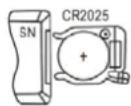
- Then slide the battery holder all the way back into the remote control.
BE COOL
5. SET FUNCTIONS
1. ON/OFF
Use the on / off button to turn the device on and off. As soon as you switch on the device, mist emerges from the mist nozzles on the top of the device and the current temperature in C ° and humidity in% are shown alternately on the display.
NOTE
When you switch on the device and the water tank is empty indicator lights up on the display.

2. FOG LEVEL
Use the Fog Level button to set the strength of the mist
You can choose between three different levels:
• 1 x press → Lowest Level → appears on the display
- 2 x press → Middle Level → appears on the display
• 3 x press → Highest Level → appears on the display


3. WARM FOG
Activate the warm fog by pressing this button. The PTC heating element in the machine will now start to heat the mist in the device → the display lights up. If you want to turn the function off, press the WARM FOG button again.
4. ER

You can use the timer to switch off the device in a time-controlled manner. Each time you press the button, the timer increases by 1 hour to a maximum of 10 hours → the display lights H up.
To switch off the timer, press until "0" appears on the display.
BE COOL
5. AUST HUMIDITY
Set the desired humidity level. Each time the button is pressed, the humidity increases by 5% from 40% to a maximum of 80%. As soon as the desired humidity is reached, the device stops producing fog. Once the desired humidity level is reached, the device stops working and enters the Standby Mode. If the humidity level is 5%RH lower than the desired humidity level, the device will automatically start working again to keep the target humidity level. When desired humidity level is set and start working, it will keep humidifying for 2 minutes no matter the room humidity reach the desired humidity or not. After 2 minutes, it will stop if the humidity level is higher than the desired level.
Please note
When you switch on the device, the device humidifies, regardless of whether the room humidity reaches the set humidity or not.
6. MODE
The humidifier is equipped with a negative ionizer. This distributes ionized air into the rooms and removes static charges.
To start the ionizer function, press the ION button → the display lights 📁 up. To stop the function, press the ION button again.
7. MODE
The humidifier is also equipped with a UV function, this cleans the air and frees it from bacteria, germs and viruses. The emerging mist is thus disinfected.
To start the UV function, press the UV button → the display lights 📋 up. To stop the function, press the UV button.
8. HT-MODE
When the humidifier is switched to night mode, the display switches off and the device continues to run in the mode you have set. To turn on the Night-Mode press the Night-Mode button to turn off the Night-Mode press any button.
9. AUTO-MODE
This product maintains the relative humidity at 55%\~68%. The humidifier will choose the best humidifying method according to different room ambient humidity.
To activate the auto mode, press and hold the AUTO button for approx. 3 seconds → the display lights up.
To stop the function, press the AUTO button again
BE COOL
6. FILTER
The device has three different filters that are included in the scope of delivery:
1. SILVER ION FILTER
The silver ION filter is located in the base of the air humidifier and, with the silver it contains, ensures an anti-bacterial effect and thus optimal water quality.
2. LIME FILTER
The lime filter is screwed onto the water tank and cleans the water from calcium and magnesium ions. Maintenance extends the service life of the room humidifier. The water filter filters water through acid ion exchange resin. Acid ion exchange resin has a chemical reaction with calcium and magnesium ions that softens and demineralises water. Please clean the water filter weekly or every 15 days (depends on your local water hardness), simply soak it in 5% saline water for 24 hours and dry it cool.
3. HEPA FILTER
The Hepa filter is located on the back of the humidifier and cleans the room air by removing dust, pollen, animal hairs, airborne particles and bad smells or polluted air.
All filters can be bought separately, the article numbers are, the item numbers are:
We recommend replacing the filters regularly:
SILVER ION FILTER → Every 2 months of operation
KALKFILTER → Every 2 months of operation
(depends on your local water hardness).
HEPA FILTER → Every 2 months of operation
SAFETY MEASUREMENTS
The BECOOL humidifier is equipped with a protective device that is intended to protect the device from possible damage.
SHUTDOWN FUNCTION
As soon as the water tank is empty or it is removed, the device switches off automatically.
CLEANING INSTRUCTIONS
Before cleaning the device, switch off the humidifier, pull the power plug and then wait approx. 10 minutes until the device has completely cooled down.
Cleaning the case:
- Clean the device with a soft, moderately damp cloth and then wipe it with a dry cloth.
Cleaning the base/water pan:
- Remove the water tank from the base to expose it. - Always empty the water in the direction of the marking in the base, otherwise water could get inside the device and damage the device:

- If dirt remains in the base, pour some clear, fresh water into the base and use a sponge to remove the dirt. Then pour the water out over the marking again. - Now wipe the inner part of the base with a moderately damp cloth and then dry it with a soft cloth.
Cleaning the water-mist converter
- The mist converter is located in the middle of the water tub - this must be cleaned regularly so that the device generates the mist correctly.
- If the water quality at your location is hard, use a lime and scale dissolving cleaner such as white vinegar or cider vinegar. (do not use dark vinegar)
- Depending on how dirty it is, put more or less cleaner on the surface of the converter and fill the tub with water.
- Leave the cleaner and water on the converter for 10 to 15 minutes act.
- Clean the converter with a brush until the deposit is removed.
- Rinse twice with water.
- Do not use any metallic or hard objects for cleaning, which could damage the converter!
BE COOL
Cleaning the water tank:
Please note
THE WATER TANK MUST BE CLEANED AFTER EVERY THIRD OPERATING DAY.
- First remove the steam outlet nozzles on the top of the water tank.
- Now lift the water tank out of the base of the humidifier.
- Now turn it upside down and open it by turning the water tank lid counterclockwise.
- Now clean the inside by using a sponge with a little soap.
- Then rinse the water tank well.
- Do not use any metallic or hard objects for cleaning, which can damage the tank.
WARNING
- Do not dip the device in water or splash it with any other liquid.
- Do not use gasoline, alcohol or solvents for cleaning the device.
- Do not spray insecticides or similar means on the device.
- Do not use the device in rooms with high humidity.
- Do not cover the device – risk of fire!
ACTIVITIES AT THE BEGINNING / END OF THE SEASON
END OF SEASON ACTIVITIES
- Switch off the device and pull out the power plug.
- Drain any water from the tub and water tank and dry all components thoroughly before putting them back together.
- Package the device and store it in a cool, dry place.
CHECKS AT THE START OF THE SEASON
- Check whether the power supply cable is OK and whether the grounding is functional.
- Follow the installation and safety instructions carefully.
TROUBLESHOOTING
Before you contact our customer hotline / service center, please check whether the error can be remedied using the information below.
| PROBLEM | SOLUTION |
| No steam comes out of the humidifier. | Check whether the device is correctly connected to the mains.Check whether you have set the rotary switch correctly.Check that there is enough water in the water tank |
| There is an unpleasant smell during operation. | When you use the device for the first time, it may emit an unpleasant smell. Remove the water tank, open it and let it air for about 12 hours.Check whether the water in the water tank is dirty or stale.Clean the water tank and fill it with clean water. |
| The device is very noisy during operation. | Check whether the water tank is inserted correctly.Check the surface on which the device is standing. |
IMPORTANT
Never try to repair the device yourself. This can lead to the immediate loss of the guarantee.
TECHNICAL INFORMATION
| Technische Informationen | |
| Item no.: | BCLB802IKUHF05 |
| Power consumption: | 105 Watt |
| Input voltage: | 220-240V |
| Working temperature: | 15 °C – 30 °C |
| Mist/h (cold mist): | 300 ml/h |
| Mist/h (warm mist): | 400 ml/h |
| Noise level: | 35dB |
| Tank volume: | 5L |
| Weight: | 2,50 kg |
| Measurements: | 240 x 371 x 170 mm |
| Contact adresses and further information: | Schuss Home Electronic GmbHScheringgasse 3, A-1140 WienTel: +43 (1) 97 0 21 – 0Serviceline: +43 (1) 97 0 21 – 544www.becool.atFB-Nr: 236974 t / FB-Gericht: Wien |
WARRANTY
By purchasing a BECOOL quality product you have acquired an innovative, long - lasting and reliable item.
For this BECOOL device we grant a warranty of 2 years from the date of purchase, valid in Austria only.
In the unlikely event that service work is required on your device in this period we warrant free repair (spare parts and labour) or (subject to Schuss's decision) to replace the product. In the event that neither repair nor exchange make sense from an economical perspective we reserve the right to issue a credit based on current value.
When dealing with air conditioning devices you should always contact the customer hotline first (see label on the device or the title page of the instruction manual), in case of fans contact your dealer or us directly. Please note that repair not performed by the authorized workshop in Austria immediately renders this warranty void.
This warranty does not include:
• Repair of replacement of parts due to normal wear
• Damage due to non-compliance with the instruction manual
• Devices that are used commercially – even in part
• Devices damaged by external forces (falling, impact, cracking, improper use etc.) as well as aesthetic wear
• Devices that have been used improperly
• Devices that were not opened by our authorized workshop.
• Unfulfilled customer expectations.
• Damage caused by force majeure, water, lightning and overvoltage.
- Devices on which type denomination and/or serial number on the device have been erased, rendered illegible or removed.
- Service work not performed by our authorized workshops, transport costs to an authorized workshop or us and back as well as associated risks.
Please note that within the warranty period we charge a flat rate of 60 € (indexed as per consumer price index 2015, June 2020) in case of operating errors or if no fault can be found.
The total warranty period of 2 years is not extended if warranty service is performed (repair or device replacement).
The 2 year warranty is only valid if the original invoice (must contain name and address of the dealer as well as full device name) and the respective warranty certificate are produced, on which the device type and serial number (can be found on the box and the device's rear or bottom) are to be noted! Only the statutory warranty coverage applies if the warranty certificate cannot be produced!
Please note that the statutory warranty coverage is not altered by this warranty and that it applies in full regardless.
Schuss Home Electronic GmbH and its vicarious agents are only liable for damages in case of gross negligence or intent. Liability for loss of profit, expected but not incurred savings, consequential damages and damages from third party claims is excluded in any case. Damages to or for recorded data are always excluded from the liability for damages.
Congratulations on your choice. We hope you will enjoy using your SHE device!
ADDRESS
BECOOL Sales
Schuss Home Electronic GmbH
A-1140 Vienna, Scheringgasse 3
Tel.: +43 (0)1/ 970 21
Type designation:
Serial number:
Together with the device, this warranty certificate must be handed to the authorized workshop or dealer you bought the device from in the event of a warranty claim!
- BE COOL
- GEBRAUCHSLAGE
- INBETRIEBNAHME
- WICHTIG
- ATTENTION
- RISK OF INJURY
- WARNING HOT STEAM
- FIRE HAZARD & OVERHAUL
- SAFETY DISTANCE
- POSITION
- RECYCLING
- DISPOSAL
- DECLARATION OF CONFIRMITY
- DELIVERY CONTENT
- DESCRIPTION OF THE DEVICE
- START UP
- INSTALLATION
- CAUTION
- 2.COMMISSIONING
- • Fill the water tank as follow:
- IMPORTANT
- Please note the following when filling the water tank:
- • Use of aromatic oil:
- DESCRIPTION OF THE CONTROL PANEL AND REMOTE CONTROL
- COMMISSIONING THE REMOTE CONTROL
- SET FUNCTIONS
- ON/OFF
- NOTE
- FOG LEVEL
- WARM FOG
- ER
- AUST HUMIDITY
- Please note
- MODE
- MODE
- HT-MODE
- AUTO-MODE
- FILTER
- SILVER ION FILTER
- LIME FILTER
- HEPA FILTER
- SAFETY MEASUREMENTS
- SHUTDOWN FUNCTION
- CLEANING INSTRUCTIONS
- Cleaning the case:
- Cleaning the base/water pan:
- Cleaning the water-mist converter
- Cleaning the water tank:
- WARNING
- ACTIVITIES AT THE BEGINNING / END OF THE SEASON
- END OF SEASON ACTIVITIES
- CHECKS AT THE START OF THE SEASON
- TROUBLESHOOTING
- TECHNICAL INFORMATION
- WARRANTY
- For this BECOOL device we grant a warranty of 2 years from the date of purchase, valid in Austria only.
- This warranty does not include:
- ADDRESS
Brand : Be Cool
Model : BCLB802IKUHF05
Category : Air purifier