BCRS2102F - Air purifier Be Cool - Free user manual and instructions
Find the device manual for free BCRS2102F Be Cool in PDF.


| Brand | Be Cool |
| Model | BCRS2102F |
| Product Type | Air Purifier with Ozone, Ionizer, and UVB Sterilizer |
| Dimensions (H x W x D) | 585 x 240 x 240 mm |
| Weight | 5.2 kg |
| Power Consumption | 55 W |
| Input Voltage / Frequency | 220-240 V ~ 50 Hz |
| Max Current | 0.26 A |
| Air Volume | 400 m³/h |
| Room Coverage | 60 m² |
| Ozone Generation | 400 mg/h |
| Active Plasma Volume | 2,000,000 pcs/cm³ |
| UVB Wavelength | 300 nm |
| Filter Type | HEPA 13 |
| Fan Speeds | 3 speeds |
| Functions | Ozone cleaning, Ionizer (Anion), UVB sterilizer, Swing oscillation |
| Safety Features | Motion sensor, audible and visual alarms, automatic shut-off in ozone mode |
| Control | Control panel on unit and remote control |
| Remote Control Battery | CR2025 (included) |
| Filter Cleaning | Vacuum every 8 weeks |
| Filter Replacement | Every 12 months or 3,000 operating hours |
| Warranty | 2 years (Austria only) |
| Scope of Delivery | Air purifier, HEPA filter, remote control, instruction manual |
Frequently Asked Questions - BCRS2102F Be Cool
User questions about BCRS2102F Be Cool
0 question about this device. Answer the ones you know or ask your own.
Ask a new question about this device
Download the instructions for your Air purifier in PDF format for free! Find your manual BCRS2102F - Be Cool and take your electronic device back in hand. On this page are published all the documents necessary for the use of your device. BCRS2102F by Be Cool.
USER MANUAL BCRS2102F Be Cool
natural_image
Exterior view of a black BE COOL air conditioner unit with control panel and ventilation grilles (no readable text or symbols)| Important informations on the aircleaning with the ozon gas | 18 |
| Important informations on safety, location and electrical connection | 19 – 21 |
| Recycling, Disposal and declaration of confirmity | 21 |
| Scope of delivery | 22 |
| Description of the device | 22 |
| Description of the control panel and the remote control | 23 – 24 |
| Commissioning | 25 |
| Explanation of function | 25 |
| Operation | 26 – 29 |
| Maintenance and cleaning | 29 – 31 |
| Troubleshooting | 31 |
| Technical Informations | 32 |
| Warranty | 32 |
PLEASE READ THE INSTRUCTION MANUAL CAREFULLY BEFORE STARTING ASSEMBLY, INSTALLATION, OPERATION OR MAINTENANCE. PROTECT YOURSELF AND OTHERS BY FOLLOWING THE SAFETY INSTRUCTIONS. FAILURE TO COMPLY WITH INSTRUCTIONS COULD RESULT IN PERSONS AND / OR PROPERTY DAMAGES AND/OR LOSS OF THE WARRANTY CLAIM!



Attention

The BE COOL air purifier produces ozone gas for air purification.
Ozone is a natural component of the air and has an antibacterial and odor-cleaning task in the atmosphere.
The BE COOL air purifier produces ozone gas without using chemicals, that disinfects the air through its oxidizing effect and transforms unpleasant, persistent odorous substances into odorless substances.
However, ozone also has the property of causing severe health damage when inhaled in high concentrations through the lungs.
When absorbed directly, ozone has a toxic effect on humans, animals and plants.
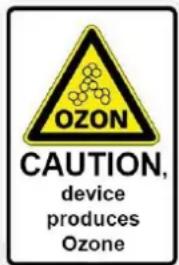
For this reason, the following safety measures must be observed:
- Ozone generation during the cleaning process produces aerosols (finely dispersed solid or liquid particles suspended in the air), which can be harmful to the lungs.
- During the cleaning process with ozone, neither people nor animals may be present in the room to be cleaned.
- Also remove any plants that may be present from the room.
- Do not use the air purifier in a room smoked by cigarettes. The escaping ozone in reaction with the cigarette smoke and nicotine creates aerosols containing fine dust, which are particularly toxic and can penetrate deep into the human organism.
- Point out the danger to potentially endangered persons.
- Mark the ozone cleaning of a room for other people and make sure that access to the premises concerned is excluded.
- Seal existing room openings so that ozone cannot escape into the environment.
- After the ozone purification process is complete, the air purifier will automatically run in standard purification mode for two hours to filter the resulting ozone from the room. Do not enter the cleaned room even during this process.
- Make sure that the treated rooms have sufficient fresh air supply or suitable air exhaust after the entire cleaning process.
Failure to observe these safety instructions may result in serious damage to health!
The following symptoms may indicate poisoning or irritation by ozone:
- Eye irritation - conjunctivitis, burning and watery eyes
• Strong coughing irritation
- Shortness of breath - feeling of tightness
- Pain when inhaling
• Dizziness, lightheadedness
- Headache
- Feeling of weakness
If you experience one or more of the above symptoms related to the use of the ozone air purifier, seek medical attention immediately.
IMPORTANT INFORMATION ON SAFETY, LOCATION AND ELECTRICAL CONNECTION.
- Read all instructions carefully before using the device.
- Use this device only in accordance with the instructions in the manual. Any other use not recommended by the manufacturer could result in fire, electric shock, or personal injury.
- This device is intended for cooling in households and may not be used for any other purpose.
- The device is not suitable for continuous and precision operation.
- It is forbidden to modify the characteristics of this device in any way and only use replacement parts and accessories recommended by the manufacturer (failure to do so will void the warranty).
-
For any repairs to the device, power plug or cable, always and exclusively contact authorized service centers. The customer service centers can be accessed online at www.becool.at
-
Remove the packaging and make sure the air conditioner is not damaged. If in doubt, do not use the air conditioner and contact the service center or your seller.
-
Keep children away from packaging material. If swallowed there is danger of suffocation!
-
If the power cord is damaged, it must be replaced by the manufacturer or an authorized service center to avoid all possible risks.
-
The device must be installed in accordance with local electrical system installation and operating instructions.
-
The electrical socket in which you connect the device must not be defective or loose and must be suitable for the required current load and above all be reliably earthed. If in doubt, have your electrical installation checked by a qualified electrician.
-
Before connecting to the device to the electrical socket, you must check whether the type of current and the mains voltage comply with the information given on the back of the device.
-
Avoid using an extension cord as it could overheat and cause a fire.
-
Do not twist or bend the power cord.
-
This device may only be used by adults.
-
Children under the age of 8 and persons with limited physical, mental, sensory or mental abilities, and lack of experience and knowledge may only use this device if it is under appropriate supervision and provide detailed instructions for use of the device in a safe manner and how the existing dangers have been described.
-
Do not let children play with the packaging and make sure that children do not play with the device.
-
Do not use the air conditioner outdoors.
-
Do not use the device with wet hands.
-
Never operate the device in areas where gas, oil or sulfur are present.
-
Do not place the device near sources of heat (e.g.: near heating systems and gas heaters) and avoid direct sunlight.
-
Keep a minimum distance of at least 50cm to combustible materials (e.g., alcohol, etc.) or pressurized vessels (e.g., spray containers).
-
Do not use the air conditioner near water or high humidity, e.g.: in the wet basement, next to swimming pool, bath or shower. Make sure that no water gets into the device.
-
Do not place heavy or hot objects on the unit and never cover the unit.
-
Never insert fingers, pins or other objects into the unit, being careful not to block the air inlet and outlet.
-
Always turn off the power before unplugging the power cord.
-
Do not pull the power cord to disconnect the device from the mains. Always pull on the plug to pull out the power cord. Do not handle the plug with wet hands to avoid electric shock.
-
Unplug the device when not in use before cleaning, servicing or moving it from one location to another.
-
If the device has a defect, switch it off with the on / off button on the control panel and contact the customer hotline.
- Maintain the air conditioner in good condition by caring for and cleaning the unit.
- The air filter should be cleaned at least once a week.
- Store the device vertically in a safe place, dry and out of the reach of children, when not in use. Do not cover the device with plastic packaging.
- Store the unit in a room with no ignition sources in operation (e.g.: open fire, service gas appliance or electric heater with open heat source).
- The air conditioner should be transported in an upright position or slightly sideways position. Empty the internal condensate tank first. Wait at least one hour after transporting the device before turning on the device.
- Always contact authorized service centers for repairs to the device, power plug, or cable.
- Do not use any means to accelerate or eliminate the defrost process, the device will do it on its own.
- If you have any questions about maintenance, you can contact the manufacturer's authorized hotline / service center.
WARNING
The main power switch and the on / off switch should not be used as the sole means of power disconnection. Always unplug the power cord before servicing or moving the unit.
To avoid the risk of electric shock, disconnect the plug from the power outlet when not in use - as well as before each cleaning.

RECYCLING
The packaging materials can be recycled. Therefore it is recommended to dispose of them in sorted waste.
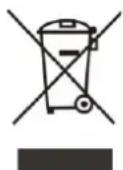
DISPOSAL
The crossed-out bin symbol requires the separate disposal of waste electrical and electronic equipment (WEEE). Electrical and electronic equipment may contain hazardous and environmentally hazardous substances. Therefore, do not dispose of it in unsorted residual waste, but at a designated collection point for waste electrical and electronic equipment. This helps to protect resources and the environment.
For more information, contact your dealer or the local authorities.
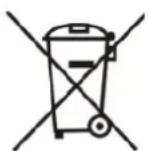
DISPOSAL OF THE BATTERIES
The crossed-out bin symbol requires the separate disposal of batteries. Please dispose the batteries in an environmentally friendly way. DO NOT dispose batteries in the residual waste. Please use the return and collection systems in your area or contact your dealer.

DECLARATION OF CONFIRMITY
We hereby confirm that this article complies with the essential requirements, regulations and directives of the EU.
The detailed declaration of conformity can be viewed at any time under the following link: www.becool.at/downloads
Errors and technical changes reserved.
www.becool.at
SCOPE OF DELIVERY
In the scope of delivery of the BECOOL air purifier, you will receive:
- Air purifier
- Filter
- Remote control
- Operating instructions
DESCRIPTION OF THE DEVICE
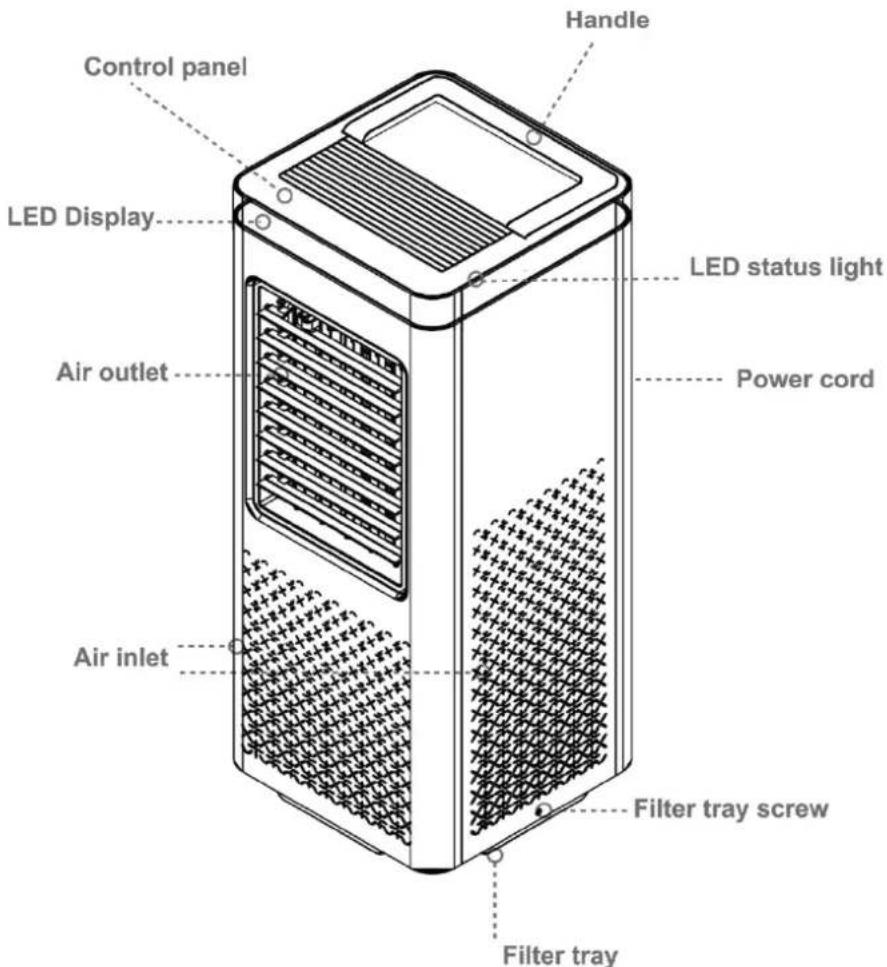
DESCRIPTION OF THE CONTROL PANEL AND THE
REMOTE CONTROL
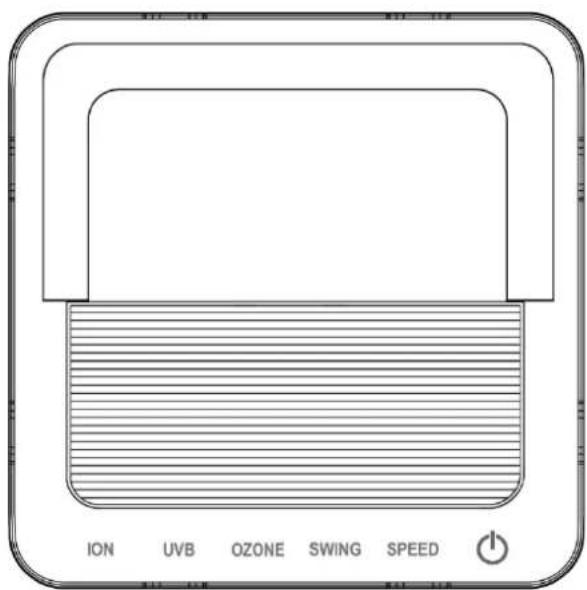
OPERATING FIELD
REMOTE CONTROL
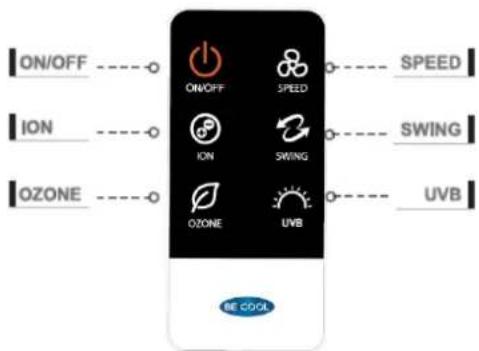
REMOTE CONTROL
Please follow the instructions below:
Initial operation:
- To operate the remote control for the first time, please pull out the plastic protector from the battery compartment on the back of the remote control.

Change battery:
- Pull out the battery holder on the back of the remote control and remove the old battery from the holder:

flowchart
graph LR
    A[" "] --> B[" "]
    B --> C[" "]
    C --> D[" "]
    style A fill:#f9f,stroke:#333
    style B fill:#ccf,stroke:#333
    style C fill:#cfc,stroke:#333
    style D fill:#fcc,stroke:#333
- Now insert a new CR2025 battery, always paying attention to the polarity markings (+/-) on the battery and the battery holder.
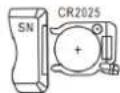
- Then push the battery holder fully back into the remote control.
CORRECT USE OF THE REMOTE CONTROL
Point the remote control directly at the front of the unit, making sure that there are no obstacles between the remote control and the unit.
NOTE
Please handle the remote control with care.
Do not expose the remote control to direct sunlight and keep it away from heat sources.
SAFETY INSTRUCTIONS FOR BATTERY REPLACEMENT:
- When the remote control is replaced or disposed of, the batteries must be removed and disposed of in accordance with current legislation as they are harmful to the environment.
- Do not dispose of batteries in fire.
• Batteries can explode or leak.
• If the remote control will not be used for a long time, remove the battery.
COMMISSIONING
PREPARATION FOR USE
IMPORTANT!
Read the safety instructions very carefully.
Especially when using the ozone cleaning mode, you must follow all instructions carefully.
- Place the unit on a level surface with a properly earthed socket.
- The BE COOL air purifier has a motion sensor that stops the ozone function as soon as the room is entered. In order for it to be able to perceive the surroundings optimally, it is recommended to point the unit with the front and a maximum distance of 6 metres in the direction of the door.
- Before using the unit, make sure that both air inlet and air outlet are free of obstructions and not blocked.
- Observe the instructions in the chapter "Important information on safety, location and electrical connection".
EXPLANATION OF FUNCTION

Ozone

ATTENTION - PLEASE OBSERVE THE WARNINGS ON OZONE VERY CAREFULLY!
Ozone is a very strong oxidant which oxidatively breaks down and destroys existing molecules. It thus has the ability to eliminate bacteria, viruses, gases, toxins and unpleasant odours and render pathogens harmless.
Explanation:
An oxygen (O2) molecule is split by high voltage into two oxygen atoms (O), these form a bond with the oxygen molecules (O2) in the air and thus become ozone (O3). However, the ozone molecule is extremely unstable and strives to give up one oxygen atom.
The ozone molecule (O3) releases a single oxygen atom (O), which destroys odour molecules and other substances through oxidation.

Anion
The air purifier is equipped with an "ioniser". This distributes ionised air into rooms and removes static charge. In addition, the atoms and molecules created promote the chemical decomposition process and can thus be used to eliminate odours and disinfect the air.

UVB steriliser
The air purifier is equipped with a "UVB light diode". This ultraviolet light is able to destroy bacteria, viruses and germs.
OPERATION
You can set all functions directly on the unit or using the remote control. Depending on the function set, the indicator lights on the control panel light up.
Point the remote control directly at the front of the unit, making sure that there are no obstacles between the remote control and the unit.
SWITCH ON THE UNIT
- Press the 🎨 button to switch on the unit.
- The ON indicator on the display lights up.
- Press the 📄 button again to switch to standby mode.
- In standby mode, the indicator lights up red.
NOTE
Never switch off the air purifier by unplugging it directly from the mains.
To switch off, always press the on/off button and wait a few minutes before disconnecting the unit from the mains. This allows the unit to go through a cycle of checks to verify its functionality.
SET FUNCTIONS
Set fan speeds
Use the 🔊 button to set the speed level of the fan.


- Press the button to change the fan speed.
- You can choose between 3 different speed levels by pressing the button until the desired level lights up.
- For each speed level of the fan, a dot lights up on the display:
- Use the Ⓗ - button on the remote control or the "ION" button on the unit to start the function and →the respective indicator lights up.
- The unit now starts to distribute ionised air into the room.
- Press the button again to deactivate the function.
Swing function
- Use the Ⓜ - button on the remote control or the "SWING" button on the unit to activate the swing function of the unit - →the respective indicator lights up.
- Press the button again to deactivate the function.
NOTE
This function distributes the discharged air to the left and right. This way you achieve a horizontal air distribution in the room.
UVB steriliser
- Use the "UVB"- button on the remote control or the "UVB" button on the unit to activate the UVB sterilisation function of the unit, →the respective indicator lights up.
- As soon as you activate the UVB-button, the speed of the fan changes automatically to the lowest fan level until you deactivate the function.
- Press the button again to deactivate the function.
NOTE
This function disinfects the drawn-in air inside the unit and cleans it for discharge from the unit.
NOTE
The UVB-lamp switches off automatically after 8 hours, unless you switch it off earlier.
Ozone cleaning

ATTENTION PLEASE OBSERVE THE WARNINGS ON OZONE VERY CAREFULLY!
- While the unit is switched on, press the - button on the remote control or the "OZONE" button on the unit for 3 seconds to start ozone purification.
- After pressing once, a duration of 15 minutes is set as standard. Each subsequent press of the button increases the cleaning time with ozone by another 15 minutes. The maximum cleaning time is 120 minutes.
- As soon as you activate the OZON-button, the speed of the fan changes automatically to the lowest fan level.
- Choose the ideal cleaning time with ozone depending on the room size:
| Room area | Recommended treatment time |
| 7,5 m2 | 15 minutes |
| 15 m2 | 30 minutes |
| 22,5 m2 | 45 minutes |
| 30 m2 | 60 minutes |
| 37,5 m2 | 75 minutes |
| 45 m2 | 90 minutes |
| 52,5 m2 | 105 minutes |
| 60 m2 | 120 minutes |
- To deactivate the cleaning function with ozone, press the button repeatedly until you reach 120 min. and then press it again.
(EXAMPLE: 15 min - 30 min - 45 min - 60 min - 75 min - 90 min - 105 min - 120 min OFF)→
ATTENTION
The room to be cleaned should be sealed to prevent ozone from escaping into the environment.
While the unit is operating in ozone mode, there must be no persons or animals in the room.
After treatment, the unit automatically runs in normal cleaning mode for 2 hours to ensure that there is no more ozone in the room.
Ozone alarm functions
The unit has a "two-way" warning system to signal the start or end of the ozone cleaning function:
1. Audible alarm
a. Rapid alarm: As soon as you start the ozone cleaning function, the air purifier emits a rapidly repeating beep sound for approx. 30 seconds. Please leave the room within this time and lock the door. The same sound is emitted when the unit detects persons or other living beings in the room (beep approx. 2 x per second).
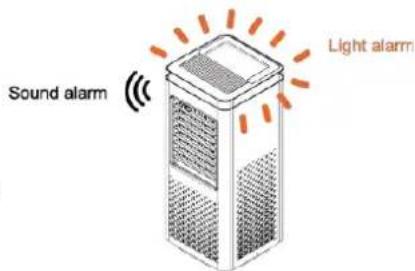
b. Slow alarm: The unit emits a slowly repeating beep sound throughout the ozone purification process. After the cleaning programme is completed, the alarm sounds for two more hours, during which the normal cleaning mode filters the ozone out of the room.
2. Visual alarm:
a. Rapid alarm: As soon as you start the ozone cleaning function, the air purifier emits a rapidly flashing orange light signal.
The same light signal is emitted when the unit detects persons or other living beings in the room. (Flashes approx. 2 x per second)
b. Slow alarm: The unit emits a slowly flashing orange light signal throughout the ozone purification process. After the cleaning programme is completed, the alarm lights up for two more hours, during which the normal cleaning mode filters the ozone out of the room.
3. Motion sensor:
a. The unit is equipped with a motion sensor that detects people and animals in the room.
b. The sensor works in a range of 6 metres, covers a radius of 120^ and is in operation during the ozone cleaning process and for two hours afterwards.
c. If the sensor detects people or animals in the room, ozone production is stopped and the rapid alarm sounds, warning that the room must be vacated.
d. As soon as the sensor no longer detects movement, operation continues automatically.
ATTENTION
Do not stay in the room under any circumstances when the unit is in the ozone cleaning process.
After the treatment, the unit automatically runs in normal cleaning mode for 2 hours to ensure that there is no more ozone in the room.
After the two-hour normal cleaning mode, be sure to check the indicator on the unit:
BLUE LIGHT→ You are allowed to stay in the room.
ORANGE LIGHT → You have to leave the room.
MAINTENANCE AND CLEANING
Cleaning HEPA filter
We recommend cleaning the filters every 8 weeks!
- To remove the dust accumulated on the outside of the air filter, use a hoover.
- After cleaning, we recommend placing the filter for at least 12 hours in a well-ventilated place, outside of living areas, preferably outdoors. This allows the particles and substances that have accumulated in the filters to escape.
- Remove and clean the filter as described below:
1. Loosening the filter housing screws
Loosen the two screws on the housing using a Phillips screwdriver to detach the housing from the filter holder.
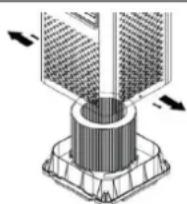
| 2. Disconnect the unit from the filter housingSeparate the housing from the filter holder by grasping the unit by the handle and pulling it upwards. | 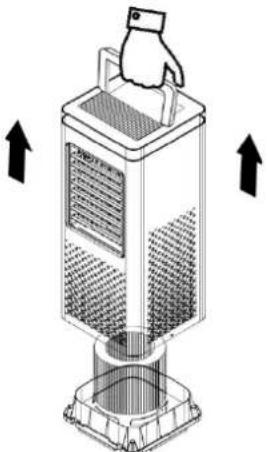 | |
| 3. Cleaning the HEPA filterRemove the filter from the housing.Remove dust and other dirt using a hoover.Never use water to clean the filter. | 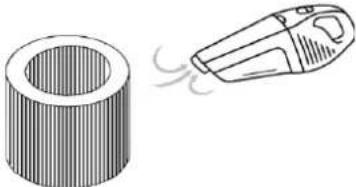 | |
| 4. Cleaning the filter housingClean the filter housing with a brush and a soft, damp cloth.You can remove the dust beforehand with a hoover.Make sure that the housing is completely dry before you reassemble the parts. | 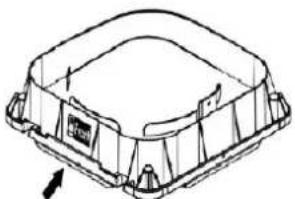 | |
| 5. Assembling the partsPut the filter back into the filter insert.Then lift the unit by grasping the handle and place it back on the filter housing.Make sure that the "FRONT" marking on the filter housing is also on the front of the unit.Finally, tighten the two screws on the housing. | 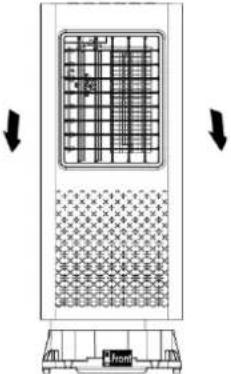 |
Replacing the filters
We recommend replacing the filter every 12 months or 3,000 operating hours!
- HEPA filter The filter must be replaced every 12 months or 3,000 operating hours.
- To install a new filter, please follow the instructions for cleaning the filter.
Cleaning the appliance
Before cleaning, switch off the appliance, wait a few minutes and then always unplug the appliance from the electrical mains.
- Clean the unit with a moderately damp cloth and then wipe it with a dry cloth.
- For safety reasons, never clean the appliance with water. This could be dangerous.
- Never use petrol, alcohol or solvents for cleaning.
- Do not spray insecticides or similar agents on the air purifier.
TROUBLESHOOTING
Before contacting our customer hotline/service center, please check whether the error can be rectified using the instructions below.
| PROBLEM | POSSIBLE CAUSE | SOLUTION |
| The unit cannot be switched on and does not respond to inputs. | The mains plug is not plugged in. | Insert the mains plug into a suitable power socket |
| The batteries of the remote control are empty. | Replace the battery. | |
| The unit or the remote control are defective. | Contact the customer service. | |
| The unit does not emit air. | The motor is defective. | Contact the customer service. |
| The unit is not switched on. | Switch on the unit. | |
| The unit shows no effect, dust load and odors remain unchanged. | No filter is inserted. | Insert a filter. |
| The filter is dirty or older than one year. | Clean the filter.Replace the filter if it is more than one year old. | |
| The unit is too close to walls or objects and the air cannot oscillate properly. | Place the unit at least 30 cm from other objects. | |
| Technical information | ||
| Article number | BCRS2102F | |
| Power consumption | 55 Watt | |
| Input voltage | 220-240V~ | |
| Frequency | 50Hz | |
| Max. Current | 0,26A | |
| Air volume | 400 m3/h | |
| Area coverage | 60m2 | |
| Ozone generation | 400mg/h | |
| Active plasma volume | 2.000.000 pcs/cm3 | |
| UVB wavelength | 300nm | |
| Filter | HEPA 13 | |
| Weight | 5.2 kg | |
| Dimensions | 240 x 240 x 585 mm | |
| Contact address for further information | Schuss Home Electronic GmbHScheringgasse 3, A-1140 ViennaTel: +43 (1) 97 0 21 - 0Service line: +43 (1) 97 0 21 - 544www.becool.atFB-No: 236974 t / FB-Court: Vienna | |
WARRANTY
By purchasing a BE COOL quality product you have acquired an innovative, long lasting and reliable item.
For this BE COOL device we grant a warranty of 2 years from the date of purchase, valid in Austria only. In the unlikely event that service work is required on your device in this period we warrant free repair (spare parts and labour) or (subject to Schuss's decision) to replace the product. In the event that neither repair nor exchange make sense from an economical perspective we reserve the right to issue a credit based on current value.
When dealing with air conditioning devices you should always contact the customer hotline first (see label on the device or the title page of the instruction manual), in case of fans contact your dealer or us directly. Please note that repair not performed by the authorised workshop in Austria immediately renders this warranty void.
This warranty does not include:
• Repair of replacement of parts due to normal wear
- Damage due to non-compliance with the instruction manual
• Devices that are used commercially – even in part
• Devices damaged by external forces (falling, impact, cracking, improper use etc.) as well as aesthetic wear
• Devices that have been used improperly
• Devices that were not opened by our authorised workshop.
- Damages caused by improperly closed condensation drains on air conditioning devices or improperly inserted water container.
- Unfulfilled customer expectations.
- Damage caused by force majeure, water, lightning and overvoltage.
- Devices on which type denomination and/or serial number on the device have been erased, rendered illegible or removed.
- Service work not performed by our authorised workshops, transport costs to an authorised workshop or us and back as well as associated risks.
- Filter.
Please note that within the warranty period we charge a flat rate of 60 € (indexed as per consumer price index 2015, June 2020) in case of operating errors or if no fault can be found.
The total warranty period of 2 years is not extended if warranty service is performed (repair or device replacement).
The 2 year warranty is only valid if the original invoice (must contain name and address of the dealer as well as full device name) and the respective warranty certificate are produced, on which the device type and serial number (can be found on the box and the device's rear or bottom) are to be noted! Only the statutory warranty coverage applies if the warranty certificate cannot be produced!
Please note that the statutory warranty coverage is not altered by this warranty and that it applies in full regardless.
Schuss Home Electronic GmbH and its vicarious agents are only liable for damages in case of gross negligence or intent. Liability for loss of profit, expected but not incurred savings, consequential damages and damages from third party claims is excluded in any case. Damages to or for recorded data are always excluded from the liability for damages.
Congratulations on your choice. We hope you will enjoy using your BE COOL device!
ADDRESS
BE COOL Sales
Schuss Home Electronic GmbH
1140 Vienna, Scheringgasse 3
Tel.: +43 (0)1/ 970 21
Type designation:......
Serial number:......
Together with the device, this warranty certificate must be handed to the authorised workshop or dealer you bought the device from in the event of a warranty claim!
- Attention
- For this reason, the following safety measures must be observed:
- Failure to observe these safety instructions may result in serious damage to health!
- IMPORTANT INFORMATION ON SAFETY, LOCATION AND ELECTRICAL CONNECTION.
- WARNING
- RECYCLING
- DISPOSAL
- DISPOSAL OF THE BATTERIES
- DECLARATION OF CONFIRMITY
- SCOPE OF DELIVERY
- DESCRIPTION OF THE DEVICE
- DESCRIPTION OF THE CONTROL PANEL AND THE
- REMOTE CONTROL
- Initial operation:
- Change battery:
- CORRECT USE OF THE REMOTE CONTROL
- NOTE
- SAFETY INSTRUCTIONS FOR BATTERY REPLACEMENT:
- COMMISSIONING
- PREPARATION FOR USE
- IMPORTANT!
- EXPLANATION OF FUNCTION
- Ozone
- ATTENTION - PLEASE OBSERVE THE WARNINGS ON OZONE VERY CAREFULLY!
- Explanation:
- Anion
- UVB steriliser
- OPERATION
- SWITCH ON THE UNIT
- SET FUNCTIONS
- Set fan speeds
- Swing function
- Ozone cleaning
- ATTENTION PLEASE OBSERVE THE WARNINGS ON OZONE VERY CAREFULLY!
- Ozone alarm functions
- Audible alarm
- Visual alarm:
- Motion sensor:
- MAINTENANCE AND CLEANING
- Cleaning HEPA filter
- Loosening the filter housing screws
- Replacing the filters
- Cleaning the appliance
- TROUBLESHOOTING
- WARRANTY
- This warranty does not include:
- ADDRESS
Brand : Be Cool
Model : BCRS2102F
Category : Air purifier