VMV D2R - Headphones S.M.S.L - Free user manual and instructions
Find the device manual for free VMV D2R S.M.S.L in PDF.


| Product Type | High-Resolution USB DAC & Headphone Amplifier |
| Brand | S.M.S.L |
| Model | VMV D2R |
| DAC Chip | Rohm BD34301EKV |
| USB Controller | XMOS XU-316 (32-bit) |
| Max Sampling Rate (USB) | PCM up to 768kHz, DSD up to 22.5792MHz (DSD512) |
| Max Sampling Rate (Optical/Coaxial) | PCM up to 192kHz |
| Bit Depth (USB) | 1 bit, 16~32 bit |
| Bit Depth (Optical/Coaxial) | 16~24 bit |
| THD+N | 0.00014% (-117dB) |
| Dynamic Range | XLR 129dB, RCA 125dB |
| Signal-to-Noise Ratio | XLR 129dB, RCA 124dB |
| Output Level (XLR) | 4.0 Vrms (fixed), 5.1 Vrms (variable) |
| Output Level (RCA) | 2.0 Vrms (fixed), 2.6 Vrms (variable) |
| Output Impedance | XLR 200Ω, RCA 100Ω |
| Inputs | USB, Optical, Coaxial, I2S (HDMI), Bluetooth, AES/EBU |
| Outputs | Balanced XLR, Unbalanced RCA |
| Bluetooth Version | 5.1 (SBC, AAC, aptX, aptX HD, LDAC) |
| MQA Decoding | Yes (Full Decoder) |
| Hi-Res Audio Certification | Yes (Japan Audio Society) |
| Power Consumption | 5W (Standby <0.5W) |
| Dimensions (WxHxD) | 280 x 235.5 x 43 mm |
| Weight | 3.2 kg (7.05 lbs) |
| Power Supply | Custom low-noise Noratel linear power supply |
| Display | Tempered glass panel with auto-dimmer |
| Remote Control | Included (full function, CR2032 battery) |
| Supported Operating Systems | Windows 7/8/8.1/10/11, Mac OSX, Linux |
Frequently Asked Questions - VMV D2R S.M.S.L
User questions about VMV D2R S.M.S.L
0 question about this device. Answer the ones you know or ask your own.
Ask a new question about this device
Download the instructions for your Headphones in PDF format for free! Find your manual VMV D2R - S.M.S.L and take your electronic device back in hand. On this page are published all the documents necessary for the use of your device. VMV D2R by S.M.S.L.
USER MANUAL VMV D2R S.M.S.L
- LOW OSR+HPC ON
- LOW OSR+HPC OFF
• HIGH LOW OSR+HPC ON
• HIGH LOW OSR+HPC OFF
PRE MODE(前级模式)
NORMAL
REVERSED
- Use Rohm's flagship DAC chip BD34301EKV, and fully optimize its performance to make its THD+N as low as-117dB;
• USB uses XMOS XU-316, a real 32bit USB solution, PCM supports up to 768kHz, and DSD supports up to DSD512 - The all-new CK-03 clock processing circuit achieves ultra-low clock jitter, making the clock jitter of fiber coax as excellent as USB;
- Customized low noise Noratel linear power supply;
- The specially designed discrete component stabilized power supply and multiple low-noise stabilized power supplies provide low-noise power supply for analog circuits;
• Qualcomm's latest Bluetooth chip supports SBC, AAC, aptX, aptX HD, LDAC;
• High-quality gold-plated input and output connection terminals;
• Newly designed high-quality knobs; - Use tempered glass display panel, higher light transmittance, longer service life;
• Equipped with remote control and full function remote control.
• Japan Audio Society (JAS) Hi-Res certified.
Specification
Input.....USB/Optical/Coaxial/I2S/Bluetooth/AES
Output.....RCA/XLR
Output Level.....XLR 4.0Vrms
5.1 Vrms(Vol variable)
RCA 2.0Vrms
2.6Vrms(Vol variable)
THD+N....0.00014% (-117dB)
Dynamic range.....XLR 129dB
RCA 125dB
SNR.....XLR 129dB
RCA 124dB
Output impedance.....XLR 200Ω
RCA 100
USB transmission......Asynchronization
USB compatibility ....Windows 7 / 8 / 8.1 / 10 / 11, Mac OSX, Linux
Bit depth....USB 1bit, 16\~32bit
Optical/Coaxial b1it, 16\~24bit
Sampling rate.....USB PCM 44.1\~768kHz
DSD 2.8224\~22.5792MHz
Optical/Coaxial PCM 44.1\~192kHz
Bluetooth specification....5.1(Supports SBC,AAC,aptX,aptX HD,LDAC)
Power consumption....5W
Standby power....<0.5W
Size....280x235.5x43mm(WxHxD)
Weight....3.2kg/7.05lbs
Specifications are subject to change without notice.
Specification
• Install CR2032 or BR2032 lithium 3V coin battery as instructions
- When using the remote control, point it toward the remote control signal receiver on the main unit from a distance of 5 m (16 ft) or less. Do not place obstructions between the main unit and the remote control.
- The remote control might not work if the remote control signal receiver on the unit is exposed to direct sunlight or bright light. If this occurs, try moving the unit.Beware that use of this remote control could cause the unin-tentional operation of other devices that can be controlled by infra.
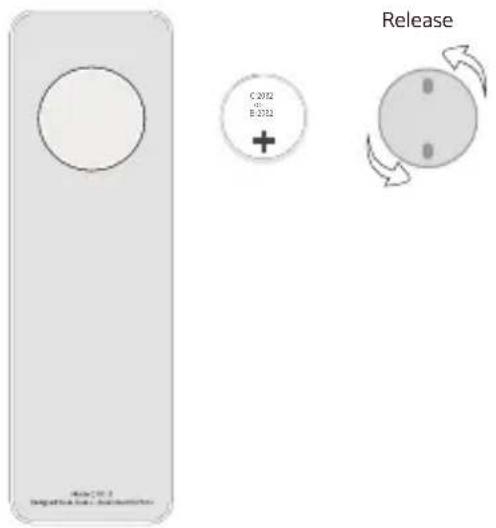
- Find the battery component on the back of your Remote.
- Turn the battery door counterclockwise until the door opens
- Remove the old battery.
- With the positive side facing up toward you, put in the newCR2032 or BR2032 lithium 3V coin battery (available at mostelectronic and drug stores).
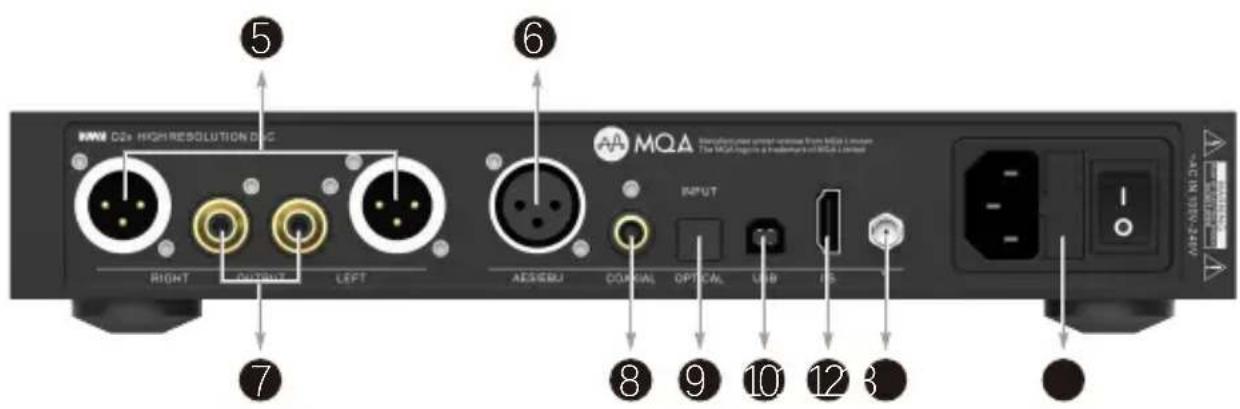
Functions
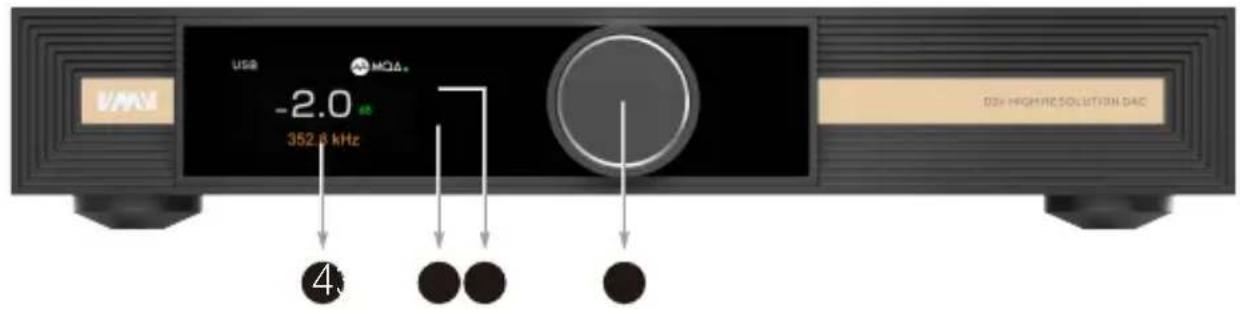
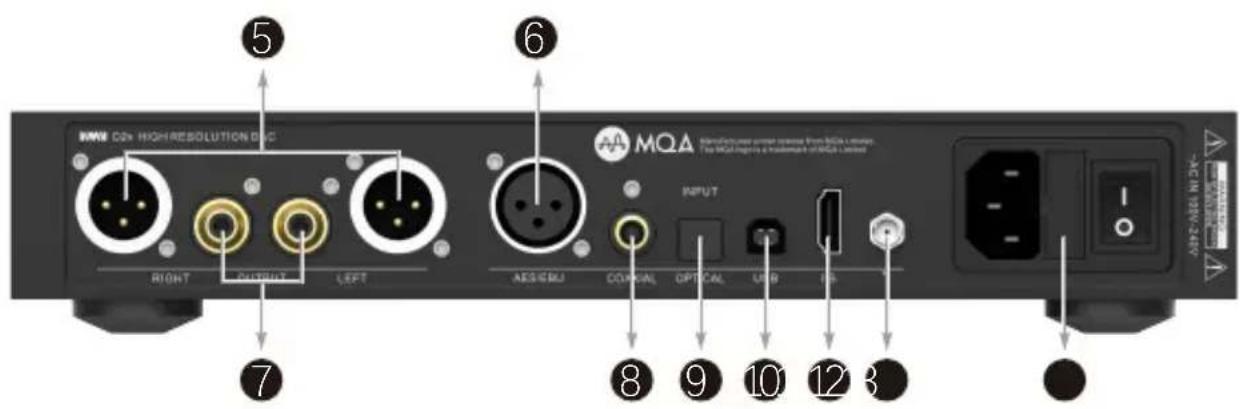
- Multi-function knob
- Remote window
- Indicator light
- Display
- XLR output
- AES input
-
RCA output
-
Coaxial input
- Optical input
- USB input
- I²S input
- Bluetooth antenna
- AC IN (100V-24V AC)
Bluetooth operating instructions
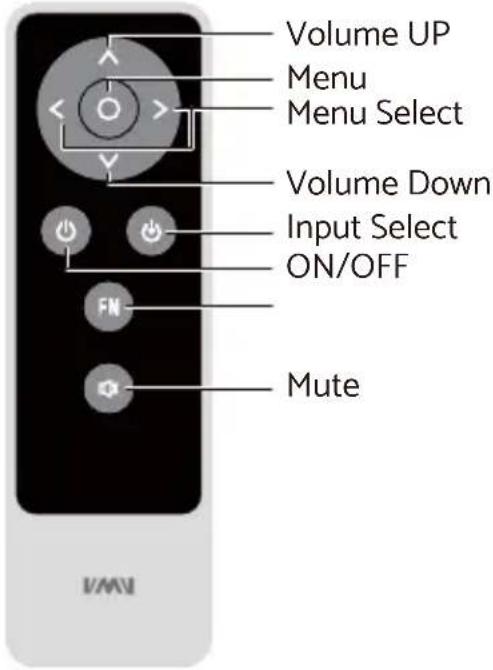
This product is equipped with a Bluetooth button, which is the FN button on the remote control, The functions of this button include:
■ Short press: Switch directly to Bluetooth input, if Bluetooth loses connection, it is a reconnect;
■ Long press: Disconnect the current device and allow pairing with other devices.
Connection:
■ Step 1: Switch the input source in the SETTING MENU or press the Bluetooth button of the remote;
■ Step 2: Turn on the Bluetooth function of the mobile phone, search for "VMV D2r", and tap to pairing. When the mobile phone displays "connected", it has been successfully connected.
Re-connection:
When you had lost the connection with the D2r, for example, going out, and back home, some phones will not re-connect the D2r if the D2r has not been re-boot, so you can press the Bluetooth button (FN) on the remote to Re-connect.
Clear pairing: Long press the "Bluetooth" button(FN) on the remote control.
After clearing the pairing, some phones may no longer be able to search for "VMV D2r". In this case, you need to delete the Bluetooth device "VMV D2r" which saved in the phone, and then search and pairing again.
About MQA
When the screen displays 🎨MQA • or 🎨MQA •, it means that the unit is decoding and playing an MQA stream or file, indicating that the sound is exactly the same as the original audio.
When the screen displays 🐘MQA . , it means that the unit is playing an MQA Studio file, which has been approved by the artist/producer, or has been verified by the copyright holder.
When the screen displays 🐎 MQA •, it means that the unit is rendering the MQA stream or file, that is, the last stage of MQA file expansion.
How to play MQA
■ D2R supports MQA decoding with USB, optical fiber and coaxial!
- D2R's MQA playback does not require the use of special playback software, such as foobar2000, Audirvanaplus only needs to support ASIO or WASAPI audio output, and when playing MQA audio, it is best to adjust the volume of the computer to the maximum, so that the audio output of the computer is in the best condition.
- When playing an MQA file, the sampling rate of the original master recording is displayed.

MQA and the Sound Wave Device are registered trade marks of MQA Limited.© 2016
Notes on playing MQA-CD
- Please make sure that what is being played is a genuine MQA-CD.
- Verify that the optical or coaxial signal output of the CD player is an unprocessed source code.
Instructions
INPUTS
USB
- BLUETOOTH
• OPTICAL
COAXIAL
- AES/EBU
• I²S(HDMI)
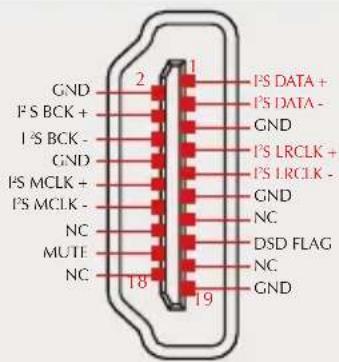
Note: The I²S interface is not a real HDMI interface. It just uses the HDMI cable to transmit it, so it cannot connect the real HDMI interface.
OUTPUTS
- ALL LINE OUT
BALANCED - UNBALANCED
PCM FILTER
- LOW OSR+HPC ON
- LOW OSR+HPC OFF
• HIGH LOW OSR+HPC ON
• HIGH LOW OSR+HPC OFF
PRE MODE
PRE MODE is the volume adjustment function switch for the output interface.
• VARIABLE: The output interface volume is controlled.
• FIXED: The output interface volume is fixed.
FN KEY FOR
• OUTPUTS
- BLUETOOTH
PHASE
I2S DSD CHANNEL
- DSDL = PCM DATA(The DSD left channel using the PCM DATA pin)
- DSDL = PCM LRCK(The DSD left channel using the PCM LRCK pin)
Note: When using the I²S input to streaming DSD audio, if you find that the left and right channels are incorrect, you can use this option to correct it.
Instructions
^12 S MODE
• NORMAL(NORMAL, PS AUDIO FORMAT)
• REVERSED(INVERTED, DATA AND LRCK INVERTED)
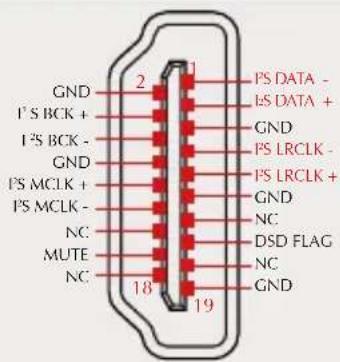
NORMAL
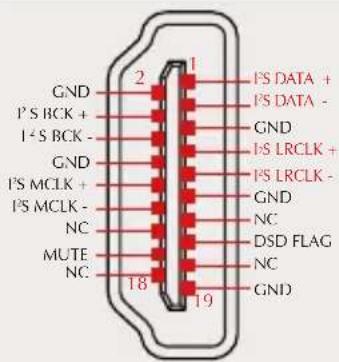
REVERSED
Note: This option is used to match different I²S interface standards, please check the interface definition of the signal source before use.
AUDIO PHASE
• NORMAL (2+,3-)
• INVERTED (2-,3+)
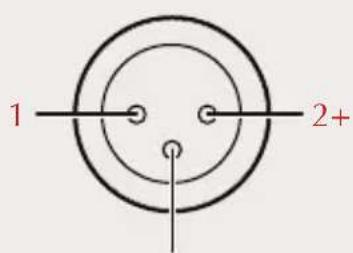
3-
NORMAL
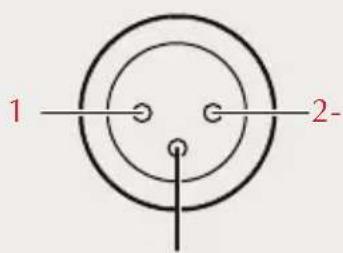
3+
INVERTED
Instructions
DIMMER
- 5 second \~ 60 second
(The range is 5 seconds-60 seconds. After setting, the screen will automatically go off within this time, and the screen will re-light up if you operate the remote control or the knob at any time.)
BRIGHTNESS
- During Bluetooth input, long press the middle button of the knob, the system will only reset the Bluetooth pairing status;
- During other input, long press the middle button of the knob, the system will clear all settings, including Bluetooth.
Safety notes
CAUTION:
TO REDUCE THE RISK OF ELECTRIC SHOCK, DO NOT REMOVE COVER(OR BACK).

CAUTION
RISK OF ELECTRIC SHOCK DO NOT OPEN


The lightning flash with arrowhead symbol, with in an equilateral triangle, is intended to alert the user to the presence of uninsulated “dangerous voltage” within the product’s enclosure that may be of sufficient magnitude to constitute a risk of electric shock to persons.

The exclamation point within an equilateral triangle is intended to alert the user to the presence of important operating and maintenance (servicing) instructions in the literature accompanying the appliance.

Safe use only under elevation
WARNING:
TO REDUCE THE RISK OF FIRE OR ELECTRIC SHOCK, DO NOT EXPOSE THIS APPLIANCE TO RAIN OR MOISTURE.
The contents of this manual are updated without prior notice. If the function of the product you are using is inconsistent with the instructions, the function of the product shall prevail!
Warranty Terms
1. The Term of Service
Foshan Shuangmusanlin Technology Co., Ltd promises to offer good-quality products. If the product is broken in 7 days after purchasing when you use it normally, you can choose to send it back for return, replacement or repairing (only the product does not affect the second sales can be returned). Repairing for free in one year if you use it normally.
-
Date of purchase is in accordance with the date on invoice or receipt uesd by seller, and if you buy it on line, you can show the screenshot of trade.
-
If an inappropriate usage causes the unit damaged, the warranty will be void. As below.
-
All damages by inappropriate use, including using it under non-normal working environment or without following the instructions.
- Dismantling, refitting, repairing by user in private.
- Causing damage by using some fittings instead of the designative or accredited ones.
-
Cannot provide credible proof of purchase.
-
Sending it back to our company for repairing.
-
Contact your S.M.S.L Audio reseller for a return or replacement.
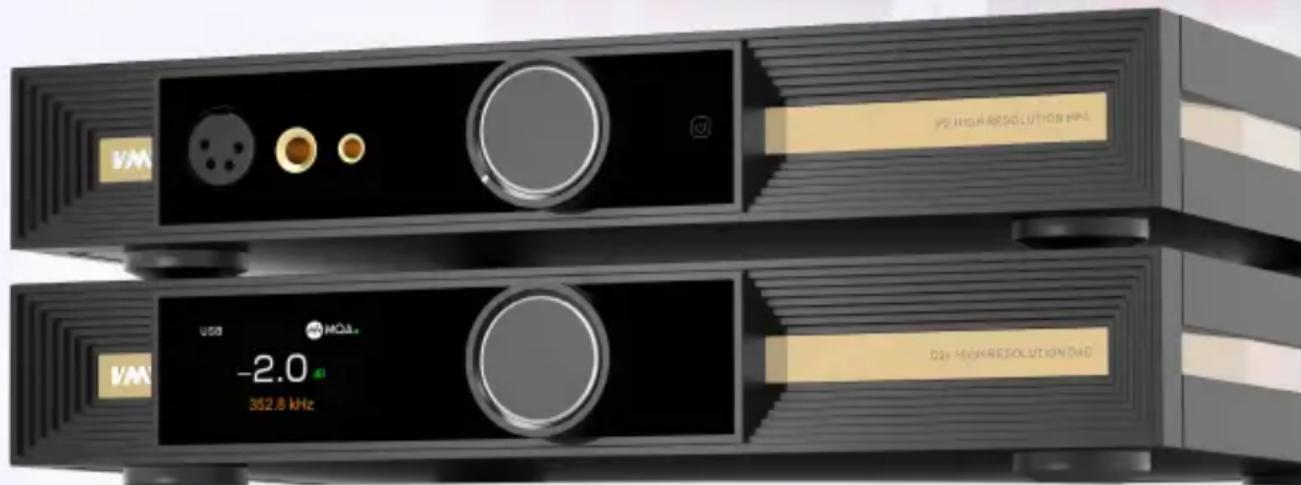
VMV
更大能量 更多可能
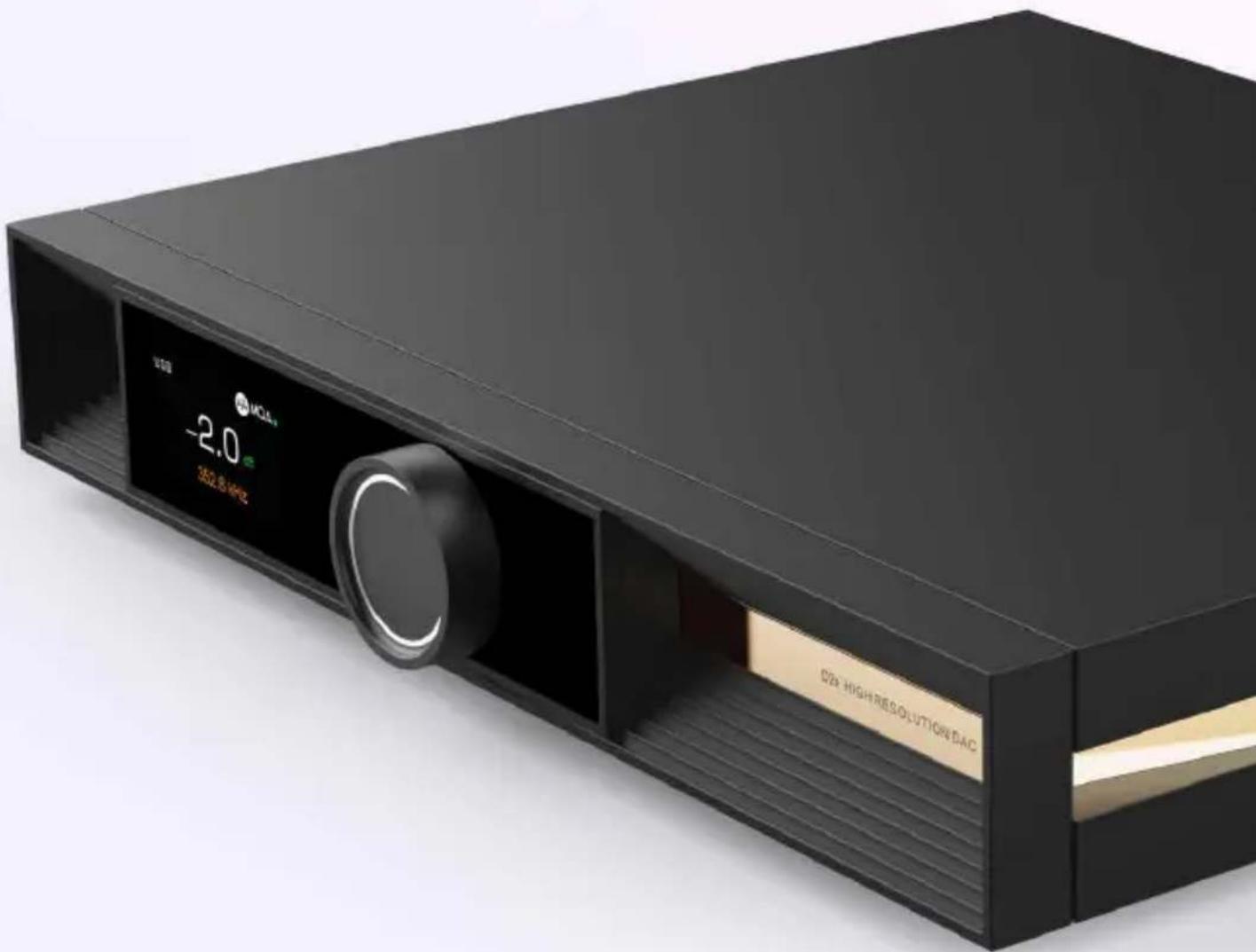
VMV D2R HIGH RESOLUTION USB DAC
- PRE MODE(前级模式)
- Specification
- Functions
- Bluetooth operating instructions
- Connection:
- Re-connection:
- About MQA
- How to play MQA
- Notes on playing MQA-CD
- Instructions
- INPUTS
- OUTPUTS
- PCM FILTER
- PRE MODE
- FN KEY FOR
- I2S DSD CHANNEL
- S MODE
- AUDIO PHASE
- DIMMER
- BRIGHTNESS
- Safety notes
- CAUTION:
- CAUTION
- WARNING:
- Warranty Terms
- The Term of Service
- 更大能量 更多可能
Brand : S.M.S.L
Model : VMV D2R
Category : Headphones