VMV D1se 2 - Headphones S.M.S.L - Free user manual and instructions
Find the device manual for free VMV D1se 2 S.M.S.L in PDF.


| Product Type | High-Resolution USB DAC / Headphone Amplifier |
| Brand | S.M.S.L |
| Model | VMV D1se 2 |
| Dimensions (W x H x D) | 210 x 39 x 170 mm (8.27 x 1.54 x 6.69 in) |
| Weight | 1.63 kg (3.59 lb) |
| Power Consumption | < 10 W |
| Power Supply | AC 100-240V, 50/60Hz with toroidal transformer |
| DAC Chip | ESS ES9039MSPRO (8-channel parallel) |
| USB Interface | XMOS XU-316 (3rd gen), PCM up to 32bit/768kHz, DSD up to DSD512 |
| Bluetooth | Qualcomm chip, supports LDAC (24bit/96kHz), aptX-HD, aptX, SBC, AAC |
| Inputs | USB, Optical, Coaxial, Bluetooth, I2S (HDMI) |
| Outputs | Balanced XLR (5.2 Vrms), Unbalanced RCA (2.5 Vrms) |
| THD+N | 0.00005% (-125 dB) |
| Dynamic Range | 133 dB (XLR), 128 dB (RCA) |
| Signal-to-Noise Ratio | 133 dB (XLR), 127 dB (RCA) |
| Supported Audio Formats | MQA, MQA-CD, PCM, DSD, DOP (USB, Optical, Coaxial) |
| MQA Decoding | Full decoder (USB, Optical, Coaxial) with indicator LED |
| Display | Color IPS display with tempered glass |
| Enclosure | Full aluminum CNC housing |
| Filters | 7 PCM filters, 4 DSD filters |
| Sound Color Modes | 9 presets (Rich, Tube, Crystal) + Standard bypass |
| Remote Control | Included, with full functions, uses CR2032 battery |
| Safety | Do not expose to rain or moisture; no user-serviceable parts inside |
| Maintenance | Clean with dry cloth; keep away from dust and heat |
| Warranty | 1 year free repair for normal use; 7-day return/replacement |
Frequently Asked Questions - VMV D1se 2 S.M.S.L
User questions about VMV D1se 2 S.M.S.L
0 question about this device. Answer the ones you know or ask your own.
Ask a new question about this device
Download the instructions for your Headphones in PDF format for free! Find your manual VMV D1se 2 - S.M.S.L and take your electronic device back in hand. On this page are published all the documents necessary for the use of your device. VMV D1se 2 by S.M.S.L.
USER MANUAL VMV D1se 2 S.M.S.L
The contents of this manual may be changed with the edition,
and are subject to change without notice.
Ver 2.0
安全注意事项
注意:
为防电击,请勿打开机盖或或后盖)。
本机内部无使用者可以维修的部件。
请委托有资格的技术人员进行维修。

注意
触电危险,请勿打开。


DoP DoP256(USB),DoP64(光纤/同轴)
蓝牙规格:
LDAC 24bit/96kHz (990kbps/660kbps/330kbps)
aptX-HD 24bit/48 kHz_576kbps
aptX 16bit/44.1 kHz_352kbps
SBC 16bit/44.1 kHz_328kbps
AAC 16bit/44.1 kHz_320kbps
消耗功率 ....../<10W
The lightning flash with arrowhead symbol, with in an equilateral triangle, is intended to alert the user to the presence of uninsulated "dangerous voltage" within the product's enclosure that may be of sufficient magnitude to constitute a risk of electric shock to persons.

The exclamation point within an equilateral triangle is intended to alert the user to the presence of important operating and maintenance (servicing) instructions in the literature accompanying the

Safe use only under elevation
WARNING:
TO REDUCE THE RISK OF FIRE OR ELECTRIC SHOCK, DO NOT EXPOSE THIS APPLIANCE TO RAIN OR MOISTURE.
The contents of this manual are updated without prior notice. If the function of the product you are using is inconsistent with the instructions, the function of the product shall prevail!
Features
• Support MQA decoding and MQA-CD;
- New 3rd generation XMOS XU-316, PCM support up to 32bit/768kHz, DSD support to DSD512;
- The new generation flagship DAC chip ES9039MSPRO of USA ESS has built-in MQA hard decoding;
- Designed with an eight-channel parallel circuit, the distortion is as low as a staggering 0.00005% (-125dB) and more stable.
• Using 11pcs High-end dual op-amp and most of Hifi standard components like nichicon KG capatitor;
- Adopt 2nd PLL to eliminate JITTER during SPDIF transmission;
- The new self-developed CK-03 clock processing circuit greatly reduces clock jitter;
- Support DOP independent display function, accurately determine the current decoding format;
- USB, optical fiber, coaxial, I2S support DSD transmission, coaxial and optical fiber support DOP64;
• Use tempered glass to fully fit the color IPS display;
• UK made noratel toroidal power transformer for linear power supply;
- Combined with multiple low-noise regulated power supplies, it provides a stable, reliable, efficient, and low-noise power supply system.
• Qualcomm high-end Bluetooth chip, support LDAC (24bit/96kHz), APTX/HD, SBC, AAC;
• High-quality monolithic full aluminum CNC housing.
• Japan Audio Association (JAS) Hi-Res certification;
• Equipped with remote control and full-featured remote control.
Specification
Input ...... USB / Optical / Coaxial / Bluetooth / I²S
Output RCA/XLR
Line output amplitude....XLR 5.2Vrms
RCA 2.5Vrms
THD+N 0.00005%(-125dB)(UN-WTD)
Dynamic range ....133dB(XLR),128dB(RCA)
SNR 133dB(XLR),127dB(RCA)
USB transmission....USB 2.0 Asynchronization
USB compatibility ....Windows 7 / 8 / 8.1 / 10(Needs Driver)
Mac OSX10.6 or Later、Linux(Driverless)
MQA decoder .... USB / Optical / Coaxial
MQA-CD decoder ..... Optical / Coaxial
Sampling rate & Bit Width:
USB PCM 44.1 \~ 768kHz(32bit)
DSD 2.8224 \~ 22.5792MHz(1bit)
Optical / Coaxial 44.1 \~ 192kHz(24bit)
DoP DoP256(USB), DoP64(Optical / Coaxial)
Bluetooth: 5.0
LDAC 24bit/96kHz (990kbps/660kbps/330kbps)
aptX-HD 24bit/48 kHz_576kbps
aptX 16bit/44.1 kHz_352kbps
SBC 16bit/44.1 kHz_328kbps
AAC 16bit/44.1 kHz_320kbps
Power Consumption ....../<10W
Size 210x170x39mm (WxHxD)
Weight 1.63kg / 3.59lb
Specifications are subject to change without notice.
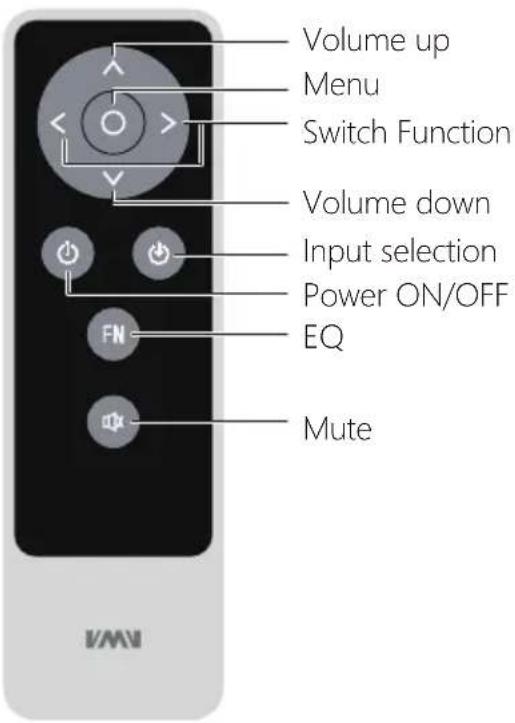
Remote Control
Install CR2032 or BR2032 lithium 3V coin battery as instructions
When using the remote control, point it toward the remote con-trol signal receiver on the main unit from a distance of 5 m (16 ft) or less. Do not place obstructions between the main unit and the remote control.
The remote control might not work if the remote control signal receiver on the unit is exposed to direct sunlight or bright light. If this occurs, try moving the unit.
Beware that use of this remote control could cause the unin-tentional operation of other devices that can be controlled by infra.
natural_image
Simple diagram with a circle and horizontal line, no text or symbols present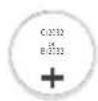

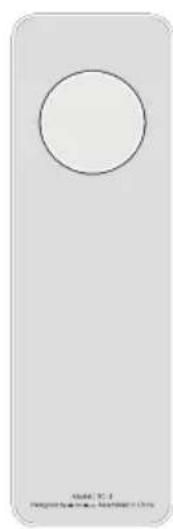
- Find the battery component on the back of your Remote.
- Turn the battery door counterclockwise until the door opens
- Remove the old battery.
- With the positive side facing up toward you, put in the newCR2032 or BR2032 lithium 3V coin battery (available at mostelectronic and drug stores).
Functions
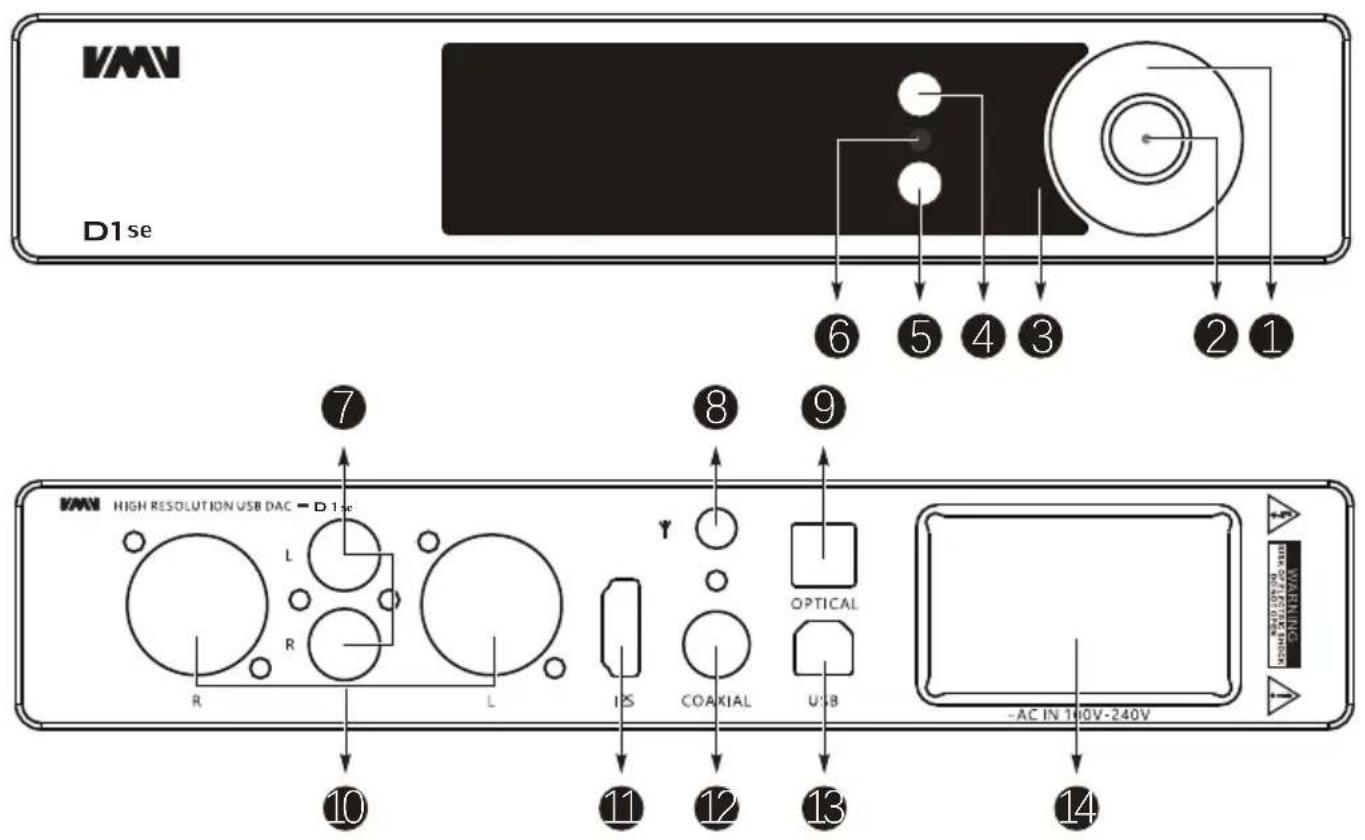
- Multi-function knob
- LED
- Display
- Input source select
- Bluetooth
- Remote window
- RCA output
- Bluetooth antenna
- Optical input
- Balanced output
- I²S input
- Coaxial input
- USB input
- AC IN (100V-24V AC)
Bluetooth operating instructions
This product is equipped with a Bluetooth button, which is the FN button on the remote control, The functions of this button include:
■ Short press: Switch directly to Bluetooth input, if Bluetooth loses connection, it is a reconnect;
■ Long press: Disconnect the current device and allow pairing with other devices.
Connection:
■ Step 1: Switch the input source in the SETTING MENU or press the Bluetooth button of the remote;
■ Step 2: Turn on the Bluetooth function of the mobile phone, search for "VMV D1se", and tap to pairing. When the mobile phone displays "connected", it has been successfully connected.
Re-connection:
When you had lost the connection with the D1se, for example, going out, and back home, some phones will not re-connect the D1se if the D1se has not been re-boot, so you can press the Bluetooth button (FN) on the remote to Re-connect.
Clear pairing: Long press the "Bluetooth" button(FN) on the remote control. After clearing the pairing, some phones may no longer be able to search for "VMV D1se". In this case, you need to delete the Bluetooth device "VMV D1se" which saved in the phone, and then search and pairing again.
About MQA
MQA (Master Quality Authenticated) is an award-winning British technology that delivers the sound of the original master recording. The master MQA file is fully authenticated and is small enough to stream or download. Includes MQA technology, which enables you to playback MQA audio files and streams, delivering the sound of the original master recording.
Visit How it works https://www.mqa.co.uk/how-it-works for more information.
MQA files playback
• Supports MQA decoding on the USB interface.
- MQA playback does not require additional software. You can use foobar2000 or Audirvana for MQA playback as it supports ASIO or WASAPI audio output. When playing MQA audio, it is suggested to adjust the volume of the computer to the maximum for the best audio output.
- The LED next to MQA logo glows green or blue to indicate that the unit is decoding and playing an MQA stream or file, and denotes provenance to ensure that the sound is identical to that of the source material. It glows blue to indicate it is playing an MQA Studio file, which has either been approved in the studio by the artist/producer or has been verified by the copyright owner. It glows magenta to indicate that the unit is rendering an MQA stream or file. This delivers the final unfold of the MQA file.
- When playing an MQA file, the sampling rate of the original master recording is displayed.

MQA
and the Sound Wave Device are registered trade marks of MQA Limited.© 2016
Instructions
INPUTS
- USB
- BLUETOOTH
• OPTICAL - COAXIAL
- I²S(HDMI)
Note: The I²S interface is not a real HDMI interface. It just uses the HDMI cable to transmit it, so it cannot connect the real HDMI interface.
OUTPUTS
- ALL LINE OUT
BALANCED - UNBALANCED
PCM FILTER
- FILTER OFF
- MINIMUM PHASE
- APODIZING
- LINEAR FAST
- LINEAR SLOW
- MINIMUM FAST
• MINIMUM SLOW - LOW DISPERSION
DSD FILTER
- 47k CUT-OFF
- 50k CUT-OFF
- 60k CUT-OFF
- 70k CUT-OFF
SOUND COLOR
There are 9 sound color settings in D1se 2
- Rich1, Rich2, Rich3
- Tube1, Tube2, Tube3
• Crystal1, Crystal2, Crystal3
This setting is using the DSP of DAC, to make some different sound color, all of these settings will not change the frequency response curve. When set to "Standard", this setting will be bypassed.
PRE MODE
PRE MODE is the volume adjustment function switch for the output interface.
• VARIABLE: The output interface volume is controlled.
• FIXED: The output interface volume is fixed.
DPLL
- MIN \~ MAX
(A total of 15 kinds, the default is 7 kinds. The larger the number is, the stronger the range to adapt to jitter, and the smaller the number, the better the performance against clock jitter.)
This DPLL setting is a special function of ESS series products. It can adjust the internal DPLL digital phase locked loop circuit Bandwidth, so that the chip achieves a balance between anti clock jitter and input tolerance.
Its function:
- When the clock stability of the input signal is good, this value can be reduced, so that the clock performance of the system is better;
- When the clock stability of the input signal is not good, the sound may be interrupted. Increase this value can avoid the sound interruption! Especially when using TV as signal source!
I²S MODE
NORMAL
- REVERSED
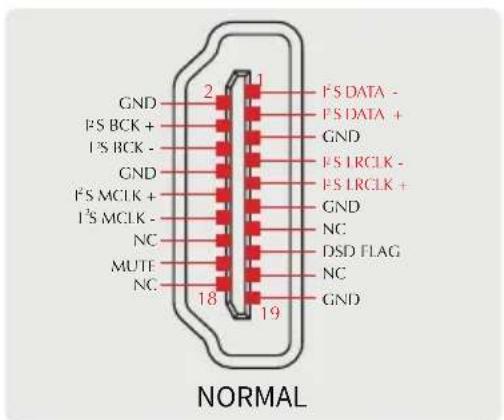
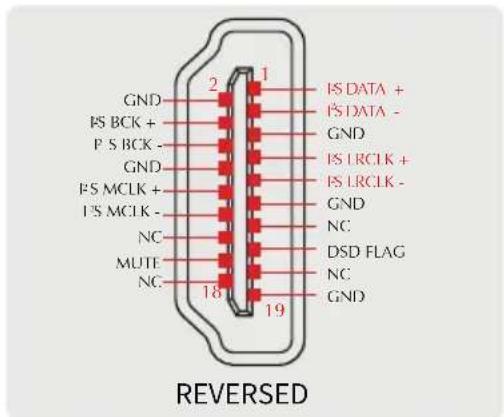
Note: This option is used to match different P'S interface standards, please check the interface definition of the signal source before use.
FN KEY FOR
• OUTPUTS
- BLUETOOTH
DIMMER
- 5 second \~ 60 second
(The range is 5 seconds-60 seconds. After setting, the screen will automatically go off within this time, and the screen will re-light up if you operate the remote control or the knob at any time.)
BRIGHTNESS
- During Bluetooth input, long press the middle button of the knob, the system will only reset the Bluetooth pairing status;
- During other input, long press the middle button of the knob, the system will clear all settings, including Bluetooth.
Warranty Terms
1. The Term of Service
Foshan Shuangmusanlin Technology Co., Ltd promises to offer good-quality products. If the product is broken in 7 days after purchasing when you use it normally, you can choose to send it back for return, replacement or repairing (only the product does not affect the second sales can be returned). Repairing for free in one year if you use it normally.
- Date of purchase is in accordance with the date on invoice or receipt uesd by seller, and if you buy it on line, you can show the screenshot of trade.
3.If an inappropriate usage causes the unit damaged, the warranty will be void. As below.
- All damages by inappropriate use, including using it under non-normal working environment or without following the instructions.
• Dismantling, refitting, repairing by user in private. - Causing damage by using some fittings instead of the designative or accredited ones.
-
Cannot provide credible proof of purchase.
-
Sending it back to our company for repairing.
-
Contact your S.M.S.L Audio reseller for a return or replacement.
- 安全注意事项
- 注意
- WARNING:
- Features
- Specification
- Remote Control
- Functions
- Bluetooth operating instructions
- Connection:
- Re-connection:
- About MQA
- MQA files playback
- Instructions
- INPUTS
- OUTPUTS
- PCM FILTER
- DSD FILTER
- SOUND COLOR
- PRE MODE
- DPLL
- I²S MODE
- FN KEY FOR
- DIMMER
- BRIGHTNESS
- Warranty Terms
- The Term of Service
Brand : S.M.S.L
Model : VMV D1se 2
Category : Headphones