M500 MKII - Headphones S.M.S.L - Free user manual and instructions
Find the device manual for free M500 MKII S.M.S.L in PDF.


| Product Type | Headphone Amplifier / DAC |
| Brand | S.M.S.L |
| Model | M500 MKII |
| DAC Chip | ES9038PRO |
| Bluetooth Version | 5.0 |
| Bluetooth Codecs | LDAC, aptX-HD, aptX, SBC, AAC |
| Inputs | USB, Optical, Coaxial, Bluetooth |
| Outputs | 6.35mm Headphone Jack, RCA, XLR |
| Headphone Output Power | 2W x 2 (16Ω), 1W x 2 (32Ω) |
| THD+N (DAC) | 0.00006% (-123dB) |
| THD+N (Headphone) | 0.0001% (-120dB) |
| Signal-to-Noise Ratio (XLR) | 131dB |
| Signal-to-Noise Ratio (RCA) | 126dB |
| Sampling Rate (USB) | Up to 768kHz/32bit, DSD512 |
| Sampling Rate (Optical/Coaxial) | Up to 192kHz/24bit |
| MQA Support | USB, Optical, Coaxial (including MQA-CD) |
| Display | 1.9 inch TFT LCD |
| Dimensions (W x H x D) | 85 x 88 x 197 mm |
| Weight | 0.90 kg / 1.98 lb |
| Power Consumption | 5W (standby <0.5W) |
| Power Supply | External power adapter (included) |
| Remote Control | Included (full-function) |
| Hi-Res Certification | JAS Hi-Res certified |
Frequently Asked Questions - M500 MKII S.M.S.L
User questions about M500 MKII S.M.S.L
0 question about this device. Answer the ones you know or ask your own.
Ask a new question about this device
Download the instructions for your Headphones in PDF format for free! Find your manual M500 MKII - S.M.S.L and take your electronic device back in hand. On this page are published all the documents necessary for the use of your device. M500 MKII by S.M.S.L.
USER MANUAL M500 MKII S.M.S.L
DoP DoP256(USB),DoP64(光纤/同轴)
蓝牙规格:
LDAC 24bit/96kHz (990kbps/660kbps/330kbps)
aptX-HD 24bit/48 kHz_576kbps
aptX 16bit/44.1 kHz_352kbps
SBC 16bit/44.1 kHz_328kbps
AAC 16bit/44.1 kHz_320kbps
消耗功率 5W
待机功耗 ....../<0.5W
体积 85x88x197mm (WxHxD)
重量 0.90kg/1.98lb
The contents of this manual may change with the version, if there is any change without notice, please go to https://www.smsl-audio.com/portal/product/support Download the latest version of the manual.
Safety Notes
• Install this unit in a well ventilated, cool, dry, clean place-away from direct sunlight, heat sources, vibration, dust, moisture, or cold..
- Use the voltage specified on this unit Only. Using this unit with a higher voltage than specified is dangerous and may cause fire, damage to this unit, or personal injury. Our company will not be held responsible for any damage resulting from the use of this unit with a voltage other than that specified.
- Do not attempt to modify or fix this unit by yourself. Contact alesperson or customer service when any service is needed. The cabinet should never be opened for any reason.
- When not planning to use this unit for long periods of time (i.e. when going on vacation), disconnect the power cable from the AC wall outlet.
Important note:
The product specifications and information mentioned in this manual are for reference only. The content of this manual is subject to change without notice.
Warranty Terms
1. The Term of Service
Foshan Shuangmusanlin Technology Co., Ltd promises to offer good-quality products. If the product is broken in 7 days after purchasing when you use it normally, you can choose to send it back for return, replacement or repairing (only the product does not affect the second sales can be returned). Repairing for free in one year if you use it normally.
-
Date of purchase is in accordance with the date on invoice or receipt uesd by seller, and if you buy it on line, you can show the screenshot of trade.
-
If an inappropriate usage causes the unit damaged, the warranty will be void. As below.
- All damages by inappropriate use, including using it under non-normal working environment or without following the instructions.
• Dismantling, refitting, repairing by user in private.
- Causing damage by using some fittings instead of the designative or accredited ones.
- Cannot provide credible proof of purchase.
-
Sending it back to our company for repairing.
-
Contact your S.M.S.L Audio reseller for a return or replacement.
Features
• The top performance D/A chip ES9038PRO from ESS Technology;
• The high-performance power supply chip ES9311, the noise of ES9311 is as low as 1uVrms;
- The 3rd ES9038PRO circuit design has a surprisingly low distortion of -123dB and is more stable;
- The new PLFC headphone amplifier circuit enables the headphone to obtain more than 2Wrms output power and less than -120dB distortion under 16 Ω load!
• The new self-developed CK-02 clock processing circuit greatly reduces clock jitter;
• XMOS XU-216, true 32bit audio processing, supports DoP and Native DSD, and reaches 32bit/768kHz and DSD512;
• USB, optical, coaxial support DSD and MQA decode, coaxial and optical support DOP64 and MQA-CD.
• Qualcomm's latest Bluetooth chip supports LDAC 24bit/96kHz, APTX/HD, SBC, AAC;
- Specially designed discrete component linear regulated power supply and multiple low noise regulated power supplies to provide low noise power for analog circuits.
• Use tempered glass display panel for higher light transmission and longer service life;
• Built-in shielded, low noise power supply processing, while improving power efficiency, lower power consumption;
• High quality gold-plated input and output jacks;
• 3 high-end dual op-amps OPA1612 and a lot of audio grade components are used;
• 1.9 inch TFT LCD display;
• JAS Hi-Res certification;
• Equipped with remote control and full-function remote control.
Specifications
Input ...... USB / Optical / Coaxial / Bluetooth
Output 6.35 Phone Jack / RCA / XLR
THD+N 0.00006%(-123dB)(UN-WTD)
HPA THD+N 0.0001%(-120dB)(UN-WTD)
HPA power 2Wx2(16Ω),1Wx2(32Ω)
HPA gain 0dB(Low),+9dB(High)
Dynamic range ....131dB(XLR),126dB(RCA)
SNR 131dB(XLR),126dB(RCA)
USB Spec....USB 2.0 Asynchronization
USB compatibility ....Windows 7 / 8 / 8.1 / 10(Needs Driver)
Mac OSX10.6 or Later、Linux(Driverless)
MQA decoder .... USB / Optical / Coaxial
MQA-CD decoder ..... Optical / Coaxial
DoP decoder .... USB / Optical / Coaxial
Sampling rate & Bit Width:
USB PCM 44.1 \~ 768kHz(32bit)
DSD 2.8224 \~ 22.5792MHz(1bit)
Optical / Coaxial 44.1 \~ 192kHz(24bit)
DoP DoP256(USB), DoP64(Optical / Coaxial)
Bluetooth: 5.0
LDAC 24bit/96kHz (990kbps/660kbps/330kbps)
aptX-HD 24bit/48 kHz_576kbps
aptX 16bit/44.1 kHz_352kbps
SBC 16bit/44.1 kHz_328kbps
AAC 16bit/44.1 kHz_320kbps
Power Consumption ....5W
Weight 0.90kg/1.98lb
SMSL reserves the right to make improvements which may result in specification or feature changes without notice.
Remote control
• Install 2 x AAA batteries as instructions.
- When using the remote control, point it toward the remote con-trol signal receiver on the main unit from a distance of 5 m (16 ft) or less. Do not place obstructions between the main unit and the remote control.
- The remote control might not work if the remote control signal receiver on the unit is exposed to direct sunlight or bright light. If this occurs, try moving the unit. Beware that use of this remote control could cause the unin-tentional operation of other devices that can be controlled by infra.
Operating the remote control
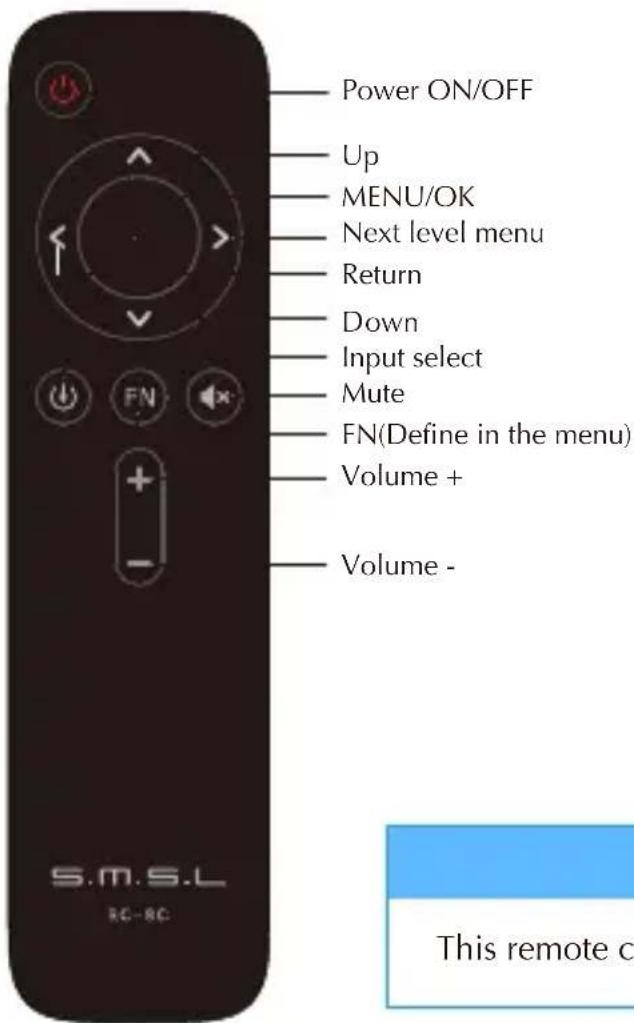
Note
This remote controller use 2 x R03/AAA batteries.
Display Interface and Instructions
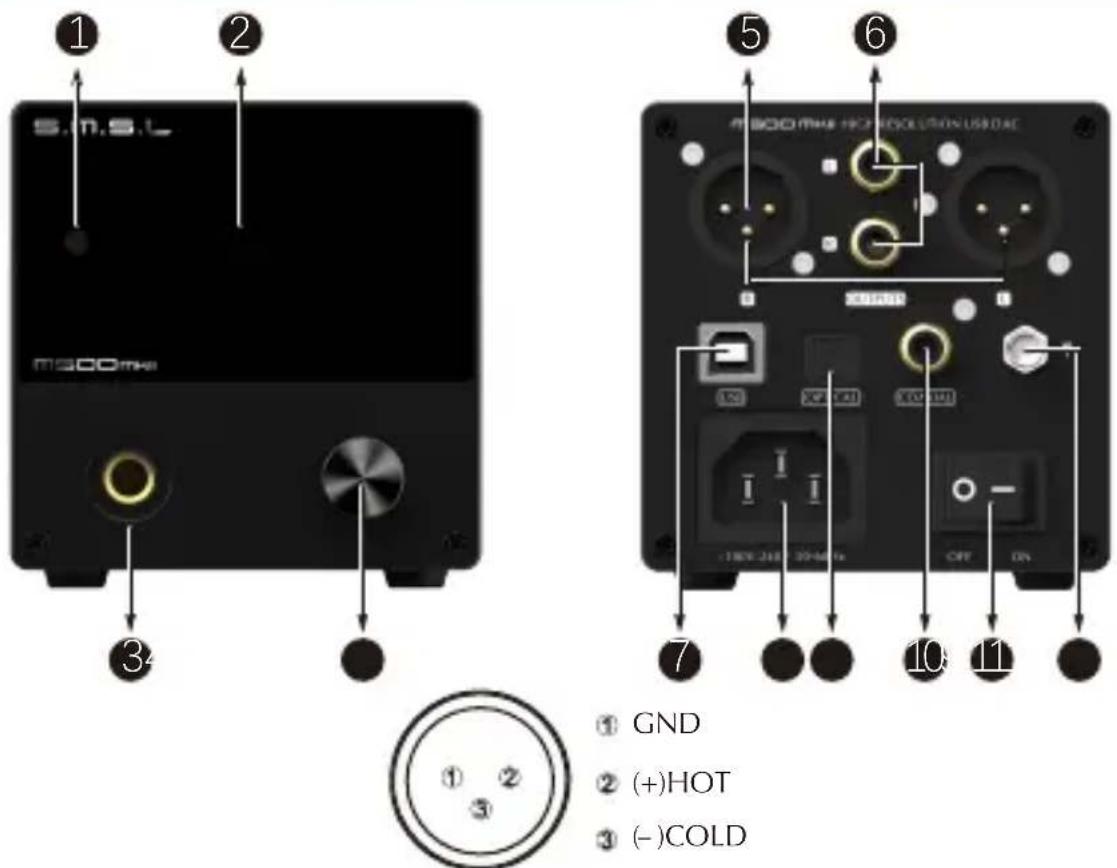
① GND
② (+)HOT
③ (-)COLD
1
4 Knob
7 USB input
10 Coaxial input
2
5 Balanced output
8 Power input
11 Power switch
3 6.35mm headphone outputDisplayRem
6 RCA output
9 Optical input
12 Bluetooth antenna
Note: Knob\*
• Konb: Volume/Menu up or down
- Button: Press to Menu/Enter
Hold to Return or Power ON/OFF
Bluetooth operating instructions\*\*
Connection:
- Step 1: Switch the input source in the SETTING MENU or press the Bluetooth button of the remote;
- Step 2: Turn on the Bluetooth function of the mobile phone, search for "SMSL M500 MKII", and tap to pairing. When the mobile phone displays "connected", it has been successfully connected.
Re-connection:
When you had lost the connection with the M500 MKII, for example, going out, and back home, some phones will not re-connect the M500 MKII if the M500 MKII has not been re-boot, so you can press the Bluetooth button on the remote to Re-connect.
Clear pairing: In the Bluetooth input state, long press the FN button. After clearing the pairing, some phones may no longer be able to search for "SMSL M500 MKII". In this case, you need to delete the Bluetooth device "SMSL M500 MKII" which saved in the phone, and then search and pairing again.
Please turn down the volume before connecting the headphones to avoid excessive volume damage to the headset.
According to the advice of health experts, do not listen to the headphones for a long time so as not affect your hearing.
Instructions
INPUT
USB AUDIO
• OPTICAL
COAXIAL
- BLUETOOTH
OUTPUT
- XLR+RCA
HPA
XLR - RCA
GAIN
- LOW (+0dB)
- HIGH (+9dB)
PCM FILTER
- Fast Linear
- Slow Linear
- Fast Minimum
- Slow Minimum
- Fast Hybrid
- Apodizing
- Brickwall
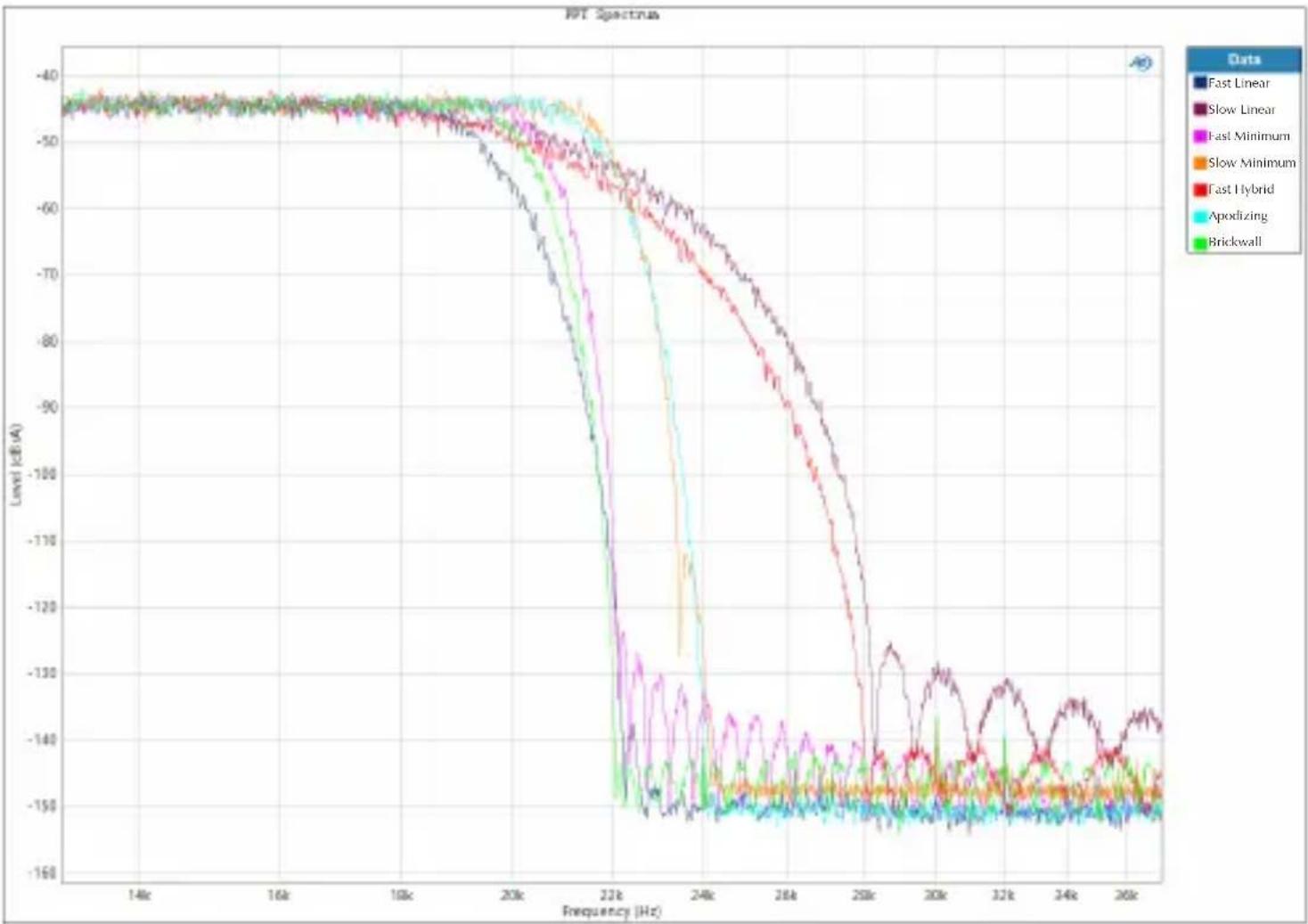
DSD FILTER
There are 4 kinds of digital filtering in total. It's the way that the digital operation means the clutter outside the audioFilter out, respectively
• 47kHz Cutoff
- 50kHz Cutoff
- 60kHz Cutoff
- 70kHz Cutoff
SOUND COLOR
There are 9 sound color settings in M500 MKII.
- Rich1、Rich2、Rich3
- Tube1、Tube2、Tube3
• Crystal1、Crystal2、Crystal3
This setting is using the DSP of ES9038PRO, to make some different sound color, all of these settings will not change the frequency response curve. When set to "Standard", this setting will be bypassed.
Instructions
PRE MODE
Volume control enable or disable.
- Vol Fixed: In this mode, volume is fixed on max output level, and the M500 MKII will ignore the volume operations.
- Vol Variable: In this mode, volume can be adjust by remote controller, and make M500 MKII a pre-amplifier.
DPLL
MIN \~ MAX
(A total of 15 kinds, the default is 7 kinds. The larger the number is, the stronger the range to adapt to jitter, and the smaller the number, the better the performance against clock jitter.)
This DPLL setting is a special function of ESS series products. It can adjust the internal DPLL digital phase locked loop circuit Bandwidth, so that the chip achieves a balance between anti clock jitter and input tolerance.
Its function:
- When the clock stability of the input signal is good, this value can be reduced, so that the clock performance of the system is better;
- When the clock stability of the input signal is not good, the sound may be interrupted. Increase this value can avoid the sound interruption! Especially when using TV as signal source!
SPDIF MODE
This setting is only valid for optical/coaxial interfaces which using SPDIF protocol;
• NORMAL MODE
NORMAL mode, only use the digital receiver chip (DIR) to process the SPDIF signal, used in most occasions, in this mode supports DoP playback.
- PROCESSOR MODE
PROCESSOR mode, in this mode M500 MKII will use the XMOS processor to process the optical/coaxial signal, so that it can have more powerful computing power and can handle various complex tasks including MQA, DoP, At this time, the system can support MQA full decoding, MQA-CD, DoP64.
Note: do not switch this mode frequently, try to restart the machine after switching this mode, otherwise it may cause output noise.
Instructions
DIMMER
- 5 second \~ 60 second
(The range is 5 seconds-60 seconds. After setting, the screen will automatically go off within this time, and the screen will re-light up if you operate the remote control or the knob at any time.)
BRIGHTNESS
- In this page, press and hold the button of the knob, the system will reset all settings, including Bluetooth pairing status.
- Safety Notes
- Important note:
- Warranty Terms
- The Term of Service
- Features
- Specifications
- Remote control
- Operating the remote control
- Note
- Display Interface and Instructions
- Note: Knob\*
- Bluetooth operating instructions\*\*
- Connection:
- Re-connection:
- Instructions
- INPUT
- OUTPUT
- GAIN
- PCM FILTER
- DSD FILTER
- SOUND COLOR
- PRE MODE
- DPLL
- SPDIF MODE
- DIMMER
- BRIGHTNESS
Brand : S.M.S.L
Model : M500 MKII
Category : Headphones