
Bluetooth Headset Business Pro 126-26 - Headphones SANDBERG - Free user manual and instructions
Find the device manual for free Bluetooth Headset Business Pro 126-26 SANDBERG in PDF.


| Product Type | Wireless Bluetooth Headset |
| Brand | Sandberg |
| Model | 126-26 (Bluetooth Headset Business Pro) |
| Connectivity | Bluetooth, USB-C (via dock) |
| Bluetooth Version | 5.0 (assumed) |
| Bluetooth Range | Up to 10 m (assumed) |
| Battery Type | Rechargeable lithium-ion (assumed) |
| Battery Life (Talk Time) | Up to 20 hours (assumed) |
| Battery Life (Standby) | Up to 400 hours (assumed) |
| Charging Time | Approximately 2 hours (assumed) |
| Charging Method | Type-C direct or via dock |
| Weight | Approx. 200 g (assumed) |
| Driver Size | 40 mm (assumed) |
| Frequency Response | 20 Hz - 20 kHz (assumed) |
| Microphone | Noise-cancelling boom mic with mute |
| Controls | Volume +/-, Mute, MFB (Multi Function Button), adjustable retractable headband |
| LED Indicator | Yes (charging/connection status) |
| Warranty | 5 years (registration required) |
| Included Accessories | Headset, dock, USB cable, user manual |
| Compatibility | PC, Mac, Bluetooth devices |
| Special Features | Retractable headband, double quality tested, docking station |
| Standards | CE, RED, EMC compliant |
Frequently Asked Questions - Bluetooth Headset Business Pro 126-26 SANDBERG
User questions about Bluetooth Headset Business Pro 126-26 SANDBERG
0 question about this device. Answer the ones you know or ask your own.
Ask a new question about this device
Download the instructions for your Headphones in PDF format for free! Find your manual Bluetooth Headset Business Pro 126-26 - SANDBERG and take your electronic device back in hand. On this page are published all the documents necessary for the use of your device. Bluetooth Headset Business Pro 126-26 by SANDBERG.
USER MANUAL Bluetooth Headset Business Pro 126-26 SANDBERG
Bluetooth Headset Business Pro
Quick guide
126-26
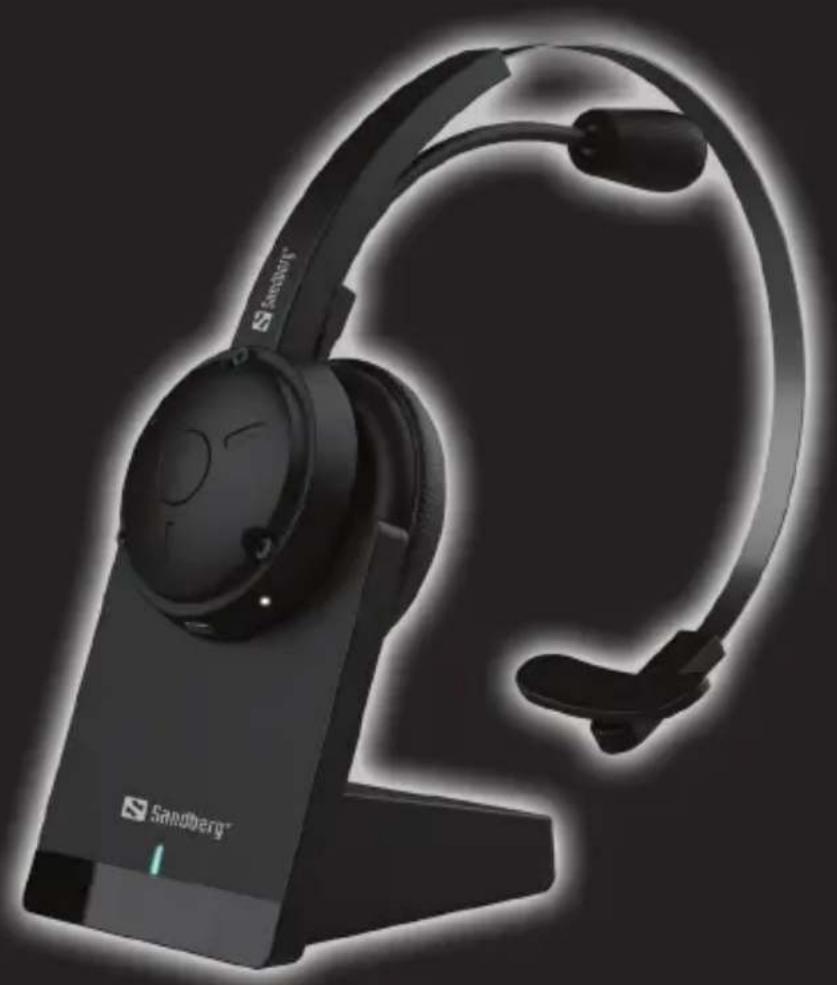
natural_image
Black Sandberg 3D headset with headband and ear cap, shown in profile view (no text or symbols on device body)
Double Quality Tested
www.sandberg.world
Product overview
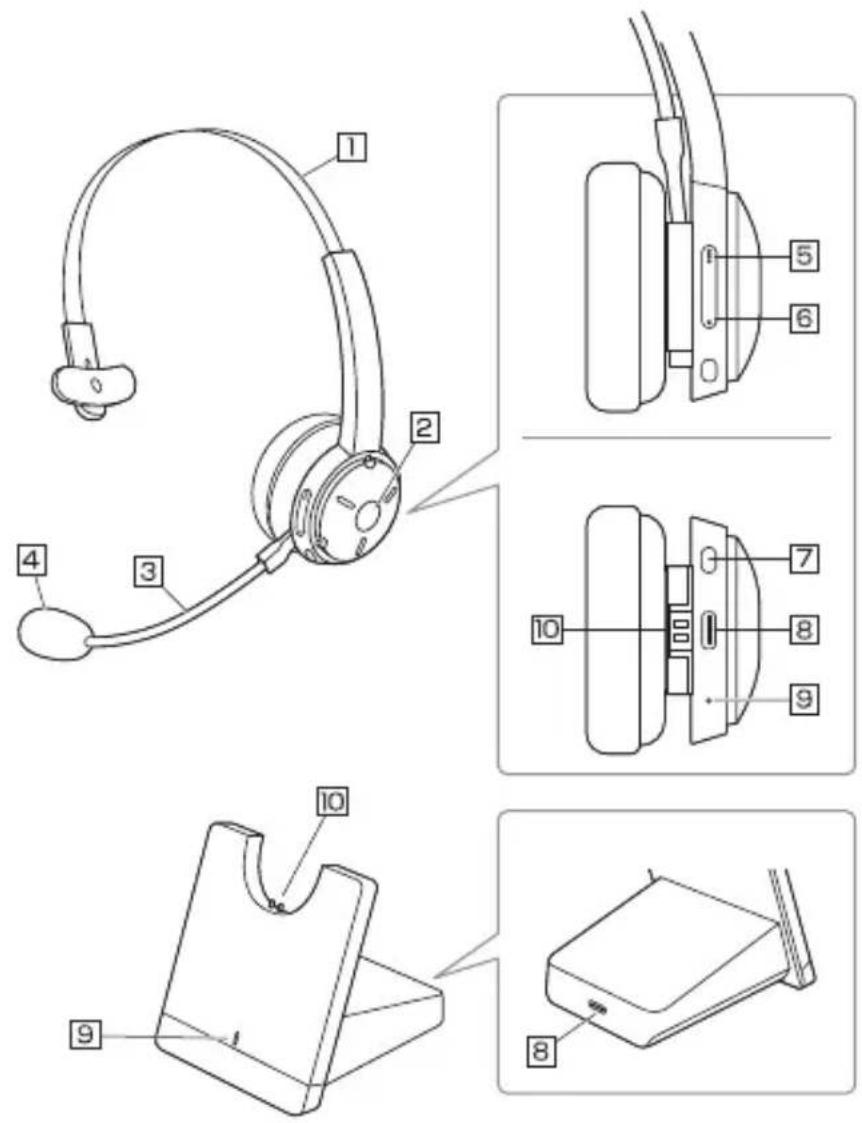
- Retractable Headband
- Mute Button
- Mic Boom
- MIC
- Volume +
- Volume -
- MFB (Multi Function Button)
- Type-C Interface
- LED Indicator
- Charging Contacts
Connection to PC by dock
When connected to a PC by the USB-cable do not pair the Bluetooth.
The headset will automatically appear as a USB device for microphone and speaker.

flowchart
graph TD
    A["USB-C USB"] --> B["Sandberg Headset Dock"]
    C["Laptop"] --> B
NOTE: The headset is charging when placed in the dock connected to your PC.
Charging
Charge in the dock
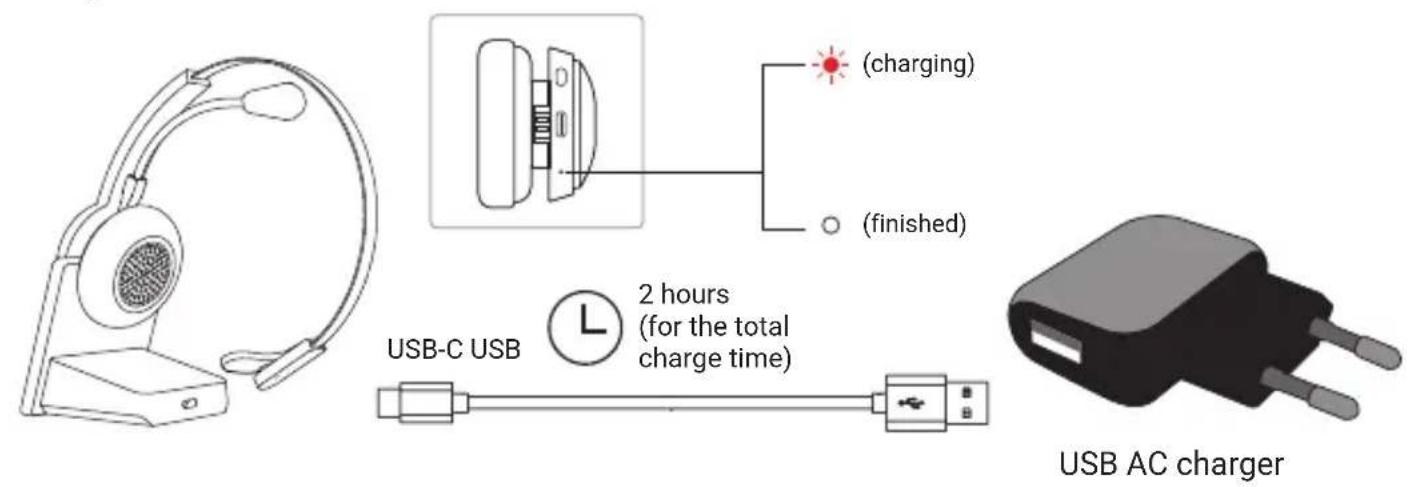
Direct charge

Direct connection to Bluetooth device
NOTE: Do not use the dock making a direct Bluetooth connection. The dock MUST be disconnected from a power source when you connect to a Bluetooth device.

Headset operation

CE
Declaration of Conformity
Manufacturer: Sandberg A/S
Address: Bregneroedvej 133D, 3460 Birkeroed, Denmark
Product description: Bluetooth headset with transmitter dock
Product name/Type no: Sandberg Bluetooth Headset Business Pro/ 126-26
We declare under our sole responsibility that the products, to which this declaration relates, are in conformity with the Council Directives on the approximation of the laws of the EEC Member States relating to the following:
Directives
Radio Equipment Directive (RED)2014/53/EU EMC directive 2014/30/EU
and
Standards
EN IEC 62368-1:2020+A11:2020 EN 50332-2:2013
ETSI EN 301 489-1 V2.2.0: 2017 ETSI EN 301 489-17 V3.2.0: 2017 ETSI EN 300 328 V2.2.2: 2017 EN 62479:2010
EN 55032: 2015+AC: 2016 EN 61000-3-2: 2014 EN 61000-3-3: 2013 EN 55035:2017
Date: 27 ^th June 2022
Location: Birkeroed, Denmark
Name: Anders Petersen Brand Director

CE letter of conformity

Sandberg®
Support
http://helpdesk.sandberg.world
Warranty
There is a five-year warranty on your Sandberg product. Please read the warranty terms and register your new Sandberg product at www.sandberg.world/warranty
5
Years Warranty


Brand : SANDBERG
Model : Bluetooth Headset Business Pro 126-26
Category : Headphones