
Compass - Microphone LOGITECH - Free user manual and instructions
Find the device manual for free Compass LOGITECH in PDF.


| Product Type | Desktop Boom Arm |
| Brand | Logitech (Blue Microphones) |
| Model | Compass |
| Boom Type | Tube-style with internal springs |
| Max Weight Hold | 2.4 lbs (including microphone and shock mount) |
| Threading | Standard 3/8" with included 3/8" to 5/8" adapter |
| Max Horizontal Reach | 32 inches |
| Cable Management | Hidden-channel cable management |
| Mounting Options | C-clamp for desktop (included) or desk-insert bushing (sold separately) |
| Pivot Points | 3 adjustable friction hinges: base, mid-point, and microphone mount |
| Spring Tension | Adjustable via screw at base |
| Compatible Microphones | Broadcast mics up to 2.4 lbs, including Blue Yeti, Yeti Pro, Blackout Spark SL |
| Color | Black (with blue accents) |
| Material | Metal construction with plastic components |
| Dimensions (approx.) | Not specified; compact desktop design |
| Weight | Not specified; lightweight |
| Power Source | None (passive mechanical device) |
| Warranty | 2 years against defects in materials and workmanship |
| Country of Origin | Designed in USA, Made in China |
| Included Accessories | Compass desktop boom arm, C-clamp for desktop mount, 3/8" to 5/8" adapter |
| Maintenance | Occasional tightening of thumbscrews and spring tension adjustment as needed |
| Repairability | Not user-serviceable; contact Blue Microphones for service |
Frequently Asked Questions - Compass LOGITECH
User questions about Compass LOGITECH
0 question about this device. Answer the ones you know or ask your own.
Ask a new question about this device
Download the instructions for your Microphone in PDF format for free! Find your manual Compass - LOGITECH and take your electronic device back in hand. On this page are published all the documents necessary for the use of your device. Compass by LOGITECH.
USER MANUAL Compass LOGITECH
natural_image
Technical line drawing of a mechanical device with blue labeling (no text or symbols beyond branding)
BLUEDESIGNS.COM
©2017 Blue Microphones. All rights reserved. Blue Logo Oval are registered trademarks of Blue Microphones, LLC.
Compass is a premium, tube-style desktop boom arm with internal springs and built-in cable management, making it ideal for broadcast applications including game streaming, podcasting, voice-over and more. With smooth, quiet operation and a sophisticated on-camera look, Compass is the perfect boom arm for broadcast mics weighing up to 2.4 pounds, including Yeti, Yeti Pro and Blackout Spark SL.
DESKTOP MOUNTING INSTRUCTIONS
Mount Compass to your desktop via the included C-clamp:
1
Unscrew the C-clamp and slide it over the side of your desktop, making sure that both the top of the C-clamp and the underside are resting on flat surfaces. Overly rounded or overhanging desktop edges do not make good mounting surfaces.
2
Screw the lower part of the C-clamp until it is tight and secure.


3 Lower Compass into the C-clamp until it is secure and rotates smoothly in both directions.
Fixed mounting with the desk-insert bushing
(sold separately, see bluedesigns.com)
If you would like to permanently mount Compass to your desktop, please use the following procedure:
- Using an electric drill and a 1-inch hole saw bit, drill a hole into the desktop at least 2.5 inches from the edges of the desk.
- Unscrew the nut from the desk-insert bushing and insert the bushing into the hole.
- Screw the nut onto the bushing from the underside of the desktop until it is tight and secure.
- Lower Compass into the desk-insert bushing until it is secure and rotates smoothly in both directions.

CONNECTING A MICROPHONE
Microphones can be connected to Compass via a shock mount, microphone clip or internal threads (if available on the mic). Compass supports shock mounts and mic clips with 3/8" threading, or 5/8" via the included adapter. Microphones can be connected facing up, or suspended upside down from Compass. To connect your microphone:
1 Insert Compass into the desktop C-Clamp from step 3 above.
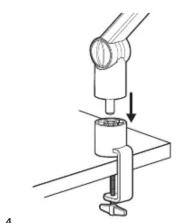
2 Screw your microphone's shockmount or mic clip onto Compass so that it is firm and secure.

3 Connect the microphone to the shockmount or mic clip.

natural_image
Technical line drawing of a mechanical device with rotating components and directional arrows (no text or symbols)4 Adjust Compass so that it makes a 90-degree angle at the middle pivot point. Confirm that the microphone balances in the 90-degree position and you can smoothly move it into the desired position as necessary. If you have the boom arm fully extended, you may need to tighten the thumbscrew at the base of the boom arm near the C-Clamp.

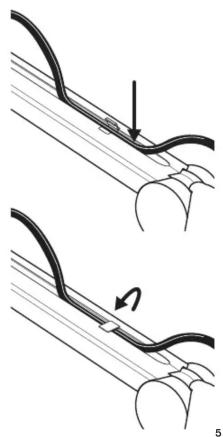
5 Connect your microphone cable to the mic, open the snaps along the top side of the boom arm tubes and tuck the microphone cable into the hidden channel
6 Close the snaps over the cable inside the hidden cable channel.
natural_image
Diagram showing two stages of a cable or wire connection, with an arrow indicating direction (no text or symbols present)FINE-TUNING COMPASS
Compass comes pre-adjusted for use with most broadcast microphones like Yeti and Yeti Pro; however, there may be situations where you wish to fine-tune the microphone hold
- Compass features adjustable friction hinges at each of the pivot points: base, mid-point, and near the microphone mount. For a more firm hold, rotate the thumbscrews at the friction hinges clockwise.
- For additional adjustment, you can fine-tune the internal spring tension. Inside the base of Compass, you will find the spring tension screw. Rotate the screw clockwise to increase the tension of the internal springs—which may be necessary for heavier microphones—or counter-clockwise to loosen—which may be necessary for lightweight microphones

natural_image
Mechanical arm diagram showing rotational motion with arrows indicating direction (no text or symbols)TECHNICAL SPECIFICATIONS:
- Boom Type: Tube-style
• Max Weight Hold: 2.4lbs (including mic and shock mount) - Threading: Standard 3/8" threading, with 3/8" to 5/8" adapter affixed
- Cable Management: Hidden-channel cable management
• Max Horizontal Reach: 32"
INCLUDED ACCESSORIES:
- Compass desktop boom arm
• C-clamp for desktop mount - 3/8" to 5/8" adapter
WARRANTY
Blue Microphones warrants its hardware product against defects in materials and workmanship for a period of TWO (2) YEARS from the date of original retail purchase, provided the purchase was made from an authorized Blue Microphones dealer. This warranty is void if the equipment is altered, misused, mishandled, disassembled, maladjusted, suffers excessive wear, or is serviced by any parties not authorized by Blue Microphones. The warranty does not include transportation costs incurred because of the need for service unless arranged for in advance. Blue Microphones reserves the right to make changes in design and improve upon its products without obligation to install these improvements in any of its products previously manufactured. For warranty service or for a copy of Blue's Warranty Policy including a complete list of exclusions and limitations, contact Blue at 818-879-5200. In keeping with our policy of continued product improvement, Baltic Latvian Universal Electronics (BLUE) reserves the right to alter specifications without prior notice.

Designed in USA. Made in China.

Brand : LOGITECH
Model : Compass
Category : Microphone