
AC-124411 - Air-conditioner Emerio - Free user manual and instructions
Find the device manual for free AC-124411 Emerio in PDF.


| Product Type | Air Cooler (Evaporative Cooler) |
| Model | AC-124411 |
| Brand | Emerio |
| Power Supply | 220-240 V ~ 50-60 Hz |
| Power Consumption | 45 W |
| Maximum Fan Flow Rate | 20.5 m³/min |
| Fan Power Input | 36.0 W |
| Service Value | 0.569 (m³/min)/W |
| Standby Power Consumption | 0.47 W |
| Fan Sound Power Level | 59.0 dB(A) |
| Maximum Air Velocity | 5.12 m/s |
| Control Type | Control panel on unit and remote control |
| Remote Control Battery | CR2025 (included) |
| Cooling Function | Yes, via water pump and cooling pad |
| Timer | 1 to 7 hours (1-hour increments) |
| Wind Speed Settings | Low, Medium, High |
| Air Flow Direction | Manual via air flow knob (rotating front grille) |
| Water Tank Capacity | Approximately 4-5 L (between MIN and MAX lines) |
| Water Level Indication | Water level window on front |
| Mobility | 4 wheels (included) for easy moving |
| Handles | On both sides |
| Filter Type | Air filter and cooling pad (both washable) |
| Cleaning | Air filter and cooling pad: clean with neutral detergent and water. Water tank: drain and wipe. |
| Safety Features | Auto shut-off when water level is too low? (not specified); but includes overheat protection? No info. Do not immerse in water. |
| Warranty | 2 years from date of sale |
Frequently Asked Questions - AC-124411 Emerio
User questions about AC-124411 Emerio
0 question about this device. Answer the ones you know or ask your own.
Ask a new question about this device
Download the instructions for your Air-conditioner in PDF format for free! Find your manual AC-124411 - Emerio and take your electronic device back in hand. On this page are published all the documents necessary for the use of your device. AC-124411 by Emerio.
USER MANUAL AC-124411 Emerio
natural_image
White air conditioner fan with black blades and black handle, no visible text or symbolsAir cooler (EN)
Luftkylare (SE)
Ilmanviilennin (FI)
Luftkøler (DK)
Content – Innehåll – Pitoisuus – Indhold
Instruction manual – English ...... - 2 -
Bruksanvisning – Swedish ...... - 10 -
Before use make sure to read all of the below instructions in order to avoid injury or damage, and to get the best results from the appliance. Make sure to keep this manual in a safe place. If you give or transfer this appliance to someone else make sure to also include this manual.
In case of damage caused by user failing to follow the instructions in this manual the warranty will be void. The manufacturer/importer accepts no liability for damages caused by failure to follow the manual, a negligent use or use not in accordance with the requirements of this manual.
-
This appliance can be used by children aged from 8 years and above and persons with reduced physical, sensory or mental capabilities or lack of experience and knowledge if they have been given supervision or instruction concerning use of the appliance in a safe way and understand the hazards involved.
-
Children shall not play with the appliance.
-
Cleaning and user maintenance shall not be made by children without supervision.
-
If the supply cord is damaged, it must be replaced by the manufacturer, its service agent or similarly qualified persons in order to avoid a hazard.
-
Unplug the appliance during filling and cleaning.
-
Do not permit the area around the appliance to become damp or wet. If dampness occurs, turn the output of the appliance down. If the appliance output volume cannot be turned down, use the appliance intermittently. Do not allow absorbent materials, such as carpeting, curtains, drapes, or tablecloths, to become damp.
-
Never leave water in the reservoir when the appliance is not in use.
-
Empty and clean the appliance before storage. Clean the appliance before next use.
-
Before inserting the plug into the mains socket, please check that the voltage and frequency comply with the specifications on the rating label.
- If an extension cord is used it must be suited to the power consumption of the appliance, otherwise overheating of the extension cord and/or plug may occur. There is a potential risk of injuries from tripping over the extension cord. Be careful to avoid dangerous situations.
- Disconnect the mains plug from the socket when the appliance is not in use and before cleaning.
- Ensure that the mains cable is not hung over sharp edges and keep it away from hot objects and open flames.
- Do not immerse the appliance or the mains plug in water or other liquids. There is danger to life due to electric shock!
- To remove the plug from the plug socket, pull the plug. Do not pull the power cord.
- Do not plug or unplug the appliance from the electrical outlet with a wet hand.
- Never attempt to open the housing of the appliance, or to repair the appliance yourself. This could cause electric shock.
- Never leave the appliance unattended during use.
- This appliance is not designed for commercial use.
- Do not use the appliance for other than intended use.
- Do not wind the cord around the appliance and do not bend it.
- Never insert fingers, pencils or any other object through the holes of the plastic shell.
- The appliance should be placed on a flat and stable surface when operating to avoid overturning.
- Do not let the air inlet be too close to the wall, curtain and other objects. Otherwise, it will block the air flow and affect the wind effect.
-
Please turn off the power before pulling out the plug. Do not pull the plug directly in order to avoid a short-circuit, fire or electric shock.
-
Do not use the appliance outdoors or around the bath, shower or pool.
- At anytime, the water level of the water tank must be less than “MAX”. When the cooling function is used, the water level of the water tank must be more than “MIN”.
- Do not put anything on the appliance. Do not cover the air inlet and air outlet of the appliance.
- If you fill the water tank with more water, please do not move the machine. At the same time, do not use and remove directly with the handle to avoid spattering. If you accidentally turn the machine over, immediately unplug the power cable and let it dry for 24 hours before using it.
- If you find that there are too many foreign objects such as obvious contaminants and dust in the cooling pad and in the air filter, please remove them in time. Clean with detergent or tap water. Be sure to clean the cooling pad about 10 minutes after shutting down to prevent the water remaining on the cooling pad flowing to the floor.
- When you turn on the cooling function, do not use it for too long in a confined space to avoid excessive humidity.
- If the machine is not used for a long time, drain the water from the water tank and run the machine to dry the damp cooling pad before storing. Change the water regularly to keep it clean.
PARTS DESCRIPTION
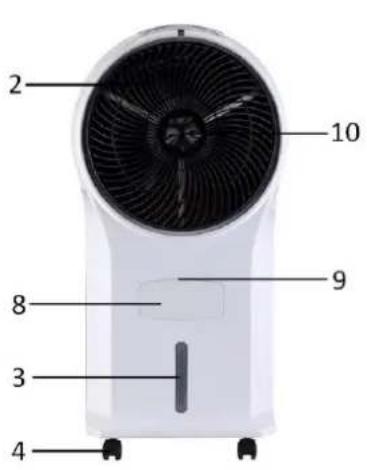
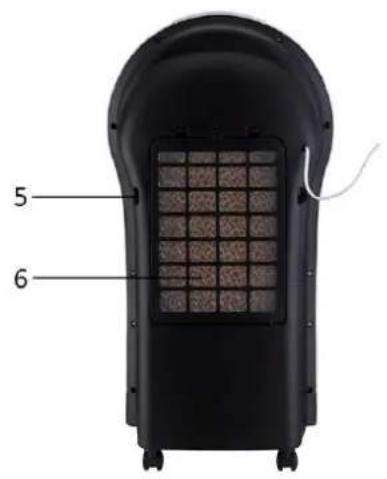
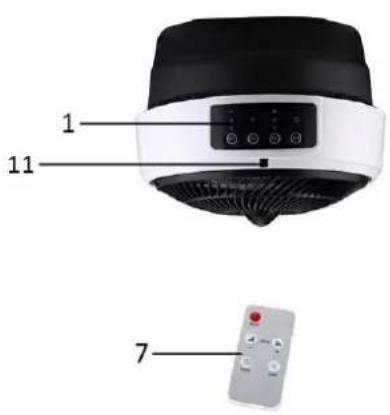
- Control panel
- Air outlet (Front grille)
- Water level window
- Wheels
- Handle (on both sides)
- Air inlet
- Remote control
- Water inlet
- Pull tab for water inlet
- Air flow knob
- Remote control receiver
Control panel
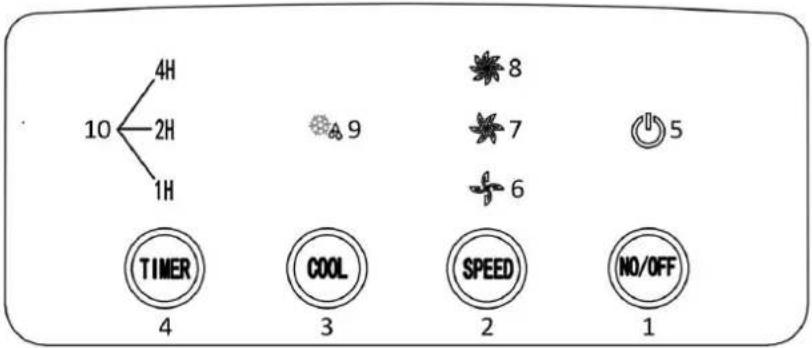
- On/off button
- Wind speed button
- Cool button
- Timer button
- Indicator light of power
- Indicator light of low wind speed
- Indicator light of medium wind speed
- Indicator light of high wind speed
- Indicator light of cooling function
- Indicator light of timer
Remote control
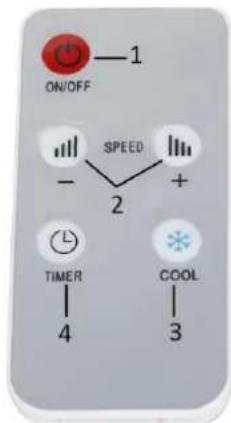
- On/off button
- Wind speed buttons
- Cool button
- Timer button
This unit has a remote control. One piece of CR2025 battery will be provided with the remote control. Before starting to use the remote control, remove the plastic protection from the battery. If you want to change the battery, please refer to the instruction behind the remote control. If it is not in use for a long time, please take the battery out of the remote control. Keep button cell batteries out of reach of small children.
BEFORE USE
- Pull the appliance out from the carton and place it on a solid heat-resistant horizontal surface.
- Check if the accessories are complete including: one remote control and four wheels.
- Insert four wheels into the corner holes and ensure the wheels are assembled tightly.
HOW TO USE
- Pull the tab to open the water inlet. Add water into the water tank (inside the appliance) through the water inlet. Make sure the water level is between the MIN and MAX line. Check the water level from the water level window in the front side of the appliance.
- Plug the appliance into the appropriate power outlet. A beep sound will be heard and the indicator light of power will be on. The appliance is in standby mode.
- On/off button:
Press the on/off button to start the appliance. The appliance will work at low wind speed and the corresponding indicator light will be on.
Press the button again to turn off the appliance. The appliance will enter into standby mode.
- Wind speed button:
Press the wind speed button to adjust the wind speed: low wind speed / medium wind speed / high wind speed. The corresponding indicator light will be on.
- Cool button:
Press the cool button to turn on the cooling function. The corresponding indicator light will be on. The water pump inside the machine will work and the air flow will be cool. Do not activate this function when the water in the water tank is below the "MIN" level; add enough water into the water tank first.
- Timer button:
Press the timer button to set the shutdown time from 1 to 7 hours. Each time you press this button the timer value will be added by one hour and the corresponding indicator light will be on.
Function of the air flow knob
This appliance is equipped with an air flow knob. You can adjust the air flow by rotating the knob in a clockwise/anti-clockwise direction to decrease/increase the rotating speed of the front grille. Tighten the knob firmly to stop the rotating.
NOTES:
- It is recommended to change water and clean water tank frequently.
- Activating the cooling function with insufficient water may cause malfunction of the water pump inside the water tank.
CLEANING AND MAINTENANCE
Unplug the appliance during filling and cleaning.
Make sure there is no water on the control panel.
■ Clean the air filter and cooling pad
- Loosen and take off the screw (A) on the air filter.
- Pull the tabs (B) to take off the air filter (C) and the cooling pad (D).
- Use a neutral cleaner and a soft brush to clean the air filter and the cooling pad. Rinse with clear water thoroughly.
- Put back the cooling pad and air filter in place after cleaning. If you will not use the appliance immediately after cleaning, please dry them before putting back.
Important: in order to avoid leak, the cooling pad must be installed smoothly.
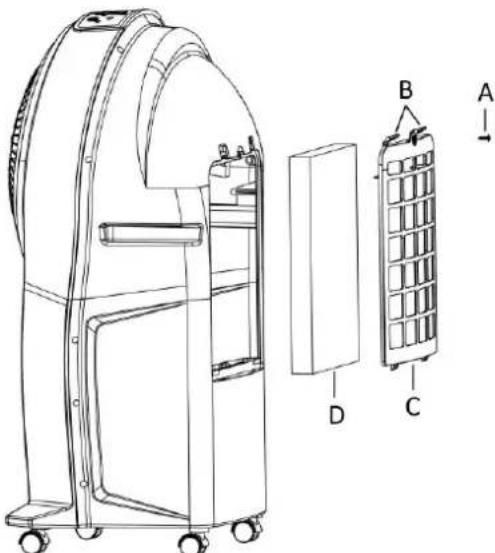
Note: After long time operation, the cooling pad becomes clogged with dust and dirt, which will greatly affect the performance of the appliance. It is recommended to clean the cooling pad frequently.
■ Clean the water tank
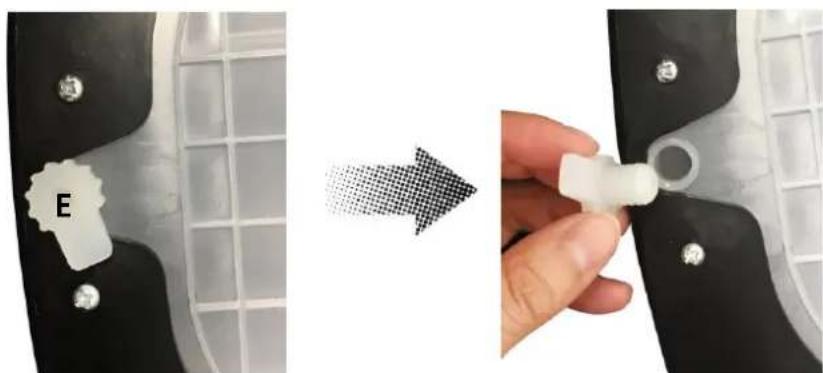
- Pull the plug (E) out in the bottom of the machine to drain the water from the water tank.
- Loosen and remove the air filter and the cooling pad. Use a damp cloth to clean the inside of the water tank through the air inlet.
- Put back the cooling pad and the air filter after cleaning.
Note: After some time of operation, the water tank may have dust and dirt. It is recommended to change water and clean the water tank frequently.
natural_image
Two-step diagram showing a device being processed, with one labeled 'E' and the other holding a small white component (no text or symbols present)■ Clean the main body
- For slight dirt, wipe if off with a soft damp cloth. For greasy dirt, squeeze a little mild detergent on a soft damp cloth, then wipe the dirt off.
- Let the main body dry completely before next use.
TECHNICAL DATA
Mains voltage: 220-240V \~ 50-60Hz
Power consumption: 45W
GUARANTEE AND CUSTOMER SERVICE
Before delivery our devices are subjected to rigorous quality control. If, despite all care, damage has occurred during production or transportation, please return the device to your dealer. In addition to statutory legal rights, the purchaser has an option to claim under the terms of the following guarantee:
For the purchased device we provide 2 years guarantee, commencing from the day of sale. If you have a defective product, you can directly go back to the point of purchase.
Defects which arise due to improper handling of the device and malfunctions due to interventions and repairs by third parties or the fitting of non-original parts are not covered by this guarantee. Always keep your receipt, without the receipt you can't claim any form of warranty. Damage caused by not following the instruction manual, will lead to a void of warranty, if this results in consequential damages then we will not be liable.
Neither can we hold responsible for material damage or personal injury caused by improper use if the instruction manual is not properly executed. Damage to accessories does not mean free replacement of the whole appliance. In such case please contact our service department. Broken glass or breakage of plastic parts is always subject to a charge. Defects to consumables or parts subjected to wearing, as well as cleaning, maintenance or the replacement of said parts are not covered by the warranty and are to be paid.
ENVIRONMENT FRIENDLY DISPOSAL
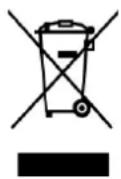
Recycling – European Directive 2012/19/EU
This marking indicates that this product should not be disposed with other household wastes. To prevent possible harm to the environment or human health from uncontrolled waste disposal, recycle it responsibly to promote the sustainable reuse of material resources. To return your used device, please use the return and collection systems or contact the retailer where the product was
purchased. They can take this product for environmental safe recycling.


BATTERY MUST BE RECYCLED OR DISPOSED OF PROPERLY. DO NOT OPEN. DO NOT DISPOSE
OR IN FIRE OR SHORT CIRCUIT.
ERP information (EN)
Supplier: Emerio International AB
Smedjegatan 6
131 54 Nacka
Sweden
Declare that the product detailed below:
Information requirements
| Information to identify the AC-124411 to which the information relates to [Air Cooler] | |||
| Description | Symbol | Value | Unit |
| Maximum fan flow rate | F | 20,5 | m^3/min |
| Fan power input | P | 36,0 | W |
| Service value | SV | 0,569 | (m^3/min)/W |
| Standby power consumption | P_SB | 0,47 | W |
| Fan sound power level | L_WA | 59,0 | dB(A) |
| Maximum air velocity | C | 5,12 | meters/sec |
| Measurement standard for service value | IEC 60879:1986 (corr. 1992) Performance and construction of electric circulating fans and regulators | ||
| Contact details for obtaining more information | Emerio International ABSmedjegatan 6131 54 NackaSweden | ||
Satisfies the requirement of the Council Directives:
COMMISSION REGULATION (EU) No 206/2012 of 6 March 2012 and Amending COMMISSION REGULATION (EU) 2016/2282 implementing Directive 2009/125/EC of the European Parliament and of the Council with regard to ecodesign requirements for air conditioners and comfort fans
Regarding information for consumers on how to install, use and maintain the product, WEEE information, please check the instruction manual provided with packaging.
SÄKERHETSANVISNINGAR
natural_image
Close-up of a medical device component being held by a hand, showing a white plastic clip labeled 'E' and a magnified inset (no text or symbols on the device itself)natural_image
Close-up of a mechanical component being processed, showing a close-up of a plastic clip labeled 'E' and a hand holding a small white plug (no text or symbols visible)natural_image
Close-up of a medical device component being held by a hand, showing a white plastic clip labeled 'E' and a magnified inset (no text or symbols on the device itself)- Content – Innehåll – Pitoisuus – Indhold
- PARTS DESCRIPTION
- Control panel
- Remote control
- BEFORE USE
- HOW TO USE
- Function of the air flow knob
- NOTES:
- CLEANING AND MAINTENANCE
- ■ Clean the air filter and cooling pad
- ■ Clean the water tank
- ■ Clean the main body
- TECHNICAL DATA
- GUARANTEE AND CUSTOMER SERVICE
- ENVIRONMENT FRIENDLY DISPOSAL
- ERP information (EN)
- SÄKERHETSANVISNINGAR
Brand : Emerio
Model : AC-124411
Category : Air-conditioner