
AC-125788 - Air-conditioner Emerio - Free user manual and instructions
Find the device manual for free AC-125788 Emerio in PDF.


| Product Type | Portable Air Conditioner |
| Model | AC-125788 |
| Brand | Emerio |
| Cooling Capacity | 12000 BTU/h (approx. 3.5 kW) |
| Energy Efficiency Ratio (EER) | 2.6 |
| Power Supply | 220-240 V ~ 50 Hz |
| Power Consumption (Cooling) | 1300 W |
| Air Flow Rate | 350 m³/h |
| Noise Level (Low/High) | 52 dB / 56 dB |
| Dehumidification Capacity | 1.5 L/h |
| Refrigerant | R290 (Propane), 180 g |
| Operating Modes | Cool, Fan, Dehumidify, Auto |
| Fan Speeds | 3 (Low, Medium, High) |
| Timer | 1-24 hours |
| Remote Control | Yes, included |
| Dimensions (W x D x H) | 345 x 345 x 670 mm |
| Weight (Net) | 25 kg |
| Castors | 4 swivel castors |
| Exhaust Hose Length | 1.5 m |
| Window Kit Included | Yes, adjustable for sliding windows |
| Water Tank / Drainage | Continuous drainage option; 5 L internal tank |
| Maintenance | Clean air filter every 2 weeks; wash with mild detergent and water |
| Safety Features | Overheat protection, automatic shut-off, anti-freeze protection |
| Spare Parts Availability | Remote control, filters, exhaust hose, window kit available from manufacturer |
| Repairability Index | 7.2 / 10 (DIY-friendly with common tools) |
Frequently Asked Questions - AC-125788 Emerio
User questions about AC-125788 Emerio
0 question about this device. Answer the ones you know or ask your own.
Ask a new question about this device
Download the instructions for your Air-conditioner in PDF format for free! Find your manual AC-125788 - Emerio and take your electronic device back in hand. On this page are published all the documents necessary for the use of your device. AC-125788 by Emerio.
USER MANUAL AC-125788 Emerio
natural_image
White and green photo of a modern air conditioner unit with visible grille and ventilation slots (no text or symbols)Air cooler (EN)
Luftkühler (DE)
Luftkylare (SE)
Luchtkoeler (NL)
Ilmanviilennin (FI)
Luftkjøler (NOR)
Luftkøler (DK)
Content – Inhalt – Innehåll – Inhoud – Pitoisuus – Innhold – Indhold
Instruction manual – English ...... - 2 -
Before use make sure to read all of the below instructions in order to avoid injury or damage, and to get the best results from the appliance. Make sure to keep this manual in a safe place. If you give or transfer this appliance to someone else, make sure to also include this manual.
In case of damage caused by user failing to follow the instructions in this manual the warranty will be void. The manufacturer/importer accepts no liability for damages caused by failure to follow the manual, a negligent use or use not in accordance with the requirements of this manual.
- This appliance can be used by children aged from 8 years and above and persons with reduced physical, sensory or mental capabilities or lack of experience and knowledge if they have been given supervision or instruction concerning use of the appliance in a safe way and understand the hazards involved.
- Children shall not play with the appliance.
- Cleaning and user maintenance shall not be made by children without supervision.
- This appliance must only be supplied at safety extra low voltage corresponding to the marking on the appliance.
- This appliance is not designed for commercial use.
- Do not use the appliance for other than intended use.
- The unit is designed for households use only. Do not use outdoors.
- The unit is to be operated with DC 5V / 1A USB power source. Use the cable provided for power connection.
- Use the unit only as described in this manual. The use of attachments not recommended by the manufacturer may cause a risk of injury to persons.
- Do not tilt the unit to avoid water leaking.
-
Please fill the water tank with clean water; distilled water is only to avoid building scale along with usage.
-
Do not use any other liquid e.g. perfume, essential oil, medicine etc. to avoid damage of the unit.
- Always turn off and disconnect the unit before assembling, cleaning and moving the unit.
- Do not place the unit in passageways or high traffic areas where there is a possibility of tripping or knocking it over.
- Do not allow any foreign objects inside the unit.
- Do not block the front and back grills of the unit.
- Do not turn the unit upside down.
- Do not submerge the unit under water or other liquids.
- Do not place the unit near open flames or fire sources.
- The unit works best in non-polluted areas. Large dust/dirt particles may reduce lifetime of unit.
- It is recommended to use the unit only in dry locations. If using in a moist area or environment, take care not to get water on to the external areas of the product.
- If a leak or spill occurs on the surface of the unit, unplug it and let it dry for 24 hours. Then, use as normal.
- Do not place in direct sunlight for extended periods of time.
- When not using the unit for extended periods of time, empty the water tank, turn the unit on, and set to the highest fan speed for at least 4 hours. This will help dry out the filter and inside of your unit.
- For the best performance, place the unit on a higher surface like a table or countertop.
- Do not place items on top of the unit.
- Do not carry the unit when filled with water. Some water may remain in the unit even if the water tank is empty.
WARNING: People with limited physical, visual or mental abilities or lacking proper experience and/or knowledge should never use the device without supervision of those responsible for their safety or those capable of assistance in using the device. The device can be switched off completely only when disconnected from the power supply.
PARTS DESCRIPTION
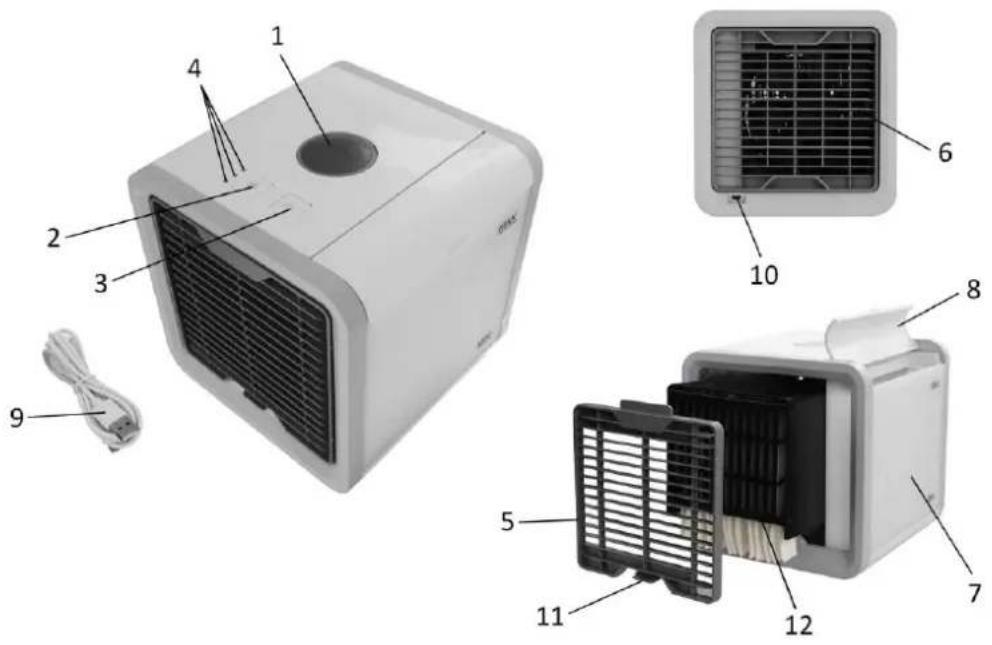
- On/off button
- Fan speed button
- Light button
- Fan speed indicator lights
- Front grille
- Back grille
- Water tank
- Water tank lid
- USB cable
- USB port
- Release tab of the front grille
- Filter
BEFORE USE
- Remove all packaging materials.
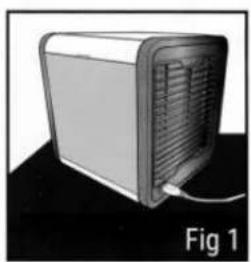
- Place the appliance on a firm, flat surface. (Fig 1)
- Open the water tank lid and fill water to the water tank. (Fig 2) After the water has been soaked by the filter inside, the water level will fall. Continue to fill the water tank. Observe the water level to ensure it is between the marks "MAX" and "MIN". Note: Let the filter absorb water for at least 3 minutes before use. Doing so will get you the coolest air quicker.
- The unit can be powered by using a USB charging cable to connect with a phone charging adapter, computer USB port or a power bank of which output is DC 5V / 1A. Please connect the charging cable to the USB port on the back of the unit with the USB power source. Your appliance now is ready for use. (Fig 3)
natural_image
3D rendering of a server unit with ventilation slots and a cable, labeled Fig 1 (no text or symbols on the device itself)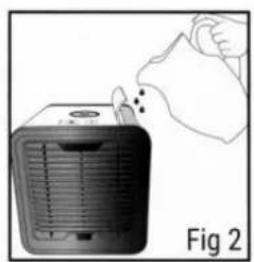
natural_image
Illustration of a hand removing or removing a small electronic device into a container (no text or symbols visible)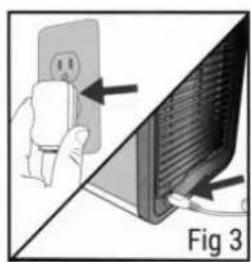
natural_image
Diagram showing a hand holding an electrical outlet next to a computer monitor, with no visible text or symbols.USE
- Press the on/off button to turn on the unit.
- Press the fan speed button to switch the fan speed among low, medium and high.
- Press the light button to choose the light color of the water tank: seven individual colors / color-cycle mode / no color.
- After use, press the on/off button to turn off the unit.
CLEANING AND MAINTENANCE
- It is recommended to clean the unit once a week. Before cleaning, please make sure the unit is switched off and not connected to the charging cable.
- Do not use gas, cleaner, hard brush or stainless-steel ball etc. to clean the unit. Avoid scratching the surface.
- Do not immerse the unit or the charging cable into water.
- Pour out the water in the water tank. Clean the water tank and wipe with a cloth if needed. Note: Be careful when moving the unit with water inside.
- Please make sure the unit and parts are dry before storing it.
- The filter should be changed every 6 months, or when you feel the unit is not functioning as it should be:
1) Press the release tab upwards and pull it out to detach the front grille from the unit.
2) Hold the filter, lift it up and carefully slide it out of the unit.
3) Place a new filter into the unit. Make sure it sets properly.
4) Insert the front grille back into the unit.
TECHNICAL DATA
USB Power source: DC 5V / 1A
Wattage: 5W
GUARANTEE AND CUSTOMER SERVICE
Before delivery our devices are subjected to rigorous quality control. If, despite all care, damage has occurred during production or transportation, please return the device to your dealer. In addition to statutory legal rights, the purchaser has an option to claim under the terms of the following guarantee:
For the purchased device we provide 2 years guarantee, commencing from the day of sale. If you have a defective product, you can directly go back to the point of purchase.
Defects which arise due to improper handling of the device and malfunctions due to interventions and repairs by third parties or the fitting of non-original parts are not covered by this guarantee. Always keep your receipt, without the receipt you can't claim any form of warranty. Damage caused by not following the instruction manual, will lead to a void of warranty, if this results in consequential damages then we will not be liable. Neither can we hold responsible for material damage or personal injury caused by improper use if the instruction manual is not properly executed. Damage to accessories does not mean free replacement of the whole appliance. In such case please contact our service department. Broken glass or breakage of plastic parts is always subject to a charge.
Defects to consumables or parts subjected to wearing, as well as cleaning, maintenance, replacement of said parts or shipping and transportation costs to and from any place of repair are not covered by the warranty and are to be paid.
ENVIRONMENT FRIENDLY DISPOSAL

Recycling – European Directive 2012/19/EU
This marking indicates that this product should not be disposed with other household wastes. To prevent possible harm to the environment or human health from uncontrolled waste disposal, recycle it responsibly to promote the sustainable reuse of material resources. To return your used device,
please use the return and collection systems or contact the retailer where the product was purchased. They can take this product for environmentally safe recycling.
SICHERHEITSHINWEISE
natural_image
Exterior view of a server unit with ventilation grille and power cord (no text or symbols visible)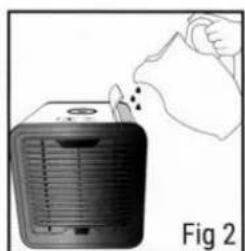
natural_image
Illustration of a hand pouring liquid into a portable air conditioner unit (no text or symbols)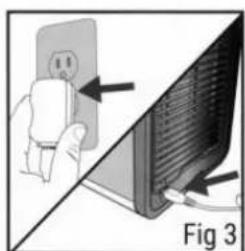
natural_image
Diagram showing a hand inserting a power outlet into a computer monitor, with arrows indicating the process (no text or symbols present)BEDIENUNG
natural_image
Illustration of a server unit with ventilation grille and power cord, labeled Fig 1 (no text or symbols on device)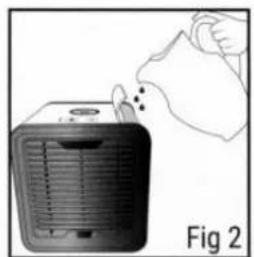
natural_image
Illustration of a hand removing or removing a heater into a cooler (no text or symbols)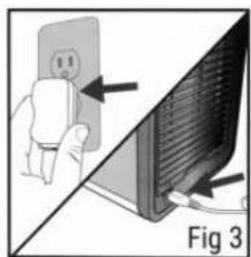
natural_image
Diagram showing a hand holding an electrical outlet connected to a computer monitor, with arrows pointing to the screen (no text or symbols present)ANVÄNDNING
natural_image
3D rendering of a server unit with ventilation slots and a cable, labeled 'Fig 1' (no text or symbols on the device itself)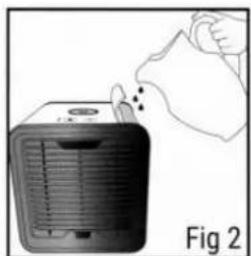
natural_image
Illustration of a hand pouring liquid into a heat exchanger unit (no text or symbols)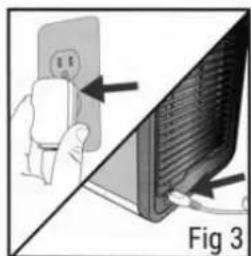
natural_image
Diagram showing a hand holding an electrical outlet next to a computer monitor, with no visible text or symbols.GEBRUIK
natural_image
3D rendering of a server unit with ventilation slots and a cable, labeled Fig 1 (no text or symbols on the device itself)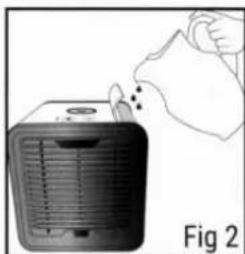
natural_image
Illustration of a hand cleaning a small electric heater (no text or symbols visible)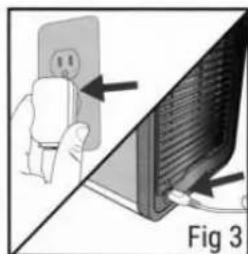
natural_image
Diagram showing a hand holding an electrical outlet connected to a computer monitor, with no visible text or symbols.KÄYTTÖ
- På/av-knapp
- Viftehastighetsknapp
- Lysknapp
- Viftehastighetsindikator lyser
- Frontgitter
- Bakgitter
- Vanntank
- Lokk til vanntank
- USB-kabel
- USB port
- Utløserklaffen på frontgitteret
- Filter
F∅ R BRUK
natural_image
Exterior view of a server unit with ventilation slots and a cable (no text or symbols visible)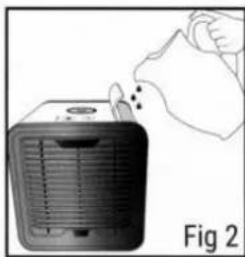
natural_image
Illustration of a hand removing or removing a heater into a cooler (no text or symbols)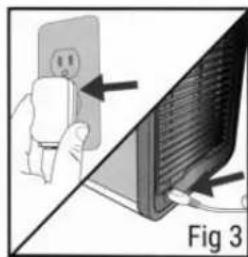
natural_image
Diagram showing a hand holding a wall-mounted device next to a computer monitor, with an arrow pointing to the screen (no text or symbols present)BRUK
natural_image
Illustration of a server unit with ventilation slots and a cable, labeled Fig 1 (no text or symbols on the device itself)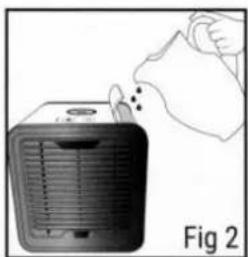
natural_image
Illustration of a hand removing or cleaning a heater into a cooler (no text or symbols visible)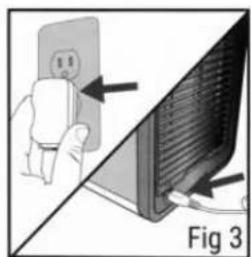
natural_image
Diagram showing a hand holding an electrical outlet connected to a computer monitor, with arrows pointing to the screen (no text or symbols present)ANVENDELSE
Brand : Emerio
Model : AC-125788
Category : Air-conditioner