
G560 LIGHTSYNC PC Gaming Speaker - Loudspeaker LOGITECH - Free user manual and instructions
Find the device manual for free G560 LIGHTSYNC PC Gaming Speaker LOGITECH in PDF.


| Product Type | 2.1 Gaming Speaker System |
| Model | G560 LIGHTSYNC |
| Brand | Logitech |
| Satellite Dimensions (each) | Approx. 4.5 x 3.5 x 5.0 in (11.4 x 8.9 x 12.7 cm) |
| Subwoofer Dimensions | Approx. 6.0 x 6.0 x 8.0 in (15.2 x 15.2 x 20.3 cm) |
| Total System Weight | Approx. 12.5 lbs (5.7 kg) |
| Power Supply | AC power cable (included) |
| Audio Channels | 2.1 (Satellites + Subwoofer) |
| Connectivity | USB, Bluetooth 4.1, 3.5mm AUX input |
| Controls | Volume up/down, G-key (lighting dim), Bluetooth pairing, Power, Headphone jack |
| Lighting | LIGHTSYNC RGB, customizable via software |
| Software | Logitech Gaming Software (LGS) for customization and full sound/lighting experience |
| Bluetooth Range | Approx. 30 ft (10 m) |
| Headphone Output | 3.5mm jack on right satellite |
| Compatibility | PC, laptop, Bluetooth-enabled devices |
| Driver Units | 2 x satellite full-range, 1 x subwoofer (exact sizes not specified) |
| Frequency Response | Not specified; typical for gaming speakers: 30 Hz – 20 kHz |
| Maximum SPL | Not specified; estimated > 90 dB |
| Warranty | Standard Logitech limited warranty |
| Box Contents | 2 satellite speakers, 1 subwoofer, USB cable, power cable, user documentation |
| Cleaning | Wipe with dry or slightly damp cloth; do not use harsh chemicals |
| Safety | Use only included power adapter; avoid water exposure; do not disassemble |
| Repairability | No user-serviceable parts; contact Logitech support for issues |
Frequently Asked Questions - G560 LIGHTSYNC PC Gaming Speaker LOGITECH
User questions about G560 LIGHTSYNC PC Gaming Speaker LOGITECH
0 question about this device. Answer the ones you know or ask your own.
Ask a new question about this device
Download the instructions for your Loudspeaker in PDF format for free! Find your manual G560 LIGHTSYNC PC Gaming Speaker - LOGITECH and take your electronic device back in hand. On this page are published all the documents necessary for the use of your device. G560 LIGHTSYNC PC Gaming Speaker by LOGITECH.
USER MANUAL G560 LIGHTSYNC PC Gaming Speaker LOGITECH
natural_image
Simple line drawing of a circular shape with a curved outer edge and a small black symbol inside (no text or labels)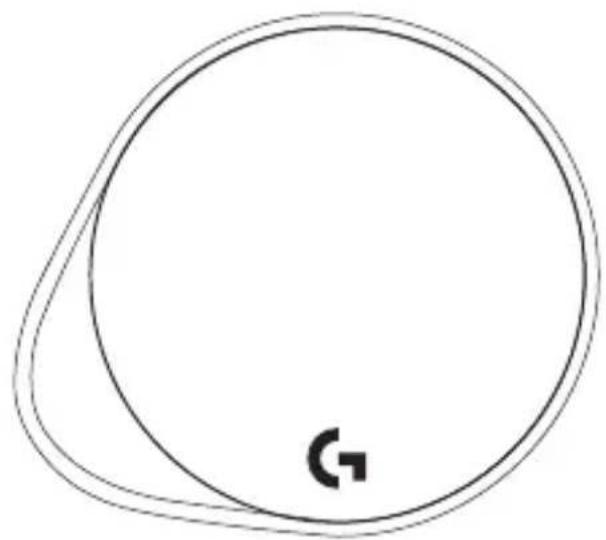
natural_image
Simple line drawing of a circular shape with a curved line and a small symbol inside, no text or labels present.English 3
Deutsch 9
Français .....15
Italiano. . . . . . . . . . . . . . . . . . . . . . . . . . . . . . . . . . . . . . . . . . . . . . . . . . . 21
Español .....27
Português ..... 33
Nederlands 39
Svenska 45
Dansk . . . . . . . . . . . . . . . . . . . . . . . . . . . . . . . . . . . . . . . . . . . . . . . . 51
Norsk. 57
Suomi 63
Ελληνικά 69
По-русски. 75
Po polsku. . . . . . . . . . . . . . . . . . . . . . . . . . . . . . . . . . . . . . . . . . . . . . . . . . . . . . . . . . . 81
Magyar. 87
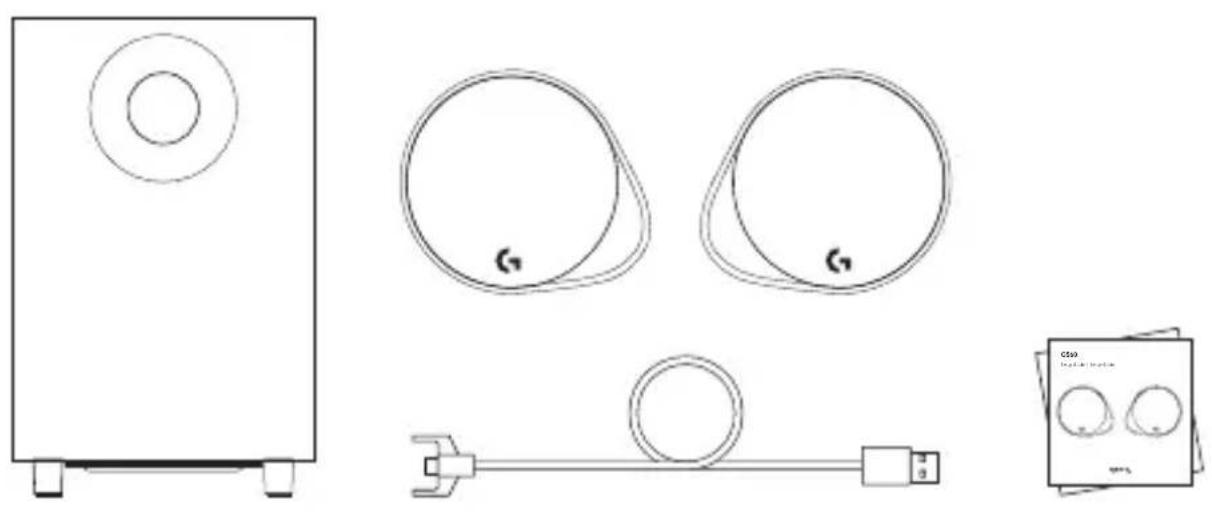
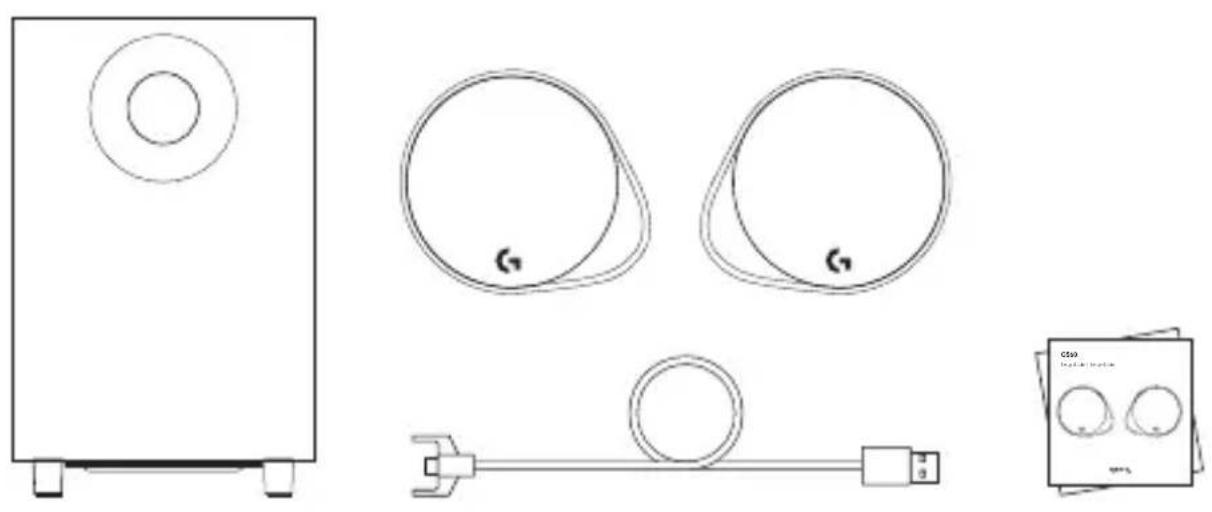
- Two satellite speakers
- One subwoofer with power cable
- USB cable
- User documentation
English
CONTROLS

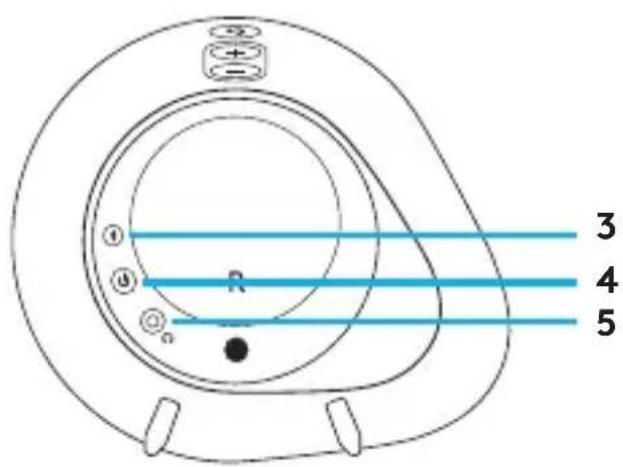
1. Volume
Adjust volume up and down with volume key.
2. G-key
Press G-key to dim the brightness of the LED lights from 100% to zero. Customize G-ksey through LGS.
3. Bluetooth
HoldBluetooth button down for 3 seconds to pair with your Bluetooth enabled device.
4. Power
Turn speakers on and off.
5. Headphone jack
Use headphone jack on back of right satellite to connect wired headphones to G560.
SETUP

- Connect left and right satellites to subwoofer.
- Plug power cord in to AC power outlet.
English
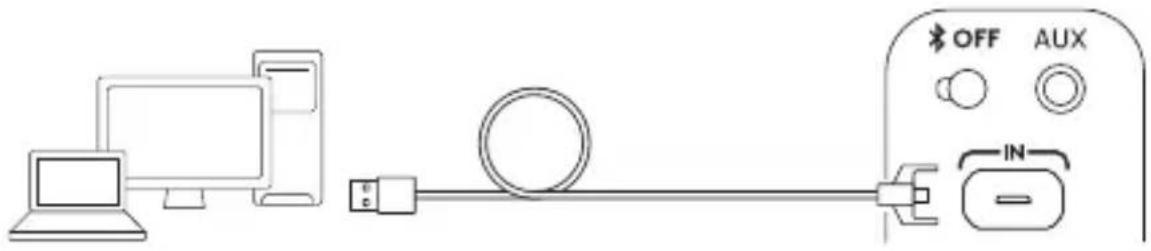
USB CONNECTION

www.logitechG.com /support/g560

natural_image
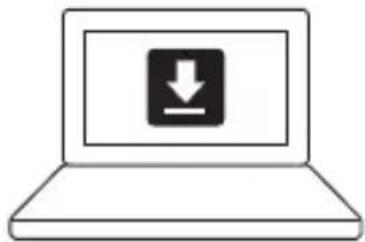
Simple line drawing of a laptop with a download icon on the screen (no text or symbols)- Connect to PC/laptop with the USB connection to take advantage of full lighting and sound experience with LGS Software.
- Go to www.logitechG.com/support/G560 to download the latest LGS software.
BLUETOOTH ^® CONNECTION

flowchart
graph LR
    A["Smartphone"] --> B["Bluetooth"]
    B --> C["Bluetooth"]
    C --> D["Hand pointing to a circular device labeled 'R'"]
    style A fill:#f9f,stroke:#333
    style B fill:#ccf,stroke:#333
    style C fill:#cfc,stroke:#333
    style D fill:#fcc,stroke:#333
For wireless streaming, use the Bluetooth connection
- Press and hold Bluetooth button located on the back of the right speaker for 3 seconds.
- Under Bluetooth settings on your device select G560 Gaming Speaker.
English
3.5MM CONNECTION

- For the 3.5mm connection use the port labeled AUX on the back of the subwoofer (3.5mm cable not included).
INHALT

1. Lautstärke
www.logitechG.com /support/g560

natural_image
Simple line drawing of a laptop with a download icon on the screen (no text or symbols)
1. Volume
www.logitechG.com /support/g560
natural_image
Simple line drawing of a laptop with a download icon on the screen (no text or symbols)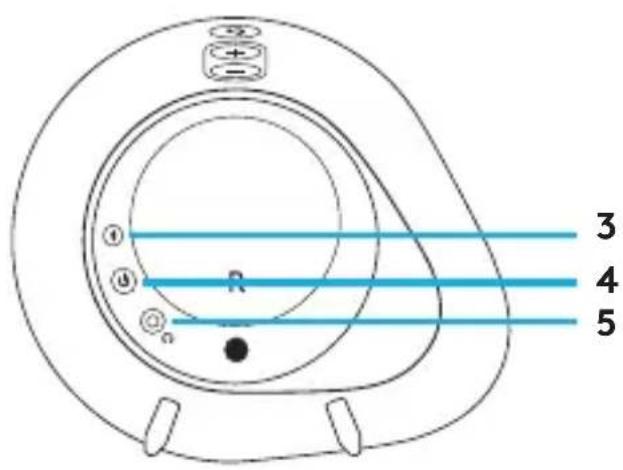
Italiano
1. Volume
www.logitechG.com /support/g560

natural_image
Simple line drawing of a laptop with a download icon on the screen (no text or symbols)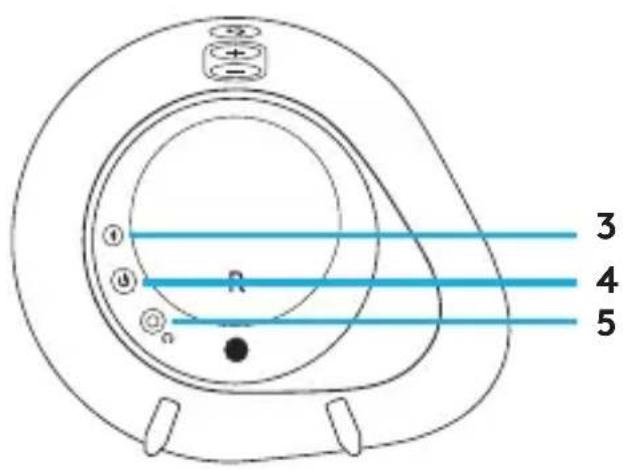
1. Volumen
www.logitechG.com /support/g560

natural_image
Simple line drawing of a laptop with a download icon on the screen (no text or symbols)
1. Volume
Aumente e diminua o volume com a tecla de volume.
2. Tecla G
www.logitechG.com /support/g560

natural_image
Simple line drawing of a laptop with a download icon on the screen (no text or symbols)
1. Volume
www.logitechG.com /support/g560

natural_image
Simple line drawing of a laptop with a download icon on the screen (no text or symbols)
1. Volym
www.logitechG.com /support/g560

natural_image
Simple line drawing of a laptop with a download icon on the screen (no text or symbols)DET INDEHOLDER KASSEN

Dansk
1. Lydstyrke
Brug lydstyrkeknappen til at skrue op og ned for lyden.
2. G-tast
www.logitechG.com /support/g560

natural_image
Simple line drawing of a laptop with a download icon on the screen (no text or symbols)DETTE FINNER DU I ESKEN


1. Volum
www.logitechG.com /support/g560

natural_image
Simple line drawing of a laptop with a download icon on the screen (no text or symbols)-
Koble til PC-en eller den bærbare PC-en via USB-tilkoblingen for å dra nytte av en komplett belysnings- og lydopplevelse med LGS-programvaren.
-
Gå til www.logitechG.com/support/G560 for å laste ned den nyeste LGS-programvaren.
BLUETOOTH®-TILKOBLING

flowchart
graph LR
    A["Smartphone"] --> B["Bluetooth"]
    B --> C["Bluetooth"]
    C --> D["Hand pointing at 'R' with '3 sec' label"]
www.logitechG.com /support/g560

natural_image
Simple line drawing of a laptop with a download icon on the screen (no text or symbols)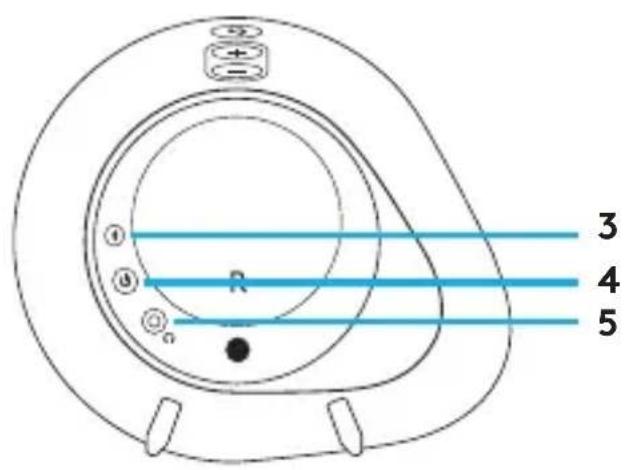
1. Ένταση ήχου
www.logitechG.com /support/g560

natural_image
Simple line drawing of a laptop with a download icon on the screen (no text or symbols)
По-русски
1. Громкость.
www.logitechG.com /support/g560

natural_image
Simple line drawing of a laptop with a download icon on the screen (no text or symbols)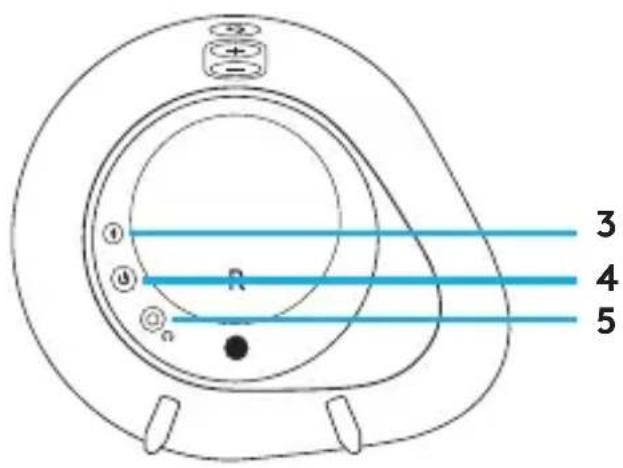
Po polsku
1. Głośność
natural_image
Line drawing of a computer connected to an electrical outlet with a cable, showing connections without any text or symbols.www.logitechG.com /support/g560

natural_image
Simple line drawing of a laptop with a download icon on the screen (no text or symbols)
1. Hangerő
www.logitechG.com /support/g560

natural_image
Simple line drawing of a laptop with a download icon on the screen (no text or symbols)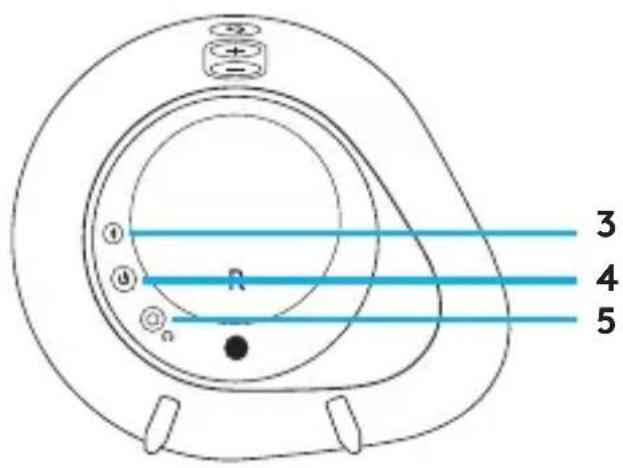
1. Hlasitost
www.logitechG.com /support/g560

natural_image
Simple line drawing of a laptop with a download icon on the screen (no text or symbols)
1. Hlasitost
www.logitechG.com /support/g560

natural_image
Simple line drawing of a laptop with a download icon on the screen (no text or symbols)
1. Гучність
natural_image
Line drawing of a computer connected to an electrical outlet with a cable, showing connections without any text or symbols.www.logitechG.com /support/g560

natural_image
Simple line drawing of a laptop with a download icon on the screen (no text or symbols)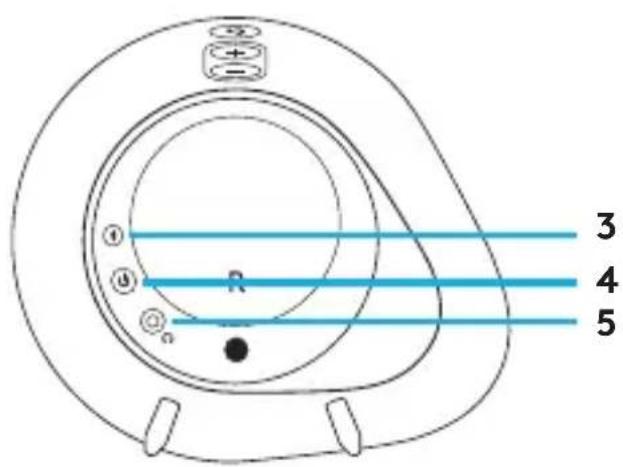
1. Helitugevus
www.logitechG.com /support/g560
natural_image
Simple line drawing of a laptop with a download icon on the screen (no text or symbols)www.logitechG.com/support/g560

natural_image
Simple line drawing of a laptop with a download icon on the screen (no text or symbols)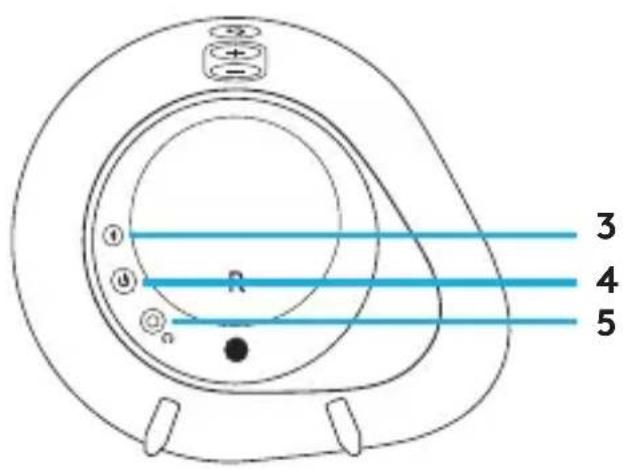
1. Garsumas
www.logitechG.com /support/g560
natural_image
Simple line drawing of a laptop with a download icon on the screen (no text or symbols)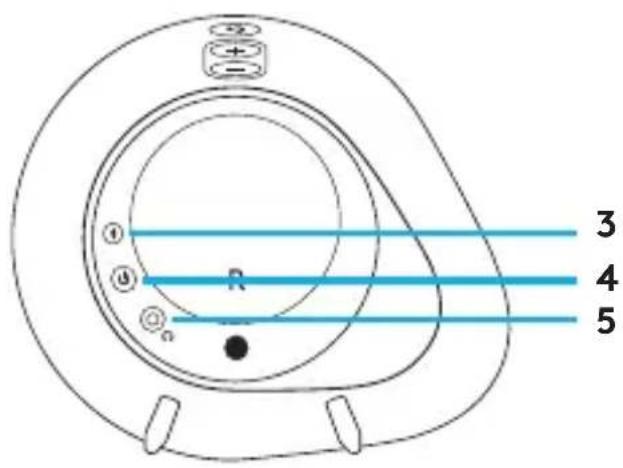
1. Сила на звука
www.logitechG.com /support/g560
natural_image
Simple line drawing of a laptop with a download icon on the screen (no text or symbols)
1. Glasnoća
- Spojite lijevi i desni satelitski zvučnik na bas-zvučnik.
- Ukopčajte kabel za napajanje u utičnicu izmjeničnog napajanja.
Hrvatski
POVEZIVANJE NA USB

www.logitechG.com/support/g560

natural_image
Simple line drawing of a laptop with a download icon on the screen (no text or symbols)
1. Jačina zvuka
Pojačajte ili utišajte zvuk pomoću tastera za podešavanje jačine zvuka.
2. G-taster
Pritisnite G-taster da biste mogli da prigušite nivo osvetljenja na LED svetlima od 100% do nule. Podešavajte G-taster kroz LGS.
3. Bluetooth
Pritisnite i zadržite 3 sekunde Bluetooth dugme da biste ga uparili sa uređajem na kome je omogućen Bluetooth.
4. Napajanje
- Povežite levi i desni satelitski zvučnik sa niskotoncem.
- Priključite kabl za napajanje u utičnicu naizmenične struje.
Srpski
USB VEZA
www.logitechG.com /support/g560

natural_image
Simple line drawing of a laptop with a download icon on the screen (no text or symbols)-
Povežite se sa PC/laptop računarom pomoću USB veze kako biste iskoristili sve svetlosne i zvučne mogućnosti LGS softvera.
-
Posetite veb lokaciju www.logitechG.com/support/G560 da biste preuzeli najnoviji LGS softver.
BLUETOOTH® VEZA

flowchart
graph LR
    A["Smartphone"] --> B["Bluetooth"]
    B --> C["Bluetooth"]
    C --> D["Hand pointing to a circular device labeled 'R'"]
    style A fill:#f9f,stroke:#333
    style B fill:#ccf,stroke:#333
    style C fill:#cfc,stroke:#333
    style D fill:#fcc,stroke:#333
Za bežično reprodukovanje koristite Bluetooth vezu
- Pritisnite i zadržite 3 sekunde Bluetooth dugme sa zadnje strane desnog zvučnika.
- U okviru Bluetooth postavki na svom uređaju izaberite G560 Gaming Speaker.
Srpski
KABL OD 3,5 MM


1. Glasnost
www.logitechG.com /support/g560

natural_image
Simple line drawing of a laptop with a download icon on the screen (no text or symbols)
1. Volum
www.logitechG.com /support/g560

natural_image
Simple line drawing of a laptop with a download icon on the screen (no text or symbols)
1. Ses
www.logitechG.com/support/g560
natural_image
Simple line drawing of a laptop with a download icon on the screen (no text or symbols)natural_image
Simple line drawing of a rectangular device with a circular top and two base legs (no text or symbols)
natural_image
Simple line drawing of a circular shape with a small symbol inside, no text or labels present.
natural_image
Simple line drawing of a circular shape with a small symbol inside, no text or labels present.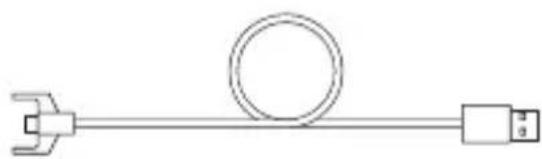
natural_image
Pure electrical circuit lines without any symbols
www.logitechG.com /support/g560
natural_image
Simple line drawing of a laptop with a download icon on the screen (no text or symbols)natural_image
Simple line drawing of a rectangular device with a circular top and two base legs (no text or symbols)
natural_image
Simple line drawing of a circular shape with a small symbol inside, no text or labels present.
natural_image
Simple line drawing of a circular shape with a small symbol inside, no text or labels present.
natural_image
Pure electrical circuit lines without any symbols
.1
הכלהה.2
USB 720 .3
الله Electrons.4
תָרִי
תָרִי

1.
.AC 7200 7210 7220 7230 7240 7250 7260 7270 7280 7290 7300 7310 7320 7330 7340 7350 7360 7370 7380 7390 7400 7410 7420 7430 7440 7450 7460 7470 7480 7490 7500 7510 7520 7530 7540 7550 7560 7570 7580 7590 7600 7610 7620 7630 7640 7650 7660 7670 7680 7690 7700 7710 7720 7730 7740 7750 7760 7770 7780 7790 7800 7810 7820 7830 7840 7850 7860 7870 7880 7890 7900
תְרָה
USB

www.logitechG.com /support/g560
natural_image
Simple line drawing of a laptop with a download icon on the screen (no text or symbols)שנה, 3.5 בדוחי .1
© 2018 Logitech. All rights reserved. Logitech, Logi and other Logitech marks are owned by Logitech and may be registered. Bluetooth ^® is a registered trademark of Bluetooth SIG, Inc. All other trademarks are the property of their respective owners.
WEB-621-001038.002

- CONTROLS
- Volume
- G-key
- Bluetooth
- Power
- Headphone jack
- SETUP
- USB CONNECTION
- www.logitechG.com /support/g560
- BLUETOOTH ® CONNECTION
- 3.5MM CONNECTION
- INHALT
- Lautstärke
- Volumen
- Tecla G
- Volym
- DET INDEHOLDER KASSEN
- Lydstyrke
- G-tast
- DETTE FINNER DU I ESKEN
- Volum
- BLUETOOTH®-TILKOBLING
- Ένταση ήχου
- Громкость.
- Głośność
- Hangerő
- Hlasitost
- Гучність
- Helitugevus
- www.logitechG.com/support/g560
- Garsumas
- Сила на звука
- Glasnoća
- POVEZIVANJE NA USB
- Jačina zvuka
- G-taster
- Napajanje
- USB VEZA
- BLUETOOTH® VEZA
- KABL OD 3,5 MM
- Glasnost
- Ses
Brand : LOGITECH
Model : G560 LIGHTSYNC PC Gaming Speaker
Category : Loudspeaker