
S120 - Loudspeaker LOGITECH - Free user manual and instructions
Find the device manual for free S120 LOGITECH in PDF.


| Product Type | 2.0 Speaker System |
| Brand | Logitech |
| Model | S120 |
| Dimensions (Each Speaker) | 7.1 x 11.9 x 8.9 cm (2.8 x 4.7 x 3.5 inches) |
| Total Weight | 0.54 kg (1.2 lbs) |
| Power Supply | AC adapter (9V DC, 500mA) |
| Power Consumption | 5W |
| Frequency Response | 90 Hz – 20 kHz |
| Impedance | 4 ohms |
| Driver Size | 5.1 cm (2 inches) |
| Input Connector | 3.5 mm stereo jack |
| Controls | Volume knob, power switch |
| Cable Length | 1.2 m (4 ft) |
| Compatible Devices | PCs, laptops, smartphones, tablets, MP3 players |
| Cleaning Instructions | Wipe with a soft, dry cloth. Do not use liquid cleaners. |
| Safety Precautions | Keep away from water and heat sources. Do not open the device. |
| Spare Parts Availability | Not available separately. Contact support for replacements. |
| Repairability | Not user-serviceable. Refer to qualified personnel. |
| Warranty | 1 year limited warranty |
Frequently Asked Questions - S120 LOGITECH
User questions about S120 LOGITECH
0 question about this device. Answer the ones you know or ask your own.
Ask a new question about this device
Download the instructions for your Loudspeaker in PDF format for free! Find your manual S120 - LOGITECH and take your electronic device back in hand. On this page are published all the documents necessary for the use of your device. S120 by LOGITECH.
USER MANUAL S120 LOGITECH
S120 STEREO SPEAKERS HAUT-PARLEURS STÉRÉO S120
Complete Setup Guide Guide d'installation complet

natural_image
Line drawing of two electronic devices connected by a cable, one with a power plug and the other with a terminal connector (no text or symbols)KNOW YOUR PRODUCT

Power plug 3.5 mm auxiliary input Headphone Jack
- Plug the power plug into an electrical outlet.
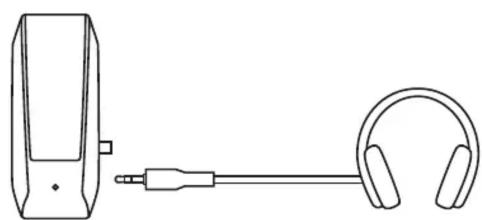
- Plug the 3.5 mm connector into the 3.5 mm input (headphone jack) on your device for audio.
- (Optional) Connect your headphones to the headphone jack on the side of the right speaker.
- Turn the speaker on (or off) using the power and volume knob on the side of the right speaker.
1

natural_image
Simple line drawing of a plug connecting a wall-mounted power outlet to a terminal block (no text or symbols)2

3
natural_image
Line drawing of a microphone and ear with a connector (no text or symbols)4

natural_image
Simple line drawing of a power switch and a circular button with rotation arrow (no text or symbols)ADJUST THE VOLUME
Increase (or decrease) the volume of speakers by rotating the control knob clockwise (or counter-clockwise) on the side of the right speaker.

www.logitech.com/support/S120

Brand : LOGITECH
Model : S120
Category : Loudspeaker