
IAN 275323 - Uncategorized CRIVIT - Free user manual and instructions
Find the device manual for free IAN 275323 CRIVIT in PDF.


| Product Type | Heatable Insoles |
| Brand | Crivit |
| Model | IAN 275323 |
| Shoe Sizes | 36 - 48 (EU) |
| Insole Thickness | Approx. 4 mm |
| Battery Type | Li-ion 18650, 3.7 V, 2000 mAh |
| Battery Pack Protection Class | III |
| Charging Time | Approx. 6 - 8 hours |
| Max Operating Time (Heat Level II) | Approx. 7 hours |
| Heat Settings | 2 (Level I: green indicator, Level II: red indicator) |
| Power Adapter Input | 100-240 V ~ 50/60 Hz, max 0.3 A |
| Power Adapter Output | 5 V, 900 mA |
| Power Adapter Protection Class | II |
| Heating Element Location | Toe area |
| Trimming | Cut along trim marks on underside (do not cut within warning symbol) |
| Attachment | Battery pack attaches to shoe with straps; cable runs up the heel |
| Cleaning | Battery pack: dry lint-free cloth; insoles: air occasionally |
| Storage | Dry place away from direct sunlight; disconnect battery if not used for long |
| Safety | Check feet regularly for redness; not for persons insensitive to heat without medical advice; do not use if damaged |
| Warranty | 3 years from date of purchase (subject to conditions) |
Frequently Asked Questions - IAN 275323 CRIVIT
User questions about IAN 275323 CRIVIT
0 question about this device. Answer the ones you know or ask your own.
Ask a new question about this device
Download the instructions for your Uncategorized in PDF format for free! Find your manual IAN 275323 - CRIVIT and take your electronic device back in hand. On this page are published all the documents necessary for the use of your device. IAN 275323 by CRIVIT.
USER MANUAL IAN 275323 CRIVIT
HEATABLE INSOLES CEB 2000 A1
GB
HEATABLE INSOLES
Operating instructions
HU
FÜTHETÖ TALPBETÉT
Használati utasítás
SI
GRELNI VLOŽEK
Navodila za uporabo
CZ
VYHŘÍVANÉ VLOŽKY DO BOT
Návod k obsluze
SK
VYHRIEVACIE VLOŽKY DO TOPÁNOK
Návod na obsluhu
DE
BEHEIZBARE
EINLEGESOHLEN
Bedienungsanleitung
GB
Before reading, unfold the page containing the illustrations and familiarise yourself with all functions of the device.
HU
Risks from electrical current 4
Interaction with the battery pack 4
Basic Safety Instructions 5
Initial use 6
Items supplied and transport inspection 6
Disposal of the packaging 6
Before initial use....7
Appliance description 7
Trimming the insoles to size 7
Charging the battery pack 8
Handling and operation 9
Switching the insoles on / off / selecting the heat setting ..... 9
Cleaning....10
Storage 10
Disposal....10
Disposal of the appliance....10
Disposal of batteries /cells 10
Appendix....11
Technical Data 11
Information regarding the EC Declaration of Conformity . . . . 1 1
Kompernass Handels GmbH warranty 12
Service 13
Importer 13
Introduction
Congratulations on the purchase of your new appliance.
You have clearly decided in favour of a quality product. These operating instructions are a part of this product. They contain important information in regard to safety, use and disposal. Before using the product, familiarise yourself with all of these operating and safety instructions. Use the product only as described and only for the specified areas of application. Retain these instructions for future reference. In addition, pass these operating instructions on to whoever might acquire the appliance at a future date.
Copyright
This documentation is copyright protected.
Any copying and / or reproduction, wholly or partially, including reproduction of the illustrations, also in a modified format is only permitted with written consent from the manufacturer.
Limited liability
All technical information, data and information for the connection and operation contained in these operating instructions correspond to the latest at time of printing and, to the best of our knowledge, take into account our previous experience and know-how. No claims can be derived from the details, illustrations and descriptions in these instructions. The manufacturer assumes no responsibility for damage caused by failure to observe the instructions, improper use, inappropriate repairs, making unauthorised changes or for using unauthorised replacement parts.
Intended use
These heatable insoles are intended exclusively for warming the feet on cold days during extended periods outdoors. They are intended solely for domestic use, not for commercial applications. Any use other than that previously described, or a modification of the insoles, is not permitted and may result in injury and / or damage to the insoles. The manufacturer assumes no liability for damages caused by contrary applications. The user alone bears the liability.
Warnings
In these extant operating instructions the following warnings are used:

DANGER
A warning of this risk level signifies a potentially dangerous situation.
In the event that the dangerous situation is not avoided it could lead to death or serious physical injury.
▶ Comply with the directives in this warning to avoid the risks of death or serious physical injury.

WARNING
A warning of this risk level signifies a potentially dangerous situation.
If the dangerous situation is not avoided it could lead to physical injuries.
▶ Observe the instructions in this warning to avoid personal injuries.
IMPORTANT
A warning of this risk level signifies possible property damage.
If the dangerous situation is not avoided it could lead to physical injuries.
▶ Observe the instructions in this warning to avoid property damage.
NOTE
▶ A notice signifies additional information that may assist you in the handling of the appliance.
Safety
In this chapter you will receive important safety information regarding the handling of the appliance. Incorrect usage can lead to injuries and property damage.
Risks from electrical current

DANGER
Observe the following safety instructions to avoid risks from electrical current:
▶ Do not use the appliance if the power adapter, the connection cable or the connector plug is damaged.
▶ Under no circumstances should you open the power adapter. There is a risk of receiving an electric shock if voltage carrying connections are touched or the electrical and /or mechanical construction is changed.
Interaction with the battery pack

WARNING
The risk of explosions and leakages exists!
For safe handling of battery pack observe the following safety instructions:
▶ Do not throw the battery pack into a fire.
▶ Do not short circuit the battery pack.
▶ Check the battery pack regularly. Leaking battery acid can cause permanent damage to the device. Special care should be taken when handling a damaged or leaking battery. Danger from acid burns! Wear protective gloves.
▶ Store the battery pack away from children.
▶ Disconnect the battery pack from the insole if you do not intend to use it for longer periods.
▶ The battery packs must be properly disposed of separately from the insoles.
Basic Safety Instructions
For safe handling of the appliance observe the following safety information:
■ Before use, check the insoles, the battery pack and the power adapter for any externally visible damage. Do not take into operation an appliance that is damaged or has been dropped.
■ To avoid possible risks, arrange for damaged cables or connectors to be exchanged by an authorised specialist or the Customer Service Department.
■ Check your feet regularly for any redness of the skin. Too much heat for a long time can cause burns. Children should therefore use the product only under adult supervision.
■ This appliance may be used by children aged 8 over and by persons with reduced physical, sensory or mental capabilities or lack of experience and knowledge, provided that they are under supervision or have been told how to use of the appliance safely and are aware of the potential risks. Children must not play with the appliance. Cleaning and user maintenance tasks must not be carried out by children unless they are supervised.
■ People who can not correctly perceive heat or cold, such as diabetics and people with disabilities etc, should consult their doctor before using the insoles.
■ Do not operate the insoles unattended.
■ Protect the insoles and the battery packs against rain and snow. Should the insoles and the battery pack becomes wet, allow them to air dry only.
■ Do not dry the insoles and the battery pack on the heating, with other sources of heat or with a hair dryer.
■ Protect the battery packs against moisture and the penetration of liquids. After attaching the battery packs to your shoes, they must always be connected (even when not switched on) to the insoles when outdoors. Thereby, the penetration of moisture and soiling in the connector sockets or plugs will be avoided.
■ Operate the insoles only with the supplied battery packs.
■ Use only the supplied power adapter to charge the battery packs. The power adapter is designed for indoor use and may not be exposed to moisture.
The power adapter is designed for indoor use and should not be exposed to moisture.
In the event of malfunctions or thunderstorms, remove the plug from the mains power socket.
Initial use
Items supplied and transport inspection
The device is delivered with the following components as standard:
- 2 x heatable insoles with integrated heating elements and connection cables
- 2 x Li-ion battery pack
- Power adapter
• This operating manual
NOTE
▶ Check the contents to make sure everything is there and for visible damage.
▶ If the delivery is not complete, or is damaged due to defective packaging or through transportation, contact the Service Hotline (see chapter Service).
Disposal of the packaging
The packaging protects the device from transport damage. The packaging materials are selected from the point of view of their environmental friendliness and disposal technology and are therefore recyclable.

culation of packaging into the material circuit saves on raw material and reduces the amount of waste generated. Dispose of packaging material that is no longer needed as per the regionally established regulations.
Before initial use
Remove all packaging materials and all transport securing devices from the appliance.
NOTE
▶ With initial use and for a brief period, a light odour accumulation can occur. This is normal and completely harmless.
Appliance description
① Insole connector plug
② Insole (underside)
3 Trimming marks
4 Connection socket of the battery pack
5 Function indicator of the battery pack
6 Function switch for the heat settings
⑦ Battery pack
8 Mains power connector for power pack
9 Connector plugs for power adapter
Trimming the insoles to size
IMPORTANT
The heating element is located in the region of the toes.
▶ Under no circumstances should you cut within the warning symbol ⊖, as this may damage the heating element.
First, select the shoes in which you wish to wear the insole ^2 . Bear in mind that the insoles ② are ca. 4 mm thick and that the better the shoe is insulated against cold, the longer you can heat with a single battery charge.
The trim mark 3 for different shoe sizes are printed on the bottom of the insoles 2 and serve only as a guide for trimming.
- Initially, trim the insole ^2 slightly larger than needed. Determine the required actual size by using an existing insole.
◆ Cut along the trim mark ③ and adjust the insole ② it the heel and sides to your individual size.
NOTE
In the final state the insole ② should fill the entire foot bed and it not be possible for it to move in the shoe.
Charging the battery pack
The battery packs ⑦ re charged via the supplied power adapter ⑧. For safe and faultless operation of the appliance with the electrical connection, observe the following instructions:
IMPORTANT
▶ Before connecting the appliance, compare the connection data (voltage and frequency) on the rating plate with that of your mains power supply. This data must be compatible to avoid possible damage to the device.
▶ Ensure that the mains power cable is not damaged and that it has not been laid over hot surfaces and / or sharp edges.
▶ Ensure that the mains power cable is not overtaut or kinked.
▶ Do not let the power cable hang over edges (trip wire effect).
◆ Plug the power adapte ⑧ into a mains power socket. Ensure that the battery packs ⑦ are switched off (function indicators ⑤ do not glow).
Connect the connector plug 9 of the power adapter 8 with the connection sockets 4 of the battery packs 7 The function indicators 5 glow red and the battery packs 7 re being charged. The optimum charging time is a minimum of 6 hours and a maximum of 8 hours.
◆ The battery pack⑦ are fully charged when the function indicators ⑤ glow green.
NOTE
▶ Frequent overcharging of the battery pack⑦ (over 8 hours) results in a reduction of both efficiency and service lifetime.
For longer storage periods (e.g. over the summer), the battery packs ⑦ should be charged to half their capacity (charging time approx. 3 hours) to extend their service life.
Handling and operation
In this section you receive important information for the handling and operation of the appliance.
Switching the insoles on / off / selecting the heat setting
Place the trimmed insoles ② in your shoes with the printed side down and run the cable upward along the heel.
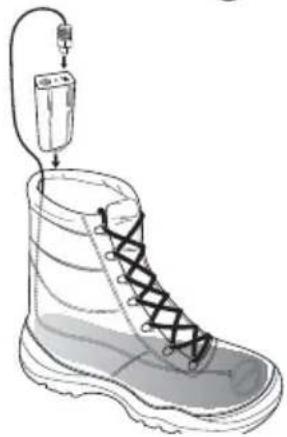
◆ Attach the battery pack⑦ using the straps to your shoes and connect the connector plug ① of the insoles ② with the connection sockets ④ of the battery pack ⑦ see Figure 1).
natural_image
Illustration of a boot with a plug inserted into it, showing lacing and base structure (no text or symbols)Fig. 1
IMPORTANT
▶ When wearing low shoes, tuck the excess cable into your socks. The cable must not drag on the ground while walking!
◆ Press the function switch 6 to switch the battery pack 7 n. The battery pack 7 switches itself on with the heat level I and the function indicator 5 glows green.
By pressing the function switch 6 once again, the heat level II can be switched on. The function indicator 5 glows red.
To switch the battery pack 7 off, press the function switch 6 once more. The function indicator 5 goes out.
NOTE
For quick warming, it is recommended to initially select the heat level II. It can later, if necessary, be turned down to the lower heating level.
▶ When the battery pack ⑦ is discharged, the function indicator ⑤ switches off and the insole ④ no longer heated.
Cleaning
IMPORTANT
▶ Protect the insole ^2 and the battery packs ^7 gainst moisture and the ingress of liquids.
▶ Do NOT use aggressive cleaning agents or chemical solvents, otherwise the surfaces may be damaged.
■ Clean the battery pack⑦ with a dry lint-free cloth.
■ The insole② should be taken out of the shoes occasionally and aired.
Storage
■ Disconnect the battery packs ⑦ from the insoles ② if you do not intend to use them for longer periods.
■ Store the insole ^2 and the battery packs 7 in a dry place away from direct sunlight.
Disposal
Disposal of the appliance
Do not dispose of this appliance in your no mal domestic waste. This product is subject to European Directive 2012/19/EU WEEE (Waste Electrical and Electronic Equipment).
Dispose of the appliance through an approved disposal centre or at your community waste facility. Observe the currently applicable regulations. In case of doubt, please contact your waste disposal centre. The battery packs must be properly disposed of separately from the insoles.
Disposal of batteries /cells
Used batteries / cells may not be disposed of in household waste.
Defective or worn-out batteries must be recycled according to Directive 2006/66/EC. All consumers are legally required to dispose of batteries / cells at a collecting point in their community or at a retail company. The purpose of this obligation is to ensure that batteries / cells are disposed of in a non-polluting manner. Only dispose of batteries / cells when they are fully discharged.
Appendix Technical Data
| Power adapter GQ05-050090-AG | |
| Input voltage 100 - 240 V | ~ 50/60 Hz |
| Current consumption max. 0.3 A | |
| Output voltage 5 V | --- |
| Output current 900 mA | |
| Protection class | II / ☐ |
| Operating temperature +15 to +35°C | |
| Humidity (no condensation) ≤ 75 % | |
| Li-ion battery pack 18650 | |
| Voltage 3.7 V | --- |
| Capacity 2000 mAh | |
| Protection class | III / ◆ |
| Charging time approx. 6. hrs | |
| Insoles | |
| Input voltage 3.7 V | == |
| Current consumption 250 mA | |
| Protection class | III / ◆ |
| Shoe sizes 36 - 48 | |
| Max. operating time | approx. 7 hrs(at Heat Level II) |
Information regarding the EC Declaration of Conformity
In regard to compliance with basic requirements and other relevant provisions, this appliance conforms with the Low Voltage Directive 2014/35/EU and the Electromagnetic Compatibility Directive 2014/30/EU.
The complete original Declaration of Conformity can be obtained from the importer.
CE
This appliance has a 3-year warranty valid from the date of purchase. If this product has any faults, you, the buyer, have certain statutory rights. Your statutory rights are not restricted in any way by the warranty described below.
Warranty conditions
The validity period of the warranty starts from the date of purchase. Please keep your original receipt in a safe place. This document will be required as proof of purchase. If any material or production fault occurs within three years of the date of purchase of the product, we will either repair or replace the product for you at our discretion. This warranty service is dependent on you presenting the defective appliance and the proof of purchase (receipt) and a short written description of the fault and its time of occurrence. If the defect is covered by the warranty, your product will either be repaired or replaced by us. The repair or replacement of a product does not signify the beginning of a new warranty period.
Warranty period and statutory claims for defects
The warranty period is not prolonged by repairs effected under the warranty. This also applies to replaced and repaired components. Any damage and defects present at the time of purchase must be reported immediately after unpacking. Repairs carried out after expiry of the warranty period shall be subject to a fee.
Scope of the warranty
This appliance has been manufactured in accordance with strict quality guidelines and inspected meticulously prior to delivery. The warranty covers material faults or production faults. The warranty does not extend to product parts subject to normal wear and tear or fragile parts such as switches, batteries, baking moulds or parts made of glass.
The warranty does not apply if the product has been damaged, improperly used or improperly maintained. The directions in the operating instructions for the product regarding proper use of the product are to be strictly followed. Uses and actions that are discouraged in the operating instructions or which are warned against must be avoided.
This product is intended solely for private use and not for commercial purposes. The warranty shall be deemed void in cases of misuse or improper handling, use of force and modifications/repairs which have not been carried out by one of our authorised Service centres.
Warranty claim procedure
To ensure quick processing of your case, please observe the following instructions:
- Please have the till receipt and the item number (e.g. IAN 12345) available as proof of purchase.
- You will find the item number on the type plate, an engraving on the front page of the instructions (bottom left), or as a sticker on the rear or bottom of the appliance.
- If functional or other defects occur, please contact the service department listed either by telephone or by e-mail.
- You can return a defective product to us free of charge to the service address that will be provided to you. Ensure that you enclose the proof of purchase (till receipt) and information about what the defect is and when it occurred.

You can download these instructions along with many other manuals, product videos and software on www.lidl-service.com.
Service

Service Great Britain
Tel.: 0871 5000 720 (£ 0.10/Min.)
E-Mail: kompernass@lidl.co.uk
IAN 275323
Importer
Please note that the following address is not the service address. Please use the service address provided in the operating instructions.
KOMPERNASS HANDELS GMBH
BURGSTRASSE 21
44867 BOCHUM
GERMANY
www.kompernass.com
Tartalomjegyzék
Bevezető 16
natural_image
Line drawing of a boot with a plug inserted into the sole, showing lacing and base plate (no text or symbols)- ábra
FIGYELEM
KOMPERNASS HANDELS GMBH
BURGSTRASSE 21
44867 BOCHUM
GERMANY
www.kompernass.com
Kazalo
Uvod 30
natural_image
Illustration of a boot with a battery connected to a wire, showing lacing and stitching (no text or symbols)Slika 1
POZOR
KOMPERNASS HANDELS GMBH
BURGSTRASSE 21
44867 BOCHUM
GERMANY
www.kompernass.com
Pooblaščeni serviser

Servis Slovenija
Tel.: 080080917
E-Mail: kompernass@lidl.si
IAN 275323
Garancijski list
natural_image
Illustration of a boot with a plug inserted into it, showing lacing and stitching (no text or symbols)obr. 1
POZOR
KOMPERNASS HANDELS GMBH
BURGSTRASSE 21
44867 BOCHUM
GERMANY
www.kompernass.com
Obsah
Úvod 58
Autorské právo 58
natural_image
Illustration of a boot with a plug inserted into it, showing lacing and base structure (no text or symbols)Obr. 1
POZOR
KOMPERNASS HANDELS GMBH
BURGSTRASSE 21
44867 BOCHUM
GERMANY
www.kompernass.com
Inhaltsverzeichnis
Einleitung 72
Urheberrecht 72
natural_image
Line drawing of a boot with a plug inserted into the sole, showing lacing and base plate (no text or symbols)Abb. 1
ACHTUNG
KOMPERNASS HANDELS GMBH
BURGSTRASSE 21
44867 BOCHUM
GERMANY
www.kompernass.com
KOMPERNASS HANDELS GMBH
BURGSTRASSE 21
44867 BOCHUM
DEUTSCHLAND / GERMANY
www.kompernass.com