
Surround 700 - Pregnant BOSE - Free user manual and instructions
Find the device manual for free Surround 700 BOSE in PDF.


| Brand | Bose |
| Model | Surround 700 |
| Product Type | Wireless surround speakers for soundbar |
| Dimensions (H x W x D) | Approximately 15 x 20 x 10 cm (estimated) |
| Unit Weight | Approximately 1.5 kg (estimated) |
| Power Supply | Mains 100-240 V via adapter |
| Connectivity | Wireless (connection to soundbar via proprietary protocol) |
| Compatible Soundbars | Bose Soundbar 500, 700, Smart Soundbar 300, SoundTouch 300 |
| Configuration Methods | Via the Bose Music app (Method 1) or manual with adapters (Method 2) |
| Audio Calibration | ADAPTiQ with headphones provided with the soundbar |
| Software Update Required | Yes, before configuration (except for Soundbar 300) |
| Care and Cleaning | Soft, dry cloth; do not use harsh products |
| Safety | Do not expose to water or humidity; use on a stable surface |
| Spare Parts Available | Speaker adapters, bases, wireless receivers, cables |
| Repairability | Contact an authorized Bose service center |
Frequently Asked Questions - Surround 700 BOSE
User questions about Surround 700 BOSE
0 question about this device. Answer the ones you know or ask your own.
Ask a new question about this device
Download the instructions for your Pregnant in PDF format for free! Find your manual Surround 700 - BOSE and take your electronic device back in hand. On this page are published all the documents necessary for the use of your device. Surround 700 by BOSE.
USER MANUAL Surround 700 BOSE
Before setup, you MUST make sure your soundbar software is up to date. Refer to your online owner's guide for more information:
Bose Soundbar 500: worldwide.Bose.com/Support/SB500
Bose Soundbar 700: worldwide.Bose.com/Support/SB700
SoundTouch 300 soundbar: global.Bose.com/Support/ST300
CAUTION: Do NOT set up the surround speakers without first updating your soundbar. Failure to do so can damage the surround speakers.
*Not applicable for Bose Smart Soundbar 300.
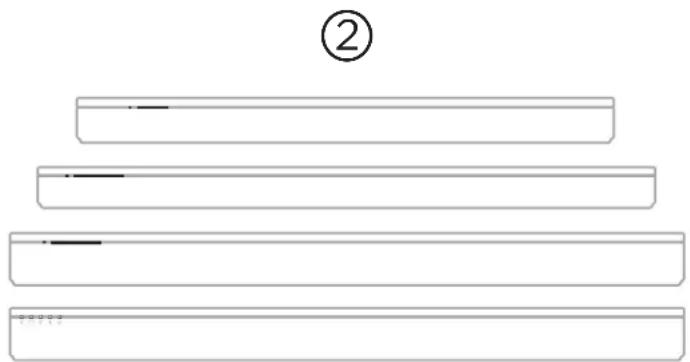
natural_image
Simple line drawing of four horizontal bars with a circled number ② above (no text or symbols on the bars)Choose your setup method
Your setup method depends on which soundbar you have.
Bose Soundbar 500, Bose Soundbar 700, or
Bose Smart Soundbar 300: See method 1.
SoundTouch 300 soundbar: See method 2.
METHOD 1
BOSE SOUNDBAR 500, BOSE SOUNDBAR 700, BOSE SMART SOUNDBAR 300



Set up using the Bose Music app
a. In the Bose Music app, from the My Products screen, select your soundbar.
b. Go to the Settings menu to add your surround speakers.
New to Bose Music app?
Download the app and follow the app instructions to set up your soundbar and surround speakers.
METHOD 2
natural_image
Diagram of a Doulo brand sensor with a lever and indicator lights (no text or symbols)Connect your adapters
a. Insert the color-coded speaker cable wires into their corresponding terminals.
b. Turn the screws to the right (clockwise) to secure the wires into the terminals.
c. Repeat steps a and b to connect your other adapter.
ENGLISH
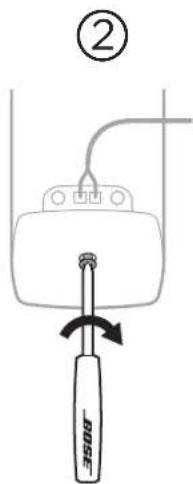
Attach the base to the speakers
a. Place the base into the bottom of the speaker. The base should fit flush into your speaker with the wire terminals facing the back.
b. Attach the base to the speaker using the screwdriver to turn the screw on the bottom of the base to the right (clockwise) until seated.
METHOD 2
(CONTINUED)
③
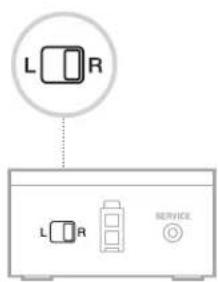
Identify switch settings on wireless receivers
a. Confirm that the switch on one wireless receiver is set to R (right).
b. Confirm that the switch on the other wireless receiver is set to L (left).
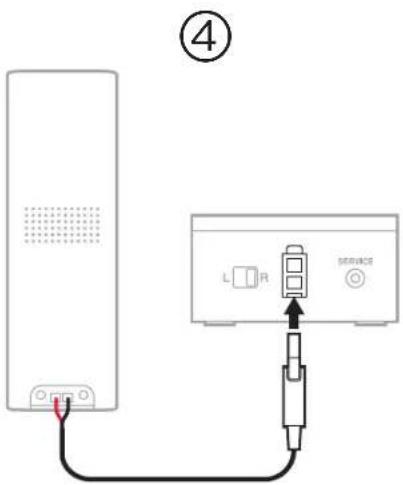
Connect your rear speakers
a. Insert the adapter into the back of the speaker.
b. Insert the two-pin connector into the wireless receiver.
c. Repeat steps a and b to set up your other speaker.
METHOD 2
(CONTINUED)
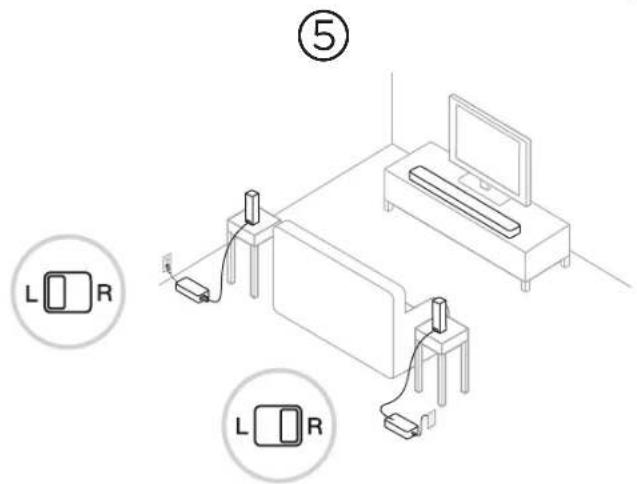
Place your rear speakers and wireless receivers
a. Facing your TV, place the speaker and R wireless receiver on the right side of your room.
b. Facing your TV, place the speaker and L wireless receiver on the left side of the room.
c. Connect to power.
ENGLISH
⑥
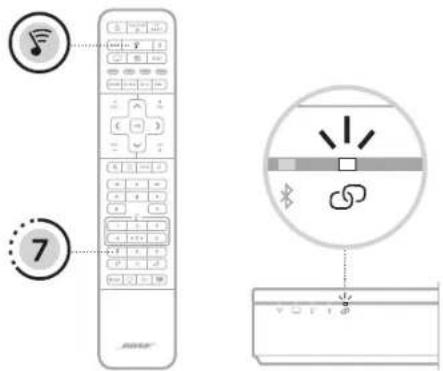
Connect the surround speakers to the soundbar
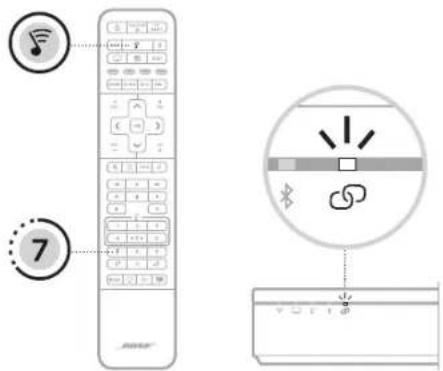
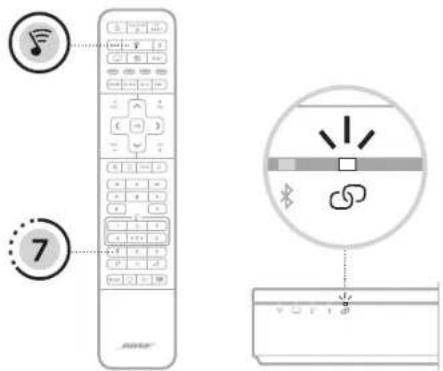
a. On your SoundTouch 300 remote, press ♂.
b. Press and hold 7 until Ⓞ on the soundbar blinks white.
Once the surround speaker connects, you hear a tone and 📋 glows white.
NOTE: Connecting may take several minutes.
METHOD 2
(CONTINUED)
⑦
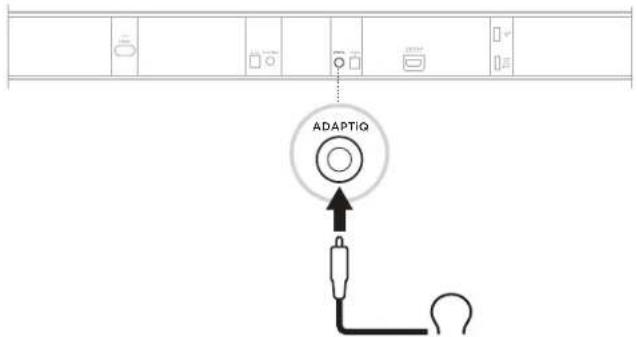
Set up ADAPTiQ audio calibration
a. Connect the ADAPTiQ headset (included with the soundbar) to the soundbar's ADAPTiQ connector.
b. Put the headset on your head.
⑧
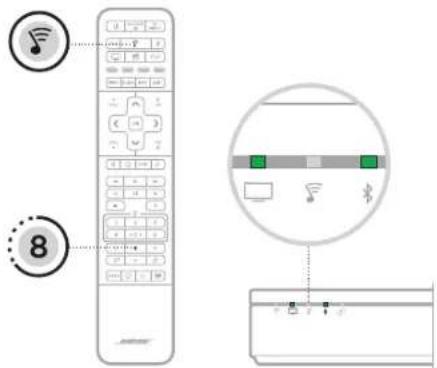
Run ADAPTiQ audio calibration
a. On your SoundTouch 300 remote, press ♂.
b. Press and hold 8 until □ and ✝ on the soundbar glow green.
NOTE: To cycle through languages, press ∧ and ∨ on the navigation pad.
START HER

SOFTWAREOPDATERING PÅKRÆVET\*
Bose Soundbar 500: worldwide.Bose.com/Support/SB500
Bose Soundbar 700: worldwide.Bose.com/Support/SB700
SoundTouch 300 soundbar: global.Bose.com/Support/ST300
natural_image
Simple line drawing of four horizontal bars with a circled number ② above (no text or symbols on the bars)natural_image
Diagram of a Doulo brand sensor with a lever and indicator lights (no text or symbols)Tilslut dine adaptere
Bose Soundbar 500: worldwide.Bose.com/Support/BASS500
Bose Soundbar 700: worldwide.Bose.com/Support/SB700
SoundTouch 300 Soundbar: global.Bose.com/Support/ST300
natural_image
Simple line drawing of four horizontal bars with a circled number ② above (no text or symbols on the bars)natural_image
Diagram of a double-ended presser with a lever and control buttons, no text or symbols present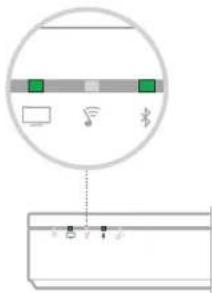
Bose Soundbar 500: worldwide.Bose.com/Support/SB500
Bose Soundbar 700: worldwide.Bose.com/Support/SB700
SoundTouch 300 soundbar: global.Bose.com/Support/ST300
natural_image
Simple line drawing of four horizontal bars with a circled number ② above (no text or symbols on the bars)natural_image
Diagram of a Douyin device with a red sensor and black scroll wheel (no text or symbols)Bose Soundbar 500: worldwide.Bose.com/Support/SB500
Bose Soundbar 700: worldwide.Bose.com/Support/SB700
Barra de sonido SoundTouch 300: global.Bose.com/Support/ST300
natural_image
Simple line drawing of four horizontal bars with a circled number ② above (no text or symbols on the bars)natural_image
Diagram of a Doulo brand sensor with a lever and indicator lights (no text or symbols)Bose Soundbar 500: worldwide.Bose.com/Support/SB500
Bose Soundbar 700: worldwide.Bose.com/Support/SB700
SoundTouch 300 soundbar: global.Bose.com/Support/ST300
natural_image
Simple line drawing of four horizontal bars with a circled number ② above (no text or symbols on the bars)Suorita ADAPTiQ-äänenkalibrointi.
Bose Soundbar 500 : worldwide.Bose.com/Support/SB500
Bose Soundbar 700 : worldwide.Bose.com/Support/SB700
Barre de son SoundTouch 300 : global.Bose.com/Support/ST300
natural_image
Simple line drawing of four horizontal bars with a circled number ② above (no text or symbols on the bars)natural_image
Diagram of a Doulo brand sensor with a lever and indicator lights (no text or symbols)natural_image
Diagram of a screwdriver with a curved arrow indicating rotation (no text or symbols)⑥
Bose Soundbar 500: worldwide.Bose.com/Support/SB500
Bose Soundbar 700: worldwide.Bose.com/Support/SB700
Soundbar SoundTouch 300: global.Bose.com/Support/ST300
natural_image
Simple line drawing of four horizontal bars with a circled number ② above (no text or symbols on the bars)natural_image
Diagram of a Doulo brand sensor with a lever and indicator lights (no text or symbols)Bose Soundbar 500: worldwide.Bose.com/Support/SB500
Bose Soundbar 700: worldwide.Bose.com/Support/SB700
SoundTouch 300 hangsugárzó: global.Bose.com/Support/ST300
natural_image
Simple line drawing of four horizontal bars with a circled number ② above (no text or symbols on the bars)natural_image
Diagram of a Doulo brand sensor with a lever and indicator lights (no text or symbols)Bose Soundbar 500: worldwide.Bose.com/Support/SB500
Bose Soundbar 700: worldwide.Bose.com/Support/SB700
SoundTouch 300-lydplanke: global.Bose.com/Support/ST300
natural_image
Simple line drawing of four horizontal bars with a circled number 2 above (no text or symbols on the bars)Velge metode for konfigurering
natural_image
Diagram of a Doulo brand sensor with a lever and indicator lights (no text or symbols)Koble til adapterne
Kjøre ADAPTiQ-lydkalibreringen
a. Trykk på ♂ på fjernkontrollen for SoundTouch 300.
b. Trykk og hold inne 8 til □ og § på lydplanken lyser grønt.
SoundTouch 300: global.Bose.com/Support/ST300
natural_image
Simple line drawing of four horizontal bars with a circled number ② above (no text or symbols on the bars)natural_image
Diagram of a Douyin device with a rose lever and control buttons (no text or symbols)Bose Soundbar 500: worldwide.Bose.com/Support/SB500
Bose Soundbar 700: worldwide.Bose.com/Support/SB700
Barra de som SoundTouch 300: global.Bose.com/Support/ST300
natural_image
Simple line drawing of four horizontal bars with a circled number ② above (no text or symbols on the bars)natural_image
Diagram of a Doulo brand sensor with a lever and indicator lights (no text or symbols)Conectar os adaptadores
⑥
Bose Soundbar 500: worldwide.Bose.com/Support/SB500
Bose Soundbar 700: worldwide.Bose.com/Support/SB700
SoundTouch 300 soundbar: global.Bose.com/Support/ST300
natural_image
Simple line drawing of four horizontal bars with a circled number ② above (no text or symbols on the bars)Välja installationsmetod
natural_image
Diagram of a Bosch 1926 sensor with a lever and indicator lights (no text or symbols)Anslut adaptrarna
Kör ADAPTiQ-ljudkalibrering
worldwide.Bose.com/Support/WSS700



- Choose your setup method
- METHOD 1
- Set up using the Bose Music app
- New to Bose Music app?
- METHOD 2
- Connect your adapters
- Attach the base to the speakers
- Identify switch settings on wireless receivers
- Connect your rear speakers
- Place your rear speakers and wireless receivers
- Connect the surround speakers to the soundbar
- (CONTINUED)
- Set up ADAPTiQ audio calibration
- Run ADAPTiQ audio calibration
- START HER
- SOFTWAREOPDATERING PÅKRÆVET\*
- Tilslut dine adaptere
- Suorita ADAPTiQ-äänenkalibrointi.
- Velge metode for konfigurering
- Koble til adapterne
- Kjøre ADAPTiQ-lydkalibreringen
- Conectar os adaptadores
- Välja installationsmetod
- Anslut adaptrarna
- Kör ADAPTiQ-ljudkalibrering
Brand : BOSE
Model : Surround 700
Category : Pregnant