
BAI-220 - Headphones BRIGMTON - Free user manual and instructions
Find the device manual for free BAI-220 BRIGMTON in PDF.


| Product Type | Wireless Headphones |
| Brand | Brigmton |
| Model | BAI-220 |
| Frequency Range (Receiver) | 84-88 MHz |
| Modulation | FM |
| Emission Distance | 30 m |
| Distortion | ≤ 0.2% |
| Emitter Power Supply | 2 x AAA batteries or 4.5V DC power adaptor |
| Receiver Power Supply | 2 x AAA batteries |
| Connectivity | 3.5mm audio cable, Y adaptor cable |
| Wireless Mode | Wireless headphone, wireless net audio chat, wireless monitoring |
| Wired Mode | Wired headphone via audio cable |
| Controls | Volume control, power ON/OFF, RESET, SCAN |
| Indicators | Power indicator on emitter and receiver |
| Package Contents | Emitter, receiver (headphone), instruction manual, audio cable, Y adaptor cable, power adaptor |
| Compatible Devices | TV, DVD, PC, MP3 players with audio out socket |
| Battery Life (Approx.) | Not specified, use alkaline batteries for longer life |
| Cleaning | Wipe with dry cloth, avoid liquids |
| Safety | Use only specified batteries, do not open, keep away from moisture |
| Spare Parts | Contact importer I.R.P., S.L. |
Frequently Asked Questions - BAI-220 BRIGMTON
User questions about BAI-220 BRIGMTON
0 question about this device. Answer the ones you know or ask your own.
Ask a new question about this device
Download the instructions for your Headphones in PDF format for free! Find your manual BAI-220 - BRIGMTON and take your electronic device back in hand. On this page are published all the documents necessary for the use of your device. BAI-220 by BRIGMTON.
USER MANUAL BAI-220 BRIGMTON
natural_image
Illustration of a person wearing headphones connected to a computer monitor and a CD, with an arrow indicating direction (no text or symbols)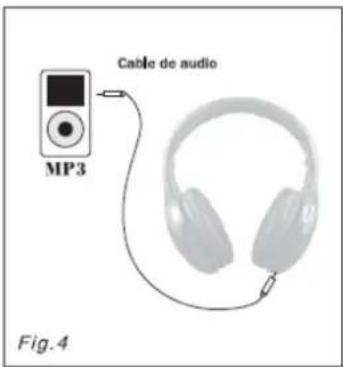
Frequency: 86 ± 0.5 MHz
Modulation: FM
Emission distance: 30 m.
Reception from any audio and visual equipment with audio and out socket, such a TV, DVD, etc.
Power supply: 2 x AAA batteries or 4,5V DC
RECEIVER
Frequency range: 84-88 MHz
Reception mode: FM
Distorsion: ≤ 0.2%
Power supply: 2 x AAA batteries
PARTS
Package includes
- Emitter
- Receiver (Headphone x 1)
- Instruction manual
- Audio Cable
- Y adaptor cable
- Power adaptor
INSTALLATION
Installing the receiver: Insert 2 AAA batteries into the battery compartment according to the + and - polarity.
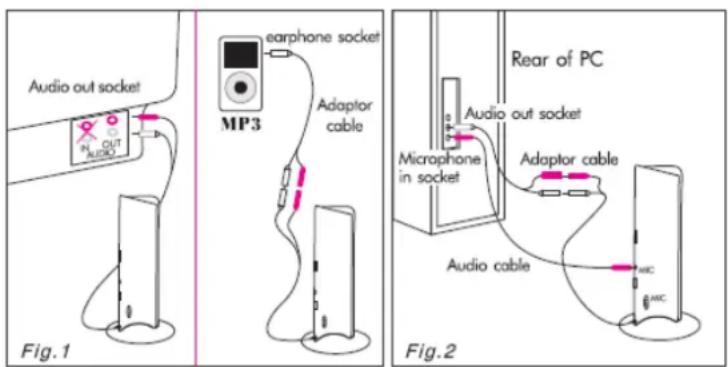
Installing the emitter: Insert 2 AAA batteries into the battery compartment according to the + and - polarity, or insert the power adaptor into power socket of emitter (4.5V DC). Insert audio plug of the emitter into AUDIO-OUT socket of audio source (TV, DVD, etc.) In case the audio out socket of the audio source is the headphone socket. The Y adaptor cable can be used for connection. To achieve best reception spread out emitter audio cable which can be also used as antenna.
natural_image
Illustration of a person wearing headphones connected to a computer monitor and a cable, labeled Fig.3 (no text or symbols on the diagram itself)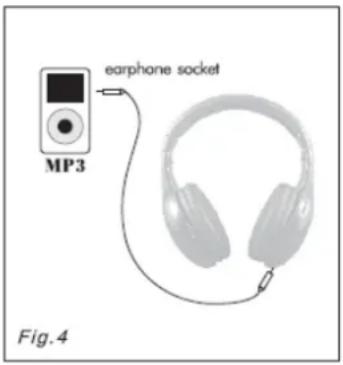
OPERATION
WIRELESS HEADPHONE
- Insert the emitter audio cable into the AUDIO-OUT socket of the electrical device or earphone socket, and move the function of the emitter to the WIRELESS HEADPHONE position, and the power indicator of emitter will go ON.
- Turn ON the volume control and power button (ON/OFF) on receiver, the power indicator of receiver will go ON. First press RESET key, and press the SCAN key, the sound sent from emitter should be head.
WIRELESS NET AUDIO CHAT
- Connect the emitter audio cable to the adaptor to the adaptor cable (fig. 2), and insert other end of the adaptor cable into the audio out socket of the PC, then insert one end of the audio cable into the microphone socket (MIC) on the emitter, and insert the other end into the microphone in socket of the PC.
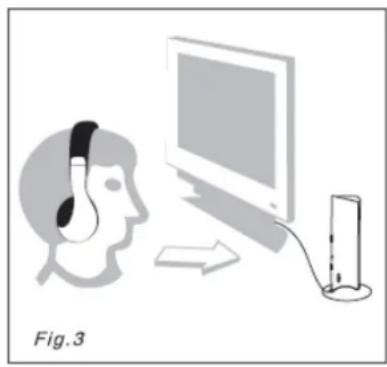
- Aim the microphone socket (MIC) of the emitter at you (fig. 3), and move the power switch of the emitter to AUDIO CHAT position, and the power indicator will go on.
- Turn on the volume control and power (ON/OFF) of the receiver and the power indicator will go on. First press the RESET key, and then press SCAN key, and then the sound sent out from the emitter can be heard
WIRELESS MONITORING
Place the emitter near the people you want monitored (such as elderly people, children, etc.) and aim the microphone (MIC) the people. Move the function switch of the emitter to the MONITOR position and the power indicator will go on. Turn on the volume control and power bottom (ON/OFF) of the receiver and the power indicator of the receiver will go on. Press the RESET key and press SCAN key, the sound sent out from emitter can be heard with the headphone.
WIRED HEADPHONE
Insert one end of the audio cable into the audio socket of the receiver (fig. 4) and insert the other end into the headphone socket of the electrical devices, such as Mp3, DVD, etc. Then the unit can be used a wire headphone.
When the unit is not used, move the function switch on the emitter to OFF position to turn off the emitter and turn the volume control receiver to the OFF position, and the power indicator receiver will go out and the receiver will turn off. Remove batteries when not using for a long time.
FUNCTIONS
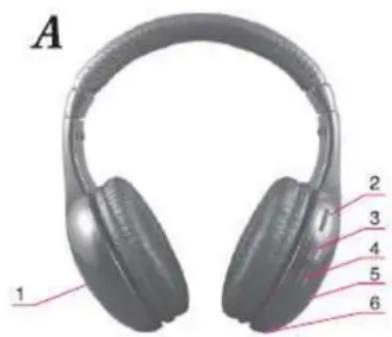
A. RECEIVER
- Battery compartment cover
- Volume control and power bottom (ON/OFF)
- Scan key (SCAN)
- Reste key (RESET)
- Power indicator
- Audio socket
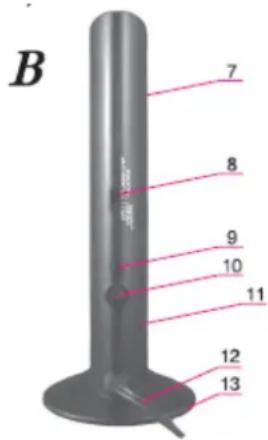
B. EMISOR
- Power indicator (front)
- Power and function switch
- Microphone socket (MIC)
- Power socket
- Microphone (MIC)
- Audio cable of emitter
- battery compartment cover (bottom)
NOTES
To achieve best reception spread out emitter audio cable of the emitter (the emitter audio cable can also be used as antenna)
If the sound is distorted or too strong, adjust the volume of the signal source (TV, DVD, etc.) to a lower level and reception performance may be improve.
Put TV on mute or quite mode so you can listen to TV without disturbing any one.
Replace the batteries if you are having the following problems
- The emitter indicator becomes dim
- The receiver reception is poor
- The volume becomes wreak and the sound is distorted
Imported: I.R.P., S.L.
DECLARATION OF CONFORMITY
I.R.P., SL declare under our responsibility that the equipment meets the requirements indicated in the following directives:
EMC DIRECTIVES
EN55013:2001+A1:2003+A2:2006
EN55020:2007
EN61000-3-2:2006
EN61000-3-3:2008
EN300 440-2 V1.3.1
EN301 489-1 V1.8.1
EN301 489-3 V1.4.1
Description of apparatus:
BRIGMTON Model BAI-220
Wireless headphones
Importer: I.R.P., SL
Address: Avenida Santa Clara de Cuba 5, 41007, Sevilla.

Brand : BRIGMTON
Model : BAI-220
Category : Headphones