
HBT400 - Headphones Champion - Free user manual and instructions
Find the device manual for free HBT400 Champion in PDF.


| Product Type | Wireless Headphones |
| Brand | Champion |
| Model | HBT400 |
| Connectivity | Bluetooth 5.0 |
| Wireless Range | Up to 10 meters |
| Battery Life | Up to 20 hours |
| Charging Time | Approximately 2 hours |
| Charging Port | Micro USB |
| Driver Size | 40 mm |
| Impedance | 32 Ω |
| Frequency Response | 20 Hz - 20 kHz |
| Sound Pressure Level | 100 dB |
| Microphone | Built-in omnidirectional |
| Controls | Volume, track skip, play/pause, call control |
| Weight | Approximately 200 g |
| Dimensions (foldable) | 17 x 16 x 4 cm |
| Ear Cushion Material | Soft memory foam with protein leather |
| Headband Padding | Adjustable with padded cushion |
| Foldable Design | Yes, for easy storage |
| Operating Temperature | 0°C to 40°C |
| Safety Certifications | CE, RoHS |
| Maintenance | Wipe clean with dry cloth; avoid liquids |
| Repairability | Battery replaceable by professional |
| Included Accessories | Charging cable, user manual |
Frequently Asked Questions - HBT400 Champion
User questions about HBT400 Champion
0 question about this device. Answer the ones you know or ask your own.
Ask a new question about this device
Download the instructions for your Headphones in PDF format for free! Find your manual HBT400 - Champion and take your electronic device back in hand. On this page are published all the documents necessary for the use of your device. HBT400 by Champion.
USER MANUAL HBT400 Champion
natural_image
Black and silver headband headphones with metallic grille and earbuds (no visible text or symbols)EN - English
SE - Svenska
DK - Danske
NO - Norsk
FI - Suomi
Safety precautions
Please read the user's manual carefully before use and keep it for future reference.
EN
- Store the headphone with power off and in a dry environment.
- If you don't use the headphone for a long period, charging the battery every 2 months for 1-2 hours.
- Don't charge the battery beyond the rating.
- Keep the temperature at 0irc C- 40irc C during charging.
- Don't put the headphone on combustible substances (bed and carpet) during charging.
- Don't disassemble and replace the built-in battery on yourself, this will cause damage the headphone.
- Use a dry cloth for cleaning if needed.
- Avoid exposing the headphone to extreme temperature. (Recommended storage temperature is -40ircC-70ircC .)
- The headphone is NOT waterproof. Avoid exposing the headphone to rain or getting liquids into any button port or other openings.
- Don't twist or bend the headphone. This may cause permanent deformation.
Package Contents
- Wireless headphone x 1
- Micro USB charging cable x 1
• 3.5mm Audio Cable x1 - User's manual x 1
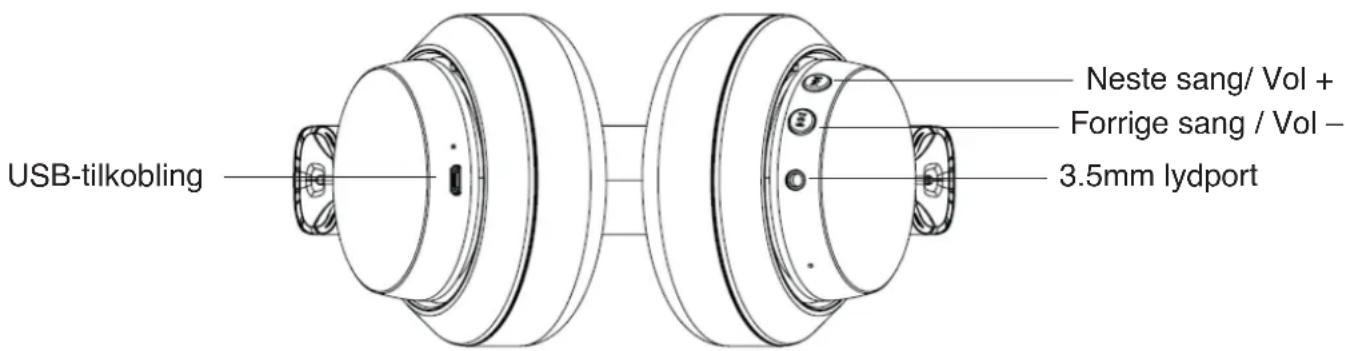
Product description


Charging the Battery
- Open the plastic plug of USB connector. Connect the micro USB charging cable to any power source and the USB connector of your headphone for charging.
- The headphone LED turns to solid red during charging. It takes about 2 hours for the charge. When the battery is fully charged, the LED turns off.
- Low battery: when battery voltage is below 3.3V, red LED flashes 1 time per 1s; once less than 3.0V, the headphone turns off.
Note: It is strongly recommended fully charging for the first use.
Pairing with Bluetooth Devices
Pairing the headphone with a phone
- Make sure the headphone is off, Long press power button around 4 seconds, then enter into paring mode.
- Start Bluetooth function on your phone or other devices, then search for new devices.
- Select the "HBT400" to pair.
- If your unit ask you to enter the PIN code, please enter 0000 (4 zero).
- Once successfully paired, the blue LED is always on and you will hear "Connected".
Pairing the headphone with a computer
- Before pairing the headphone with your computer, please make sure your computer or laptop has the built-in Bluetooth feature. If not, you must use a Bluetooth dongle, preferably version 2.1 or above.
- Long press power button around 4 seconds, then enter pairing mode.
- Start the Bluetooth program in the computer. Then selected "Search new device".
- Select the "HBT400" to pair.
- Use headphone to enjoy music, watch TV or movies, play games and more.
- Re-connected: if your phone or other devices connected before, then headphone will automatically reconnect.
- Line-in Connect: when without Bluetooth function, it can work to plug line-in cable as wired headphone.
Technical Specification:
| Bluetooth Version | BT4.2 | |
| Support Profile | HSPv1.6, HFPv1.2, A2DPv1.3, AVRCPv1.6 | |
| Support | apt-x-II | |
| Bluetooth distance | ≥10m | |
| Pairing name | HBT400 | |
| Speaker diameter | 40mm | |
| Frequency Response | 20Hz-20KHz | |
| Li-battery Capability | 500mAh | |
| Talking time | 20 hours | |
| Playing time | 20 hours | |
| Charging time | 2-2.5 hours | |
| Charger Mode | Micro USB 5V/1A | |
| Weight | 284g | |
| Outer dimension (L×W×H) | 170*85*189mm | |
Control Instructions
| Function Operations Tips | ||
| Power on When headph | hone turn off, long press "power" button around 2 sec | You will hear "power on" and LED flashes blue per 1 sec |
| Power off When headph | phone turn on, long press "power" button around 4 sec | LED flashes red for 2 seconds and sounds "Power off" |
| Pairing Long press "po | wer" button around 4 sec | LED flashes blue and red alternately when entering the pairing mode, at the same time it sounds "ready to pair, turn code 0000" voice prompt.Successfully pairing: Pairing complete or Connected (second connect) |
| Answer a call Short press | "Power" button Red LED flash | 2 times per 1 sec (voice prompt: beep) |
| Reject a call Long pres | s "Power" button for 2 sec | Blue LED slide on |
| End a call Short press | "Power" button Blue LED slide on | |
| Redial the last number | Double press "Power" button Red LED flashes 2 times per 1 sec (voice prompt: beep) | |
| Cancel the function of Redial the last number | Short press "Power" button Blue LED slide on (voice prompt: beep) | |
| Sound transfer (between headphone and phone) | Long press "Power" button around 2s | Blue LED slide on |
| Play Short press "Power" button Blue LED slide on | ||
| Pause Short press "Po | wer" button Blue LED slide on | |
| Previous song Long press | " " button 3 sec Blue LED slide on | |
| Next song Long press | " " button 3 sec Blue LED slide on | |
| Vol + | Short press " " button | Blue LED slide on (when increase to the max sound, voice sounds "beep") |
| Vol - | Short press " " button | Blue LED slide on (when adjust to the minimum sound, voice sounds "beep") |
LED Indicator
| When charging | Red LED slide on |
| When fully charged | Red led turn down |
| Standby Pairing mode: blue LED flashes 1 time per 1 secConnected mode: blue LED slide on | |
| Incoming call | Red LED flashes 2 times per 1 sec |
| Disconnect | Blue LED flashes 1 time per 1 sec |
| On the call | Blue LED slide on |
| Low battery alarm | When battery voltage less than 3.3V, red LED flashes 1 time per 1 sec |
1. The headphone cannot be powered on.
- The battery may be flat. Please recharge the battery and try again.
2. Why doesn't the headphone pair with the mobile phone?
- Check that the headphone is charged and is in pairing mode.
- Make sure that the mobile phone's Bluetooth function is on.
- Make sure that the two devices are in the effective pairing range. (10 meters)
- Make sure that there is no obstacle between the headphone and the mobile phone, such as electronic equipment and a wall.
• Furthermore, you can try restarting the headphone and pairing it with the mobile phone again.
3. There is disturbing noise.
- Bluetooth is a radio technology, so it is sensitive to obstacles between the headphone and the pairing device.
- Please make sure that there is no obstacle between the two devices and is within the range. (10 meters)
4. I can't hear sound.
- Try increase the volume.
- Make sure that the Bluetooth function is on and whether the two devices are connecting and in the range. (10 meters)
- Make sure the headphones are close enough to your device, and there is no obstacle between them.
5. My mobile phone or computer cannot find the headphone.
- Please check that the headphone is in pairing mode. Refer to chapter 5. Pairing with Bluetooth devices. Sometimes when the headphone is connected too many Bluetooth devices, it cannot search and pair effectively. Or your mobile phone and computer are already connected to many other devices. Try removing some connections before searching the headphone.
Correct Disposal of this product
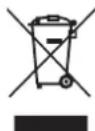
This marking indicates that this product should not be disposed with other household wastes throughout the EU. To prevent possible harm to the environment or human health from uncontrolled waste disposal, recycle it responsibly to promote the sustainable reuse of material resources.


CHAMPION
Champion®
Makadamgatan 14 | 254 64 Helsingborg | Sweden
Designed in Sweden | Assembled in China


Säkerhetsåtgärder
Designed in Sweden | Assembled in China



Designed in Sweden | Assembled in China



Sikkerhetstiltak
Lading av batteriet
Designed in Sweden | Assembled in China


Turvallisuusohjeet
Designed in Sweden | Assembled in China


- Safety precautions
- EN
- Package Contents
- Product description
- Charging the Battery
- Pairing with Bluetooth Devices
- Pairing the headphone with a phone
- Pairing the headphone with a computer
- Technical Specification:
- The headphone cannot be powered on.
- Why doesn't the headphone pair with the mobile phone?
- There is disturbing noise.
- I can't hear sound.
- My mobile phone or computer cannot find the headphone.
- Correct Disposal of this product
- CHAMPION
- Säkerhetsåtgärder
- Sikkerhetstiltak
- Lading av batteriet
- Turvallisuusohjeet
Brand : Champion
Model : HBT400
Category : Headphones