
CHTW300 - Headphones Champion - Free user manual and instructions
Find the device manual for free CHTW300 Champion in PDF.


| Product Type | Headphones |
| Brand | Champion |
| Model | CHTW300 |
| Connectivity | Wired with 3.5mm audio jack |
| Driver Size | 40 mm |
| Frequency Response | 20 Hz - 20 kHz |
| Impedance | 32 ohms |
| Sensitivity | 108 dB |
| Cable Length | 1.2 m |
| Weight | 200 g |
| Controls | In-line microphone and volume control |
| Compatibility | Smartphones, tablets, PCs, laptops |
| Design | Over-ear, closed-back |
| Material | Plastic headband, foam ear cushions |
| Care Instructions | Wipe with a soft, dry cloth |
| Spare Parts Available | Replacement ear cushions |
| Repairability | No user-serviceable parts; seek professional repair |
| Safety | Do not expose to moisture; avoid high volumes to prevent hearing damage |
Frequently Asked Questions - CHTW300 Champion
User questions about CHTW300 Champion
0 question about this device. Answer the ones you know or ask your own.
Ask a new question about this device
Download the instructions for your Headphones in PDF format for free! Find your manual CHTW300 - Champion and take your electronic device back in hand. On this page are published all the documents necessary for the use of your device. CHTW300 by Champion.
USER MANUAL CHTW300 Champion
2 x Bluetooth Earphones • Charging Case • User Manual Charging Cable • Extra silicone earcaps size S and L
Specifications
Earphones
Bluetooth version: 5.0+ED
Support: HSP, HFP, A2DP, AVRCP
Battery: 50mah x 2 Li-polymer type
Working time: 4 hrs
Charging time: 1-2 hrs
Standy time: 80 hrs
Transmission distance: 10 m Frequenew range: 3 402-3 4
Frequency range: 2.402-2.480GHz Output voltage: 3.7V
Output Voltage: 5.7V
Charging Case
Battery capacity: 380mAh
Charging time: 2-3 hrs Charging voltage: 5V/1
Charging voltage: 5V/300mA Earphones can be fully charged
3 times with a full charged case
Product overview
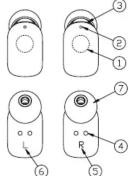
Earphones
-
Touch control surface
-
MIC
-
LED indicator
-
Magnetic charging slot
-
Right earphone
-
Left earphone
-
Slicene screen
-
Silicone earcap size M
Charging Case
-
LED indikator
-
Micro USB charging port


How to wear
Insert the earphones into your
ears and place 1 like the picture
Get started
Remove the earphones from
the package and place into
the charging case. Charge the earbones completely before use
Charging
Charging Case
- Plug the charging cable into the Micro USB charging port in
the case and the other end into a USB power adapter or
laptop/desktop.
-
The LED indicator will turn white when charging
-
The LED indicator will turn off when charging is completed.
- Time for full charge in 2-3 hours
Earphones
- Put the earphones into the charging case.
-
The LED indicator will turn solid red when
-
The LED indicator will turn solid red when charging.
-
The LED indicator will turn off when charging is con
-
Time for full charge is 1-2 hours.
Wireless pairing
First time pairing
- Turn off the Bluetooth on your device (eg smartphone). Make
sure your earphones and your device are within 1m of reach.
-
Open the charging case and take out both earphones. You will bear a voice saying "Power on," and the LED light will turn blue.
-
After 3 seconds, the light of the left earphone (L) will flash blue
-
After 2 December, the right of the law shall be (a) will reach and red alternately automatically. You will hear a voice saying
"connected, right channel, left channel". The earphones are
now paired.
- Now the voice says "pairing". Turn on the Bluetooth on your
device and select "CHTW300" from the list. When the pairing
is complete you will hear a voice saying "second device connected" and the LED light flashes blue.
connected and the LED light hashes blue
To pair manually, touch the Touch control surface in 5 seconds until the LED light flashes red and blue. Pairing is now activated

Second time and forward
The headphones are automatically paired when the headphones
are removed from the case. The left earphones will now
automatically connect to the device that you have paired the earphones to.
If the earphones loses pairing
If the earphones loses contact with each other, and just one of
the earphone have sound, you must restore to factory settings.
To restore to factory settings
- "Forget" the CHTW300 earphones in your device's
Bluetooth list
- Turn off the earphones by touching the Touch control
surface until the voice says "Power off".
-
Start the earphones by touching the Touch control surface until the voice says "Power on".
-
Then touch the touch control
"Power off" and the earphones turn off.
- The earphones are now in factory se
pair the earphones again according to the instructions in
Wireless pairing - First time pairing.
Power on
Touch the Touch control surface for 2 seconds and the
earphones turns on
From the charging case: Open the case and take out both
earphones.
Power off
Touch the Touch control surface for 6 seconds and the
earphones power off
Power off/charging: Put the earphones into the charging case.
Close the lid and the earphones will power off automatically and
enter charging mod
LED indicators
Charging: Red-solid light
In pairing mode: Blue and red flash alternately
Connected: Blue flashes every 5 seconds
Unconnected: Blue flashes every 2 seconds
Low battery: Red light flashing
Touch control
| Left earphone (L) Right earphone (R) | ||
| Play/Pause Touch | twice Touch twice | |
| Next track | Touch and hold for 4 seconds | - |
| Return to the beginning of the track | - | Touch and hold for 4 seconds |
| Sirj/Google assistant (voice dial) | Touch and hold for 2 seconds | Touch and hold for 2 seconds |
| Take/end phone call | Touch twice Touch twice | |
| Reject phone call | Touch and hold for 2 seconds | Touch and hold for 2 seconds |
The CHTW300 has no audio control. To adjust the volume,
you have to adjust manually on your device.
Safety and care
- Keep the earphones from extrem heat and humidity. High heat
will decrease the lifespan of the earphones and battery.
- The earphones should be charged at least once every
6 months.
-
Clean with a soft cloth, damp with diluted soap water solution, if necessary. Never use chemical cleaners.
-
Do not drop the earphones on hard surface
-
Do not take the earphones apart.
-
When the earphones are not in use, store the earphones in
the charging case in a cool, dry place.

CHAMPION
Champion, Makadamgatan 14, 254 64 Helsingborg, Sweden
Champion, Makadamgatan 14, 254 64 Helsingborg, Sweden
www.championnordic.se, info@championnordic.se Dhara + 46 42 35 33 00


Brand : Champion
Model : CHTW300
Category : Headphones