
TCP-40 - Hi-Fi System DENVER - Free user manual and instructions
Find the device manual for free TCP-40 DENVER in PDF.


| Product Type | Hi-Fi System with CD player, cassette and FM radio |
| Brand | Denver |
| Model | TCP-40 |
| Power Supply (Mains) | 220-240 V~, 50/60 Hz |
| Battery Power | 6 x C (LR14) batteries, not included |
| Output Power | 2 x 1.1 W RMS |
| FM Frequency Range | 87.5 - 108 MHz |
| Antenna | Telescopic, extendable for better reception |
| Playable Formats | Audio CD, audio cassettes, FM radio |
| Playback Functions | Play, pause, stop, fast forward, fast reverse, repeat (CD), programming (CD) |
| Auxiliary Input | Yes (3.5 mm aux jack) |
| Display | LED with function indicators |
| Approx. Dimensions | 300 x 200 x 150 mm |
| Approx. Weight | 2 kg |
| Operating Temperature | 0°C to 40°C |
| Safety | Do not expose to water, heat; do not open; use only official accessories |
| Care and Cleaning | Unplug before cleaning, use a dry cloth, avoid moisture |
| Spare Parts and Repairability | Contact Denver after-sales service for any repair or spare part |
Frequently Asked Questions - TCP-40 DENVER
User questions about TCP-40 DENVER
0 question about this device. Answer the ones you know or ask your own.
Ask a new question about this device
Download the instructions for your Hi-Fi System in PDF format for free! Find your manual TCP-40 - DENVER and take your electronic device back in hand. On this page are published all the documents necessary for the use of your device. TCP-40 by DENVER.
USER MANUAL TCP-40 DENVER
natural_image
Black and white photo of a modern portable radio cassette player with a brand logo, no visible text or symbols on the device itself.INSTRUCTION MANUAL
Please read this manual carefully before using, and keep it for future reference.
Content
English 3
Dansk 8
Deutsche 13
Español 18
Suomi 23
Français 28
Italiano 33
Nederlands 38
Norsk 43
Polski 48
Português 53
Svenska 58
Safety information
Please read the safety instructions carefully before using the product for the first time
and keep the instructions for future reference.
- This product is not a toy. Keep it out of reach of children.
- Keep product out of the reach of children and pets to avoid chewing and swallowing.
- Never use old and new batteries or different types of batteries together. Remove the batteries when you are not using the system for a longer period of time. Check the polarity (+/-) of the batteries when inserting them in the product. Wrong positioning can cause an explosion. Batteries are not included.
- Product operating and storage temperature is from 0 degree Celsius to 40 degree Celsius. Under and over this temperature might affect the function.
- Never open the product. Touching the inside electrics can cause electric shock. Repairs or service should only be performed by qualified personnel.
- Do not expose to heat, water, moisture, direct sunlight!
- Please protect your ears against loud volume. Loud volume can damage your ears and risk in hearing loss.
- The unit is not waterproof. If water or foreign objects enter the unit, it may result in fire or electric shock. If water or a foreign object enters the unit, stop use immediately.
- The direct plug-in cable is used as disconnect device, the disconnect device shall remain readily operable. So, make sure there is space around the power outlet for easy access.
- Do not use non original accessories together with the product as this can make the product functionality abnormal.
TCP-40
Getting to know your CD Cassette Boombox
You'll be up and running in no time
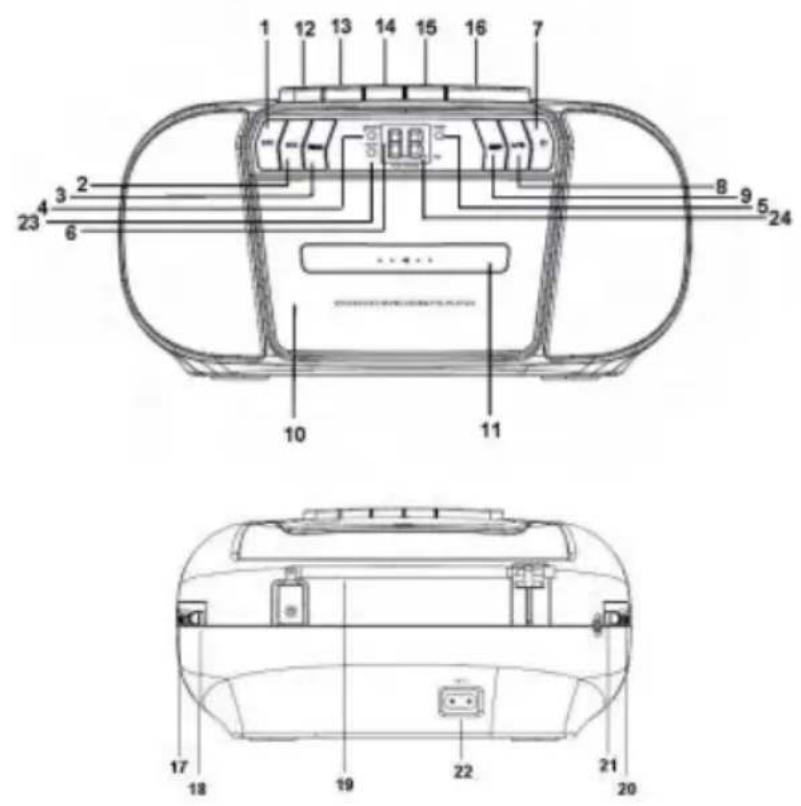
- Skip Backward 10. Cassette Door 17. Tuning
- Skip Forward 11. Cassette Case 18. Aux In
- Program 12. Pause 19. Telescopic Antenna
- Power Indicator 13. Stop/Eject 20. Volume
- LED Display 15. Fast Forward 22. AC power input
- Stop 16. Play 23. FM ST Indicator
- Play/Pause 24. Repeat Indicator
-
Repeat
-
Play/Program Indicator 14. Rewind 21. FM Mono/FM ST/TAPE OFF/CD(Aux)
natural_image
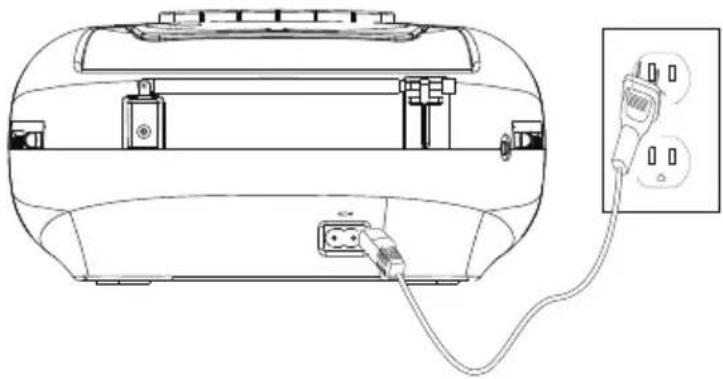
Line drawing of a device with attached plug and cable, no text or symbols presentInserting batteries (optional)
The unit can be operated either by AC power or batteries.
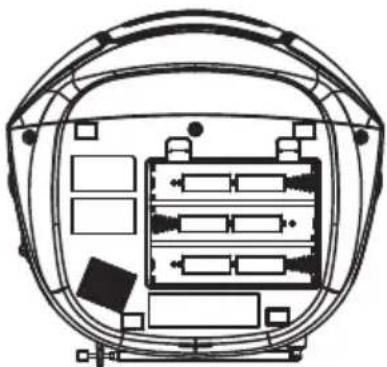
Note: When the battery power is low, the audio quality becomes a little distorted and normal volume level is reduced. Switch off the CD Cassette Boombox and replace the batteries.
natural_image
Technical line drawing of a helmet frame with internal compartments and mounting points (no text or symbols)Insert 6 "C" size (UM-2) batteries (not included), as illustrated in Fig.6.
Using your CD Cassette Boombox
Let's get started
Set a sound source
The FUNCTION selector is located on the side of the unit. Set the FUNCTION selector to different positions to select different sources, such as FM, Tape or CD.
Cassette playback
- Set the FUNCTION selector to the TAPE (OFF) position.
- Press the STOP/EJECT button to open cassette door, insert a cassette into the compartment and close the door
- Press the PLAY button, and adjust to the required volume level. When the tape comes to the end, the playback stops and the PLAY button automatically releases.
- During playback, to fast forward, press down the FAST FWD button. To rewind, press down the REWIND button. To stop playback, press the STOP/EJECT button.
- Press the PAUSE button to pause playback, and press again the PAUSE button to resume playback.
- To eject the cassette, press the STOP/EJECT button to stop playback, then press again the STOP/EJECT button to open the cassette compartment door. Then remove the cassette.
FM radio
- Set the FUNCTION selector to the FM ST. or FM MONO position.
- Adjust the sound level using the VOLUME control.
- Rotate the TUNING control to adjust radio frequency.
- To ensure best radio reception, fully extend the telescopic antenna should and rotate the telescopic antenna.
Using your CD Cassette Boombox
ALL RIGHTS RESERVED, COPYRIGHT DENVER A/S

denver.eu

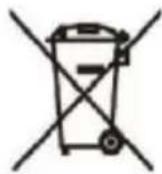

Electric and electronic equipment contains materials, components and substances that can be hazardous to your health and the environment, if the waste material (discarded electric and electronic equipment) is not handled correctly.
Electric and electronic equipment is marked with the crossed out trash can symbol, seen above. This symbol signifies that electric and electronic equipment should not be disposed of with other household waste, but should be disposed of separately.
All cities have established collection points, where electric and electronic equipment can either be submitted free of charge at recycling stations and other collection sites, or be collected from the households. Additional information is available at the technical department of your city.
Hereby, Denver A/S declares that the radio equipment type TCP-40 is in compliance with Directive 2014/53/EU. The full text of the EU declaration of conformity is available at the following internet address: denver.eu. and then click the search ICON on topline of website. Write modelnumber: TCP-40. Now enter product page, and red directive is found under downloads/other downloads
Operating Frequency Range: FM 8.75 - 108MHz Max Output Power: 2x1.1 W
Denver A/S
Omega 5A, Soeften
DK-8382 Hinnerup
Denmark
www.facebook.com/denver.eu
natural_image
Line drawing of a device with attached plug and cable, no text or symbols presentnatural_image
Technical line drawing of a helmet frame with internal compartments and mounting points (no text or symbols)Now enter product page, and red directive is found under downloads/other downloads
Driftsfrekvensområde:F M87. .5 - 108 MHz
natural_image
Line drawing of a device with attached plug and cable, no text or symbols presentnatural_image
Technical line drawing of a helmet frame with internal compartments and mounting points (no text or symbols)Now enter product page, and red directive is found under downloads/other downloads
natural_image
Line drawing of a device with attached plug and cable, no text or symbols presentnatural_image
Technical line drawing of a helmet frame with internal compartments and mounting points (no text or symbols)natural_image
Line drawing of a device with attached plug and socket, no text or symbols presentnatural_image
Technical line drawing of a helmet frame with internal compartments and mounting points (no text or symbols)natural_image
Line drawing of a device with attached plug and cable, no text or symbols presentInsertion des piles (en option)
natural_image
Technical line drawing of a helmet frame with internal compartments and mounting points (no text or symbols)natural_image
Line drawing of a device with attached plug and cable, no text or symbols presentInserimento batterie (opzionale)
natural_image
Technical line drawing of a helmet frame with internal compartments and mounting points (no text or symbols)Now enter product page, and red directive is found under downloads/other downloads
natural_image
Line drawing of a device with attached plug and cable, no text or symbols presentBatterijen installeren (optioneel)
natural_image
Technical line drawing of a helmet frame with internal compartments and mounting points (no text or symbols)Now enter product page, and red directive is found under downloads/other downloads
Frequentiebereik: FM 87.5 - 108 MHz
natural_image
Line drawing of a device with attached plug and cable, no text or symbols presentSette inn batterier (valgfritt)
natural_image
Technical line drawing of a helmet frame with internal compartments and mounting points (no text or symbols)natural_image
Line drawing of a device rear panel with connected plug and socket, shown with an inset showing two outlets (no text or symbols)natural_image
Top-down schematic of a vehicle headgear with internal compartments and mounting points (no text or labels)Now enter product page, and red directive is found under downloads/other downloads
natural_image
Line drawing of a device with attached plug and cable, no text or symbols presentnatural_image
Technical line drawing of a helmet frame with internal compartments and mounting points (no text or symbols)natural_image
Line drawing of a device with attached plug and cable, no text or symbols presentnatural_image
Technical line drawing of a helmet frame with internal compartments and mounting points (no text or symbols)- INSTRUCTION MANUAL
- Content
- Safety information
- TCP-40
- Getting to know your CD Cassette Boombox
- Inserting batteries (optional)
- Using your CD Cassette Boombox
- Set a sound source
- Cassette playback
- FM radio
- Insertion des piles (en option)
- Inserimento batterie (opzionale)
- Batterijen installeren (optioneel)
- Sette inn batterier (valgfritt)
Brand : DENVER
Model : TCP-40
Category : Hi-Fi System