
MCB-600 - Hi-Fi System DENVER - Free user manual and instructions
Find the device manual for free MCB-600 DENVER in PDF.


| Product type | Hi-Fi System |
| Brand | Denver |
| Model | MCB-600 |
| Dimensions (W x H x D) | Approx. 200 x 250 x 300 mm (each speaker) |
| Weight | Approx. 5 kg (total) |
| Power supply | 230 V ~ 50 Hz |
| Output power | 2 x 10W RMS |
| Main functions | CD player, FM tuner, Bluetooth, USB, AUX input |
| Audio inputs | AUX (3.5mm jack), USB |
| Headphone output | 3.5mm jack |
| Speakers | 2 passive speakers (not amplified) |
| Wireless connectivity | Bluetooth 5.0 |
| CD player | CD, CD-R, CD-RW |
| FM tuner | FM stereo with auto scan |
| USB port | MP3/WMA playback |
| Remote control | Included |
| Display | LED |
| Housing material | Plastic and wood (speakers) |
| Maintenance and cleaning | Clean with a soft, dry cloth. Do not use abrasive products. |
| Safety | Do not expose to moisture. Disconnect before cleaning. |
| Spare parts and repairability | Contact Denver customer service for replacement parts. |
Frequently Asked Questions - MCB-600 DENVER
User questions about MCB-600 DENVER
0 question about this device. Answer the ones you know or ask your own.
Ask a new question about this device
Download the instructions for your Hi-Fi System in PDF format for free! Find your manual MCB-600 - DENVER and take your electronic device back in hand. On this page are published all the documents necessary for the use of your device. MCB-600 by DENVER.
USER MANUAL MCB-600 DENVER
natural_image
Line drawing of three identical speaker units with front and back views, no text or symbols present.User Manual
EngLish
Panel
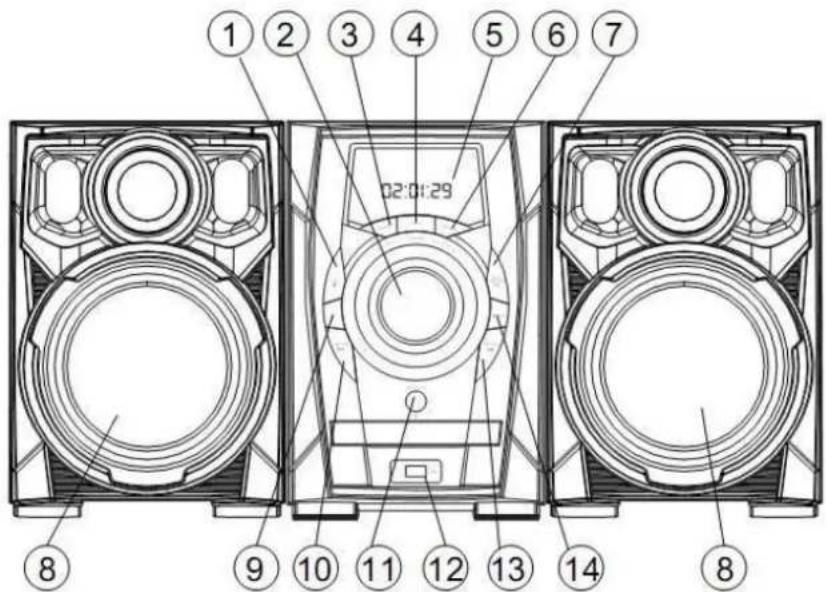
Front Panel:

1.STOP
2.VOLUME - Adjust the sound output of the amplifier
3.STANDBY - ON/OFF
4.MUTE – In play status, if mute button is pressed, the will be no audio output, the sound is eliminated
5.DISPLAY DIGITAL
6.FUNCTION - CD / FM / AUX / Bluetooth function conversion
7.PLAY/PAUSE/SCAN - Play a disc/press again to return to normal play/Automatically search for FM radio.
8.SPEAKER
9.EQ - Select a sound mode:DISCO, POP, ROCK, JAZZ, SOFT, HEAVY, FLAT.
10.PREV/CH- - When playing CD discs, press PREV to go to the previous chapter or e previous station.
- OPEN/CLOSE - Press OPEN/CLOSE button, the disc tray opens. Place the disc on the tray with the title facing up. Press OPEN/CLOSE again to close the disc tray.
12.USB PORT
- NEXT/CH+ - When playing CD discs, press NEXT to advance to the next chapter. When playing CD, MP3 discs, press NEXT to advance to the next track or to the next station
14.CD/USB - Press this button to switch the play between DISC and USB.
Rear panel:
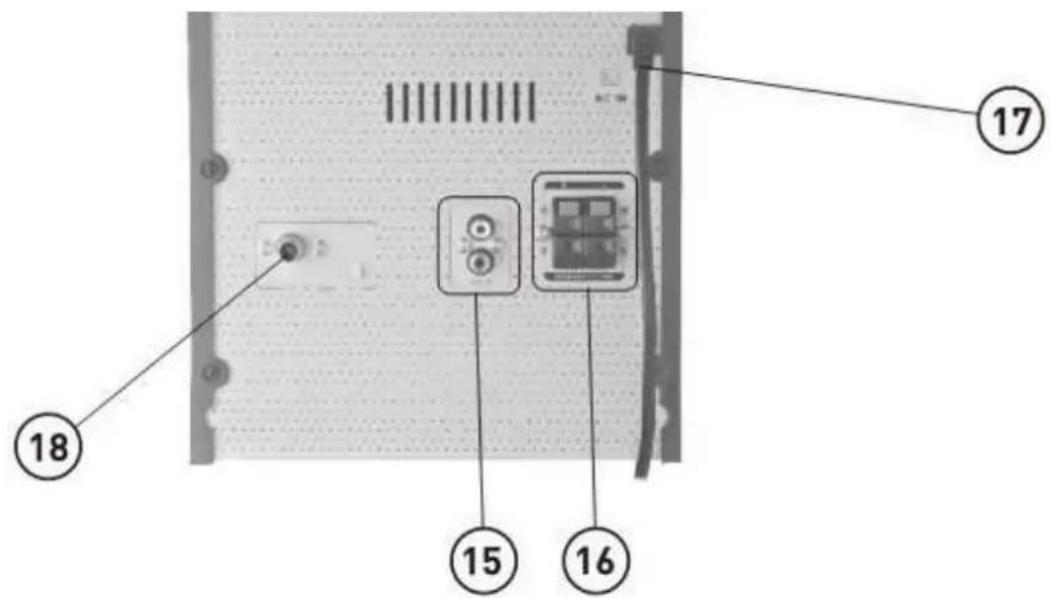
15.LINE IN
16.SPEAKER OUTPUT
17. POWER CORD
18.FM ANTENNA
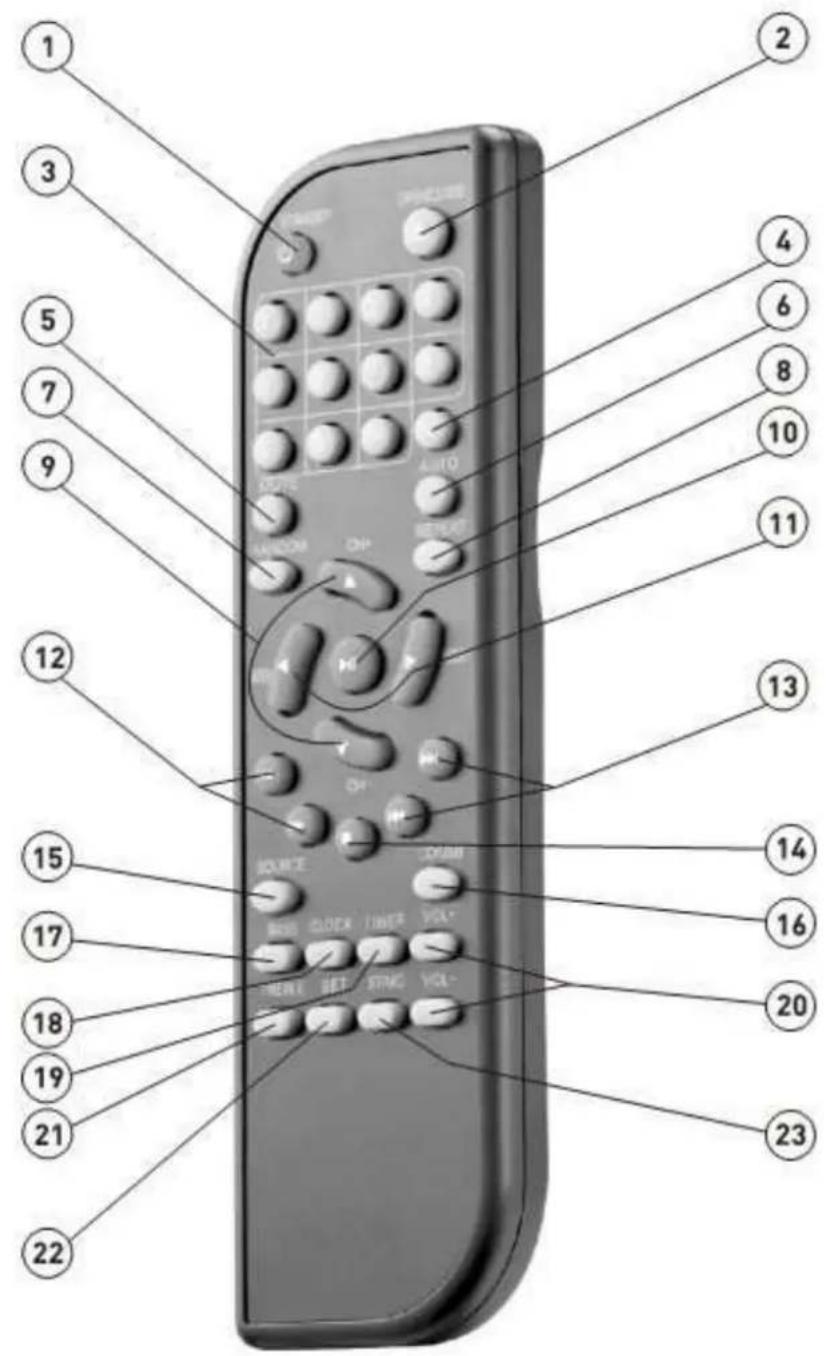
Remote Control

1.STANDBY- ON/OFF
WARNING: If the product is not to be used for long periods of time, ensure that you unplug it for safety reasons.
-
OPEN/CLOSE - Press OPEN/CLOSE button, the disc tray opens. Place the disc on the tray with the title facing up. Press OPEN/CLOSE again to close the disc tray.
-
NO. BUTTONS - When playing CD discs, after loading the disc, use the digit key to select the desired track or chapter directly. Press 10+ key and then another digit key to select a track with a greater than 10.
-
EQ - Select the sound mode:DISCO, POP, ROCK, JAZZ, SOFT, HEAVY, FLAT.
5.MUTE - Mute the amplifier output sound.
6.SCAN - Automatically search for FM radio.
- RANDOM - Press random and the CD player will shuffle the songs to play randomly.
8.REPEAT - When playing CD discs, the sequence is track repeat, all repeat, repeat cancel.
9.CH-/CH+ - When in FM radio mode, the PREV& NEXT station.
- PLAY/PAUSE - Play the disc/press PLAY/PAUSE again to return to normal play.
11.SEEK-/SEEK+ - When in FM radio mode, long press this button for backward & forward searching.
12.REV/FWD - Press this button for quick rewind & forward search.
13.PREV/NEXT - When playing CD discs, press PREV & NEXT to go to the previous or next track.
14.STOP - When playing a CD disc, press the stop, the unit will stop playing. Press the PLAY button to restart playback.
15.FUNCTION - CD / FM / Bluetooth /AUX function conversion.
16.CD/USB - Press this button to switch the play between CD and USB.
17.BASS - Press the BASS button and Press the Volume + - keys to change the bass level.
18.CLOCK - Press the CLOCK key once to display the clock, press twice and the hours will flash. Press up or down arrow keys to adjust the hour, Press three times and the minutes will flash. Press up or down arrow keys to adjust the minutes.
19.ALARM - Press ALARM once, the hours will flash, then press the arrow down key to set the hour. Press a second time, the minutes will flash and press, the arrow down key to set the minutes. Press OK three times to set the time and four times to cancel the setting.
20.VOL-+ Adjust the sound output of the amplifier.
21.TREBLE - Press the and then press the volume + - keys to change the treble level.
22.SLEEP - Press SLEEP once, the hours will flash, press the arrow down key to set the hour. Press twice and the minutes will flash, press the arrow down key to set the minutes and OK to confirm the time. Press four times to cancel the setting.
23.ST/MO - When playing CD discs, press R/L button to select the left, right channels or stereo.
Remote Control Operation
- Insert the batteries into the battery compartment. Aim the remote at the remote sensor on the front of the player. Ensure that there are no obstacles between the remote and the sensor. The distance between the remote and sensor must not exceed 5m.
- Take the batteries out of the remote control if it is not going to be used for a long time.
- It will be cancelled automatically within 10s after pressing CLOCK, ALARM and SLEEP.
Basic OPERATION
- Press the FUNCTION button to change between the different functions
Preset radio stations
- You can preset up to 20 FM stations.
A. Tune to your desired radio station (refer to "Tuning to radio station").
B. Use the numeric keypad (1-9, 10/0, 10+) to select the desired preset memory.
C. Press ENTER to store the radio station.
D. Repeat steps A-C to store other radio stations.
- Press SCAN button system automatically tuning top strong radio station and Store the radio station.
Listening to Preset Radio Stations
- Press CH+/- to select desired preset radio stations.
- Use the numeric keypad (1-9, 10/0, 10+) to select the desired preset memory.
Bluetooth function
-Press the FUNCTION button to change from Bluetooth and Radio mode.
-Then use your mobile phone to search for the bluetooth signal on the unit.
-When the device is requires to enter the identification code please enter "0000" to pair the unit.
-Once successfully connected, the unit will synchronise to play music from your mobile phone.
-When the bluetooth connection is frequently disturbed, the bluetooth connection should be be reconnected manually.
SPECIFICATION
Discs compatibility: CD/DA - MP3
Playback from USB: MP3 files
Bluetooth function
Intro or random function
FM/FM stereo radio
FM band: 87.5 – 108 MHz
PLL electronic tuner
20 radio channels preset
Max output 60W x 2
Power supply 230V - 50Hz
ALL RIGHTS RESERVED, COPYRIGHT DENVER ELECTRONICS A/S
DENVER®
www.denver-electronics.com

Electric and electronic equipment and included batteries contains materials, components and substances that can be hazardous to your health and the environment, if the waste material (discarded electric and electronic equipment and batteries) is not handled correctly.
Electric and electronic equipment and batteries is marked with the crossed out trash can symbol, seen below. This symbol signifies that electric and electronic equipment and batteries should not be disposed of with other household waste, but should be disposed of separately.
As the end user it is important that you submit your used batteries to the appropriate and designated facility. In this manner you make sure that the batteries are recycled in accordance with legislature and will not harm the environment.
All cities have established collection points, where electric and electronic equipment and batteries can either be submitted free of charge at recycling stations and other collection sites, or be collected from the households. Additional information is available at the technical department of your city.
Importer:
DENVER ELECTRONICS A/S
Stavneagervej 22,
DK-8250 EGAA
DENMARK
www.facebook.com/denverelectronics
Hereby, Inter Sales A/S, declares that this product (MCB-600) is in compliance with the essential requirements and other relevant provisions of Directive 1999/5/EC. A copy of the Declaration of conformity may be obtained at:
Inter Sales A/S
Stavneagervej 22,
DK-8250 Egaa
Denmark
DENVER MCB-600

natural_image
Line drawing of three identical speaker units with front and back views, no text or symbols present.- LINE IN
- H∅JTTALERUDGANG
- NETLEDNING
- FM ANTENNE
Fjernbetjening
natural_image
Line drawing of three identical audio/video sound amplifiers with no text or symbols1. STANDBY- ON/OFF
natural_image
Line drawing of three identical speaker units with circular heads and a digital display (no text or symbols)Bedienungsanleitung
German
Bedienelemente

Vorderansicht:
- LINE-EINGANG
- LAUTSPRECHERAUSGANG
- NETZKABEL
- UKW-ANTENNE
Fernbedienung
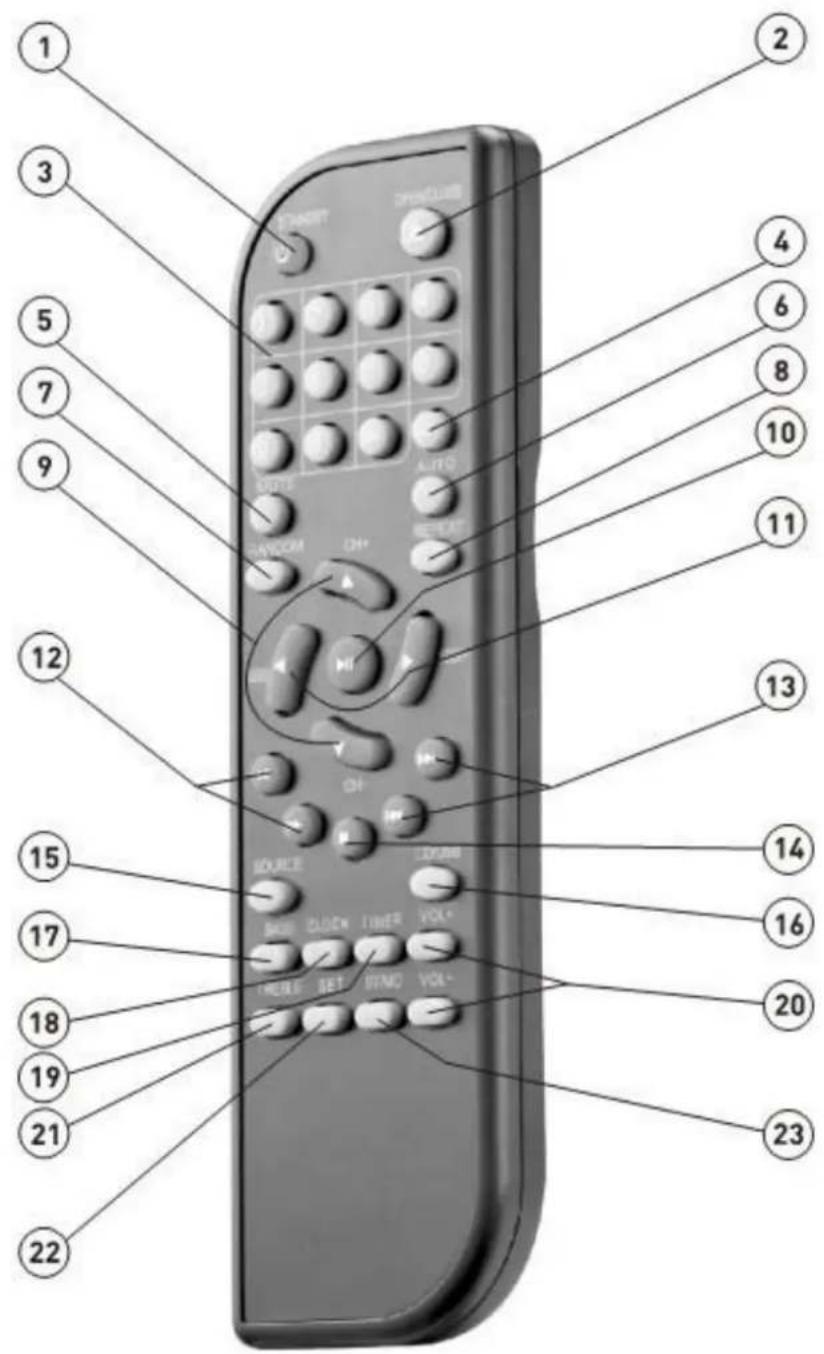
- STANDBY - EIN/AUS
natural_image
Line drawing of three identical speaker units with front and back views, no text or symbols present.47. EN ESPERA - ON/OFF
natural_image
Line drawing of three identical speaker units with circular heads and a digital display (no text or symbols)Bruksanvisning
Swedish
Panel

Främre panel:
- STANDBY - PÅ/AV
natural_image
Line drawing of three identical front-mounted speakers with digital display (no text or symbols)- WEJŚCIE LINII
- WYJŚCIE GŁOŚNIKA
- SZNUR ZASILAJACY
- ANTENA FM
Pilot
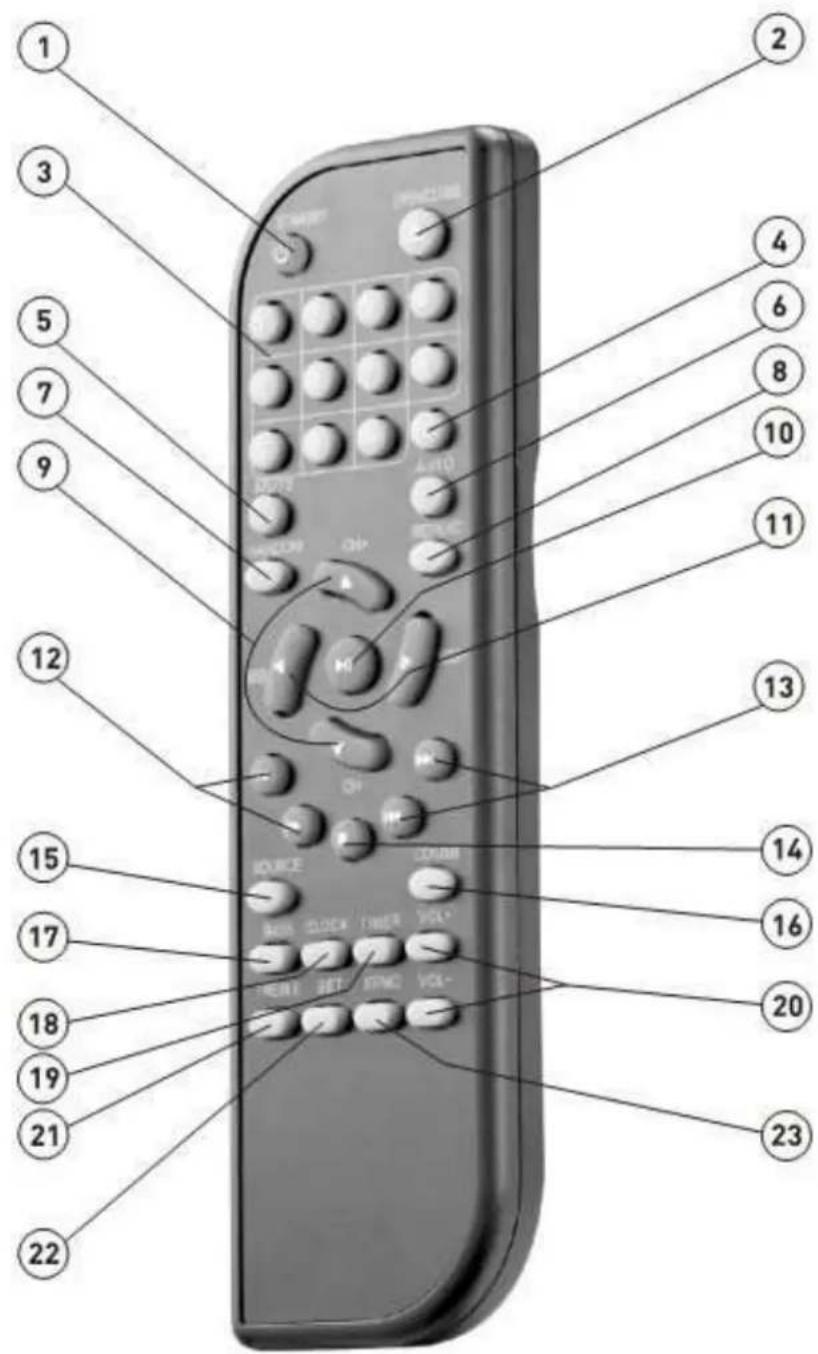
- STANDBY - ON/OFF (WŁĄCZONY/ WYŁĄCZONY)
natural_image
Line drawing of three identical front-mounted speakers with digital display (no text or symbols)Guide d'utilisation
French
Panneaux
Panneau avant :
- ENTREE HAUT-NIVEAU
- SORTIE D'ENCEINTE
- CORDON D'ALIMENTATION
- ANTENNE FM
Télécommande

natural_image
Line drawing of three identical speaker units with front, side, and top views (no text or symbols)Gebruikshandleiding
Dutch
Paneel

Voorpaneel:
- LIJN IN
- LUIDSPREKERUITGANG
- VOEDINGSKABEL
- FM-ANTENNE
Afstandsbediening

139. STAND-BY - AAN/UIT
natural_image
Line drawing of three identical speaker units with front, side, and top views (no text or symbols)Käyttöopas
Finnish
Paneeli
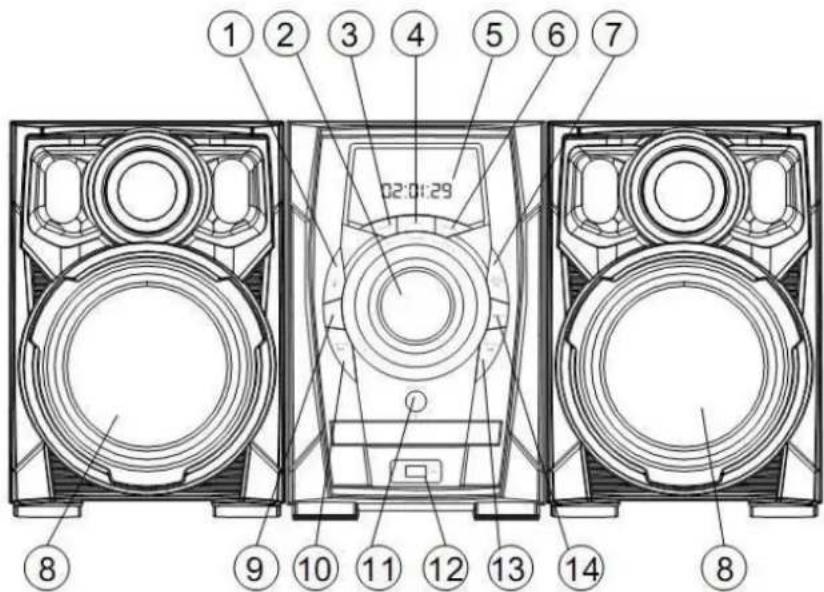
Etupaneeli:
- LINJA SISÄÄN
- KAIUTINLÄHTÖ
- VIRTAJOHTO
- FM-ANTENNI
Kaukosäädin


- User Manual
- Panel
- Front Panel:
- Remote Control
- 1.STANDBY- ON/OFF
- Remote Control Operation
- Basic OPERATION
- Preset radio stations
- Listening to Preset Radio Stations
- Bluetooth function
- SPECIFICATION
- DENVER®
- DENVER MCB-600
- Fjernbetjening
- STANDBY- ON/OFF
- Bedienungsanleitung
- Fernbedienung
- EN ESPERA - ON/OFF
- Bruksanvisning
- Främre panel:
- Pilot
- Guide d'utilisation
- Panneaux
- Télécommande
- Gebruikshandleiding
- Paneel
- Voorpaneel:
- Afstandsbediening
- STAND-BY - AAN/UIT
- Paneeli
- Etupaneeli:
- Kaukosäädin
Brand : DENVER
Model : MCB-600
Category : Hi-Fi System