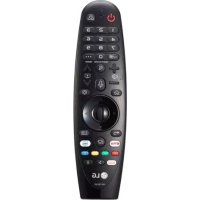
Magic Motion AN-MR200 - Remote control LG - Free user manual and instructions
Find the device manual for free Magic Motion AN-MR200 LG in PDF.


Pick your language and provide your email: we'll send you a specifically translated version.
| Product Type | Remote Control |
| Model | Magic Motion AN-MR200 |
| Brand | LG |
| Compatibility | Select LG Smart TVs (2016-2018 models) |
| Connectivity | Bluetooth, Infrared (IR) |
| Motion Control | Yes, with built-in gyroscope and accelerometer |
| Voice Control | Yes, with built-in microphone |
| Buttons | Navigation, Volume, Channel, Input, Smart, Settings, Number pad, Playback controls |
| Power Source | 2 x AA batteries (not included) |
| Battery Life | Approximately 6 months (typical usage) |
| Dimensions (W x H x D) | 1.8 x 6.5 x 1.2 inches (45 x 165 x 30 mm) |
| Weight (with batteries) | Approx. 3.5 oz (100 g) |
| Range | Up to 30 feet (10 meters) via Bluetooth |
| Operating Temperature | 32°F to 104°F (0°C to 40°C) |
| Cleaning | Wipe with a soft, dry cloth. Do not use liquids or cleaners. |
| Safety | Keep away from moisture and heat sources. Remove batteries if not used for extended periods. |
| Spare Parts / Repairability | Battery compartment cover is replaceable; otherwise, not user-serviceable. Contact LG support for issues. |
| Certifications | CE, FCC, RoHS |
Frequently Asked Questions - Magic Motion AN-MR200 LG
How do I pair the LG Magic Motion AN-MR200 remote with my TV?
Insert two AA batteries, then press and hold the Smart and Settings buttons simultaneously for 3 seconds. The remote will enter pairing mode. On the TV, go to Settings > General > External Devices > Magic Remote > Pair. Follow on-screen instructions.
What batteries does the AN-MR200 use and how long do they last?
The remote uses two AA batteries (alkaline recommended). Typical battery life is approximately 6 months with normal usage. Replace when the remote becomes unresponsive or the battery indicator appears on screen.
Can I use the Magic Motion remote with any LG TV?
No, the AN-MR200 is compatible with select LG Smart TV models from 2016-2018. Check your TV's compatibility list or try pairing. If not compatible, the remote may work via IR but without motion/voice features.
How do I reset the LG Magic Motion remote?
Remove the batteries, press and hold the Power button for 10 seconds to discharge capacitors, then reinsert batteries. If still issues, re-pair the remote with the TV.
Why is the motion cursor not working?
Ensure the remote is paired via Bluetooth (IR-only mode does not support motion). Check battery level, and make sure no obstructions are blocking the line of sight. Re-pair if necessary.
Can I use the voice control feature without a microphone?
No, the voice control requires the built-in microphone. The remote must be paired and the TV's voice recognition feature enabled. Speak into the microphone near the top of the remote.
How do I clean the remote control?
Wipe with a soft, dry cloth. Do not use water, cleaning fluids, or abrasive materials. Remove batteries before cleaning to avoid accidental button presses.
What is the range of the AN-MR200 remote?
The remote operates via Bluetooth with a range of up to 30 feet (10 meters) in open space. For IR functions, the range is shorter and requires line of sight.
My remote is not working at all. What should I do?
First, replace the batteries with fresh ones. If still not working, check if the TV's IR sensor is blocked. Try re-pairing the remote. If the issue persists, reset the remote (remove batteries, hold Power button). Contact LG support if needed.
Can I replace the battery cover if it breaks?
Yes, replacement battery covers for the AN-MR200 can be ordered from LG spare parts or third-party sellers. However, the remote itself is not field-repairable for internal issues.
User questions about Magic Motion AN-MR200 LG
0 question about this device. Answer the ones you know or ask your own.
Ask a new question about this device
No questions yet. Be the first to ask one.
Download the instructions for your Remote control in PDF format for free! Find your manual Magic Motion AN-MR200 - LG and take your electronic device back in hand. On this page are published all the documents necessary for the use of your device. Magic Motion AN-MR200 by LG.