
ECOSYS M2540dn - Printer KYOCERA - Free user manual and instructions
Find the device manual for free ECOSYS M2540dn KYOCERA in PDF.


| Product Type | Monochrome Laser Printer |
| Model | ECOSYS M2540dn |
| Brand | Kyocera |
| Functions | Print, Copy, Scan, Fax (optional) |
| Print Speed | Up to 40 ppm (A4) |
| Print Resolution | 1200 x 1200 dpi |
| Duplex Printing | Automatic (standard) |
| Paper Input Capacity | 250-sheet cassette + 50-sheet multipurpose tray |
| Paper Output Capacity | 150 sheets face-down |
| Media Sizes Supported | A4, A5, A6, B5, Letter, Legal, Custom (up to 216 x 356 mm) |
| Processor | ARM Cortex-A9 1.2 GHz |
| Memory | 512 MB (standard) |
| Display | 5-line LCD with backlight |
| Connectivity | USB 2.0, Gigabit Ethernet, optional Wi-Fi |
| Network Protocols | TCP/IP, Bonjour, HTTP, FTP, SMTP, SMB, IPP |
| Mobile Printing | AirPrint, Mopria, Kyocera Mobile Print |
| Security Features | User login, job accounting, IPsec, SSL/TLS, secure printing |
| Toner Model | TK-1150 (yield approx. 12,000 pages) |
| Drum Life | Approx. 100,000 pages |
| Power Consumption | Printing: 560W, Standby: 42W, Sleep: 1.2W |
| Power Supply | AC 220-240V, 50/60Hz |
| Dimensions (W x D x H) | 375 x 393 x 267 mm |
| Weight | Approx. 11.5 kg |
| Noise Level | Printing: 49 dB(A), Standby: 28 dB(A) |
| Operating Temperature | 10°C to 32.5°C |
| Certifications | ENERGY STAR, CE, RoHS |
| Warranty | 1 year standard (varies by region) |
Frequently Asked Questions - ECOSYS M2540dn KYOCERA
User questions about ECOSYS M2540dn KYOCERA
0 question about this device. Answer the ones you know or ask your own.
Ask a new question about this device
Download the instructions for your Printer in PDF format for free! Find your manual ECOSYS M2540dn - KYOCERA and take your electronic device back in hand. On this page are published all the documents necessary for the use of your device. ECOSYS M2540dn by KYOCERA.
USER MANUAL ECOSYS M2540dn KYOCERA
natural_image
Exterior view of a Kyocera printer with control panel and display screen (no visible text or symbols on the device itself)Indledning
Energy Star-programmet (ENERGY STAR®) 1-14
Indstillinger for besked for Status Monitor 4-14
Configuration Tool 4-15
Adgang til Configuration Tool 4-15
Lukning af Configuration Tool 4-16
Fortsat scanning 6-17
Farvevalg 6-17
Filformat 6-18
E-mail emne/tekst 6-19
Du kan opnå fjernadgang til maskinen for at udskrive, sende eller downloade data.
Administratorer kan konfigurere maskinadfærden eller administrationsindstillingerne.
Command Center RX (side 2-38)
Safety Guide (ECOSYS M2135dn/ECOSYS M2635dn/ECOSYS M2635dw/ECOSYS M2040dn/ECOSYS M2540dn/ECOSYS M2540dw)
Fortsat scanning (side 6-17)
Filformat (side 6-18)
System Menu/ Counter


| Rapport | Udskr. rapport | Menuoversigt (Se engelsk Operation Guide) |
| Statusside (Se engelsk Operation Guide) | ||
| Skrifttypeliste (Se engelsk Operation Guide) | ||
| Adm. rap.indstil (Se Betjeningsvejledning vedrørende fax.) | ||
| Resultatrapport (Se engelsk Operation Guide) | ||
| Joblog-historie | Auto Sender (Se engelsk Operation Guide) | |
| Sende-historie (Se engelsk Operation Guide) | ||
| Destination (Se engelsk Operation Guide) | ||
| Emne (Se engelsk Operation Guide) | ||
| Personoplysning (Se engelsk Operation Guide) | ||
| Tæller (side 2-37) | ||
| System/netværk | Netværksindst. | Værtsnavn (Se engelsk Operation Guide) | ||
| Wi-Fi Direct sæt Wi-Fi Direct (Se engelsk Operation Guide) | Engelsk Operation Guide) | |||
| Enhedsnavn (Se engelsk Operation Guide) | ||||
| IP-adresse (Se engelsk Operation Guide) | ||||
| Auto frakobling (Se engelsk Operation Guide) | ||||
| Wi-Fi indstilling Wi-Fi (Se engelsk Operation Guide) | ||||
| Opsætning (Se engelsk Operation Guide) | ||||
| TCP/IP-indstill. (Se engelsk Operation Guide) | ||||
| Genstart netv. (Se engelsk Operation Guide) | ||||
| Kablet netv.i ind. TCP/IP-indstill. | (Se engelsk Operation Guide) | |||
| LAN interface (Se engelsk Operation Guide) | ||||
| Bonjour (Se engelsk Operation Guide) | ||||
| IPSec (Se engelsk Operation Guide) | ||||
| Protokolindst. (Se engelsk Operation Guide) | ||||
| Sikkerhedsindst. (Se engelsk Operation Guide) | ||||
| Ping (Se engelsk Operation Guide) | ||||
| Genstart netværksdelen (Se engelsk Operation Guide) | ||||
| Primært netværk (Se engelsk Operation Guide) | ||||
| Indst. I.F. blok | USB-vært (Se engelsk Operation Guide) | |||
| USB-enhed (Se engelsk Operation Guide) | ||||
| USB-lagring (Se engelsk Operation Guide) | ||||
| Sikkerhedsniveau (Se engelsk Operation Guide) | ||||
| Genstart (Se engelsk Operation Guide) | ||||
| Ekstra funktion (Se engelsk Operation Guide) | ||||
| FAX-serverindst. (Se engelsk Operation Guide) | ||||
| Bruger/job-konto | Brugerlogon | Brugerlogon (Se engelsk Operation Guide) | ||
| Lokal brugerlist (Se engelsk Operation Guide) | ||||
| Kontospærring (Se engelsk Operation Guide) | ||||
| ID-kort indstil. Tastatur login (Se engelsk Operation Guide) | Eksstra gokend. (Se engelsk Operation Guide) | |||
| Gruppegodkend. (Se engelsk Operation Guide) | ||||
| Inst. gæst godk. (Se engelsk Operation Guide) | ||||
| PIN login (Se engelsk Operation Guide) | ||||
| NW brugeregensk. (Se engelsk Operation Guide) | ||||
| Jobregnskab | Jobregnskab (Se engelsk Operation Guide) | |||
| RegnskabAdgang (Se engelsk Operation Guide) | ||||
| Kontoliste (Se engelsk Operation Guide) | ||||
| Samlet regnskab (Se engelsk Operation Guide) | ||||
| Hver jobkonto (Se engelsk Operation Guide) | ||||
| Kontoliste (Se engelsk Operation Guide) | ||||
| Std. indstil. Angiv grænse (Se engelsk Operation Guide) | ||||
| Kopi/udskrifttæl (Se engelsk Operation Guide) | ||||
| Tællergrænse (Se engelsk Operation Guide) | ||||
| Ukendt bruger | Ukendt id-job (Se engelsk Operation Guide) | |||
| Brugeregenskab (Se engelsk Operation Guide) | ||||
| Brugeregenskab (Se engelsk Operation Guide) | ||||
| Generelt | Sprog (Se engelsk Operation Guide) | |||
| Std. skærm (Se engelsk Operation Guide) | ||||
| Lyd | Brummer (Se engelsk Operation Guide) | |||
| FAX højttaler (Se Betjeningsvejledning vedrørende fax.) | ||||
| FAX monitor (Se Betjeningsvejledning vedrørende fax.) | ||||
| Skærmlysstyrke (Se engelsk Operation Guide) | ||||
| Generelt | Orig/papir indst | Bru.def orig.str (Se engelsk Operation Guide) | ||
| Reg.orig.(DP) (Se engelsk Operation Guide) | ||||
| Std. Orig.-str (Se engelsk Operation Guide) | ||||
| Bru.def papirstr (Se engelsk Operation Guide) | ||||
| Indst. kass. 1 Kassette 1 form. | (Se engelsk Operation Guide) | |||
| Kassette 1 type (Se engelsk Operation Guide) | ||||
| Indst. kass. 2 Kassette 2 form. | (Se engelsk Operation Guide) | |||
| Kassette 2 type (Se engelsk Operation Guide) | ||||
| Indst. kass. 3 Kassette 3 form. | (Se engelsk Operation Guide) | |||
| Kassette 3 type (Se engelsk Operation Guide) | ||||
| Multifunkt.bakke MP-bakkestr. | (Se engelsk Operation Guide) | |||
| MP-bakketype (Se engelsk Operation Guide) | ||||
| Medietype (Se engelsk Operation Guide) | ||||
| Medie til Auto (Se engelsk Operation Guide) | ||||
| Std. papirkilde (Se engelsk Operation Guide) | ||||
| Spec. papir hand. (Se engelsk Operation Guide) | ||||
| Meddelelse for papirindstilling (Se engelsk Operation Guide) | ||||
| Forvalgt grænse (Se engelsk Operation Guide) | ||||
| Mål (Se engelsk Operation Guide) | ||||
| Fejlhåndtering | Dupl.papirfejl (Se engelsk Operation Guide) | |||
| Fejl v.papirvalg (Se engelsk Operation Guide) | ||||
| Datoindst. | Dato/klokkeslæt (Se engelsk Operation Guide) | |||
| Datoformat (Se engelsk Operation Guide) | ||||
| Tidszone (Se engelsk Operation Guide) | ||||
| Sommertid (Se engelsk Operation Guide) | ||||
| Generelt | Timer indst. | Auto.nulstil. (Se engelsk Operation Guide) | ||
| Nuls. paneltimer (Se engelsk Operation Guide) | ||||
| Dvaleniveau (Modeller uden for Europa) (Se engelsk Operation Guide) | ||||
| Dvaleregler (Europæiske modeller) (Se engelsk Operation Guide) | ||||
| Dvaletimer (Se engelsk Operation Guide) | ||||
| Tænd/sluk regel (Europæiske modeller) (Se engelsk Operation Guide) | ||||
| Tænd/sluk timer (Europæiske modeller) (Se engelsk Operation Guide) | ||||
| Auto. fejlslet. Ryd (Se engelsk Operation Guide) | ||||
| Timer Ryd timer (Se engelsk Operation Guide) | ||||
| Ubrugelig tid (Se Betjeningsvejledning vedrørende fax.) | ||||
| Ping Timeout (Se engelsk Operation Guide) | ||||
| Funktionsstd. | Farvevalg (Se engelsk Operation Guide) | |||
| Scan-opløsning (Se engelsk Operation Guide) | ||||
| Fax opløsning (Se Betjeningsvejledning vedrørende fax) | ||||
| Orig.bille(kopi) (Se engelsk Operation Guide) | ||||
| Orig.bille(send) (Se engelsk Operation Guide) | ||||
| Zoom (Se engelsk Operation Guide) | ||||
| Sorter (Se engelsk Operation Guide) | ||||
| Original retning (Se engelsk Operation Guide) | ||||
| Baggr.(Kopi) (Se engelsk Operation Guide) | ||||
| Baggr.(Send) (Se engelsk Operation Guide) | ||||
| EcoPrint (Se engelsk Operation Guide) | ||||
| Drop blank(Kopi) (Se engelsk Operation Guide) | ||||
| Drop Blank(Send) (Se engelsk Operation Guide) | ||||
| Angiv filnavn (Se engelsk Operation Guide) | ||||
| Email-emne/tekst (Se engelsk Operation Guide) | ||||
| Con.scan-kopiér (Se engelsk Operation Guide) | ||||
| FortScan-Fax (Se engelsk Operation Guide) | ||||
| Con.scan-andre (Se engelsk Operation Guide) | ||||
| Filformat (Se engelsk Operation Guide) | ||||
| Filadskillelse (Se engelsk Operation Guide) | ||||
| JPEG/TIFF udskr. (Se engelsk Operation Guide) | ||||
| XPS tilpas side (Se engelsk Operation Guide) | ||||
| Detalje-indstil. 2-på-1 layout (Se engelsk Operation Guide) | ||||
| Generelt | Funktionsstd. | Detalje-indstil. | 4-på-1 layout (Se engelsk Operation Guide) | |
| Kantlinje (Se engelsk Operation Guide) | ||||
| Orig. behandling (Se engelsk Operation Guide) | ||||
| Efterbehand. (Se engelsk Operation Guide) | ||||
| Billedkvalitet (Se engelsk Operation Guide) | ||||
| Farve TIFF-komp. (Se engelsk Operation Guide) | ||||
| PDF/A (Se engelsk Operation Guide) | ||||
| Højt.komp.PDF (Se engelsk Operation Guide) | ||||
| Sort Lvl(Kopi) (Se engelsk Operation Guide) | ||||
| Sort Lvl(Send) (Se engelsk Operation Guide) | ||||
| Login operation (Se engelsk Operation Guide) | ||||
| RAM-disk (Se engelsk Operation Guide) | ||||
| Formater SD-kort (Se engelsk Operation Guide) | ||||
| Generelt | Ekstra hukomm. (Se engelsk Operation Guide) | |||
| Disp. Status/Log (Se engelsk Operation Guide) | ||||
| USB-tastaturtype (Se engelsk Operation Guide) | ||||
| Alarm lav toner (Se engelsk Operation Guide) | ||||
| Vis PowerOffMsg (Se engelsk Operation Guide) | ||||
| Sæt energi.tils. | Gendannelsesniv. (Se engelsk Operation Guide) | |||
| Kopi | Papirvalg (Se engelsk Operation Guide) | |||
| Aut. papirvalg (Se engelsk Operation Guide) | ||||
| Auto % prioritet (Se engelsk Operation Guide) | ||||
| Dok.fød. læsning (Se engelsk Operation Guide) | ||||
| Definer Valgtast (Se engelsk Operation Guide) | ||||
| Printer | Vælg emulering (Se engelsk Operation Guide) | |||
| EcoPrint (Se engelsk Operation Guide) | ||||
| Oversk. A4/Lett. (Se engelsk Operation Guide) | ||||
| Duplex (Se engelsk Operation Guide) | ||||
| Kopier (Se engelsk Operation Guide) | ||||
| Retning (Se engelsk Operation Guide) | ||||
| Bred A4 (Se engelsk Operation Guide) | ||||
| FormFeed TimeOut (Se engelsk Operation Guide) | ||||
| LF-handling (Se engelsk Operation Guide) | ||||
| CR-handling (Se engelsk Operation Guide) | ||||
| Jobnavn (Se engelsk Operation Guide) | ||||
| Brugernavn (Se engelsk Operation Guide) | ||||
| MFBak. Prioritet (Se engelsk Operation Guide) | ||||
| Papirføder-måde (Se engelsk Operation Guide) | ||||
| Autoskift (Se engelsk Operation Guide) | ||||
| Opløsning (Se engelsk Operation Guide) | ||||
| KIR (Se engelsk Operation Guide) | ||||
| Send | Definer Valgtast (Se engelsk Operation Guide) | |||
| TjekModtager (Se engelsk Operation Guide) | ||||
| Ny dest.indtast. Indtast (Se engelsk Operation Guide) | ||||
| Tilbagekald dest. (Se engelsk Operation Guide) | ||||
| Std. skærm (Se engelsk Operation Guide) | ||||
| Send og videres. (Se engelsk Operation Guide) | ||||
| Fax (Se Betjeningsvejledning vedrørende fax) | ||||
| Dokumentboks | Underadresseboks (Se Betjeningsvejledning vedrørende fax.) | |||
| Jobboks | Hurtige kopier (Se engelsk Operation Guide) | |||
| Slet jobtilb.h. (Se engelsk Operation Guide) | ||||
| Pollingboks (Se Betjeningsvejledning vedrørende fax.) | ||||
| Definer Valgtast (Se engelsk Operation Guide) | ||||
| Rediger modtager | Adressebog (Se engelsk Operation Guide) | |||
| Udskr. liste (Se engelsk Operation Guide) | ||||
| AdrBogStandard (Se engelsk Operation Guide) | ||||
| Justér/servicér | Just. kopitæthed (Se engelsk Operation Guide) | |||
| Send/boks-tæthed (Se engelsk Operation Guide) | ||||
| Kontrast (kopi) (Se engelsk Operation Guide) | ||||
| Kontrast (send) (Se engelsk Operation Guide) | ||||
| Baggrundstæthed (Se engelsk Operation Guide) | ||||
| Udskr.tæthed (Se engelsk Operation Guide) | ||||
| Autom.farvekorr. (Se engelsk Operation Guide) | ||||
| Korrig. streger (Se engelsk Operation Guide) | ||||
| Serviceindst. (Se engelsk Operation Guide) | ||||
Energy Star-programmet (ENERGY STAR®) 1-14
Generel bemærkning
CLASS 1 LASER PRODUCT
KLASSE 1 LASER PRODUKT
This product contains GPL (http://www.gnu.org/licenses/gpl.html) and/or LGPL (http://www.gnu.org/licenses/lgpl.html) software as part of its firmware. You can get the source code, and you are permitted to copy, redistribute and modify it under the terms of GPL/LGPL. Se http://www.kyoceradocumentsolutions.com/gpl/. for yderligere oplysninger, herunder om kildekodens tilgængelighed.
OpenSSL License
Copyright (c) 1998-2006 The OpenSSL Project. All rights reserved.
Redistribution and use in source and binary forms, with or without modification, are permitted provided that the following conditions are met:
- Redistributions of source code must retain the above copyright notice, this list of conditions and the following disclaimer.
- Redistributions in binary form must reproduce the above copyright notice, this list of conditions and the following disclaimer in the documentation and/or other materials provided with the distribution.
- All advertising materials mentioning features or use of this software must display the following acknowledgment: "This product includes software developed by the OpenSSL Project for use in the OpenSSL Toolkit. (http://www.openssl.org/)"
- The names "OpenSSL Toolkit" and "OpenSSL Project" must not be used to endorse or promote products derived from this software without prior written permission. For written permission, please contact openssl-core@openssl.org.
- Products derived from this software may not be called "OpenSSL" nor may "OpenSSL" appear in their names without prior written permission of the OpenSSL Project.
- Redistributions of any form whatsoever must retain the following acknowledgment: "This product includes software developed by the OpenSSL Project for use in the OpenSSL Toolkit (http://www.openssl.org/)
THIS SOFTWARE IS PROVIDED BY THE OpenSSL PROJECT "AS IS" AND ANY EXPRESSED OR IMPLIED WARRANTIES, INCLUDING, BUT NOT LIMITED TO, THE IMPLIED WARRANTIES OF MERCHANTABILITY AND FITNESS FOR A PARTICULAR PURPOSE ARE DISCLAIMED. IN NO EVENT SHALL THE OpenSSL PROJECT OR ITS CONTRIBUTORS BE LIABLE FOR ANY DIRECT, INDIRECT, INCIDENTAL, SPECIAL, EXEMPLARY, OR CONSEQUENTIAL DAMAGES (INCLUDING, BUT NOT LIMITED TO, PROCUREMENT OF SUBSTITUTE GOODS OR SERVICES; LOSS OF USE, DATA, OR PROFITS; OR BUSINESS INTERRUPTION) HOWEVER CAUSED AND ON ANY THEORY OF LIABILITY, WHETHER IN CONTRACT, STRICT LIABILITY, OR TORT (INCLUDING NEGLIGENCE OR OTHERWISE) ARISING IN ANY WAY OUT OF THE USE OF THIS SOFTWARE, EVEN IF ADVISED OF THE POSSIBILITY OF SUCH DAMAGE.
Original SSLeay License
Copyright (C) 1995-1998 Eric Young (eay@cryptsoft.com) All rights reserved.
This package is an SSL implementation written by Eric Young (eay@cryptsoft.com). The implementation was written so as to conform with Netscapes SSL.
This library is free for commercial and non-commercial use as long as the following conditions are aheared to. The following conditions apply to all code found in this distribution, be it the RC4, RSA, Ihash, DES, etc., code; not just the SSL code. The SSL documentation included with this distribution is covered by the same copyright terms except that the holder is Tim Hudson (tjh@cryptsoft.com).
Copyright remains Eric Young's, and as such any Copyright notices in the code are not to be removed.
If this package is used in a product, Eric Young should be given attribution as the author of the parts of the library used.
This can be in the form of a textual message at program startup or in documentation (online or textual) provided with the package.
Redistribution and use in source and binary forms, with or without modification, are permitted provided that the following conditions are met:
- Redistributions of source code must retain the copyright notice, this list of conditions and the following disclaimer.
- Redistributions in binary form must reproduce the above copyright notice, this list of conditions and the following disclaimer in the documentation and/or other materials provided with the distribution.
- All advertising materials mentioning features or use of this software must display the following acknowledgement: "This product includes cryptographic software written by Eric Young (eay@cryptsoft.com)"
The word 'cryptographic' can be left out if the routines from the library being used are not cryptographic related :-). - If you include any Windows specific code (or a derivative thereof) from the apps directory (application code) you must include an acknowledgement: "This product includes software written by Tim Hudson (tjh@cryptsoft.com)"
THIS SOFTWARE IS PROVIDED BY ERIC YOUNG "AS IS" AND ANY EXPRESS OR IMPLIED WARRANTIES, INCLUDING, BUT NOT LIMITED TO, THE IMPLIED WARRANTIES OF MERCHANTABILITY AND FITNESS FOR A PARTICULAR PURPOSE ARE DISCLAIMED. IN NO EVENT SHALL THE AUTHOR OR CONTRIBUTORS BE LIABLE FOR ANY DIRECT, INDIRECT, INCIDENTAL, SPECIAL, EXEMPLARY, OR CONSEQUENTIAL DAMAGES (INCLUDING, BUT NOT LIMITED TO, PROCUREMENT OF SUBSTITUTE GOODS OR SERVICES; LOSS OF USE, DATA, OR PROFITS; OR BUSINESS INTERRUPTION) HOWEVER CAUSED AND ON ANY THEORY OF LIABILITY, WHETHER IN CONTRACT, STRICT LIABILITY, OR TORT (INCLUDING NEGLIGENCE OR OTHERWISE) ARISING IN ANY WAY OUT OF THE USE OF THIS SOFTWARE, EVEN IF ADVISED OF THE POSSIBILITY OF SUCH DAMAGE.
The licence and distribution terms for any publicly available version or derivative of this code cannot be changed. i.e. this code cannot simply be copied and put under another distribution licence [including the GNU Public Licence.]
Monotype Imaging License Agreement
1 Software shall mean the digitally encoded, machine readable, scalable outline data as encoded in a special format as well as the UFST Software.
2 You agree to accept a non-exclusive license to use the Software to reproduce and display weights, styles and versions of letters, numerals, characters and symbols (Typefaces) solely for your own customary business or personal purposes at the address stated on the registration card you return to Monotype Imaging. Under the terms of this License Agreement, you have the right to use the Fonts on up to three printers. If you need to have access to the fonts on more than three printers, you need to acquire a multiuser license agreement which can be obtained from Monotype Imaging. Monotype Imaging retains all rights, title and interest to the Software and Typefaces and no rights are granted to you other than a License to use the Software on the terms expressly set forth in this Agreement.
3 To protect proprietary rights of Monotype Imaging, you agree to maintain the Software and other proprietary information concerning the Typefaces in strict confidence and to establish reasonable procedures regulating access to and use of the Software and Typefaces.
4 You agree not to duplicate or copy the Software or Typefaces, except that you may make one backup copy. You agree that any such copy shall contain the same proprietary notices as those appearing on the original.
5 This License shall continue until the last use of the Software and Typefaces, unless sooner terminated. This License may be terminated by Monotype Imaging if you fail to comply with the terms of this License and such failure is not remedied within thirty (30) days after notice from Monotype Imaging. When this License expires or is terminated, you shall either return to Monotype Imaging or destroy all copies of the Software and Typefaces and documentation as requested.
6 You agree that you will not modify, alter, disassemble, decrypt, reverse engineer or decompile the Software.
7 Monotype Imaging warrants that for ninety (90) days after delivery, the Software will perform in accordance with Monotype Imaging-published specifications, and the diskette will be free from defects in material and workmanship. Monotype Imaging does not warrant that the Software is free from all bugs, errors and omissions.
The parties agree that all other warranties, expressed or implied, including warranties of fitness for a particular purpose and merchantability, are excluded.
8 Your exclusive remedy and the sole liability of Monotype Imaging in connection with the Software and Typefaces is repair or replacement of defective parts, upon their return to Monotype Imaging.
In no event will Monotype Imaging be liable for lost profits, lost data, or any other incidental or consequential damages, or any damages caused by abuse or misapplication of the Software and Typefaces.
9 Massachusetts U.S.A. law governs this Agreement.
10 You shall not sublicense, sell, lease, or otherwise transfer the Software and/or Typefaces without the prior written consent of Monotype Imaging.
11 Use, duplication or disclosure by the Government is subject to restrictions as set forth in the Rights in Technical Data and Computer Software clause at FAR 252-227-7013, subdivision (b)(3)(ii) or subparagraph (c)(1)(ii), as appropriate. Further use, duplication or disclosure is subject to restrictions applicable to restricted rights software as set forth in FAR 52.227-19 (c)(2).
12 You acknowledge that you have read this Agreement, understand it, and agree to be bound by its terms and conditions. Neither party shall be bound by any statement or representation not contained in this Agreement. No change in this Agreement is effective unless written and signed by properly authorized representatives of each party. By opening this diskette package, you agree to accept the terms and conditions of this Agreement.
Knopflerfish License
This product includes software developed by the Knopflerfish Project. http://www.knopflerfish.org
Copyright 2003-2010 The Knopflerfish Project. All rights reserved.
Redistribution and use in source and binary forms, with or without modification, are permitted provided that the following conditions are met:
- Redistributions of source code must retain the above copyright notice, this list of conditions and the following disclaimer.
- Redistributions in binary form must reproduce the above copyright notice, this list of conditions and the following disclaimer in the documentation and/or other materials provided with the distribution.
- Neither the name of the KNOPFLERFISH project nor the names of its contributors may be used to endorse or promote products derived from this software without specific prior written permission.
THIS SOFTWARE IS PROVIDED BY THE COPYRIGHT HOLDERS AND CONTRIBUTORS "AS IS" AND ANY EXPRESS OR IMPLIED WARRANTIES, INCLUDING, BUT NOT LIMITED TO, THE IMPLIED WARRANTIES OF MERCHANTABILITY AND FITNESS FOR A PARTICULAR PURPOSE ARE DISCLAIMED. IN NO EVENT SHALL THE COPYRIGHT OWNER OR CONTRIBUTORS BE LIABLE FOR ANY DIRECT, INDIRECT, INCIDENTAL, SPECIAL, EXEMPLARY, OR CONSEQUENTIAL DAMAGES (INCLUDING, BUT NOT LIMITED TO, PROCUREMENT OF SUBSTITUTE GOODS OR SERVICES; LOSS OF USE, DATA, OR PROFITS; OR BUSINESS INTERRUPTION) HOWEVER CAUSED AND ON ANY THEORY OF LIABILITY, WHETHER IN CONTRACT, STRICT LIABILITY, OR TORT (INCLUDING NEGLIGENCE OR OTHERWISE) ARISING IN ANY WAY OUT OF THE USE OF THIS SOFTWARE, EVEN IF ADVISED OF THE POSSIBILITY OF SUCH DAMAGE.
Apache License (Version 2.0)
Apache License
Version 2.0, January 2004
http://www.apache.org/licenses/
TERMS AND CONDITIONS FOR USE, REPRODUCTION, AND DISTRIBUTION
1. Definitions.
"License" shall mean the terms and conditions for use, reproduction, and distribution as defined by Sections 1 through 9 of this document.
"Licensor" shall mean the copyright owner or entity authorized by the copyright owner that is granting the License.
"Legal Entity" shall mean the union of the acting entity and all other entities that control, are controlled by, or are under common control with that entity. For the purposes of this definition, "control" means (i) the power, direct or indirect, to cause the direction or management of such entity, whether by contract or otherwise, or (ii) ownership of fifty percent (50%) or more of the outstanding shares, or (iii) beneficial ownership of such entity.
"You" (or "Your") shall mean an individual or Legal Entity exercising permissions granted by this License.
"Source" form shall mean the preferred form for making modifications, including but not limited to software source code, documentation source, and configuration files.
"Object" form shall mean any form resulting from mechanical transformation or translation of a Source form, including but not limited to compiled object code, generated documentation, and conversions to other media types.
"Work" shall mean the work of authorship, whether in Source or Object form, made available under the License, as indicated by a copyright notice that is included in or attached to the work (an example is provided in the Appendix below).
"Derivative Works" shall mean any work, whether in Source or Object form, that is based on (or derived from) the Work and for which the editorial revisions, annotations, elaborations, or other modifications represent, as a whole, an original work of authorship. For the purposes of this License, Derivative Works shall not include works that remain separable from, or merely link (or bind by name) to the interfaces of, the Work and Derivative Works thereof.
"Contribution" shall mean any work of authorship, including the original version of the Work and any modifications or additions to that Work or Derivative Works thereof, that is intentionally submitted to Licensor for inclusion in the Work by the copyright owner or by an individual or Legal Entity authorized to submit on behalf of the copyright owner. For the purposes of this definition, "submitted" means any form of electronic, verbal, or written communication sent to the Licensor or its representatives, including but not limited to communication on electronic mailing lists, source code control systems, and issue tracking systems that are managed by, or on behalf of, the Licensor for the purpose of discussing and improving the Work, but excluding communication that is conspicuously marked or otherwise designated in writing by the copyright owner as "Not a Contribution."
"Contributor" shall mean Licensor and any individual or Legal Entity on behalf of whom a Contribution has been received by Licensor and subsequently incorporated within the Work.
- Grant of Copyright License. Subject to the terms and conditions of this License, each Contributor hereby grants to You a perpetual, worldwide, non-exclusive, no-charge, royalty-free, irrevocable copyright license to reproduce, prepare Derivative Works of, publicly display, publicly perform, sublicense, and distribute the Work and such Derivative Works in Source or Object form.
- Grant of Patent License. Subject to the terms and conditions of this License, each Contributor hereby grants to You a perpetual, worldwide, non-exclusive, no-charge, royalty-free, irrevocable (except as stated in this section) patent license to make, have made, use, offer to sell, sell, import, and otherwise transfer the Work, where such license applies only to those patent claims licensable by such Contributor that are necessarily infringed by their Contribution(s) alone or by combination of their Contribution(s) with the Work to which such Contribution(s) was submitted. If You institute patent litigation against any entity (including a cross-claim or counterclaim in a lawsuit) alleging that the Work or a Contribution incorporated within the Work constitutes direct or contributory patent infringement, then any patent licenses granted to You under this License for that Work shall terminate as of the date such litigation is filed.
- Redistribution. You may reproduce and distribute copies of the Work or Derivative Works thereof in any medium, with or without modifications, and in Source or Object form, provided that You meet the following conditions:
(a) You must give any other recipients of the Work or Derivative Works a copy of this License; and
(b) You must cause any modified files to carry prominent notices stating that You changed the files; and
(c) You must retain, in the Source form of any Derivative Works that You distribute, all copyright, patent, trademark, and attribution notices from the Source form of the Work, excluding those notices that do not pertain to any part of the Derivative Works; and
(d) If the Work includes a "NOTICE" text file as part of its distribution, then any Derivative Works that You distribute must include a readable copy of the attribution notices contained within such NOTICE file, excluding those notices that do not pertain to any part of the Derivative Works, in at least one of the following places: within a NOTICE text file distributed as part of the Derivative Works; within the Source form or documentation, if provided along with the Derivative Works; or, within a display generated by the Derivative Works, if and wherever such third-party notices normally appear. The contents of the NOTICE file are for informational purposes only and do not modify the License. You may add Your own attribution notices within Derivative Works that You distribute, alongside or as an addendum to the NOTICE text from the Work, provided that such additional attribution notices cannot be construed as modifying the License.
You may add Your own copyright statement to Your modifications and may provide additional or different license terms and conditions for use, reproduction, or distribution of Your modifications, or for any such Derivative Works as a whole, provided Your use, reproduction, and distribution of the Work otherwise complies with the conditions stated in this License.
- Submission of Contributions. Unless You explicitly state otherwise, any Contribution intentionally submitted for inclusion in the Work by You to the Licensor shall be under the terms and conditions of this License, without any additional terms or conditions. Notwithstanding the above, nothing herein shall supersede or modify the terms of any separate license agreement you may have executed with Licensor regarding such Contributions.
- Trademarks. This License does not grant permission to use the trade names, trademarks, service marks, or product names of the Licensor, except as required for reasonable and customary use in describing the origin of the Work and reproducing the content of the NOTICE file.
- Disclaimer of Warranty. Unless required by applicable law or agreed to in writing, Licensor provides the Work (and each Contributor provides its Contributions) on an "AS IS" BASIS, WITHOUT WARRANTIES OR CONDITIONS OF ANY KIND, either express or implied, including, without limitation, any warranties or conditions of TITLE, NON-INFRINGEMENT, MERCHANTABILITY, or FITNESS FOR A PARTICULAR PURPOSE. You are solely responsible for determining the appropriateness of using or redistributing the Work and assume any risks associated with Your exercise of permissions under this License.
8 Limitation of Liability. In no event and under no legal theory, whether in tort (including negligence), contract, or otherwise, unless required by applicable law (such as deliberate and grossly negligent acts) or agreed to in writing, shall any Contributor be liable to You for damages, including any direct, indirect, special, incidental, or consequential damages of any character arising as a result of this License or out of the use or inability to use the Work (including but not limited to damages for loss of goodwill, work stoppage, computer failure or malfunction, or any and all other commercial damages or losses), even if such Contributor has been advised of the possibility of such damages. - Accepting Warranty or Additional Liability. While redistributing the Work or Derivative Works thereof, You may choose to offer, and charge a fee for, acceptance of support, warranty, indemnity, or other liability obligations and/or rights consistent with this License. However, in accepting such obligations, You may act only on Your own behalf and on Your sole responsibility, not on behalf of any other Contributor, and only if You agree to indemnify, defend, and hold each Contributor harmless for any liability incurred by, or claims asserted against, such Contributor by reason of your accepting any such warranty or additional liability.
END OF TERMS AND CONDITIONS
APPENDIX: How to apply the Apache License to your work.
To apply the Apache License to your work, attach the following boilerplate notice, with the fields enclosed by brackets "[]" replaced with your own identifying information. (Don't include the brackets!) The text should be enclosed in the appropriate comment syntax for the file format. We also recommend that a file or class name and description of purpose be included on the same "printed page" as the copyright notice for easier identification within third-party archives.
Copyright [yyyy] [name of copyright owner]
Licensed under the Apache License, Version 2.0 (the "License"); you may not use this file except in compliance with the License. You may obtain a copy of the License at
http://www.apache.org/licenses/LICENSE-2.0
Unless required by applicable law or agreed to in writing, software distributed under the License is distributed on an "AS IS" BASIS, WITHOUT WARRANTIES OR CONDITIONS OF ANY KIND, either express or implied. See the License for the specific language governing permissions and limitations under the License.
Energisparefunktion
→ Duplex (side 6-10)
Energy Star-programmet (ENERGY STAR®)

Command Center RX 2-38
Adgang til Command Center RX ..... 2-39
natural_image
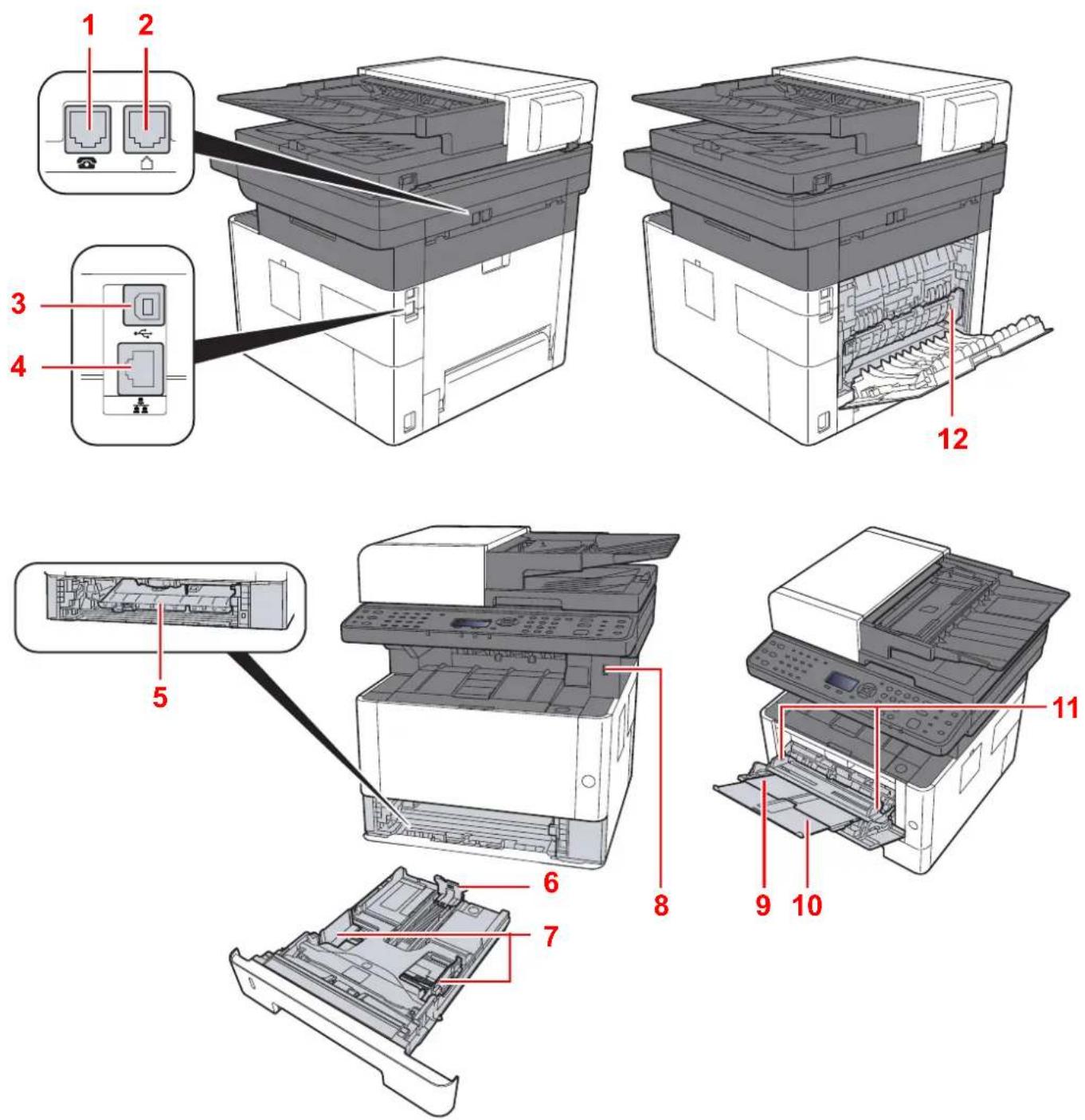
3D technical diagram of a multi-layered electronic device with internal components and a red annotation line indicating '15' (no text or symbols on the device itself)15 Bagdæksel
natural_image
3D diagram of a printer with internal components and a red annotation line indicating number 16 (no text or symbols on the device itself)Maskinens dele (Stik/indvendigt)
natural_image
Illustration of a printer with a circular button labeled 'Power' and an arrow pointing to it (no text or symbols present)Slukning
natural_image
Illustration of a printer with a blue circular button being inserted, showing paper and print views (no text or symbols)
BEMAERK
natural_image
Illustration of a hand holding a CD next to a laptop displaying a simple diagram (no text or symbols present)
BEMAERK
5 Afslut installationen.
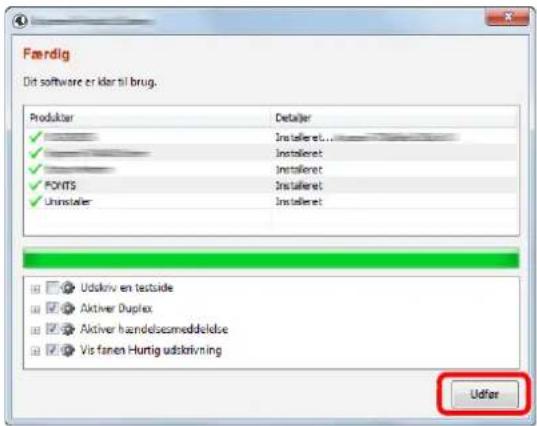
natural_image
Illustration of a hand holding a CD next to a laptop displaying a small screen (no text or symbols visible)
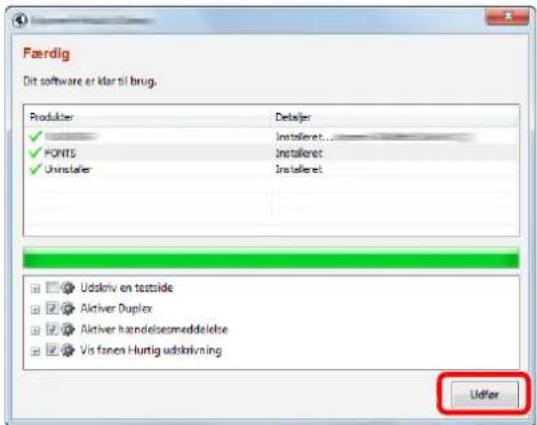
BEMAERK
5 Afslut installationen.
natural_image
Illustration of a hand holding a CD next to a laptop displaying a small diagram (no text or symbols present)Dobbeltklik på ikonet [Kyocera].
2 Vis skærmen.
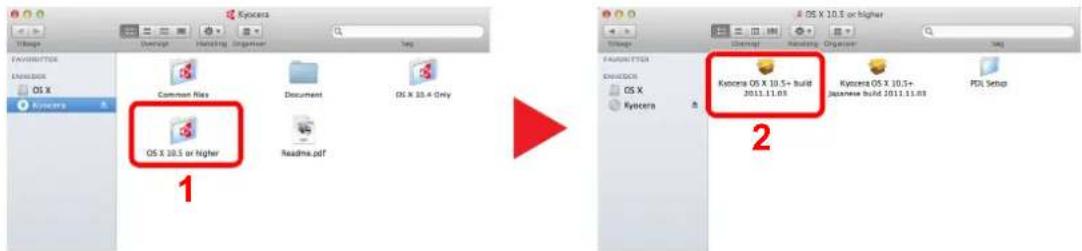
2 Konfigurere TWAIN Driver.
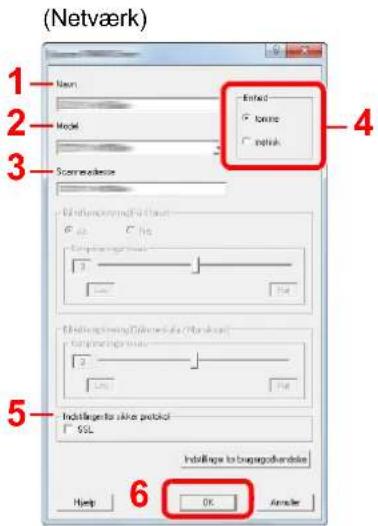
1 Klik på fanebladet [ Indstillinger].
Hvis skæmbilledet "There is a problem with this website's security certificate." vises, skal certifikatet konfigureres.

Command Center RX User Guide

BEMAERK
natural_image
Illustration showing two hand gestures: one holding a stack of papers with an arrow, the other holding a closed book with a striped pattern (no text or symbols)Bladr papiret og bank det let på en plan overflade.
natural_image
Diagram showing a printer assembly process with a blue plastic casing and an arrow indicating the process (no text or symbols present)
BEMAERK
natural_image
Illustration of a hand placing a blue plastic bag into a mechanical drawer (no text or symbols)Ved brug af Folio, Oficio II eller Legal
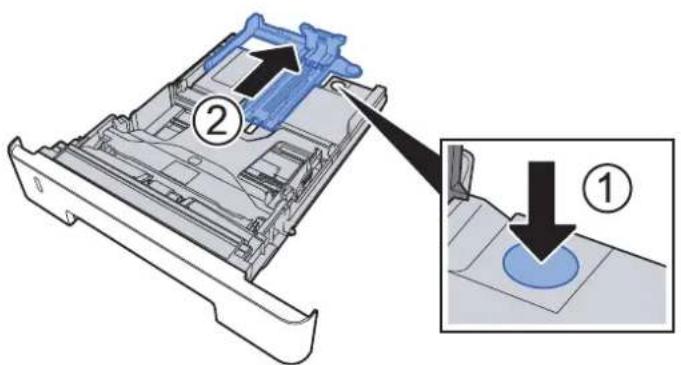
4 Læg papir.
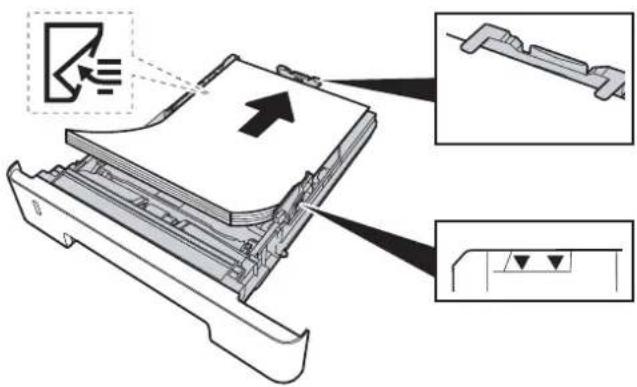

VIGTIGT
natural_image
Diagram of a blue plastic container with an arrow pointing to its side (no text or symbols present)
VIGTIGT
natural_image
Diagram of a printer with a blue internal component and an arrow indicating alignment, no text or symbols present.6 Vis skærmen.
[System Menu/Counter] tast > [▲] [▼] tast > [Generelt] > [OK] tast > [▲] [▼] tast > [Orig/papir indst.] > [OK] tast > [▲] [▼] tast > [Indst. Kass. 1 (til 3)] > [OK] tast
7 Konfigurér funktionen.
natural_image
Illustration of a printer with a blue scroll wheel and control panel (no text or symbols)2 Konfigurér indstillinger for tilladelse.
5 Angiv placeringen.
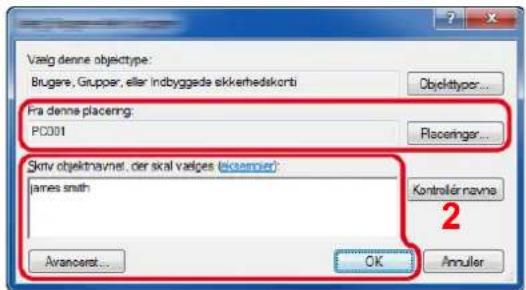
Indstillinger for besked for Status Monitor 4-14
Configuration Tool 4-15
Adgang til Configuration Tool 4-15
Lukning af Configuration Tool 4-16
Status Monitor kontekstmenu
Indstillinger for besked for Status Monitor (side 4-14)
• www.kyoceradocumentsolutions.com
Åbn vores webside.
• A f s l u t
Lukker Status Monitor.
Indstillinger for besked for Status Monitor
natural_image
Illustration of a hand holding a CD next to a laptop displaying a small diagram (no text or symbols present)
BEMAERK
4 [Configuration Tool] > [Run]
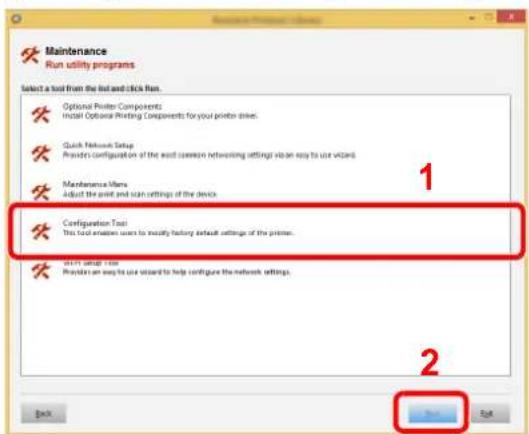
5 Vælg maskinens driver. > [OK]
Vinduet med Configuration Tool vises.
| Element Beskrivelse | |
| Model name Viser maskinens modelnavn. | |
| System firmware Viser versionen af maskinens systemfirmware. | |
| Engine firmware Viser versionen af maskinens programfirmware. | |
| Serial number Viser maskinens serienummer. | |
| Total memory Viser maskinens hukommelseskapacitet i bytes. | |
| Total printed pages Viser det samlede antal sider udskrevet på maskinen. | |
2 Anbring originalerne.
natural_image
Illustration of a printer with an arrow indicating a loading or operation (no text or symbols present)
BEMÆRK
natural_image
Illustration of a printer with paper sheets and a close-up inset showing internal components (no text or symbols)natural_image
Illustration of a printer with a blue cable inserted, showing internal components and control panel (no text or symbols)natural_image
Two-step illustration of a printer's internal structure before and after processing, showing blue plastic sheeting and red arrow (no text or symbols)flowchart
graph TD
    A["Printer Printing"] --> B["1: Patterned Image"]
    A --> C["2: Patterned Image"]
    A --> D["3: Patterned Image"]
    A --> E["4: Patterned Image"]
natural_image
Illustration of a printer's open lid and its internal mechanism, showing the printer's left side with an arrow indicating left motion (no text or symbols present)Kopiering (side 6-3)
4 Indtast antal kopier vha. taltasterne.
natural_image
Illustration of a printer with an open lid and control panel, showing no text or symbols.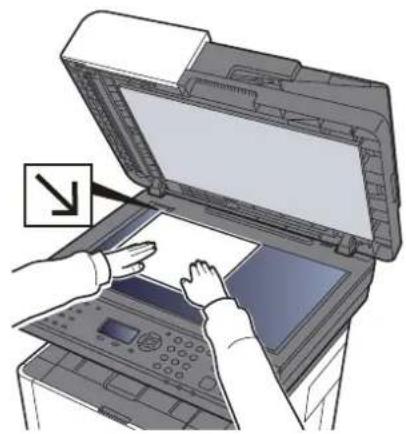
natural_image
Illustration of a printer with open lid and hands operating the paper (no text or symbols visible)natural_image
Illustration of a printer with an open lid and internal tray, showing no text or symbols.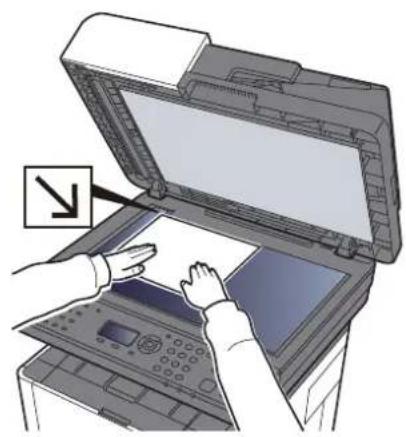
natural_image
Illustration of a printer with open lid and hands interacting with a paper (no text or symbols visible)Fortsat scanning 6-17
Farvevalg 6-17
Filformat 6-18
E-mail emne/tekst 6-19
flowchart
graph TD
    A["1: File 1, 2: Star Rating"] --> B["3: Page 1"]
    B --> C["1: Page 2, 2: Star Rating"]
    C --> D["3: Page 2, 1: Star Rating"]
    D --> E["1: Page 3, 2: Star Rating"]
    E --> F["3: Page 3, 1: Star Rating"]
Duplex


Original Kopiering
flowchart
graph LR
    A["Star Rating"] --> B["Rating 1"]
    B --> C["Rating 2"]
    C --> D["Rating 3"]
EcoPrint


EcoPrint sparer toner under udskrivning.
natural_image
Two leaf-shaped icons with white vein patterns, one gray and one white, next to a red play triangle (no text or symbols)Fortsat scanning


natural_image
Illustration of a printer with an open lid and a hand holding a tool, no text or symbols present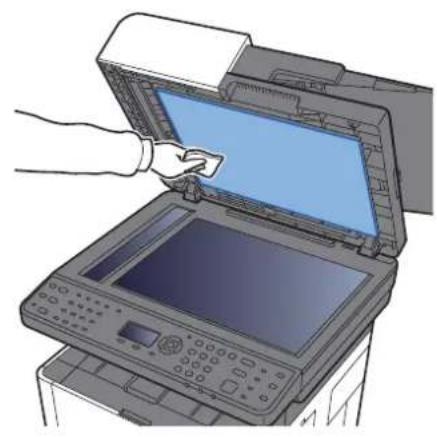
natural_image
Illustration of a hand inserting a device into an open printer (no text or symbols visible)natural_image
Diagram showing the process of a printer's internal structure before and after, with no visible text or symbols.
VIGTIGT
natural_image
Technical line drawing of two mechanical components with a prohibition symbol (no text or labels)
VIGTIGT
natural_image
Two technical illustrations: a cylindrical component and a vertical cylindrical device with a prohibition symbol (no text or labels present)
VIGTIGT
natural_image
Illustration of a hand pressing down on an open computer motherboard with arrows indicating process flow (no text or symbols present)natural_image
Illustration of a hand pressing a button on a printer cover, with an inset showing the printer's internal structure (no text or symbols present)
VIGTIGT
natural_image
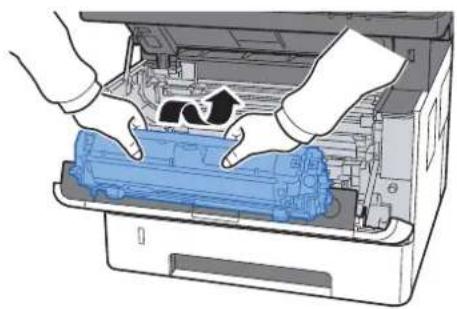
Illustration of hands installing or adjusting a blue plastic sheet inside an open printer (no text or symbols visible)9 Returner fremkalderen sammen med tonerbeholderen til deres positioner ved at tilpasse styrene i begge ender til rillerne i maskinen.
natural_image
Illustration of hands installing or adjusting a blue plastic component inside an open printer (no text or symbols visible)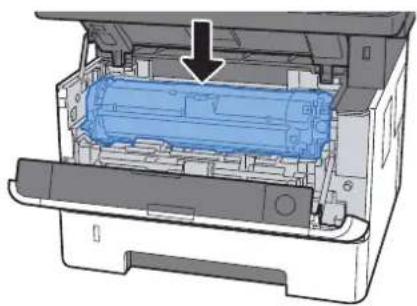
natural_image
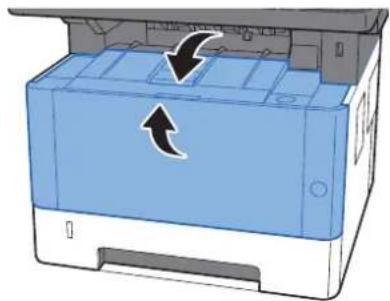
Diagram of a printer internal structure showing internal components and a blue cylindrical component with an arrow indicating assembly (no text or symbols present)10 Luk frontdækslet.
natural_image
Illustration of a blue printer with directional arrows indicating movement or loading (no text or symbols present)ECOSYS M2135dn/ECOSYS M2635dn/ECOSYS M2635dw
ECOSYS M2040dn/ECOSYS M2540dn/ECOSYS M2540dw
natural_image
Illustration of a printer with an open lid and a black arrow pointing to the print area (no text or symbols present)▶
natural_image
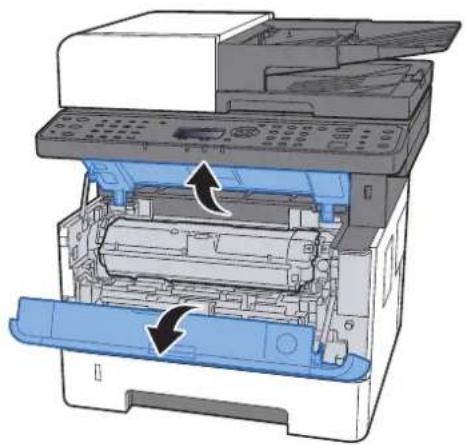
Diagram of an open printer with internal components and directional arrows indicating assembly (no text or symbols)2 Lås tonerbeholderen op.
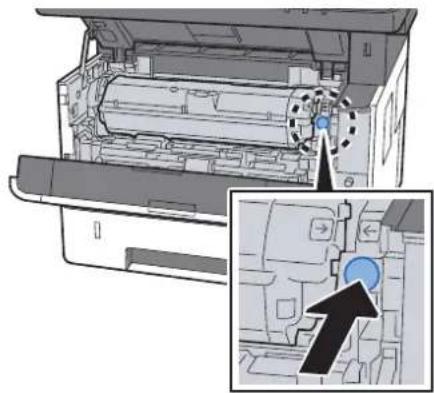
natural_image
Diagram of a printer internal structure with an inset showing a blue circular component (no text or symbols)▶
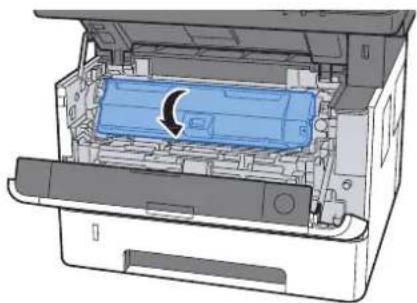
natural_image
Diagram of an open printer internal showing a blue plastic component with a curved arrow indicating rotation (no text or symbols present)3 Fjern tonerbeholderen.
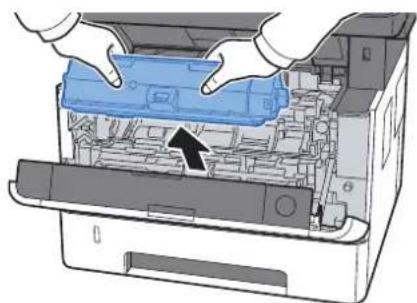
natural_image
Illustration of a printer's internal structure showing hands operating the lid and casing (no text or symbols visible)natural_image
Diagram of a blue mechanical component being wrapped in a transparent sheet, with an arrow indicating motion (no text or symbols present)natural_image
3D diagram of a blue plastic enclosure with an arrow pointing to a wireframe cube (no text or symbols)
VIGTIGT
6 Ryst tonerbeholderen.
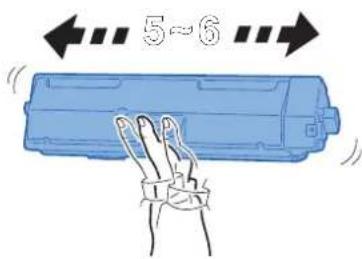
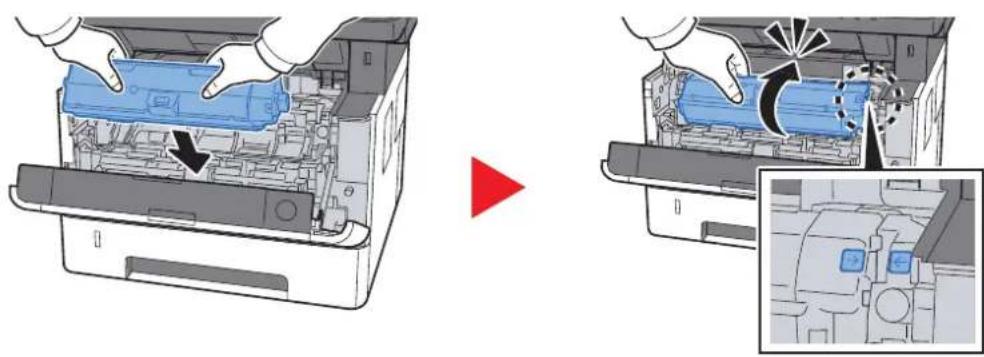
7 Installér tonerbeholderen.
natural_image
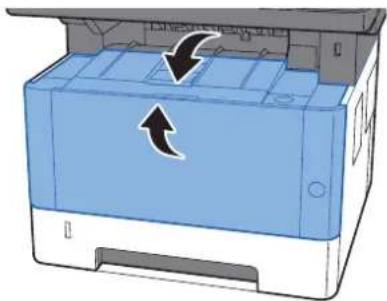
Diagram showing a printer's internal structure before and after assembly, with no visible text or symbols.8 Luk frontdækslet.
natural_image
Illustration of a blue printer with an arrow indicating compression or disassembly (no text or symbols present)