
SFM 4 B2 - Blender SILVERCREST - Free user manual and instructions
Find the device manual for free SFM 4 B2 SILVERCREST in PDF.


| Product Type | Blender |
| Brand | SilverCrest |
| Model | SFM 4 B2 |
| Power Consumption | 1500 W |
| Voltage | 220-240 V, 50/60 Hz |
| Capacity | 2 L |
| Dimensions (H x W x D) | 400 x 200 x 200 mm |
| Weight | 3 kg |
| Material | Stainless steel blades, Tritan jar |
| Speed Settings | 2 speed levels + pulse |
| Functions | Blending, crushing ice, smoothies, soups |
| Safety Features | Safety lock lid, overload protection, non-slip feet |
| Cleaning | Dishwasher-safe removable parts |
| Maintenance | Regular cleaning, blade sharpening not required |
| Spare Parts | Replacement jar, blade unit, lid |
| Repairability | Replacement parts available, user-serviceable |
| Warranty | 2 years |
| Accessories Included | Blending jar, lid, tamper |
| Usage | For domestic use only |
Frequently Asked Questions - SFM 4 B2 SILVERCREST
User questions about SFM 4 B2 SILVERCREST
0 question about this device. Answer the ones you know or ask your own.
Ask a new question about this device
Download the instructions for your Blender in PDF format for free! Find your manual SFM 4 B2 - SILVERCREST and take your electronic device back in hand. On this page are published all the documents necessary for the use of your device. SFM 4 B2 by SILVERCREST.
USER MANUAL SFM 4 B2 SILVERCREST
natural_image
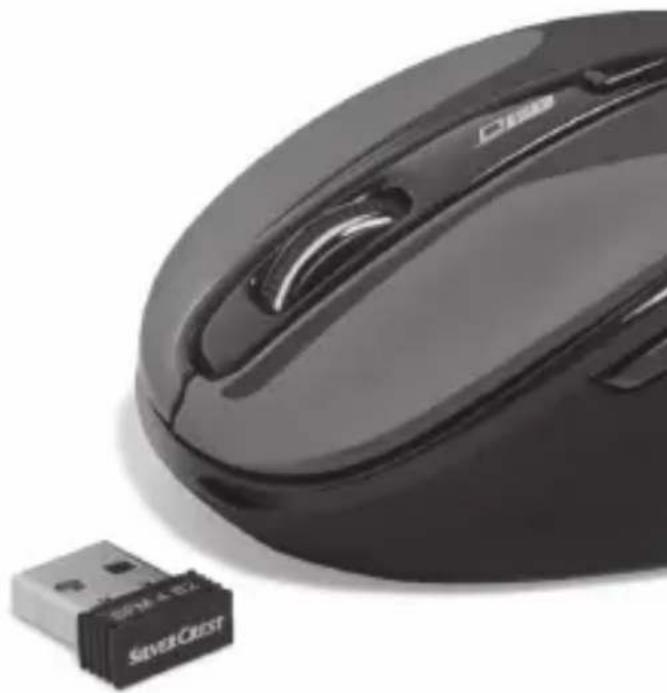
Close-up of a black computer mouse with a silver Crest USB tag nearby (no visible text or symbols on the device itself)WIRELESS OPTICAL MOUSE SFM 4 B2
GB CY
WIRELESS OPTICAL MOUSE
Operation and Safety Notes
RO
MOUSE OPTIC FĂRĂ FIR
GB/CY Operation and Safety Notes Page 5
Warnings and symbols used.... Page 6
Introduction Page 7
Intended use...... Page 8
Trademark notices.... Page 8
Scope of delivery Page 9
Safety notes...... Page 9
Description of parts ...... Page 14
Technical data Page 15
Before use Page 16
Operation...... Page 17
Software installation Page 18
Storage when not in use ...... Page 19
Cleaning Page 20
Troubleshooting Page 20
Disposal Page 20
Simplified EU declaration of conformity .. Page 22
Warranty Page 22
| Warnings and symbols usedThese instructions for use contain the following symbols and warnings: | |
 | DANGER! This symbol with the signal word “DANGER” indicates a hazard with a high level of risk which, if not avoided, will result in serious injury or death. |
 | WARNING! This symbol with the signal word “WARNING” indicates a hazard with a medium level of risk which, if not avoided, could result in serious injury. |
 | CAUTION! This symbol with the signal word “CAUTION” indicates a hazard with a low level of risk which, if not avoided, could result in minor or moderate injury. |
 | ATTENTION! This symbol with the signal word “ATTENTION” indicates a possible property damage. |
 | NOTE: This symbol with the signal word “NOTE” provides additional useful information. |
 | Direct current |
 | Warning against optical radiation |
 | This action sign indicates to wear suitable protective gloves! Follow the instructions to avoid hands striking or being struck by objects or being in contact with thermal or chemical materials! |
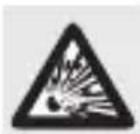
 | WARNING! EXPLOSION HAZARD!A warning with this symbol and word “WARNING! EXPLOSION HAZARD” indicates the potential threat of explosion. Failure to observe this warning may result in serious or fatal injuries and potential property damage. Follow the instructions in this warning to prevent serious injuries, a danger to life or property damage! |
WIRELESS OPTICAL MOUSE
●Introduction
We congratulate you on the purchase of your new product. You have chosen a high quality product. The instructions for use are part of the product. They contain important information concerning safety, use and disposal. Before using the product, please familiarise yourself with all of the safety information and instructions for use. Only use the product as described and for the specified applications. If you pass the product on to anyone else, please ensure that you also pass on all the documentation with it.
●Intended use
This WIRELESS OPTICAL MOUSE (hereinafter referred to as "product") is an information technology device and is designed as an input device for computers. This product must not be used outside of closed rooms. This product is not intended for use in companies or for other commercial uses (e.g. office productivity applications). Use this product only in the home for private purposes Any other use is considered improper. Any claims resulting from improper use or due to unauthorised modification of the product will be considered un-warranted. Any such use is at your own risk.
●Trademark notices
- iUSB Registered trademark of USB Implementers Forum, Inc.
■ Windows registered trademark of Microsoft Corporation in the United States and other countries.
■ Mac OS is trademarks of Apple Inc., registered in the U.S. and other countries.
The SilverCrest trademark and trade name is the property of their respective owners.
■ Any other names and products are trademarks or registered trademarks of their respective owners.
- Scope of delivery
1 Wireless optical mouse
1 USB dongle
1 CD-ROM installation software
2 Batteries (AA)
1 Instructions for use

Safetynotes
Before using the product, please familiarize yourself with all of the safety instructions and instructions for use! When passing this product on to others, please also include all the documents!
WARNING! DANGER TO LIFE AND RISK OF ACCIDENT FOR INFANTS AND CHILDREN!
DANGER! RISK OF SUFFOCATION! Never leave children unsupervised with the packaging material. The packaging material poses a suffocation hazard. Children frequently underestimate the dangers. The packaging material is not a toy.
This product may be used by children age 8 years and up as well as by persons with reduced physical, sensory or mental capacities or lacking experience and/or knowledge, so long as they are supervised or instructed in the safe use of the product and understand the associated risks. Do not allow children to play with the product. Cleaning and user maintenance should not be performed by children without supervision. The product is not a toy.

DANGER! Some of the provided parts can be swallowed. If a part is swallowed, seek immediate medical attention.

DANGER! Radio interference
■ Switch the product off on aeroplanes, in hospitals, service rooms, or near medical electronic systems. The wireless signals transmitted could impact the functionality of sensitive electronics.
- Keep the product at least 20 cm from pacemakers or implantable cardioverter defibrillators, as the electromagnetic radiation may impair the functionality of pacemakers.
■ The radio waves transmitted could cause interference in hearing aids.
- Do not place the product near flammable gasses or potentially explosives areas (e.g. paint shops) with the wireless components on, as the radio waves emitted can cause explosions and fire.
The range of the radio waves varies by environmental conditions. In the event of wireless data transmission, unauthorised third parties receiving the data cannot be excluded.

DANGER! Keep batteries out of reach of children. If accidentally swallowed seek immediate medical attention.

DANGER! EXPLOSION HAZARD!
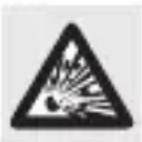
Never recharge non-rechargeable batteries. Do not short-circuit batteries or open them. Overheating, fire or bursting can be the result. Never throw batteries into fire or water. Do not exert mechanical loads to batteries.
Risk of batteries leakage
Avoid extreme environmental conditions and temperatures, which could affect batteries, e.g. radiators / direct sunlight.
In the event of a leakage of batteries, immediately remove them from the product to prevent damage.
Avoid contact of leaked chemicals with skin, eyes and mucous membranes. In the event of contact with battery acid, thoroughly flush the affected area with plenty of clean water and seek immediate medical attention.
WEAR PROTECTIVE GLOVES!

Leaked or damaged batteries can cause burns on contact with the skin. Wear suitable protective gloves at all times if such an event occurs.
Battery
■ Both batteries must always be replaced at the same time.
- Insert batteries according to polarity marks (+) and (-) on the battery and the product.
■ Never try to recharge the batteries and under no circumstances throw them into fire.
- Clean the contacts on the battery and in the battery compartment before inserting!
■ Remove exhausted batteries from the product immediately
■ Only use the specified type of battery!
■ Remove the battery when the product is not to be used for a long time.
- Improper use may cause explosions and danger to life.
ATTENTION! RISK OF PROPERTY DAMAGE
- Check the product before every use! Discontinue use if any damage to the product is detected!
This product does not contain any parts which can be serviced by the user. -
Do not place burning candles or other open fire on or next to the product.
■ Sudden temperature changes may cause condensation inside the product. In this case, allow the product to acclimate for some time before using it again to prevent short circuits! -
Do not operate the product near heat sources, e.g. radiators or other devices emitting heat!
- Do not throw the product into fire and do not expose to high temperatures.
■ Never open the product!! It has no internal parts requiring maintenance.
ATTENTION! Ensure that
- no direct heat sources (e.g. heating) can affect the product.
any contact with splashed and dripping water and corrosive liquids is avoided and the product is not operated in the vicinity of water. In particular, the product should never be submerged in liquid; do not place any vessels filled with liquid, for example, vases or drinks, on or near the product.
■ the product is not used in the immediate vicinity of magnetic
fields (e.g. speakers).
■ no fire sources (e.g. burning candles) are placed on or ne the product.
■ no objects are inserted into the interior of the product.
■ the product is never subjected to excessive shocks and vibrations.

Take care to avoid injury to eyes and skin when in the vicinity of optical radiation

NOTE:
The user must take regular breaks during the use of the product, in case of pain in the hands, arms or shoulder and neck area the work must be interrupted and some stretching exercises must be done.
The OWIM GmbH & Co KG is not responsible for interference with radios or televisions due to unauthorised modification of the product.
The user of the product is fully responsible for correcting interference caused by such unauthorised modification of the product, as well as replacement of such products.
It is necessary to repair the product if they have been damaged in any way, for example, if the housing is damaged, if liquid or objects have penetrated the product or if the product has been exposed to rain or moisture.
Repair work is also required if the product is not working properly or has been dropped. If smoke is produced, or there are any unusual sounds or smells, turn the product off immediately. In such cases, the product should not be used until they have been inspected by authorised service personnel. Only have the product repaired by qualified personnel. Never open the housing of the product.
●Description of parts
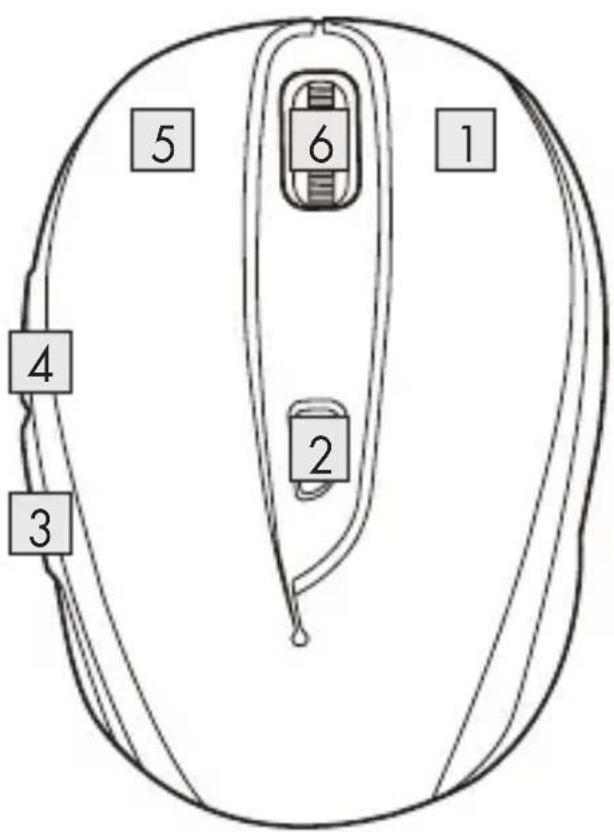
Please refer to the fold out page.
1 Right mouse button
2 DPI button
3 Backward button
4 Forward button
5 Left mouse button
6 Scroll wheel and middle mouse button
7 Battery compartment cover
8 Instructions for use
9 USB dongle
10 Software CD
11 2 x AA batteries
●Technical data
Voltage supply: 2 x 1.5 V, AA batteries
Operation time: 3 to 6 months (Alkaline battery)
Operating Systems: Windows ^® 7 / 8 / 10, XP, Vista
Resolution: 1000 / 1500 / 2000 dpi
Wireless range: 5 m
Radio frequency band: 2408 - 2474 MHz
Max. transmitted power: 0.72 mW
USB version: 2.0
Hardware: 1 free USB port available
Operating temperature: 5 to 35 °C
Storage temperature: 0 to 45 °C
Storage humidity: 10 to 70 % RH
Dimension (L x W x H): approx. 101 x 66 x 41 mm
Net weight:
approx. 65 g
The specification and design may be changed without notification.
Before use

NOTE:
Before use, verify the package contents are complete and undamaged!
All parts have to be unpacked and the packaging material has to be removed completely.
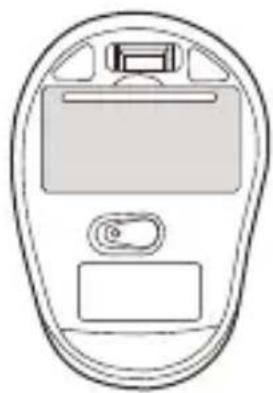
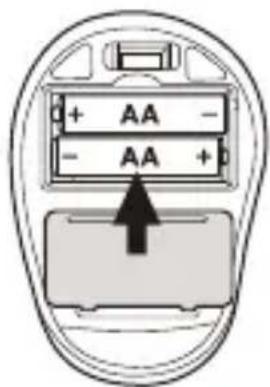
- Setting up your mouse – inserting/replacing the battery
■ Remove the battery compartment cover 7.
natural_image
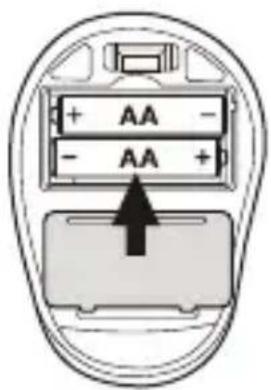
Line drawing of a mobile phone device with screen, keypad, and button (no text or symbols)- Insert 2 AA batteries into the battery compartment.
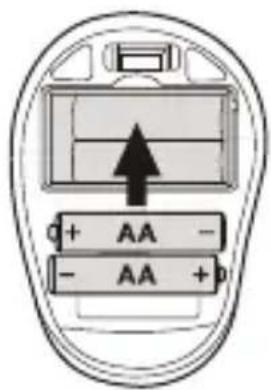
■ Ensure that the polarities are correct (+/-).
■ Reinsert the battery compartment cover 7 and push it down until it locks in place.
Operation
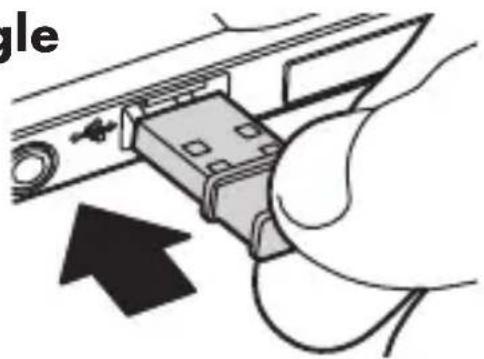
Connecting the USB dongle
9: Slot the USB dongle 9
into a spare USB port on your computer.
■ Turn your computer on.
■ The necessary drivers are automatically installed.
natural_image
Diagram of a hand inserting a device into a cable, with an arrow indicating direction (no text or symbols present)1 Right mouse button:
Provides traditional mouse click functions.
2 DPI button: (1000 / 1500 /
2000 - Click button once, then change DPI setting to next DPI value). The default DPI setting is 1500 dpi. Choose a setting that is comfortable for you.
3 Backward button
4 Forward button
5 Left mouse button:
Provides traditional mouse functions like click, double click and drag.
6 Scroll wheel and middle
mouse button: Roll up or down to scroll through pages or documents.
●Software installation

NOTE:
The software is Not compatible with MAC OS.
- You can also download the mouse installation software at www.Lidl-service.com. At this Lidl service website you have to input the product number IAN 304463 to search for the software to download.
Software installation from CD
-
Insert the provided Setup Disc into the computer's CD rom.
-
The installation process should start automatically.
-
If this is not the case, start the file "SFM B2 Mouse Setup.exe" manually on the CD-ROM by double-clicking.
-
Follow the installation instructions to complete the whole installation process.
-
After installing and running the application software program, you will find the below user interface.
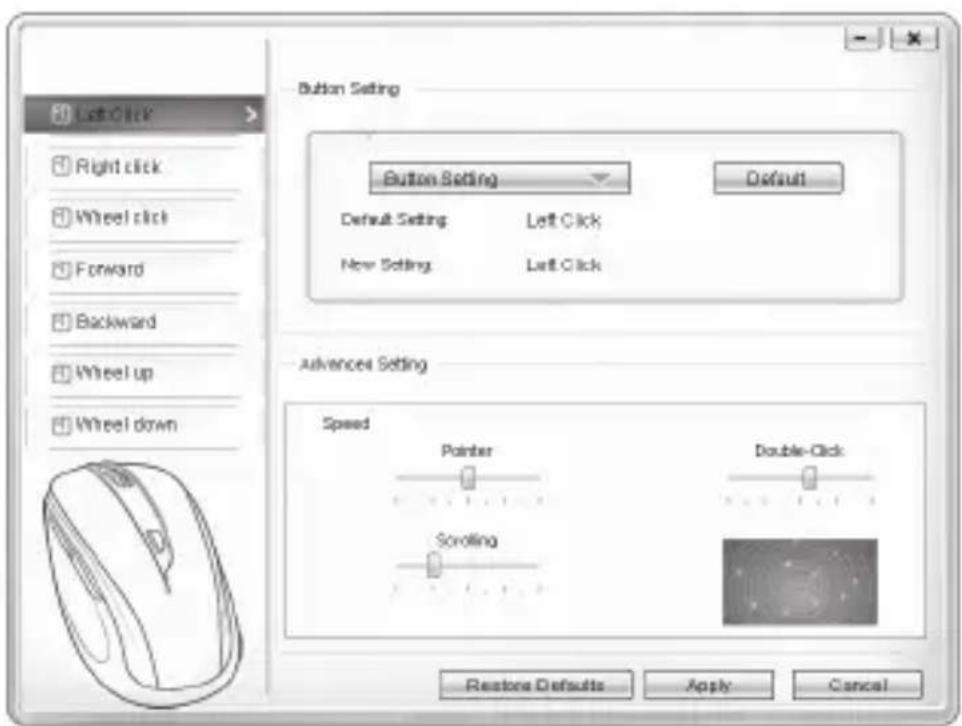
Configuration of the individual mouse buttons
You can use the software to control the functions of the mouse buttons customize to your wishes.
The configuration menu of the mouse appears.
- Select on left column for which button you would like to change its setting. Here you can now setup each one button setting for those five individual buttons' function.
- Click on "Button Setting" and then select one function from the menu.
To activate the changes, click the "OK" button - With the button "Restore defaults" you can put the buttons the wireless mouse back to the initial delivery state.
Below other tabs of this configuration menu contain the configuration options of the respective operating system. You can adjust mouse button setup to your desired mouse setting at "Advanced Setting".
Pointer
Scrolling
Double-Click
●Storage when not in use
- Batteries must be removed before storage.
■ Store the product in a dry indoor location protected from direct sunlight, preferably in its original packaging.
●Cleaning
■ Switch the product off before cleaning!
- No acid, chafing or solvent cleaning agents should be used or the product can be damaged.
■ Only clean the outside of the product using a soft, dry cloth!
At persistent soiling, a mild cleaning agent can be used.
●Troubleshooting
Problem Solution
The product does not work properly.
Option 1: Check if the battery is properly fitted.
Option 2: The battery needs to be replaced by a new one.
Option 3: Remove any other mouse connected to your computer and reconnect your mouse.
●Disposal
Packaging:
The packaging is made of environmentally friendly materials, which may be disposed of through your local recycling facilities.
Product:
Contact your municipality for information on how to dispose of your worn-out product.
The adjacent symbol of a crossed out dustbin on wheels indicates this product is subject to Directive 2012/19/EU. This directive states at the end of the life this product must not be disposed of through regular household refuse but must be returned to special collection sites, recycling depots or waste management companies.
This disposal is free of charge to you.
Protect the environment and dispose of properly.
The product is recyclable, subject to extended manufacturer responsibility, and collected separately.
Batteries:
Think about the environment and your personal health. Dispose empty batteries in separate collecting boxes. These can be found in many public buildings or in shops where batteries are sold.
Improper disposal of batteries can harm the environment!
Never dispose of batteries in your household waste. They may contain toxic heavy metals and are subject to hazardous waste regulations. The chemical symbols of the heavy metals are: Cd = cadmium, Hg = mercury, Pb = lead. Therefore dispose of used batteries through your local collection site.
●Simplified EU declaration of conformity
Hereby, OWIM GmbH & Co. KG, Stiftsbergstraße 1, DE-74167 Neckarsulm, GERMANY, declares that the product [WIRELESS OPTICAL MOUSE, HG04130A / HG04130B / HG04130C], is in compliance with Directives 2014/53/EU and 2011/65/EU.
The full text of the EU declaration of conformity is available at the following internet address: www.owim.com
●Warranty
The product has been manufactured to strict quality guidelines and meticulously examined before delivery. In the event of product defects you have legal rights against the retailer of this product. Your legal rights are not limited in any way by our warranty detailed below.
The warranty for this product is 3 years from the date of purchase. Should this product show any fault in materials or manufacture within 3 years from the date of purchase, we will repair or replace it – at our choice – free of charge to you.
The warranty period begins on the date of purchase. Please keep the original sales receipt in a safe location. This document is required as your proof of purchase. This warranty becomes void if the product has been damaged, or used or maintained improperly.
The warranty applies to defects in material or manufacture. This warranty does not cover product parts subject to normal wear, thus possibly considered consumables (e.g. batteries) or for damage to fragile parts, e.g. switches, rechargeable batteries or glass parts.
CE
MOUSE OPTIC FĂRĂ FIR
Introducere
natural_image
Top-down schematic of a device casing with labeled component 'U' (no text or symbols beyond label)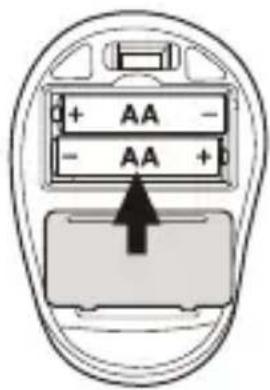
Operarea
natural_image
Simple line drawing of a device casing with handle, panel, and button (no text or symbols)●Работа
natural_image
Diagram of a device with an arrow pointing to a component, no visible text or symbolsnatural_image
Top-down schematic of a mobile phone device casing (no text or symbols)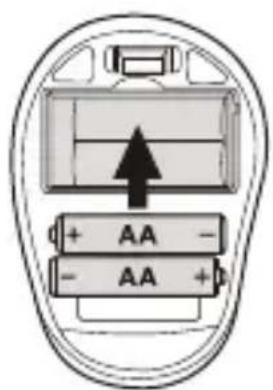
Λειτουργία
GEFAHR! EXPLOSIONSGEFAHR!
TRAGEN SIE SCHUTZHANDSCHUHE!

natural_image
Line drawing of a mobile phone device casing with front panel and keypad (no text or symbols)Bedienung
natural_image
Close-up of a hand inserting a device into a cable (no text or symbols visible)●Softwareinstallation

HINWEIS:
- WIRELESS OPTICAL MOUSE SFM 4 B2
- WIRELESS OPTICAL MOUSE
- MOUSE OPTIC FĂRĂ FIR
- Warnings and symbols used.... Page 6
- Introduction Page 7
- Intended use...... Page 8
- Trademark notices.... Page 8
- Scope of delivery Page 9
- Safety notes...... Page 9
- Description of parts ...... Page 14
- Technical data Page 15
- Before use Page 16
- Operation...... Page 17
- Software installation Page 18
- Storage when not in use ...... Page 19
- Cleaning Page 20
- Troubleshooting Page 20
- Disposal Page 20
- Simplified EU declaration of conformity .. Page 22
- Warranty Page 22
- ●Introduction
- ●Intended use
- ●Trademark notices
- - Scope of delivery
- Safetynotes
- WARNING! DANGER TO LIFE AND RISK OF ACCIDENT FOR INFANTS AND CHILDREN!
- DANGER! Some of the provided parts can be swallowed. If a part is swallowed, seek immediate medical attention.
- DANGER! Radio interference
- DANGER! Keep batteries out of reach of children. If accidentally swallowed seek immediate medical attention.
- DANGER! EXPLOSION HAZARD!
- Risk of batteries leakage
- WEAR PROTECTIVE GLOVES!
- Battery
- ATTENTION! RISK OF PROPERTY DAMAGE
- ATTENTION! Ensure that
- NOTE:
- ●Description of parts
- ●Technical data
- Before use
- - Setting up your mouse – inserting/replacing the battery
- Operation
- Connecting the USB dongle
- Right mouse button:
- DPI button: (1000 / 1500 /
- Backward button
- Forward button
- Left mouse button:
- Scroll wheel and middle
- ●Software installation
- Software installation from CD
- Configuration of the individual mouse buttons
- The configuration menu of the mouse appears.
- ●Storage when not in use
- ●Cleaning
- ●Troubleshooting
- Problem Solution
- ●Disposal
- Packaging:
- Product:
- This disposal is free of charge to you.
- Batteries:
- Improper disposal of batteries can harm the environment!
- ●Simplified EU declaration of conformity
- ●Warranty
- Introducere
- Operarea
- ●Работа
- Λειτουργία
- GEFAHR! EXPLOSIONSGEFAHR!
- TRAGEN SIE SCHUTZHANDSCHUHE!
- Bedienung
- ●Softwareinstallation
- HINWEIS:
Brand : SILVERCREST
Model : SFM 4 B2
Category : Blender