
Discovery A10.302 - Tablet BLAUPUNKT - Free user manual and instructions
Find the device manual for free Discovery A10.302 BLAUPUNKT in PDF.


| Product Type | Tablet |
| Brand | Blaupunkt |
| Model | Discovery A10.302 |
| Display Size | 10.1 inches |
| Display Resolution | 1280 x 800 pixels |
| Processor | Quad-core 1.3 GHz |
| RAM | 2 GB |
| Internal Storage | 32 GB |
| Expandable Storage | microSD card up to 128 GB |
| Operating System | Android 10 |
| Battery Capacity | 6000 mAh |
| Charging Port | USB-C |
| Rear Camera | 5 MP |
| Front Camera | 2 MP |
| Connectivity | Wi-Fi 802.11 b/g/n, Bluetooth 4.0 |
| Dimensions | 245 x 172 x 9 mm |
| Weight | 500 g |
| Color | Gray |
| Warranty | 2 years |
| Accessories Included | Charger, USB cable, user manual |
Frequently Asked Questions - Discovery A10.302 BLAUPUNKT
User questions about Discovery A10.302 BLAUPUNKT
0 question about this device. Answer the ones you know or ask your own.
Ask a new question about this device
Download the instructions for your Tablet in PDF format for free! Find your manual Discovery A10.302 - BLAUPUNKT and take your electronic device back in hand. On this page are published all the documents necessary for the use of your device. Discovery A10.302 by BLAUPUNKT.
USER MANUAL Discovery A10.302 BLAUPUNKT
You have made a wise choice.
Naturally, we will also provide you with after-sales service.
For technical queries and/or problems contact us via our webpage
www.blaupunkt.com
Any reproduction is strictly prohibited without written permission of the manufacturer.
Product illustrations contained in this manual are for guidance only. Depending on your Tablet PC, it may be that some functions are
not or only be changed available (eg, Camera, Bluetooth, 3G, etc.)
Important info for the disposal of waste
(applicable in the countries of the European Union and other European countries with separate collection systems)

On the device, the packaging or accompanying manuals for the product, the symbol of the crossed out wheeled bin indicates that this product must not be disposed of with normal household waste!

They also contribute to the proper disposal of the unit to protect the environment and the health of those around you. It helps protect natural resources, recycling of materials, reduce the consumption of raw materials! Disconnect electrical waste from other waste and dispose it on with your local, free return system. For recycling information, please contact your local Civic Office, your household waste disposal service, the shop where you purchased the product or the manufacturer.
Important info for disposal of batteries
(applicable in the countries of the European Union and other European countries with separate battery collection systems)

On the battery, the packaging or accompanying manuals for the product, the symbol of the crossed out wheeled bin indicates that the batteries in this product should not be disposed of with normal household waste!
The chemical symbols for lead (Pb), mercury (Hg) and Cd below the crossed out wheeled bin indicates that the lead, mercury and cadmium content of the battery is higher than those laid down in the EC Directive 2006/66 reference values. If batteries are not disposed of
If not disposed of properly, they can cause harm to human health or the environment.
They also contribute to the proper disposal of the battery/batteries to protect the environment and the health of those around you. It helps protect natural resources, recycling of materials, and reduce the consumption of raw materials! Separate batteries from other waste and dispose of them through your local, free battery return system. For recycling information, please contact your local Civic Office, your household waste disposal service, the shop where you purchased the product, or the manufacturer.
IMPORTANT: the built-in battery in this product is not interchangeable. To do so, please contact the manufacturer.
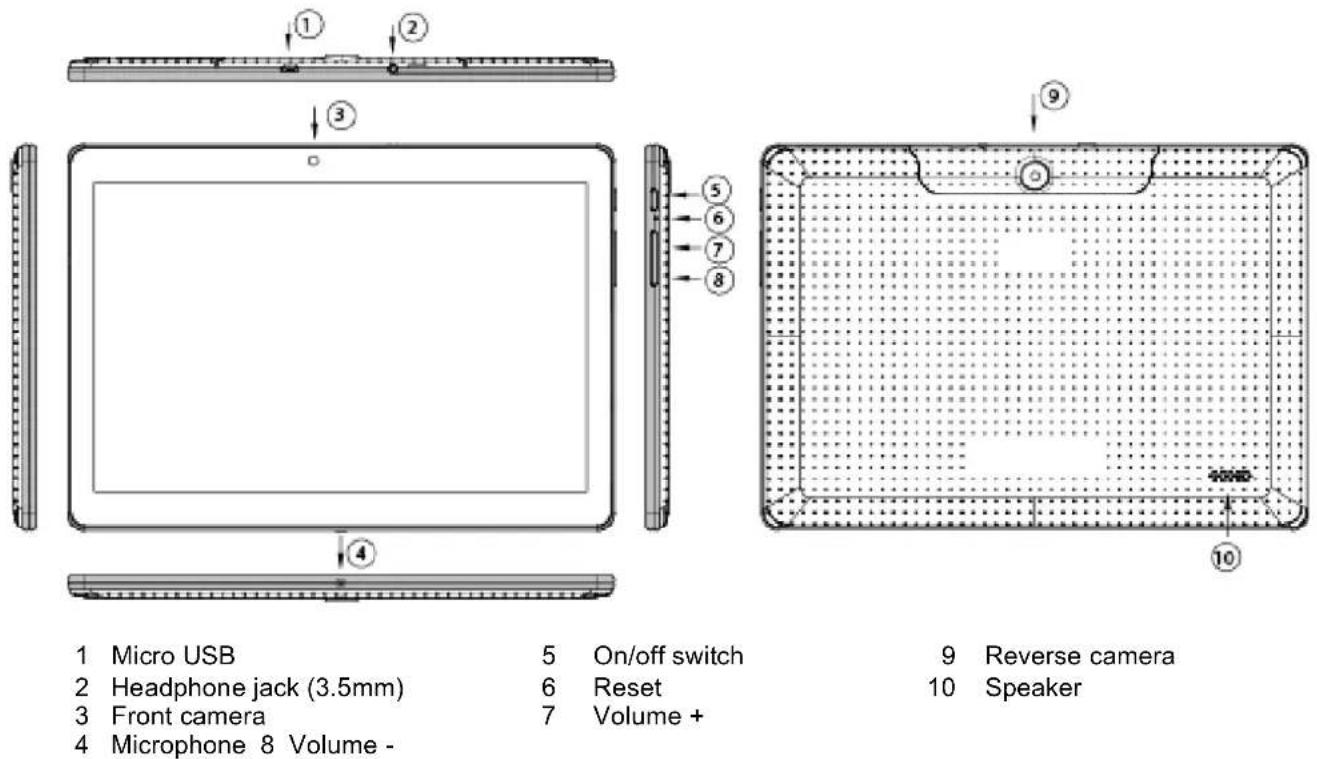
1 Product view
2 Charging
Please follow these steps to charge your Tablet PC.
- Plug one end of the data line into the Power connector port (micro USB) of the tablet PC.
- Insert the AC end of the adapter into the wall outlet.
3 Power-On
The first time you turn on the tablet PC, you need to unlock the screen by dragging the lock icon out of the circle and enter the home screen, which makes it easy for you to access frequently used functions. (Screen can be different due to the model you are using).
Drag the lock icon right out of the circle to unlock.
3.1 Set-up assistant
To make it easier for you to initially set up your tablet PC, the set-up assistant helps you with the first important things (language, date/time, WLAN, display brightness, and location detection).
3.2 Explanation
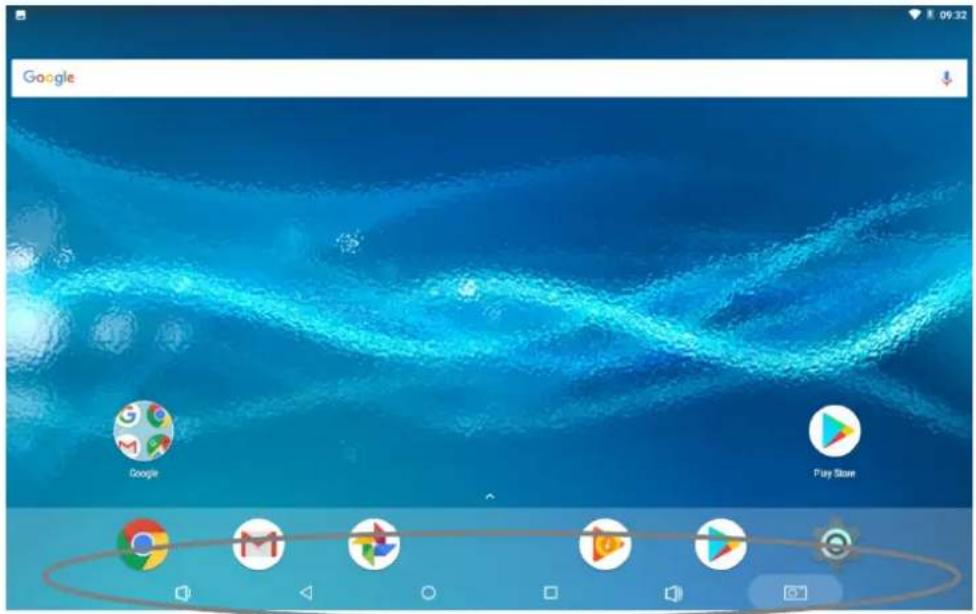
(Fig. may differ)
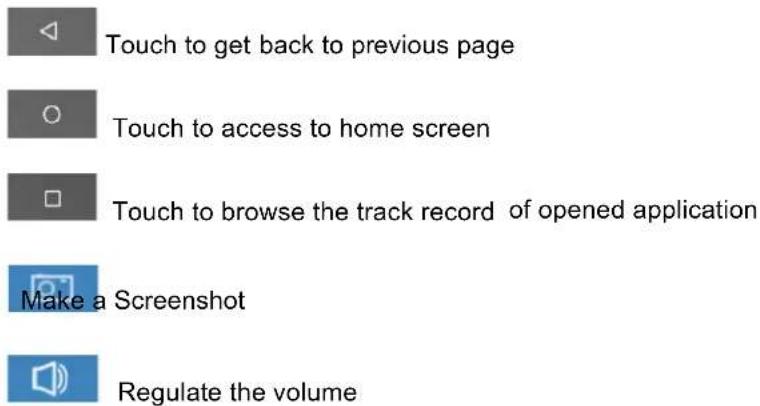
4 Turn off / Standby
To power your tablet PC down completely, hold the "On/Off" switch down until the window appears asking you whether you want to switch the device off. Confirm with "OK" if you want to power the device down completely. If you merely want to move the device into standby mode (for use soon and a fast start), simply tap the On/Off switch.
Please note that the tablet PC, when in standby mode, still consumes power, albeit very little and in this mode the battery can also discharge over several days.
5 Starting Apps
Wipe the symbol ▲ on the main screen to see all the apps. Now tap on the icon for the App that you wish to start (e.g. music).
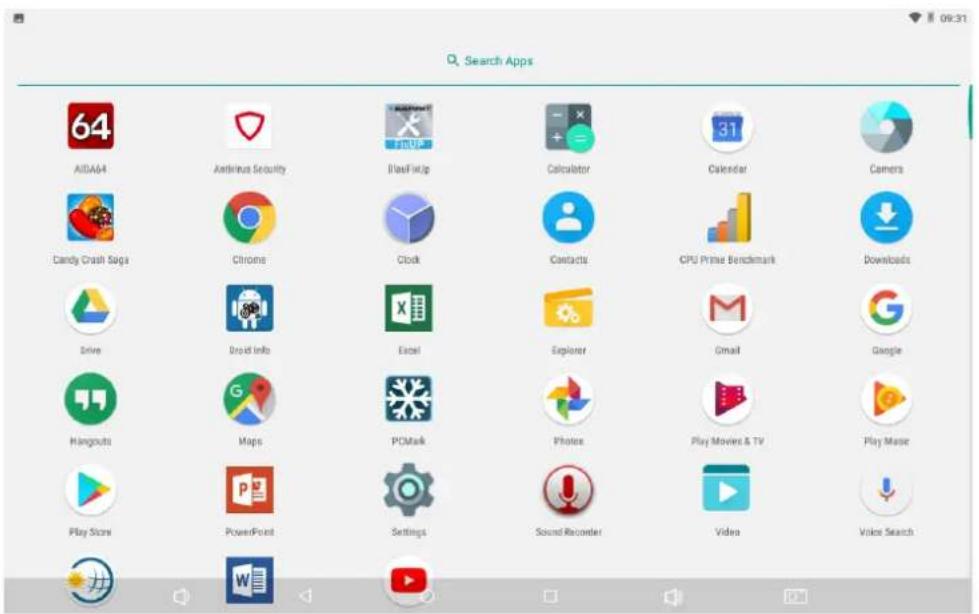
You can select apps (icons) and position them on the main screen by pressing and holding them (Fig. may differ).
6 Open settings
To open "Settings" tap on

You can adjust all the settings in this menu. The changes become effective immediately.
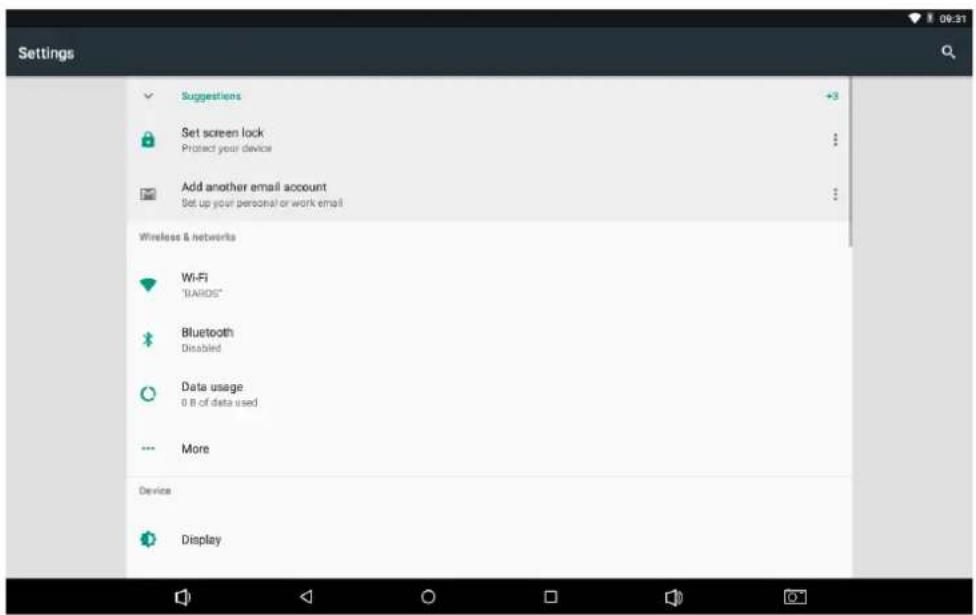
(Fig. may differ)
Guarantee
Please keep the proof of purchase for this device for the entire duration of the guarantee period, as it must be produced in the event of any claim.
You (as the end user) receive a 24-month guarantee from the date of sale. The article has been manufactured using the most modern production methods and subjected to strict quality controls.
Please contact only the manufacturer (not the dealer where you purchased it) in the event of any defects during the guarantee period.
eMail: support@first-servicecenter.de
The guarantee does not cover damage caused by improper use or external influence (water, falling, sunlight, breakage or impact).
User information / Contact
If your device has a defect or you have problems with it, please contact our Service & Support Centre. If you need to send your device to us, please attend to the following points:
- Use only the original packaging
- Add a detailed error description
- Add your full name and address and a copy of your purchase receipt
- Stamp and send the package to us (sufficient postage)
Service / Contact: www.blaupunkt.com
Declaration of Conformity
Hereby Baros GmbH, declares, that the device Discovery A10.302 / BWN 10, is in compliance with the essential requirements and other relevant regulations of Directive 2014/53/EU.
The Declaration of Conformity can be found at: www.blaupunkt.de
Information about the open-source software used in this product
The open-source software supplied with this product contains software files that meet specific open-source licence requirements.
This open-source software (in its current form) is subject to change and is provided in the fullest form possible under applicable law. The authors do not, under any circumstances, accept liability for damage that may occur as a result of using this software.
We do not accept any liability for damaged equipment if the software is modified. With regard to the open-source files contained in this software, you can obtain further information about the open-source software used and the associated licenses by selecting:
"Settings\About tablet\Legal information" in the device menu.
You can obtain a copy of General Public License Version 2 (GPLv2) at
http://www.gnu.org/licenses/gpl-2.0.txt or from the Free Software Foundation, Inc. 51 Franklin Street, Fifth Floor, Boston, MA 02110-1301, USA.
You can obtain a copy of Apache License Version 2.0 at http://www.apache.org/licenses/LICENSE-2.0.
We will provide everyone upon request the applicable GPL source code files via CD-ROM or similar storage medium for a nominal cost to cover shipping and media charges as allowed under the GPL.
This offer is valid for 3 years. GPLv2 inquiries: Please direct all GPL inquiries to the following address:
Please state the model name and version number of the software in your enquiry.



- IMPORTANT INFO FOR THE DISPOSAL OF WASTE
- IMPORTANT INFO FOR DISPOSAL OF BATTERIES
- PRODUCT VIEW
- CHARGING
- POWER-ON
- SET-UP ASSISTANT
- EXPLANATION
- TURN OFF / STANDBY
- STARTING APPS
- OPEN SETTINGS
- GUARANTEE
- USER INFORMATION / CONTACT
- DECLARATION OF CONFORMITY
- INFORMATION ABOUT THE OPEN-SOURCE SOFTWARE USED IN THIS PRODUCT
Brand : BLAUPUNKT
Model : Discovery A10.302
Category : Tablet