
Mistral Elan HI282 - Air conditioner PHILIPS - Free user manual and instructions
Find the device manual for free Mistral Elan HI282 PHILIPS in PDF.


| Product Type | Steam Iron |
| Brand | Philips |
| Model | Mistral Elan HI282 |
| Power Supply | 230 V, 50/60 Hz (estimated based on typical Philips irons) |
| Power Consumption | Approx. 2000 W (typical for steam irons) |
| Water Tank Capacity | 200 ml (max fill) |
| Temperature Control | Rotary dial with MIN, ●, ●●, ●●● MAX settings |
| Steam Control | Rotary dial with O (no steam), ♡ (normal steam), ★ (extra steam), SELF CLEAN |
| Spray Function | Yes, via spray button |
| Shot of Steam | Yes, via button, up to 5 consecutive shots |
| Vertical Steam | Yes, for hanging clothes |
| Drip Stop | Yes, prevents water leakage at low temperatures (HI282 model) |
| Auto Stop (Safety Shut-off) | Not available on HI282 (only on HI292/HI294) |
| Soleplate Material | Metal (assumed, not specified) |
| Self-Cleaning / Descaling | Yes, through SELF CLEAN setting; recommended every 2 weeks |
| Anti-Calc System | Removable steam control needle for manual cleaning |
| Storage | Upright position; cord winder |
| Safety Features | Thermal cut-out, auto shut-off on inactivity (not on HI282), warning about hot soleplate |
| Maintenance | Regular self-cleaning; wipe soleplate with damp cloth; do not use vinegar |
| Warranty | Standard Philips warranty (not specified) |
Frequently Asked Questions - Mistral Elan HI282 PHILIPS
User questions about Mistral Elan HI282 PHILIPS
0 question about this device. Answer the ones you know or ask your own.
Ask a new question about this device
Download the instructions for your Air conditioner in PDF format for free! Find your manual Mistral Elan HI282 - PHILIPS and take your electronic device back in hand. On this page are published all the documents necessary for the use of your device. Mistral Elan HI282 by PHILIPS.
USER MANUAL Mistral Elan HI282 PHILIPS
Keep pages 3 and 50 open when reading these operating instructions.
Important
- Please read these instructions in conjunction with the illustrations before using the appliance.
- Before using for the first time, check if the voltage rating on the typeplate corresponds to the mains voltage in your home.
- Never use the appliance if it is damaged in any way. Take care that children cannot touch the iron when hot and that they cannot pull the mains cord.
- The ejected steam is hot and therefore hazardous. Never direct the steam towards people.
- Remove the plug from the socket before filling the iron with water or pouring out the remaining water after use.
- Never immerse the iron in water.
- When you have finished ironing, and also when leaving the iron even for a short while:
- set the steam control to position O;
- Put the iron in an upright position;
- Remove the mains plug from the wall socket.
Note: The soleplate may become seriously corroded if the iron is stored with the soleplate facing downwards.
- Some parts of the iron have been slightly greased and as a result the iron may slightly smoke when switched on for the first time. After a short while, however, this will cease.
- Before using the first time, remove any sticker or protective foil from the soleplate. Clean the soleplate with a soft cloth.
- Do not put vinegar or other descaling agents into the water reservoir.
- Do not use chemically descaled water.
- The cordset should not be allowed to touch the soleplate when it is hot.
- If the mains cord of this appliance is damaged, it must be replaced by the original type only.
Please apply to your Philips dealer or to the Philips organisation in your country for replacement.
General description (fig. 1)
A Temperature control (rotate) B Steam control (rotate)
O = no steam ♡ = normal steam = extra steam
- SELF CLEAN = self-cleaning / descaling, removing steam control needle
© Spray button (press) D Shot of Steam button (press) E Spray F Filling aperture G Soleplate H Water reservoir with level indication ① Temperature pilot light (amber) J Type plate K Cord winder L Cord clip M Measuring beaker N "Auto Stop" pilot light (red)
(with types HI 292 and HI 294 only)
Filling with water (for steam-ironing and spraying)
- Please fill this iron with normal tap water before using for the first time.
- For refilling, you can also use tap water. However, if the water is very hard (hardness higher than 17°DH / 21 1/4° Clarke), it is advisable to use distilled water.
- Remove the mains plug from the wall socket before filling the iron.
Set the steam control to position O (= no steam).
- Stand the iron on its end and pour water into the filling aperture (fig. 2).
Use the measuring beaker with spout for this purpose.
Do not fill higher than marking "MAX" on the water reservoir.
(Maximum filling = approx. 200 ml.)
Ironing temperature
• Always check first to see whether a label with ironing instructions is attached to the article to be ironed. (See table.) Follow these ironing instructions in all cases. - If ironing instructions are missing but you do know the kind of fabric, then see the table. - The table is valid for the materials only and is not applicable to any applied finish, gloss etc. Textile to which some kind of finish has been applied (gloss, wrinkle, relief etc.) can best be ironed at lower temperatures. - Sort the laundry out according to ironing temperature first: wool with wool, cotton with cotton, etc.
| TableNote.: ☒ on the label means:"This article cannot be ironed!" | |||
| Instructions on label | Textile | Temperature control | Steam control |
 | Synthetic fibres(e.g. acetate, acryl, viscose, polyamide (nylon), polyester.Silk | MIN● |  No steam No steam |
 | Wool | ●● |  Normal steam Normal steam |
 | CottonLinen | ●●●MAX |  Extra steam Extra steam |
- The iron heats up quicker than it cools down. Therefore, start ironing the articles requiring the lowest temperature such as those made of synthetic fibres.
- If the fabric consists of various kinds of fibres, you must always select the lowest ironing temperature of the composition of those fibres.
(E.g. an article consisting of "60% polyester and 40% cotton" should be ironed at the temperature indicated for polyester (●) and without steam.)
If you do not know what kind(s) of fabric(s) the article has been made of, find a spot which will be invisible when wearing or using the article.
Try out the ironing temperature which is most suitable there. (Start at a relatively low temperature.)
- Pure woollen fabrics (100% wool) may be pressed with the iron set to a steam position. Preferably set the steam control to maximum position and use a dry pressing cloth.
When steam-ironing woollen fabrics, shining of the fabric may occur. This can be prevented by turning the article inside out and ironing the reverse side.
- Velvet and other textures which rapidly acquire shiny spots should be ironed in one direction only (with the nap) applying light pressure.
Always keep the iron moving.
- Iron the reverse side of synthetic materials and silk to prevent shining spots. Do not use the spray to prevent stains.
Setting the temperature
- Stand the iron on its end.
- Set the temperature control to the correct ironing temperature as indicated in the ironing instructions or in the table. (See fig. 3.)
- Insert the mains plug into the wall socket.
- After the amber temperature pilot light has gone out and come on again you may start ironing. The pilot light will go out from time to time during ironing.
If you set the temperature control to a lower setting after ironing at a high temperature, do not begin again before the pilot light comes on.
Spraying
At any temperature by pushing on the spray button ⚙ (C) a couple of times the laundry can be damped down (fig. 4).
Ensure that there is enough water in the water reservoir.
Shot of Steam
By pressing button 🎨 (D) an intense "shot" of steam is emitted from the soleplate (fig. 5).
This can be very useful e.g. when removing stubborn creases.
The "shot" of steam facility can be used only while ironing with high ironing temperature (positions ranging from ●● to ●●●).
You can apply max. five sequential shots of steam (with steam of good quality).
Vertical position
“Shot of steam” can also be applied when holding the iron in a vertical position. This is useful for removing creases from hanging clothes, curtains, etc.
- Ensure that the water reservoir is filled-up completely.
- Set the temperature control to position ●●● MAX.
- Wait a little while for the amber temperature pilot light to go out and to come on again.
- Direct the soleplate towards the hanging clothes, curtains, etc. and press button 🎨 (D).
- As soon as the steam output decreases, hold your iron horizontally and wait a few seconds before using “Shot of steam” again.
Steam-ironing
- As indicated on the temperature control (A) and the table, steam-ironing is only possible at higher ironing temperatures:
●● or ●●● for moderate steam
●●● for maximum steam.
- With conventional steam irons, water may leak from the soleplate if a too low temperature has been selected. This will then cause stains. Your new steam iron (types HI 282, HI 284, HI 292 and HI 294 only) has the "Drip Stop" feature. If a too low temperature has been
selected, your iron will automatically stop steaming to prevent water leaking from the sole plate.
When this happens, you can hear "Click". Set the temperature control to the advised position. Steaming will recommence as soon as the appropriate temperature has been reached.
- Ensure that there is enough water in the water reservoir.
- Stand the iron on its rear side.
- Set the temperature control at the required position within the "steam area" (●● or ●●●) (fig. 6).
- Insert the mains plug into the wall socket.
- Wait a little while for the amber temperature pilot light to go out and to come on again.
- Set the steam control to the required position (fig. 3).
Ironing without steam
For ironing without steam proceed as described for steam-ironing. However, the steam control should remain in position O (= no steam).
"Auto stop" (automatic safety shut-off) (types HI 292 and HI 294 only)
If the iron is left in a motionless horizontal position for more than 30 seconds, or in a vertical position for more than 8 minutes, the red "Auto Stop" pilot light (N) will start blinking and the heating element will switch off automatically.
When picking up the iron again, the red light will go out and the amber temperature pilot light (I) will come on. This indicates that the iron has begun heating up again.
When the amber indicator light has gone out you can recommence ironing.
Maintenance
- It is important to apply "self-cleaning" at least every two weeks to remove scale etc.
The harder the water, the more the iron should be self-cleaned.
- Fill the water reservoir half-full with water.
- Stand the iron in upright position.
- Set the temperature control to MAX.
- Insert the mains plug into the wall socket.
- Allow the iron to heat up until the amber temperature pilot light first goes out and then comes on again.
- Remove the plug from the wall socket.
- Hold the iron horizontally over the sink.
- Set the steam control to position ●SELF CLEAN. Turn the steam control far enough, so that the dot ●on the steam control meets the mark ▲ on the iron. The steam control will then spring up slightly.
- Pull the steam control up until it stops (fig. 7).
- Boiling water and steam will now come out of the holes in the soleplate. Impurities and scale (if any) are washed away with it (fig. 8).
- Move the iron forwards and backwards while this happens.
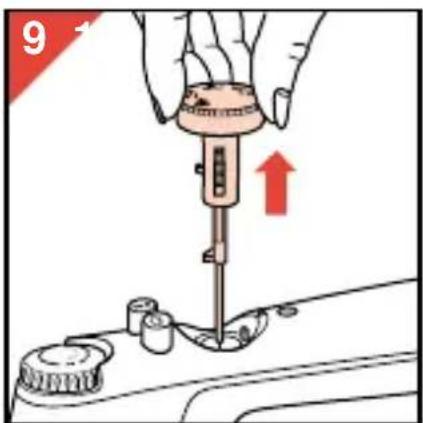
- You can pull the steam control further upwards to remove the steam control needle (fig. 9). It is then possible to remove any scale from the needle. For this purpose you may use vinegar.
However, avoid bending or damaging the steam control needle!
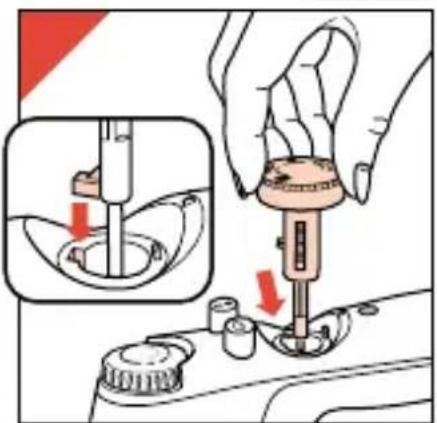
- Replace the steam control needle. Insert the point of the needle exactly in the centre of the aperture and fit the small notch at the side into the spacing (fig. 10).
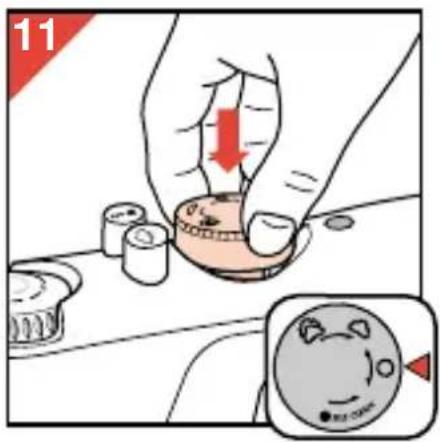
- Depress the steam control (fig. 11).
- Set the steam control to position O.
- Stand the iron upright on its end.
- Set the temperature control to MAX.
- Insert the mains plug into the wall socket and let the iron heat up again.
- Move the iron over a (preferably) old piece of cloth.
The remainder of the water inside the steam chamber will now vaporize and leave the iron through the soleplate.
Do not put vinegar or other descaling agents into the water reservoir.
Cleaning
- Before cleaning remove the mains plug from the wall socket and allow the iron to cool down sufficiently.
- Scale and other setting can be wiped off the soleplate with a damp cloth and some non-scratching (fluid) abrasive.
Keep the soleplate smooth: avoid hard contact with metal objects.
- The upper part of the appliance can be cleaned with a damp cloth.
- From time to time clean the inside of the water reservoir by filling with water and shaking. Then pour the water back out.
Storage
- Remove the mains plug from the wall socket.
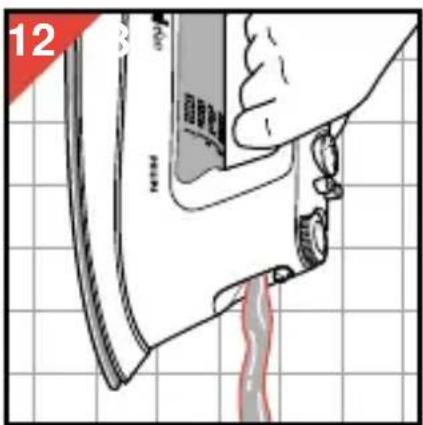
- Pour any remaining water out of the water reservoir (fig. 12).
- Set the steam control to position O.
- Stand the iron upright and let it cool down sufficiently.
- The mains cord can be wound around the cord storage. Allow a generous loop of cord before starting the windings around the cord storage.
- Always store the iron standing upright (fig. 13).
Regularly check if the mains cord is still in a good and safe condition.
For U.K. only:
Fitting a different plug
This appliance is fitted with a BS 1363 13 Amp. plug.
Should you need to replace the plug, connect the wires as follows:
Green/yellow wire to the Earth terminal ( ± ) of the new plug.
Brown wire to the Live (L) terminal of the new plug.
Blue wire to the Neutral (N) terminal of the new plug.
Always fit the same value of fuse as that originally supplied with your appliance.
Only use BS 1362 approved fuses.
As a guide only: Appliances under 700 W can have a 3 Amp. fuse (red) and all others should have a 13 Amp. fuse (brown).
When disposing of an old plug (particularly the moulded type which has been cut from the mains cord) always remove the fuse as the plug could be dangerous if ever inserted in a live socket.

- IMPORTANT
- GENERAL DESCRIPTION (FIG. 1)
- FILLING WITH WATER (FOR STEAM-IRONING AND SPRAYING)
- IRONING TEMPERATURE
- SETTING THE TEMPERATURE
- SPRAYING
- SHOT OF STEAM
- VERTICAL POSITION
- STEAM-IRONING
- IRONING WITHOUT STEAM
- AUTO STOP" (AUTOMATIC SAFETY SHUT-OFF) (TYPES HI 292 AND HI 294 ONLY)
- MAINTENANCE
- CLEANING
- STORAGE
- FOR U.K. ONLY
- FITTING A DIFFERENT PLUG
Brand : PHILIPS
Model : Mistral Elan HI282
Category : Air conditioner