
MeMO Pad 7 ME70CX - Tablet ASUS - Free user manual and instructions
Find the device manual for free MeMO Pad 7 ME70CX ASUS in PDF.
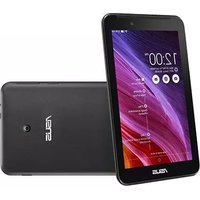


| Product Type | Tablet |
| Brand | ASUS |
| Model | MeMO Pad 7 ME70CX |
| Display Size | 7 inches |
| Display Resolution | 1024 x 600 pixels |
| Processor | Intel Atom Z2520 1.2 GHz Dual-Core |
| RAM | 1 GB |
| Internal Storage | 8 GB eMMC |
| Expandable Storage | microSD up to 64 GB |
| Operating System | Android 4.4 KitKat |
| Camera (Rear) | 2 MP |
| Camera (Front) | 0.3 MP |
| Connectivity | Wi-Fi 802.11 b/g/n, Bluetooth 4.0 |
| Battery Capacity | 3500 mAh |
| Battery Life | Up to 9 hours (video playback) |
| Dimensions (W x D x H) | 192 x 110 x 10.7 mm |
| Weight | 279 g |
| Charging Port | Micro USB 2.0 |
| Audio Jack | 3.5 mm headphone |
| Sensors | Accelerometer, G-Sensor |
| Maintenance | Clean with dry cloth; avoid moisture |
| Safety | Do not disassemble; use original charger |
| Spare Parts & Repairability | Battery and screen available through ASUS service |
| General Information | Manual available in PDF on ASUS support |
Frequently Asked Questions - MeMO Pad 7 ME70CX ASUS
Actual battery life varies with usage.
User questions about MeMO Pad 7 ME70CX ASUS
0 question about this device. Answer the ones you know or ask your own.
Ask a new question about this device
Download the instructions for your Tablet in PDF format for free! Find your manual MeMO Pad 7 ME70CX - ASUS and take your electronic device back in hand. On this page are published all the documents necessary for the use of your device. MeMO Pad 7 ME70CX by ASUS.
USER MANUAL MeMO Pad 7 ME70CX ASUS
IN SEARCH OF INCREDIBLE
User Guide
Charging your device
Ensure to fully charge your ASUS Tablet before using it in battery mode for extended periods. Remember that the power adapter charges your ASUS Tablet as long as it is plugged into an AC power source. Be aware that it takes much longer to charge the ASUS Tablet when it is in use.
IMPORTANT! Do not leave the ASUS Tablet connected to the power supply once it is fully charged. ASUS Tablet is not designed to be left connected to the power supply for extended periods of time.
Airplane precautions
Contact your airline provider to learn about related inflight services that can be used and restrictions that must be followed when using your ASUS Tablet in-flight.
IMPORTANT! You can send your ASUS Tablet through x-ray machines (used on items placed on conveyor belts), but do not expose them from magnetic detectors and wands.
Safety precautions
This ASUS Tablet should only be used in environments with ambient temperatures between 0°C to 35°C (32°F to 95°F).
Long time exposure to extremely high or low temperature may quickly deplete and shorten the battery life. To ensure the battery's optimal performance, ensure that it is exposed within the recommended environment temperature.
Package contents

ASUS Tablet


Power charger* Power adapter*

Technical documentations and warranty card Micro USB cable*
NOTES:
- If any of the items is damaged or missing, contact your retailer. • * These contents vary with country or region.
Your ASUS Tablet Front view

Rear view

* The microSD card slot supports microSD and microSDHC card formats.
Charging your ASUS Tablet Using the power adapter and micro USB cable
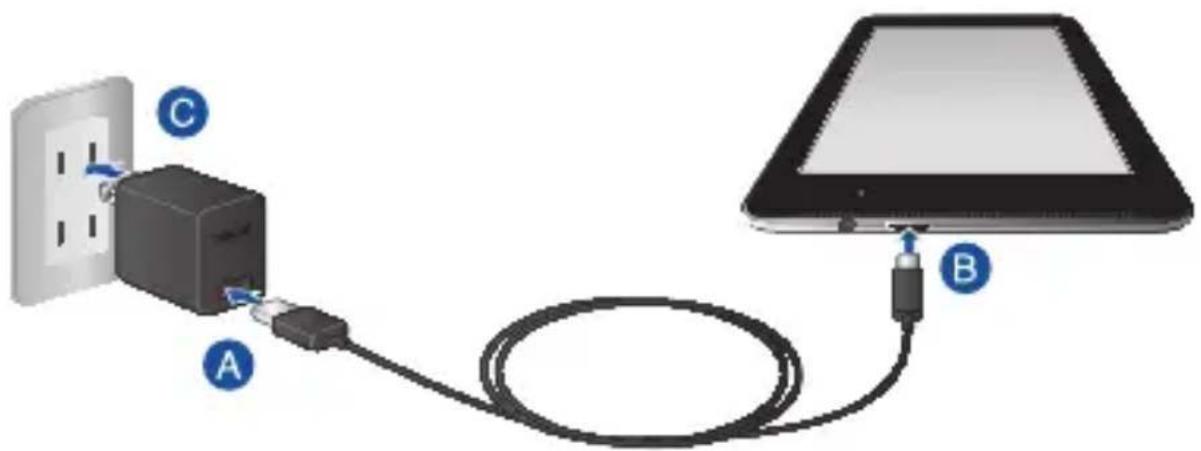
To charge your ASUS Tablet:
A Connect the micro USB cable to the power adapter. B Plug the micro USB connector into your ASUS Tablet. Plug the power adapter into a grounded power outlet.

Charge your ASUS Tablet for eight (8) hours before using it in battery mode for the first time.
NOTE: The output voltage of this adapter is DC 5.2 V, 1.35 A, 7 W.
Using the power charger
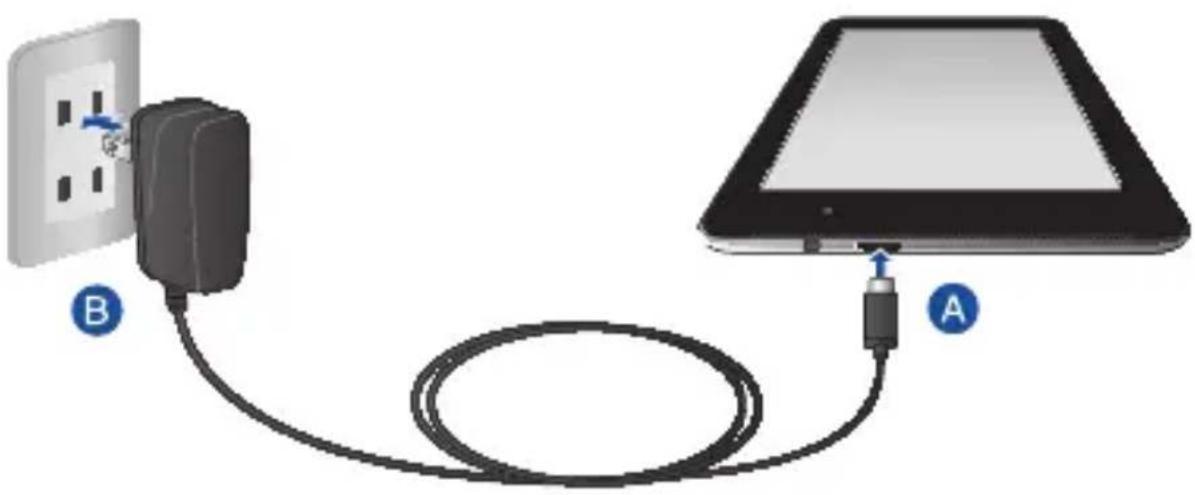
To charge your ASUS Tablet:
A Plug the micro USB connector into your ASUS Tablet. B Plug the power charger into a grounded power outlet.

Charge your ASUS Tablet for eight (8) hours before using it in battery mode for the first time.
NOTE: The output voltage of this adapter is DC 5 V, 1 A, 5 W.
IMPORTANT!
- Use only the bundled power adapter and micro USB cable to charge your ASUS Tablet. Using a different power adapter may damage your ASUS Tablet.
- Peel the protective film off from the power adapter and micro USB cable before charging the ASUS Tablet to prevent risk or injury.
- Ensure to plug the power adapter to the correct power outlet with the correct input rating.
- When using your ASUS Tablet while plugged-in to a power outlet, the grounded power outlet must be near the unit and easily accessible.
- Do not place objects on top of your ASUS Tablet.
NOTES:
- Your ASUS Tablet can be charged via the USB port on a computer only when it is in sleep mode (screen off) or turned off.
- Charging through a USB port of a computer may take longer time to complete.
- If your computer does not provide enough power for charging your ASUS Tablet, charge your ASUS Tablet via the grounded power outlet instead.
Appendices
Federal Communications Commission Statement
This device complies with FCC Rules Part 15. Operation is subject to the following two conditions:
• This device may not cause harmful interference. - This device must accept any interference received, including interference that may cause undesired operation.
This equipment has been tested and found to comply with the limits for a class B digital device, pursuant to Part 15 of the Federal Communications Commission (FCC) rules. These limits are designed to provide reasonable protection against harmful interference in a residential installation. This equipment generates, uses, and can radiate radio frequency energy and, if not installed and used in accordance with the instructions, may cause harmful interference to radio communications. However, there is no guarantee that interference will not occur in a particular installation. If this equipment causes harmful interference to radio or television reception, which can be determined by turning the equipment off and on, the user is encouraged to try to correct the interference by doing one or more of the following measures:
• Reorient or relocate the receiving antenna. - Increase the separation between the equipment and receiver. - Connect the equipment into an outlet on a circuit different from that to which the receiver is connected.
- Consult the dealer or an experienced radio/TV technician for help.
Changes or modifications not expressly approved by the party responsible for compliance could void the user's authority to operate the equipment.
The antenna(s) used for this transmitter must not be co-located or operating in conjunction with any other antenna or transmitter.
RF Exposure Information (SAR)
This device meets the government's requirements for exposure to radio waves. This device is designed and manufactured not to exceed the emission limits for exposure to radio frequency (RF) energy set by the Federal Communications Commission of the U.S. Government.
The exposure standard employs a unit of measurement known as the Specific Absorption Rate, or SAR. The SAR limit set by the FCC is 1.6 W/kg. Tests for SAR are conducted using standard operating positions accepted by the FCC with the EUT transmitting at the specified power level in different channels. The highest SAR value for the device as reported to the FCC is 0.65 W/kg when placed next to the body.
The FCC has granted an Equipment Authorization for this device with all reported SAR levels evaluated as in compliance with the FCC RF exposure guidelines. SAR information on this device is on file with the FCC and can be found under the Display Grant section of www.fcc.gov/oet/ea/fccid after searching on FCC ID: MSQK01A.
Canada, Industry Canada (IC) Notices
This Class B digital apparatus complies with Canadian ICES-003, RSS-210, and CAN ICES-3(B)/NMB-3(B).
Operation is subject to the following two conditions: (1) this device may not cause interference, and (2) this device must accept any interference, including interference that may cause undesired operation of the device. The IC ID for this device is 3568A-K01A.
Radio Frequency (RF) Exposure Information
The radiated output power of the Wireless Device is below the Industry Canada (IC) radio frequency exposure limits. The Wireless Device should be used in such a manner such that the potential for human contact during normal operation is minimized.
This device has been evaluated for and shown compliant with the IC Specific Absorption Rate ("SAR") limits when installed in specific host products operated in portable exposure conditions.
Canada's REL (Radio Equipment List) can be found at the following web address: http://www.ic.gc.ca/app/sitt/reltel/srch/nwRdSrch.do?lang=eng
Additional Canadian information on RF exposure also can be found at the following web address: http://www.ic.gc.ca/eic/site/smt-gst.nsf/eng/sf08792.html
Canada, Industry Canada (IC) Notice
http://www.ic.gc.ca/eic/site/smt-gst.nsf/eng/sf08792.html
IC Warning Statement
The device could automatically discontinue transmission in case of absence of information to transmit, or operational failure. Note that this is not intended to prohibit transmission of control or signaling information or the use of repetitive codes where required by the technology.
The device for the band 5150-5250 MHz is only for indoor usage to reduce potential for harmful interference to co-channel mobile satellite systems; the maximum antenna gain permitted (for device in the bands 5250-5350 MHz and 5470-5725 MHz) to comply with the EIRP limit; and the maximum antenna gain permitted (for devices in the band 5275-5850 MHz) to comply with the EIRP limits specified for point-to-point and non point-to-point operation as appropriate, as stated in section A9.2(3). In addition, high-power radars are allocated as primary users (meaning they have priority) of the band 5250-5350 MHz and this radar could cause interference and/or damage to LE-LAN devices.
The Country Code Selection feature is disabled for products marketed in the US/Canada. For product available in the USA/Canada markets, only channel 1-11 can be operated. Selection of other channels is not possible.
EC Declaration of Conformity
This product is compliant with the regulations of the R&TTE Directive 1999/5/EC. The Declaration of Conformity can be downloaded from http://support.asus.com.
Limitation of Liability
Circumstances may arise where because of a default on ASUS' part or other liability, you are entitled to recover damages from ASUS. In each such instance, regardless of the basis on which you are entitled to claim damages from ASUS, ASUS is liable for no more than damages for bodily injury (including death) and damage to real property and tangible personal property; or any other actual and direct damages resulted from omission or failure of performing legal duties under this Warranty Statement, up to the listed contract price of each product.
ASUS will only be responsible for or indemnify you for loss, damages or claims based in contract, tort or infringement under this Warranty Statement.
This limit also applies to ASUS' suppliers and its reseller. It is the maximum for which ASUS, its suppliers, and your reseller are collectively responsible.
UNDER NO CIRCUMSTANCES IS ASUS LIABLE FOR ANY OF THE FOLLOWING: (1) THIRD-PARTY CLAIMS AGAINST YOU FOR DAMAGES; (2) LOSS OF, OR DAMAGE TO, YOUR RECORDS OR DATA; OR (3) SPECIAL, INCIDENTAL, OR INDIRECT DAMAGES OR FOR ANY ECONOMIC CONSEQUENTIAL DAMAGES (INCLUDING LOST PROFITS OR SAVINGS), EVEN IF ASUS, ITS SUPPLIERS OR YOUR RESELLER IS INFORMED OF THEIR POSSIBILITY.
Prevention of Hearing Loss
To prevent possible hearing damage, do not listen at high volume levels for long periods.

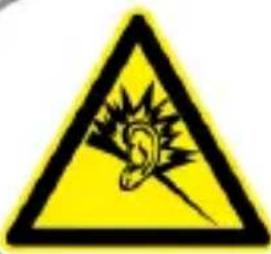
For France, headphones/earphones for this device are compliant with the sound pressure level requirement laid down in the applicable EN 50332-1:2000 and/or EN50332-2:2003 standard required by French Article L.5232-1.
CE Mark Warning
CE
CE marking for devices with wireless LAN/ Bluetooth
This equipment complies with the requirements of Directive 1999/5/EC of the European Parliament and Commission from 9 March, 1999 governing Radio and Telecommunications Equipment and mutual recognition of conformity.
The highest CE SAR value for the device is 0.429 W/Kg.
This equipment may be operated in:
| AT BE BG CH CY CZ DE DK | |||||||
| EE ES FI FR GB GR HU IE | |||||||
| IT | IS | LI | LT | LU | LV | MT | NL |
| NO PL PT RO SE SI SK TR | |||||||
DFS controls related to radar detection shall not be accessible to the user.
Rechargeable Battery Recycling Service in North America
For US and Canada customers, you can call 1-800-822-8837 (toll-free) for recycling information of your ASUS products' rechargeable batteries.
RF Exposure information (SAR) - CE
This device meets the EU requirements (1999/519/EC) on the limitation of exposure of the general public to electromagnetic fields by way of health protection.
The limits are part of extensive recommendations for the protection of the general public. These recommendations have been developed and checked by independent scientific organizations through regular and thorough evaluations of scientific studies. The unit of measurement for the European Council's recommended limit for mobile devices is the "Specific Absorption Rate" (SAR), and the SAR limit is 2.0 W/Kg averaged
over 10 gram of body tissue. It meets the requirements of the International Commission on Non-Ionizing Radiation Protection (ICNIRP).
For next-to-body operation, this device has been tested and meets the ICNIRP exposure guidelines and the European Standards EN 62311 and EN 50566. SAR is measured with the device directly contacted to the body while transmitting at the highest certified output power level in all frequency bands of the mobile device.
India RoHS
This product complies with the "India E-waste (Management and Handling) Rule 2011" and prohibits the use of lead, mercury, hexavalent chromium, polybrominated biphenyls (PBBs), and polybrominated diphenyl ethers (PBDEs) in concentrations exceeding 0.1% by weight in homogeneous materials and 0.01% by weight in homogeneous materials for cadmium, except for the exemptions listed in Schedule-II of the Rule.
Power Safety Requirement
Products with electrical current ratings up to 6A and weighing more than 3 kg must use approved power cords greater than or equal to: H05VV-F, 3G, 0.75 mm² or H05VV-F, 2G, 0.75 mm².
ASUS Recycling/Takeback Services
ASUS recycling and takeback programs come from our commitment to the highest standards for protecting our environment. We believe in providing solutions for you to be able to responsibly recycle our products, batteries, other components, as well as the packaging materials. Please go to http://csr.asus.com/english/Takeback.htm for detailed recycling information in different regions.
Coating notice
IMPORTANT! To provide electrical insulation and maintain electrical safety, a coating is applied to insulate the device except on the areas where the I/O ports are located.
Green ASUS notice
ASUS is devoted to creating environment-friendly products and packaging to safeguard consumers' health while minimizing the impact on the environment. The reduction of the number of the manual pages complies with the reduction of carbon emission.
For the detailed user manual and related information, refer to the user manual included with the ASUS Tablet or visit the ASUS Support Site at http://support.asus.com/.
Regional notice for Singapore
Complies with
IDA Standards
DB103778
This ASUS product complies with IDA Standards.
Proper disposal

Risk of explosion if battery is replaced by an incorrect type. Dispose of used batteries according to the instructions.

DO NOT throw the battery in municipal waste. The symbol of the crossed out wheeled bin indicates that the battery should not be placed in municipal waste.

DO NOT throw the ASUS Tablet in municipal waste. This product has been designed to enable proper reuse of parts and recycling. The symbol of the crossed out wheeled bin indicates that the product (electrical, electronic equipment and mercury-containing button cell battery) should not be placed in municipal waste. Check local regulations for disposal of electronic products.

DO NOT throw the ASUS Tablet in fire. DO NOT short circuit the contacts. DO NOT disassemble the ASUS Tablet.
Copyright Information
No part of this manual, including the products and software described in it, may be reproduced, transmitted, transcribed, stored in a retrieval system, or translated into any language in any form or by any means, except documentation kept by the purchaser for backup purposes, without the express written permission of ASUSTeK COMPUTER INC. ("ASUS").
ASUS and ASUS Tablet logo are trademarks of ASUSTek Computer Inc.
Information in this document is subject to change without notice.
Copyright © 2014 ASUSTeK COMPUTER INC. All Rights Reserved.
Model name: K01A (ME70C/ME7000C)
| Manufacturer ASUSTek COMPUTER INC. | |
| Address, City 4F, No. 150, LI-TE RD., PEITOU, TAIPEI 112, TAIWAN | |
| Authorized Representative in Europe | ASUS COMPUTER GmbH |
| Address, City HARKORT STR. 21-23, 40880 RATINGEN | |
| Country GERMANY | |
EC Declaration of Conformity

We, the undersigned,
| Manufacturer: | ASUSTeK COMPUTER INC. |
| Address: | 4F, No. 150, LI-TE Rd., PEITOU, TAIPEI 112, TAIW AN |
| Authorized representative in Europe: | ASUS COMPUTER GmbH |
| Address, City: | HARKORT STR. 21-23, 40880 RATINGEN |
| Country: | GERMANY |
declare the following apparatus:
| Product name : ASUS Tablet (WiFi/Bluetooth/GPS) | |
| Model name : K01A | |
conform with the essential requirements of the following directives:
2004/108/EC-EMC Directive
| EN 55022:2010+AC:2011EN 61000-3-2:2006+A2:2009EN 55013:2001+A1:2003+A2:2006 | EN 55024:2010EN 61000-3-3:2008EN 55020:2007+A11:2011 |
1999/5/EC-R&TTE Directive
| EN 300 328 V1.7.1(2006-10) | EN 301 489-1 V1.9.2(2011-09) |
| EN 300 440-1 V1.6.1(2010-08) | EN 301 489-3 V1.6.1(2013-08) |
| EN 300 440-2 V1.4.1(2010-08) | EN 301 489-4 V1.4.1(2009-05) |
| EN 301 511 V9.0.2(2003-03) | EN 301 489-7 V1.3.1(2005-11) |
| EN 301 908-1 V5.2.1(2011-05) | EN 301 489-9 V1.4.1(2007-11) |
| EN 301 908-2 V5.2.1(2011-07) | EN 301 489-17 V2.2.1(2012-09) |
| EN 301 893 V1.6.1(2011-11) | EN 301 489-24 V1.5.1(2010-09) |
| EN 302 544-2 V1.1.1(2009-01) | EN 302 326-2 V1.2.2(2007-06) |
| EN 302 623 V1.1.1(2009-01) | EN 302 326-3 V1.3.1(2007-09) |
| EN 50360:2001 | EN 301 357-2 V1.4.1(2008-11) |
| EN 50360/A1 (2012-03) | EN 302 291-1 V1.1.1(2005-07) |
| EN 62479:2010 | EN 302 291-2 V1.1.1(2005-07) |
| EN 50566:2013 | |
| EN 62209-1:2006 | |
| EN 62209-2:2010 |
2006/95/EC-LVD Directive
| EN 60950-1 / A12:2011 | EN 60065:2002 / A12:2011 |
2009/125/EC-ErP Directive
| ☐ Regulation (EC) No. 1275/2008 | ☐ Regulation (EC) No. 278/2009 |
| ☐ Regulation (EC) No. 642/2009 | ☐ Regulation (EC) No. 617/2013 |
2011/65/EU-RoHS Directive
Ver. 140331
CE marking

(EC conformity marking)
Position: CEO
Name: Jerry Shen

Declaration Date: 02/05/2014
Year to begin affixing CE marking: 2014
Signature: ____




- IN SEARCH OF INCREDIBLE
- CHARGING YOUR DEVICE
- AIRPLANE PRECAUTIONS
- SAFETY PRECAUTIONS
- PACKAGE CONTENTS
- NOTES
- YOUR ASUS TABLET FRONT VIEW
- REAR VIEW
- CHARGING YOUR ASUS TABLET USING THE POWER ADAPTER AND MICRO USB CABLE
- USING THE POWER CHARGER
- IMPORTANT
- APPENDICES
- FEDERAL COMMUNICATIONS COMMISSION STATEMENT
- RF EXPOSURE INFORMATION (SAR)
- CANADA, INDUSTRY CANADA (IC) NOTICES
- RADIO FREQUENCY (RF) EXPOSURE INFORMATION
- CANADA, INDUSTRY CANADA (IC) NOTICE
- IC WARNING STATEMENT
- EC DECLARATION OF CONFORMITY
- LIMITATION OF LIABILITY
- PREVENTION OF HEARING LOSS
- CE MARK WARNING
- CE
- CE MARKING FOR DEVICES WITH WIRELESS LAN/ BLUETOOTH
- RECHARGEABLE BATTERY RECYCLING SERVICE IN NORTH AMERICA
- RF EXPOSURE INFORMATION (SAR) - CE
- INDIA ROHS
- POWER SAFETY REQUIREMENT
- ASUS RECYCLING/TAKEBACK SERVICES
- COATING NOTICE
- GREEN ASUS NOTICE
- REGIONAL NOTICE FOR SINGAPORE
- PROPER DISPOSAL
- COPYRIGHT INFORMATION
Brand : ASUS
Model : MeMO Pad 7 ME70CX
Category : Tablet