GIGABYTE AORUS WATERFORCE 240 - Computer Cooling Component

AORUS WATERFORCE 240 - Computer Cooling Component GIGABYTE - Free user manual and instructions

Find the device manual for free AORUS WATERFORCE 240 GIGABYTE in PDF.

📄 2 pages English EN Download 💬 AI Question 10 questions ⚙️ Specs
Notice GIGABYTE AORUS WATERFORCE 240 - page 1
Pick your language and provide your email: we'll send you a specifically translated version.
Product Type All-in-one liquid CPU cooler
Brand Gigabyte
Model AORUS WATERFORCE 240
Radiator Dimensions (W x H x D) 272 x 120 x 27 mm
Radiator Material Aluminum
Fan Dimensions 120 x 120 x 25 mm
Fan Speed 800 - 2500 RPM
Fan Airflow 60.7 CFM (max)
Fan Noise Level 10 - 31 dB(A)
Pump Dimensions 68.3 x 68.3 x 44.8 mm
Pump Speed 3400 RPM (PWM controlled)
Pump Noise Level 25 dB(A) (max)
Socket Compatibility (Intel) LGA 1700, 1200, 115x, 2011, 2066
Socket Compatibility (AMD) AM5, AM4, TR4, sTRX4, sWRX8
Maximum TDP Support Up to 250W (depending on CPU)
Lighting Addressable RGB on pump head
Warranty 3 years (pump and radiator)
Maintenance Sealed loop; no refilling required; clean radiator fins with compressed air
Safety Avoid bending tubes excessively; ensure secure mounting to prevent leaks
Spare Parts Contact Gigabyte support for fan replacement or mounting brackets

Frequently Asked Questions - AORUS WATERFORCE 240 GIGABYTE

What socket types are compatible with the AORUS WATERFORCE 240?
The cooler supports Intel LGA 1700, 1200, 115x, 2011, 2066 and AMD AM5, AM4, TR4, sTRX4, sWRX8 sockets.
How do I install the RGB lighting on the pump?
Connect the RGB cable from the pump to an addressable RGB header (5V, 3-pin) on your motherboard. Use Gigabyte's RGB Fusion software to control the lighting.
Is the liquid cooling loop sealed? Can I refill it?
Yes, the loop is sealed and maintenance-free. Refilling is not required and should not be attempted as it may damage the unit and void the warranty.
What is the maximum TDP the AORUS WATERFORCE 240 can handle?
It can handle CPUs with a TDP up to 250W under typical conditions, but actual performance depends on CPU architecture and case airflow.
Can I replace the fans with different ones?
Yes, the cooler uses standard 120mm fans. You can replace them with aftermarket fans, but ensure the airflow direction is correct for exhaust through the radiator.
How do I clean the radiator?
Use compressed air or a low-pressure vacuum to remove dust from the radiator fins. Avoid using water or solvents. Hold fans stationary to prevent spinning during cleaning.
Does the pump need to be powered separately?
The pump receives power via the 3-pin pump header on the motherboard. Connect it to a dedicated pump header or CPU_FAN header and enable full-speed in BIOS.
How do I control fan speeds?
Fan speeds can be controlled via the motherboard's PWM headers. Gigabyte motherboards may offer Smart Fan 5 software for custom curves.
What is the recommended mounting orientation?
Mount the radiator at the top or front of the case. Ensure the pump is below the highest point of the radiator to avoid trapping air bubbles in the pump.
Why is my pump making a gurgling noise?
Trapped air bubbles in the loop can cause noise. Tilt the case slightly or run the pump at high speed for a few hours to move air to the radiator. Ensure proper orientation.

User questions about AORUS WATERFORCE 240 GIGABYTE

0 question about this device. Answer the ones you know or ask your own.

Ask a new question about this device

The email remains private: it is only used to notify you if someone responds to your question.

No questions yet. Be the first to ask one.

Download the instructions for your Computer Cooling Component in PDF format for free! Find your manual AORUS WATERFORCE 240 - GIGABYTE and take your electronic device back in hand. On this page are published all the documents necessary for the use of your device. AORUS WATERFORCE 240 by GIGABYTE.

USER MANUAL AORUS WATERFORCE 240 GIGABYTE

AORUS WATERFORCE Quick Installation Guide

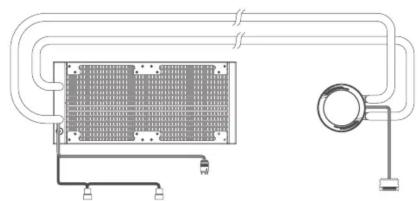
Package Contents:
a
GIGABYTE AORUS WATERFORCE 240 - AORUS WATERFORCE Quick Installation Guide - 1

natural_image Pure technical diagram of a heat exchanger or cooling unit with tubing and mounting base (no text or symbols)

1 x AORUS WATERFORCE 360

GIGABYTE AORUS WATERFORCE 240 - AORUS WATERFORCE Quick Installation Guide - 2

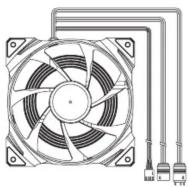
natural_image Technical diagram of a heat exchanger or cooling unit with cooling fins and piping (no text or symbols)

DRUS WATERFORCE 240

GIGABYTE AORUS WATERFORCE 240 - AORUS WATERFORCE Quick Installation Guide - 3

natural_image Technical line drawing of a heat exchanger or cooling unit with tubing and mounting base (no text or symbols)

GIGABYTE AORUS WATERFORCE 240 - AORUS WATERFORCE Quick Installation Guide - 4

b
GIGABYTE AORUS WATERFORCE 240 - AORUS WATERFORCE Quick Installation Guide - 5
AORUS WATERFORCE 360: 3 x 12cm fans
AORUS WATERFORCE 280: 2 x 14cm fans
AORUS WATERFORCE 240: 2 x 12cm fans

©
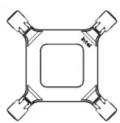
GIGABYTE AORUS WATERFORCE 240 - AORUS WATERFORCE Quick Installation Guide - 6

d
GIGABYTE AORUS WATERFORCE 240 - AORUS WATERFORCE Quick Installation Guide - 7

e
GIGABYTE AORUS WATERFORCE 240 - AORUS WATERFORCE Quick Installation Guide - 8

f
GIGABYTE AORUS WATERFORCE 240 - AORUS WATERFORCE Quick Installation Guide - 9
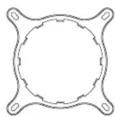
1 x Intel Backplate 1 x Intel Mounting Bracket 1 x AMD Mounting Bracket
1 x TR4/sTRX40 Mounting Bracket

g
GIGABYTE AORUS WATERFORCE 240 - AORUS WATERFORCE Quick Installation Guide - 10

h
GIGABYTE AORUS WATERFORCE 240 - AORUS WATERFORCE Quick Installation Guide - 11

i
GIGABYTE AORUS WATERFORCE 240 - AORUS WATERFORCE Quick Installation Guide - 12

j
GIGABYTE AORUS WATERFORCE 240 - AORUS WATERFORCE Quick Installation Guide - 13

k
GIGABYTE AORUS WATERFORCE 240 - AORUS WATERFORCE Quick Installation Guide - 14

1
GIGABYTE AORUS WATERFORCE 240 - AORUS WATERFORCE Quick Installation Guide - 15

m
GIGABYTE AORUS WATERFORCE 240 - AORUS WATERFORCE Quick Installation Guide - 16
Length: 25.86mmLength: 26.66mm

4 x Thumbscrew Caps 4 x LGA 115x/1200/1366 Standoff Screws 4 x LGA 2011/2011-3/2066 Standoff Screws 4 x LGA 1700 Standoff Screws 4 x AMD Standoff Screws 4 x TR4/sTRX40 Screws 16 or 24 x Radiator Screws n o p q r s 8 or 12 x Fan Screws 8 or 12 x Washers 4 x AM4 Screws Mylar Washers 1 x Micro USB to Motherboard Cable 8 or 12 x Radiator Standoff Screws 1 x Thermal Grease 12CM-AWC248-ONR

Installing the Mounting Bracket

Intel Backplate
Intel For LGA 1700 socket For LGA 115x/1200 socket

Intel Platform
GIGABYTE AORUS WATERFORCE 240 - Installing the Mounting Bracket - 2

natural_image Diagram showing a microchip assembly with mounting base and circuit board (no text or symbols)

Intel LGA 2011/2011-3/2066
Diagram illustrating a mechanical assembly with labeled components and directional arrows, likely representing motion or force vectors.

Intel LGA 115x/1200
h

Intel LGA 1700
GIGABYTE AORUS WATERFORCE 240 - Installing the Mounting Bracket - 5

flowchart
graph TD
    A["Input"] --> B["Component 1"]
    B --> C["Component 2"]
    C --> D["Component 3"]
    D --> E["Output"]
    style A fill:#f9f,stroke:#333
    style E fill:#bbf,stroke:#333

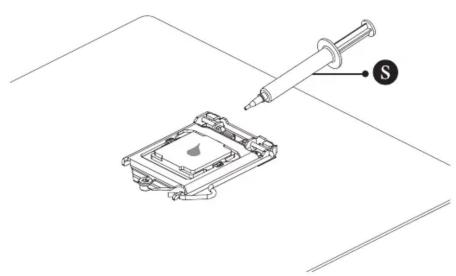
Warning

GIGABYTE AORUS WATERFORCE 240 - Installing the Mounting Bracket - 7

natural_image Technical line drawing of a device with a syringe and a labeled component (no text or symbols)

Diagram showing a mechanical component with rotational arrows and a label 'g' pointing to it, likely indicating motion or assembly.

Installing the Mounting Bracket

AMD AM4 AMD TR4/sTRX40
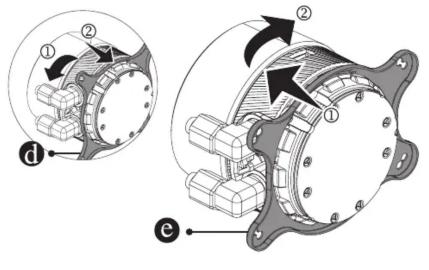
Technical diagram of an electric motor with labeled components and directional arrows indicating rotation or movement.

Technical diagram of a mechanical assembly with labeled parts and directional arrows indicating motion or assembly.

AMD TR4/sTRX40 Platform
Technical diagram showing a mechanical assembly with labeled parts and a warning mechanism indicator.

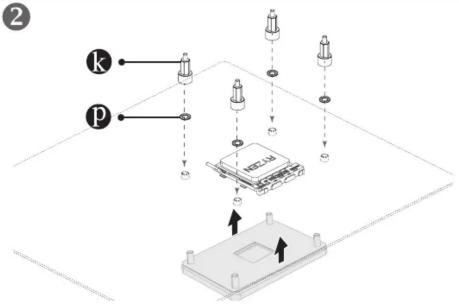
1 AMD Platform
Technical diagram showing assembly of a device with labeled components and directional arrows indicating assembly or movement.

2
2 k p

3
Diagram illustrating a mechanical or electrical component with labeled parts and directional arrows indicating motion or movement.

4
SATA Power USB 2.0 Cable Micro USB Socket

Cable Connection

m o n SARUN SARUN Fan connection Fan ARGB connection

Technical diagram of a computer tower with labeled components including fan, drive, and ventilation slots

GIGABYTE AORUS WATERFORCE 240 - Cable Connection - 3
r screws are for use on AORUS chassis model AC300G and AC300W only.

GIGABYTE AORUS WATERFORCE 240 - Cable Connection - 4

Contact Us

GIGA-BYTE TECHNOLOGY CO., LTD.

Address: No.6, Baoqiang Rd., Xindian Dist., New Taipei City 231, Taiwan

TEL: +886-2-8912-4000, FAX: +886-2-8912-4005

Tech. and Non-Tech. Support (Sales/Marketing) : https://esupport.gigabyte.com

WEB address (English): https://www.gigabyte.com

WEB address (Chinese): https://www.gigabyte.com/tw

© 2021 GIGA-BYTE TECHNOLOGY CO., LTD. All rights reserved.

The trademarks mentioned in this manual are legally registered to their respective owners.

Disclaimer

Information in this manual is protected by copyright laws and is the property of GIGABYTE.

Changes to the specifications and features in this manual may be made by GIGABYTE without prior notice.

No part of this manual may be reproduced, copied, translated, transmitted, or published in any form or by any means without GIGABYTE's prior written permission.

For product-related information, check on our website at: https://www.gigabyte.com

GIGABYTE™
Manual assistant
Powered by Anthropic
Waiting for your message
Product information

Brand : GIGABYTE

Model : AORUS WATERFORCE 240

Category : Computer Cooling Component