
Spark - Uncategorized Niceboy - Free user manual and instructions
Find the device manual for free Spark Niceboy in PDF.


| Product Type | Contactless Payment Bracelet |
| Brand | Niceboy |
| Model | ONE Spark |
| Category | Wearable Payment Device |
| Payment Chip Type | NFC (Near Field Communication) |
| Effective Chip Distance | 1-3 cm |
| Compatible App | Niceboy Pay |
| Required Operating System | Android 10+ or iOS 8.2+ |
| Card Tokenization | Via NFC on smartphone |
| Payment Method | Contactless credit/debit card emulation |
| Battery | Built-in rechargeable battery (estimated typical 1-2 years of use) |
| Charging | Not specified; likely wireless or via contacts |
| Water Resistance | Not specified; avoid immersion |
| Dimensions (approx.) | Width: 25 mm, Height: 200 mm (adjustable band) |
| Weight (approx.) | 20 g |
| Package Contents | Payment bracelet Niceboy ONE Spark, User manual |
| Material | Silicone band with plastic payment element |
| Color Options | Not specified; standard black likely |
| Safety | Do not throw into fire; not suitable for children under 3; do not disassemble |
| Care & Cleaning | Wipe with a soft, dry cloth; avoid solvents |
| Repair | Only authorized Niceboy technicians; user disassembly voids warranty |
| Manufacturer | NICEBOY s.r.o., Prague, Czech Republic |
| Country of Origin | China |
Frequently Asked Questions - Spark Niceboy
User questions about Spark Niceboy
0 question about this device. Answer the ones you know or ask your own.
Ask a new question about this device
Download the instructions for your Uncategorized in PDF format for free! Find your manual Spark - Niceboy and take your electronic device back in hand. On this page are published all the documents necessary for the use of your device. Spark by Niceboy.
USER MANUAL Spark Niceboy
User Manual / Contactless Payment Strip
CZ
PROPOJENÍ S APLIKACÍ
natural_image
Simple line drawing of a horizontal bar with circular cutouts and a small rectangular button labeled 'ΦΦ' (no text or symbols beyond basic markings)natural_image
Simple line drawing of a remote control panel with four buttons and a Wi-Fi icon (no text or symbols)natural_image
Simple line drawing of a device with five circles and a rectangular sensor icon (no text or symbols)natural_image
Pure diagram of a horizontal bar with circular slots and a small rectangular button, no text or symbols present.natural_image
Simple line drawing of a remote control panel with four circular buttons and a Wi-Fi icon (no text or symbols)natural_image
Simple line drawing of a device with five circles and a rectangular sensor icon (no text or symbols)CONNECTING TO THE APP
Install the Niceboy Pay app on your mobile phone (the app is only supported on Android 10 and above, iOS 8.2 and above for security reasons).
Turn on the NFC function on your mobile phone.
Open the downloaded Niceboy Pay app.
- If you have already created an account, log in with your email address and password.
- If you do not have an account, click on „Create an account“. Enter your email and choose a password. Then click on register. The application will allow you to log into your account.
Now all you have to do is add your wearable. The chip is in the extended part of the bracelet.

natural_image
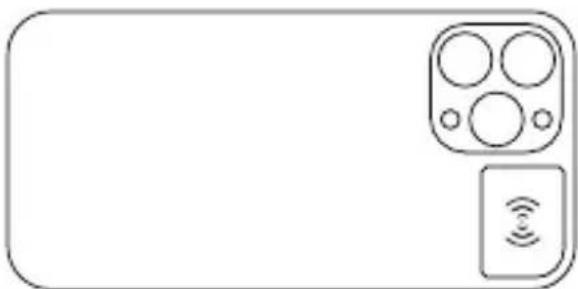
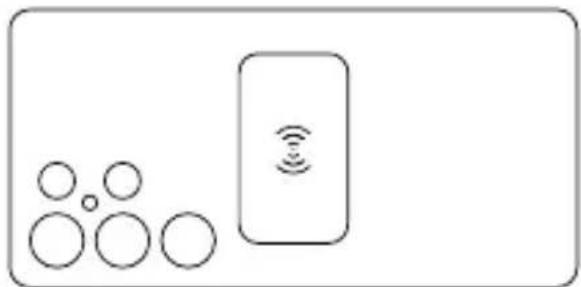
Pure diagram of a horizontal bar with circular slots and a central button, no text or symbols presentClick on „Add Device.“ Then attach your device to your phone’s NFC chip (for iPhones, the NFC chip is usually on the top of the phone, see Picture 1. For Android devices, it is most often seen in Picture 2. The exact position of your phone’s NFC chip may vary on different devices. To find out the exact position of your phone’s NFC chip, contact your phone manufacturer).
After adding the device to your account, you can add your credit card or create a business card.
natural_image
Simple line drawing of a remote control panel with four buttons and a Wi-Fi icon (no text or symbols)Figure 1 Common approximate location of the NFC chip on an iPhone
natural_image
Simple line drawing of a device with five circles and a rectangular sensor icon (no text or symbols)Figure 2 Common approximate location of Android devices
To add a card, first enter the card number, then its expiration date and CVV code. After filling in, it is necessary to confirm the conditions by clicking „confirm and continue“. The card must then be tokenized into the device. You can do this by touching the device to your phone’s NFC chip again. For a smooth process of tokenization, place the payment element on the table and place the phone next to it. Try not to move your phone. If you are unable to complete the tokenization, it will be necessary to bring the device closer to the NFC chip. Subsequently, all you have to do is authorize the card with a verification code using an SMS message and complete the activation.
ATTENTION! Limit movement when tokenizing the card to the device with the phone. Failed activation several times in a row can lead to blocking of the device. The device can be unlocked in the app under „Help“ -> „Wearables“ -> „My wearable is not responding“ -> „Unlock wearable“.
- If you want to remove the card, click „Remove Card“.
- The card can be temporarily deactivated using the „Active/Inactive“ button.
PAYING WITH A PAYMENT BRACELET
How to pay correctly with a bracelet?
- Place the payment element at a distance of 1-2 cm from the logo for contactless payment
- Keep the bracelet in the given position until you hear a beep or until the information and completion of payment appear on the terminal display.
COMMON MISTAKES WHEN PAYING WITH THE BRACELET
Do not rush to pay with a wristband. Always wait until the terminal displays information about a successful transaction.
SECURITY NOTICES
- Do not throw the device into a fire.
- The device is not suitable for children under 3 years of age.
- Attempting to disassemble the device will result in irreversible damage. The device may only be disassembled by an authorized Niceboy s.r.o. technician.
RETURNING OF THE PRODUCT WITHIN 14 DAYS / RETURN OF THE PRODUCT
- In case of returning the device within 14day period or in case of a product complaint, the customer is obliged to remove the payment card from his/her device. In the event of failure to do so, the manufacturer shall not be liable for any damages incurred.
- In case of mechanical damage by the customer, the claim cannot be accepted (scratches, dents, other visible damage).
SPECIFICATIONS
Device: Niceboy ONE Spark Application: Niceboy Pay Payment chip type: NFC Effective chip distance: 1-3 cm
PACKAGE CONTENTS
Payment bracelet Niceboy ONE Spark Instructions for use
niceboy®
MANUFACTURER:
NICEBOY s.r.o., 5. kvetna 1746/22, Prague 4,
Nusle, 140 00, Czech Republic, ID: 294 16 876
Made in China.
RoHS CE ✉ 📧


Brand : Niceboy
Model : Spark
Category : Uncategorized