
ASB-20CSW - Soundbar AKAI - Free user manual and instructions
Find the device manual for free ASB-20CSW AKAI in PDF.


| Product Type | 2.1 Channel Soundbar with Wired Subwoofer |
| Brand | AKAI |
| Model | ASB-20CSW |
| Soundbar Dimensions | 800 x 95 x 65 mm |
| Subwoofer Dimensions | 200 x 300 x 300 mm |
| Total Output Power | 80W |
| Speaker Drivers | Soundbar: 2.25" 20W x2; Subwoofer: 5.25" 40W x1 |
| Bluetooth Version | 5.3 + EDR |
| Bluetooth Range | Up to 10m |
| Connectivity | AUX, USB, Optical, Coaxial, HDMI(ARC) |
| USB Playback Formats | MP3, WAV |
| USB Max Capacity | 32GB (FAT32 format) |
| Equalizer Presets | Music (EQ1), Movie (EQ2), News (EQ3) |
| Wall Mounting | Keyhole slots, 634mm apart |
| Remote Control | Included (requires AAA battery) |
| Included Accessories | User manual, Remote control, Aux cable, Wall mounting kit |
| Power Supply | Built-in AC100-240V |
| LED Display | Green (standby) and mode indicators |
| Subwoofer Connection | Wired via SW OUT |
Frequently Asked Questions - ASB-20CSW AKAI
User questions about ASB-20CSW AKAI
0 question about this device. Answer the ones you know or ask your own.
Ask a new question about this device
Download the instructions for your Soundbar in PDF format for free! Find your manual ASB-20CSW - AKAI and take your electronic device back in hand. On this page are published all the documents necessary for the use of your device. ASB-20CSW by AKAI.
USER MANUAL ASB-20CSW AKAI
2.1 Channel Soundbar with Wired Subwoofer
ASB-20CSW

natural_image
Two black electronic devices: a black rectangular device labeled 'AKAI' and a long cylindrical device with '31' marking (no additional text or symbols visible)User Manual
EN - ENGLISH
Thank you for purchasing this soundbar! To ensure its proper use, please read this manual carefully before using the product and keep the manual in a safe place for future reference.
A compact yet powerful Bluetooth soundbar with modern design and excellent audio response. With 2 built-in speakers and 1 wired subwoofer which provide clarity in a wide range of frequencies, with clear highs and deep bass that exceed the unit's size. An integral USB port enables playback of MP3/WAV files directly from compatible media, with further flexible input options including Aux, USB, Optical, Coaxial and HDMI(ARC). A convenient and cost-effective TV audio upgrade that does not compromise on performance.
- Slender and stylish glossy black design;
- 2 speakers and 1 wired subwoofer for a clear sound with deep bass;
• Built-in 2.1 channel amplifier with 3 EQ presets - Versatile input options to support a range of devices
• USB port for MP3 media playback
• Keyhole slots for wall mounting - Remote control and Aux cable included
Accessories:
User manual x 1
Remote control x 1
Aux-in cable x 1
Wall mounting and screws x 1
Matters Need Attention:
- Do not install this product under high temperatures, wet environment, especially in spaces where it may come in contact with rain, moisture or other liquids.
- To reduce the risk or electrical shock or fire, do not remove the cabinet's cover, please contact the service directly.
- In case of malfunction, do not attempt to repair the unit on your own, please contact the service directly.
- If fragments or liquids fall into device box, please turned off the product or cut off the power right away. The product can be used again only after was checked and repaired by the service.
Technical Specifications and Features:
Output power: 80W
Speaker drivers: soundbar 2.25" 20W*2+subwoofer 5.25" 40W*1
Bluetooth version: 5.3+EDR
Bluetooth channel emission power: 1mW
Bluetooth frequency: 2.4 – 2.483GHz
Bluetooth range: Up to 10m
Connections: AUX, USB, Optical, Coaxial, HDMI(ARC)
Power supply: Built-in AC100-240V
Dimensions: soundbar 800*95*65mm, subwoofer 200*300*300mm
Connections:
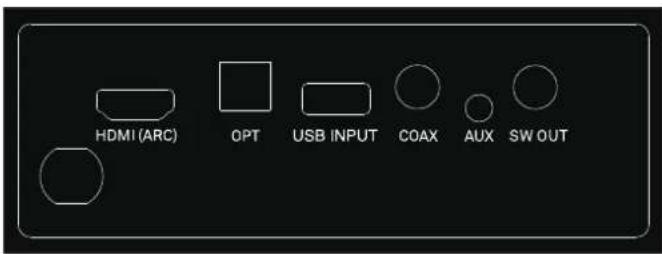
- HDMI(ARC): Use to connect compatible devices by using a HDMI cable. (not provided)
- OPT: Use to connect compatible devices using an optical cable (not provided).
- USB INPUT: Use to connect a flash drive for direct MP3 playback (FAT32 format and 32GB max).
- COAX: Use to connect compatible devices using a coaxial cable (not provided).
- AUX: Use to connect compatible devices using the 3.5mm - 3.5mm stereo jack cable (provided).
- SW OUT: Use to connect the subwoofer
LED display:
- Green LED : Standby mode
- USB: USB media mode
- OPT: Optical mode
-
ARC: HDMI(ARC) mode
-
bt: Bluetooth mode
- AUX: Auxiliary input mode
- COA: Coaxial mode
Remote Control:

| Button | Function |
| Power on/off | |
| Mute sound or recover volume | |
| TREBLE+ | Increase treble |
| TREBLE- | Decrease treble |
| BASS+ | Increase bass |
| BASS- | Decrease bass |
| + | Increase volume |
| - | Decrease volume |
| Next track* | |
| Previous track* | |
| Play/Pause* | |
| MODE | Switch between modes |
| BT | Bluetooth mode |
| USB | USB mode |
| AUX | AUX-in mode |
| OPT | Optical mode |
| HDMI ARC | HDMI mode |
| EQ | Equalizer |
| COAX | COAX mode |
| USB repeat playback |
*Applicable for USB and Bluetooth mode only
*The Remote uses AAA Battery
Subwoofer connected with soundbar method:
Insert subwoofer cable into SW OUT interface on the back of soundbar, then turn on the unit, the subwoofer and soundbar will be connected.
Control panel keys:

1- Power: Press 0.5 second to switch on, hold for 3 seconds to turn off.
Mode: Turn it on and then press 0.5 second to switch the mode.
2-Long press to next track, short press to increase volume.
3-Long press to previous track, short press to decrease volume.
4-Play/Pause
Input Functions:
- Power on/off: Press the Power on/off button on the remote control or soundbar control panel to turn the unit on and off.
- AUX in: Connect a compatible device using the 3.5mm - 3.5mm stereo jack cable provided. Select AUX mode either by pressing the AUX button on your remote control or repeatedly pressing the MODE button on the soundbar control panel until AUX is displayed on the LED display. Ensure the connected device is producing an audio signal, then adjust the volume of soundbar using the Volume up and Volume down buttons on the remote control or soundbar control panel.
- Bluetooth: Press the BT button on the remote control or repeatedly pressing the MODE button on the soundbar control panel until bt is shown on the LED display. The LED display will flash to indicate that the soundbar is in Bluetooth pairing mode. Ensure that the device you wish to connect is also in pairing mode and search for "ASB-20CSW" in its device list. When the two devices are paired, the LED display on the soundbar will stop flashing and remain constant. (The soundbar will now automatically re-pair with this device whenever it is within range and has Bluetooth turned on.)
- USB media mode: The soundbar is compatible with USB flash drives of up to 32GB (Fat32 format) in size and can play MP3 and WAV audio files directly. Simply insert a compatible drive into the USB port on the back of the soundbar and the unit will automatically switch to USB mode and play the first compatible track.
USB repeat mode (also accessed via the remote control) enables single track repeat (ONE), all track repeat (ALL), ORDER, Random (SHUFF).
The media player also has a memory function that will recall and continue from the last-played point when a USB flash drive that has previously been used with the soundbar is reinserted.
- HDMI(ARC): Connect an HDMI ARC compatible device to the HDMI(ARC) port on the soundbar using a HDMI cable (not supplied). Select HDMI(ARC) mode either by pressing the HDMI(ARC) button on your remote control or repeatedly pressing the MODE button on the soundbar control panel until ARC is displayed on the LED display. Ensure HDMI ARC is selected as the TV's audio output, then adjust the volume of soundbar using the Volume up and Volume down buttons on the remote control or soundbar control panel.
- Optical in: Connect a compatible device to the OPTICAL input on the soundbar using a digital optical cable (not supplied). Select OPT mode either by pressing the OPT button on your remote control or repeatedly pressing the MODE button on the soundbar control panel until OPT is displayed on the LED display. Ensure Optical SPDIF or External device output is selected as the TV's audio output, then adjust the volume of the soundbar using the Volume up and Volume down buttons on the remote control or soundbar control panel.
- Coaxial in: Connect a compatible device to the COAXIAL input on the soundbar using a digital coaxial cable (not supplied). Select COAX mode either by pressing the MODE button on your remote control or repeatedly pressing the MODE button on the soundbar control panel until COA is displayed on the LED display. Ensure Coaxial SPDIF or External device output is selected as the TV's audio output, then adjust the volume of the soundbar using the Volume up and Volume down buttons on the remote control or soundbar control panel.
- Equalizer modes: The soundbar has 3 equalizer presets, adapted for various styles of music. Press
the EQ button on the remote to choose between Music (EQ1), Movie (EQ2), News (EQ3).
- Wall mounting: The soundbar has two keyhole slots on the back to enable wall mounting, using the fixings provided. (Note: distance of two keyhole is 634mm)
- Firmly fix 1 dowel into each hole in the wall if necessary.

Solid wall (i.e. solid brick, solid concrete, solid wood)
Drywall, plaster wall, lath wall etc.
- Put the speaker onto the screws in the wall.

DISPOSAL OF ELECTRICAL AND ELECTRONIC EQUIPMENT:

This symbol on the product or packaging means that the product should not be treated as household waste. Do not throw garbage at the end of its life, but take it to a collection center for recycling. in this way you will help to protect the environment and be able to prevent any negative consequences that it would have on the environment and human health. To find your nearest collection center:
Contact local authorities
Access the website: www.mmediu.ro
Request additional information from the store where you purchased the product.
IMPORTER/PRODUCER: SC INTERVISION TRADING-RO SRL
Street I.C Bratianu, no. 48-52, building A, floor. 5,
room 504-505, Pitesti City, Arges County, Romania
Postal code: 110121
AKAI
natural_image
Black Akai device with a cube and a long cylindrical tube, no visible text or symbols on the devices themselves.ELIMINAREA ECHIPAMENTELOR ELECTRICE ŞI ELECTRONICE

natural_image
Two black electronic devices: a black rectangular box labeled 'AKAI' and a long cylindrical device with 'A3' marking (no additional text or symbols)Οδηγίες χρήσης
ΕΛΛ - ΕΛΛΗΝΙΚΑ
| Button | Function |
| Power on/off | |
| Mute sound or recover volume | |
| TREBLE+ | Increase treble |
| TREBLE- | Decrease treble |
| BASS+ | Increase bass |
| BASS- | Decrease bass |
| + | Increase volume |
| - | Decrease volume |
| Next track* | |
| Previous track* | |
| Play/Pause* | |
| MODE | Switch between modes |
| BT | Bluetooth mode |
| USB | USB mode |
| AUX | AUX-in mode |
| OPT | Optical mode |
| HDMI ARC | HDMI mode |
| EQ | Equalizer |
| COAX | COAX mode |
| USB repeat playback |




*Applicable for USB and Bluetooth mode only
*The Remote uses AAA Battery
Solid wall (i.e. solid brick, solid concrete, solid wood)
Drywall, plaster wall, lath wall etc.
τοίχο.
ΠΡΟΕΙΔΟΠΟΙΗΣΗ!
natural_image
Two black electronic devices: a black rectangular device labeled 'AKAI' and a long cylindrical device with 'A1' marking (no additional text or symbols visible)ИЗХВЪРЛЯНЕ НА ЕЛЕКТРИЧЕСКО И ЕЛЕКТРОННО ОБОРУДВАНЕ

natural_image
Black Akai device with a cube and a long cylindrical tube, no visible text or symbols on the devices themselves.natural_image
Two black electronic devices: a black rectangular device labeled 'AKAI' and a long cylindrical device with 'A1' marking (no additional text or symbols visible)Návod k použití
CZ - ČESKY
LIKVIDACE ELEKTRICKÝCH A ELEKTRONICKÝCH ZAŘÍZENÍ

natural_image
Black Akai device with a cube and a long cylindrical tube, no visible text or symbols on the devices themselves.Návod na použitie
SK - SLOVENSKY
LIKVIDÁCIA ELEKTRICKÝCH A ELEKTRONICKÝCH ZARIADENÍ

Certificat de conformitate eliberat in baza certificatelor si rapoartelor de teste BCTC2312202411C; BCTC2312707876S; BCTC2312202411-2E; BCTC2312202411-1E si BCTC2312202411-3E ale Shenzhen BCTC Testing Co., Ltd, 1-2/F., Building B, Pengzhou Industrial Park, No.158, Fuyuan 1st Road, Tangwei, Fuhai Substrict, Bao'an District, Shenzhen, Guangdong, China.
Intervision Trading Ro SRL,
Semnatura:

Numele si functia: CIOBANU DORIN – DIRECTOR
Data: 12 lanuarie, 2024
Locul: Pitesti, Romania
Nr.INT 334
We, INTERVISION TRADING RO SRL, default importer (manufacturer), with registered office in Mosoia Commune, Smeura Village, 8 Fagetului Alley, declare under sole responsibility that the following products:
Brand name: AKAI
Type: ASB-20CSW
Descriptions: SOUNDBAR
Lot: 20240100XXX
to which this declaration related is in conformity with the essential requirements of the following directives of the Council of the European Communities:
EUROPEAN COMMUNITY DIRECTIVE 2014/53/EU
EUROPEAN COMMUNITY DIRECTIVE 2011/65/EU Amd 2015/863/EU & 2017/2102/EU
The products are compliant with the following standards:
EN 62368-1:2020+A11:2020
EN 62479:2010
EN 50663:2017
EN 301 489-1 V2.2.3 (2019-11)
EN 301 489-17 V3.2.4 (2020-09)
EN 300 328 V2.2.2 (2019-07)
IEC 62321-3-1: 2013 ; IEC 62321-5: 2013 ;
IEC 62321-4:2013 + A1:2017 ; IEC 62321-6: 2015 ;
IEC 62321-7-1: 2015 ; IEC 62321-7-2: 2017 ;
IEC 62321-8: 2017
Certificate of conformity issued based on the Certificates and test reports BCTC2312202411C; BCTC2312707876S; BCTC2312202411-2E; BCTC2312202411-1E and BCTC2312202411-3E by Shenzhen BCTC Testing Co., Ltd, 1-2/F., Building B, Pengzhou Industrial Park, No.158, Fuyuan 1st Road, Tangwei, Fuhai Substrict, Bao'an District, Shenzhen, Guangdong, China.
Intervision Trading Ro SRL,

Signature:
Printed name and Position:
CIOBANU DORIN – GENERAL MANAGER
Date: 12 ^th of January, 2024
Place: Pitesti, Romania
- Channel Soundbar with Wired Subwoofer
- Accessories:
- Matters Need Attention:
- Technical Specifications and Features:
- Connections:
- LED display:
- Remote Control:
- Subwoofer connected with soundbar method:
- Input Functions:
- DISPOSAL OF ELECTRICAL AND ELECTRONIC EQUIPMENT:
- IMPORTER/PRODUCER: SC INTERVISION TRADING-RO SRL
- AKAI
- ELIMINAREA ECHIPAMENTELOR ELECTRICE ŞI ELECTRONICE
- Οδηγίες χρήσης
- ΠΡΟΕΙΔΟΠΟΙΗΣΗ!
- ИЗХВЪРЛЯНЕ НА ЕЛЕКТРИЧЕСКО И ЕЛЕКТРОННО ОБОРУДВАНЕ
- Návod k použití
- LIKVIDACE ELEKTRICKÝCH A ELEKTRONICKÝCH ZAŘÍZENÍ
- Návod na použitie
- LIKVIDÁCIA ELEKTRICKÝCH A ELEKTRONICKÝCH ZARIADENÍ
- Nr.INT 334
Brand : AKAI
Model : ASB-20CSW
Category : Soundbar