
OFFICE M40 Vertical - Mouse Niceboy - Free user manual and instructions
Find the device manual for free OFFICE M40 Vertical Niceboy in PDF.


| Product Type | Mouse |
| Model | OFFICE M40 Vertical |
| Brand | Niceboy |
| Dimensions | 115 x 82 x 75 mm |
| Weight | 90 g |
| Power Supply | 2x AAA batteries (1.5 V each) |
| Voltage | DC 3 V ±5% |
| Current Consumption | ≤ 25 mA |
| Sensor Type | Optical |
| Max DPI | 1600 |
| DPI Modes | 800 / 1200 / 1600 |
| Number of Buttons | 6 |
| Connection Type | USB Dongle (2.4 GHz) |
| Frequency Band | 2.4 GHz |
| Radio Frequency Power | ≤ 75 mW |
| System Requirements | Windows, Mac |
| Package Contents | Mouse, USB dongle, 2x AAA batteries, user manual |
| Operating Temperature | 0°C to 45°C |
| Storage Temperature | -20°C to 60°C |
| Operating Humidity | 20% to 90% |
| Maintenance | Monthly cleaning with dry/damp cloth; use toothbrush for gaps; dry ear swab for optic |
| Certification | Complies with EU directives 2014/53/EU, 2014/30/EU, 2014/35/EU, 2011/65/EU |
Frequently Asked Questions - OFFICE M40 Vertical Niceboy
User questions about OFFICE M40 Vertical Niceboy
0 question about this device. Answer the ones you know or ask your own.
Ask a new question about this device
Download the instructions for your Mouse in PDF format for free! Find your manual OFFICE M40 Vertical - Niceboy and take your electronic device back in hand. On this page are published all the documents necessary for the use of your device. OFFICE M40 Vertical by Niceboy.
USER MANUAL OFFICE M40 Vertical Niceboy
ZAPNUTÍ/VYPNUTÍ
natural_image
Technical line drawing of a mechanical or electronic component with no visible text or symbolsZAPNUTIE/VYPNUTIE
https://niceboy.eu/sk/declaration/office-m40-vertical
INFORMÁCIE PRE POUŽÍVATELOV K LIKVIDÁCII ELEKTRICKÝCH A ELEKTRONICKÝCH ZARIADENÍ (DOMÁCNOSTI)
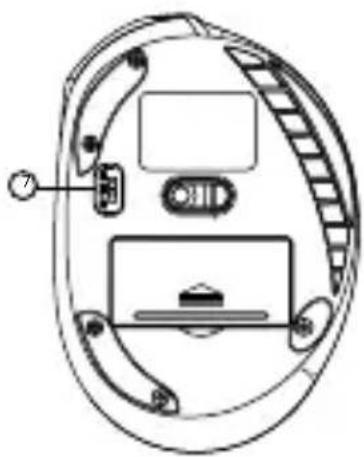
TURNING ON/OFF
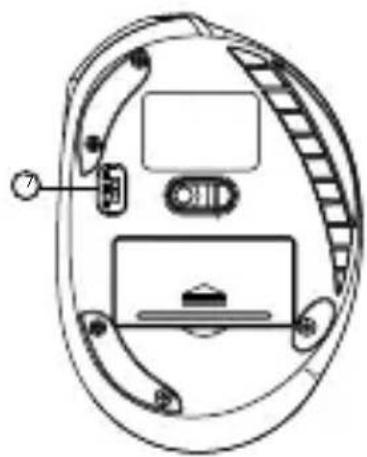
Turn on the mouse using the slide switch on the underside of the mouse. The switch must be in the ON position for the mouse to work. If the mouse is not recognised, check that the USB driver in your computer is up to date (information should be provided by the manufacturer of your PC/laptop).
CONNECTING TO A PC VIA USB
Move the connection mode switch to USB mode. Plug the supplied USB receiver into a USB port on your PC. Niceboy OFFICE M40 VERTICAL is a Plug & Play device and will automatically configure itself to connect to your device.
PARAMETERS
Voltage: DC 3V ±5G, proud: ≤ 25 mA
Power Supply: 2x AAA battery, 1,5V
Sensor: Optical
Max DPI: 1600
DPI MODE: 800 / 1200 / 1600
Number of buttons: 6
Connection: USB Dongle(2.4 GHz)
Frequency band: 2.4GHz
Radio frequency power: ≤ 75mW
System requirements: Win, Mac
Measurements: 115 * 82 * 75mm
Dimension: 90g
MAINTENANCE AND CLEANING
The device requires minimal maintenance, but we recommend that you perform the following tasks once a month: Disconnect the mouse from the computer and use a dry or damp cloth in warm water to clean it from the dirt. Use a round toothbrush or dampened ear swabs to clean the gaps. To clean the mouse optic use only dry ear swabs to gently remove any dirt or the dust particles.
ADDITIONAL INFORMATION
Avoid using the mouse on places exposed to too low or high temperature (0 °C and more/ 45 °C and more) or humidity (20 % and less/ 90 % and more). Avoid storing the mouse on places exposed to too low or high temperature (-20 °C and more/ 60 °C and more) or humidity (90 % and more). Protect the product from rain, humidity and liquids and do not attempt to disassemble it. Protect the device from sharp objects and falls from height. Batteries – improper handling (prolonged charging, short circuit, breakage by other objects, etc.) may result in fire, overheating or battery leakage. The battery or accumulator that may be included with the product has a lifetime period of six months, as it is a consumable. This product complies with all the basic requirements of relevant EU directives.
NICEBOY s.r.o. hereby declares that the equipment Niceboy OFFICE M40 VERTICAL complies with Directives 2014/53 / EU, 2014/30 / EU, 2014/35 / EU, and 2011/65 / EU. The full content of EU Declaration of Conformity is available on the following websites:
https://niceboy.eu/en/declaration/office-m40-vertical
USER INFORMATION FOR DISPOSING ELECTRICAL AND ELECTRONIC DEVICES (HOME USE)

This symbol located on a product or in the product's original documentation means that the used electrical or electronic products may not be disposed together with the communal waste. In order to dispose of these products correctly, take them to a designated collection site, where they will be accepted for free. By disposing of a product in this way, you are helping to protect precious natural resources and helping to prevent any potential negative impacts on the environment and human health, which could be the result of incorrect waste disposal. You may receive more detailed information from your local authority or nearest collection site. According to national regulations, fines may also be given out to anyone who disposes of this type of waste incorrectly.
User information for disposing electrical and electronic devices (business and corporate use)
In order to correctly dispose of electrical and electronic devices for business and corporate use, refer to the product's manufacturer or importer. They will provide you with information regarding all disposal methods and, according to the date stated on the electrical or electronic device on the market, they will tell you who is responsible for financing the disposal of this electrical or electronic device. Information regarding disposal processes in other countries outside the EU. The symbol displayed above is only valid for countries within the European Union. For the correct disposal of electrical and electronic devices, request the relevant information from your local authorities or the device seller.

LIEFERUMFANG
Niceboy OFFICE M40 VERTICAL
Gebrauchsanleitung
2x AAA Batterie
USB Dongle
ÜBERSICHT BELEGUNG

CSATLAKOZÁS A SZÁMÍTÓGÉPHEZ USB-N
UKLJUČIVANJE/ISKLJUČIVANJE
https://niceboy.eu/hr/declaration/office-m40-vertical
INFORMACIJE ZA KORISNIKA O NAČINU ZBRINJAVANJA ELEKTRIČNIH I ELEKTRONSKIH UREĐAJA (DOMĆINSTVA)

Simbol naveden na proizvodu ili u popratnoj dokumentaciji znači da je zabranjeno odlagati električne ili elektroničke proizvode zajedno s komunalnim otpadom. Pobrinite se za pravilnu likvidaciju otpada: dotrajali proizvod predajte besplatno u ovlašteni centar za skupljanje otpada. Propisnom likvidacijom dotrajalog proizvoda ćete doprinijeti očuvanju skupocjenih prirodnih izvora te prevenciji negativnih utjecaja na okoliš i ljudsko zdravlje zbog nepravilne likvidacije otpada. Za više informacija obratite se nadležnom lokalnom uredu ili mjestu zbrinjavanja. Nepravilno zbrinjavanje ove vrste otpada kažnjava se sukladno nacionalnim propisima.
Informacije za korisnika o načinu zbrinjavanja električnih i elektronskih uređaja (poslovna uporaba) Vezano za pravilno zbrinjavanje dotrajale električne/elektronske opreme za poslovnu upotrebu i upotrebu u tvorničkim pogonima obratite se proizvođaču ili uvozniku ovog proizvoda. Proizvođač će Vam pružiti informacije o načinu zbrinjavanja proizvoda i obavijestit će vas o tome tko je dužan osigurati zbrinjavanje ovog električnog uređaja ovisno o datumu uvođenja proizvoda na tržište. Informacije o zbrinjavanju dotrajalog proizvoda u ostalim zemljama (izvan EU). Gore navedeni simbol važi samo u Europskoj uniji. Za više informacija o pravilnom zbrinjavanju električnih i elektronskih uređaja se obratite prodavatelju ili dobavljaču.
ZAWARTOŚĆ OPAKOWANIA
Niceboy OFFICE M40 VERTICAL
INFORMACJE DODATKOWE
https://niceboy.eu/pl/declaration/office-m40-vertical
INFORMACJA DLA UŻYTKOWNIKÓW DOTYCZĄCA UTYLIZACJI SPRZĘTU ELEKTRYCZNEGO I ELEKTRONICZNEGO (GOSPODARSTWA DOMOWE)

VKLOP/IZKLOP
PORNIRE/OPRIRE
Tensiune: DC 3V ±5G, current: ≤ 25 mA
Alimentare: 2x baterie AAA, 1,5V
Senzor/ Tehnologie: optic
DPI maxim: 1600
natural_image
Technical line drawing of a mechanical or electronic component with no visible text or symbolsВКЛЮЧВАНЕ/ИЗКЛЮЧВАНЕ


- ZAPNUTÍ/VYPNUTÍ
- ZAPNUTIE/VYPNUTIE
- INFORMÁCIE PRE POUŽÍVATELOV K LIKVIDÁCII ELEKTRICKÝCH A ELEKTRONICKÝCH ZARIADENÍ (DOMÁCNOSTI)
- TURNING ON/OFF
- CONNECTING TO A PC VIA USB
- PARAMETERS
- MAINTENANCE AND CLEANING
- ADDITIONAL INFORMATION
- USER INFORMATION FOR DISPOSING ELECTRICAL AND ELECTRONIC DEVICES (HOME USE)
- LIEFERUMFANG
- ÜBERSICHT BELEGUNG
- CSATLAKOZÁS A SZÁMÍTÓGÉPHEZ USB-N
- UKLJUČIVANJE/ISKLJUČIVANJE
- INFORMACIJE ZA KORISNIKA O NAČINU ZBRINJAVANJA ELEKTRIČNIH I ELEKTRONSKIH UREĐAJA (DOMĆINSTVA)
- ZAWARTOŚĆ OPAKOWANIA
- INFORMACJE DODATKOWE
- INFORMACJA DLA UŻYTKOWNIKÓW DOTYCZĄCA UTYLIZACJI SPRZĘTU ELEKTRYCZNEGO I ELEKTRONICZNEGO (GOSPODARSTWA DOMOWE)
- VKLOP/IZKLOP
- PORNIRE/OPRIRE
- ВКЛЮЧВАНЕ/ИЗКЛЮЧВАНЕ
Brand : Niceboy
Model : OFFICE M40 Vertical
Category : Mouse