GKRC-22E - Uncategorized ENTES - Free user manual and instructions
Find the device manual for free GKRC-22E ENTES in PDF.


| Product Type | Voltage Protection Relay |
| Model | GKRC-22E |
| Series | GKRC-E Series |
| Dimensions | Not specified (Rail mounting type) |
| Weight | 127 g (box weight) |
| Power Supply (ΔU) | 85–300 VAC |
| Nominal Voltage (Un) | 230 VAC (L-N) / 380–400 VAC (L-L) |
| Frequency | 45.0–65.0 Hz |
| Output Contacts | 2 C/O (8A / 2000 VA) |
| Operating Temperature | -20 to +70 °C |
| Storage Temperature | -25 to +80 °C |
| Maximum Humidity | 95% RH, Non-condensing |
| Protection Class | IP41 (front panel), below IP20 (terminals) |
| Mounting | Rail mounting (DIN) |
| Monitored Parameters | Phase sequence, phase loss, voltage unbalance, under/over voltage, under/over frequency |
| Alarm Outputs | 2 relay outputs (C/O) for alarm indication |
| Display | Graphic screen with tutorial mode |
| Technical Support | +90 850 888 84 25 |
| Compliance | Refer to user manual for full instructions |
Frequently Asked Questions - GKRC-22E ENTES
User questions about GKRC-22E ENTES
0 question about this device. Answer the ones you know or ask your own.
Ask a new question about this device
Download the instructions for your Uncategorized in PDF format for free! Find your manual GKRC-22E - ENTES and take your electronic device back in hand. On this page are published all the documents necessary for the use of your device. GKRC-22E by ENTES.
USER MANUAL GKRC-22E ENTES
EN Technical Specifications:
• Power Supply(ΔU) : 85-300VAC
• Nominal Voltage(Un) : Un = 230VAC (L-N)
: Un = 380/400VAC (L-L)
• Frequency : 45.0 -65.0 Hz • Output Contact : 1 C/O /8A /2
• Output Contact : TCIO, (8A/2000 VA) (GKRC-21E) 2 C/O, (8A/2000VA) (GKRC-22E)
• Operating Temperature : -20/+70 °C
• Storage Temperature : -25/+80 °C
• Maximum Humidity : %95, Non-Condensing
- Protection Class : IP41 (front panel), below IP20 (terminal)
- =Connection : Rail Mounting
- Dimensions - Box Weight
-Box Weight .127g
1 C/O, (8A / 2000 VA) (GKRC-21E) 2 C/O, (8A / 2000VA) (GKRC-23E)
2 C/O . (8A / 2000VA) (GKRC-22E)
• =Temperatura Operativa Ambiente:(°C): -20/+70 °C
• =Temperatura de Almacenaje(°C): -25/+80 °C
Technical Support Call Center: +90 850 888 84 25


GKRC-E Series Voltage Protection Relay Quick Start Manual
EN Please refer to user manual with the general
instructions document which can be downloaded from the web site: www.entes.eu
WARNING: This equipment must be installed only by
professionals. The manufacturer shall not be held
responsible for failure to comply with the instructions
in this manual. Please read the instructions in this
manual before performing installation and take note
of the following precautions.
- Ensure that all incoming AC power and other power
sources are turned OFF before performing any work on the
instrument. Failure to do so may result in serious or even fatal injury and/or equipment damage.
- Before connecting the instrument to the power source,
check the labels on the back of the instrument to ensure
that your instrument is equipped with the appropriate power supply voltage, input voltages and currents.
- Under no circumstances should a damaged instrument
be connected to a power source
- To prevent potential fire or shock hazard, do not expose
the instrument to rain or moisture
-
Do not open the instrument under any circumstances when it is corrected to a power source.
-
Always supply the device with the correct rated voltage
The pictures 1,2,3,4,5 changes one by one every 2 seconds. Press OK to select when the desired language screen is displayed.

LETS LEARN screen is displayed. To continue with the next screen press OK
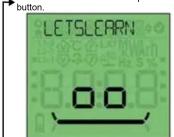
ALL OK screen is displayed. To continue with the next screen press OK button.


ALARM screen is displayed. To continue with the next screen press OK button


CONTINUE screen is displayed. To continue with the next screen press OK button.

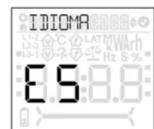
GO BACK screen is displayed. To continue with the next screen press OK button.
After language selection, device goes into tutorial mode. HELLO screen is displayed at first. To continue with the next screen press OK button.


THANKS screen is displayed. Press OK to terminate tutorial mode. Measure screen is displayed.

AGE DE L'INSTALLATION

Main menu or previous menu

Up direction key

Down direction key

Detail menu or confirmation
| Alarm Description | ||
| No Phase | -?- | Alarm triggers in case there is no connection in any of the phases :L1,L2,L3 |
| Phase Sequence | -?- | Alarm triggers if L1, L2, L3 are not clockwise |
| Voltage Unbalance | This alarm is triggered if any phase-to-phase voltage deviates by x% from the average of the phase-to-phase voltages. | |
| Under Frequency | Alarm is triggered if it goes below XX.X Hz of the adjusted lower frequency value | |
| Over Frequency | Alarm is triggered if it goes over XX.X Hz of the adjusted upper frequency value | |
| Under Voltage | Alarm is triggered if it goes below XXX.X V of the adjusted lower voltage value | |
| Over Voltage | Alarm is triggered if it goes over XXX.X V of the adjusted upper voltage value | |
| Unit Symbols | ||
| Volt | V | Voltage |
| Hertz | Hz | Frequency |
| Seconds | S | On Delay, Off Delay |
| Percentage | % | Voltage unbalance, hysteresis |
Brand : ENTES
Model : GKRC-22E
Category : Uncategorized