EPM-34-96 - Uncategorized ENTES - Free user manual and instructions
Find the device manual for free EPM-34-96 ENTES in PDF.


| Product Type | 3-Phase Ammeter |
| Model | EPM-34-96 |
| Brand | ENTES |
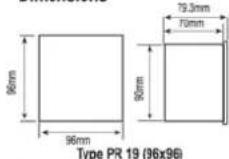
| Dimensions | 96 x 96 x 70 mm |
| Weight | 0.34 kg |
| Power Supply | 24…250 V AC/DC, 45-65 Hz, <4 VA |
| Measurement Input | 0.005-5.5 A~ (for X/5A), 0.005-1.1 A~ (for X/1A) |
| Accuracy | 0.5% ±1 digit (10%-110% of full scale) |
| Current Transformer Ratio | 1…1000 (X/5A), 1…5000 (X/1A) |
| Display | Red LED, 4 digits |
| Protection Class | Double Insulation, Class II |
| Ingress Protection | IP54 front, IP00 terminals |
| Material | Non-flammable |
| Mounting | Panel mount |
| Panel Cut-out | 91 x 91 mm |
| Wire Cross Section | 4 mm |
| Operating Temperature | -5°C to +70°C |
| Compliance | EN-61010-1 |
| Functions | Phase current measurement, demand and max demand, programmable CT ratio, password protection |
| Fuse Rating | 6 A, F type |
| Maintenance | Clean with dry cloth; no solvents |
Frequently Asked Questions - EPM-34-96 ENTES
User questions about EPM-34-96 ENTES
0 question about this device. Answer the ones you know or ask your own.
Ask a new question about this device
Download the instructions for your Uncategorized in PDF format for free! Find your manual EPM-34-96 - ENTES and take your electronic device back in hand. On this page are published all the documents necessary for the use of your device. EPM-34-96 by ENTES.
USER MANUAL EPM-34-96 ENTES

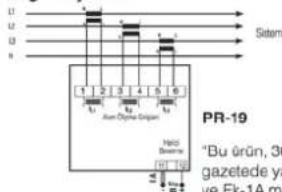
Bağlantı Şeması
0.005-1.1A\~ (X/1A cin)
: %0.5±1djiit [(%10-%110) × tam skala]
1 ... 1000 (X/5A icin)
1 5000 (X/1A icin)
-5°C: +70°C
Kirmizi LED display
PR-19
Cift valtum-sipif II (回)
IP 54
IP 00
Yanmaz
Pannva önden
4 mm
0.34 kg
0.54 kg
91x91mm
1 ...... Display of IL1 input.
2 ..... Display of IL2 input.
3 ...... Display of IL3 input.
4 ...... ESC button to exit from a menu any time.
5 ...... DOWN button.
6 ...... UP button.
7 .... SET button. It is used to enter into the menu and to save the values. If SET button is pressed for 3 seconds in the measurement mode, you can enter into menus.
PRECAUTIONS FOR INSTALLATION AND SAFE USE
- Failure to follow those instructions will result in death or serious injury.
- Disconnect all power before working on equipment.
- When the device connected to the network, do not remove the back panel.
- Do not try to clean the device with solvent or the like. Only clean the device with dried cloth.
- Verify correct terminal connections when wiring.
- Electrical equipment should be serviced only by your component seller.
- Only for rack panel mounting.
- The fuse should be used F type and current boundary value must be 6A. No responsibility is assured by the manufacturer or any of its subsidiaries for any consequences arising out of the use of this material.
General Information
EPM-34 is designed to measure the phase currents in 3 phase systems.
Applications of EPM-34
1) It can measure Phase Currents (IL) in 3 phase systems.
2) You can observe demand and max. demand values of measured currents with 2 different periods, also the calculation time for demand and max. demand values can be determined from the dE-t (demand time) menu.
3) Current transformer ratio can be programmed,
[1....1000 (for X/5A), 1....5000 (for X/1A)]
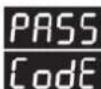
4) A password can be arranged from PASS CodE menu in order to prevent change of the setting by unauthorized person.
Specific Functions of Buttons:
While device is in the measurement mode, some buttons and button groups have below special functions.

: When "DOWN" button is pressed, 1st demand values are displayed.

: When "UP" button is pressed, 1st max. demand values are displayed.

: When "ESC" and "DOWN" buttons are pressed at the same time, 2nd demand values are displayed.

When "ESC" and "UP" buttons are pressed at the same time, 2nd max. demand values are displayed.

: When "DOWN" and "UP" buttons are pressed at the same time, all demand and max. demand values are reset.
EPM-34 Menu Settings
After making the connections of the device as given in user manual, voltage is supplied. Required settings must be done by using menus in order to have the correct measurements and applications.

Current Transformer Menu
In this menu, current transformer ratio and current transformer secondary value is set.

Current Transformer Ratio
In this menu, current transformer ratio is set.
[1 ..... 1000 (for X/5A) between, 1 ..... 5000 (for X/1A)] a can be entered
Note: If the current transformer is not used between the system and EPM-34, CT ratio must be set as "1".
For example: If a current transformer with 30 A / 5 A is used between the system and EPM-34, CT ratio must be set as "6". (30/5=6)

flowchart
graph TD
    A["Set"] --> B["Set"]
    B --> C["Set"]
    C --> D["↑"]
    C --> E["↓"]
    D --> F["Set"]
    E --> F
    F --> G["↑"]
    F --> H["↓"]
    G --> I["Set"]
    H --> I
    I --> J["↑"]
    I --> K["↓"]
    J --> L["Set"]
    K --> L
    L --> M["↑"]
    L --> N["↓"]
    M --> O["Set"]
    N --> O
    O --> P["Esc"]
    P --> Q["↑"]
    P --> R["↓"]
    Q --> S["Set"]
In order to set CT ratio. In the measurement mode;
Press SET button for 3 secs.(CUr- rEnt trF menu is displayed)
Press SET button (Ctr menu is displayed)
Press SET button (1st digit of second display blinks)
Find 1st digit of the value which you want to enter by scrolling UP/DOWN buttons.
Press SET button (2nd digit of second display blinks. If you set 1st digit value incorrect, you can set again by pressing ESC button)
Find 2nd digit value by scrolling UP/DOWN buttons.

Press SET button (3rd digit of second display blinks. If you set 2nd digit value incorrect, you can set again by pressing ESC button.)
Find 3rd digit value by scrolling UP/DOWN buttons.
Press SET button (4th digit of second display blinks. If you set 3rd digit value incorrect, you can set again by pressing ESC button.)
Find 4th digit value by scrolling UP/DOWN buttons.
Press SET button (Ctr is displayed.)
Press ESC button one by one until SAUE SET no is displayed.
By using UP/DOWN buttons, find SAUE SET yES
Press SET button while SAUE SET yES is displayed. (If you press ESC button or select "no" option instead of "yES", new data is cancelled and the previous data is set.)

Current transformer secondary value setting
In this menu, current transformer secondary value can be set as "5A" or "1A".
Note: If the secondary value is changed from "5A" to "1A", Ctr (current transformer ratio) value is set as 5 times of previous value automatically. If the secondary value is changed from "1A" to "5A", Ctr (CT ratio) value is set as 1/5 times of the previous value automatically.
In order to set secondary value; in the measurement mode.
Press SET button for 3 secs.(CUr- rEnt trF menu is displayed)
Press SET button (Ctr menu is displayed.)

flowchart
graph TD
    A["Set"] --> B["Set"]
    B --> C["↑"]
    B --> D["↓"]
    C --> E["Set"]
    D --> E
    E --> F["↑"]
    E --> G["↓"]
    F --> H["Set"]
    G --> H
    H --> I["Esc"]
    I --> J["↑"]
    I --> K["↓"]
    J --> L["Set"]
By using UP/DOWN buttons, find SEC menu.
Press SET button (active secondary value is displayed on second display)
Set the secondary current value by using UP/DOWN buttons

Press SET button SEC is displayed. (New value is entered but it is not executed yet. In order to set the new value, please follow below steps)
Press ESC button one by one until SAUE SET no is displayed.
By using UP/DOWN buttons, find "SAUE SET YES"
Press SET button while SAUE SET yES is displayed. (If you press ESC button or select "no" option instead of "yES", new data is cancelled and the previous data is set.)

dE-t (Demand Time - Demand calculation time) Menu:

(dE-1 (1st Demand Time - 1st Demand calculation time) Menu
dE-1 demand time can be set between 1-60 minutes which is independent from dE-2. In this time interval, 1st demand and 1st max. demand values are calculated.

(dE-2 (2nd Demand Time - 2nd Demand calculation time) Menu
dE-2 demand time can be set between 1-60 seconds which is independent from dE-1. In this time interval, 2nd demand and 2nd max. demand values are calculated.
In order to set demand calculation time; in measurement mode, Press SET button for 3 secs. (CUr-rEnt trF menu is displayed)
By using UP/DOWN buttons, find dE-t menu.
Press SET button (dE-1 menu is displayed)
By using UP/DOWN buttons, select "dE-1" or "dE-2"
Press SET button (1st digit of second display blinks)
By using UP/DOWN buttons, set 1st digit
Press SET button (2nd digit of second display blinks. If you set 1st digit incorrect, you can set again by pressing ESC button).
By using UP/DOWN buttons, set 2nd digit.
Press SET button. dE-1 or dE-2 is displayed (new value is entered but it is not executed yet. In order to set the new value, please follow below steps)
Press ESC button one by one until SAUE SEt no is displayed.
By using UP/DOWN buttons, find SAUE SET YES
Press SET button while SAUE SET yES is displayed. (If you press ESC button or select "no" option instead of "yES", new data is cancelled and the previous data is set.)
User Password Settings
User password is set and activated in this menu. In order to prevent the device's settings from unauthorized access, it is necessary to set up a 4 digits user password and then activate it.
This menu has 2 submenus.

Changing the User Password
In this menu, user password can be changed.
Note: Factory set value for user password is "1234"

flowchart
graph TD
    A["Set"] --> B["↑"]
    A --> C["↓"]
    B --> D["Set"]
    C --> D
    D --> E["↑"]
    D --> F["↓"]
    E --> G["Set"]
    F --> G
    G --> H["↑"]
    G --> I["↓"]
    H --> J["Set"]
    I --> J
    J --> K["↑"]
    J --> L["↓"]
    K --> M["Set"]
    L --> M
In order to change the user password; in measurement mode, Press SET button for 3 secs. (CUr-rEnt trF menu is displayed)
By using UP/DOWN buttons, find PASS CodE menu
Press SET button (PASS CodE EnbL menu is displayed.)
By using UP/DOWN buttons, find PASS CodE CHnG menu.
Press SET button (1st digit of second display blinks)
By using UP-DOWN-SET buttons, enter old password.
By using UP-DOWN-SET buttons, enter new password.
By using UP-DOWN-SET buttons, enter re-enter new password.


Press SET button PASS CodE CHnG is displayed. (New value is entered but is not executed yet. In order to set the new value, please follow below steps.)
Press ESC button one by one until SAUE SET no is displayed.
By using UP/DOWN buttons, find SAUE SET YES
Press SET button while SAUE SET yES is displayed. (If you press ESC button or select "no" option instead of "yES", new data is cancelled and the previous data is set.)

Activating the user password
This menu is used to activate the user password.
After activating the user password, if SET button is pressed for 3 seconds in order to enter to the menu, a user password is required.

flowchart
graph TD
    A["Set"] --> B["↑"]
    A --> C["↓"]
    B --> D["Set"]
    C --> D
    D --> E["Set"]
    E --> F["↑"]
    E --> G["↓"]
    F --> H["Set"]
    G --> H
    H --> I["Set"]
    I --> J["↑"]
    I --> K["↓"]
    J --> L["Set"]
    K --> L
    L --> M["Set"]
    M --> N["Esc"]
    N --> O["↑"]
    N --> P["↓"]
    O --> Q["Set"]
In order to activate the user password; in the measurement mode, Press SET button for 3 seconds (CUr-rEnt trF menu is displayed.)
By using UP/DOWN buttons, find PASS CodE menu
Press SET button (PASS CodE EnbL menu is displayed.)
Press SET button (1st digit of second display blinks.)
By using UP-DOWN-SET buttons, enter the password.
Press SET button, ErbL no is displayed.
By using UP/DOWN buttons, find EnbL yES menu
Press SET button, PASS CodE EnbL is displayed. (New value is entered but it is not executed yet. In order to set the new value, please follow below steps.)
Press ESC button one by one until "SAUE SET no" is displayed.
By using UP/DOWN buttons, find SAUE SET YES
Press SET button while SAUE SET yES is displayed. (If you press ESC button or select "no" option instead of "yES", new data is cancelled and the previous data is set.)
Technical Features
Operating Volta Frequency (Hz)
Auxiliary Supply Power Consumption
Measurement input power consumption lin
Class
Current Transformer Ratio
Ambient Temperature
Display
Dimension
Equipment Protection Class
Box Protection Class
Terminal Protection Class
Box Material
Installation
Wire Crossection (for terminals)
Weight
Installation Category
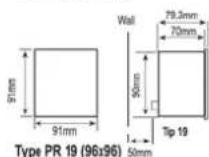
Panel Cut-outs
Complies with EN-61010-1 standard.
Dimensions
Connection Diagram

: 24 ... 250 V AC/DC
: 45-65 Hz
: < 4 VA
: <1VA
: 0.005-5.5A\~ (for X/5A)
0.005-1.1A\~ (for X/1A)
: 0.5%±1digit [(10%-110%) x full scale]
: 1 ... 1000 (for X/5A)
1 ... 5000 (for X/1A)
:-5°C:+70°C
: Red LED display
: PR-19
: Double Insulation-Class II (回)
: IP 54
: IP 00
: Non-flammable
: Panel Mounted
: 4 mm
: 0.34 kg
: Class III
: 91x91mm
Panel Cut-outs
Factory Set Values
Ctr - 0001
SEC-5A
dt1 - 15
dt2 - 30
PASS CodE EnbL - no
PASS CodE - 1234

STROMMESSGERÄT EPM-34

flowchart
graph TD
    A["①"] --> B["EPM-34"]
    C["②"] --> D["AMETER"]
    E["③"] --> F["AMETER"]
    G["④"] --> H["Set"]
    I["⑤"] --> J["Clear"]
    K["⑥"] --> L["Set"]
    M["A"] --> N["True RMS"]
In this menu, user password can be changed.

0.005-5.5A\~ (for X/5A)
0.005-1.1A\~ (for X/1A)
0.5%±1digit [(10%-110%) x full scale]
1 ... 1000 (for X/5A)
1 ... 5000 (for X/1A)
-5°C +70°C
Red LED dis
PR-19
Donne
Brand : ENTES
Model : EPM-34-96
Category : Uncategorized